mirror DODGE CHALLENGER 2016 3.G Owner's Manual
[x] Cancel search | Manufacturer: DODGE, Model Year: 2016, Model line: CHALLENGER, Model: DODGE CHALLENGER 2016 3.GPages: 651, PDF Size: 4.47 MB
Page 309 of 651
setting, showing that the setting has been selected. Refer
to “Keyless Enter-N-Go” in “Things To Know Before
Starting Your Vehicle”.
•Personal Settings Linked to Key Fob — If Equipped
This feature provides automatic recall of all settings
stored to a memory location (driver ’s seat, exterior
mirrors, steering column position and radio station pre-
sets) to enhance driver mobility when entering and
exiting the vehicle. To make your selection, press the
“Personal Settings Linked to Key Fob” button on the
touchscreen, until a check-mark appears next to the
setting, showing that the setting has been selected. NOTE:
The seat will return to the memorized seat
location (if Personal Settings Linked to Key Fob is set to
ON) when the Remote Keyless Entry (RKE) transmitter is
used to unlock the door. Refer to “Driver Memory Seat”
in “Understanding The Features Of Your Vehicle” for
further information.
Auto Comfort Systems — If Equipped
After pressing the “Auto-On Comfort” button on the
touchscreen the following settings will be available:
• Auto-On Driver Heated/Ventilated Seat & Steering
Wheel With Vehicle Start — If Equipped
When this feature is selected the driver’s heated seat and
heated steering wheel will automatically turn ON when
temperatures are below 40° F (4.4° C). When tempera-
tures are above 80° F (26.7° C) the driver vented seat will
turn ON. To make your selection, press the “Auto-On
Driver Heated/Ventilated Seat & Steering Wheel With
4
UNDERSTANDING YOUR INSTRUMENT PANEL 307
Page 344 of 651
this function again will cause the MAX A/C operation to
switch into manual mode and the MAX A/C indicator
will turn off.
2. A/C Button
Press and release to change the current setting, the
indicator illuminates when A/C is ON. Performing this
function again will cause the A/C operation to switch
into manual mode and the A/C indicator will turn off.
3. Recirculation Button
Press and release to change the current setting, the
indicator illuminates when ON.
4. AUTO Operation Button
Automatically controls the interior cabin temperature by
adjusting airflow distribution and amount. Performing
this function will cause the system to switch between
manual mode and automatic modes. Refer to “Automatic
Operation” for more information.5. Front Defrost Button
Press and release to change the current airflow setting to
Defrost mode. The indicator illuminates when this fea-
ture is ON. Air comes from the windshield and side
window demist outlets. When the defrost button is
selected, the blower level will increase. Use Defrost mode
with maximum temperature settings for best windshield
and side window defrosting and defogging. Performing
this function will cause the ATC to switch into manual
mode. If the front defrost mode is turned off the climate
system will return the previous setting.
6. Rear Defrost Button
Press and release this button to turn on the rear window
defroster and the heated outside mirrors (if equipped).
An indicator will illuminate when the rear window
defroster is on. The rear window defroster automatically
turns off after 10 minutes.
342 UNDERSTANDING YOUR INSTRUMENT PANEL
Page 357 of 651
If you see theicon on your touchscreen, you have
the Uconnect 8.4AN system. If not, you have a
Uconnect 8.4A system. Get Started
All you need to control your Uconnect system with your
voice are the buttons on your steering wheel.
1. Visit
UconnectPhone.com to check mobile device and
feature compatibility and to find phone pairing
instructions.
2. Reduce background noise. Wind and passenger con- versations are examples of noise that may impact
recognition.
3. Speak clearly at a normal pace and volume while facing straight ahead. The microphone is positioned
on the rearview mirror and aimed at the driver.
4. Each time you give a Voice Command, you must first push either the VR or Phone button, wait until after
the beep, then say your Voice Command.
Uconnect 8.4AN
4
UNDERSTANDING YOUR INSTRUMENT PANEL 355
Page 370 of 651
Register (8.4A/8.4AN)
To unlock the full potential of Uconnect Access in your
vehicle, you first need to register with Uconnect Access.
1. Push the ASSIST button on your rearview mirror.
2. Press the “Uconnect Care” button on the touchscreen.3. A helpful Uconnect Care Agent will register your
vehicle and handle all of the details.
Signing up is easy! Simply follow the steps above. Or,
press the “Apps
” button on the touchscreen to
“Register By Web” to complete the process using your
smartphone or computer.
For further information please visit DriveUconnect.com.
Mobile App (8.4A/8.4AN)
You’re only a few steps away from using remote com-
mands and playing your favorite music in your vehicle.
Assist Button
368 UNDERSTANDING YOUR INSTRUMENT PANEL
Page 382 of 651
STARTING PROCEDURES
Before starting your vehicle, adjust your seat, adjust the
inside and outside mirrors, fasten your seat belt, and if
present, instruct all other occupants to buckle their seat
belts.
WARNING!
•Never use the PARK position as a substitute for the
parking brake. Always apply the parking brake
fully when parked to guard against vehicle move-
ment and possible injury or damage.
• When leaving the vehicle, always make sure the
keyless ignition node is in “OFF” mode, remove
the Key Fob from the vehicle and lock the vehicle.
• Never leave children alone in a vehicle, or with
access to an unlocked vehicle. Leaving children in
a vehicle unattended is dangerous for a number of
(Continued)
WARNING! (Continued)
reasons. A child or others could be seriously or
fatally injured. Children should be warned not to
touch the parking brake, brake pedal or the trans-
mission gear selector.
• Do not leave the Key Fob in or near the vehicle (or
in a location accessible to children), and do not
leave the ignition (of a vehicle equipped with
Keyless Enter-N-Go) in the ACC or ON/RUN
mode. A child could operate power windows, other
controls, or move the vehicle.
• Do not leave children or animals inside parked
vehicles in hot weather. Interior heat build-up may
cause serious injury or death.
380 STARTING AND OPERATING
Page 567 of 651
Cleaning Headlights
Your vehicle is equipped with plastic headlights and fog
lights that are lighter and less susceptible to stone break-
age than glass headlights.
Plastic is not as scratch resistant as glass and therefore
different lens cleaning procedures must be followed.
To minimize the possibility of scratching the lenses and
reducing light output, avoid wiping with a dry cloth. To
remove road dirt, wash with a mild soap solution fol-
lowed by rinsing.
Do not use abrasive cleaning components, solvents, steel
wool or other aggressive material to clean the lenses.
Glass Surfaces
All glass surfaces should be cleaned on a regular basis
with MOPAR Glass Cleaner, or any commercial
household-type glass cleaner. Never use an abrasive typecleaner. Use caution when cleaning the inside rear win-
dow equipped with electric defrosters or windows
equipped with radio antennas. Do not use scrapers or
other sharp instrument that may scratch the elements.
When cleaning the rear view mirror, spray cleaner on the
towel or cloth that you are using. Do not spray cleaner
directly on the mirror.
Cleaning Plastic Instrument Cluster Lenses
The lenses in front of the instruments in this vehicle are
molded in clear plastic. When cleaning the lenses, care
must be taken to avoid scratching the plastic.
1. Clean with a wet soft cloth. A mild soap solution may
be used, but do not use high alcohol content or
abrasive cleaners. If soap is used, wipe clean with a
clean damp cloth.
2. Dry with a soft cloth.
7
MAINTAINING YOUR VEHICLE 565
Page 579 of 651
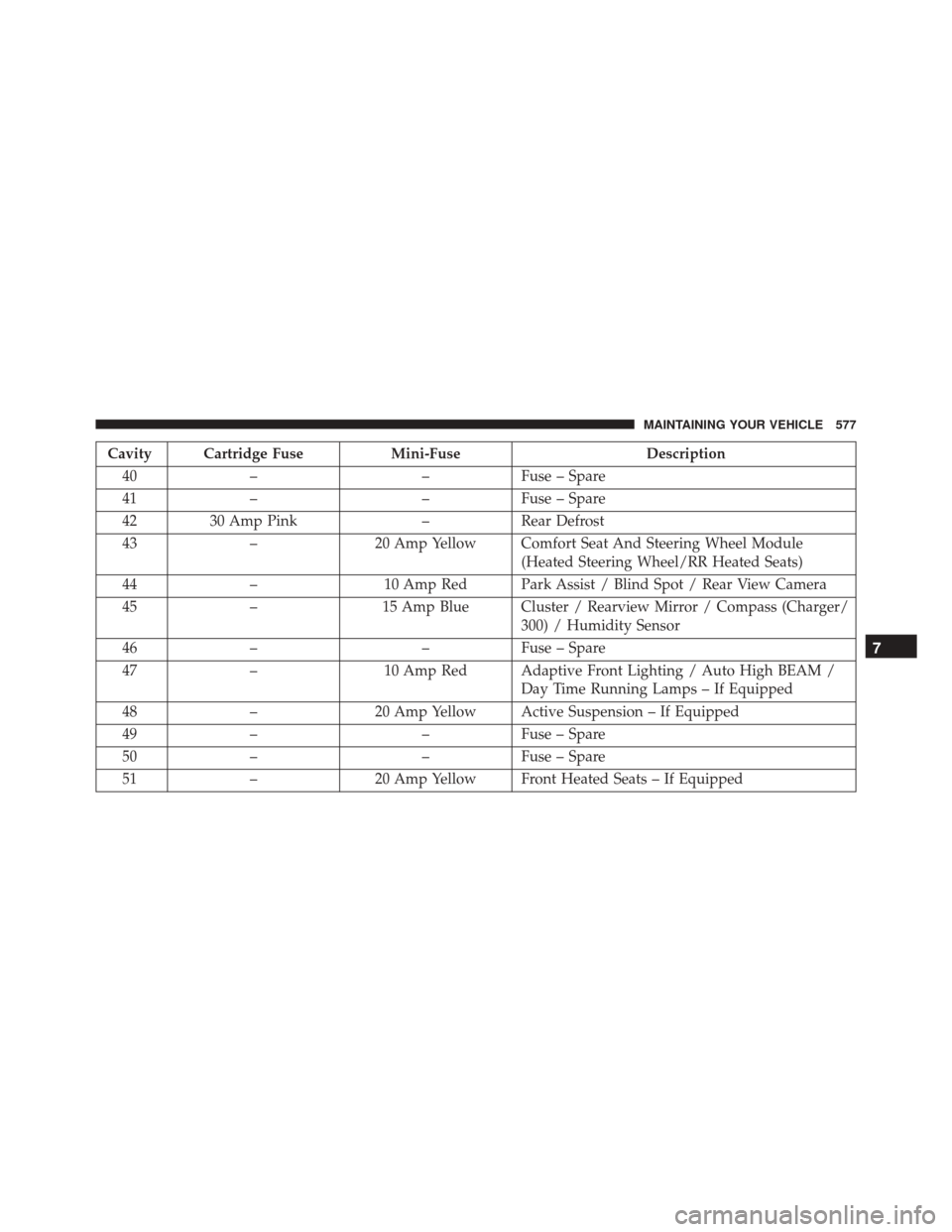
Cavity Cartridge FuseMini-FuseDescription
40 – –Fuse – Spare
41 – –Fuse – Spare
42 30 Amp Pink –Rear Defrost
43 –20 Amp Yellow Comfort Seat And Steering Wheel Module
(Heated Steering Wheel/RR Heated Seats)
44 – 10 Amp Red Park Assist / Blind Spot / Rear View Camera
45 – 15 Amp Blue Cluster / Rearview Mirror / Compass (Charger/
300) / Humidity Sensor
46 – –Fuse – Spare
47 – 10 Amp Red Adaptive Front Lighting / Auto High BEAM /
Day Time Running Lamps – If Equipped
48 –20 Amp Yellow Active Suspension – If Equipped
49 – –Fuse – Spare
50 – –Fuse – Spare
51 –20 Amp Yellow Front Heated Seats – If Equipped
7
MAINTAINING YOUR VEHICLE 577
Page 581 of 651
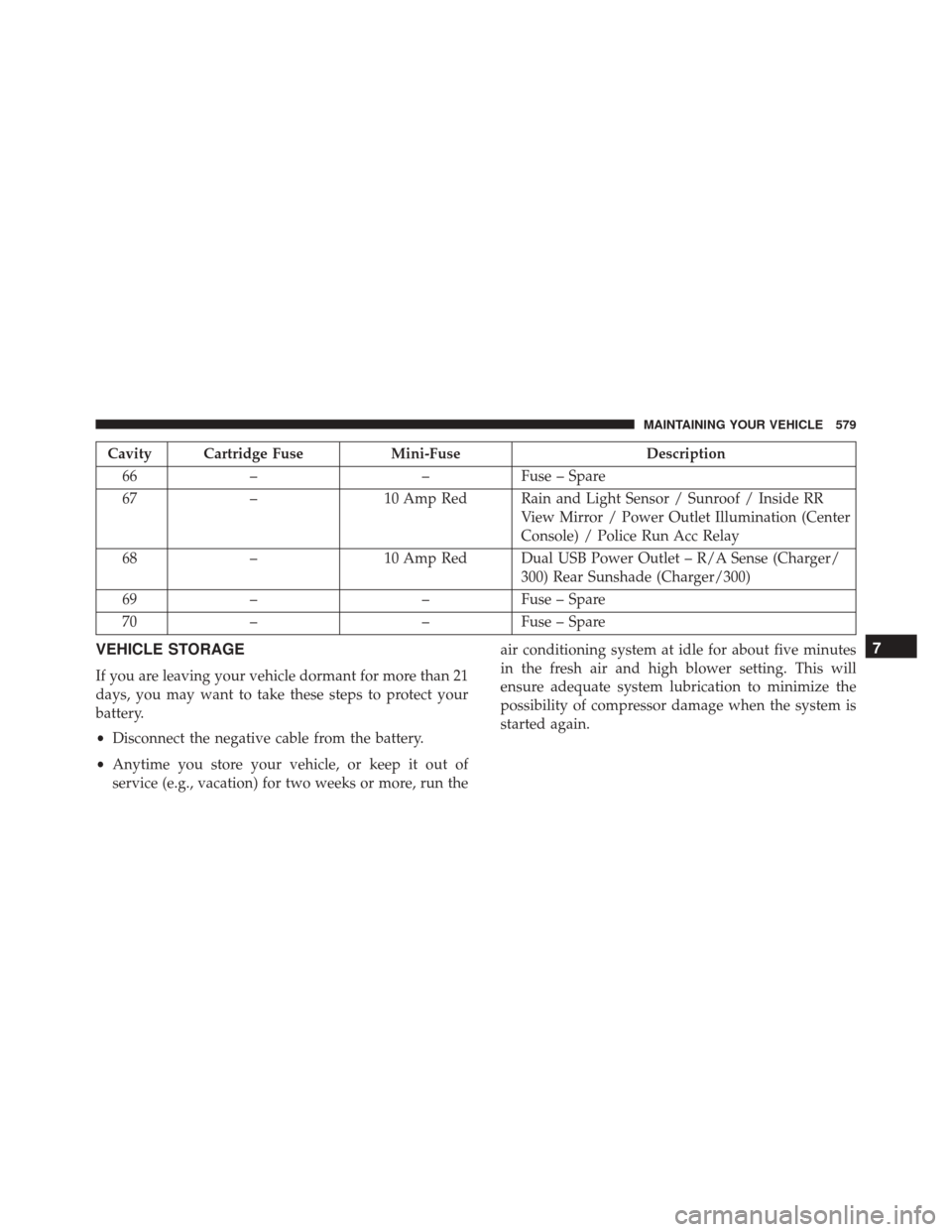
Cavity Cartridge FuseMini-FuseDescription
66 – –Fuse – Spare
67 – 10 Amp Red Rain and Light Sensor / Sunroof / Inside RR
View Mirror / Power Outlet Illumination (Center
Console) / Police Run Acc Relay
68 – 10 Amp Red Dual USB Power Outlet – R/A Sense (Charger/
300) Rear Sunshade (Charger/300)
69 – –Fuse – Spare
70 – –Fuse – Spare
VEHICLE STORAGE
If you are leaving your vehicle dormant for more than 21
days, you may want to take these steps to protect your
battery.
•Disconnect the negative cable from the battery.
• Anytime you store your vehicle, or keep it out of
service (e.g., vacation) for two weeks or more, run the air conditioning system at idle for about five minutes
in the fresh air and high blower setting. This will
ensure adequate system lubrication to minimize the
possibility of compressor damage when the system is
started again.
7
MAINTAINING YOUR VEHICLE 579
Page 632 of 651
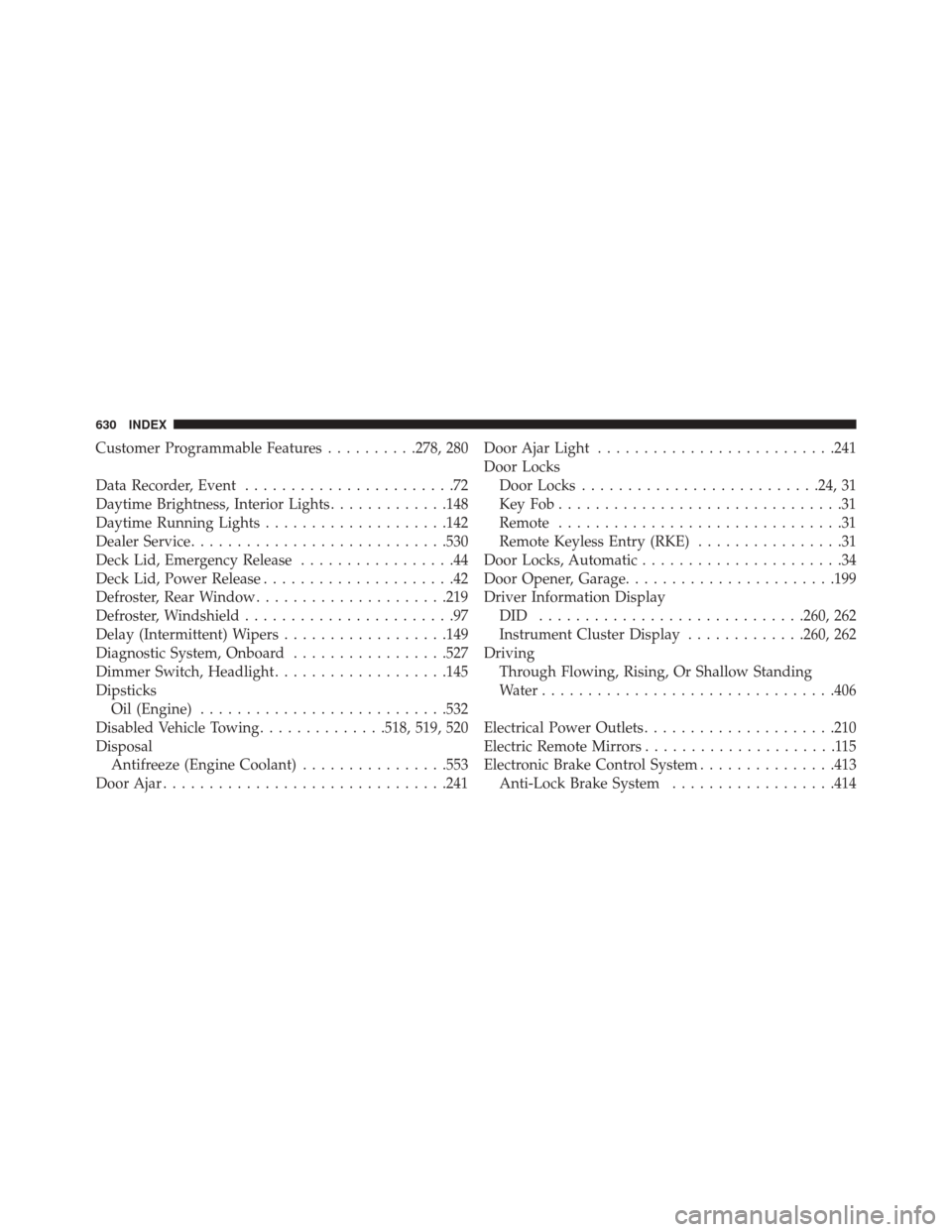
Customer Programmable Features..........278, 280
Data Recorder, Event .......................72
Daytime Brightness, Interior Lights .............148
Daytime Running Lights ....................142
Dealer Service ........................... .530
Deck Lid, Emergency Release .................44
Deck Lid, Power Release .....................42
Defroster, Rear Window .....................219
Defroster, Windshield .......................97
Delay (Intermittent) Wipers ..................149
Diagnostic System, Onboard .................527
Dimmer Switch, Headlight ...................145
Dipsticks Oil (Engine) .......................... .532
Disabled Vehicle Towing ..............518, 519, 520
Disposal Antifreeze (Engine Coolant) ................553
Door Ajar .............................. .241Door Ajar Light
......................... .241
Door Locks Door Locks ......................... .24, 31
KeyFob...............................31
Remote ...............................31
Remote Keyless Entry (RKE) ................31
Door Locks, Automatic ......................34
Door Opener, Garage ...................... .199
Driver Information Display DID ............................ .260, 262
Instrument Cluster Display .............260, 262
Driving Through Flowing, Rising, Or Shallow Standing
Water ............................... .406
Electrical Power Outlets .....................210
Electric Remote Mirrors .....................115
Electronic Brake Control System ...............413
Anti-Lock Brake System ..................414
630 INDEX
Page 634 of 651
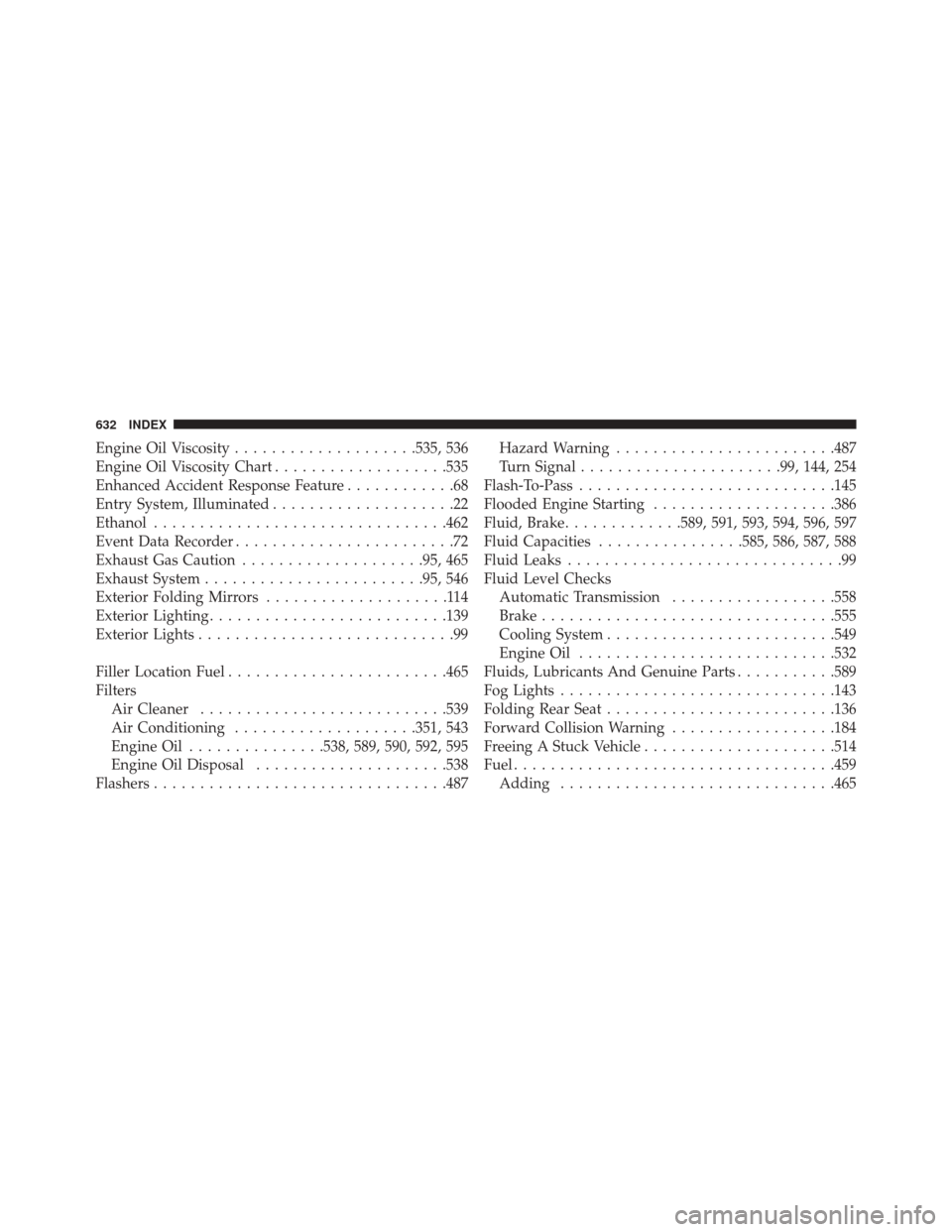
Engine Oil Viscosity....................535, 536
Engine Oil Viscosity Chart ...................535
Enhanced Accident Response Feature ............68
Entry System, Illuminated ....................22
Ethanol ............................... .462
Event Data Recorder ........................72
Exhaust Gas Caution ....................95, 465
Exhaust System ....................... .95, 546
Exterior Folding Mirrors ....................114
Exterior Lighting ......................... .139
Exterior Lights ............................99
Filler Location Fuel ....................... .465
Filters Air Cleaner .......................... .539
Air Conditioning ....................351, 543
Engine Oil ...............538, 589, 590, 592, 595
Engine Oil Disposal .....................538
Flashers ............................... .487Hazard Warning
....................... .487
Turn Signal ..................... .99, 144, 254
Flash-To-Pass ........................... .145
Flooded Engine Starting ....................386
Fluid, Brake .............589, 591, 593, 594, 596, 597
Fluid Capacities ................585, 586, 587, 588
Fluid Leaks ..............................99
Fluid Level Checks Automatic Transmission ..................558
Brake ............................... .555
Cooling System ........................ .549
Engine Oil ........................... .532
Fluids, Lubricants And Genuine Parts ...........589
Fog Lights ............................. .143
Folding Rear Seat ........................ .136
Forward Collision Warning ..................184
Freeing A Stuck Vehicle .....................514
Fuel .................................. .459
Adding ............................. .465
632 INDEX