instrument panel DODGE CHALLENGER 2017 3.G Owners Manual
[x] Cancel search | Manufacturer: DODGE, Model Year: 2017, Model line: CHALLENGER, Model: DODGE CHALLENGER 2017 3.GPages: 506, PDF Size: 4.44 MB
Page 219 of 506
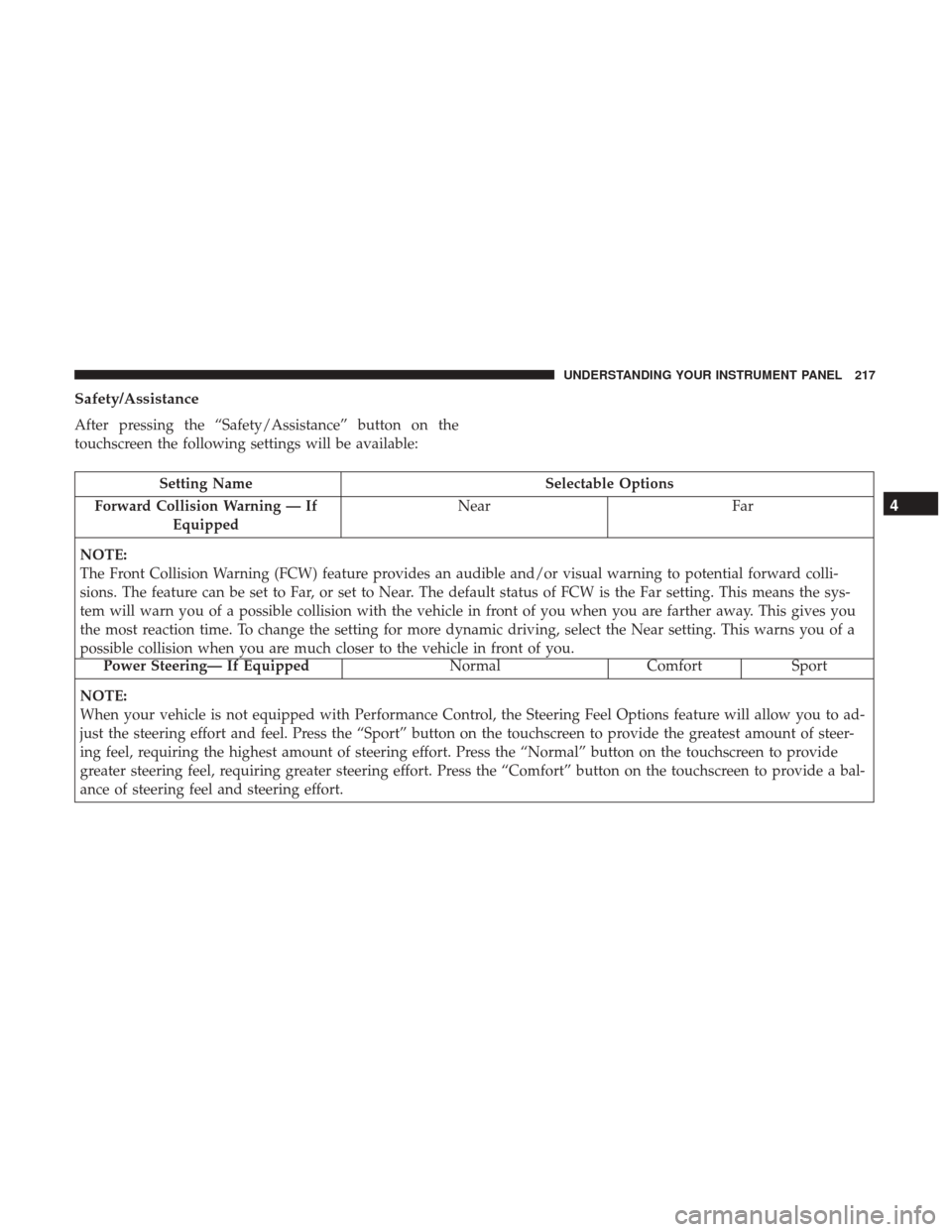
Safety/Assistance
After pressing the “Safety/Assistance” button on the
touchscreen the following settings will be available:
Setting NameSelectable Options
Forward Collision Warning — If Equipped Near
Far
NOTE:
The Front Collision Warning (FCW) feature provides an audible and/or visual warning to potential forward colli-
sions. The feature can be set to Far, or set to Near. The default status of FCW is the Far setting. This means the sys-
tem will warn you of a possible collision with the vehicle in front of you when you are farther away. This gives you
the most reaction time. To change the setting for more dynamic driving, select the Near setting. This warns you of a
possible collision when you are much closer to the vehicle in front of you.
Power Steering— If Equipped Normal Comfort Sport
NOTE:
When your vehicle is not equipped with Performance Control, the Steering Feel Options feature will allow you to ad-
just the steering effort and feel. Press the “Sport” button on the touchscreen to provide the greatest amount of steer-
ing feel, requiring the highest amount of steering effort. Press the “Normal” button on the touchscreen to provide
greater steering feel, requiring greater steering effort. Press the “Comfort” button on the touchscreen to provide a bal-
ance of steering feel and steering effort.
4
UNDERSTANDING YOUR INSTRUMENT PANEL 217
Page 220 of 506
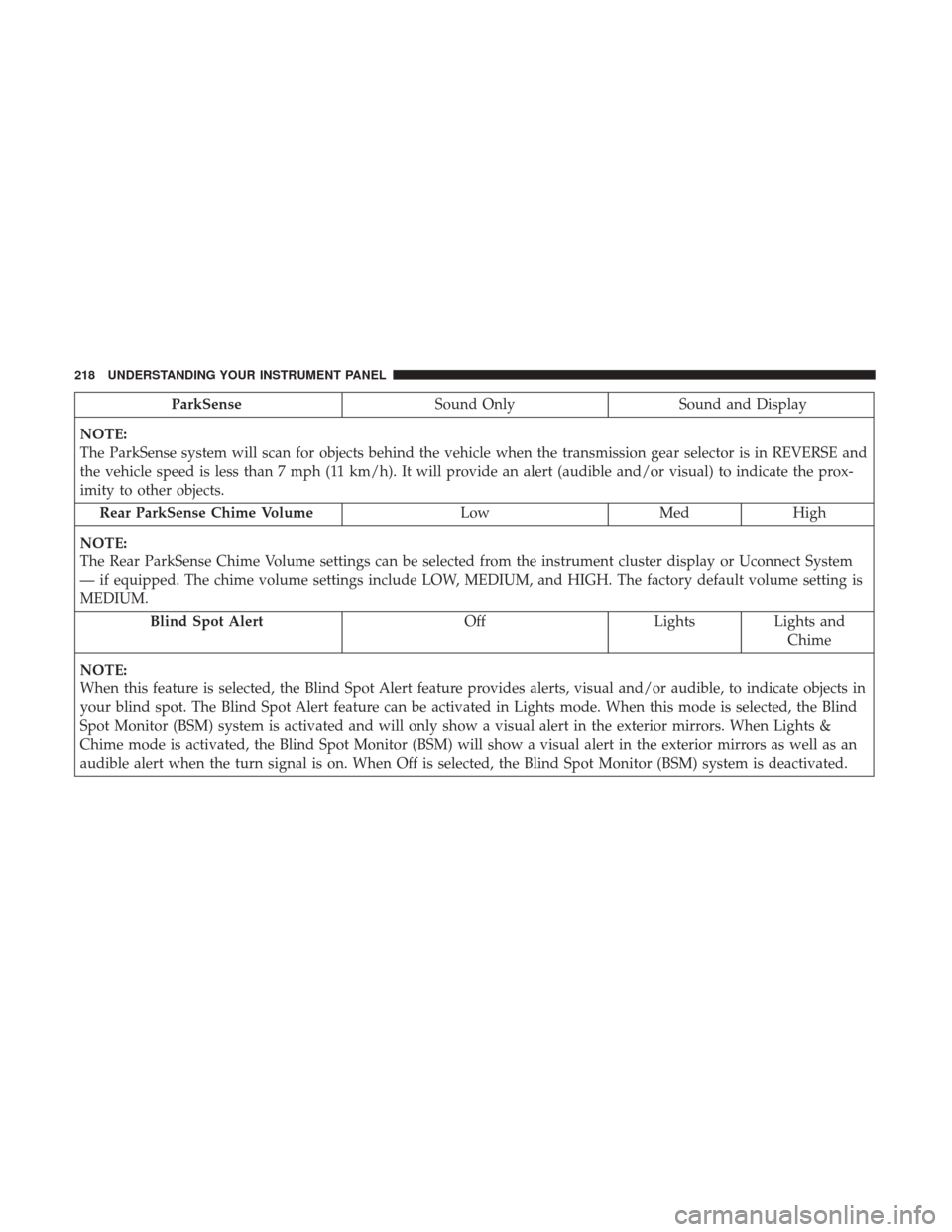
ParkSenseSound Only Sound and Display
NOTE:
The ParkSense system will scan for objects behind the vehicle when the transmission gear selector is in REVERSE and
the vehicle speed is less than 7 mph (11 km/h). It will provide an alert (audible and/or visual) to indicate the prox-
imity to other objects. Rear ParkSense Chime Volume LowMedHigh
NOTE:
The Rear ParkSense Chime Volume settings can be selected from the instrument cluster display or Uconnect System
— if equipped. The chime volume settings include LOW, MEDIUM, and HIGH. The factory default volume setting is
MEDIUM. Blind Spot Alert OffLightsLights and
Chime
NOTE:
When this feature is selected, the Blind Spot Alert feature provides alerts, visual and/or audible, to indicate objects in
your blind spot. The Blind Spot Alert feature can be activated in Lights mode. When this mode is selected, the Blind
Spot Monitor (BSM) system is activated and will only show a visual alert in the exterior mirrors. When Lights &
Chime mode is activated, the Blind Spot Monitor (BSM) will show a visual alert in the exterior mirrors as well as an
audible alert when the turn signal is on. When Off is selected, the Blind Spot Monitor (BSM) system is deactivated.
218 UNDERSTANDING YOUR INSTRUMENT PANEL
Page 221 of 506
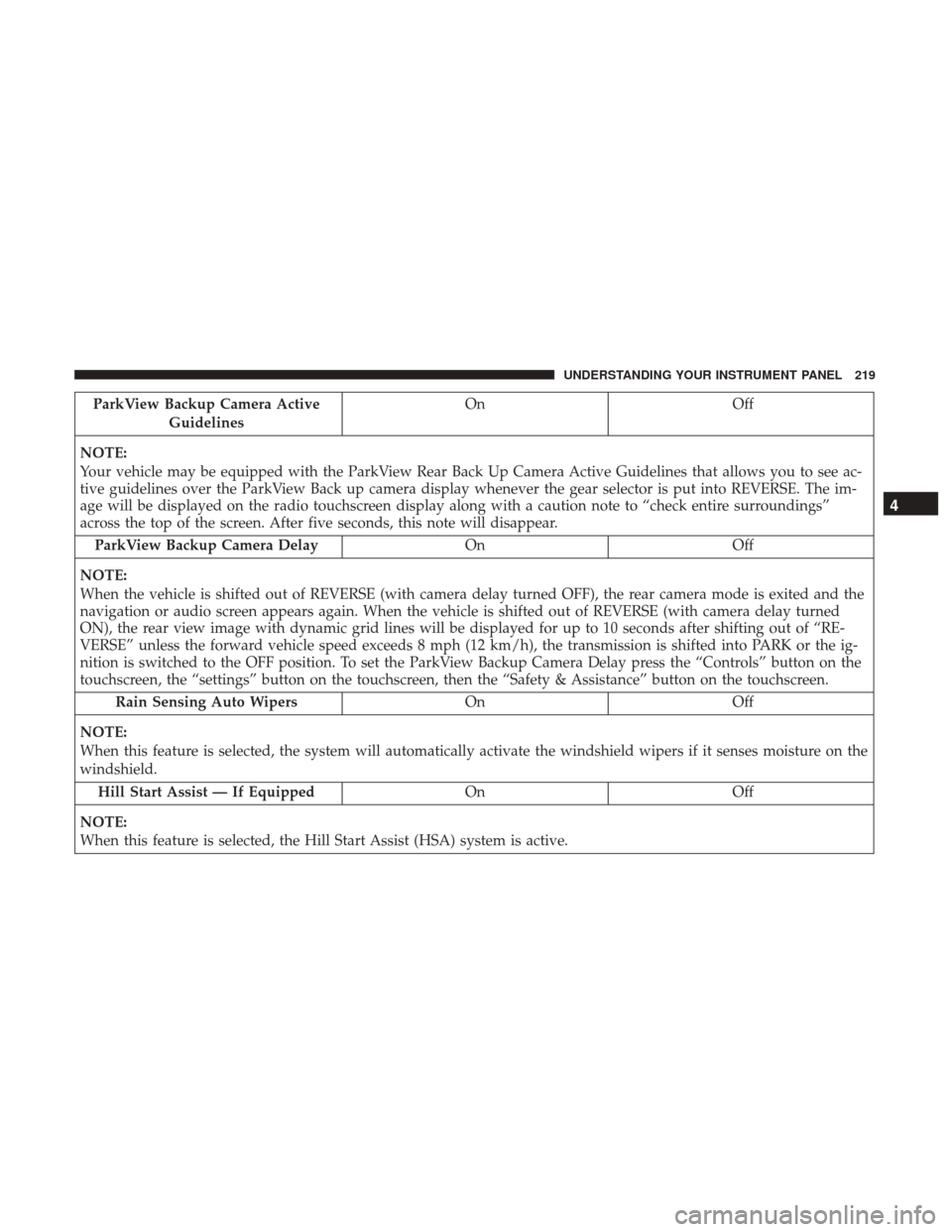
ParkView Backup Camera ActiveGuidelines On Off
NOTE:
Your vehicle may be equipped with the ParkView Rear Back Up Camera Active Guidelines that allows you to see ac-
tive guidelines over the ParkView Back up camera display whenever the gear selector is put into REVERSE. The im-
age will be displayed on the radio touchscreen display along with a caution note to “check entire surroundings”
across the top of the screen. After five seconds, this note will disappear. ParkView Backup Camera Delay OnOff
NOTE:
When the vehicle is shifted out of REVERSE (with camera delay turned OFF), the rear camera mode is exited and the
navigation or audio screen appears again. When the vehicle is shifted out of REVERSE (with camera delay turned
ON), the rear view image with dynamic grid lines will be displayed for up to 10 seconds after shifting out of “RE-
VERSE” unless the forward vehicle speed exceeds 8 mph (12 km/h), the transmission is shifted into PARK or the ig-
nition is switched to the OFF position. To set the ParkView Backup Camera Delay press the “Controls” button on the
touchscreen, the “settings” button on the touchscreen, then the “Safety & Assistance” button on the touchscreen. Rain Sensing Auto Wipers OnOff
NOTE:
When this feature is selected, the system will automatically activate the windshield wipers if it senses moisture on the
windshield. Hill Start Assist — If Equipped OnOff
NOTE:
When this feature is selected, the Hill Start Assist (HSA) system is active.
4
UNDERSTANDING YOUR INSTRUMENT PANEL 219
Page 222 of 506
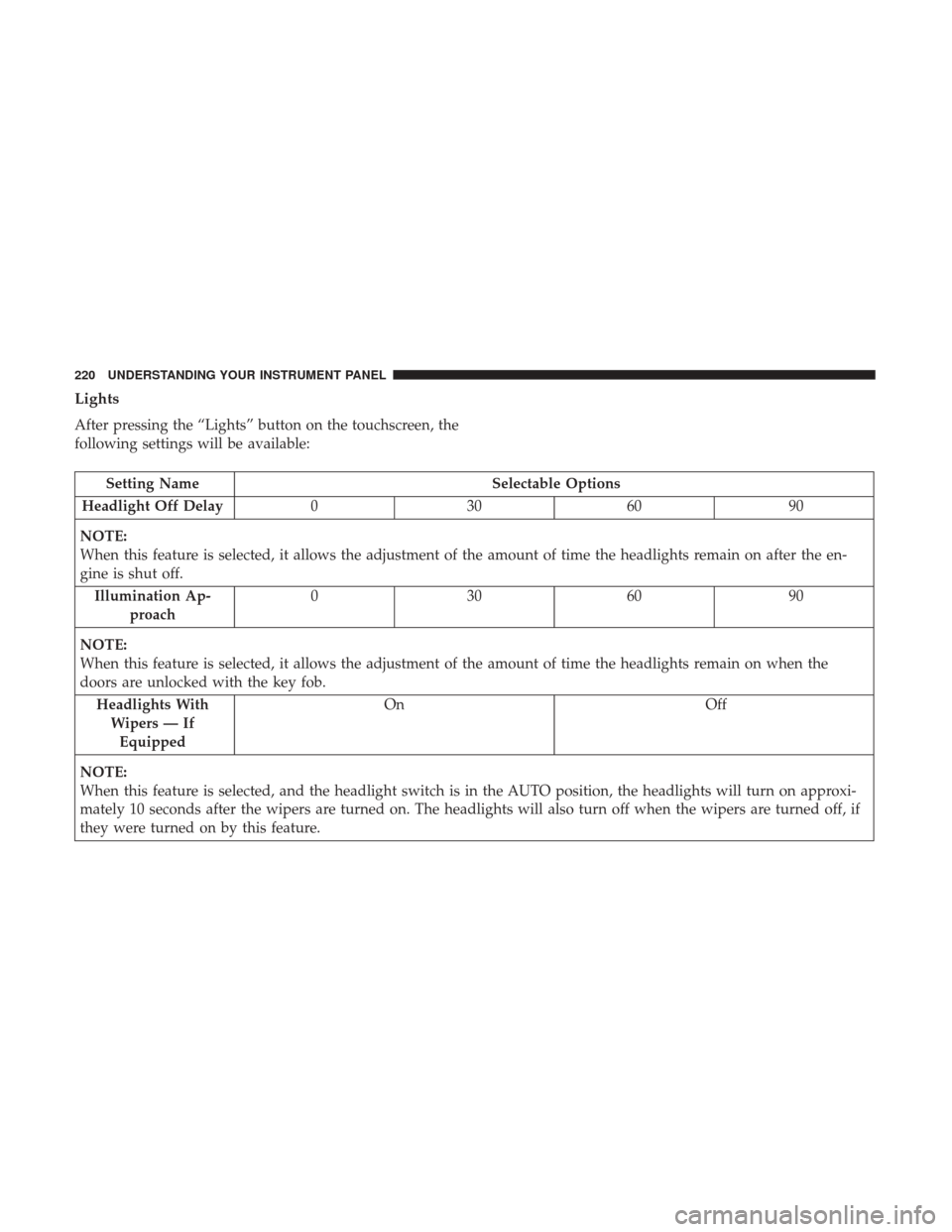
Lights
After pressing the “Lights” button on the touchscreen, the
following settings will be available:
Setting NameSelectable Options
Headlight Off Delay 030609 0
NOTE:
When this feature is selected, it allows the adjustment of the amount of time the headlights remain on after the en-
gine is shut off. Illumination Ap- proach 03
0609 0
NOTE:
When this feature is selected, it allows the adjustment of the amount of time the headlights remain on when the
doors are unlocked with the key fob. Headlights WithWipers — IfEquipped On
Off
NOTE:
When this feature is selected, and the headlight switch is in the AUTO position, the headlights will turn on approxi-
mately 10 seconds after the wipers are turned on. The headlights will also turn off when the wipers are turned off, if
they were turned on by this feature.
220 UNDERSTANDING YOUR INSTRUMENT PANEL
Page 223 of 506
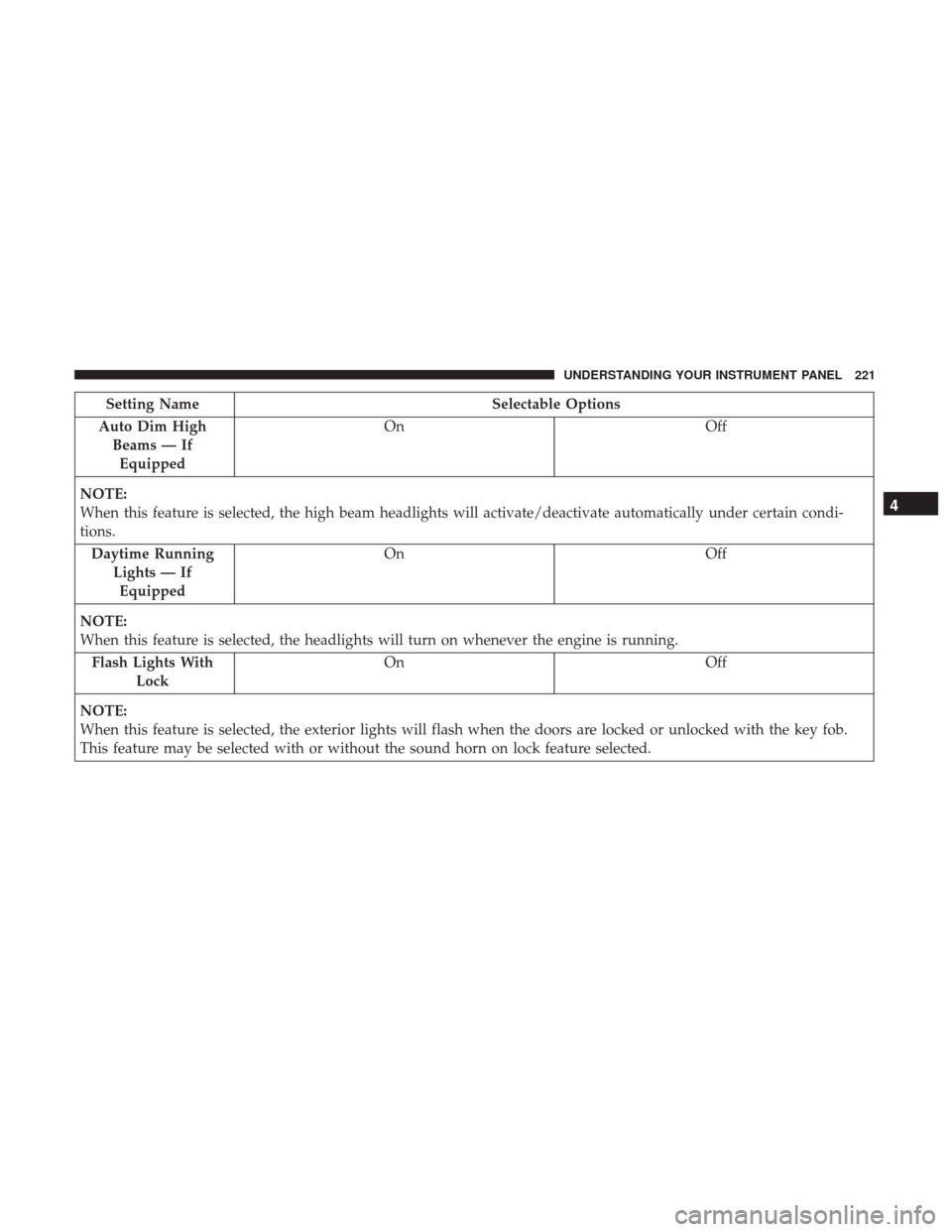
Setting NameSelectable Options
Auto Dim High Beams — IfEquipped On
Off
NOTE:
When this feature is selected, the high beam headlights will activate/deactivate automatically under certain condi-
tions. Daytime Running Lights — IfEquipped On
Off
NOTE:
When this feature is selected, the headlights will turn on whenever the engine is running. Flash Lights With Lock On
Off
NOTE:
When this feature is selected, the exterior lights will flash when the doors are locked or unlocked with the key fob.
This feature may be selected with or without the sound horn on lock feature selected.
4
UNDERSTANDING YOUR INSTRUMENT PANEL 221
Page 224 of 506
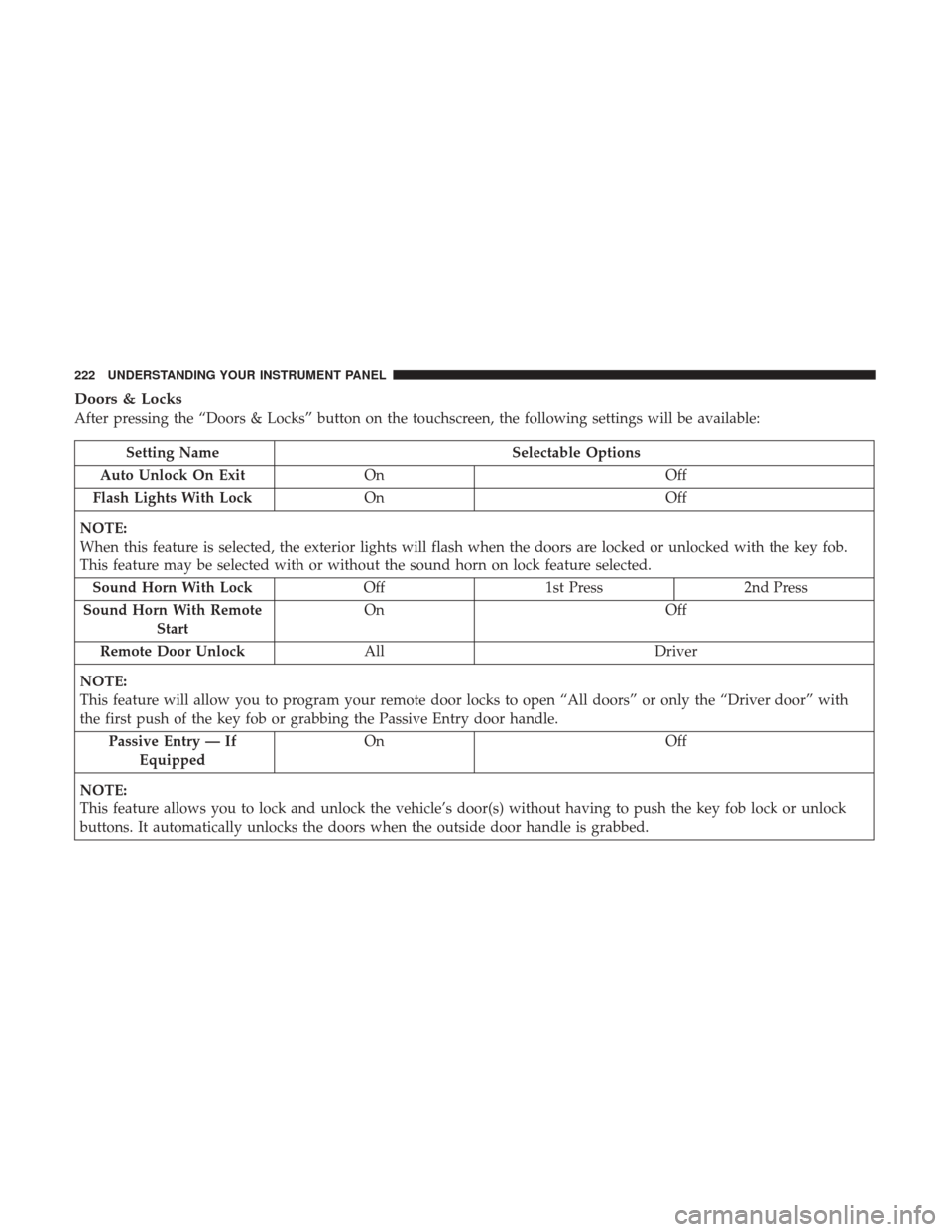
Doors & Locks
After pressing the “Doors & Locks” button on the touchscreen, the following settings will be available:
Setting NameSelectable Options
Auto Unlock On Exit On Off
Flash Lights With Lock On Off
NOTE:
When this feature is selected, the exterior lights will flash when the doors are locked or unlocked with the key fob.
This feature may be selected with or without the sound horn on lock feature selected. Sound Horn With Lock Off1st Press 2nd Press
Sound Horn With Remote Start On
Off
Remote Door Unlock All Driver
NOTE:
This feature will allow you to program your remote door locks to open “All doors” or only the “Driver door” with
the first push of the key fob or grabbing the Passive Entry door handle. Passive Entry — If Equipped On
Off
NOTE:
This feature allows you to lock and unlock the vehicle’s door(s) without having to push the key fob lock or unlock
buttons. It automatically unlocks the doors when the outside door handle is grabbed.
222 UNDERSTANDING YOUR INSTRUMENT PANEL
Page 225 of 506
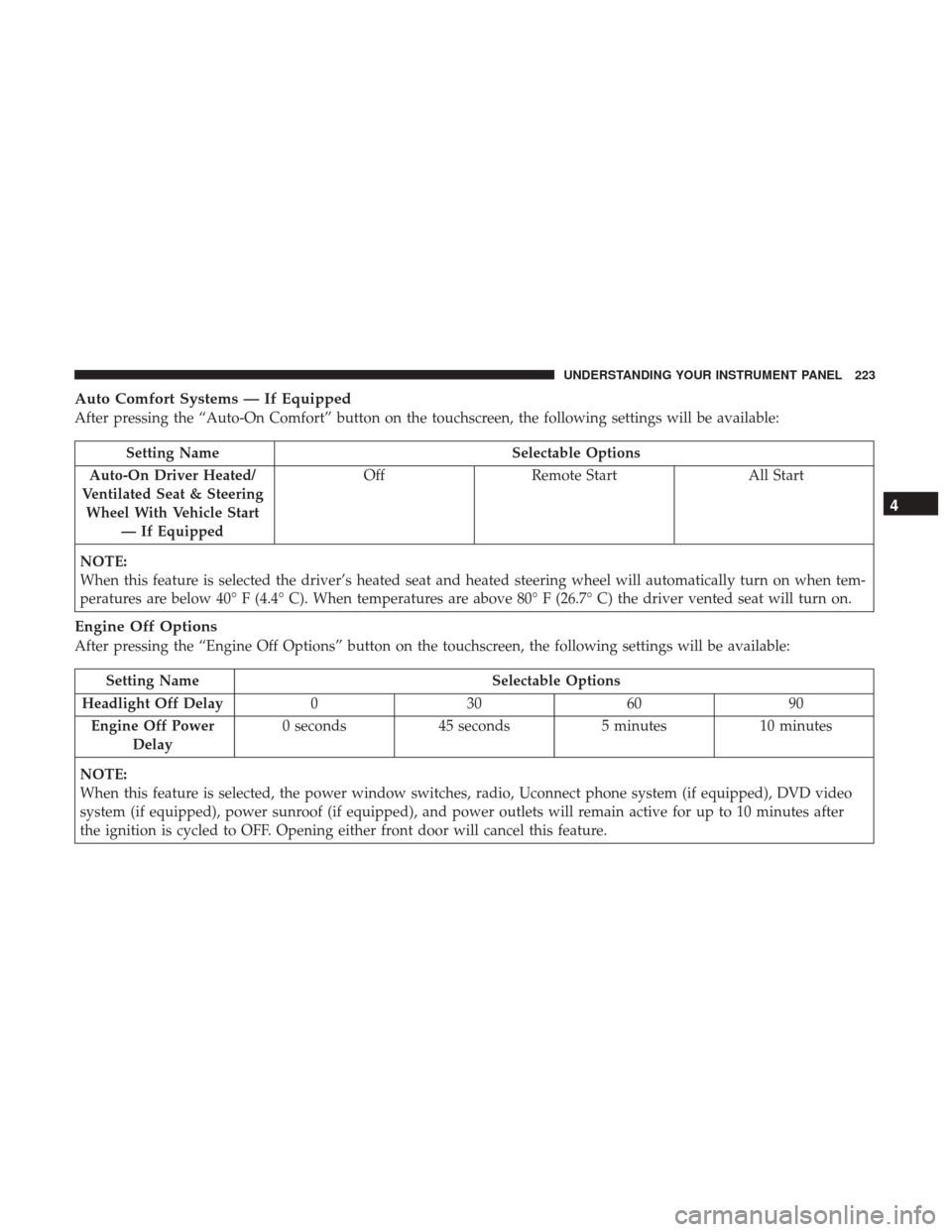
Auto Comfort Systems — If Equipped
After pressing the “Auto-On Comfort” button on the touchscreen, the following settings will be available:
Setting NameSelectable Options
Auto-On Driver Heated/
Ventilated Seat & Steering Wheel With Vehicle Start — If Equipped Off
Remote Start All Start
NOTE:
When this feature is selected the driver’s heated seat and heated steering wheel will automatically turn on when tem-
peratures are below 40° F (4.4° C). When temperatures are above 80° F (26.7° C) the driver vented seat will turn on.
Engine Off Options
After pressing the “Engine Off Options” button on the touchscreen, the following settings will be available:
Setting Name Selectable Options
Headlight Off Delay 030609 0
Engine Off Power Delay 0 seconds
45 seconds 5 minutes10 minutes
NOTE:
When this feature is selected, the power window switches, radio, Uconnect phone system (if equipped), DVD video
system (if equipped), power sunroof (if equipped), and power outlets will remain active for up to 10 minutes after
the ignition is cycled to OFF. Opening either front door will cancel this feature.
4
UNDERSTANDING YOUR INSTRUMENT PANEL 223
Page 226 of 506
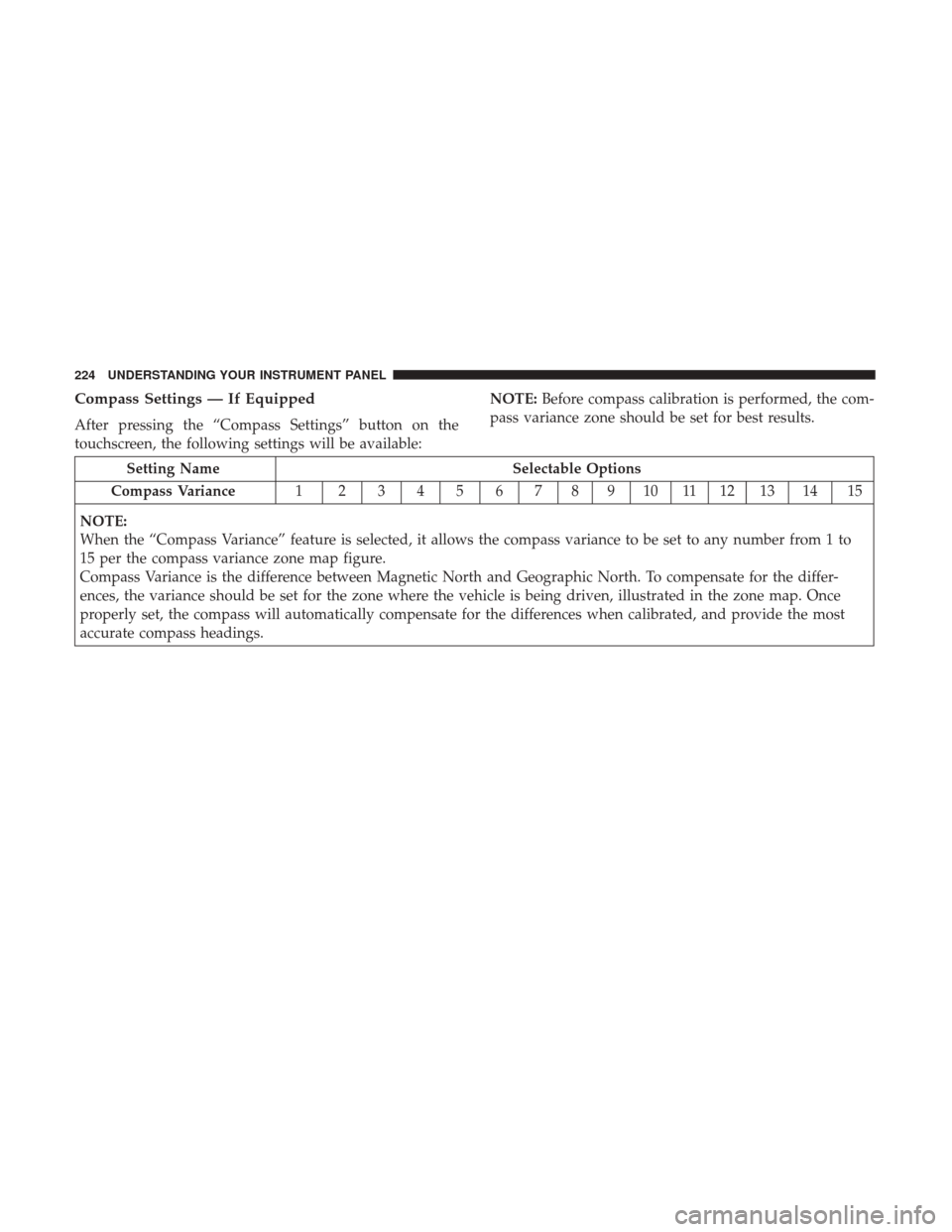
Compass Settings — If Equipped
After pressing the “Compass Settings” button on the
touchscreen, the following settings will be available:NOTE:
Before compass calibration is performed, the com-
pass variance zone should be set for best results.
Setting Name Selectable Options
Compass Variance 1 23456789101112131415
NOTE:
When the “Compass Variance” feature is selected, it allows the compass variance to be set to any number from 1 to
15 per the compass variance zone map figure.
Compass Variance is the difference between Magnetic North and Geographic North. To compensate for the differ-
ences, the variance should be set for the zone where the vehicle is being driven, illustrated in the zone map. Once
properly set, the compass will automatically compensate for the differences when calibrated, and provide the most
accurate compass headings.
224 UNDERSTANDING YOUR INSTRUMENT PANEL
Page 227 of 506
Compass Variance Zone Map
4
UNDERSTANDING YOUR INSTRUMENT PANEL 225
Page 228 of 506
Compass CalibrationYe s
NOTE:
Press “Compass Calibration” on the touchscreen to enter calibration. To start calibration of the compass, press the
“Yes” button on the touchscreen and complete one or more 360-degree turns (in an area free from large metal or me-
tallic objects). A message will appear on the touchscreen when the compass has been successfully calibrated.
Keep magnetic materials away from the rear view mirror, such as Mobile Phones, Laptops and Radar Detectors. This
is where the compass module is located, and it can cause interference with the compass sensor, and it may give false
readings.
Audio
After pressing the “Audio” button on the touchscreen, the following settings will be available:
Setting Name Selectable Options
Equalizer +–
NOTE:
When in the “Equalizer” display you may adjust the Bass, Mid and Treble settings. Adjust the settings with the “+”
and “–” buttons on the touchscreen or by selecting any point on the scale between the “+” and “–” buttons on the
touchscreen. Balance/Fade Arrow Buttons “C” icon
NOTE:
The “Balance/Fade” feature allows you to adjust the Balance and Fade settings. Press and drag the speaker icon or
use the arrows to adjust, tap the “C” icon to readjust to the center.
226 UNDERSTANDING YOUR INSTRUMENT PANEL