engine DODGE CHALLENGER 2017 3.G Workshop Manual
[x] Cancel search | Manufacturer: DODGE, Model Year: 2017, Model line: CHALLENGER, Model: DODGE CHALLENGER 2017 3.GPages: 506, PDF Size: 4.44 MB
Page 233 of 506
System Information
After pressing the “System Information” button on the touchscreen, the following settings will be available:
Setting NameSelectable Options
System Information System Software Information Screen
NOTE:
When the “System Information” feature is selected, a “System Software Information” screen will appear, displaying
the system software version. You can also update your maps with a USB device. Please see your Authorized Dealer
for further information.
Customer Programmable Features — Uconnect 8.4
Settings
Press the “Apps” button, and then press the “Set-
tings” button on the touchscreen to display the menu
setting screen. In this mode, the Uconnect system allows
you to access programmable features that may be
equipped such as Display, Language, Units, Voice,
Clock, Safety & Driving Assistance, Lights, Doors &
Locks, Auto-On Comfort, Engine Off Options, Audio,
Phone, SiriusXM Setup, Restore Settings, Clear Personal
Data and System Information.
NOTE:
• Only one touchscreen area may be selected at a time.
• Depending on the vehicles options, feature settings may
vary.
When making a selection, press the button on the touch-
screen to enter the desired mode. Once in the desired
mode, press and release the preferred setting “option” until
a check-mark appears next to the setting, showing that
setting has been selected. Once the setting is complete,
either press the back arrow button on the touchscreen to
return to the previous menu, or press the “X” button on the
touchscreen to close out of the settings screen. Pressing the
4
UNDERSTANDING YOUR INSTRUMENT PANEL 231
Page 243 of 506
Auto Comfort Systems — If Equipped
After pressing the “Auto-On Comfort” button on the touchscreen, the following settings will be available:
Setting NameSelectable Options
Auto-On Driver Heated/Ventilated Seat & Steering Wheel With Vehicle Start — If Equipped Off
Remote Start All Starts
NOTE:
When this feature is selected the driver’s heated seat and heated steering wheel will automatically turn on when tem-
peratures are below 40° F (4.4° C). When temperatures are above 80° F (26.7° C) the driver vented seat will turn on.
Engine Off Options
After pressing the “Engine Off Options” button on the touchscreen, the following settings will be available:
Setting Name Selectable Options
Engine Off Power Delay 0 seconds 45 seconds 5 minutes 10 minutes
NOTE:
When this feature is selected, the power window switches, radio, Uconnect Phone system (if equipped), DVD video
system (if equipped), power sunroof (if equipped), and power outlets will remain active for up to 10 minutes after
the ignition is cycled to OFF. Opening either front door will cancel this feature. To change the Engine Off Power De-
lay setting, press the “+” or “-” button on the touchscreen to select your desired time interval, and choose from “0
seconds,” “45 seconds,” “5 minutes” or “10 minutes.”
4
UNDERSTANDING YOUR INSTRUMENT PANEL 241
Page 249 of 506
PERFORMANCE PAGES — IF EQUIPPED
Performance Pages is an application that provides a dis-
play for performance indicators, as received from the
instrument cluster, that will help you gain familiarity with
the capabilities of your vehicle in real-time.
To access the Performance Pages, press the “Apps” button
on the touchscreen then press the “Performance Pages”
button on the touchscreen. Press the desired button on the
touchscreen to access that specific Performance Page.
WARNING!
Measurement of vehicle statistics with the Perfor-
mance Pages is intended for off-highway or off-road
use only and should not be done on any public
roadways. It is recommended that these features be
used in a controlled environment and within the limits
of the law. The capabilities of the vehicle as measured
by the Performance Pages must never be exploited in a
reckless or dangerous manner, which can jeopardize
the user ’s safety or the safety of others. Only a safe,
attentive, and skillful driver can prevent accidents.The Performance Pages include the following:
•
Home
• Timers
• Gauges 1
• Gauges 2
• G-Force
• Engine
The following describes each feature and its operation:
4
UNDERSTANDING YOUR INSTRUMENT PANEL 247
Page 255 of 506
When G-Force is selected, the following features will be
available:
•Lateral G-Force Left and Right
The lateral g-force measures the (sideways) left and right
force of the vehicle.
• Longitudinal G-Force Fore and Aft
The longitudinal g-force measures the acceleration and
braking force of the vehicle.
• Peak G-Forces Fore Aft, Left and Right
This shows the maximum g-forces that have been achieved
since the last reset from the instrument cluster display.
Peak values are maintained through ignition cycles by the
instrument cluster display until they are cleared by the
driver.
• Vehicle Speed
Vehicle Speed measures the current speed of the vehicle in
either mph or km/h, starting at 0 with no maximum value.
• Steering Wheel Angle
Steering Wheel Angle utilizes the steering angle sensor to
measure the degree of the steering wheel relative to zero.
The zero degree measurement indicates a steering wheel straight ahead position. When the steering angle value is
negative, this indicates a turn to the left, and when the
steering angle value is positive, a turn to the right.
Engine
When selected, this screen displays the following values:
Performance Pages — Engine
4
UNDERSTANDING YOUR INSTRUMENT PANEL 253
Page 256 of 506
•Vehicle Speed
Shows the actual vehicle speed.
• Instantaneous Horsepower/Kilowatts
Shows the instantaneous horsepower.
• Instantaneous Torque
Shows the instantaneous torque.
• Oil Pressure
Shows the actual engine oil pressure.
• Gear (Automatic Transmission Only)
Shows the current (or pending) operating gear of the
vehicle.
PERFORMANCE CONTROL — IF EQUIPPED
Your vehicle is equipped with a Performance Control
feature which allows for coordinating the operation of
various vehicle systems depending upon the type of driv-
ing behavior desired. The Performance Control feature is
controlled through the Uconnect radio and may be ac-
cessed by performing any of the following:
• Pushing the Super Track Pack button on the instrument
panel switch bank. •
Selecting “Performance Control” from the “Apps”
menu.
• Selecting “Performance Control” from within the Perfor-
mance Pages menu.
You will be able to enable, disable, and customize the
functionality of the Launch Control and Drive Mode
Set-Up features within Performance Control.
Descriptions of these features are provided below. To
access information about the functionality of these features
through the Uconnect system, press the “Info” button on
the touchscreen.
Launch Mode
WARNING!
Launch Mode is intended for off-highway or off-road
use only and should not be used on any public
roadways. It is recommended that this feature be used
in a controlled environment, and within the limits of
the law. The capabilities of the vehicle as measured by
the performance pages must never be exploited in a
reckless or dangerous manner, which can jeopardize
the user ’s safety or the safety of others. Only a safe,
attentive, and skillful driver can prevent accidents.
254 UNDERSTANDING YOUR INSTRUMENT PANEL
Page 257 of 506
This vehicle is equipped with a Launch Mode system that
is designed to allow the driver to achieve maximum
vehicle acceleration in a straight line. Launch Mode is a
form of traction control that manages tire slip while
launching the vehicle. This feature is intended for use
during race events on a closed course where consistent
quarter mile and zero to sixty times are desired. The systemis not intended to compensate for lack of driver experience
or familiarity with the race track. Use of this feature in low
traction (cold, wet, gravel, etc.) conditions may results in
excess wheel slip outside this systems control resulting in
an aborted launch.
NOTE:
•
Launch Mode should not be used on public roads.
Always check track conditions and the surrounding
area.
• Launch Mode is not available for the first 500 miles of
the vehicle’s life.
• Launch Mode should only be used when the engine and
transmission are at operating temperature.
• Launch Mode is intended to be used on dry, paved road
surfaces only. Use on slippery or loose surfaces may
cause damage to vehicle components and is not recom-
mended.
Automatic Transmission — If Equipped
Launch Control is only available when the following
procedure is followed:
1. Press the “Apps” button on the touchscreen, select “Performance Control”, and press the “Launch Mode”
Launch Mode
4
UNDERSTANDING YOUR INSTRUMENT PANEL 255
Page 258 of 506
button on the touchscreen or push the Super Track Pak
button on the integrated center stack switch bank.
2. To adjust the Launch RPM, press and drag the slider bar, or press the arrows on the touchscreen, to adjust the
holding RPM. Press the back arrow button on the
touchscreen when finished. The setting will be saved.
NOTE: The default RPM for launch mode is a preset
factory value. Optimal launch RPM will depend on the
engine and tires on the vehicle, as well as the road and
weather conditions. Not all RPM settings will be usable in
all configurations and scenarios. If requested launch RPM
is not attainable in a given scenario, the engine will provide
the maximum amount of torque possible to get as close as
possible to the requested RPM.
3. Press the “Activate Launch Mode” button on the touch- screen.
4. Ensure the vehicle is not moving and the steering wheel is pointing straight.
5. Hold the brake pedal and verify the vehicle is in a forward transmission gear. 6. While holding the brake, rapidly apply the accelerator
pedal to wide open throttle. The engine speed will hold
at the RPM that was set in the “Launch RPM Set-up”
screen.
NOTE: Messages will appear in the instrument cluster
display to inform the driver if one or more of the above
conditions have not been met.
7. When conditions four through six have been met, the instrument cluster display will read “Launch Ready
Release Brake.” Release the brake and continue to hold
wide open throttle to launch.
8. Keep the vehicle pointed straight. Launch Control will be active until the vehicle reaches 62 MPH (100 km/h).
Launch Control will abort before launch completion and
display “Launch Aborted” in the instrument cluster dis-
play for any the following conditions:
• The accelerator pedal is released during launch.
• The ESC system detects that the vehicle is no longer
moving in a straight line.
• The “ESC OFF” button is pressed to change the system
to another mode if Launch Control is enabled.
256 UNDERSTANDING YOUR INSTRUMENT PANEL
Page 259 of 506
Manual Transmission — If Equipped
Launch Control is only available when the following
procedure is followed:
1. Press the “Apps” button on the touchscreen, selectPerformance Control, and press the “Launch Control”
button on the touchscreen or push the Super Track Pak
button on the center stack switch bank.
2. To adjust the Launch RPM, press and drag the slider bar or press the arrows on the touchscreen to adjust the
holding RPM. Press the back arrow button when fin-
ished. The setting will be saved.
NOTE: The default for launch control is 3000 RPM. Opti-
mal launch RPM will depend on the engine and tires on the
vehicle, as well as road and weather conditions. Not all
RPM settings will be usable in all configurations and
scenarios. If requested launch RPM is not attainable in a
given scenario, the engine will provide the maximum
amount of torque possible to get as close as possible to the
requested RPM.
3. Press the “Activate Launch Mode” button on the touch- screen.
4. Ensure the vehicle is not moving and the steering wheel is pointing straight. 5. Fully depress the clutch pedal and verify the vehicle is
in first gear.
6. While holding the clutch depressed, rapidly apply the accelerator pedal to wide open throttle. The engine
speed will hold at the RPM that was set in the “Launch
RPM Set-up” screen.
NOTE: Messages will appear in the instrument cluster
display to inform the driver if one or more of the above
conditions have not been met.
7. When conditions four through six have been met, the instrument cluster display will read “Launch Ready
Release Clutch.” Release the clutch quickly and continue
to hold wide open throttle to launch. Execute shifts as
described in the section “Manual Transmission – Shift-
ing.”
8. Keep the vehicle pointed straight. Launch control will be active until the vehicle reaches 62 MPH (100 km/h).
Launch Control will abort before launch completion and
display “Launch Aborted” in the instrument cluster dis-
play for any the following conditions:
• The brake is applied during launch.
4
UNDERSTANDING YOUR INSTRUMENT PANEL 257
Page 260 of 506
•The ESC system detects that the vehicle is no longer
moving in a straight line.
• The “ESC OFF” button is pressed to change the ESC
system to another mode if Launch Control is enabled.
CAUTION!
Do not attempt to shift when the drive wheels are
spinning and do not have traction. Damage to the
transmission may occur.
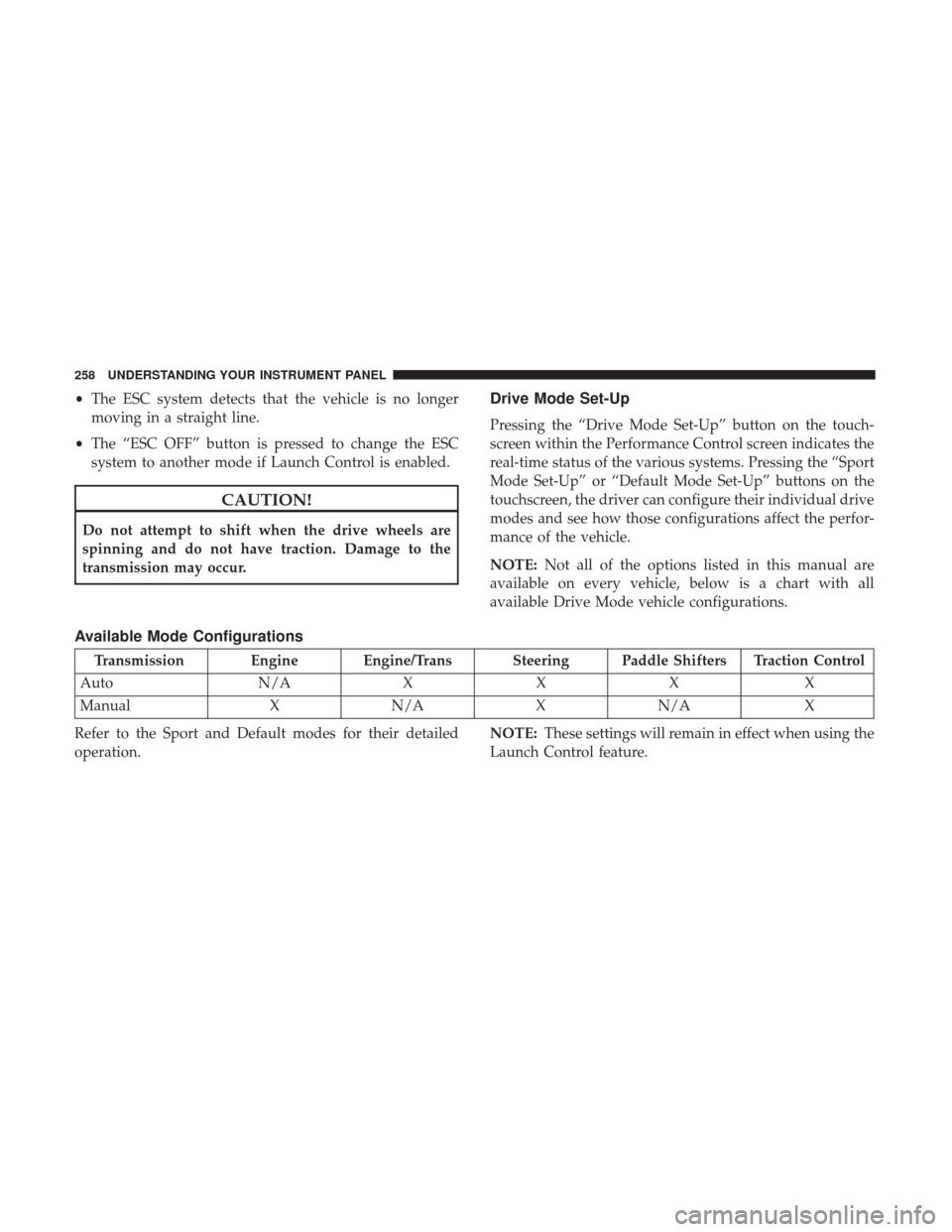
Drive Mode Set-Up
Pressing the “Drive Mode Set-Up” button on the touch-
screen within the Performance Control screen indicates the
real-time status of the various systems. Pressing the “Sport
Mode Set-Up” or “Default Mode Set-Up” buttons on the
touchscreen, the driver can configure their individual drive
modes and see how those configurations affect the perfor-
mance of the vehicle.
NOTE: Not all of the options listed in this manual are
available on every vehicle, below is a chart with all
available Drive Mode vehicle configurations.
Available Mode Configurations
Transmission Engine Engine/Trans Steering Paddle Shifters Traction Control
Auto N/AXXX X
Manual XN/A XN/A X
Refer to the Sport and Default modes for their detailed
operation. NOTE:
These settings will remain in effect when using the
Launch Control feature.
258 UNDERSTANDING YOUR INSTRUMENT PANEL
Page 261 of 506
Default Mode
The vehicle will always start in Default Mode. This mode is
for typical driving conditions. While in Default Mode, the
Engine, Transmission and Traction will operate in their
Normal settings and cannot be changed. The Steering assist
may be configured to Normal, Sport, or Comfort by
pressing the corresponding buttons on the touchscreen.The Paddle Shifters may be enabled or disabled while in
this mode.
Default ModeDefault Mode Set-Up
4
UNDERSTANDING YOUR INSTRUMENT PANEL 259