torque DODGE CHALLENGER 2018 User Guide
[x] Cancel search | Manufacturer: DODGE, Model Year: 2018, Model line: CHALLENGER, Model: DODGE CHALLENGER 2018Pages: 516, PDF Size: 5.17 MB
Page 433 of 516
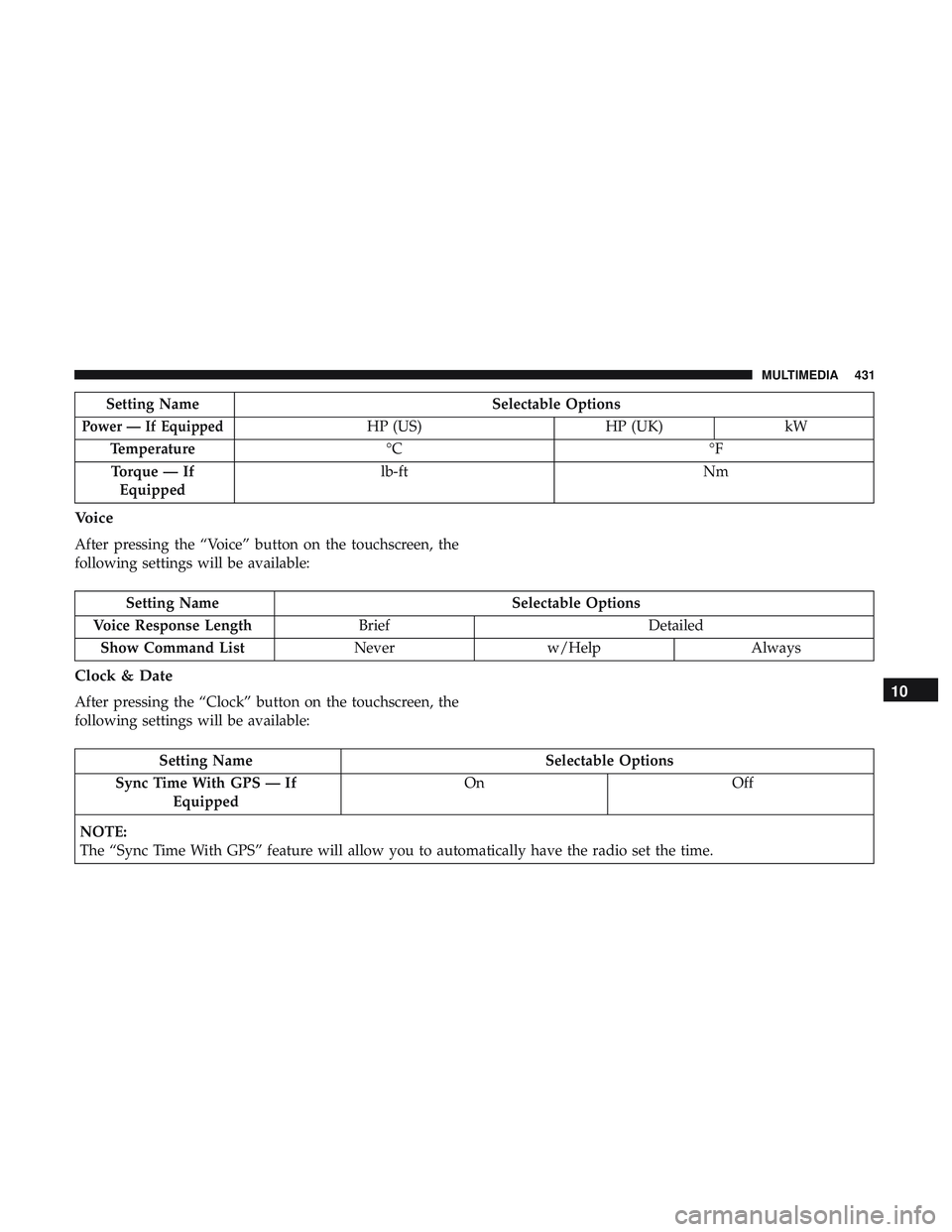
Setting NameSelectable Options
Power — If EquippedHP (US)HP (UK)kW
Temperature °C °F
Torque — If Equipped lb-ft
Nm
Voice
After pressing the “Voice” button on the touchscreen, the
following settings will be available:
Setting Name Selectable Options
Voice Response Length Brief Detailed
Show Command List Neverw/Help Always
Clock & Date
After pressing the “Clock” button on the touchscreen, the
following settings will be available:
Setting Name Selectable Options
Sync Time With GPS — If Equipped On
Off
NOTE:
The “Sync Time With GPS” feature will allow you to automatically have the radio set the time.
10
MULTIMEDIA 431
Page 452 of 516
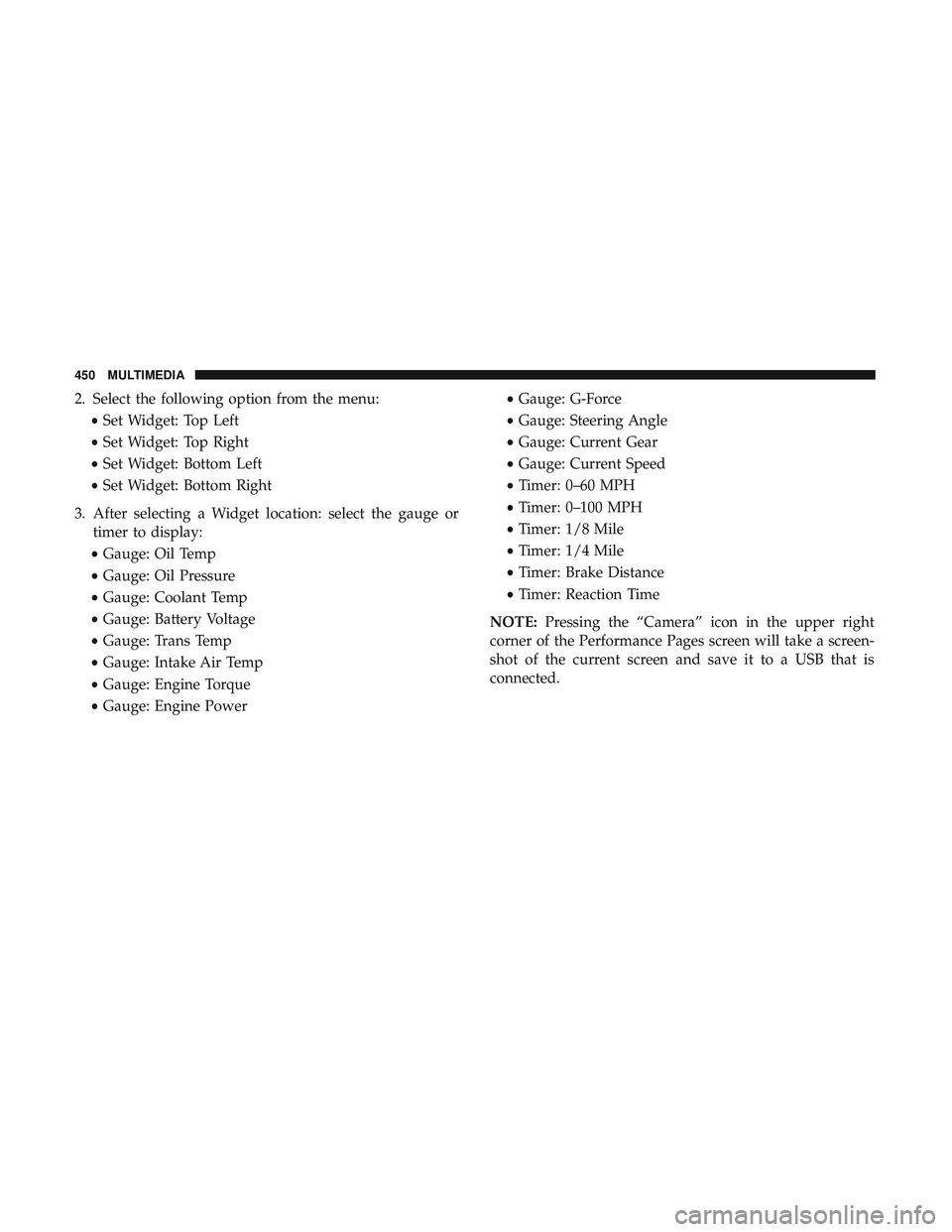
2. Select the following option from the menu:•Set Widget: Top Left
• Set Widget: Top Right
• Set Widget: Bottom Left
• Set Widget: Bottom Right
3. After selecting a Widget location: select the gauge or timer to display:
• Gauge: Oil Temp
• Gauge: Oil Pressure
• Gauge: Coolant Temp
• Gauge: Battery Voltage
• Gauge: Trans Temp
• Gauge: Intake Air Temp
• Gauge: Engine Torque
• Gauge: Engine Power •
Gauge: G-Force
• Gauge: Steering Angle
• Gauge: Current Gear
• Gauge: Current Speed
• Timer: 0–60 MPH
• Timer: 0–100 MPH
• Timer: 1/8 Mile
• Timer: 1/4 Mile
• Timer: Brake Distance
• Timer: Reaction Time
NOTE: Pressing the “Camera” icon in the upper right
corner of the Performance Pages screen will take a screen-
shot of the current screen and save it to a USB that is
connected.
450 MULTIMEDIA
Page 459 of 516
Engine
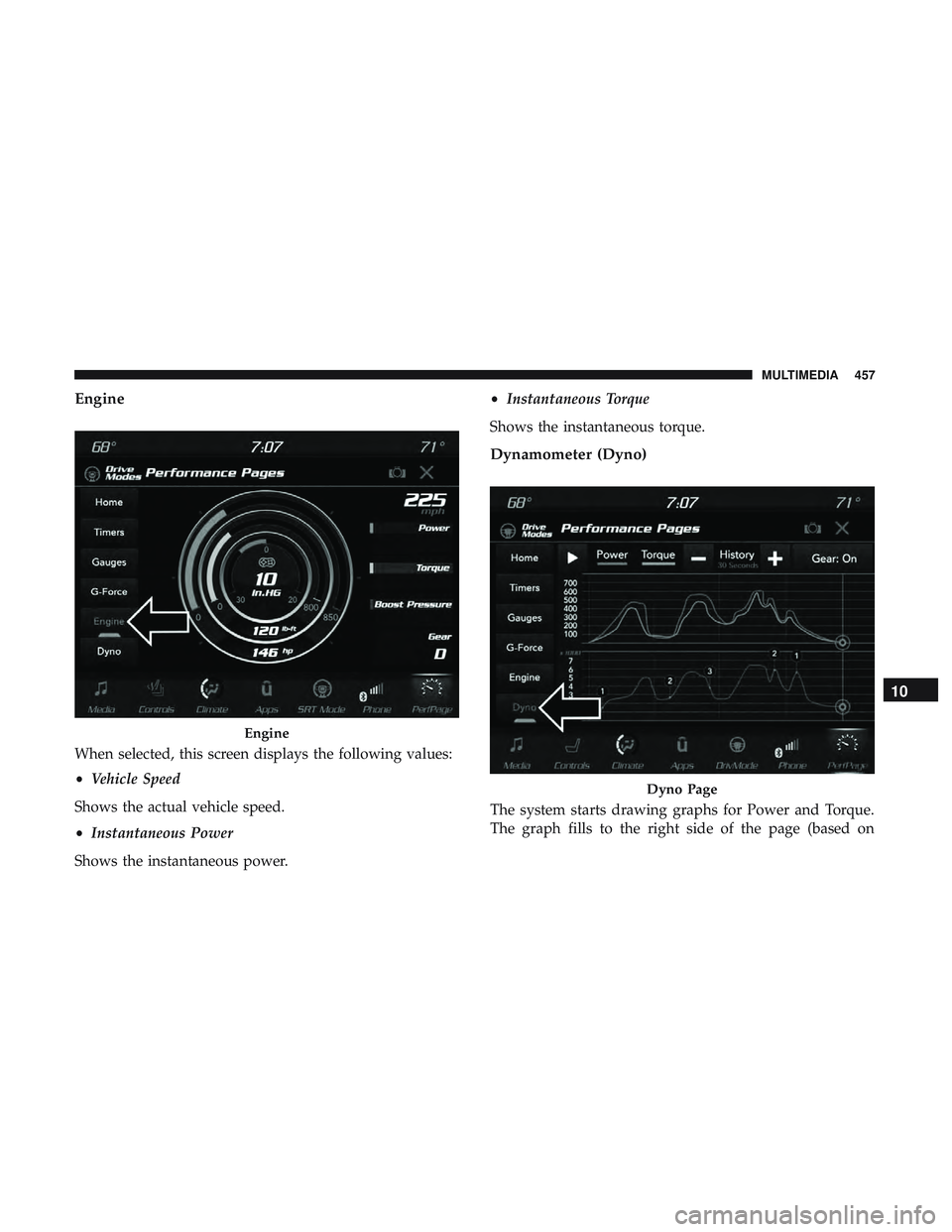
When selected, this screen displays the following values:
•Vehicle Speed
Shows the actual vehicle speed.
• Instantaneous Power
Shows the instantaneous power. •
Instantaneous Torque
Shows the instantaneous torque.
Dynamometer (Dyno)
The system starts drawing graphs for Power and Torque.
The graph fills to the right side of the page (based on
Engine
Dyno Page
10
MULTIMEDIA 457
Page 513 of 516
Wheel Nut Torque....................... .389
Tire Safety Information ...................... .358
Tire Service Kit ............297, 298, 299, 301, 304, 305
Tongue Weight/Trailer Weight .................257
To Open Hood .............................78
Towing ................................. .253
Disabled Vehicle ........................ .313
Guide ................................ .256
Recreational ........................... .262
Weight ............................... .256
Towing Behind A Motorhome ..................262
Traction ................................ .263
Traction Control .......................... .131
Trailer Towing ............................ .253
Cooling System Tips ..................... .262
Hitches ............................... .256
Minimum Requirements ....................257
Tips ................................. .261
Trailer And Tongue Weight ..................257
Wiring ............................... .260
Trailer Towing Guide ....................... .256
Trailer Weight ............................ .256
Transfer Case ............................ .357
Fluid .......................... .357, 398, 400
Maintenance ........................... .357Transmission
............................. .209
Automatic ...................... .207, 209, 355
Fluid ............................. .398, 400
Maintenance ........................... .355
Manual ............................... .204
Shifting .............................. .207
Transporting Pets ......................... .187
Tread Wear Indicators ...................... .372
Trunk Lid (Deck Lid) .........................79
Trunk Release Remote Control ..................79
Turn Signals ........................... .58,
117
Uconnect Uconnect Settings .................18, 19, 29, 418
Uconnect 4C/4C Nav With 8.4-Inch Display ........427
Uconnect 4 With 7-Inch Display ................406
Uconnect Settings Customer Programmable Features ..........29, 418
Uniform Tire Quality Grades ..................381
Unleaded Gasoline ........................ .391
Untwisting Procedure, Seat Belt ................154
Vanity Mirrors .............................53
Vehicle Certification Label ....................251
Vehicle Identification Number (VIN) .............388
12
INDEX 511