warning DODGE CHALLENGER 2019 Owner's Manual
[x] Cancel search | Manufacturer: DODGE, Model Year: 2019, Model line: CHALLENGER, Model: DODGE CHALLENGER 2019Pages: 532, PDF Size: 5.01 MB
Page 55 of 532
Rear Head Restraints
The rear outboard head restraints are non-adjustable and
are designed to reduce the risk of injury by restricting head
movement in the event of a rear impact.
Vehicles Without Passenger Seating Installed
All passenger occupants within the vehicle must be in a
seat equipped with a Seat Belt System and Head Restraint
for the safety of the passenger. If the passenger and/or rear
seats have been removed, do not ride in those areas.
This vehicle has been designed to maximize total perfor-
mance. In doing so, the deletion of passenger seats and/or
rear seat may affect the NVH (Noise, Vibration, and
Harshness) characteristics. As a result, the interior (driver
cockpit) Noise, Vibration, and Harshness (NVH) will be
louder overall.
WARNING!
•If the passenger and/or rear seats have been re-
moved, do not ride in those areas. In a collision,
people riding in these areas are more likely to be
seriously injured or killed.
(Continued)
WARNING! (Continued)
•If this vehicle was not factory equipped with a
passenger seat, NEVER attempt to install a passenger
seat because the safety systems, including the air
bags and seatbelt, may not properly protect you.
• It is dangerous to ride in a cargo area, inside or
outside of a vehicle. In a collision, people riding in
this area are more likely to be seriously injured or
killed.
• Only ride in available seating positions equipped
with seat belt systems. Always properly wear your
seat belt. Failure to do so could result in an increased
risk of serious injury or death in the event of an
accident.
• Be sure everyone in your vehicle is in a seat and
using a seat belt properly. Occupants, including the
driver, should always wear their seat belts whether
or not an air bag is also provided at their seating
positions to minimize the risk of severe injury or
death in the event of a crash.
(Continued)
3
GETTING TO KNOW YOUR VEHICLE 53
Page 56 of 532
WARNING!(Continued)
•All occupants, including the driver, should not oper-
ate a vehicle or sit in a vehicle’s seat if the head
restraints are not in place of their proper positions in
order to minimize the risk of neck injury in the event
of a crash.
• Head restraints should never be adjusted while the
vehicle is in motion. Driving a vehicle with the head
restraints improperly adjusted or removed could
cause serious injury or death in the event of a
collision.
STEERING WHEEL
Manual Tilt/Telescoping Steering Column —
If Equipped
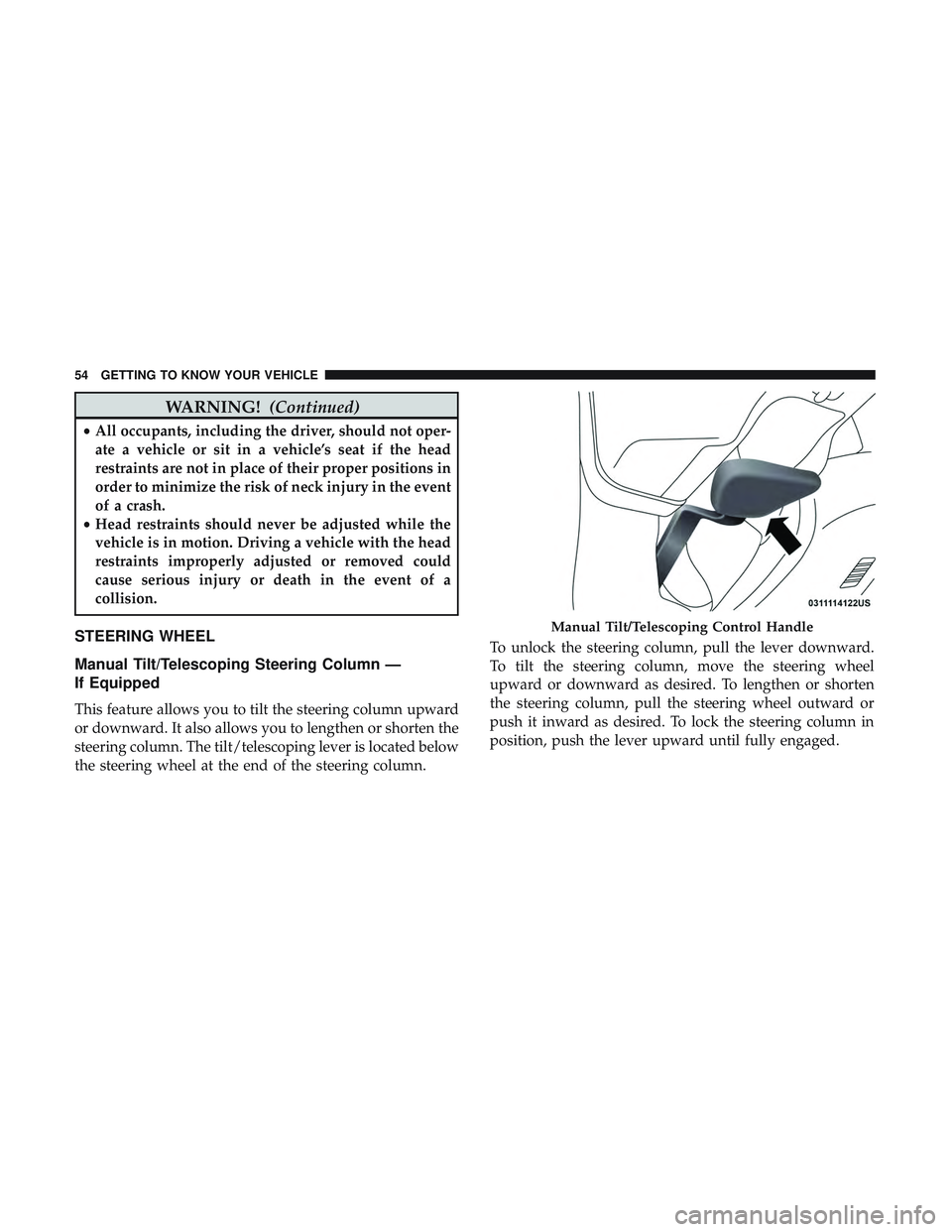
This feature allows you to tilt the steering column upward
or downward. It also allows you to lengthen or shorten the
steering column. The tilt/telescoping lever is located below
the steering wheel at the end of the steering column. To unlock the steering column, pull the lever downward.
To tilt the steering column, move the steering wheel
upward or downward as desired. To lengthen or shorten
the steering column, pull the steering wheel outward or
push it inward as desired. To lock the steering column in
position, push the lever upward until fully engaged.
Manual Tilt/Telescoping Control Handle
54 GETTING TO KNOW YOUR VEHICLE
Page 57 of 532
WARNING!
Do not adjust the steering column while driving.
Adjusting the steering column while driving or driv-
ing with the steering column unlocked, could cause the
driver to lose control of the vehicle. Failure to follow
this warning may result in serious injury or death.
Power Tilt/Telescoping Steering Column —
If Equipped
This feature allows you to tilt the steering column upward
or downward. It also allows you to lengthen or shorten the
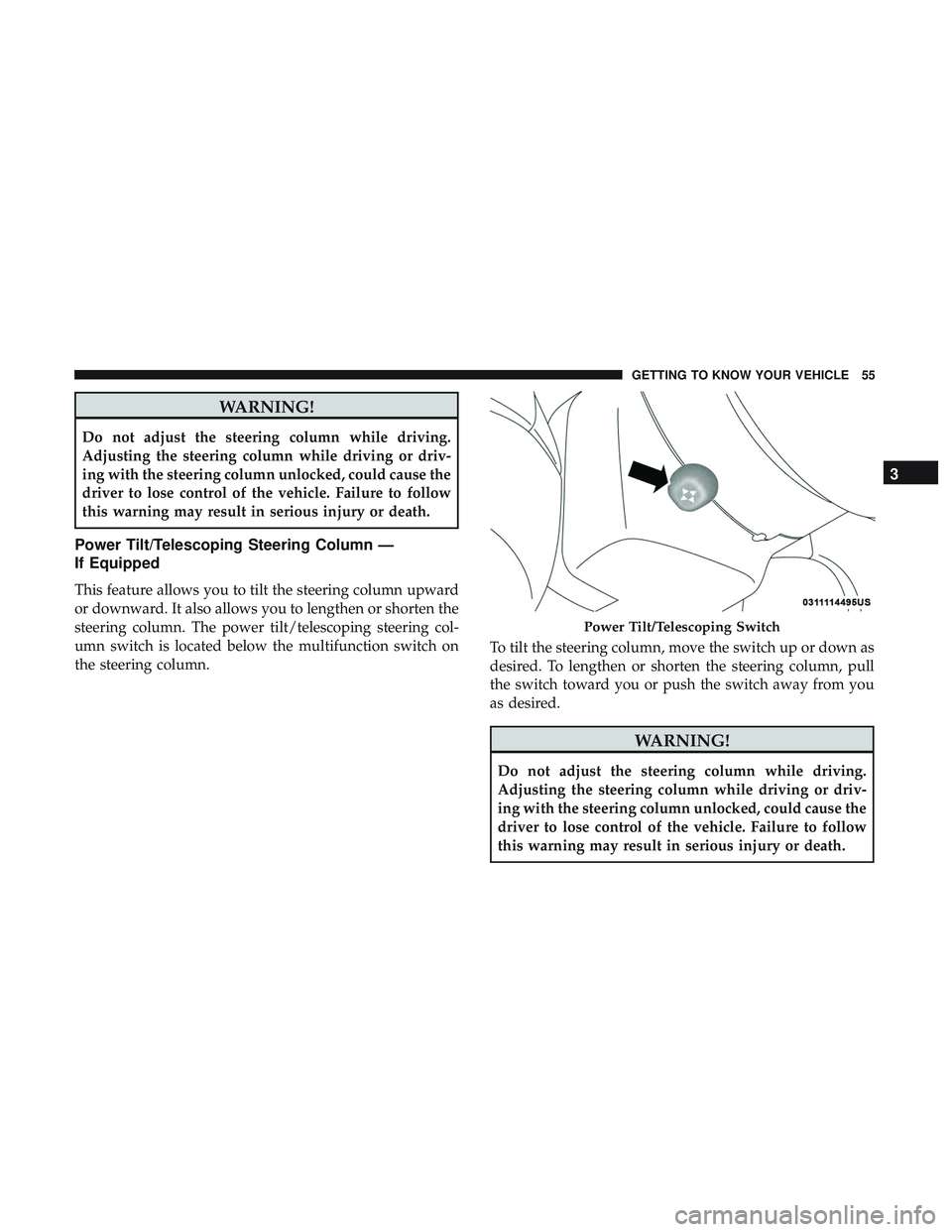
steering column. The power tilt/telescoping steering col-
umn switch is located below the multifunction switch on
the steering column.To tilt the steering column, move the switch up or down as
desired. To lengthen or shorten the steering column, pull
the switch toward you or push the switch away from you
as desired.
WARNING!
Do not adjust the steering column while driving.
Adjusting the steering column while driving or driv-
ing with the steering column unlocked, could cause the
driver to lose control of the vehicle. Failure to follow
this warning may result in serious injury or death.
Power Tilt/Telescoping Switch
3
GETTING TO KNOW YOUR VEHICLE 55
Page 58 of 532
Heated Steering Wheel — If Equipped
The steering wheel contains a heating element that helps
warm your hands in cold weather. The heated steering
wheel has only one temperature setting. Once the heated
steering wheel has been turned on, it will stay on for an
average of 80 minutes before automatically shutting off.
This time will vary based on environmental temperatures.
The heated steering wheel can shut off early or may not
turn on when the steering wheel is already warm.
The heated steering wheel control button is located within
the Uconnect system. You can gain access to the control
button through the climate screen or the controls screen.
•Press the heated steering wheel button
once to turn
the heating element on.
• Press the heated steering wheel buttona second time
to turn the heating element off.
NOTE: The engine must be running for the heated steering
wheel to operate. Vehicles Equipped With Remote Start
On models that are equipped with remote start, the heated
steering wheel can be programmed to come on during a
remote start through the Uconnect system. Refer to
“Uconnect Settings” in “Multimedia” for further informa-
tion.
WARNING!
•
Persons who are unable to feel pain to the skin
because of advanced age, chronic illness, diabetes,
spinal cord injury, medication, alcohol use, exhaus-
tion, or other physical conditions must exercise care
when using the steering wheel heater. It may cause
burns even at low temperatures, especially if used
for long periods.
• Do not place anything on the steering wheel that
insulates against heat, such as a blanket or steering
wheel covers of any type and material. This may
cause the steering wheel heater to overheat.
56 GETTING TO KNOW YOUR VEHICLE
Page 60 of 532
Outside Mirrors
To receive maximum benefit, adjust the outside mirror(s) to
center on the adjacent lane of traffic and a slight overlap of
the view obtained from the inside mirror.
NOTE:The passenger side convex outside mirror will give
a much wider view to the rear, and especially of the lane
next to your vehicle.
WARNING!
Vehicles and other objects seen in an outside convex
mirror will look smaller and farther away than they
really are. Relying too much on side convex mirrors
could cause you to collide with another vehicle or other
object. Use your inside mirror when judging the size or
distance of a vehicle seen in a side convex mirror.
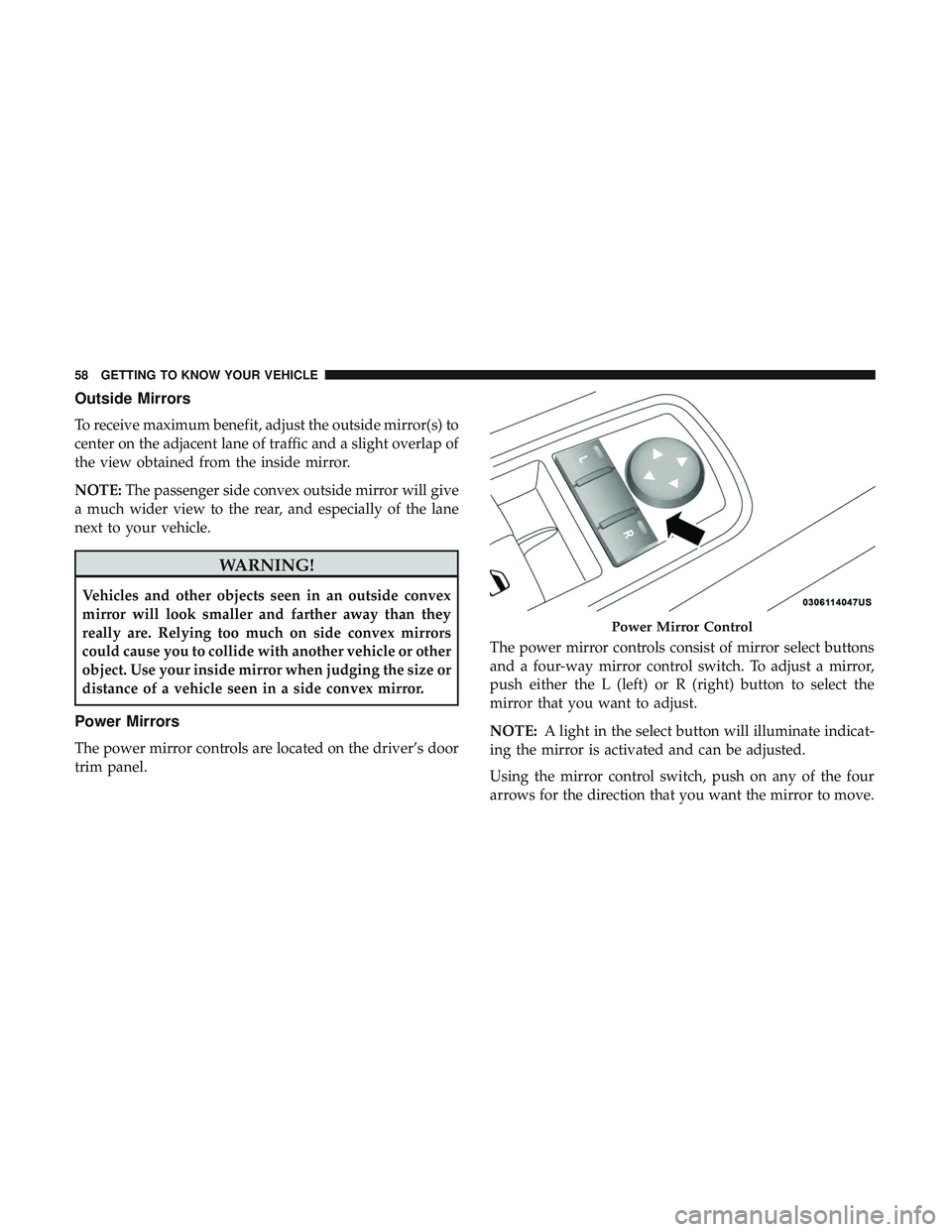
Power Mirrors
The power mirror controls are located on the driver’s door
trim panel. The power mirror controls consist of mirror select buttons
and a four-way mirror control switch. To adjust a mirror,
push either the L (left) or R (right) button to select the
mirror that you want to adjust.
NOTE:
A light in the select button will illuminate indicat-
ing the mirror is activated and can be adjusted.
Using the mirror control switch, push on any of the four
arrows for the direction that you want the mirror to move.
Power Mirror Control
58 GETTING TO KNOW YOUR VEHICLE
Page 69 of 532
Intermittent Wiper System
Use the intermittent wiper when weather conditions make
a single wiping cycle with a variable pause between cycles
desirable. Rotate the end of the multifunction lever to the
first detent position, and then turn the end of the lever to
select the desired delay interval. There are four delay
settings, which allow you to regulate the wipe interval
from a minimum of one cycle every second to a maximum
of approximately 36 seconds between cycles. The delay
intervals will double in duration when the vehicle speed is
10 mph (16 km/h) or less.
Windshield Washers
To use the washer, push the multifunction lever inward
(toward the steering column) and hold it for as long as
washer spray is desired.
If you activate the washer while the windshield wiper
control is in the delay range, the wipers will operate for
two wipe cycles after releasing the lever and then resume
the intermittent interval previously selected.
If you activate the washer while the windshield wiper is
turned off, the wipers will operate for three wipe cycles
and then turn off.
WARNING!
Sudden loss of visibility through the windshield could
lead to a collision. You might not see other vehicles or
other obstacles. To avoid sudden icing of the wind-
shield during freezing weather, warm the windshield
with the defroster before and during windshield
washer use.
Mist Feature
Rotate the end of the lever downward to the MIST position
to activate a single wipe cycle to clear off road mist or spray
from a passing vehicle. The wipers will continue to operate
until you release the multifunction lever.
NOTE:The mist feature does not activate the washer
pump; therefore, no washer fluid will be sprayed on the
windshield. The wash function must be used in order to
spray the windshield with washer fluid.
3
GETTING TO KNOW YOUR VEHICLE 67
Page 81 of 532
WINDOWS
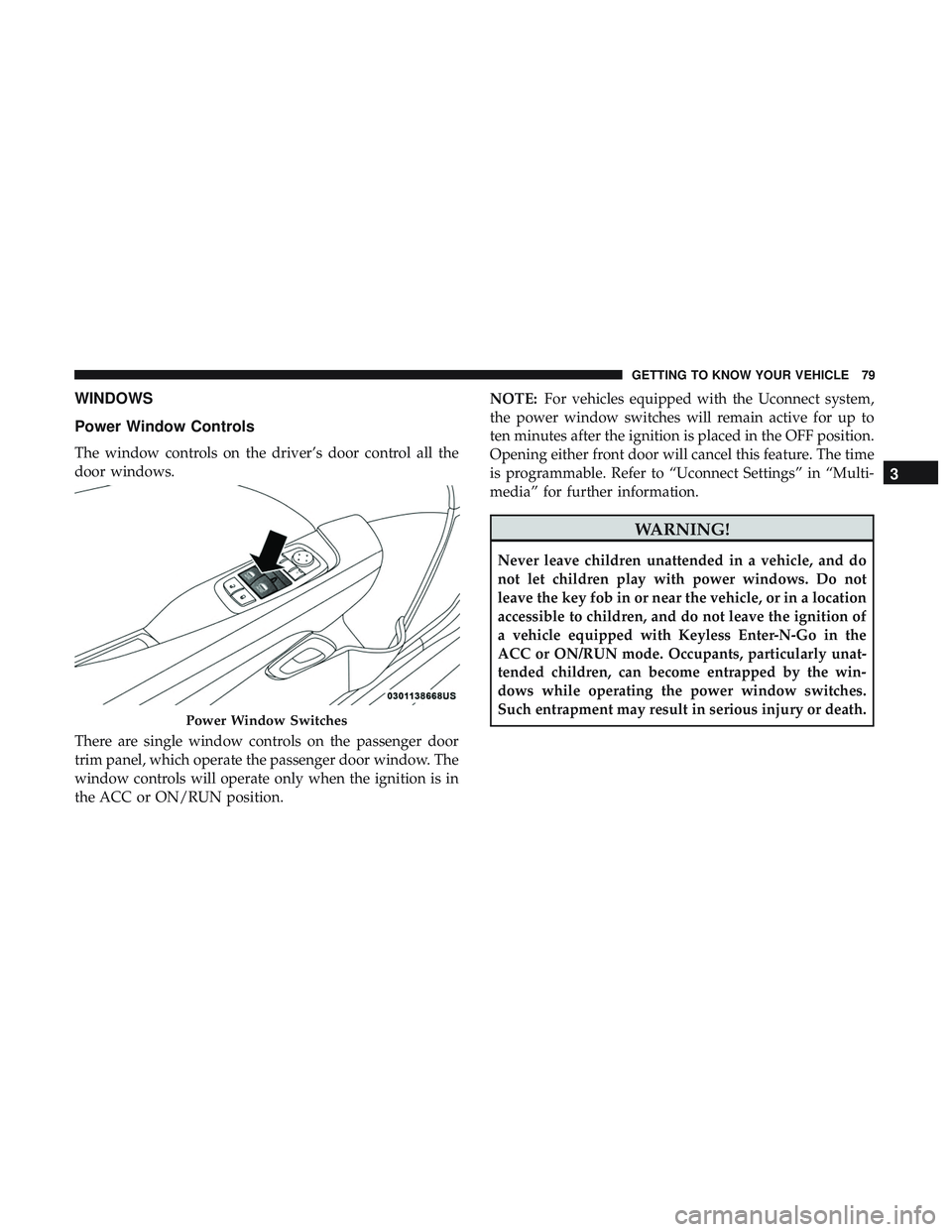
Power Window Controls
The window controls on the driver’s door control all the
door windows.
There are single window controls on the passenger door
trim panel, which operate the passenger door window. The
window controls will operate only when the ignition is in
the ACC or ON/RUN position.NOTE:
For vehicles equipped with the Uconnect system,
the power window switches will remain active for up to
ten minutes after the ignition is placed in the OFF position.
Opening either front door will cancel this feature. The time
is programmable. Refer to “Uconnect Settings” in “Multi-
media” for further information.
WARNING!
Never leave children unattended in a vehicle, and do
not let children play with power windows. Do not
leave the key fob in or near the vehicle, or in a location
accessible to children, and do not leave the ignition of
a vehicle equipped with Keyless Enter-N-Go in the
ACC or ON/RUN mode. Occupants, particularly unat-
tended children, can become entrapped by the win-
dows while operating the power window switches.
Such entrapment may result in serious injury or death.
Power Window Switches
3
GETTING TO KNOW YOUR VEHICLE 79
Page 82 of 532
Auto-Down Feature
The driver and, in some models, passenger power window
switches have an Auto-Down feature. Push the window
switch to the second detent, release, and the window will
go down automatically.
To open the window part way, push the window switch to
the first detent and release it when you want the window
to stop.
To stop the window from going all the way down during
the Auto-Down operation, pull up on the switch briefly.
Wind Buffeting
Wind buffeting can be described as the perception of
pressure on the ears or a helicopter-type sound in the ears.
Your vehicle may exhibit wind buffeting with the windows
down, or the sunroof (if equipped) in certain open or
partially open positions. This is a normal occurrence and
can be minimized. If the buffeting occurs with the rear
windows open, open the front and rear windows together
to minimize the buffeting. If the buffeting occurs with the
sunroof open, adjust the sunroof opening to minimize the
buffeting or open any window.
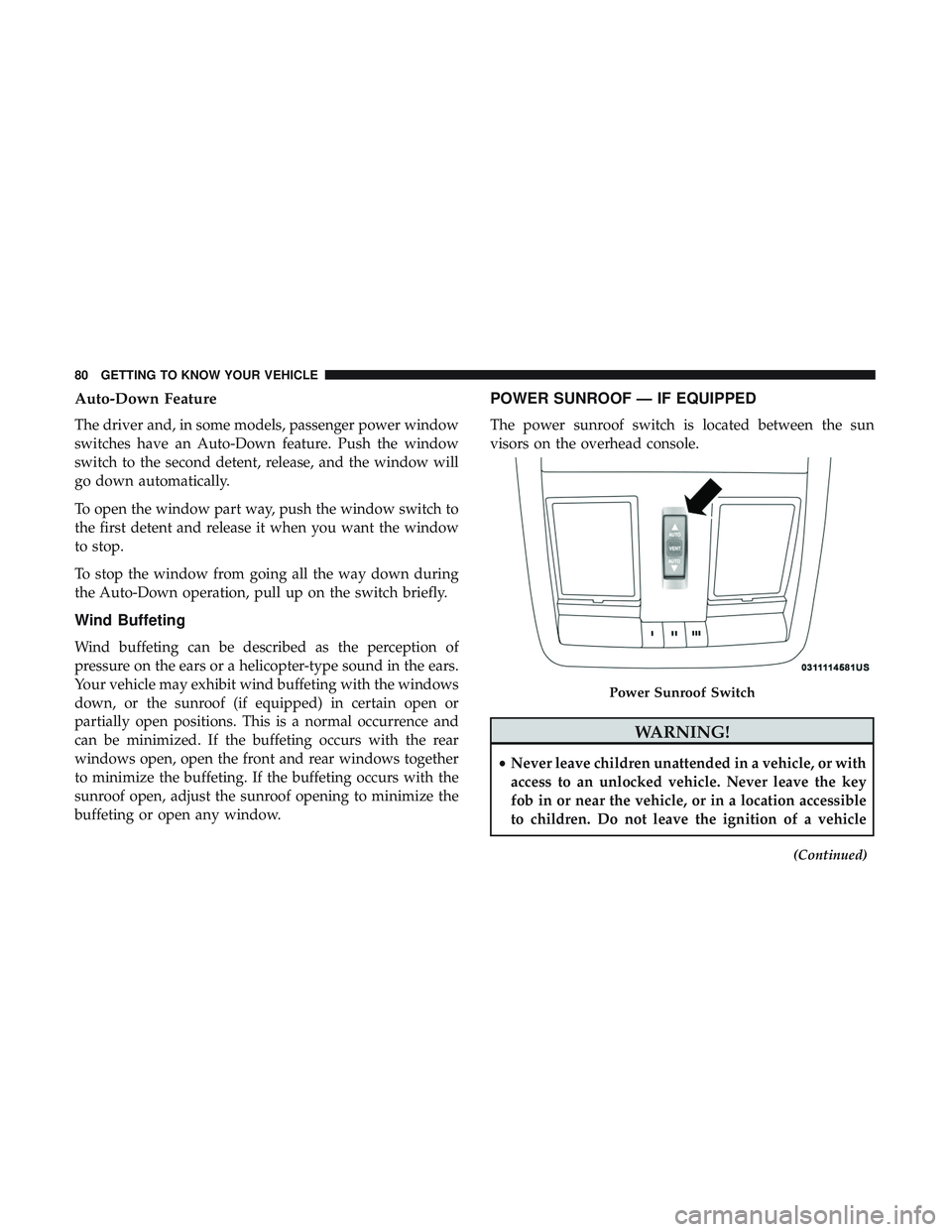
POWER SUNROOF — IF EQUIPPED
The power sunroof switch is located between the sun
visors on the overhead console.
WARNING!
•Never leave children unattended in a vehicle, or with
access to an unlocked vehicle. Never leave the key
fob in or near the vehicle, or in a location accessible
to children. Do not leave the ignition of a vehicle
(Continued)
Power Sunroof Switch
80 GETTING TO KNOW YOUR VEHICLE
Page 83 of 532
WARNING!(Continued)
equipped with Keyless Enter-N-Go in the ACC or
ON/RUN mode. Occupants, particularly unattended
children, can become entrapped by the power sun-
roof while operating the power sunroof switch. Such
entrapment may result in serious injury or death.
• In a collision, there is a greater risk of being thrown
from a vehicle with an open sunroof. You could also
be seriously injured or killed. Always fasten your
seat belt properly and make sure all passengers are
also properly secured.
• Do not allow small children to operate the sunroof.
Never allow your fingers, other body parts, or any
object, to project through the sunroof opening. In-
jury may result.
Opening Sunroof
Express
Push the switch rearward and release it within one-half
second, the sunroof and sunshade will open automatically
and stop at full open position. During Express Open
operation any other actuation of the sunroof switches will
stop the sunroof in a partially open position. Manual Mode
Push and hold the switch rearward, the sunroof and
sunshade will open and automatically stop at full open
position. Releasing the switch while the sunroof is in
motion will stop the sunroof in a partially open position.
Vent Open
Push and release the Vent switch within one half second
and the sunroof will open to the vent position. During
Express Vent operation any other actuation of the sunroof
switches will stop the sunroof operation.
Closing Sunroof
Express
Push the switch forward and release it within one-half
second and the sunroof will close automatically from any
position. During Express Close operation any other actua-
tion of the sunroof switches will stop the sunroof in a
partially open position.
Manual Mode
Push and hold the switch forward and the sunroof will
close from any position and stop at a full closed position.
Releasing the switch while the sunroof is in motion will
stop the sunroof in a partially open position.
3
GETTING TO KNOW YOUR VEHICLE 81
Page 86 of 532
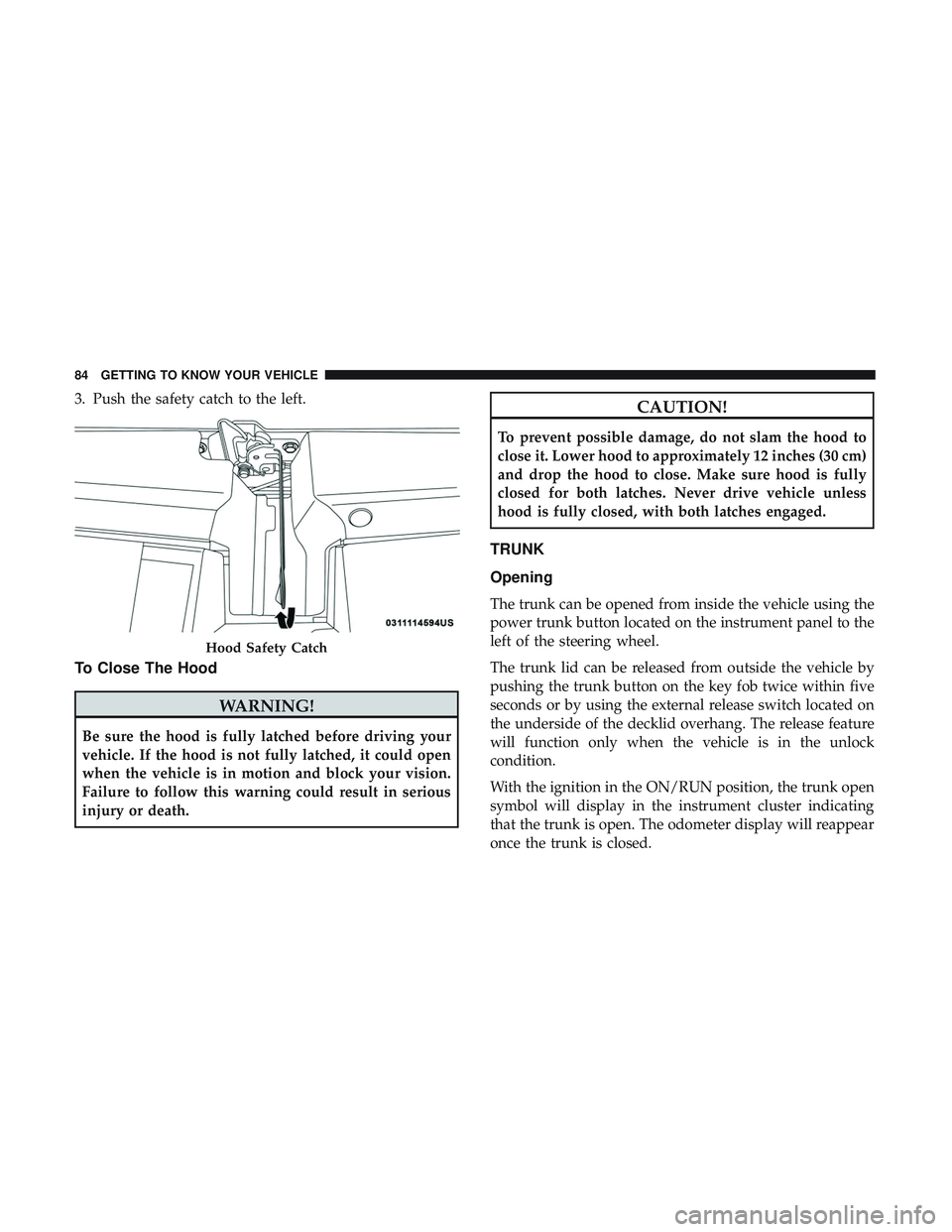
3. Push the safety catch to the left.
To Close The Hood
WARNING!
Be sure the hood is fully latched before driving your
vehicle. If the hood is not fully latched, it could open
when the vehicle is in motion and block your vision.
Failure to follow this warning could result in serious
injury or death.
CAUTION!
To prevent possible damage, do not slam the hood to
close it. Lower hood to approximately 12 inches (30 cm)
and drop the hood to close. Make sure hood is fully
closed for both latches. Never drive vehicle unless
hood is fully closed, with both latches engaged.
TRUNK
Opening
The trunk can be opened from inside the vehicle using the
power trunk button located on the instrument panel to the
left of the steering wheel.
The trunk lid can be released from outside the vehicle by
pushing the trunk button on the key fob twice within five
seconds or by using the external release switch located on
the underside of the decklid overhang. The release feature
will function only when the vehicle is in the unlock
condition.
With the ignition in the ON/RUN position, the trunk open
symbol will display in the instrument cluster indicating
that the trunk is open. The odometer display will reappear
once the trunk is closed.
Hood Safety Catch
84 GETTING TO KNOW YOUR VEHICLE