instrument panel DODGE CHALLENGER 2019 Manual PDF
[x] Cancel search | Manufacturer: DODGE, Model Year: 2019, Model line: CHALLENGER, Model: DODGE CHALLENGER 2019Pages: 532, PDF Size: 5.01 MB
Page 423 of 532
NOTE:
•FCA US LLC or your dealer may contact you directly
regarding software updates.
• To help further improve vehicle security and minimize
the potential risk of a security breach, vehicle owners
should:
• Routinely check www.driveuconnect.com (U.S. Resi-
dents) or www.driveuconnect.ca (Canadian Residents)
to learn about available Uconnect software updates.
• Only connect and use trusted media devices (e.g.
personal mobile phones, USBs, CDs).
Privacy of any wireless and wired communications cannot
be assured. Third parties may unlawfully intercept infor-
mation and private communications without your consent.
For further information, refer to “Data Collection & Pri-
vacy” in your Uconnect Owner ’s Manual Supplement or
“Onboard Diagnostic System (OBD II) Cybersecurity” in
“Getting To Know Your Instrument Panel”.UCONNECT SETTINGS
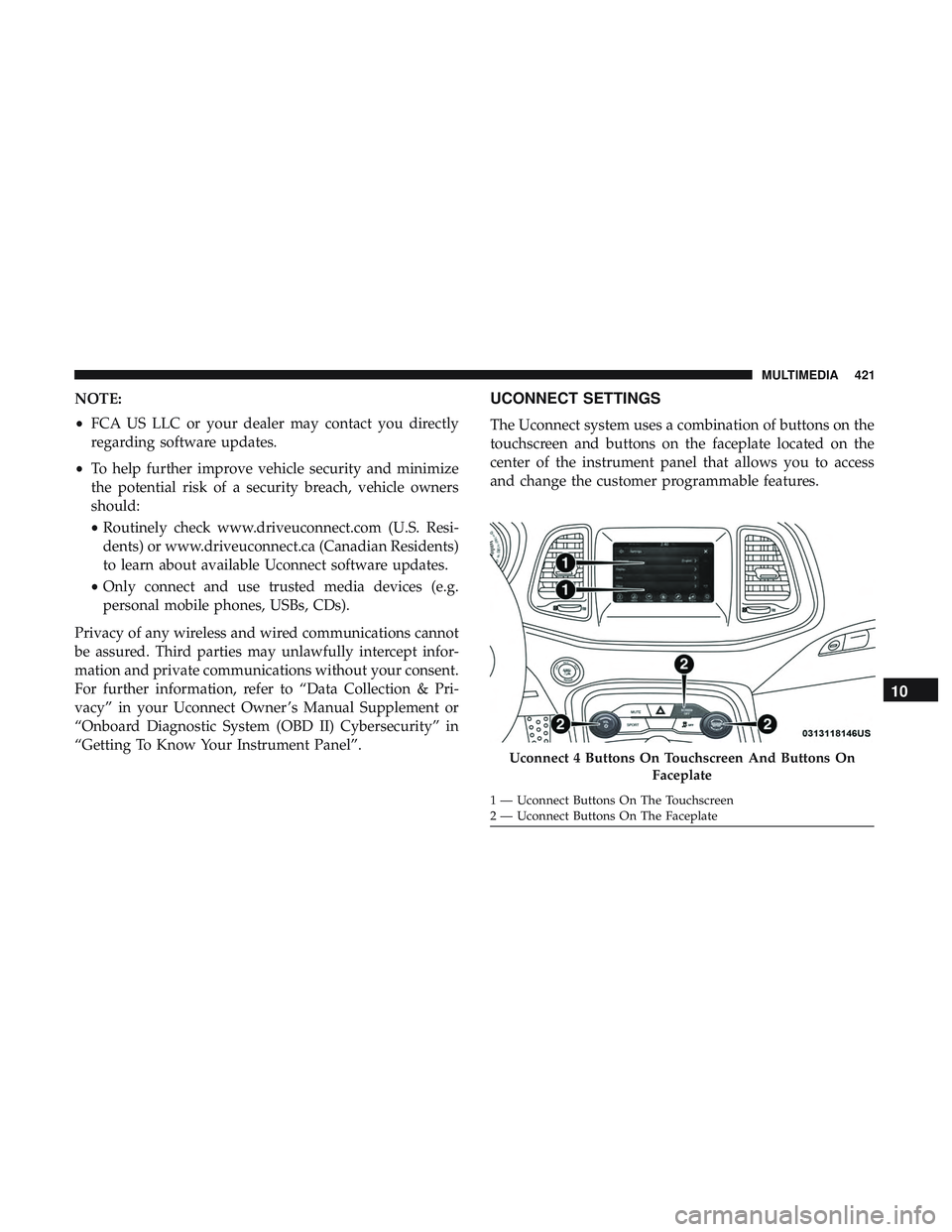
The Uconnect system uses a combination of buttons on the
touchscreen and buttons on the faceplate located on the
center of the instrument panel that allows you to access
and change the customer programmable features.
Uconnect 4 Buttons On Touchscreen And Buttons On Faceplate
1 — Uconnect Buttons On The Touchscreen
2 — Uconnect Buttons On The Faceplate
10
MULTIMEDIA 421
Page 475 of 532
The following options can be selected:
•Pressing the STOP button will freeze the graph. Selecting
Play will clear the graph and restart the process over
• Press the “+” or “–” buttons to change the history of the
graph. The selectable options are 30, 60, 90, 120 seconds.
The graph will expand or constrict depending on the
setting selected.
• Select the “Gear” display setting to turn the graph gear
markers on and off.
NOTE: The Gear on/off feature will only display if your
vehicle is equipped with an Automatic Transmission.
Performance Control — If Equipped
Your vehicle is equipped with a Performance Control
feature which allows for coordinating the operation of
various vehicle systems depending upon the type of driv-
ing behavior desired. The Performance Control feature is
controlled through the Uconnect system and may be ac-
cessed by performing any of the following:
• Pushing the Super Track Pack button on the instrument
panel switch bank. •
Selecting “Performance Control” from the “Apps”
menu.
• Selecting “Performance Control” from within the Perfor-
mance Pages menu.
You will be able to enable, disable, and customize the
functionality of the Launch Control and Performance Con-
trol Set-Up features within Performance Control.
Descriptions of these features are provided below. To
access information about the functionality of these features
through the Uconnect system, press the “Info” button on
the touchscreen.
NOTE: Scat and Widebody Dodge vehicles equipped with
a 6.4L engine will use SRT Drive Modes rather than the
Dodge Performance Control Pages. Please refer to the
Owner ’s Manual Supplement for further information on
the SRT Drive Modes.10
MULTIMEDIA 473
Page 479 of 532
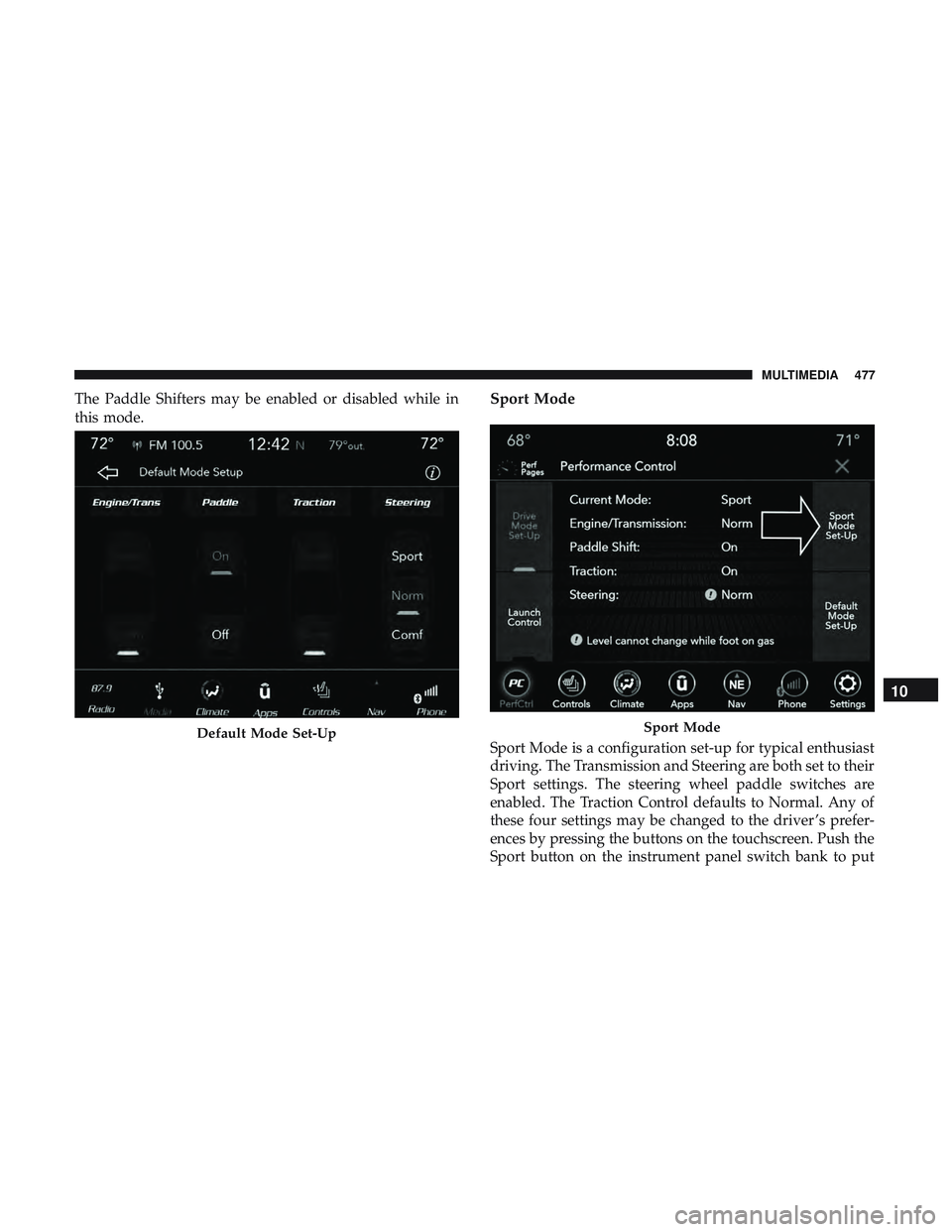
The Paddle Shifters may be enabled or disabled while in
this mode.Sport Mode
Sport Mode is a configuration set-up for typical enthusiast
driving. The Transmission and Steering are both set to their
Sport settings. The steering wheel paddle switches are
enabled. The Traction Control defaults to Normal. Any of
these four settings may be changed to the driver ’s prefer-
ences by pressing the buttons on the touchscreen. Push the
Sport button on the instrument panel switch bank to putDefault Mode Set-UpSport Mode
10
MULTIMEDIA 477
Page 520 of 532
HomeLink (Garage Door Opener)................87
Hood Prop ................................83
Hood Release ..............................83
Ignition ..................................26
Switch .................................26
Information Center, Vehicle ...................105
Inside Rearview Mirror ....................57, 281
Instrument Cluster Descriptions ........................ .102, 123
Display ........................... .105, 108
Instrument Panel Lens Cleaning ................400
Interior Appearance Care .....................399
Interior Lights ..............................64
Intermittent Wipers (Delay Wipers) ...............67
Introduction ................................4
In Vehicle Help Vehicle User Guide ........................17
iPod/USB/MP3 Control ..................... .483
Bluetooth Streaming Audio .................483
Jacking Instructions ........................ .303
Jack Location ............................ .301
Jack Operation ........................ .303, 373Jump Starting
..................... .324, 325, 326
Key Fob Arm The System ..........................34
Panic Alarm .............................21
Programming Additional Key Fobs ..........25, 33
Unlatch The Trunk ........................21
Key Fob Battery Service (Remote Keyless Entry) .....22
Key Fob Programming (Remote Keyless Entry) ......25
Key-In Reminder ............................28
Keyless Enter-N-Go ..........................37
Enter The Trunk ..........................21
Keys ....................................18
Replacement ......................... .25, 33
Lane Change And Turn Signals .................63
Lane Change Assist ..........................63
Lap/Shoulder Belts ........................ .159
Latches ................................. .204
Hood ..................................83
Lead Free Gasoline ........................ .406
Leaks, Fluid ............................. .204
Life Of Tires ............................. .387
Light
Bulbs .......................... .204, 286
Lights .................................. .204
518 INDEX