radio controls DODGE CHALLENGER 2020 User Guide
[x] Cancel search | Manufacturer: DODGE, Model Year: 2020, Model line: CHALLENGER, Model: DODGE CHALLENGER 2020Pages: 396, PDF Size: 16.64 MB
Page 355 of 396
MULTIMEDIA353
Android Auto™ Maps
Push and hold the VR button on the
steering wheel or tap the microphone
icon to ask Google to take you to a
desired destination by voice. You can
also touch the Navigation icon in Android Auto™
to access Google Maps™.
NOTE:
If the VR button is not held, and is only pushed,
the built-in Uconnect VR prompts you and any
navigation command said launches the built-in
Uconnect navigation system.
While using Android Auto™, Google Maps™
provides voice-guided:
Navigation
Live traffic information
Lane guidance
For further information, refer to
www.android.com/auto/ (US Residents) https:/
/www.android.com/intl/en_ca/auto (Canadian
Residents).
For further information on the navigation
function, please refer to https://
support.google.com/android or https:// support.google.com/androidauto/. Android Auto™ Music
Android Auto™ allows you to access
and stream your favorite music with
apps like Google Play Music,
iHeartRadio, and Spotify. Using your
smartphone’s data plan, you can stream
endless music on the road.
NOTE:
Music apps, playlists, and stations must be set
up on your smartphone prior to using Android
Auto™, for them to work with Android Auto™.
NOTE:
To see the metadata for the music playing
through Android Auto™, select the Uconnect
System’s media screen.
For further information refer to https://
support.google.com/androidauto.
Android Auto™ Communication
With Android Auto™ connected, push
and hold the VR button on the
steering wheel to activate voice
recognition specific to the Android
Auto™. This will allow you to send and reply to
text messages, have incoming text messages
read out loud, and place and receive hands-free
calls. Android Auto™ Apps
The Android Auto™ App will display all the
compatible apps that are available to use with
Android Auto™, every time it is launched. You
must have the compatible app downloaded,
and you must be signed in to the app for it to
work with Android Auto™.
Refer to https://play.google.com/store/apps/
to see the latest list of available apps for
Android Auto™.
Apple CarPlay® Integration
NOTE:
Feature availability depends on your carrier and
mobile phone manufacturer. Some Apple
CarPlay® features may or may not be available
in every region and/or language.
Uconnect works seamlessly with Apple
CarPlay®, the smarter, more secure way to use
your iPhone® in the car, and stay focused on
the road. Use your Uconnect Touchscreen
display, the vehicle's knobs and controls, and
your voice with Siri to get access to Apple
Music®, Maps, Messages, and more.
9
20_LA_OM_EN_USC_t.book Page 353
Page 369 of 396
MULTIMEDIA367
Even though the system is designed for many
languages and accents, the system may not
always work for some.
NOTE:
It is recommended that you do not store names
in your favorites phonebook while the vehicle is
in motion.
Phonebook (Mobile and Favorites) name
recognition rate is optimized when the entries
are not similar. You can say “O” (letter “O”) for
“0” (zero).
Even though international dialing for most
number combinations is supported, some
shortcut dialing number combinations may not
be supported.
Far End Audio Performance
Audio quality is maximized under:
Low-To-Medium Blower Setting
Low-To-Medium Vehicle Speed
Low Road Noise
Smooth Road Surface
Fully Closed Windows
Dry Weather Conditions
Operation From The Driver's Seat Performance such as audio clarity, echo, and
loudness to a large degree rely on the phone
and network, and not the Uconnect Phone.
Echo at the far end can sometimes be reduced
by lowering the in-vehicle audio volume.
Bluetooth® Communication Link
Mobile phones have been found to lose
connection to the Uconnect Phone. When this
happens, the connection can generally be
re-established by switching the mobile phone
OFF/ON. Your mobile phone is recommended to
remain in Bluetooth® ON mode.
Power-Up
After switching the ignition key from OFF to
either the ON/RUN or ACC position, or after a
language change, you must wait at least 15
seconds prior to using the system.
STEERING WHEEL AUDIO CONTROLS — IF
EQUIPPED
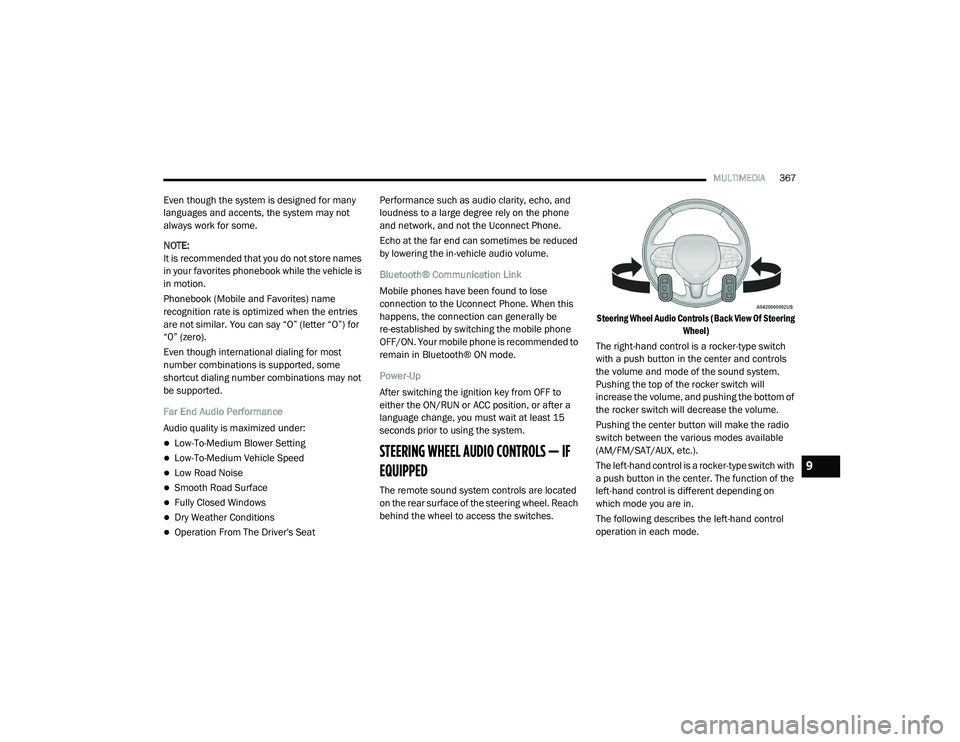
The remote sound system controls are located
on the rear surface of the steering wheel. Reach
behind the wheel to access the switches.
Steering Wheel Audio Controls (Back View Of Steering
Wheel)
The right-hand control is a rocker-type switch
with a push button in the center and controls
the volume and mode of the sound system.
Pushing the top of the rocker switch will
increase the volume, and pushing the bottom of
the rocker switch will decrease the volume.
Pushing the center button will make the radio
switch between the various modes available
(AM/FM/SAT/AUX, etc.).
The left-hand control is a rocker-type switch with
a push button in the center. The function of the
left-hand control is different depending on
which mode you are in.
The following describes the left-hand control
operation in each mode.
9
20_LA_OM_EN_USC_t.book Page 367
Page 389 of 396
387
Seats
.......................................... 29, 31, 32, 34Adjustment........................................... 29, 31Head Restraints................................... 34, 35Heated........................................................ 32Height Adjustment....................................... 31Power.......................................................... 31Rear Folding......................................... 29, 30Seatback Release................................ 29, 30Tilting............................................ 29, 31, 34Vented......................................................... 33Ventilated.................................................... 33Security Alarm.......................................... 23, 84Arm The System.......................................... 23Selection Of Coolant (Antifreeze)......... 299, 302Sentry Key Key Programming........................................ 22Sentry Key (Immobilizer).................................. 21Sentry Key Replacement.......................... 16, 22Service Assistance......................................... 376Service Contract............................................ 377Service Manuals............................................ 379Shift Indicator Light....................................... 158Shifting.......................................................... 158Automatic Transmission.................. 158, 160Shoulder Belts............................................... 115Side View Mirror Adjustment........................... 39Signals, Turn.................................... 43, 89, 147Siri................................................................. 373
Sirius Satellite Radio..................................... 343Favorites................................................... 345Replay...................................................... 345SiriusXM Satellite RadioBrowse in SXM......................................... 345Favorites................................................... 345Replay...................................................... 345Snow Chains (Tire Chains)................... 284, 285Snow Tires.................................................... 281Spare Tires................................. 216, 281, 282Spark Plugs.......................................... 299, 302SpecificationsFuel (Gasoline)................................ 299, 302Oil.................................................... 299, 302Speed ControlAccel/Decel..................................... 167, 168Cancel...................................................... 168Resume.................................................... 168Set............................................................ 167Speed Control (Cruise Control)... 166, 167, 169Sport Mode................................................... 165Starting................................................ 148, 149Automatic Transmission........................... 148Button......................................................... 17Cold Weather............................................ 151Engine Fails To Start................................. 152Starting And Operating......................... 148, 149Starting Procedures............................. 148, 149Steering........................................................... 37Column Lock................................................ 37
Power........................................................ 166Tilt Column...................................................37Wheel, Heated.............................................38Wheel, Tilt....................................................37Steering Wheel Audio Controls...................... 367Steering Wheel Mounted Sound
System Controls............................................ 367Storage.................................................. 64, 287Storage, Vehicle..................................... 53, 287Store Radio Presets...................................... 343Storing Your Vehicle...................................... 287Stuck, Freeing............................................... 231Sun Roof...................................................55, 57Supplemental Restraint System – Air Bag.... 122Synthetic Engine Oil...................................... 254
T
Telescoping Steering Column...........................37Temperature Control, Automatic (ATC).............52Tilt Steering Column.........................................37Time DelayHeadlight.....................................................42Tire And Loading Information Placard........... 273Tire Markings................................................ 269Tire Safety Information.................................. 269Tire Service Kit......... 220, 221, 223, 225, 226Tires.................................. 147, 276, 281, 286Aging (Life Of Tires)................................... 279Air Pressure.............................................. 276Chains............................................. 284, 285
11
20_LA_OM_EN_USC_t.book Page 387