AUX DODGE CHALLENGER 2020 Owner's Manual
[x] Cancel search | Manufacturer: DODGE, Model Year: 2020, Model line: CHALLENGER, Model: DODGE CHALLENGER 2020Pages: 396, PDF Size: 16.64 MB
Page 369 of 396
MULTIMEDIA367
Even though the system is designed for many
languages and accents, the system may not
always work for some.
NOTE:
It is recommended that you do not store names
in your favorites phonebook while the vehicle is
in motion.
Phonebook (Mobile and Favorites) name
recognition rate is optimized when the entries
are not similar. You can say “O” (letter “O”) for
“0” (zero).
Even though international dialing for most
number combinations is supported, some
shortcut dialing number combinations may not
be supported.
Far End Audio Performance
Audio quality is maximized under:
Low-To-Medium Blower Setting
Low-To-Medium Vehicle Speed
Low Road Noise
Smooth Road Surface
Fully Closed Windows
Dry Weather Conditions
Operation From The Driver's Seat Performance such as audio clarity, echo, and
loudness to a large degree rely on the phone
and network, and not the Uconnect Phone.
Echo at the far end can sometimes be reduced
by lowering the in-vehicle audio volume.
Bluetooth® Communication Link
Mobile phones have been found to lose
connection to the Uconnect Phone. When this
happens, the connection can generally be
re-established by switching the mobile phone
OFF/ON. Your mobile phone is recommended to
remain in Bluetooth® ON mode.
Power-Up
After switching the ignition key from OFF to
either the ON/RUN or ACC position, or after a
language change, you must wait at least 15
seconds prior to using the system.
STEERING WHEEL AUDIO CONTROLS — IF
EQUIPPED
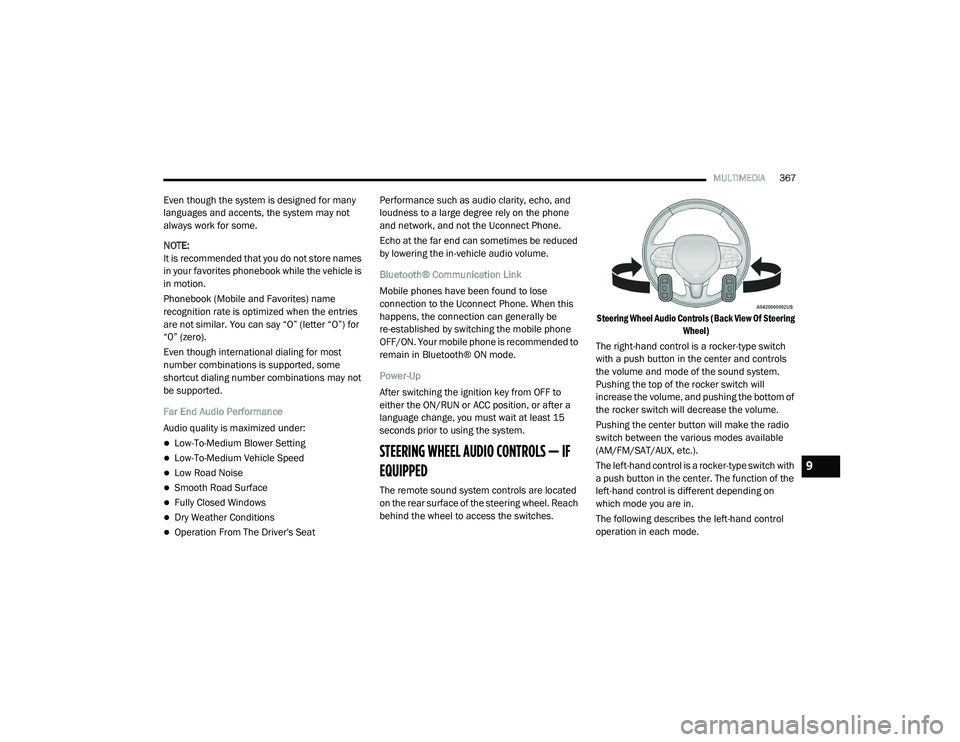
The remote sound system controls are located
on the rear surface of the steering wheel. Reach
behind the wheel to access the switches.
Steering Wheel Audio Controls (Back View Of Steering
Wheel)
The right-hand control is a rocker-type switch
with a push button in the center and controls
the volume and mode of the sound system.
Pushing the top of the rocker switch will
increase the volume, and pushing the bottom of
the rocker switch will decrease the volume.
Pushing the center button will make the radio
switch between the various modes available
(AM/FM/SAT/AUX, etc.).
The left-hand control is a rocker-type switch with
a push button in the center. The function of the
left-hand control is different depending on
which mode you are in.
The following describes the left-hand control
operation in each mode.
9
20_LA_OM_EN_USC_t.book Page 367
Page 370 of 396
368MULTIMEDIA
RADIO OPERATION
Pushing the top of the switch will “Seek” up for
the next listenable station and pushing the
bottom of the switch will “Seek” down for the
next listenable station.
The button located in the center of the left-hand
control will tune to the next preset station that
you have programmed in the radio preset
button.
MEDIA MODE
Pushing the top of the switch once goes to the
next track on the selected media (AUX/USB/
Bluetooth®). Pushing the bottom of the switch
once goes to the beginning of the current track,
or to the beginning of the previous track if it is
within eight seconds after the current track
begins to play.
NOTE:
While In Media Mode, the center button on the
left rocker switch is nonfunctional.
IPOD®/USB/MP3 CONTROL — IF EQUIPPED
This feature allows an iPod® or external USB
device to be plugged into the USB port. Plugging in a smartphone device to a USB Port
may activate Android Auto™ or Apple CarPlay®
features, if equipped
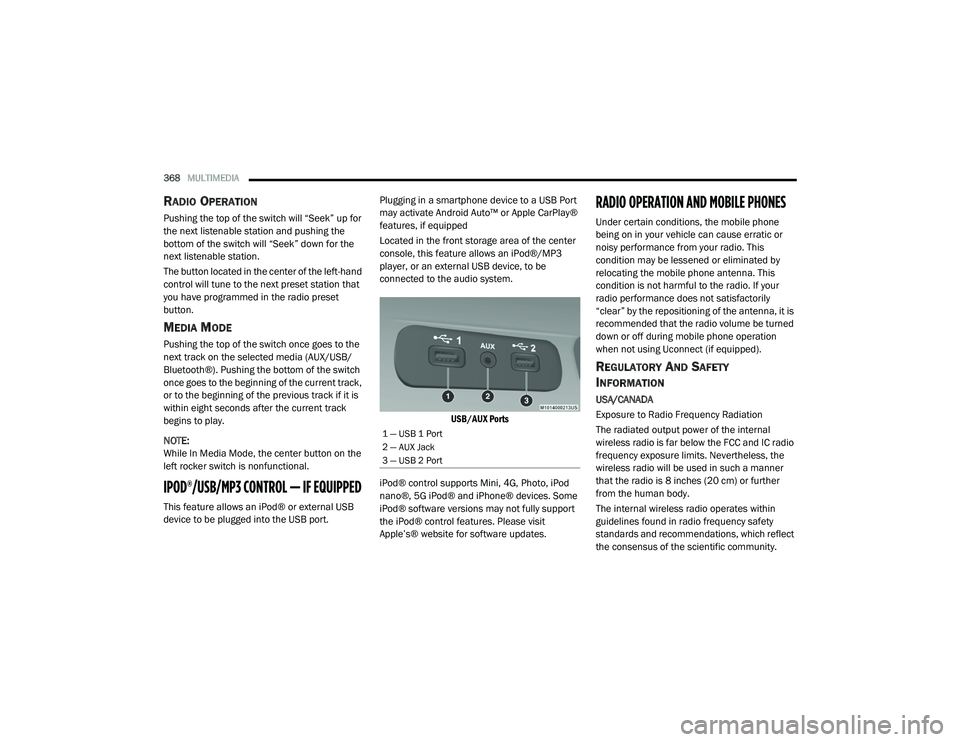
Located in the front storage area of the center
console, this feature allows an iPod®/MP3
player, or an external USB device, to be
connected to the audio system.
USB/AUX Ports
iPod® control supports Mini, 4G, Photo, iPod
nano®, 5G iPod® and iPhone® devices. Some
iPod® software versions may not fully support
the iPod® control features. Please visit
Apple’s® website for software updates.
RADIO OPERATION AND MOBILE PHONES
Under certain conditions, the mobile phone
being on in your vehicle can cause erratic or
noisy performance from your radio. This
condition may be lessened or eliminated by
relocating the mobile phone antenna. This
condition is not harmful to the radio. If your
radio performance does not satisfactorily
“clear” by the repositioning of the antenna, it is
recommended that the radio volume be turned
down or off during mobile phone operation
when not using Uconnect (if equipped).
REGULATORY AND SAFETY
I
NFORMATION
USA/CANADA
Exposure to Radio Frequency Radiation
The radiated output power of the internal
wireless radio is far below the FCC and IC radio
frequency exposure limits. Nevertheless, the
wireless radio will be used in such a manner
that the radio is 8 inches (20 cm) or further
from the human body.
The internal wireless radio operates within
guidelines found in radio frequency safety
standards and recommendations, which reflect
the consensus of the scientific community.
1 — USB 1 Port
2 — AUX Jack
3 — USB 2 Port
20_LA_OM_EN_USC_t.book Page 368
Page 371 of 396
MULTIMEDIA369
The radio manufacturer believes the internal
wireless radio is safe for use by consumers. The
level of energy emitted is far less than the
electromagnetic energy emitted by wireless
devices such as mobile phones. However, the
use of wireless radios may be restricted in some
situations or environments, such as aboard
airplanes. If you are unsure of restrictions, you
are encouraged to ask for authorization before
turning on the wireless radio.
The following regulatory statement applies to all
Radio Frequency (RF) devices equipped in this
vehicle:
This device complies with Part 15 of the FCC
Rules and with Innovation, Science and
Economic Development Canada license-exempt
RSS standard(s). Operation is subject to the
following two conditions:
1. This device may not cause harmful
interference, and
2. This device must accept any interference received, including interference that may
cause undesired operation. Le présent appareil est conforme aux CNR
d`Innovation, Science and Economic
Development applicables aux appareils radio
exempts de licence. L'exploitation est autorisée
aux deux conditions suivantes:
1. l'appareil ne doit pas produire de
brouillage, et
2. l'utilisateur de l'appareil doit accepter tout brouillage radioélectrique subi, même si le
brouillage est susceptible d'en compro -
mettre le fonctionnement.
La operación de este equipo está sujeta a las
siguientes dos condiciones:
1. es posible que este equipo o dispositivo no cause interferencia perjudicial y
2. este equipo o dispositivo debe aceptar cualquier interferencia, incluyendo la que
pueda causar su operación no deseada.
NOTE:
Changes or modifications not expressly
approved by the party responsible for compli -
ance could void the user’s authority to operate
the equipment. NOTE:
This equipment has been tested and found to
comply with the limits for a Class B digital
device, pursuant to Part 15 of the FCC Rules.
These limits are designed to provide reason
-
able protection against harmful interference
in a residential installation. This equipment
generates, uses and can radiate radio
frequency energy and, if not installed and
used in accordance with the instructions,
may cause harmful interference to radio
communications. However, there is no guar -
antee that interference will not occur in a
particular installation.
If this equipment does cause harmful inter -
ference to radio or television reception,
which can be determined by turning the
equipment off and on, the user is encour -
aged to try to correct the interference by one
or more of the following measures:
a. Increase the separation between the equipment and receiver.
b. Consult an authorized dealer or an expe -
rienced radio technician for help.
9
20_LA_OM_EN_USC_t.book Page 369
Page 373 of 396
MULTIMEDIA371
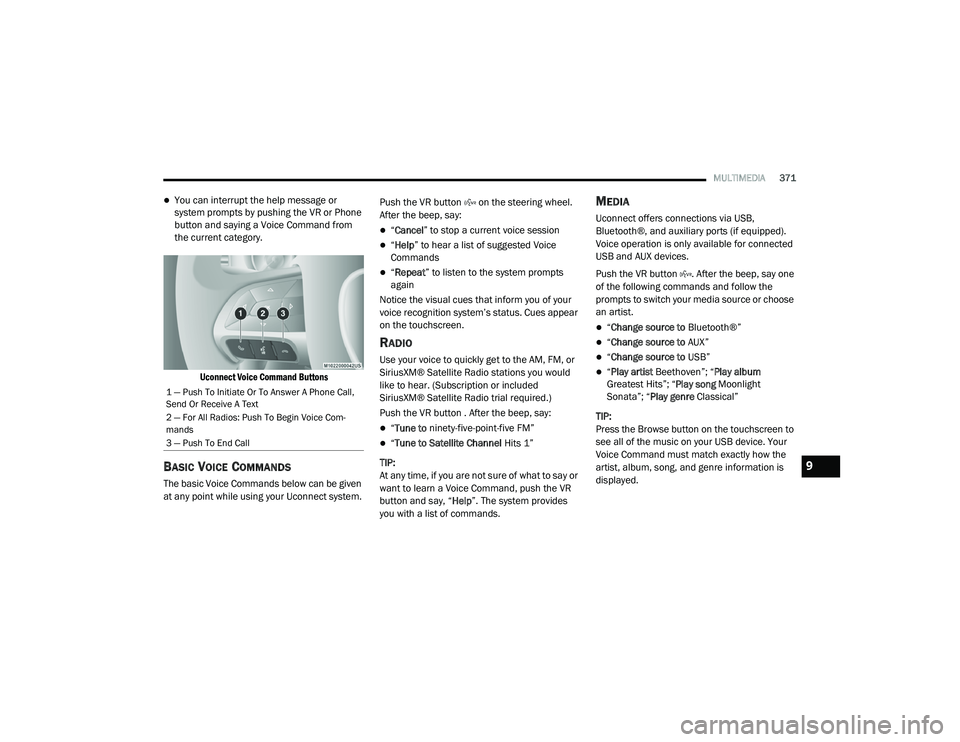
You can interrupt the help message or
system prompts by pushing the VR or Phone
button and saying a Voice Command from
the current category.
Uconnect Voice Command Buttons
BASIC VOICE COMMANDS
The basic Voice Commands below can be given
at any point while using your Uconnect system. Push the VR button on the steering wheel.
After the beep, say:
“
Cancel ” to stop a current voice session
“Help ” to hear a list of suggested Voice
Commands
“ Repeat ” to listen to the system prompts
again
Notice the visual cues that inform you of your
voice recognition system’s status. Cues appear
on the touchscreen.
RADIO
Use your voice to quickly get to the AM, FM, or
SiriusXM® Satellite Radio stations you would
like to hear. (Subscription or included
SiriusXM® Satellite Radio trial required.)
Push the VR button . After the beep, say:
“ Tune to ninety-five-point-five FM”
“Tune to Satellite Channel Hits 1”
TIP:
At any time, if you are not sure of what to say or
want to learn a Voice Command, push the VR
button and say, “ Help”. The system provides
you with a list of commands.
MEDIA
Uconnect offers connections via USB,
Bluetooth®, and auxiliary ports (if equipped).
Voice operation is only available for connected
USB and AUX devices.
Push the VR button . After the beep, say one
of the following commands and follow the
prompts to switch your media source or choose
an artist.
“ Change source to Bluetooth®”
“Change source to AUX”
“Change source to USB”
“Play artist Beethoven”; “ Play album
Greatest Hits”; “ Play song Moonlight
Sonata”; “ Play genre Classical”
TIP:
Press the Browse button on the touchscreen to
see all of the music on your USB device. Your
Voice Command must match exactly how the
artist, album, song, and genre information is
displayed.
1 — Push To Initiate Or To Answer A Phone Call,
Send Or Receive A Text
2 — For All Radios: Push To Begin Voice Com -
mands
3 — Push To End Call
9
20_LA_OM_EN_USC_t.book Page 371
Page 377 of 396
MULTIMEDIA375
GENERAL INFORMATION
The following regulatory statement applies to all
Radio Frequency (RF) devices equipped in this
vehicle:
This device complies with Part 15 of the FCC
Rules and with Innovation, Science and
Economic Development Canada license-exempt
RSS standard(s). Operation is subject to the
following two conditions:
1. This device may not cause harmful
interference, and
2. This device must accept any interference received, including interference that may
cause undesired operation. Le présent appareil est conforme aux CNR
d`Innovation, Science and Economic
Development applicables aux appareils radio
exempts de licence. L'exploitation est autorisée
aux deux conditions suivantes:
1. l'appareil ne doit pas produire de
brouillage, et
2. l'utilisateur de l'appareil doit accepter tout brouillage radioélectrique subi, même si le
brouillage est susceptible d'en compro -
mettre le fonctionnement.
La operación de este equipo está sujeta a las
siguientes dos condiciones:
1. es posible que este equipo o dispositivo no cause interferencia perjudicial y
2. este equipo o dispositivo debe aceptar cualquier interferencia, incluyendo la que
pueda causar su operación no deseada.
NOTE:
Changes or modifications not expressly
approved by the party responsible for compli -
ance could void the user’s authority to operate
the equipment. ADDITIONAL
INFORMATION
© 202 1 FCA US LLC. All rights reserved.
Mopar and Uconnect are registered
trademarks and Mopar Owner Connect is a
trademark of FCA US LLC. Android™ is a
trademark of Google Inc. SiriusXM® and all
related marks and logos are trademarks of
SiriusXM® Radio Inc.
Uconnect System Support:
US residents visit www.DriveUconnect.com or
call: 1-877-855-8400 (24 hours a day 7 days
a week)
Canadian residents visit www.DriveUcon -
nect.ca or call: 1-800-465-2001 (English) or
1-800-387-9983 (French)
SiriusXM Guardian™ services support:
US residents visitwww.driveuconnect.com/
sirius-xm-guardian or call: 1-844-796-4827
Canadian residents visitwww.siriusxm.ca/
guardian-v1/ or call: 1-877-324-9091
9
20_LA_OM_EN_USC_t.book Page 375
Page 383 of 396
381
Automatic Transmission Limp
Home Mode
............................................ 28, 163AutoPark........................................................ 150Autostick Operation.................................................. 164Aux Mode....................................................... 350Axle Fluid........................... 299, 301, 302, 304Axle Lubrication................. 299, 301, 302, 304
B
Back-Up......................................................... 186Battery.................................................... 84, 251Charging System Light................................. 84Keyless Key Fob Replacement.................... 14Location.................................................... 251Belts, Seat..................................................... 146Blind Spot Monitoring.................................... 100BluetoothConnect Or Disconnect Link Betweenthe Uconnect Phone And Mobile
Phone
................................................... 366Connecting To A Particular Mobile PhoneOr Audio Device After Pairing................361Bluetooth Mode............................................. 351Body Mechanism Lubrication........................ 259B-Pillar Location............................................. 273Brake Assist System........................................ 94Brake Control System...................................... 94Brake Fluid...............266, 299, 301, 302, 304
Brake System...................................... 266, 291Fluid Check.......... 266, 299, 301, 302, 304Master Cylinder........................................ 266Parking..................................................... 154Warning Light.....................................83, 291Brake/Transmission Interlock...................... 160Break-In Recommendations, New Vehicle.... 152Brightness, Interior Lights................................ 44Bulb Replacement........................................ 204Bulbs, Light.......................................... 147, 204
C
Camera, Rear................................................ 186Capacities, Fluid.................................. 297, 298Caps, FillerFuel.......................................................... 188Oil (Engine)...................................... 246, 254Radiator (Coolant Pressure)..................... 264Car Washes................................................... 288Carbon Monoxide Warning................... 145, 296CargoVehicle Loading........................................ 189Cellular Phone.............................................. 368Certification Label......................................... 189Chains, Tire.......................................... 284, 285Changing A Flat Tire...................................... 269Chart, Tire Sizing........................................... 270
Check Engine Light
(Malfunction Indicator Light)............................92Checking Your Vehicle For Safety.................. 145Checks, Safety.............................................. 145Child Restraint.............................................. 130Child RestraintsBooster Seats........................................... 133Child Seat Installation............................... 142How To Stow An unused ALR Seat Belt..... 139Infant And Child Restraints....................... 132Lower Anchors And Tethers For Children................................................ 135Older Children And Child Restraints.......... 132Seating Positions...................................... 134Clean Air Gasoline......................................... 294CleaningWheels...................................................... 283Climate Control................................................47Cold Weather Operation................................ 151Compact Spare Tire...................................... 281Contract, Service........................................... 377Cooling Pressure Cap (Radiator Cap)............ 264Cooling System............................................. 262Adding Coolant (Antifreeze)...................... 263Coolant Level................................... 262, 265Cooling Capacity.............................. 297, 298Disposal Of Used Coolant......................... 26511
20_LA_OM_EN_USC_t.book Page 381
Page 388 of 396
386 Power Brakes
....................................................... 291Deck Lid Release........................................ 58Distribution Center (Fuses)....................... 211Door Locks.................................................. 25Mirrors......................................................... 39Outlet (Auxiliary Electrical Outlet)................ 65Seats........................................................... 31Steering..................................................... 166Sunroof....................................................... 55Tilt/Telescoping Steering Column............... 37Windows...................................................... 54Power SeatsForward....................................................... 31Lumbar........................................................ 31Rearward..................................................... 31Power Steering Fluid.......... 299, 301, 302, 304Pregnant Women And Seat Belts...................118Preparation For Jacking................................. 217PretensionersSeat Belts.................................................. 118Programmable Features................................ 306
R
Radial Ply Tires.............................................. 277Radiator Cap (Coolant Pressure Cap)............ 264RadioPresets...................................................... 343Radio Operation.................................. 341, 368
Rain Sensitive Wiper System........................... 46Rear Camera................................................. 186Rear ParkSense System............................... 181Rear Seats, Folding.......................................... 30Recreational Towing..................................... 197Reformulated Gasoline................................. 294Refrigerant.................................................... 257Release, Hood................................................. 57Reminder, Lights On........................................ 42Reminder, Seat Belt...................................... 114Remote Keyless EntryArm The Alarm............................................. 23Panic Alarm................................................. 14Programming Additional Key Fobs........ 16, 22Unlatch The Trunk....................................... 14Remote StartingExit Remote Start Mode.............................. 20Uconnect Customer ProgrammableFeatures.........................................21, 317Uconnect Settings..............................21, 317Remote Trunk Release.................................... 58Replacement Bulbs...................................... 204Replacement Keys.................................... 16, 22Replacement Tires........................................ 279Reporting Safety Defects.............................. 378Restraints, Child........................................... 130Restraints, Head....................................... 34, 35Rocking Vehicle When Stuck........................ 231Rotation, Tires.............................................. 285
S
Safety Checks Inside Vehicle........................ 146Safety Checks Outside Vehicle...................... 147Safety Defects, Reporting............................. 378Safety Information, Tire................................. 269Safety Tips.................................................... 145Safety, Exhaust Gas...................................... 145Schedule, Maintenance....................... 234, 239Seat Belt Reminder..........................................83Seat Belts............................................ 112, 146Automatic Locking Retractor (ALR)........... 119Child Restraints........................................ 130Energy Management Feature................... 119Extender................................................... 118Front Seat............................... 112, 115, 116Inspection................................................. 146Lap/Shoulder Belt Operation.................... 116Lap/Shoulder Belt Untwisting................... 117Lap/Shoulder Belts................................... 115Operating Instructions.............................. 116Pregnant Women...................................... 118Pretensioners........................................... 118Rear Seat.................................................. 115Reminder.................................................. 114Seat Belt Extender.................................... 118Seat Belt Pretensioner.............................. 118Untwisting Procedure................................ 117Seat Belts Maintenance................................ 289
20_LA_OM_EN_USC_t.book Page 386