reset DODGE CHALLENGER 2020 Owner's Manual
[x] Cancel search | Manufacturer: DODGE, Model Year: 2020, Model line: CHALLENGER, Model: DODGE CHALLENGER 2020Pages: 396, PDF Size: 16.64 MB
Page 345 of 396
MULTIMEDIA343
Setting Presets
The Presets are available for all Radio Modes,
and are activated by pressing any of the six
Preset buttons on the touchscreen, located at
the top of the screen.
When you are receiving a station that you wish
to commit into memory, press and hold the
desired numbered button on the touchscreen
for more than two seconds or until you hear a
confirmation beep.
The Radio stores up to 12 presets in each of the
Radio modes. A set of six presets are visible at
the top of the radio screen.
You can switch between the two radio presets
by pressing the Arrow button located in the
upper right of the radio touchscreen.
Browse In AM/FM
When in either AM or FM, the Browse Screen
provides a means to edit the Presets List and is
entered by pushing the ENTER/BROWSE
button.
Scrolling Preset List
Once in the Browse Presets screen, you can
scroll the preset list by rotation of the TUNE/
SCROLL knob, or by pressing the Up and Down
arrow keys, located on the right of the screen. Preset Selection From List
A Preset can be selected by pressing any of the
listed Presets or by pushing the ENTER/
BROWSE button on the TUNE/SCROLL knob to
select the currently highlighted Preset.
When selected, the radio tunes to the station
stored in the Preset and returns to the main
radio screen.
Deleting Presets
A Preset can be deleted in the Presets Browse
screen by pressing the Trash Can icon for the
corresponding Preset.
Return To Main Radio Screen
You can return to the Main Radio Screen, by
pressing the X button on the touchscreen when
in the Browse Presets screen.
SiriusXM® Satellite Radio Mode — If
Equipped
SiriusXM® Satellite Radio uses direct
satellite-to-receiver broadcasting technology to
provide clear, coast-to-coast radio content.
SiriusXM® is a subscription based service.
SiriusXM® All Access Package
All satellite radio-equipped vehicles come with a
one-year trial to the SiriusXM® All Access
package, providing over 160 channels of the
best programming for all the places life takes
you.
In your vehicle — You’ll get every channel
available on your radio, including all the
premium programming like Howard Stern,
every NFL® game, every MLB® game, every
NASCAR® race, Oprah Radio, and more.
On the go — With a SiriusXM® Internet Radio
subscription included with the All Access trial,
you’ll get SiriusXM® on your computer,
smartphone, or tablet. Including:
A huge On Demand catalog
Xtra Channels featuring SiriusXM®
Latino – a collection of Spanish-language
channels
MySXM – allowing you to personalize
your favorite music channels
Go to siriusxm.com/getallaccess for more
information9
20_LA_OM_EN_USC_t.book Page 343
Page 346 of 396
344MULTIMEDIA SiriusXM® services require subscriptions, sold
separately after the 12-month tria
l included
with the new vehicle purchase. If you decide to
continue your service at the end of your trial
subscription, the plan you choose will
automatically renew and bill at then-current
rates unti l you call SiriusXM® at 866-635-2349
to cancel. See SiriusXM® Customer Agreement
for complete terms at www.siriusxm.com. All
fees and programming subject to change. Our
satellite service is available only to those at
least 18 and older in the 48 contiguous USA
and D.C. Our SiriusXM® satellite service is also
available in PR (with coverage limitations). Our
Internet radio service is available throughout
our satellite service area and in AK. © 202 1
SiriusXM® Radio Inc. Sirius, XM and all related
marks and logos are trademarks of SiriusXM®
Radio Inc. Service available in Canada; see
www.siriusxm.ca.
This functionality is only available for radios
equipped with a Satellite receiver. In order to
receive satellite radio, the vehicle needs to be
outside with a clear view to the sky.
If the screen shows Acquiring Signal, you might
have to change the vehicle’s position in order to
receive a signal. In most cases, the satellite
radio does not receive a signal in underground
parking garages or tunnels.
No Subscription
Radios equipped with a Satellite receiver,
require a subscription to the SiriusXM® Service.
When the Radio does not have the necessary
subscription, the Radio is able to receive the
Pre-View channel only.
Acquiring SiriusXM® Subscription
To activate the SiriusXM® Satellite Radio
subscription, US residents call:
1-800-643-2112
Canadian residents call:
1-888-539-7474
NOTE:
You will need to provide the SiriusXM® ID (RID)
located at the bottom of the Channel 0 screen. The Satellite Mode is activated by a press of the
SXM button on the touchscreen.
When in Satellite mode:
The SXM button on the touchscreen is high
-
lighted.
The SiriusXM® Presets are displayed at the
top of the screen.
The Genre is displayed below the Presets
Bar.
The SiriusXM® Channel Number is displayed
in the center.
The Program Information is displayed at the
bottom of the Channel Number.
The SiriusXM® function buttons are
displayed below the Program Information.
Tuning is done by operating the Tune Knob or by
Direct Tune, similar to other Radio Bands, see
Presets, browse, Tune Knob, and Direct Tune.
In addition to the tuning Operation functions
common to all Radio modes, the replay, Traffic/
Weather Jump, and fav button functions are
available in SiriusXM® Mode.
20_LA_OM_EN_USC_t.book Page 344
Page 347 of 396
MULTIMEDIA345
Replay
The replay function provides a means to store
and replay up to 22 minutes of music audio and
48 minutes of talk radio. Once the channel is
switched, content in replay memory is lost.
Press the Replay button on the touchscreen.
The play/pause, rewind/forward and live
buttons will display at the top of the screen,
along with the replay time.
You can exit by pressing the Replay button on
the touchscreen, any time during the Replay
mode.
Play/Pause
Press the Pause/Play button on the
touchscreen to pause the playing of live or
rewound content at any time. Play can be
resumed again by pressing of the Pause/Play
button on the touchscreen.
Rewind
Press the RW button on the touchscreen to
rewind the content in steps of five seconds.
Pressing the RW button on the touchscreen for
more than two seconds rewinds the content.
The Radio begins playing the content at the
point at which the press is released. Forward
Each press of the FW button on the touchscreen
forwards the content in steps of five seconds.
Forwarding of the content can only be done
when the content is previously rewound, and
therefore, can not be done for live content. A
continuous press of the FW button on the
touchscreen also forwards the content. The
Radio begins playing the content at the point at
which the press is released.
Live
Press the Live button on the touchscreen to
resume playing of Live content.
Favorites
Press the Fav button on the touchscreen to
activate the favorites menu, which will time out
in five seconds in absence of user interaction.
You can exit the Favorites Menu by a press of
the X in the top right corner.
The favorites feature enables you to set a
favorite artist, or song that is currently playing.
The Radio then uses this information to alert
you when either the favorite song, or favorite
artist are being played at any time by any of the
SiriusXM® Channels.The maximum number of favorites that can be
stored in the Radio is 50.
Fav. Artist:
While the song is playing to set a
Favorite Artist, press the Fav button on the
touchscreen and then the Fav. Artist button on
the touchscreen.
Fav. Song: While the song is playing to set a
Favorite Song, press the Fav button on the
touchscreen and then the Fav Song button on
the touchscreen.
Browse In SXM
Press the Browse button on the touchscreen to
edit Presets, Favorites, Game Zone, and Jump
settings, along with providing the SiriusXM®
Channel List.
This Screen contains many submenus. You can
exit a sub menu to return to a parent menu by
pressing the Back Arrow.
All
Press the All button at the left of the Browse
Screen.
9
20_LA_OM_EN_USC_t.book Page 345
Page 348 of 396
346MULTIMEDIA
Channel List
Press the Channel List, or Genre, to display all
the SiriusXM® Channel Numbers. You can
scroll the Channel list by pressing the Up and
Down arrows, located on the right side of the
screen. Scrolling can also be done by operating
the TUNE/SCROLL knob.
Genre
Press the Genre button on the touchscreen to
display a list of Genres. You can select any
desired Genre by pressing the Genre list, the
Radio tunes to a channel with the content in the
selected Genre.
Presets
Press the Presets button located at the left of
the Browse screen.
You can scroll the Presets list pressing the up
and down arrows located at the right side of the
screen. Scrolling can also be done by operating
the TUNE/SCROLL knob as well.
Preset Selection
A Preset can be selected by pressing any of the
listed Presets, or by pushing the ENTER/
BROWSE button on the TUNE/SCROLL knob to
select the currently highlighted Preset. When selected, the Radio tunes to the station
stored in the Preset, and returns to the main
Radio screen.
Deleting A Preset
A Preset can be deleted in the Presets Browse
screen by pressing the Trash Can Icon for the
corresponding Preset.
Favorites
Press the Favorites button located at the left of
the Browse screen.
The Favorites menu provides a means to Edit
the Favorites list and to configure the Alert
Settings, along with providing a list of Channels
currently airing any of the items in the Favorites
list.
You can scroll the Favorites list by pressing the
Up and Down arrows located at the right side of
the screen. Scrolling can also be done by
operating the TUNE/SCROLL knob as well.
Remove Favorites
Press the Remove Favorites tab at the top of the
screen. Press the Delete All button on the
touchscreen to delete all of the Favorites or
press the Trash Can icon next to the Favorite to
be deleted.Alert Settings
Press the Alert Setting tab at the top of the
screen. The Alert Settings menu allows you to
choose from a Visual alert or Audible and Visual
alert when one of your favorites is airing on any
of the SiriusXM® channels.
Game Zone
Press the Game Zone button, located at the left
of the Browse screen. This feature provides you
with the ability to select teams, edit the
selection, and set alerts.
On Air
Press the On-Air tab at the top of the screen. The
On-Air list provides a list of Channels currently
airing any of the items in the Selections list, and
pressing any of the items in the list tunes the
radio to that channel.
Select Teams
Press the Select Teams button on the
touchscreen to activate the League Scroll list.
Press the chosen league and a scroll list of all
teams within the league will appear, then you
can select a team by pressing the
corresponding box. A check mark appears for all
teams that are chosen.
20_LA_OM_EN_USC_t.book Page 346
Page 370 of 396
368MULTIMEDIA
RADIO OPERATION
Pushing the top of the switch will “Seek” up for
the next listenable station and pushing the
bottom of the switch will “Seek” down for the
next listenable station.
The button located in the center of the left-hand
control will tune to the next preset station that
you have programmed in the radio preset
button.
MEDIA MODE
Pushing the top of the switch once goes to the
next track on the selected media (AUX/USB/
Bluetooth®). Pushing the bottom of the switch
once goes to the beginning of the current track,
or to the beginning of the previous track if it is
within eight seconds after the current track
begins to play.
NOTE:
While In Media Mode, the center button on the
left rocker switch is nonfunctional.
IPOD®/USB/MP3 CONTROL — IF EQUIPPED
This feature allows an iPod® or external USB
device to be plugged into the USB port. Plugging in a smartphone device to a USB Port
may activate Android Auto™ or Apple CarPlay®
features, if equipped
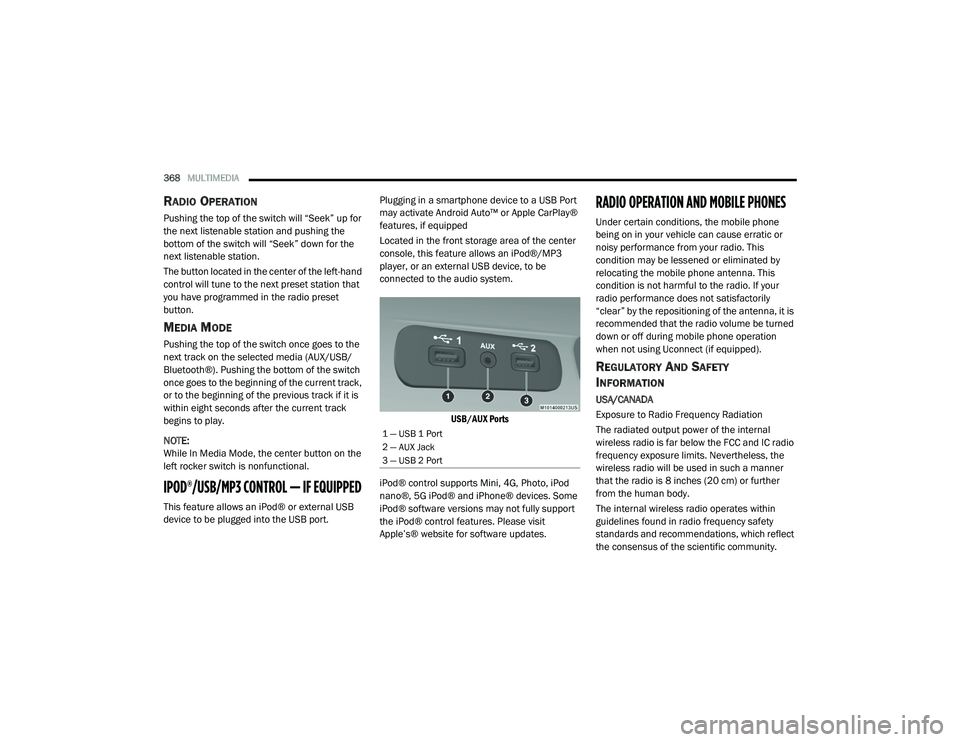
Located in the front storage area of the center
console, this feature allows an iPod®/MP3
player, or an external USB device, to be
connected to the audio system.
USB/AUX Ports
iPod® control supports Mini, 4G, Photo, iPod
nano®, 5G iPod® and iPhone® devices. Some
iPod® software versions may not fully support
the iPod® control features. Please visit
Apple’s® website for software updates.
RADIO OPERATION AND MOBILE PHONES
Under certain conditions, the mobile phone
being on in your vehicle can cause erratic or
noisy performance from your radio. This
condition may be lessened or eliminated by
relocating the mobile phone antenna. This
condition is not harmful to the radio. If your
radio performance does not satisfactorily
“clear” by the repositioning of the antenna, it is
recommended that the radio volume be turned
down or off during mobile phone operation
when not using Uconnect (if equipped).
REGULATORY AND SAFETY
I
NFORMATION
USA/CANADA
Exposure to Radio Frequency Radiation
The radiated output power of the internal
wireless radio is far below the FCC and IC radio
frequency exposure limits. Nevertheless, the
wireless radio will be used in such a manner
that the radio is 8 inches (20 cm) or further
from the human body.
The internal wireless radio operates within
guidelines found in radio frequency safety
standards and recommendations, which reflect
the consensus of the scientific community.
1 — USB 1 Port
2 — AUX Jack
3 — USB 2 Port
20_LA_OM_EN_USC_t.book Page 368
Page 387 of 396
385
Loading Vehicle
................................... 189, 190Capacities................................................. 190Tires.......................................................... 273Locks Auto Unlock................................................. 28Automatic Door........................................... 28Power Door.................................................. 25Low Tire Pressure System............................. 107Lubrication, Body........................................... 259Lug Nuts/Bolts.............................................. 291
M
Maintenance................................................... 57Maintenance Free Battery............................. 251Maintenance Schedule............... 234, 239, 240Malfunction Indicator Light
(Check Engine)......................................... 86, 92ManualBackward............................................. 29, 30Forward................................................ 29, 30Park Release............................................. 229Rearward..................................................... 29Service...................................................... 379Tilt............................................................... 30Manual Transmission................. 155, 267, 268Fluid Level Check............................ 267, 268Map/Reading Lights........................................ 43Methanol....................................................... 295
Mirrors............................................................. 38Electric Powered.......................................... 39Electric Remote........................................... 39Heated......................................................... 39Outside........................................................ 39Rearview.............................................38, 199Vanity.......................................................... 40Modifications/AlterationsVehicle......................................................... 10Monitor, Tire Pressure System...................... 107Mopar Parts.................................................. 378Multi-Function Control Lever............................ 41
N
New Vehicle Break-In Period......................... 152
O
Occupant Restraints..................................... 111Octane Rating, Gasoline (Fuel)... 293, 299, 302Oil Change Indicator........................................ 75Reset........................................................... 75Oil Filter, Change.......................................... 255Oil Filter, Selection........................................ 255Oil Pressure Light............................................. 84Oil, Engine................................... 252, 299, 302Capacity........................................... 297, 298Change Interval........................................ 252Checking................................................... 250Dipstick.................................................... 250Disposal................................................... 255
Filter....................................... 255, 299, 302Filter Disposal........................................... 255Identification Logo.................................... 253Materials Added To................................... 255Pressure Warning Light................................84Recommendation................... 252, 297, 298Synthetic................................................... 254Viscosity........................ 253, 254, 297, 298Onboard Diagnostic System.............................91Operating Precautions.....................................91Operator ManualOwner's Manual....................................9, 379Outside Rearview Mirrors.................................39Overheating, Engine...................................... 229Owner’s Manual (Operator Manual)................... 9
P
Paddle Shift Mode........................................ 164Paddle Shifters............................................. 164Paint Care..................................................... 287Panic Alarm......................................................14Parking Brake............................................... 154ParkSense System, Rear............................... 181Passenger SeatEasy Entry....................................................34Passing Light....................................................42Performance....................................................77Pets............................................................... 145Pinch Protection...............................................56Placard, Tire And Loading Information.......... 273
11
20_LA_OM_EN_USC_t.book Page 385
Page 388 of 396
386 Power Brakes
....................................................... 291Deck Lid Release........................................ 58Distribution Center (Fuses)....................... 211Door Locks.................................................. 25Mirrors......................................................... 39Outlet (Auxiliary Electrical Outlet)................ 65Seats........................................................... 31Steering..................................................... 166Sunroof....................................................... 55Tilt/Telescoping Steering Column............... 37Windows...................................................... 54Power SeatsForward....................................................... 31Lumbar........................................................ 31Rearward..................................................... 31Power Steering Fluid.......... 299, 301, 302, 304Pregnant Women And Seat Belts...................118Preparation For Jacking................................. 217PretensionersSeat Belts.................................................. 118Programmable Features................................ 306
R
Radial Ply Tires.............................................. 277Radiator Cap (Coolant Pressure Cap)............ 264RadioPresets...................................................... 343Radio Operation.................................. 341, 368
Rain Sensitive Wiper System........................... 46Rear Camera................................................. 186Rear ParkSense System............................... 181Rear Seats, Folding.......................................... 30Recreational Towing..................................... 197Reformulated Gasoline................................. 294Refrigerant.................................................... 257Release, Hood................................................. 57Reminder, Lights On........................................ 42Reminder, Seat Belt...................................... 114Remote Keyless EntryArm The Alarm............................................. 23Panic Alarm................................................. 14Programming Additional Key Fobs........ 16, 22Unlatch The Trunk....................................... 14Remote StartingExit Remote Start Mode.............................. 20Uconnect Customer ProgrammableFeatures.........................................21, 317Uconnect Settings..............................21, 317Remote Trunk Release.................................... 58Replacement Bulbs...................................... 204Replacement Keys.................................... 16, 22Replacement Tires........................................ 279Reporting Safety Defects.............................. 378Restraints, Child........................................... 130Restraints, Head....................................... 34, 35Rocking Vehicle When Stuck........................ 231Rotation, Tires.............................................. 285
S
Safety Checks Inside Vehicle........................ 146Safety Checks Outside Vehicle...................... 147Safety Defects, Reporting............................. 378Safety Information, Tire................................. 269Safety Tips.................................................... 145Safety, Exhaust Gas...................................... 145Schedule, Maintenance....................... 234, 239Seat Belt Reminder..........................................83Seat Belts............................................ 112, 146Automatic Locking Retractor (ALR)........... 119Child Restraints........................................ 130Energy Management Feature................... 119Extender................................................... 118Front Seat............................... 112, 115, 116Inspection................................................. 146Lap/Shoulder Belt Operation.................... 116Lap/Shoulder Belt Untwisting................... 117Lap/Shoulder Belts................................... 115Operating Instructions.............................. 116Pregnant Women...................................... 118Pretensioners........................................... 118Rear Seat.................................................. 115Reminder.................................................. 114Seat Belt Extender.................................... 118Seat Belt Pretensioner.............................. 118Untwisting Procedure................................ 117Seat Belts Maintenance................................ 289
20_LA_OM_EN_USC_t.book Page 386
Page 389 of 396
387
Seats
.......................................... 29, 31, 32, 34Adjustment........................................... 29, 31Head Restraints................................... 34, 35Heated........................................................ 32Height Adjustment....................................... 31Power.......................................................... 31Rear Folding......................................... 29, 30Seatback Release................................ 29, 30Tilting............................................ 29, 31, 34Vented......................................................... 33Ventilated.................................................... 33Security Alarm.......................................... 23, 84Arm The System.......................................... 23Selection Of Coolant (Antifreeze)......... 299, 302Sentry Key Key Programming........................................ 22Sentry Key (Immobilizer).................................. 21Sentry Key Replacement.......................... 16, 22Service Assistance......................................... 376Service Contract............................................ 377Service Manuals............................................ 379Shift Indicator Light....................................... 158Shifting.......................................................... 158Automatic Transmission.................. 158, 160Shoulder Belts............................................... 115Side View Mirror Adjustment........................... 39Signals, Turn.................................... 43, 89, 147Siri................................................................. 373
Sirius Satellite Radio..................................... 343Favorites................................................... 345Replay...................................................... 345SiriusXM Satellite RadioBrowse in SXM......................................... 345Favorites................................................... 345Replay...................................................... 345Snow Chains (Tire Chains)................... 284, 285Snow Tires.................................................... 281Spare Tires................................. 216, 281, 282Spark Plugs.......................................... 299, 302SpecificationsFuel (Gasoline)................................ 299, 302Oil.................................................... 299, 302Speed ControlAccel/Decel..................................... 167, 168Cancel...................................................... 168Resume.................................................... 168Set............................................................ 167Speed Control (Cruise Control)... 166, 167, 169Sport Mode................................................... 165Starting................................................ 148, 149Automatic Transmission........................... 148Button......................................................... 17Cold Weather............................................ 151Engine Fails To Start................................. 152Starting And Operating......................... 148, 149Starting Procedures............................. 148, 149Steering........................................................... 37Column Lock................................................ 37
Power........................................................ 166Tilt Column...................................................37Wheel, Heated.............................................38Wheel, Tilt....................................................37Steering Wheel Audio Controls...................... 367Steering Wheel Mounted Sound
System Controls............................................ 367Storage.................................................. 64, 287Storage, Vehicle..................................... 53, 287Store Radio Presets...................................... 343Storing Your Vehicle...................................... 287Stuck, Freeing............................................... 231Sun Roof...................................................55, 57Supplemental Restraint System – Air Bag.... 122Synthetic Engine Oil...................................... 254
T
Telescoping Steering Column...........................37Temperature Control, Automatic (ATC).............52Tilt Steering Column.........................................37Time DelayHeadlight.....................................................42Tire And Loading Information Placard........... 273Tire Markings................................................ 269Tire Safety Information.................................. 269Tire Service Kit......... 220, 221, 223, 225, 226Tires.................................. 147, 276, 281, 286Aging (Life Of Tires)................................... 279Air Pressure.............................................. 276Chains............................................. 284, 285
11
20_LA_OM_EN_USC_t.book Page 387