instrument cluster DODGE CHALLENGER 2020 Repair Manual
[x] Cancel search | Manufacturer: DODGE, Model Year: 2020, Model line: CHALLENGER, Model: DODGE CHALLENGER 2020Pages: 396, PDF Size: 16.64 MB
Page 315 of 396
MULTIMEDIA313
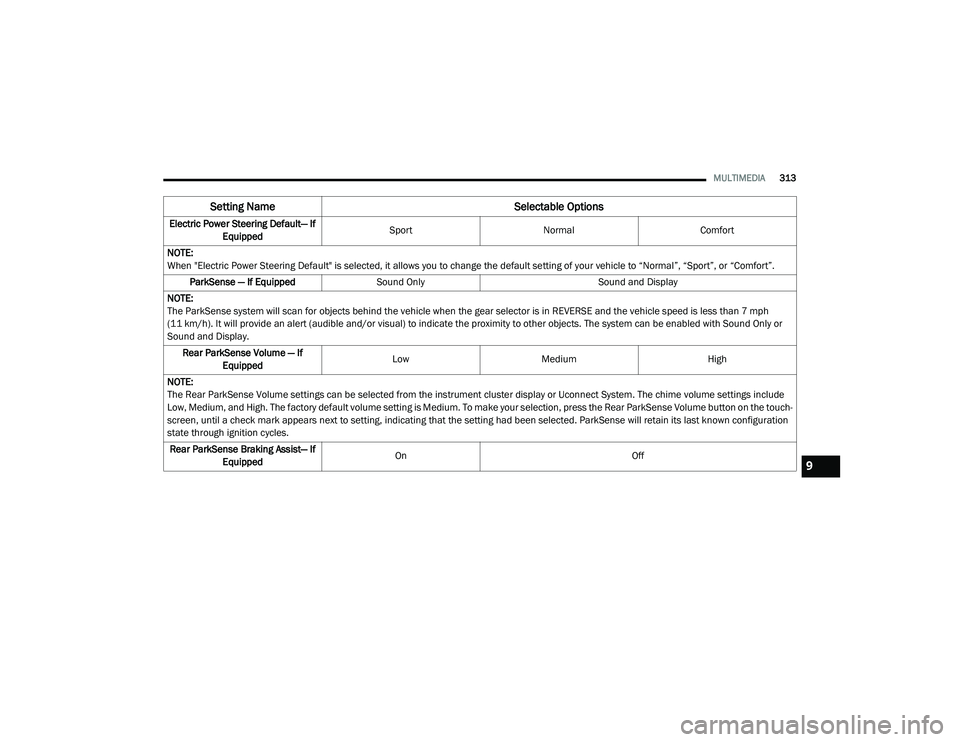
Electric Power Steering Default— If
Equipped Sport
Normal Comfort
NOTE:
When "Electric Power Steering Default" is selected, it allows you to change the default setting of your vehicle to “Normal”, “Sport”, or “Comfort”. ParkSense — If Equipped Sound Only Sound and Display
NOTE:
The ParkSense system will scan for objects behind the vehicle when the gear selector is in REVERSE and the vehicle speed is less than 7 mph
(11 km/h). It will provide an alert (audible and/or visual) to indicate the proximity to other objects. The system can be enabled with Sound Only or
Sound and Display. Rear ParkSense Volume — If Equipped Low
Medium High
NOTE:
The Rear ParkSense Volume settings can be selected from the instrument cluster display or Uconnect System. The chime volume settings include
Low, Medium, and High. The factory default volume setting is Medium. To make your selection, press the Rear ParkSense Volume button on the touch -
screen, until a check mark appears next to setting, indicating that the setting had been selected. ParkSense will retain its last known configuration
state through ignition cycles.
Rear ParkSense Braking Assist— If Equipped On
Off
Setting Name Selectable Options
9
20_LA_OM_EN_USC_t.book Page 313
Page 327 of 396
MULTIMEDIA325
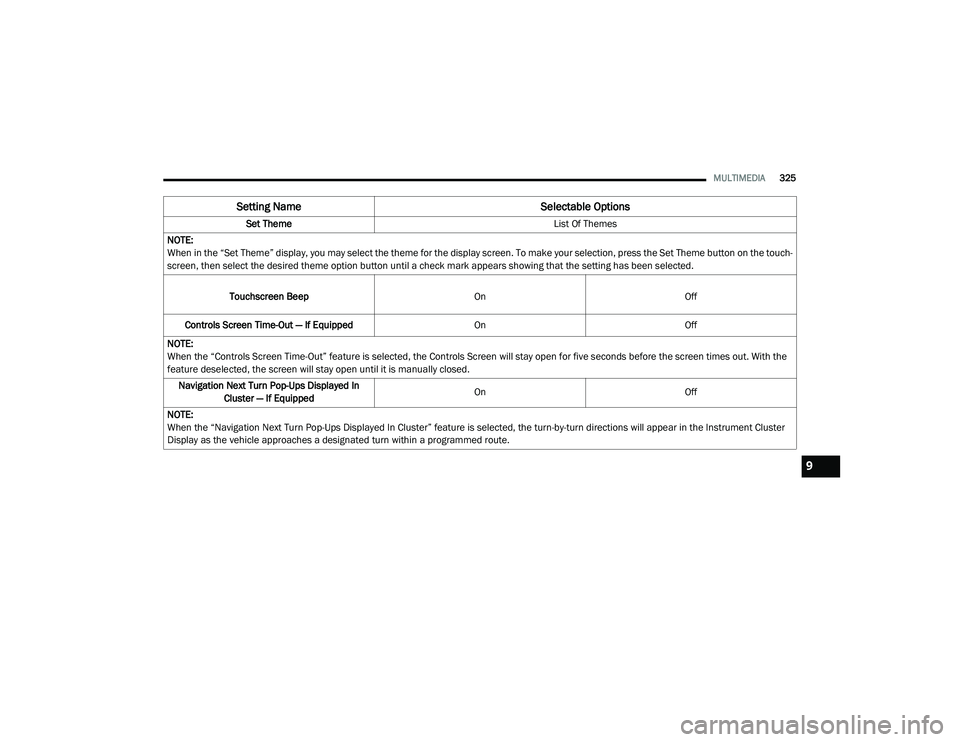
Set Theme List Of Themes
NOTE:
When in the “Set Theme” display, you may select the theme for the display screen. To make your selection, press the Set Theme button on the touch -
screen, then select the desired theme option button until a check mark appears showing that the setting has been selected.
Touchscreen Beep OnOff
Controls Screen Time-Out — If Equipped OnOff
NOTE:
When the “Controls Screen Time-Out” feature is selected, the Controls Screen will stay open for five seconds before the screen times out. With the
feature deselected, the screen will stay open until it is manually closed. Navigation Next Turn Pop-Ups Displayed In Cluster — If Equipped On
Off
NOTE:
When the “Navigation Next Turn Pop-Ups Displayed In Cluster” feature is selected, the turn-by-turn directions will appear in the Instrument Cluster
Display as the vehicle approaches a designated turn within a programmed route.
Setting Name Selectable Options
9
20_LA_OM_EN_USC_t.book Page 325
Page 328 of 396
326MULTIMEDIA
Units
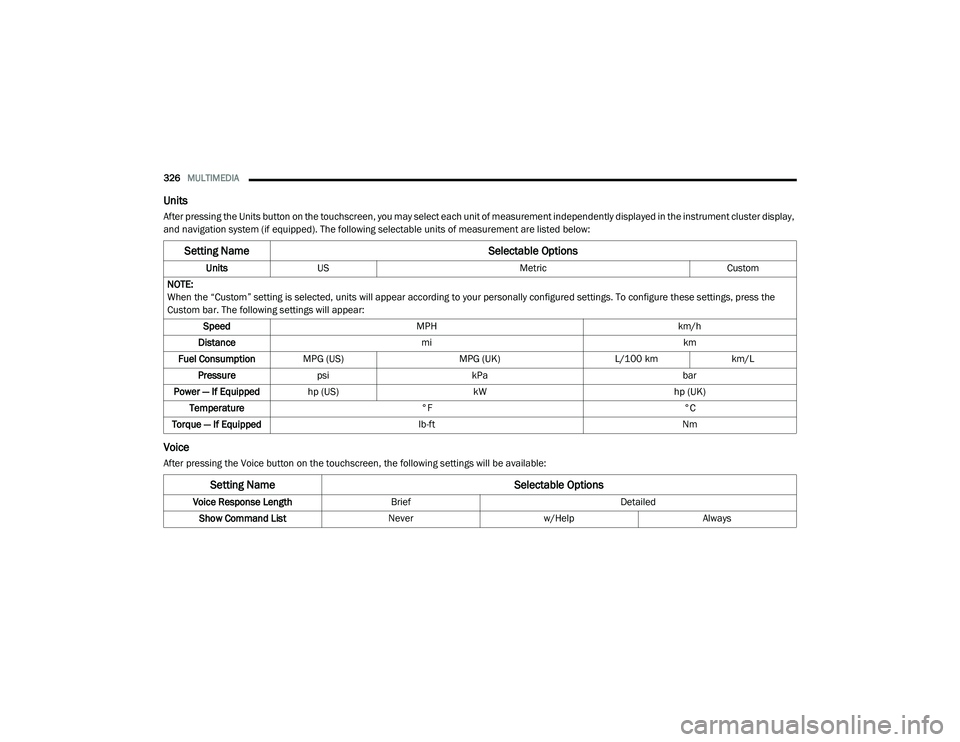
After pressing the Units button on the touchscreen, you may select each unit of measurement independently displayed in the instrument cluster display,
and navigation system (if equipped). The following selectable units of measurement are listed below:
Voice
After pressing the Voice button on the touchscreen, the following settings will be available:
Setting Name Selectable Options
UnitsUS Metric Custom
NOTE:
When the “Custom” setting is selected, units will appear according to your personally configured settings. To configure these settings, press the
Custom bar. The following settings will appear: Speed MPH km/h
Distance mi km
Fuel Consumption MPG (US) MPG (UK)L/100 kmkm/L
Pressure psi kPa bar
Power — If Equipped hp (US) kW hp (UK)
Temperature °F °C
Torque — If Equipped lb-ft Nm
Setting Name Selectable Options
Voice Response LengthBrief Detailed
Show Command List Neverw/Help Always
20_LA_OM_EN_USC_t.book Page 326
Page 331 of 396
MULTIMEDIA329
Forward Collision Warning Active
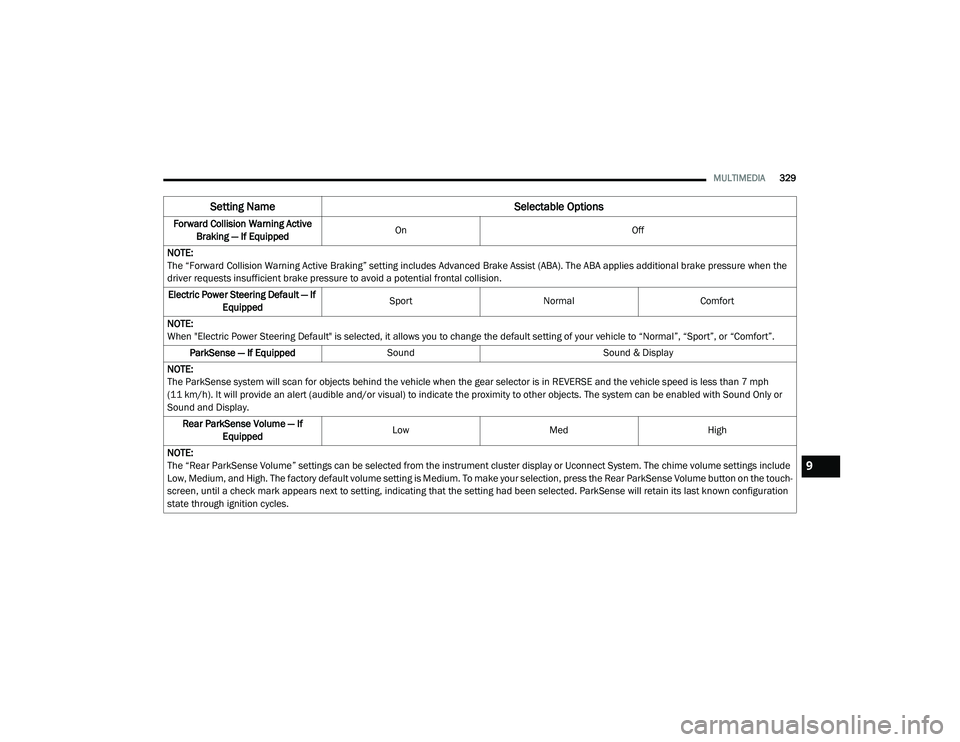
Braking — If Equipped On
Off
NOTE:
The “Forward Collision Warning Active Braking” setting includes Advanced Brake Assist (ABA). The ABA applies additional brake pressure when the
driver requests insufficient brake pressure to avoid a potential frontal collision. Electric Power Steering Default — If Equipped Sport
Normal Comfort
NOTE:
When "Electric Power Steering Default" is selected, it allows you to change the default setting of your vehicle to “Normal”, “Sport”, or “Comfort”. ParkSense — If Equipped Sound Sound & Display
NOTE:
The ParkSense system will scan for objects behind the vehicle when the gear selector is in REVERSE and the vehicle speed is less than 7 mph
(11 km/h). It will provide an alert (audible and/or visual) to indicate the proximity to other objects. The system can be enabled with Sound Only or
Sound and Display. Rear ParkSense Volume — If Equipped Low
Med High
NOTE:
The “Rear ParkSense Volume” settings can be selected from the instrument cluster display or Uconnect System. The chime volume settings include
Low, Medium, and High. The factory default volume setting is Medium. To make your selection, press the Rear ParkSense Volume button on the touch -
screen, until a check mark appears next to setting, indicating that the setting had been selected. ParkSense will retain its last known configuration
state through ignition cycles.
Setting Name Selectable Options
9
20_LA_OM_EN_USC_t.book Page 329
Page 386 of 396
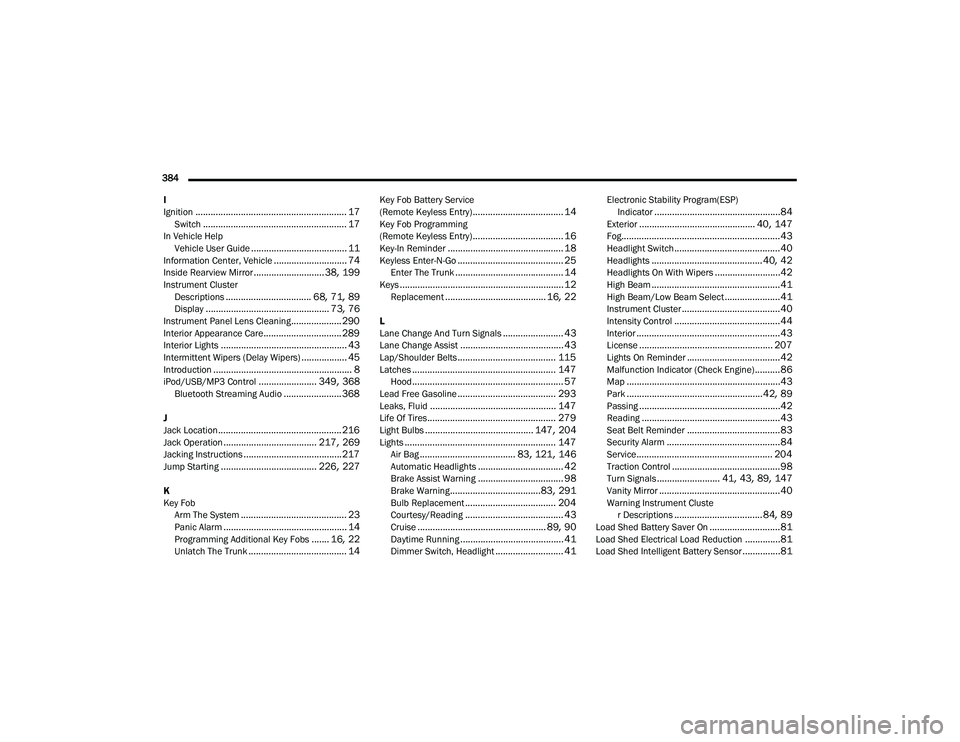
384 I
Ignition
............................................................ 17Switch......................................................... 17In Vehicle Help Vehicle User Guide...................................... 11Information Center, Vehicle............................. 74Inside Rearview Mirror............................ 38, 199Instrument ClusterDescriptions.................................. 68, 71, 89Display................................................. 73, 76Instrument Panel Lens Cleaning.................... 290Interior Appearance Care............................... 289Interior Lights.................................................. 43Intermittent Wipers (Delay Wipers).................. 45Introduction....................................................... 8iPod/USB/MP3 Control....................... 349, 368Bluetooth Streaming Audio....................... 368
J
Jack Location................................................. 216Jack Operation..................................... 217, 269Jacking Instructions....................................... 217Jump Starting...................................... 226, 227
K
Key FobArm The System
.......................................... 23Panic Alarm................................................. 14Programming Additional Key Fobs....... 16, 22Unlatch The Trunk....................................... 14
Key Fob Battery Service
(Remote Keyless Entry).................................... 14Key Fob Programming
(Remote Keyless Entry).................................... 16Key-In Reminder.............................................. 18Keyless Enter-N-Go.......................................... 25Enter The Trunk........................................... 14Keys................................................................. 12Replacement........................................ 16, 22
L
Lane Change And Turn Signals........................ 43Lane Change Assist......................................... 43Lap/Shoulder Belts....................................... 115Latches......................................................... 147Hood............................................................ 57Lead Free Gasoline....................................... 293Leaks, Fluid.................................................. 147Life Of Tires................................................... 279Light Bulbs........................................... 147, 204Lights............................................................ 147Air Bag...................................... 83, 121, 146Automatic Headlights.................................. 42Brake Assist Warning.................................. 98Brake Warning....................................83, 291Bulb Replacement.................................... 204Courtesy/Reading....................................... 43Cruise................................................... 89, 90Daytime Running......................................... 41Dimmer Switch, Headlight........................... 41
Electronic Stability Program(ESP)Indicator..................................................84Exterior.............................................. 40, 147Fog...............................................................43Headlight Switch..........................................40Headlights............................................ 40, 42Headlights On With Wipers..........................42High Beam...................................................41High Beam/Low Beam Select......................41Instrument Cluster.......................................40Intensity Control..........................................44Interior.........................................................43License..................................................... 207Lights On Reminder.....................................42Malfunction Indicator (Check Engine)..........86Map.............................................................43Park......................................................42, 89Passing........................................................42Reading.......................................................43Seat Belt Reminder.....................................83Security Alarm.............................................84Service...................................................... 204Traction Control...........................................98Turn Signals......................... 41, 43, 89, 147Vanity Mirror................................................40Warning Instrument Cluster Descriptions................................... 84, 89Load Shed Battery Saver On............................81Load Shed Electrical Load Reduction..............81Load Shed Intelligent Battery Sensor...............81
20_LA_OM_EN_USC_t.book Page 384
Page 391 of 396
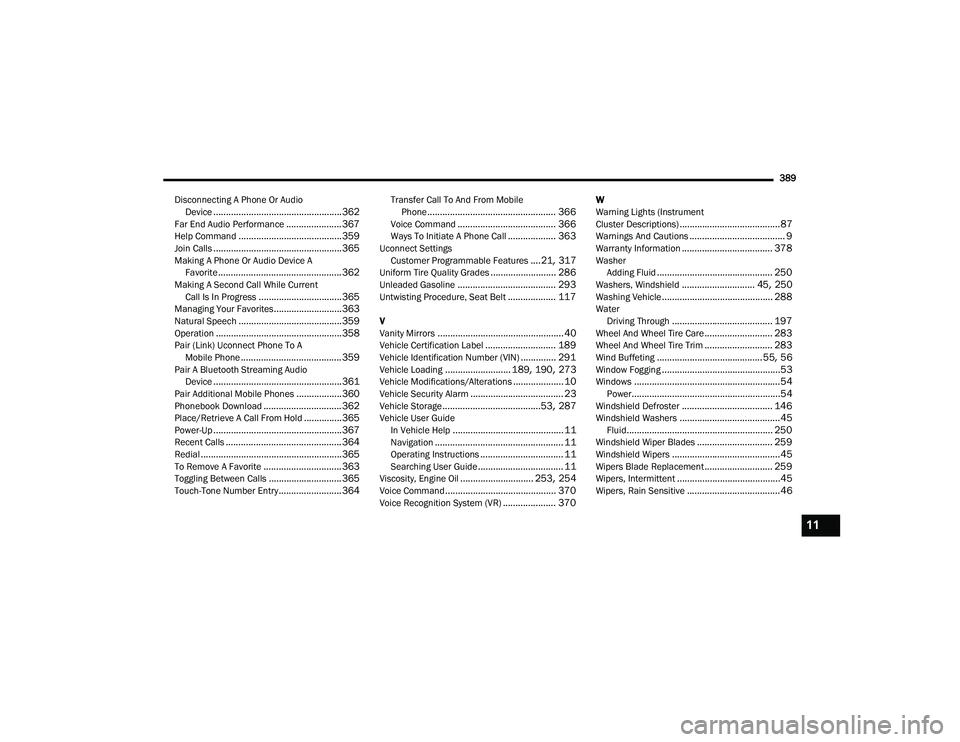
389
Disconnecting A Phone Or Audio Device
................................................... 362Far End Audio Performance...................... 367Help Command......................................... 359Join Calls................................................... 365Making A Phone Or Audio Device AFavorite................................................. 362Making A Second Call While CurrentCall Is In Progress................................. 365Managing Your Favorites........................... 363Natural Speech......................................... 359Operation.................................................. 358Pair (Link) Uconnect Phone To AMobile Phone........................................ 359Pair A Bluetooth Streaming AudioDevice................................................... 361Pair Additional Mobile Phones.................. 360Phonebook Download............................... 362Place/Retrieve A Call From Hold............... 365Power-Up................................................... 367Recent Calls.............................................. 364Redial........................................................ 365To Remove A Favorite............................... 363Toggling Between Calls............................. 365Touch-Tone Number Entry......................... 364
Transfer Call To And From MobilePhone................................................... 366Voice Command....................................... 366Ways To Initiate A Phone Call................... 363Uconnect SettingsCustomer Programmable Features....21, 317Uniform Tire Quality Grades.......................... 286Unleaded Gasoline....................................... 293Untwisting Procedure, Seat Belt................... 117
V
Vanity Mirrors.................................................. 40Vehicle Certification Label............................ 189Vehicle Identification Number (VIN).............. 291Vehicle Loading.......................... 189, 190, 273Vehicle Modifications/Alterations.................... 10Vehicle Security Alarm..................................... 23Vehicle Storage.......................................53, 287Vehicle User GuideIn Vehicle Help............................................ 11Navigation................................................... 11Operating Instructions................................. 11Searching User Guide.................................. 11Viscosity, Engine Oil............................. 253, 254Voice Command............................................ 370Voice Recognition System (VR)..................... 370
W
Warning Lights (Instrument
Cluster Descriptions)
........................................87Warnings And Cautions...................................... 9Warranty Information.................................... 378WasherAdding Fluid.............................................. 250Washers, Windshield............................. 45, 250Washing Vehicle............................................ 288WaterDriving Through........................................ 197Wheel And Wheel Tire Care........................... 283Wheel And Wheel Tire Trim........................... 283Wind Buffeting..........................................55, 56Window Fogging...............................................53Windows..........................................................54Power...........................................................54Windshield Defroster.................................... 146Windshield Washers........................................45Fluid.......................................................... 250Windshield Wiper Blades.............................. 259Windshield Wipers...........................................45Wipers Blade Replacement........................... 259Wipers, Intermittent.........................................45Wipers, Rain Sensitive.....................................46
11
20_LA_OM_EN_USC_t.book Page 389