key fob DODGE CHALLENGER 2021 Owner's Manual
[x] Cancel search | Manufacturer: DODGE, Model Year: 2021, Model line: CHALLENGER, Model: DODGE CHALLENGER 2021Pages: 328, PDF Size: 15 MB
Page 85 of 328
STARTING AND OPERATING83
(Continued)
(Continued)
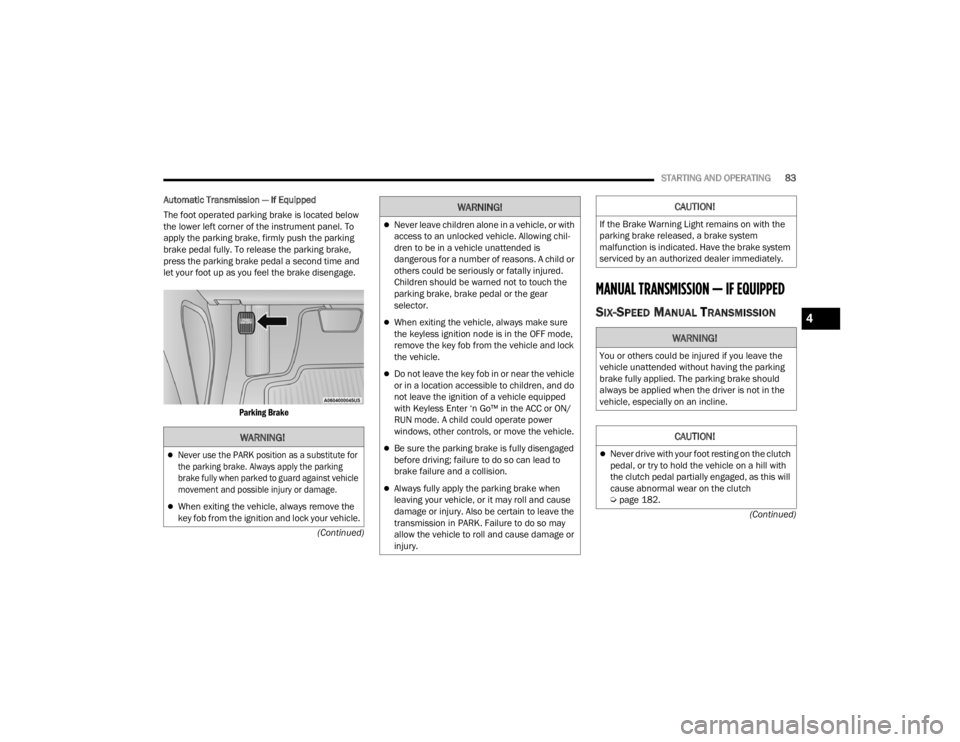
Automatic Transmission — If Equipped
The foot operated parking brake is located below
the lower left corner of the instrument panel. To
apply the parking brake, firmly push the parking
brake pedal fully. To release the parking brake,
press the parking brake pedal a second time and
let your foot up as you feel the brake disengage.
Parking Brake
MANUAL TRANSMISSION — IF EQUIPPED
SIX-SPEED MANUAL TRANSMISSION
WARNING!
Never use the PARK position as a substitute for
the parking brake. Always apply the parking
brake fully when parked to guard against vehicle
movement and possible injury or damage.
When exiting the vehicle, always remove the
key fob from the ignition and lock your vehicle.
Never leave children alone in a vehicle, or with
access to an unlocked vehicle. Allowing chil -
dren to be in a vehicle unattended is
dangerous for a number of reasons. A child or
others could be seriously or fatally injured.
Children should be warned not to touch the
parking brake, brake pedal or the gear
selector.
When exiting the vehicle, always make sure
the keyless ignition node is in the OFF mode,
remove the key fob from the vehicle and lock
the vehicle.
Do not leave the key fob in or near the vehicle
or in a location accessible to children, and do
not leave the ignition of a vehicle equipped
with Keyless Enter ‘n Go™ in the ACC or ON/
RUN mode. A child could operate power
windows, other controls, or move the vehicle.
Be sure the parking brake is fully disengaged
before driving; failure to do so can lead to
brake failure and a collision.
Always fully apply the parking brake when
leaving your vehicle, or it may roll and cause
damage or injury. Also be certain to leave the
transmission in PARK. Failure to do so may
allow the vehicle to roll and cause damage or
injury.
WARNING!CAUTION!
If the Brake Warning Light remains on with the
parking brake released, a brake system
malfunction is indicated. Have the brake system
serviced by an authorized dealer immediately.
WARNING!
You or others could be injured if you leave the
vehicle unattended without having the parking
brake fully applied. The parking brake should
always be applied when the driver is not in the
vehicle, especially on an incline.
CAUTION!
Never drive with your foot resting on the clutch
pedal, or try to hold the vehicle on a hill with
the clutch pedal partially engaged, as this will
cause abnormal wear on the clutch
Ú page 182.
4
21_LA_OM_EN_USC_t.book Page 83
Page 89 of 328

STARTING AND OPERATING87
IGNITION PARK INTERLOCK
This vehicle is equipped with an Ignition Park
Interlock which requires the transmission to be in
PARK before the ignition can be turned to the OFF
mode. This helps the driver avoid inadvertently
leaving the vehicle without placing the
transmission in PARK. This system also locks the
transmission in PARK whenever the ignition is in
the OFF mode.
NOTE:The transmission is NOT locked in PARK when the
ignition is in the ACC mode (even though the
engine will be off). Ensure that the transmission is
in PARK, and the ignition is OFF (not in ACC mode)
before exiting the vehicle.
BRAKE TRANSMISSION SHIFT
I
NTERLOCK (BTSI) SYSTEM
This vehicle is equipped with a BTSI system that
holds the transmission gear selector in PARK
unless the brakes are applied. To shift the
transmission out of PARK, the engine must be
running and the brake pedal must be pressed. The
brake pedal must also be pressed to shift from
NEUTRAL into DRIVE or REVERSE when the vehicle
is stopped or moving at low speeds.
EIGHT-SPEED AUTOMATIC
T
RANSMISSION
The transmission gear range is displayed both on
the gear selector and in the instrument cluster. To
select a gear range, push the lock button on the
gear selector and move the selector rearward or
forward. To shift the transmission out of PARK, the
engine must be running and the brake pedal must
be pressed. You must also press the brake pedal to
shift from NEUTRAL into DRIVE or REVERSE when
the vehicle is stopped or moving at low speeds.
Select the DRIVE range for normal driving.
Unintended movement of a vehicle could
injure those in or near the vehicle. As with all
vehicles, you should never exit a vehicle while
the engine is running. Before exiting a vehicle,
always come to a complete stop, then apply
the parking brake, shift the transmission into
PARK, and turn the ignition OFF. When the
ignition is in the OFF mode, the transmission
is locked in PARK, securing the vehicle against
unwanted movement.
When exiting the vehicle, always make sure
the ignition is in the OFF mode, remove the
key fob from the vehicle, and lock the vehicle.
Never leave children alone in a vehicle, or with
access to an unlocked vehicle. Allowing chil -
dren to be in a vehicle unattended is
dangerous for a number of reasons. A child or
others could be seriously or fatally injured.
Children should be warned not to touch the
parking brake, brake pedal or the transmis -
sion gear selector.
Do not leave the key fob in or near the vehicle
(or in a location accessible to children), and do
not leave the ignition in the ACC or ON/RUN
mode. A child could operate power windows,
other controls, or move the vehicle.
WARNING!CAUTION!
Shift into or out of PARK or REVERSE only after
the vehicle has come to a complete stop.
Do not shift between PARK, REVERSE,
NEUTRAL, or DRIVE when the engine is above
idle speed.
Before shifting into any gear, make sure your
foot is firmly pressing the brake pedal.
4
21_LA_OM_EN_USC_t.book Page 87
Page 90 of 328
88STARTING AND OPERATING
(Continued)
NOTE:
The transmission electronics are self-cali-
brating; therefore, the first few shifts on a new
vehicle may be somewhat abrupt. This is a
normal condition, and precision shifts will
develop within a few hundred miles (kilome -
ters).
In the event of a mismatch between the gear
selector position and the actual transmission
gear (for example, driver selects PARK while
driving), the position indicator will blink continu -
ously until the selector is returned to the proper
position, or the requested shift can be
completed.
The electronically-controlled transmission adapts
its shift schedule based on driver inputs, along
with environmental and road conditions.
Only shift from DRIVE to PARK or REVERSE when
the accelerator pedal is released and the vehicle is
stopped. Be sure to keep your foot on the brake
pedal when shifting between these gears.
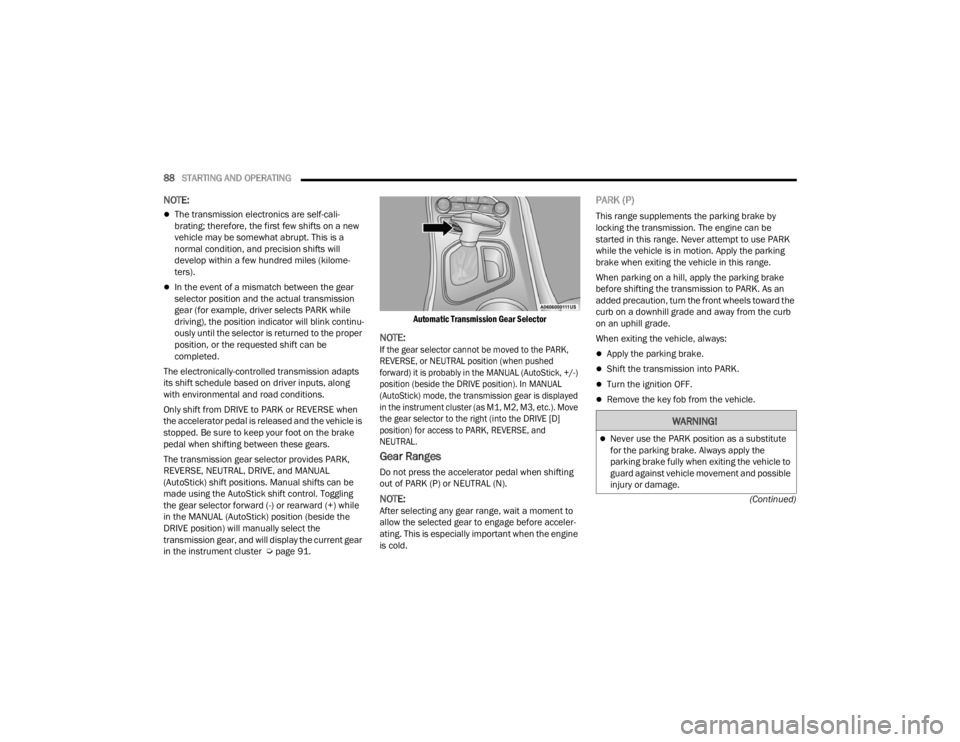
The transmission gear selector provides PARK,
REVERSE, NEUTRAL, DRIVE, and MANUAL
(AutoStick) shift positions. Manual shifts can be
made using the AutoStick shift control. Toggling
the gear selector forward (-) or rearward (+) while
in the MANUAL (AutoStick) position (beside the
DRIVE position) will manually select the
transmission gear, and will display the current gear
in the instrument cluster Ú page 91.
Automatic Transmission Gear Selector
NOTE:
If the gear selector cannot be moved to the PARK,
REVERSE, or NEUTRAL position (when pushed
forward) it is probably in the MANUAL (AutoStick, +/-)
position (beside the DRIVE position). In MANUAL
(AutoStick) mode, the transmission gear is displayed
in the instrument cluster (as M1, M2, M3, etc.). Move
the gear selector to the right (into the DRIVE [D]
position) for access to PARK, REVERSE, and
NEUTRAL.
Gear Ranges
Do not press the accelerator pedal when shifting
out of PARK (P) or NEUTRAL (N).
NOTE:After selecting any gear range, wait a moment to
allow the selected gear to engage before acceler
-
ating. This is especially important when the engine
is cold.
PARK (P)
This range supplements the parking brake by
locking the transmission. The engine can be
started in this range. Never attempt to use PARK
while the vehicle is in motion. Apply the parking
brake when exiting the vehicle in this range.
When parking on a hill, apply the parking brake
before shifting the transmission to PARK. As an
added precaution, turn the front wheels toward the
curb on a downhill grade and away from the curb
on an uphill grade.
When exiting the vehicle, always:
Apply the parking brake.
Shift the transmission into PARK.
Turn the ignition OFF.
Remove the key fob from the vehicle.
WARNING!
Never use the PARK position as a substitute
for the parking brake. Always apply the
parking brake fully when exiting the vehicle to
guard against vehicle movement and possible
injury or damage.
21_LA_OM_EN_USC_t.book Page 88
Page 91 of 328

STARTING AND OPERATING89
(Continued) The following indicators should be used to ensure
that you have properly engaged the transmission
into the PARK position:
When shifting into PARK, push the lock button
on the gear selector and firmly move the
selector all the way forward until it stops and is
fully seated.
Look at the transmission gear position display
and verify that it indicates the PARK position (P),
and is not blinking.
With the brake pedal released, verify that the
gear selector will not move out of PARK.
Your vehicle could move and injure you and
others if it is not in PARK. Check by trying to
move the transmission gear selector out of
PARK with the brake pedal released. Make
sure the transmission is in PARK before
exiting the vehicle.
The transmission may not engage PARK if the
vehicle is moving. Always bring the vehicle to a
complete stop before shifting to PARK, and
verify that the transmission gear position indi
-
cator solidly indicates PARK (P) without
blinking. Ensure that the vehicle is completely
stopped, and the PARK position is properly
indicated, before exiting the vehicle.
It is dangerous to shift out of PARK or
NEUTRAL if the engine speed is higher than
idle speed. If your foot is not firmly pressing
the brake pedal, the vehicle could accelerate
quickly forward or in reverse. You could lose
control of the vehicle and hit someone or
something. Only shift into gear when the
engine is idling normally and your foot is firmly
pressing the brake pedal.
WARNING!
Unintended movement of a vehicle could
injure those in or near the vehicle. As with all
vehicles, you should never exit a vehicle while
the engine is running. Before exiting a vehicle,
always come to a complete stop, then apply
the parking brake, shift the transmission into
PARK, and turn the ignition OFF. When the
ignition is in the OFF mode, the transmission
is locked in PARK, securing the vehicle against
unwanted movement.
When exiting the vehicle, always make sure
the ignition is in the OFF mode, remove the
key fob from the vehicle, and lock the vehicle.
Never leave children alone in a vehicle, or with
access to an unlocked vehicle. Allowing chil -
dren to be in a vehicle unattended is
dangerous for a number of reasons. A child or
others could be seriously or fatally injured.
Children should be warned not to touch the
parking brake, brake pedal or the transmis -
sion gear selector.
Do not leave the key fob in or near the vehicle
(or in a location accessible to children), and do
not leave the ignition in the ACC or ON/RUN
mode. A child could operate power windows,
other controls, or move the vehicle.
WARNING!CAUTION!
Before moving the transmission gear selector
out of PARK, you must start the engine, and
also press the brake pedal. Otherwise,
damage to the gear selector could result.
DO NOT race the engine when shifting from
PARK or NEUTRAL into another gear range, as
this can damage the drivetrain.
4
21_LA_OM_EN_USC_t.book Page 89
Page 129 of 328

MULTIMEDIA127
Lights
When the Lights button is pressed on the touchscreen, the system displays the options related to the vehicle’s exterior and interior lights.
NOTE:When the “Daytime Running Lights” feature is selected, the daytime running lights can be turned On or Off. This feature is only allowed by law in the country
of the vehicle purchased.
Depending on the vehicle’s options, feature settings may vary.
Setting Name Description
Headlight Off DelayThis setting will allow you to set the amount of time it takes for the headlights
to shut off after the vehicle is turned off. The available settings are “0 sec”, “30 sec”, “60 sec”, and “90 sec”.
Headlight Illumination On Approach This setting will allow you to set the amount of time it takes for the headlights
to shut off after the vehicle is unlocked. The available settings are “0 sec”, “30 sec”, “60 sec”, and “90 sec”.
Headlights with Wipers This setting will turn the headlights on when the wipers are activated.
Daytime Running Lights This setting will allow you to turn the Daytime Running Lights on or off.
Flash Lights With Lock This setting will allow you to turn on or off the flashing of the lights when the
Lock button is pushed on the key fob. Available settings are “On” and “Off”.
Auto Dim High Beams This setting will allow you to turn the Auto Dim High Beams on or off.5
21_LA_OM_EN_USC_t.book Page 127
Page 130 of 328

128MULTIMEDIA
Doors & Locks
When the Doors & Locks button is pressed on the touchscreen, the system displays the options related to locking and unlocking the vehicle’s doors.
NOTE:Depending on the vehicle’s options, feature settings may vary.
Setting Name Description
Auto Unlock On Exit
This setting will unlock the doors when any of the doors are opened from the inside.
Flash Lights With Lock This setting will allow you to turn on or off the flashing of the lights when the
Lock button is pushed on the key fob. Available settings are “On” and “Off”.
Sound Horn With Lock This setting will sound the horn when the Lock button is pushed on the key
fob. The “Off” setting will not sound the horn when the Lock button is pushed. The “1st Press” setting will sound the horn when the Lock button is pushed once. The “2nd Press” setting will sound the horn when the Lock button is pushed twice.
Sound Horn With Remote Start This setting will sound the horn when the remote start is activated from the
key fob.
Remote Door Unlock This setting will change how many pushes of the Unlock button on the key fob
are needed to unlock all the doors. The “Driver Door” setting will only unlock
the driver door on the first push on the Unlock button. The “All Doors” setting will unlock all doors on the first push of the Unlock button.
21_LA_OM_EN_USC_t.book Page 128
Page 131 of 328

MULTIMEDIA129
Seats & Comfort
Passive Entry
This setting will allow you to turn the Passive Entry feature
(Keyless Enter ‘n Go™) on or off.
Personal Settings Linked To Key Fob This setting will recall preset radio stations and driver seat position that have
been linked to the key fob.
Setting Name Description
When Seats & Comfort button is pressed on the touchscreen, the system displays the option related to the vehicle’s comfort systems when remote start has
been activated or the vehicle has been started.
NOTE:Depending on the vehicle’s options, feature settings may vary.
Setting NameDescription
Auto-On Driver Heated/Ventilated Seat & Steering Wheel With Vehicle Start
This setting will activate the vehicle’s comfort system and heated seats or
heated steering wheel when the vehicle is remote started or ignition is
started. The “Off” setting will not activate the comfort systems. The “Remote Start” setting will only activate the comfort systems when using Remote
Start. The “All Start” setting will activate the comfort systems whenever the vehicle is started.
5
21_LA_OM_EN_USC_t.book Page 129
Page 247 of 328

IN CASE OF EMERGENCY245
Proper towing or lifting equipment is required to
prevent damage to your vehicle. Use only tow bars
and other equipment designed for this purpose,
following equipment manufacturer’s instructions.
Use of safety chains is mandatory. Attach a tow bar
or other towing device to main structural members
of the vehicle, not to fascia/bumpers or associated
brackets. State and local laws regarding vehicles
under tow must be observed.
If you must use the accessories (wipers,
defrosters, etc.) while being towed, the ignition
must be in the ON/RUN mode, not the ACC mode.
If the key fob is unavailable or the vehicle's battery
is discharged, find Instructions on shifting the
transmission out of PARK Ú page 241.
REAR-WHEEL DRIVE (RWD) MODELS
FCA US LLC recommends towing your vehicle with
all four wheels OFF the ground using a flatbed.
If flatbed equipment is not available, and the
transmission is operable, the vehicle may be flat
towed (with all four wheels on the ground) under
the following conditions:
The transmission must be in NEUTRAL (N).
Instructions on shifting the transmission to
NEUTRAL (N) when the engine is off
Ú page 241.
The towing distance must not exceed 30 miles
(48 km).
The towing speed must not exceed 30 mph
(48 km/h).
If the transmission is not operable, or the vehicle
must be towed faster than 30 mph (48 km/h) or
farther than 30 miles (48 km), then the only
acceptable method of towing is with a flatbed
truck.
ENHANCED ACCIDENT RESPONSE SYSTEM
(EARS)
This vehicle is equipped with an Enhanced
Accident Response System.
This feature is a communication network that
takes effect in the event of an impact Úpage 206.
EVENT DATA RECORDER (EDR)
This vehicle is equipped with an event data
recorder (EDR). The main purpose of an EDR is to
record data that will assist in understanding how a
vehicle’s systems performed under certain crash
or near crash-like situations, such as an air bag
deployment or hitting a road obstacle Úpage 207.
CAUTION!
Do not use sling type equipment when towing.
Vehicle damage may occur.
When securing the vehicle to a flat bed truck,
do not attach to front or rear suspension
components. Damage to your vehicle may
result from improper towing.
FCA US LLC does not recommend towing this
vehicle using a tow dolly. Vehicle damage may
occur.
CAUTION!
Towing this vehicle in violation of the above
requirements can cause severe engine and/or
transmission damage. Damage from improper
towing is not covered under the New Vehicle
Limited Warranty.
7
21_LA_OM_EN_USC_t.book Page 245
Page 315 of 328

313
Autostick Operation
.................................................... 91Axle Fluid....................................................... 307Axle Lubrication............................................. 307
B
Back-Up......................................................... 108Battery.................................................... 70, 254Charging System Light................................. 70Keyless Key Fob Replacement.................... 14Location.................................................... 254Belts, Seat..................................................... 223Blind Spot Monitoring.................................... 184BluetoothConnecting To A Particular Mobile Phone Or Audio Device After Pairing
................154Body Mechanism Lubrication........................ 260B-Pillar Location............................................. 285Brake Assist System...................................... 179Brake Control System.................................... 179Brake Fluid.......................................... 265, 307Brake System...................................... 265, 301Fluid Check..................................... 265, 307Master Cylinder......................................... 265Parking........................................................ 82Warning Light..................................... 70, 301
Brake/Transmission Interlock......................... 87Break-In Recommendations, New Vehicle....... 82Brightness, Interior Lights................................ 45Bulb Replacement........................................ 276Bulbs, Light.......................................... 225, 276
C
Camera, Rear................................................ 108Capacities, Fluid........................................... 305Caps, FillerFuel.......................................................... 109Oil (Engine)............................................... 251Radiator (Coolant Pressure)..................... 264Car Washes................................................... 298Carbon Monoxide Warning............................ 225CargoVehicle Loading........................................ 110CD................................................................. 148Cellular Phone.............................................. 177Certification Label......................................... 110Chains, Tire................................................... 295Chart, Tire Sizing........................................... 281Check Engine Light
(Malfunction Indicator Light)............................ 77Checking Your Vehicle For Safety................. 223Checks, Safety.............................................. 223Child Restraint.............................................. 208
Child RestraintsBooster Seats........................................... 211Child Seat Installation............................... 221How To Stow An unused ALR Seat Belt..... 217Infant And Child Restraints....................... 210Lower Anchors And Tethers For Children.. 213Older Children And Child Restraints.......... 210Seating Positions...................................... 212Clean Air Gasoline......................................... 303CleaningWheels...................................................... 294Climate Control................................................48Cold Weather Operation...................................81Compact Spare Tire...................................... 292Contract, Service........................................... 309Controls........................................................ 140Cooling Pressure Cap (Radiator Cap)............ 264Cooling System............................................. 262Adding Coolant (Antifreeze)...................... 263Coolant Level................................... 262, 264Cooling Capacity....................................... 305Disposal Of Used Coolant......................... 264Drain, Flush, And Refill............................. 262Inspection................................................. 264Points To Remember................................ 264Pressure Cap............................................ 264Radiator Cap............................................. 264Selection Of Coolant (Antifreeze)......................... 263, 305, 306
11
21_LA_OM_EN_USC_t.book Page 313
Page 318 of 328

316 I
Ignition
............................................................ 16Switch......................................................... 16Information Center, Vehicle............................. 63Inside Rearview Mirror............................ 36, 226Instrument Cluster Descriptions......................................... 61, 75Display................................................. 62, 64Instrument Cluster DisplayAudio........................................................... 67Driver Assist................................................ 66Fuel Economy.............................................. 67Speedometer.............................................. 65Vehicle Info................................................. 65Instrument Panel Lens Cleaning.................... 300Interior Appearance Care............................... 299Interior Lights.................................................. 44Intermittent Wipers (Delay Wipers).................. 46iPod/USB/MP3 Control................................... 54Bluetooth Streaming Audio......................... 54
J
Jack Location................................................. 230Jack Operation............................................... 231Jacking Instructions....................................... 231Jump Starting............................. 238, 239, 240
K
Key FobArm The System
.......................................... 20Programming Additional Key Fobs............... 15Unlatch The Trunk....................................... 14Key Fob Battery Service
(Remote Keyless Entry).................................... 14
Key Fob Programming (Remote Keyless Entry).. 15
Keyless Enter 'n Go™....................................... 22Enter The Trunk........................................... 14Keys................................................................. 13Replacement............................................... 15
L
Lane Change And Turn Signals........................ 44Lane Change Assist......................................... 44Lap/Shoulder Belts....................................... 195Latches......................................................... 225Hood............................................................ 58Lead Free Gasoline....................................... 302Leaks, Fluid.................................................. 225Life Of Tires................................................... 290Light Bulbs........................................... 225, 276
Lights............................................................ 225Air Bag...................................... 69, 200, 223Automatic Headlights..................................43Brake Assist Warning................................ 182Brake Warning................................... 70, 301Bulb Replacement.................................... 276Courtesy/Reading........................................45Cruise...................................................75, 76Daytime Running.........................................42Dimmer Switch, Headlight...........................42
Electronic Stability Program(ESP) Indicator....71
Exterior.............................................. 41, 225Fog...............................................................44Headlight Switch..........................................41Headlights............................................ 41, 43Headlights On With Wipers..........................43High Beam...................................................42High Beam/Low Beam Select......................42Instrument Cluster.......................................41Intensity Control..........................................45Interior.........................................................44License..................................................... 279Lights On Reminder.....................................43Malfunction Indicator (Check Engine)..........73
21_LA_OM_EN_USC_t.book Page 316