keyless DODGE CHALLENGER 2022 User Guide
[x] Cancel search | Manufacturer: DODGE, Model Year: 2022, Model line: CHALLENGER, Model: DODGE CHALLENGER 2022Pages: 336, PDF Size: 16.47 MB
Page 61 of 336
GETTING TO KNOW YOUR VEHICLE59
WINDOWS
POWER WINDOW CONTROLS
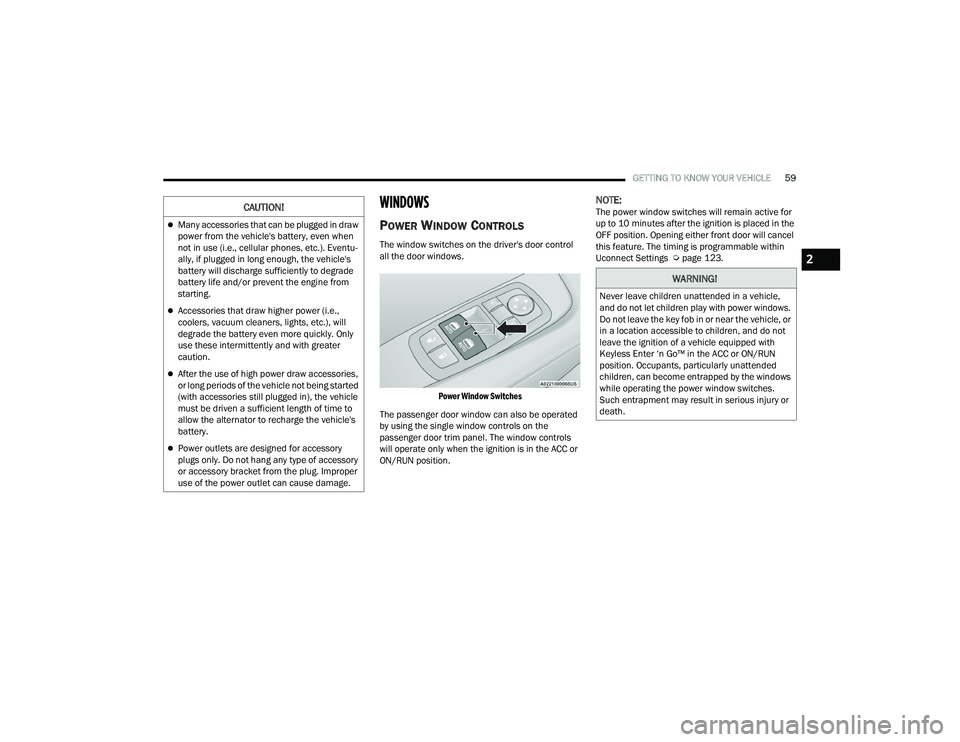
The window switches on the driver's door control
all the door windows.
Power Window Switches
The passenger door window can also be operated
by using the single window controls on the
passenger door trim panel. The window controls
will operate only when the ignition is in the ACC or
ON/RUN position.
NOTE:The power window switches will remain active for
up to 10 minutes after the ignition is placed in the
OFF position. Opening either front door will cancel
this feature. The timing is programmable within
Uconnect Settings Ú page 123.
Many accessories that can be plugged in draw
power from the vehicle's battery, even when
not in use (i.e., cellular phones, etc.). Eventu -
ally, if plugged in long enough, the vehicle's
battery will discharge sufficiently to degrade
battery life and/or prevent the engine from
starting.
Accessories that draw higher power (i.e.,
coolers, vacuum cleaners, lights, etc.), will
degrade the battery even more quickly. Only
use these intermittently and with greater
caution.
After the use of high power draw accessories,
or long periods of the vehicle not being started
(with accessories still plugged in), the vehicle
must be driven a sufficient length of time to
allow the alternator to recharge the vehicle's
battery.
Power outlets are designed for accessory
plugs only. Do not hang any type of accessory
or accessory bracket from the plug. Improper
use of the power outlet can cause damage.
CAUTION!
WARNING!
Never leave children unattended in a vehicle,
and do not let children play with power windows.
Do not leave the key fob in or near the vehicle, or
in a location accessible to children, and do not
leave the ignition of a vehicle equipped with
Keyless Enter ‘n Go™ in the ACC or ON/RUN
position. Occupants, particularly unattended
children, can become entrapped by the windows
while operating the power window switches.
Such entrapment may result in serious injury or
death.
2
22_LA_OM_EN_USC_t.book Page 59
Page 62 of 336
60GETTING TO KNOW YOUR VEHICLE
Automatic Window Features
The driver and, in some models, passenger power
window switches have an Auto-Down feature. Push
the window switch to the second detent, release,
and the window will go down automatically.
To open the window part way, push the window
switch to the first detent and release it when you
want the window to stop.
To stop the window from going all the way down
during the Auto-Down operation, pull up on the
switch briefly.
WIND BUFFETING
Wind buffeting can be described as the perception
of pressure on the ears or a helicopter-type sound
in the ears. Your vehicle may exhibit wind buffeting
with the windows down, or the sunroof (if
equipped) in certain open or partially open
positions. This is a normal occurrence and can be
minimized. If the buffeting occurs with the windows
open, partially close the windows to minimize the
buffeting. If the buffeting occurs with the sunroof
open, adjust the sunroof opening to minimize the
buffeting or open any window.
POWER SUNROOF — IF EQUIPPED
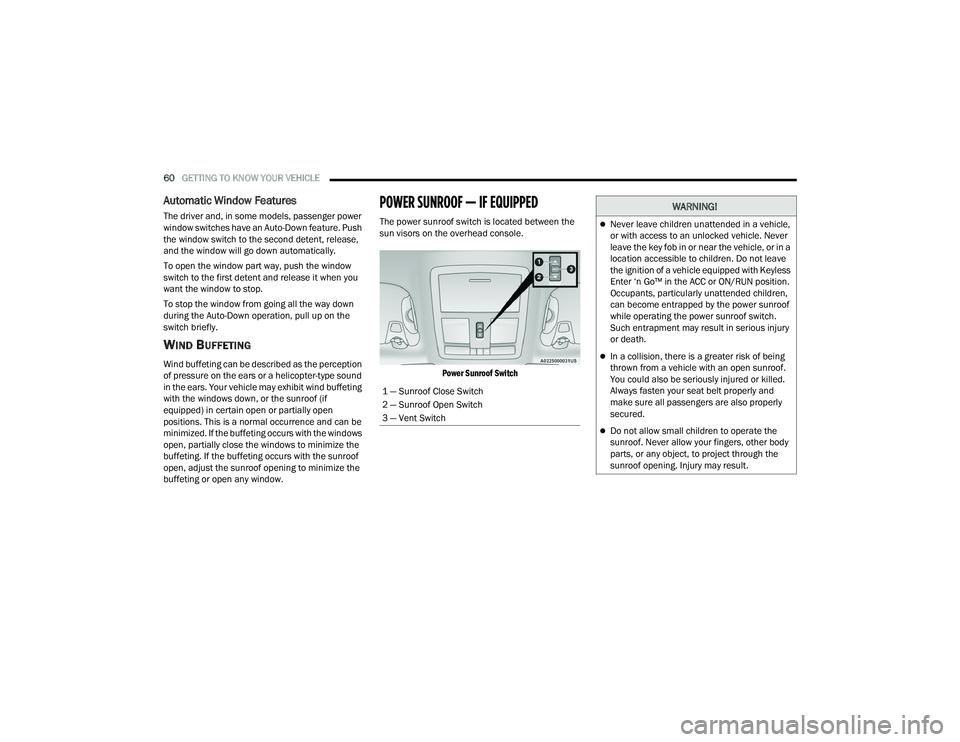
The power sunroof switch is located between the
sun visors on the overhead console.
Power Sunroof Switch
1 — Sunroof Close Switch
2 — Sunroof Open Switch
3 — Vent Switch
WARNING!
Never leave children unattended in a vehicle,
or with access to an unlocked vehicle. Never
leave the key fob in or near the vehicle, or in a
location accessible to children. Do not leave
the ignition of a vehicle equipped with Keyless
Enter ‘n Go™ in the ACC or ON/RUN position.
Occupants, particularly unattended children,
can become entrapped by the power sunroof
while operating the power sunroof switch.
Such entrapment may result in serious injury
or death.
In a collision, there is a greater risk of being
thrown from a vehicle with an open sunroof.
You could also be seriously injured or killed.
Always fasten your seat belt properly and
make sure all passengers are also properly
secured.
Do not allow small children to operate the
sunroof. Never allow your fingers, other body
parts, or any object, to project through the
sunroof opening. Injury may result.
22_LA_OM_EN_USC_t.book Page 60
Page 67 of 336
GETTING TO KNOW YOUR INSTRUMENT PANEL65
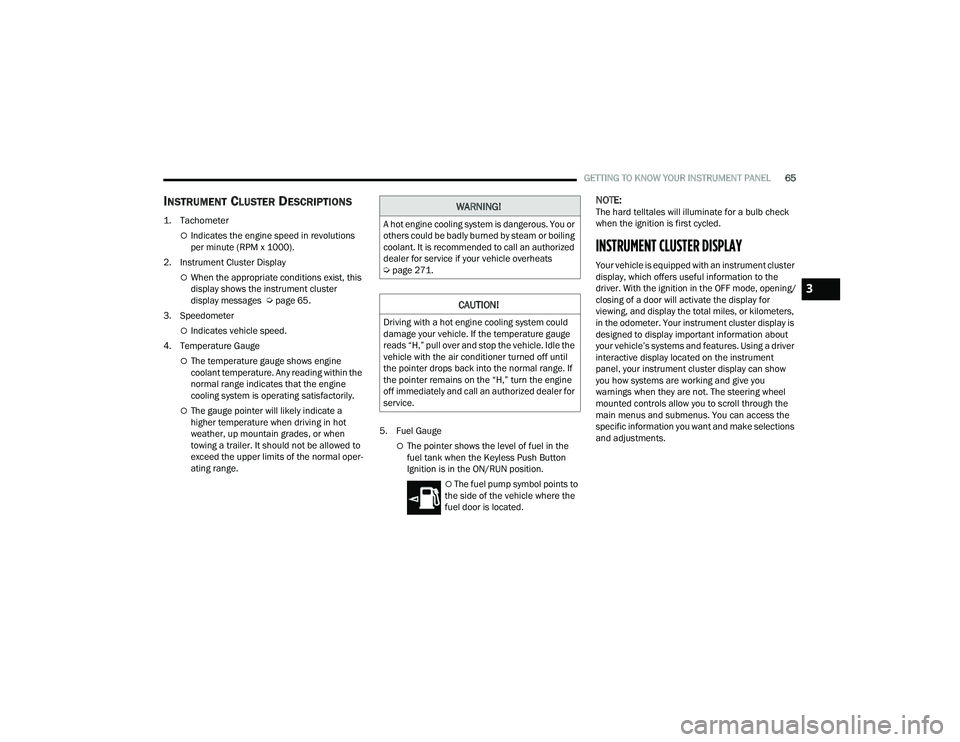
INSTRUMENT CLUSTER DESCRIPTIONS
1. Tachometer
Indicates the engine speed in revolutions
per minute (RPM x 1000).
2. Instrument Cluster Display
When the appropriate conditions exist, this
display shows the instrument cluster
display messages Ú page 65.
3. Speedometer
Indicates vehicle speed.
4. Temperature Gauge
The temperature gauge shows engine
coolant temperature. Any reading within the
normal range indicates that the engine
cooling system is operating satisfactorily.
The gauge pointer will likely indicate a
higher temperature when driving in hot
weather, up mountain grades, or when
towing a trailer. It should not be allowed to
exceed the upper limits of the normal oper -
ating range. 5. Fuel Gauge
The pointer shows the level of fuel in the
fuel tank when the Keyless Push Button
Ignition is in the ON/RUN position.
The fuel pump symbol points to
the side of the vehicle where the
fuel door is located.
NOTE:The hard telltales will illuminate for a bulb check
when the ignition is first cycled.
INSTRUMENT CLUSTER DISPLAY
Your vehicle is equipped with an instrument cluster
display, which offers useful information to the
driver. With the ignition in the OFF mode, opening/
closing of a door will activate the display for
viewing, and display the total miles, or kilometers,
in the odometer. Your instrument cluster display is
designed to display important information about
your vehicle’s systems and features. Using a driver
interactive display located on the instrument
panel, your instrument cluster display can show
you how systems are working and give you
warnings when they are not. The steering wheel
mounted controls allow you to scroll through the
main menus and submenus. You can access the
specific information you want and make selections
and adjustments.
WARNING!
A hot engine cooling system is dangerous. You or
others could be badly burned by steam or boiling
coolant. It is recommended to call an authorized
dealer for service if your vehicle overheats
Ú page 271.
CAUTION!
Driving with a hot engine cooling system could
damage your vehicle. If the temperature gauge
reads “H,” pull over and stop the vehicle. Idle the
vehicle with the air conditioner turned off until
the pointer drops back into the normal range. If
the pointer remains on the “H,” turn the engine
off immediately and call an authorized dealer for
service.
3
22_LA_OM_EN_USC_t.book Page 65
Page 69 of 336
GETTING TO KNOW YOUR INSTRUMENT PANEL67
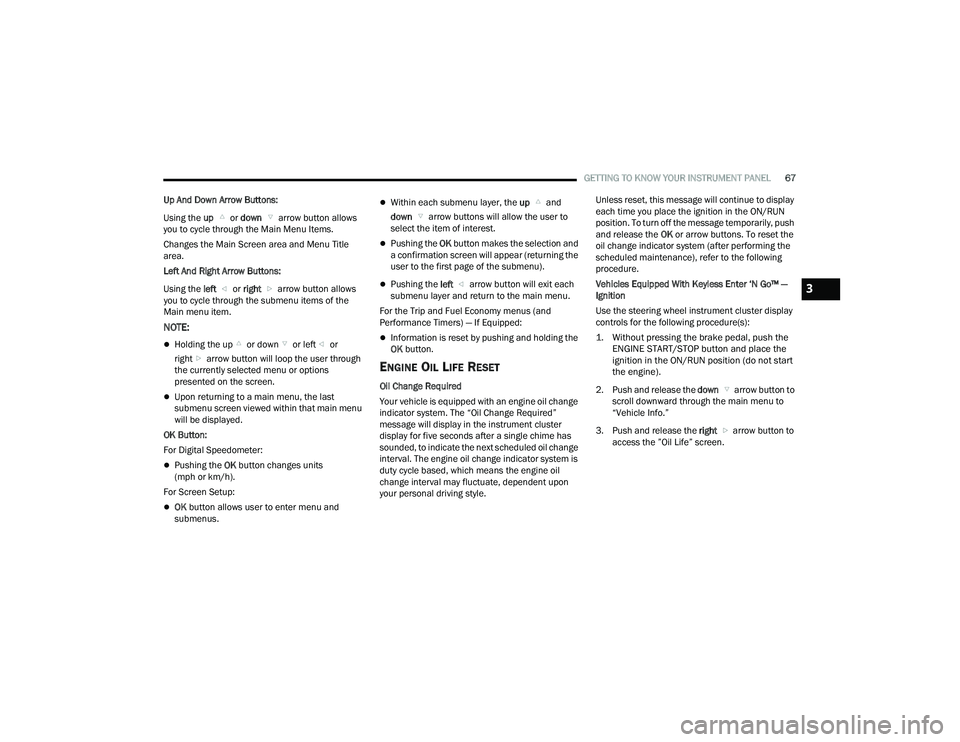
Up And Down Arrow Buttons:
Using the up or down arrow button allows
you to cycle through the Main Menu Items.
Changes the Main Screen area and Menu Title
area.
Left And Right Arrow Buttons:
Using the left or right arrow button allows
you to cycle through the submenu items of the
Main menu item.
NOTE:
Holding the up or down or left or
right arrow button will loop the user through
the currently selected menu or options
presented on the screen.
Upon returning to a main menu, the last
submenu screen viewed within that main menu
will be displayed.
OK Button:
For Digital Speedometer:
Pushing the OK button changes units
(mph or km/h).
For Screen Setup:
OK button allows user to enter menu and
submenus.
Within each submenu layer, the up and
down arrow buttons will allow the user to
select the item of interest.
Pushing the OK button makes the selection and
a confirmation screen will appear (returning the
user to the first page of the submenu).
Pushing the left arrow button will exit each
submenu layer and return to the main menu.
For the Trip and Fuel Economy menus (and
Performance Timers) — If Equipped:
Information is reset by pushing and holding the
OK button.
ENGINE OIL LIFE RESET
Oil Change Required
Your vehicle is equipped with an engine oil change
indicator system. The “Oil Change Required”
message will display in the instrument cluster
display for five seconds after a single chime has
sounded, to indicate the next scheduled oil change
interval. The engine oil change indicator system is
duty cycle based, which means the engine oil
change interval may fluctuate, dependent upon
your personal driving style. Unless reset, this message will continue to display
each time you place the ignition in the ON/RUN
position. To turn off the message temporarily, push
and release the
OK or arrow buttons. To reset the
oil change indicator system (after performing the
scheduled maintenance), refer to the following
procedure.
Vehicles Equipped With Keyless Enter ‘N Go™ —
Ignition
Use the steering wheel instrument cluster display
controls for the following procedure(s):
1. Without pressing the brake pedal, push the ENGINE START/STOP button and place the
ignition in the ON/RUN position (do not start
the engine).
2. Push and release the down arrow button to
scroll downward through the main menu to
“Vehicle Info.”
3. Push and release the right arrow button to
access the ”Oil Life” screen.
3
22_LA_OM_EN_USC_t.book Page 67
Page 84 of 336
82 (Continued)
STARTING AND OPERATING
STARTING THE ENGINE
Before starting your vehicle, adjust your seat,
adjust the inside and outside mirrors, fasten your
seat belt, and if present, instruct all other
occupants to buckle their seat belts.
MANUAL TRANSMISSION — IF EQUIPPED
Apply the parking brake, place the gear selector in
NEUTRAL and press the clutch pedal before
starting vehicle. This vehicle is equipped with a
clutch interlocking ignition system. It will not start
unless the clutch pedal is pressed to the floor.
AUTOMATIC TRANSMISSION —
I
F EQUIPPED
The gear selector must be in the PARK position
before you can start the engine. Apply the brakes
before shifting into any driving gear.
Tip Start Feature — Automatic
Transmission
Place the ignition in the START position and
release it as the starter engages. The starter motor
will automatically disengage itself once engine is
running. If the engine fails to start, the starter will
disengage automatically in 10 seconds. If this
occurs:
1. Place the ignition in the OFF position.
2. Wait 10 to 15 seconds.
3. Repeat the “Normal Starting” procedure.
WARNING!
When exiting the vehicle, always make sure
the ignition is in OFF position, remove the key
fob from the vehicle and lock the vehicle.
Never leave children alone in a vehicle, or with
access to an unlocked vehicle. Leaving chil -
dren in a vehicle unattended is dangerous for
a number of reasons. A child or others could
be seriously or fatally injured. Children should
be warned not to touch the parking brake,
brake pedal or the transmission gear selector.
Do not leave the key fob in or near the vehicle
(or in a location accessible to children), and do
not leave the ignition (of a vehicle equipped
with Keyless Enter ‘n Go™) in the ACC or ON/
RUN position. A child could operate power
windows, other controls, or move the vehicle.
Do not leave children or animals inside parked
vehicles in hot weather. Interior heat buildup
may cause serious injury or death.
WARNING!CAUTION!
Shift into or out of PARK or REVERSE only after
the vehicle has come to a complete stop.
Do not shift between PARK, REVERSE,
NEUTRAL, or DRIVE when the engine is above
idle speed.
Before shifting into any gear, make sure your
foot is firmly pressing the brake pedal.
22_LA_OM_EN_USC_t.book Page 82
Page 86 of 336
84STARTING AND OPERATING
(Continued)
NOTE:If the ignition switch is left in the ACC or RUN
(engine not running) position and the transmission
is in PARK, the system will automatically time out
after 30 minutes of inactivity and the ignition will
switch to the OFF position.
AUTOPARK
AutoPark is a supplemental feature to assist in
placing the vehicle in PARK should the situations
on the following pages occur. It is a back up system
and should not be relied upon as the primary
method by which the driver shifts the vehicle into
PARK.
The conditions under which AutoPark will engage
are outlined on the following pages. If the vehicle is not in PARK and the driver turns off
the engine, the vehicle may AutoPark.
AutoPark will engage when all of these conditions
are met:
Vehicle is equipped with an 8-speed transmis
-
sion
Vehicle is not in PARK
Vehicle speed is 1.2 mph (1.9 km/h) or less
Ignition switched from RUN to ACC
NOTE:For Keyless Enter ‘n Go™ equipped vehicles, the
engine will turn off and the ignition switch will
change to ACC position. After 30 minutes, the
ignition switches to OFF automatically, unless the
driver turns the ignition switch OFF. If the vehicle is not in PARK and the driver exits the
vehicle with the engine running, the vehicle may
AutoPark.
AutoPark will engage when all of these conditions
are met:
Vehicle is equipped with an 8-speed transmis
-
sion
Vehicle is not in PARK
Vehicle speed is 1.2 mph (1.9 km/h) or less
Driver’s seat belt is unbuckled
Driver’s door is ajar
Brake pedal is not pressed
The message “ AutoPark Engaged Shift to P then
Shift to Gear ” will display in the instrument cluster.
NOTE:In some cases the ParkSense graphic will be
displayed in the instrument cluster. In these cases,
the gear selector must be returned to “P” to select
desired gear.
If the driver shifts into PARK while moving, the
vehicle may AutoPark.
AutoPark will engage ONLY when vehicle speed is
1.2 mph (1.9 km/h) or less.
The message “ Vehicle Speed is Too High to Shift to
P” will be displayed in the instrument cluster if
vehicle speed is above 1.2 mph (1.9 km/h).WARNING!
Driver inattention could lead to failure to place
the vehicle in PARK. ALWAYS DO A VISUAL
CHECK that your vehicle is in PARK by verifying
that a solid (not blinking) “P” is indicated in
the instrument cluster display and on the gear
selector. If the “P” indicator is blinking, your
vehicle is not in PARK. As an added precau -
tion, always apply the parking brake when
exiting the vehicle.
AutoPark is a supplemental feature. It is not
designed to replace the need to shift your
vehicle into PARK. It is a back up system and
should not be relied upon as the primary
method by which the driver shifts the vehicle
into PARK.
WARNING!
22_LA_OM_EN_USC_t.book Page 84
Page 89 of 336
STARTING AND OPERATING87
(Continued)
When parking on a hill, it is important to turn the
front wheels toward the curb on a downhill grade
and away from the curb on an uphill grade. For
vehicles equipped with an automatic transmission,
apply the parking brake before placing the gear
selector in PARK, otherwise the load on the
transmission locking mechanism may make it
difficult to move the gear selector out of PARK. The
parking brake should always be applied whenever
the driver is not in the vehicle.
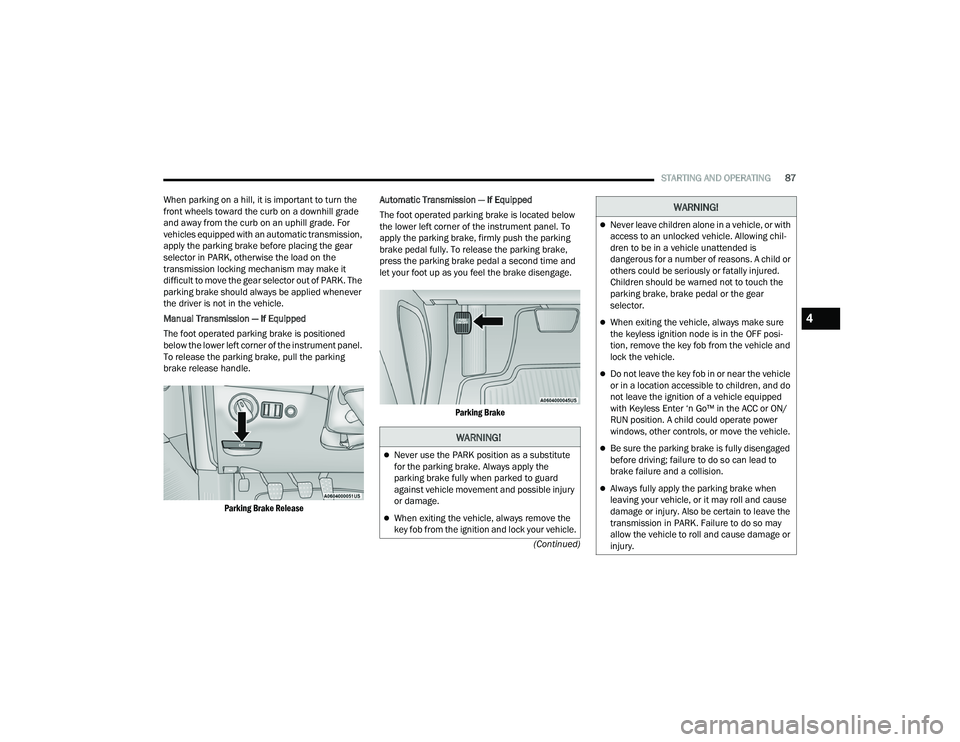
Manual Transmission — If Equipped
The foot operated parking brake is positioned
below the lower left corner of the instrument panel.
To release the parking brake, pull the parking
brake release handle.
Parking Brake Release
Automatic Transmission — If Equipped
The foot operated parking brake is located below
the lower left corner of the instrument panel. To
apply the parking brake, firmly push the parking
brake pedal fully. To release the parking brake,
press the parking brake pedal a second time and
let your foot up as you feel the brake disengage.
Parking Brake
WARNING!
Never use the PARK position as a substitute
for the parking brake. Always apply the
parking brake fully when parked to guard
against vehicle movement and possible injury
or damage.
When exiting the vehicle, always remove the
key fob from the ignition and lock your vehicle.
Never leave children alone in a vehicle, or with
access to an unlocked vehicle. Allowing chil -
dren to be in a vehicle unattended is
dangerous for a number of reasons. A child or
others could be seriously or fatally injured.
Children should be warned not to touch the
parking brake, brake pedal or the gear
selector.
When exiting the vehicle, always make sure
the keyless ignition node is in the OFF posi -
tion, remove the key fob from the vehicle and
lock the vehicle.
Do not leave the key fob in or near the vehicle
or in a location accessible to children, and do
not leave the ignition of a vehicle equipped
with Keyless Enter ‘n Go™ in the ACC or ON/
RUN position. A child could operate power
windows, other controls, or move the vehicle.
Be sure the parking brake is fully disengaged
before driving; failure to do so can lead to
brake failure and a collision.
Always fully apply the parking brake when
leaving your vehicle, or it may roll and cause
damage or injury. Also be certain to leave the
transmission in PARK. Failure to do so may
allow the vehicle to roll and cause damage or
injury.
WARNING!
4
22_LA_OM_EN_USC_t.book Page 87
Page 91 of 336
STARTING AND OPERATING89
The spring will try to pull the gear selector toward
THIRD and FOURTH gear. Make sure you move the
gear selector into SECOND or FIFTH gear. If you let
the gear selector move in the direction of the
pulling, you may end shifting from FIRST to
FOURTH or from SIXTH to THIRD gear. You must always use FIRST gear (or REVERSE)
when starting from a standing position.
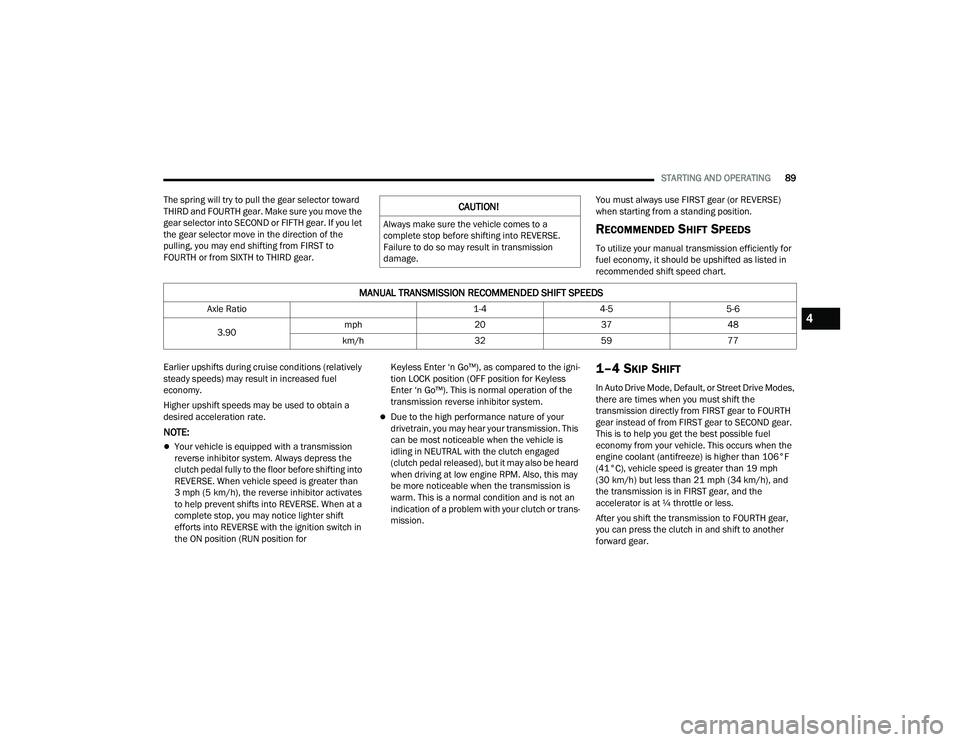
RECOMMENDED SHIFT SPEEDS
To utilize your manual transmission efficiently for
fuel economy, it should be upshifted as listed in
recommended shift speed chart.
Earlier upshifts during cruise conditions (relatively
steady speeds) may result in increased fuel
economy.
Higher upshift speeds may be used to obtain a
desired acceleration rate.
NOTE:
Your vehicle is equipped with a transmission
reverse inhibitor system. Always depress the
clutch pedal fully to the floor before shifting into
REVERSE. When vehicle speed is greater than
3 mph (5 km/h), the reverse inhibitor activates
to help prevent shifts into REVERSE. When at a
complete stop, you may notice lighter shift
efforts into REVERSE with the ignition switch in
the ON position (RUN position for Keyless Enter ‘n Go™), as compared to the igni
-
tion LOCK position (OFF position for Keyless
Enter ‘n Go™). This is normal operation of the
transmission reverse inhibitor system.
Due to the high performance nature of your
drivetrain, you may hear your transmission. This
can be most noticeable when the vehicle is
idling in NEUTRAL with the clutch engaged
(clutch pedal released), but it may also be heard
when driving at low engine RPM. Also, this may
be more noticeable when the transmission is
warm. This is a normal condition and is not an
indication of a problem with your clutch or trans -
mission.
1–4 SKIP SHIFT
In Auto Drive Mode, Default, or Street Drive Modes,
there are times when you must shift the
transmission directly from FIRST gear to FOURTH
gear instead of from FIRST gear to SECOND gear.
This is to help you get the best possible fuel
economy from your vehicle. This occurs when the
engine coolant (antifreeze) is higher than 106°F
(41°C), vehicle speed is greater than 19 mph
(30 km/h) but less than 21 mph (34 km/h), and
the transmission is in FIRST gear, and the
accelerator is at ¼ throttle or less.
After you shift the transmission to FOURTH gear,
you can press the clutch in and shift to another
forward gear.
CAUTION!
Always make sure the vehicle comes to a
complete stop before shifting into REVERSE.
Failure to do so may result in transmission
damage.
MANUAL TRANSMISSION RECOMMENDED SHIFT SPEEDS
Axle Ratio 1-44-55-6
3.90 mph
203748
km/h 3259774
22_LA_OM_EN_USC_t.book Page 89
Page 135 of 336
MULTIMEDIA133
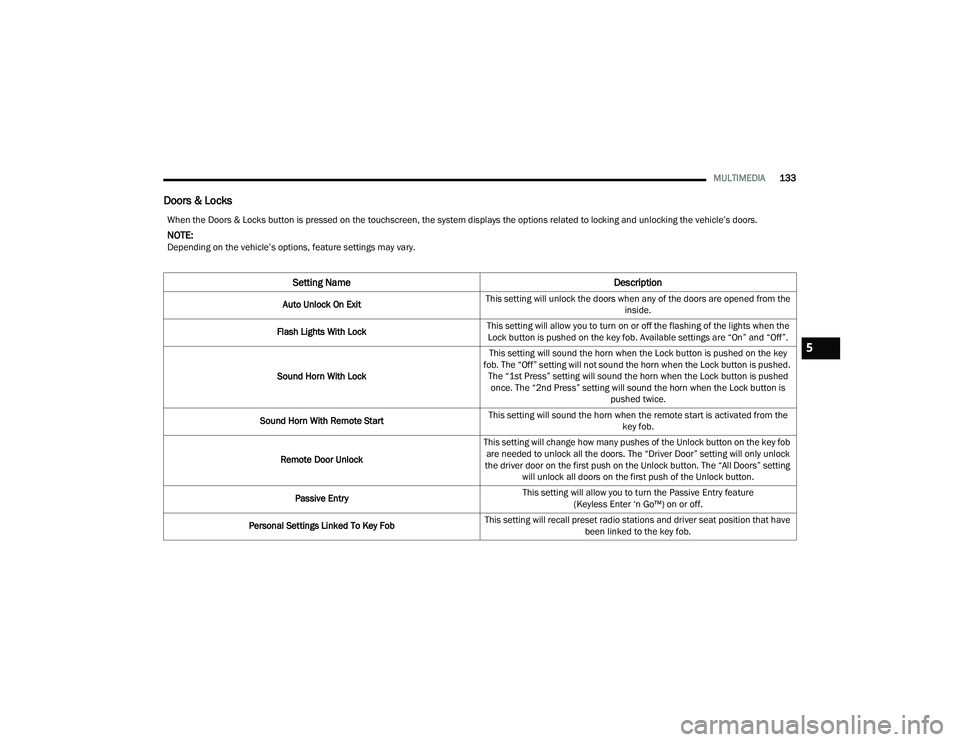
Doors & Locks
When the Doors & Locks button is pressed on the touchscreen, the system displays the options related to locking and unlocking the vehicle’s doors.
NOTE:Depending on the vehicle’s options, feature settings may vary.
Setting Name Description
Auto Unlock On ExitThis setting will unlock the doors when any of the doors are opened from the
inside.
Flash Lights With Lock This setting will allow you to turn on or off the flashing of the lights when the
Lock button is pushed on the key fob. Available settings are “On” and “Off”.
Sound Horn With Lock This setting will sound the horn when the Lock button is pushed on the key
fob. The “Off” setting will not sound the horn when the Lock button is pushed. The “1st Press” setting will sound the horn when the Lock button is pushed once. The “2nd Press” setting will sound the horn when the Lock button is pushed twice.
Sound Horn With Remote Start This setting will sound the horn when the remote start is activated from the
key fob.
Remote Door Unlock This setting will change how many pushes of the Unlock button on the key fob
are needed to unlock all the doors. The “Driver Door” setting will only unlock
the driver door on the first push on the Unlock button. The “All Doors” setting will unlock all doors on the first push of the Unlock button.
Passive Entry This setting will allow you to turn the Passive Entry feature
(Keyless Enter ‘n Go™) on or off.
Personal Settings Linked To Key Fob This setting will recall preset radio stations and driver seat position that have
been linked to the key fob.
5
22_LA_OM_EN_USC_t.book Page 133
Page 326 of 336
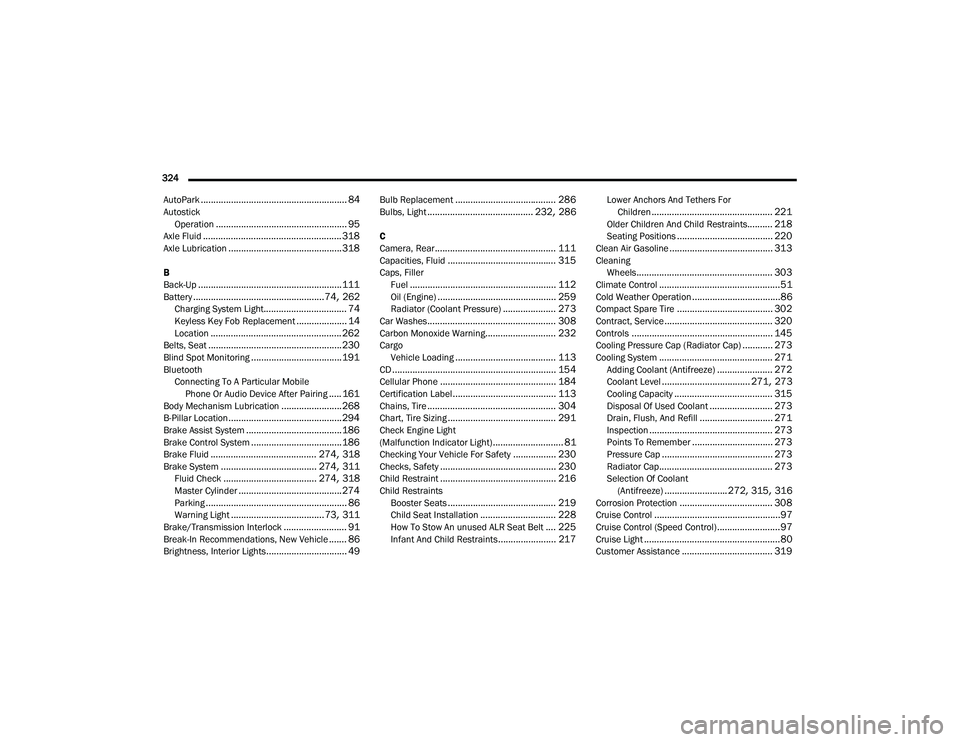
324 AutoPark
.......................................................... 84Autostick Operation.................................................... 95Axle Fluid....................................................... 318Axle Lubrication............................................. 318
B
Back-Up......................................................... 111Battery.................................................... 74, 262Charging System Light................................. 74Keyless Key Fob Replacement.................... 14Location.................................................... 262Belts, Seat..................................................... 230Blind Spot Monitoring.................................... 191BluetoothConnecting To A Particular MobilePhone Or Audio Device After Pairing
..... 161Body Mechanism Lubrication........................ 268B-Pillar Location............................................. 294Brake Assist System...................................... 186Brake Control System.................................... 186Brake Fluid.......................................... 274, 318Brake System...................................... 274, 311Fluid Check..................................... 274, 318Master Cylinder......................................... 274Parking........................................................ 86Warning Light..................................... 73, 311Brake/Transmission Interlock......................... 91Break-In Recommendations, New Vehicle....... 86Brightness, Interior Lights................................ 49
Bulb Replacement........................................ 286Bulbs, Light.......................................... 232, 286
C
Camera, Rear................................................ 111Capacities, Fluid........................................... 315Caps, FillerFuel.......................................................... 112Oil (Engine)............................................... 259Radiator (Coolant Pressure)..................... 273Car Washes................................................... 308Carbon Monoxide Warning............................ 232CargoVehicle Loading........................................ 113CD................................................................. 154Cellular Phone.............................................. 184Certification Label......................................... 113Chains, Tire................................................... 304Chart, Tire Sizing........................................... 291Check Engine Light
(Malfunction Indicator Light)............................ 81Checking Your Vehicle For Safety................. 230Checks, Safety.............................................. 230Child Restraint.............................................. 216Child RestraintsBooster Seats........................................... 219Child Seat Installation.............................. 228How To Stow An unused ALR Seat Belt.... 225Infant And Child Restraints....................... 217
Lower Anchors And Tethers ForChildren................................................ 221Older Children And Child Restraints.......... 218Seating Positions...................................... 220Clean Air Gasoline......................................... 313CleaningWheels...................................................... 303Climate Control................................................51Cold Weather Operation...................................86Compact Spare Tire...................................... 302Contract, Service........................................... 320Controls........................................................ 145Cooling Pressure Cap (Radiator Cap)............ 273Cooling System............................................. 271Adding Coolant (Antifreeze)...................... 272Coolant Level................................... 271, 273Cooling Capacity....................................... 315Disposal Of Used Coolant......................... 273Drain, Flush, And Refill............................. 271Inspection................................................. 273Points To Remember................................ 273Pressure Cap............................................ 273Radiator Cap............................................. 273Selection Of Coolant(Antifreeze)......................... 272, 315, 316Corrosion Protection..................................... 308Cruise Control..................................................97Cruise Control (Speed Control).........................97Cruise Light......................................................80Customer Assistance.................................... 319
22_LA_OM_EN_USC_t.book Page 324