transmission DODGE CHALLENGER 2022 Owners Manual
[x] Cancel search | Manufacturer: DODGE, Model Year: 2022, Model line: CHALLENGER, Model: DODGE CHALLENGER 2022Pages: 336, PDF Size: 16.47 MB
Page 6 of 336
4
STARTING AND OPERATING
STARTING THE ENGINE ......................................... 82
Manual Transmission — If Equipped ...............82
Automatic Transmission — If Equipped...........82
Normal Starting ................................................83
AutoPark ...........................................................84
Extended Park Starting ....................................85
If Engine Fails To Start .....................................85
Cold Weather Operation
(Below –22°F Or −30°C) ...............................86
After Starting.....................................................86
ENGINE BLOCK HEATER — IF EQUIPPED ............ 86
ENGINE BREAK-IN RECOMMENDATIONS —
3.6L & 5.7L ........................................................... 86
PARKING BRAKE ................................................... 86
MANUAL TRANSMISSION — IF EQUIPPED ......... 88 6-Speed Manual Transmission........................88
Shifting ..............................................................88
Recommended Shift Speeds...........................89
1–4 Skip Shift ..................................................89
Downshifting .....................................................90 AUTOMATIC TRANSMISSION —
IF EQUIPPED .......................................................... 90
Ignition Park Interlock ......................................91
Brake Transmission Shift Interlock (BTSI)
System .............................................................91
8-Speed Automatic Transmission ...................91
SPORT MODE — WITHOUT PERFORMANCE
CONTROL................................................................. 96
FUEL SAVER TECHNOLOGY 5.7L —
IF EQUIPPED ...........................................................97
ELECTRIC POWER STEERING ...............................97
CRUISE CONTROL SYSTEMS — IF EQUIPPED .....97
Cruise Control ..................................................97
Adaptive Cruise Control (ACC) .........................99
PARKSENSE REAR PARK ASSIST —
IF EQUIPPED ....................................................... 107
ParkSense Sensors ....................................... 107
ParkSense Display ........................................ 107ParkSense Warning Display ......................... 109
Enabling And Disabling ParkSense .............. 109Service The ParkSense Rear Park
Assist System ................................................ 110Cleaning The ParkSense System ................. 110
ParkSense System Usage Precautions........ 110
PARKVIEW REAR BACK UP CAMERA............... 111 REFUELING THE VEHICLE .................................. 112
Loose Fuel Filler Cap Message .................... 113
VEHICLE LOADING .............................................. 113
Vehicle Certification Label ........................... 113
Gross Vehicle Weight Rating (GVWR) .......... 113
Gross Axle Weight Rating (GAWR) ............... 114
Overloading ................................................... 114
Loading .......................................................... 114
TRAILER TOWING ............................................... 114
Common Towing Definitions......................... 114
Trailer Hitch Classification............................ 116
Trailer Towing Weights
(Maximum Trailer Weight Ratings)............... 116
Trailer And Tongue Weight .......................... 117
Towing Requirements ................................... 117
Towing Tips ................................................... 119
RECREATIONAL TOWING
(BEHIND MOTORHOME) ..................................... 120
DRIVING TIPS ....................................................... 120
Driving On Slippery Surfaces ........................ 120Driving Through Water ................................. 121
22_LA_OM_EN_USC_t.book Page 4
Page 8 of 336
6
JUMP STARTING .................................................. 246 Preparations For Jump Start......................... 247Jump Starting Procedure .............................. 247
IF YOUR ENGINE OVERHEATS ........................... 248
MANUAL PARK RELEASE — 8–SPEED
TRANSMISSION .................................................. 249
FREEING A STUCK VEHICLE .............................. 250
TOWING A DISABLED VEHICLE .......................... 252 Rear-Wheel Drive (RWD) Models.................. 253
ENHANCED ACCIDENT RESPONSE SYSTEM
(EARS) .................................................................. 253
EVENT DATA RECORDER (EDR) ......................... 253
SERVICING AND MAINTENANCE
SCHEDULED SERVICING .................................... 254
3.6L And 5.7L Engines ................................. 254
ENGINE COMPARTMENT .................................... 259
3.6L Engine ................................................... 2595.7L Engine ................................................... 260Checking Oil Level ......................................... 261
Adding Washer Fluid ................................... 261Maintenance-Free Battery ........................... 262
Pressure Washing ......................................... 262 VEHICLE MAINTENANCE..................................... 263
Engine Oil ...................................................... 263
Engine Oil Filter ........................................... 265Engine Air Cleaner Filter ............................ 265
Air Conditioner Maintenance ..................... 266
Accessory Drive Belt Inspection ................... 267Body Lubrication ......................................... 268
Windshield Wiper Blades ............................ 268
Exhaust System ............................................. 270Cooling System ............................................ 271
Brake System ............................................... 274
Clutch Hydraulic System — Manual
Transmission (If Equipped)........................... 275Manual Transmission — If Equipped............ 275
Automatic Transmission — If Equipped ....... 275
All-Wheel Drive (AWD) — If Equipped .......... 276
Rear Axle ........................................................ 276Fuses.............................................................. 277
Bulb Replacement ........................................ 286
TIRES..................................................................... 290
Tire Safety Information ................................ 290Tires — General Information ........................ 297
Tire Types....................................................... 301
Spare Tires — If Equipped ............................ 301
Wheel And Wheel Trim Care ........................ 303
Snow Traction Devices ................................. 304
Tire Rotation Recommendations ................. 306 DEPARTMENT OF TRANSPORTATION
UNIFORM TIRE QUALITY GRADES .................... 306
Treadwear...................................................... 307
Traction Grades ............................................. 307Temperature Grades..................................... 307
VEHICLE STORAGE ............................................ 307
BODYWORK .......................................................... 308
Protection From Atmospheric Agents ........ 308Body And Underbody Maintenance ............. 308
Preserving The Bodywork ............................. 308
INTERIORS ........................................................... 309
Seats And Fabric Parts ................................. 309
Plastic And Coated Parts .............................. 309
Leather Surfaces........................................... 310
Glass Surfaces ............................................. 310
TECHNICAL SPECIFICATIONS
VEHICLE IDENTIFICATION NUMBER (VIN) ........ 311
BRAKE SYSTEM .................................................. 311
WHEEL AND TIRE TORQUE
SPECIFICATIONS ................................................. 311Torque Specifications ................................... 311
22_LA_OM_EN_USC_t.book Page 6
Page 9 of 336
7
FUEL REQUIREMENTS ........................................ 312 3.6L Engine.................................................... 312
5.7L Engine
(With Automatic Transmission) .................... 3125.7L Engine (With Manual Transmission).... 312Reformulated Gasoline ................................. 313Materials Added To Fuel .............................. 313Gasoline/Oxygenate Blends ........................ 313
Do Not Use E-85 In Non-Flex Fuel
Vehicles .......................................................... 313
CNG And LP Fuel System Modifications ...... 314
Methylcyclopentadienyl Manganese
Tricarbonyl (MMT) In Gasoline...................... 314Fuel System Cautions ................................... 314
FLUID CAPACITIES .............................................. 315
ENGINE FLUIDS AND LUBRICANTS ................... 316
CHASSIS FLUIDS AND LUBRICANTS ................ 318
CUSTOMER ASSISTANCE
SUGGESTIONS FOR OBTAINING SERVICE
FOR YOUR VEHICLE ........................................... 319
Prepare For The Appointment ...................... 319Prepare A List ................................................ 319Be Reasonable With Requests..................... 319
IF YOU NEED ASSISTANCE ................................ 319
FCA US LLC Customer Center....................... 319
FCA Canada Inc. Customer Center............... 319
Mexico ............................................................ 320
Puerto Rico And US Virgin Islands................ 320
Customer Assistance For The Hearing
Or Speech Impaired
(TDD/TTY) ...................................................... 320
Service Contract ........................................... 320 WARRANTY INFORMATION ................................ 321
MOPAR® PARTS ................................................. 321
REPORTING SAFETY DEFECTS .......................... 321
In The 50 United States And
Washington, D.C............................................ 321
In Canada ...................................................... 321
PUBLICATION ORDER FORMS .......................... 322
GENERAL INFORMATION.................................... 322
22_LA_OM_EN_USC_t.book Page 7
Page 12 of 336
10
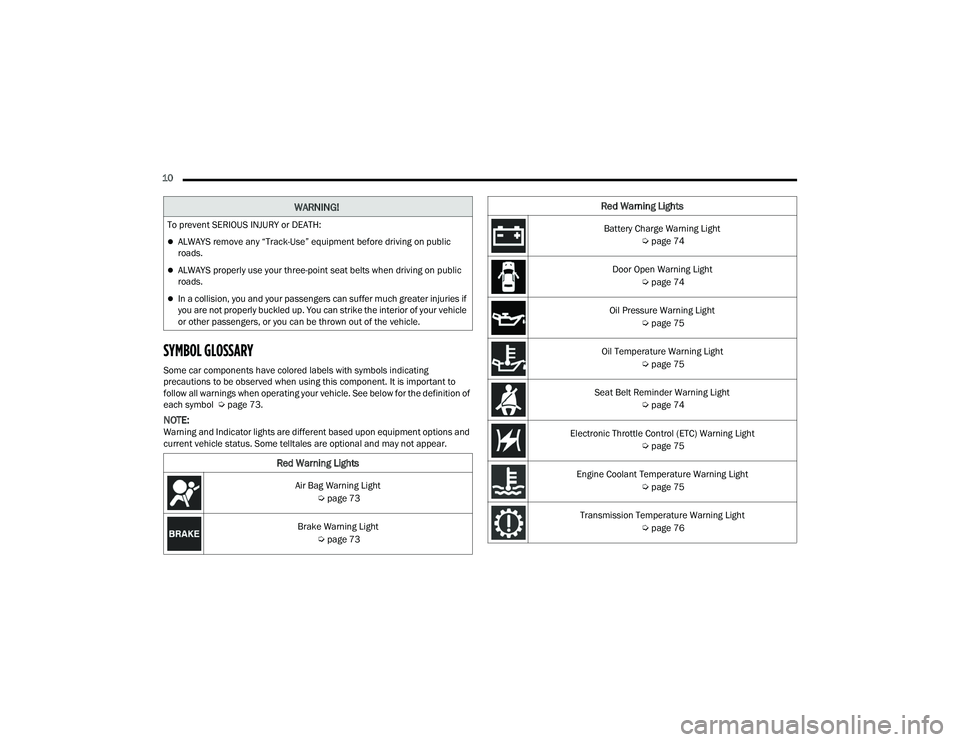
SYMBOL GLOSSARY
Some car components have colored labels with symbols indicating
precautions to be observed when using this component. It is important to
follow all warnings when operating your vehicle. See below for the definition of
each symbol Úpage 73.
NOTE:Warning and Indicator lights are different based upon equipment options and
current vehicle status. Some telltales are optional and may not appear.
WARNING!
To prevent SERIOUS INJURY or DEATH:
ALWAYS remove any “Track-Use” equipment before driving on public
roads.
ALWAYS properly use your three-point seat belts when driving on public
roads.
In a collision, you and your passengers can suffer much greater injuries if
you are not properly buckled up. You can strike the interior of your vehicle
or other passengers, or you can be thrown out of the vehicle.
Red Warning Lights
Air Bag Warning Light
Úpage 73
Brake Warning Light Úpage 73
Battery Charge Warning Light
Úpage 74
Door Open Warning Light Úpage 74
Oil Pressure Warning Light Úpage 75
Oil Temperature Warning Light Úpage 75
Seat Belt Reminder Warning Light Úpage 74
Electronic Throttle Control (ETC) Warning Light Úpage 75
Engine Coolant Temperature Warning Light Úpage 75
Transmission Temperature Warning Light Úpage 76
Red Warning Lights
22_LA_OM_EN_USC_t.book Page 10
Page 26 of 336
24GETTING TO KNOW YOUR VEHICLE
(Continued)
NOTE:Manually locking the vehicle will not arm the
Vehicle Security system.
POWER DOOR LOCKS
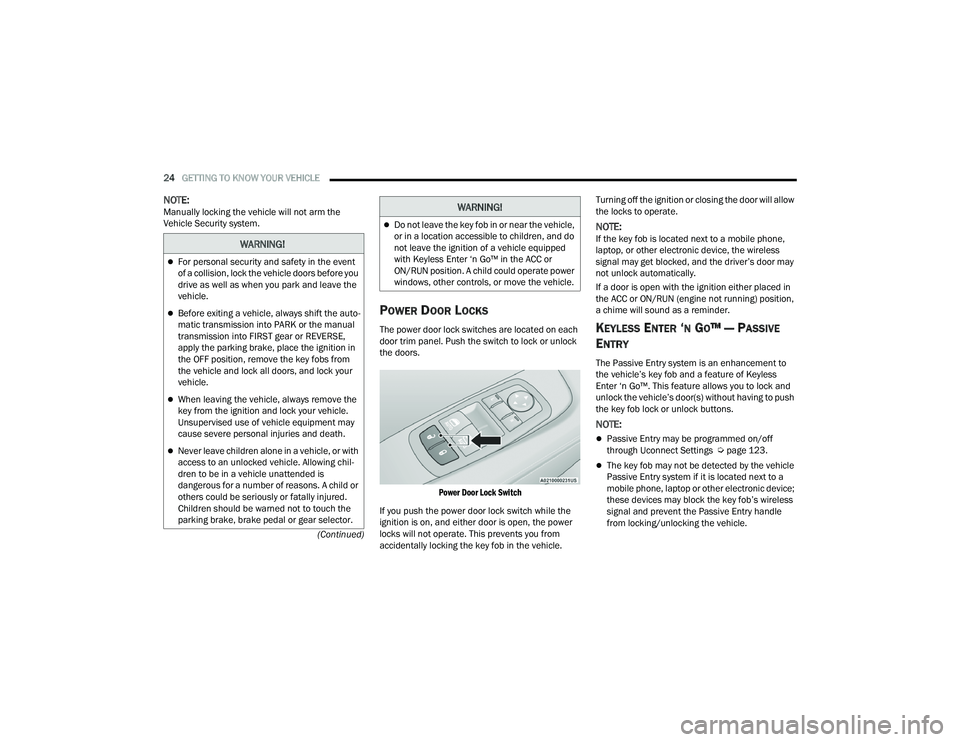
The power door lock switches are located on each
door trim panel. Push the switch to lock or unlock
the doors.
Power Door Lock Switch
If you push the power door lock switch while the
ignition is on, and either door is open, the power
locks will not operate. This prevents you from
accidentally locking the key fob in the vehicle. Turning off the ignition or closing the door will allow
the locks to operate.
NOTE:If the key fob is located next to a mobile phone,
laptop, or other electronic device, the wireless
signal may get blocked, and the driver’s door may
not unlock automatically.
If a door is open with the ignition either placed in
the ACC or ON/RUN (engine not running) position,
a chime will sound as a reminder.
KEYLESS ENTER ‘N GO™ — PASSIVE
E
NTRY
The Passive Entry system is an enhancement to
the vehicle’s key fob and a feature of Keyless
Enter ‘n Go™. This feature allows you to lock and
unlock the vehicle’s door(s) without having to push
the key fob lock or unlock buttons.
NOTE:
Passive Entry may be programmed on/off
through Uconnect Settings Ú page 123.
The key fob may not be detected by the vehicle
Passive Entry system if it is located next to a
mobile phone, laptop or other electronic device;
these devices may block the key fob’s wireless
signal and prevent the Passive Entry handle
from locking/unlocking the vehicle.
WARNING!
For personal security and safety in the event
of a collision, lock the vehicle doors before you
drive as well as when you park and leave the
vehicle.
Before exiting a vehicle, always shift the auto -
matic transmission into PARK or the manual
transmission into FIRST gear or REVERSE,
apply the parking brake, place the ignition in
the OFF position, remove the key fobs from
the vehicle and lock all doors, and lock your
vehicle.
When leaving the vehicle, always remove the
key from the ignition and lock your vehicle.
Unsupervised use of vehicle equipment may
cause severe personal injuries and death.
Never leave children alone in a vehicle, or with
access to an unlocked vehicle. Allowing chil -
dren to be in a vehicle unattended is
dangerous for a number of reasons. A child or
others could be seriously or fatally injured.
Children should be warned not to touch the
parking brake, brake pedal or gear selector.
Do not leave the key fob in or near the vehicle,
or in a location accessible to children, and do
not leave the ignition of a vehicle equipped
with Keyless Enter ‘n Go™ in the ACC or
ON/RUN position. A child could operate power
windows, other controls, or move the vehicle.
WARNING!
22_LA_OM_EN_USC_t.book Page 24
Page 43 of 336
GETTING TO KNOW YOUR VEHICLE41
To operate HomeLink®, push and release any
of the programmed HomeLink® buttons. These
buttons will activate the devices they are
programmed to with each press of the corre -
sponding HomeLink® button.
The HomeLink® indicator light is located above
the center button.
NOTE:HomeLink® is disabled when the Vehicle Security
system is active Ú page 322.
BEFORE YOU BEGIN PROGRAMMING
H
OMELINK®
For efficient programming and accurate
transmission of the Radio Frequency (RF) signal, it
is recommended that a new battery be placed in
the hand-held transmitter of the device that is
being programmed to the HomeLink® system.
Make sure your hand-held transmitter is
programmed to activate the device you are trying
to program your HomeLink® button to.
Ensure that your vehicle is parked outside of the
garage before you begin programming.
It is recommended that you erase all the channels
of your HomeLink® before you use it for the first
time.
ERASING ALL THE HOMELINK®
C
HANNELS
To erase the channels, follow this procedure:
1. Place the ignition switch into the ON/RUN
position.
2. Push and hold the two outside HomeLink® buttons (I and III) for up to 20 seconds, or until
the HomeLink® indicator light flashes.
NOTE:Erasing all channels should only be performed
when programming HomeLink® for the first time.
Do not erase channels when programming addi -
tional buttons.
IDENTIFYING WHETHER YOU HAVE A
R
OLLING CODE OR NON-ROLLING CODE
D
EVICE
Before programming a device to one of your
HomeLink® buttons, you must determine whether
the device has a rolling code or non-rolling code. Rolling Code Devices
To determine if your device has a rolling code, a
good indicator is its manufacturing date. Typically,
devices manufactured after 1995 have rolling
codes. A device with a rolling code will also have a
“LEARN” or “TRAIN” button located where the
antenna is attached to the device. The button may
not be immediately visible when looking at the
device. The name and color of the button may vary
slightly by manufacturer.
NOTE:The “LEARN” or “TRAIN” button is not the button
you normally use to operate the device.
Non-rolling Code Devices
Most devices manufactured before 1995 will not
have a rolling code. These devices will also not
have a “LEARN” or “TRAIN” button.
2
22_LA_OM_EN_USC_t.book Page 41
Page 45 of 336
GETTING TO KNOW YOUR VEHICLE43
NOTE:Canadian Radio Frequency (RF) laws require trans -
mitter signals to time-out (or quit) after several
seconds of transmission, which may not be long
enough for HomeLink® to pick up the signal during
programming. Similar to this Canadian law, some
U.S. gate operators are designed to time-out in the
same manner. The procedure may need to be
performed multiple times to successfully pair the
device to your HomeLink® buttons.
REPROGRAMMING A SINGLE
H
OMELINK® BUTTON
To reprogram a single HomeLink® button that has
been previously trained, without erasing all the
channels, follow the procedure below. Be sure to
determine whether the new device you want to
program the HomeLink® button to has a rolling
code, or non-rolling code.
1. Place the ignition in the ON/RUN position,
without starting the engine.
2. Push and hold the desired HomeLink® button until the HomeLink® indicator light begins to
flash after 20 seconds. Do not release the
button.
3. Without releasing the button , proceed with
Step 2 in “Programming HomeLink® To A
Garage Door Opener” and follow all remaining
steps.
CANADIAN/GATE OPERATOR
P
ROGRAMMING
For programming transmitters in Canada/United
States that require the transmitter signals to
“time-out” after several seconds of transmission:
Canadian Radio Frequency (RF) laws require
transmitter signals to time-out (or quit) after
several seconds of transmission, which may not be
long enough for HomeLink® to pick up the signal
during programming. Similar to this Canadian law,
some U.S. gate operators are designed to time-out
in the same manner.
It may be helpful to unplug the device during the
cycling process to prevent possible overheating of
the garage door or gate motor.
1. Place the ignition in the ON/RUN position.
NOTE:For vehicles equipped with Keyless Enter ‘n Go™,
place the ignition in the RUN position. Make sure
while programming HomeLink® with the engine on
that your vehicle is outside of your garage, or that
the garage door remains open at all times.
2. Place the hand-held transmitter 1 to 3 inches
(3 to 8 cm) away from the HomeLink® button
you wish to program while keeping the
HomeLink® indicator light in view. 3. Continue to push and hold the HomeLink®
button while you push and release (cycle) your
hand-held transmitter every two seconds until
HomeLink® has successfully accepted the
frequency signal. The indicator light will flash
slowly and then rapidly when fully trained.
4. Watch for the HomeLink® indicator to change flash rates. When it changes, it is
programmed. It may take up to 30 seconds or
longer in rare cases. The garage door may
open and close while you are programming.
5. Push and hold the programmed HomeLink® button and observe the indicator light.
NOTE:
If the indicator light stays on constantly,
programming is complete and the garage
door/device should activate when the
HomeLink® button is pushed.
To program the two remaining HomeLink®
buttons, repeat each step for each
remaining button. DO NOT erase the chan -
nels.
If you unplugged the garage door opener/device
for programming, plug it back in at this time.
2
22_LA_OM_EN_USC_t.book Page 43
Page 53 of 336
GETTING TO KNOW YOUR VEHICLE51
RAIN SENSING WIPERS — IF EQUIPPED
This feature senses rain or snowfall on the
windshield and automatically activates the wipers.
Rotate the end of the multifunction lever to one of
four settings to activate this feature.
The sensitivity of the system can be adjusted with
the multifunction lever. Wiper delay position 1 is
the least sensitive, and wiper delay position 4 is
the most sensitive.
Wiper delay position three should be used for
normal rain conditions.
NOTE:
The Rain Sensing feature will not operate when
the wiper switch is in the low or high-speed posi -
tion.
The Rain Sensing feature may not function prop -
erly when ice, or dried salt water is present on
the windshield.
Use of Rain-X or products containing wax or sili-
cone may reduce Rain Sensing performance.
The Rain Sensing feature can be turned on and
off using the Uconnect system Ú page 123.
The Rain Sensing system has protection features
for the wiper blades and arms, and will not operate
under the following conditions:
Low Ambient Temperature — When the ignition
is first placed in the ON position, the Rain
Sensing system will not operate until the wiper
switch is moved, vehicle speed is greater than
0 mph (0 km/h), or the outside temperature is
greater than 32°F (0°C).
Transmission In NEUTRAL Position — When the
ignition is ON, and the transmission is in the
NEUTRAL position, the Rain Sensing system will
not operate until the wiper switch is moved,
vehicle speed is greater than 3 mph (5 km/h),
or the gear selector is moved out of the
NEUTRAL position.
Remote Start Mode Inhibit — On vehicles
equipped with the Remote Start system, Rain
Sensing wipers are not operational when the
vehicle is in the Remote Start mode.
CLIMATE CONTROLS
The Climate Control system allows you to regulate
the temperature, air flow, and direction of air
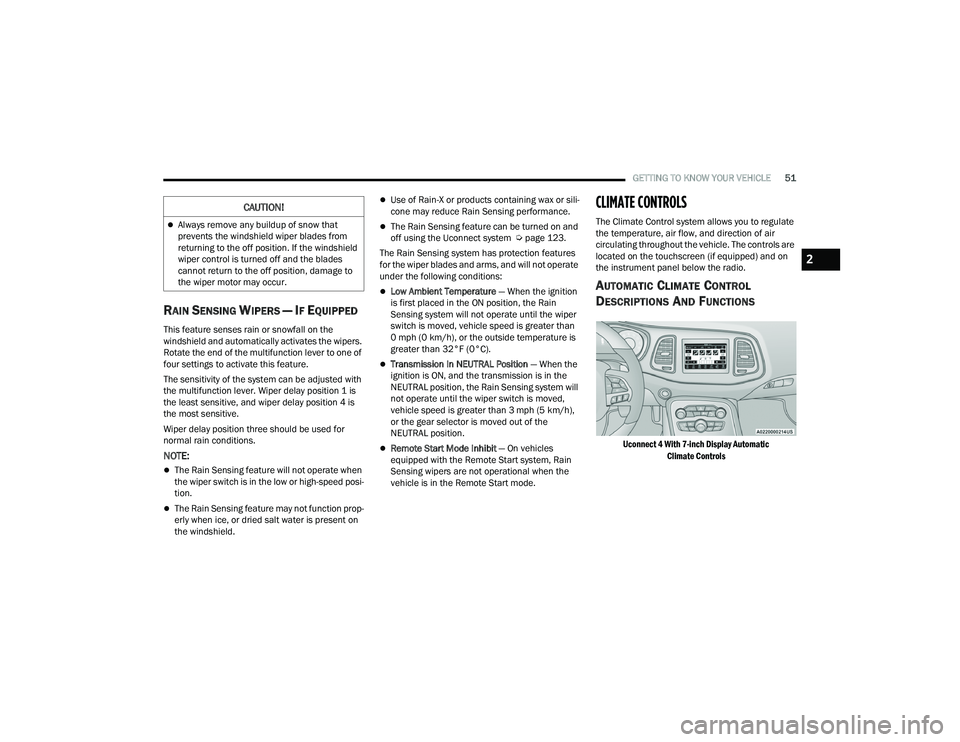
circulating throughout the vehicle. The controls are
located on the touchscreen (if equipped) and on
the instrument panel below the radio.
AUTOMATIC CLIMATE CONTROL
D
ESCRIPTIONS AND FUNCTIONS
Uconnect 4 With 7-inch Display Automatic
Climate Controls
Always remove any buildup of snow that
prevents the windshield wiper blades from
returning to the off position. If the windshield
wiper control is turned off and the blades
cannot return to the off position, damage to
the wiper motor may occur.
CAUTION!
2
22_LA_OM_EN_USC_t.book Page 51
Page 65 of 336
GETTING TO KNOW YOUR VEHICLE63
NOTE:The automatic transmission must be in PARK
before the button will operate. For manual trans -
missions, the vehicle must be in NEUTRAL.
Key Fob Trunk Release Button
Push the power trunk button on the key
fob twice within five seconds to release
the trunk.
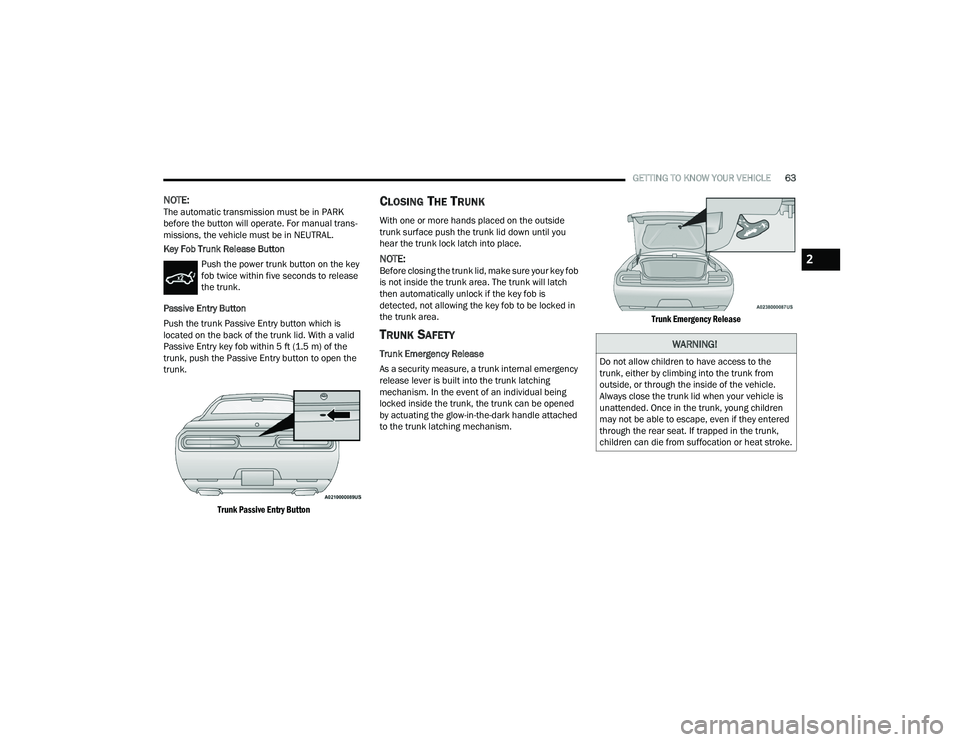
Passive Entry Button
Push the trunk Passive Entry button which is
located on the back of the trunk lid. With a valid
Passive Entry key fob within 5 ft (1.5 m) of the
trunk, push the Passive Entry button to open the
trunk.
Trunk Passive Entry Button
CLOSING THE TRUNK
With one or more hands placed on the outside
trunk surface push the trunk lid down until you
hear the trunk lock latch into place.
NOTE:Before closing the trunk lid, make sure your key fob
is not inside the trunk area. The trunk will latch
then automatically unlock if the key fob is
detected, not allowing the key fob to be locked in
the trunk area.
TRUNK SAFETY
Trunk Emergency Release
As a security measure, a trunk internal emergency
release lever is built into the trunk latching
mechanism. In the event of an individual being
locked inside the trunk, the trunk can be opened
by actuating the glow-in-the-dark handle attached
to the trunk latching mechanism.
Trunk Emergency Release
WARNING!
Do not allow children to have access to the
trunk, either by climbing into the trunk from
outside, or through the inside of the vehicle.
Always close the trunk lid when your vehicle is
unattended. Once in the trunk, young children
may not be able to escape, even if they entered
through the rear seat. If trapped in the trunk,
children can die from suffocation or heat stroke.
2
22_LA_OM_EN_USC_t.book Page 63
Page 70 of 336
68GETTING TO KNOW YOUR INSTRUMENT PANEL
4. Push and hold the OK button to reset oil life. If
conditions are met, the gauge and numeric
display will update to show 100%. If conditions
are not met a pop-up message of "To reset oil
life engine must be off with ignition in run” will
be displayed (for five seconds), and the user
will remain at the Oil Life screen.
5. Push and release the up or down arrow
button to return to previous main menu.
NOTE:If the indicator message illuminates when you start
the vehicle, the oil change indicator system did not
reset. If necessary, repeat this procedure.
Secondary Method Of Resetting Engine Oil Life
1. Without pressing the brake pedal, push the ENGINE START/STOP button and place the
ignition to the ON/RUN position (do not start
the engine).
2. Fully press the accelerator pedal, slowly, three times within ten seconds.
3. Without pushing the brake pedal, push the ENGINE START/STOP button once to return the
ignition to the OFF position.
NOTE:If the indicator message illuminates when you start
the vehicle, the oil change indicator system did not
reset. If necessary, repeat this procedure.
PERFORMANCE SHIFT INDICATOR
(PSI) — I
F EQUIPPED
The PSI is enabled on vehicles with manual
transmission, or when a vehicle with automatic
transmission is in manual shift mode. The PSI
provides the driver with a visual indication within
the instrument cluster display when the driver
configured gear shift point has been reached and
the driver is still accelerating. This indication
notifies the driver to change gear corresponding to
the configured RPMs in the head unit.
INSTRUMENT CLUSTER DISPLAY
S
ELECTABLE MENU ITEMS
Push and release the up or down arrow
button until the desired Selectable Menu item is
displayed in the instrument cluster display.
Follow the Menu or submenu prompts as desired.
Speedometer
Push and release the up or down arrow
button until the speedometer menu is displayed in
the instrument cluster display. Push and release
the OK button to toggle units (km/h or mph) of the
speedometer.
Vehicle Info
Push and release the up or down arrow
button until the “Vehicle Info” menu is displayed in
the instrument cluster display. Push and release
the right or left arrow button to scroll
through the submenus items of “Vehicle Info.”
Follow the directional prompts to access or reset
any of the following “Vehicle Info” submenu items:
Tire Pressure Monitor
If tire pressure is OK for all tires, a vehicle ICON is
displayed with tire pressure values in each corner
of the ICON.
If one or more tires have low pressure, “Inflate Tire
To XX” is displayed with the vehicle ICON and the
tire pressure values in each corner of the ICON with
the pressure value of the low tire are displayed in
a different color than the other tire pressure value.
If the Tire Pressure system requires service,
“Service Tire Pressure System” is displayed.
Tire PSI is an information only function and cannot
be reset Ú page 196.
22_LA_OM_EN_USC_t.book Page 68