door lock DODGE CHALLENGER SRT 2010 3.G User Guide
[x] Cancel search | Manufacturer: DODGE, Model Year: 2010, Model line: CHALLENGER SRT, Model: DODGE CHALLENGER SRT 2010 3.GPages: 436, PDF Size: 8.59 MB
Page 24 of 436
To Lock The Doors
Press and release the LOCK button on the RKE transmit-
ter to lock both doors. The turn signal lights will flash
and the horn will chirp to acknowledge the signal.
Sound Horn with Remote Key Lock
This feature will cause the horn to chirp when the doors
are locked with the RKE transmitter. This feature can be
turned on or turned off. Refer to “Electronic Vehicle
Information Center (EVIC)/Personal Settings (Customer-
Programmable Features)” in “Understanding Your In-
strument Panel” for further information.
•When not using the EVIC, perform the following
steps:
1. Press the LOCK button on a programmed RKE trans-
mitter for at least 4 seconds, but no longer than 10 sec-
onds. Then, press the PANIC button while still holding
the LOCK button. 2. Release both buttons at the same time.
3. Test the feature while outside of the vehicle by press-
ing the LOCK button on the RKE transmitter with the
ignition switch in the OFF position and the Key Fob
removed.
4. Repeat these steps if you want to return this feature to
its previous setting.
NOTE:
Pressing the LOCK button on the RKE transmit-
ter while you are in the vehicle will activate the Security
Alarm. Opening a door with the Security Alarm activated
will cause the alarm to sound. Press the UNLOCK button
to deactivate the Security Alarm.
Remote Open Window Feature
This feature allows you to remotely lower both door
windows at the same time. To use this feature, press and
release the UNLOCK button on the RKE transmitter and
2
THINGS TO KNOW BEFORE STARTING YOUR VEHICLE 23
Page 27 of 436
2. Closeness to a radio transmitter such as a radio station
tower, airport transmitter, and some mobile or CB radios.
REMOTE STARTING SYSTEM
This system uses the Remote Keyless Entry
(RKE) transmitter to start the engine conve-
niently from outside the vehicle while still
maintaining security. The system has a range of
approximately 328 ft (100 m).
NOTE: The vehicle must be equipped with an auto-
matic transmission to be equipped with Remote Start.
How To Use Remote Start
All of the following conditions must be met before the
engine will remote start:
•Shift lever in PARK
•Doors closed
•Hood closed
•Hazard switch off
•Brake switch inactive (brake pedal not pressed)
•Ignition key removed from ignition switch
•Battery at an acceptable charge level, and
•RKE PANIC button not pressed.
WARNING!
•Do not start or run an engine in a closed garage or
confined area. Exhaust gas contains Carbon Mon-
oxide (CO) which is odorless and colorless. Car-
bon Monoxide is poisonous and can cause serious
injury or death when inhaled.
•Keep Remote Keyless Entry (RKE) transmitters
away from children. Operation of the Remote Start
System, windows, door locks or other controls
could cause serious injury or death.
26 THINGS TO KNOW BEFORE STARTING YOUR VEHICLE
Page 28 of 436
To Enter Remote Start Mode
Press and release the REMOTE START button
on the RKE transmitter twice, within five sec-
onds. The parking lights will flash and the horn
will chirp twice (if programmed). Then, the
engine will start and the vehicle will remain in the
Remote Start mode for a 15-minute cycle.
NOTE:
•If an engine fault is present the vehicle will start and
then shut down 10 seconds later.
•The park lamps will turn on and remain on during
Remote Start mode.
•For security, power window and power sunroof op-
eration (if equipped) are disabled when the vehicle is
in the Remote Start mode.
•The engine can be started two consecutive times with
the RKE transmitter. However, the ignition must be cycled by pushing the START/STOP button twice (or
the ignition switch must be cycled to the ON position)
before you can repeat the start sequence for a third
cycle.
To Exit Remote Start Mode without Driving the
Vehicle
•
Press and release the REMOTE START button one time
or allow the engine to run for the entire 15-minute
cycle.
NOTE: To avoid unintentional shut downs, the system
will disable the one time press of the REMOTE START
button for two seconds after receiving a valid Remote
Start request.
To Exit Remote Start Mode and Drive the Vehicle
Before the end of 15 minute cycle, press and release the
UNLOCK button on the RKE transmitter to unlock the
doors and disarm the Vehicle Security Alarm (if
2
THINGS TO KNOW BEFORE STARTING YOUR VEHICLE 27
Page 29 of 436
equipped). Then, prior to the end of the 15 minute cycle,
press and release the START/STOP button. If the
START/STOP button is not present, insert the Key Fob
into the ignition switch and turn the switch to the ON
position.
NOTE:
•For vehicles not equipped with Keyless Go feature, the
ignition switch must be in the ON position in order to
drive the vehicle.
•For vehicles not equipped with Keyless Go feature, the
message “Insert Key/Turn To On” will display in the
EVIC until you insert the Key Fob. Once inserted, the
message “Turn To On” will display in the EVIC until
you turn the Key Fob to ON.
•For vehicles equipped with Keyless Go feature, the
message “Push Button/Insert Key” will display in the
EVIC until you push the START button.
DOOR LOCKS
Manual Door Locks
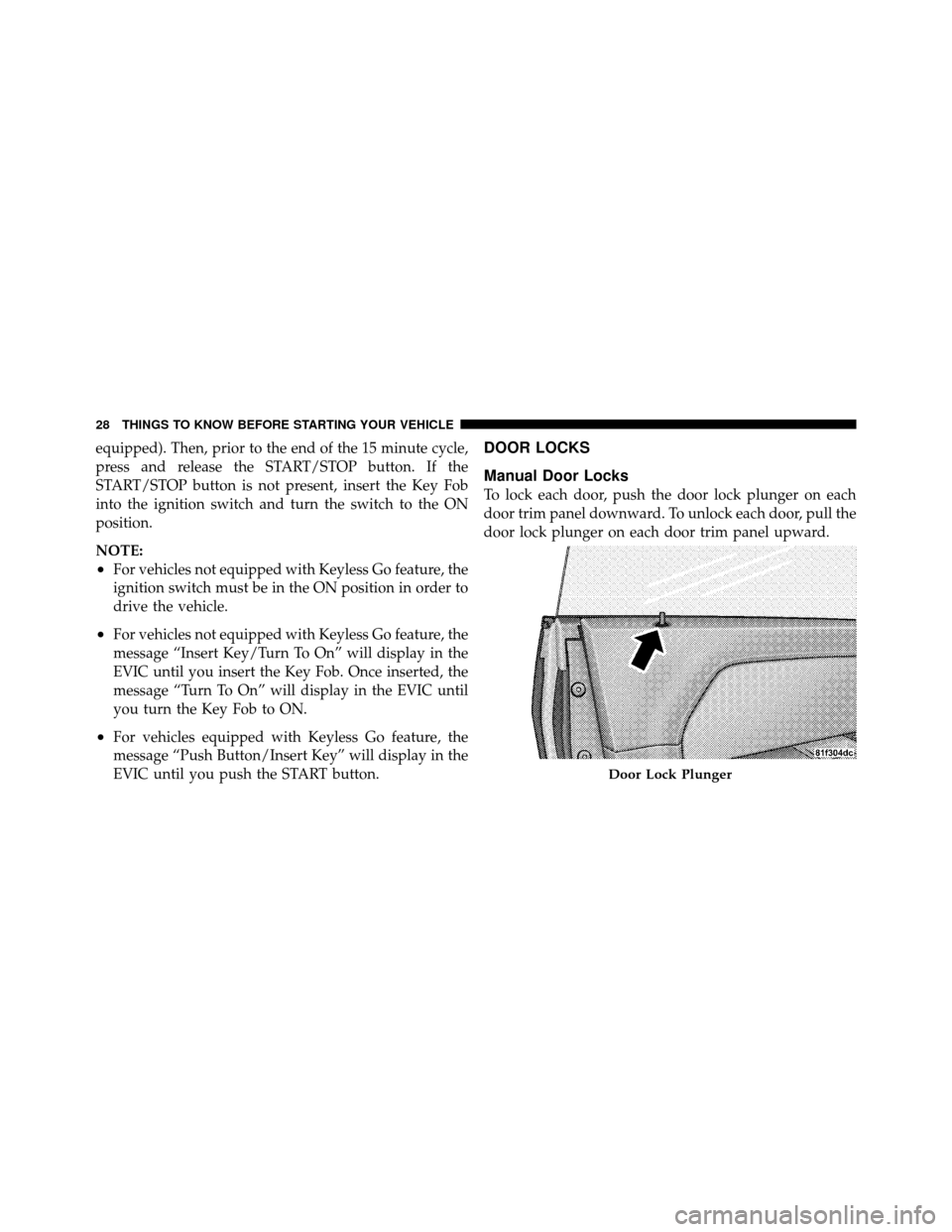
To lock each door, push the door lock plunger on each
door trim panel downward. To unlock each door, pull the
door lock plunger on each door trim panel upward.
Door Lock Plunger
28 THINGS TO KNOW BEFORE STARTING YOUR VEHICLE
Page 30 of 436
If the door lock plunger is down when you shut the door,
the door will lock. Therefore, make sure the key is not
inside the vehicle before closing the door.
WARNING!
•For personal security and safety in the event of an
accident, lock the vehicle doors before you drive as
well as when you park and leave the vehicle.
•When leaving the vehicle, always remove the key
from the ignition and lock your vehicle. Unsuper-
vised use of vehicle equipment may cause severe
personal injuries and death.
•Never leave children alone in a vehicle. Leaving
unattended children in a vehicle is dangerous for a
number of reasons. A child or others could be
seriously or fatally injured. Don’t leave the key in
the ignition. A child could operate power win-
dows, other controls, or move the vehicle.
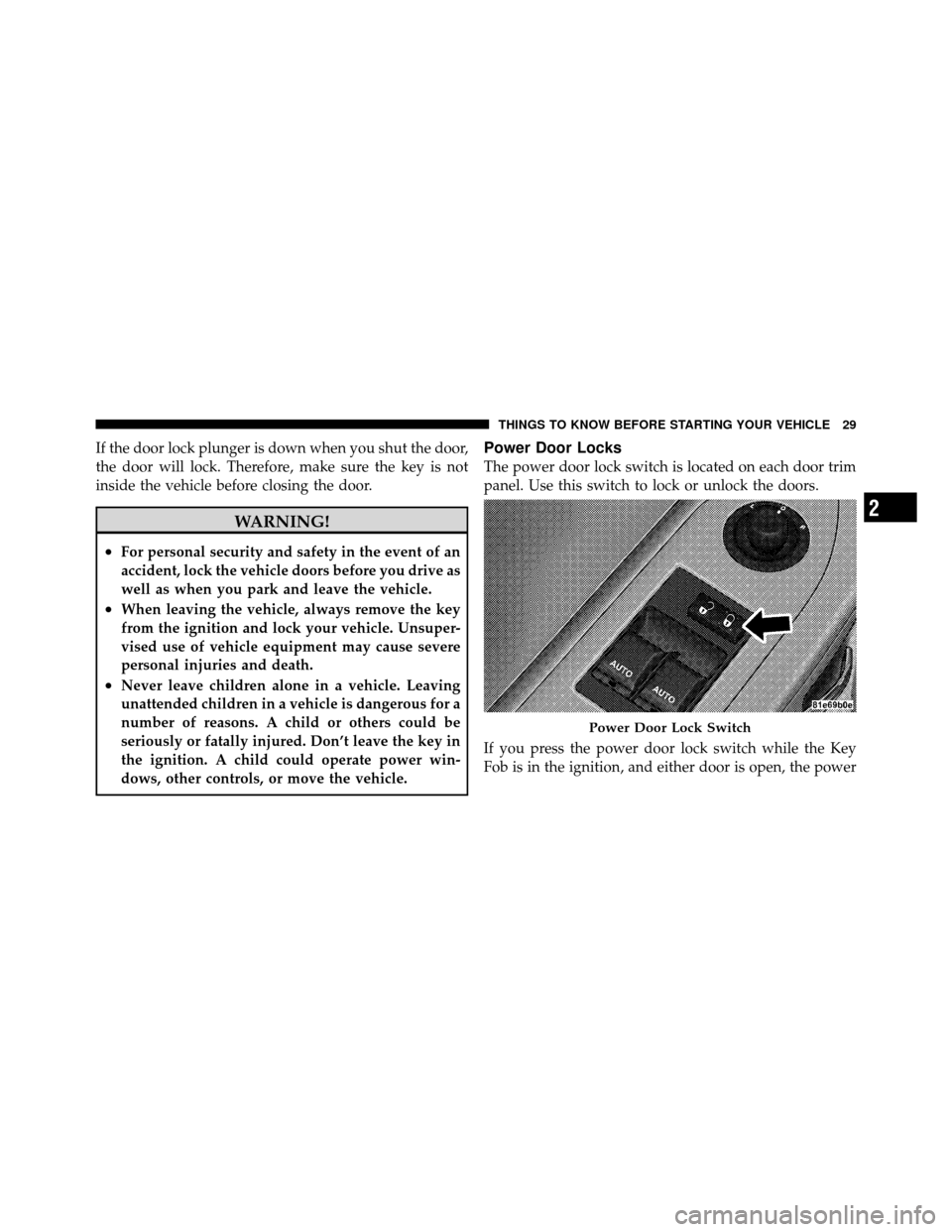
Power Door Locks
The power door lock switch is located on each door trim
panel. Use this switch to lock or unlock the doors.
If you press the power door lock switch while the Key
Fob is in the ignition, and either door is open, the power
Power Door Lock Switch
2
THINGS TO KNOW BEFORE STARTING YOUR VEHICLE 29
Page 31 of 436
locks will not operate. This prevents you from acciden-
tally locking the Key Fob in the vehicle. Removing the
Key Fob or closing the door will allow the locks to
operate. If a door is open, the Key Fob is in the ignition,
and the ignition is in the OFF or ACC position, a chime
will sound as a reminder to remove the Key Fob.
Automatic Door Locks
The doors will lock automatically if all of the following
conditions are met:
1. The Automatic Door Locks feature is enabled
2. The transmission is in gear
3. All doors are closed
4. The throttle is pressed
5. The vehicle speed is above 15 mph (24 km/h)6. The doors were not previously locked using the power
door lock switch or Remote Keyless Entry (RKE)
transmitter
Automatic Door Locks — If Equipped
The auto door lock feature can be enabled or disabled by
your authorized dealer. See your authorized dealer for
programming.
Automatic Unlock Doors on Exit
The doors will unlock automatically if:
1. The Automatic Unlock Doors On Exit feature is en-
abled
2. The transmission was in gear and the vehicle speed
returned to 0 mph (0 km/h)
3. The transmission is in NEUTRAL or PARK
4. The driver door is opened
5. The doors were not previously unlocked
30 THINGS TO KNOW BEFORE STARTING YOUR VEHICLE
Page 32 of 436
6. The vehicle speed is 0 mph (0 km/h)
Automatic Unlock Doors on Exit Programming
The Automatic Unlock Doors On Exit feature can be
enabled or disabled. Refer to “Electronic Vehicle Infor-
mation Center (EVIC)/Personal Settings (Customer-
Programmable Features)” in “Understanding Your In-
strument Panel” for further information.
•When not using the EVIC, perform the following
steps:
1. Enter the vehicle and close all doors.
2. Place the Key Fob in the ignition switch.
3. Within 15 seconds, cycle the ignition switch between
OFF and RUN and then back to OFF four times ending
up in the LOCK position. However, do not start the
engine. 4. Within 30 seconds, press the power door UNLOCK
switch to unlock the doors.
5. A single chime will indicate the completion of the
programming.
NOTE:
If you do not hear the chime, it means that the
system did not enter the programming mode and you
will need to repeat the procedure.
6. Repeat these steps if you want to return this feature to
its previous setting.
NOTE: Use the Automatic Unlock Doors On Exit feature
in accordance with local laws.
2
THINGS TO KNOW BEFORE STARTING YOUR VEHICLE 31
Page 34 of 436
AUTO-Down Feature
The driver’s door power window switch and passenger
door power window switch have an AUTO-down fea-
ture. Press the window switch to the second detent,
release, and the window will go down automatically.
To open the window part way, press the window switch
to the first detent and release it when you want the
window to stop.
To stop the window from going all the way down during
the AUTO-down operation, pull up on the switch briefly.
The power window switches will remain active for up to
60 minutes after the ignition switch is turned OFF.
Opening either door will cancel this feature. The time for
this feature is programmable. Refer to “Electronic Vehicle
Information Center (EVIC)/Personal Settings (Customer-
Programmable Features)” in “Understanding Your In-
strument Panel” for further information.
Wind Buffeting
Wind buffeting can be described as the perception of
pressure on the ears or a helicopter-type sound in the
ears. Your vehicle may exhibit wind buffeting with the
windows down, or the sunroof (if equipped) in certain
open or partially open positions. This is a normal occur-
rence and can be minimized. If the buffeting occurs with
one window open, then open the other window to
minimize the buffeting. If the buffeting occurs with the
sunroof open, then adjust the sunroof opening to mini-
mize the buffeting.
TRUNK LOCK AND RELEASE
The trunk lid can be released from inside the vehicle by
pressing the Trunk Release button. The button is located
on the instrument panel to the left of the steering wheel.
2
THINGS TO KNOW BEFORE STARTING YOUR VEHICLE 33
Page 56 of 436
•Turn on the interior lights, which remain on as long as
the battery has power or until the ignition key is
removed.
•Unlock the doors automatically.
If a Deployment Occurs
The airbags are designed to deflate immediately after
deployment.
NOTE:Front and/or side airbags will not deploy in all
collisions. This does not mean something is wrong with
the airbag system.
If you do have a collision which deploys the airbags, any
or all of the following may occur:
•The nylon airbag material may sometimes cause abra-
sions and/or skin reddening to the driver and front
passenger as the airbags deploy and unfold. The
abrasions are similar to friction rope burns or those
you might get sliding along a carpet or gymnasium floor. They are not caused by contact with chemicals.
They are not permanent and normally heal quickly.
However, if you haven’t healed significantly within a
few days, or if you have any blistering, see your doctor
immediately.
•As the airbags deflate, you may see some smoke-like
particles. The particles are a normal by-product of the
process that generates the non-toxic gas used for
airbag inflation. These airborne particles may irritate
the skin, eyes, nose, or throat. If you have skin or eye
irritation, rinse the area with cool water. For nose or
throat irritation, move to fresh air. If the irritation
continues, see your doctor. If these particles settle on
your clothing, follow the garment manufacturer’s in-
structions for cleaning.
Do not drive your vehicle after the airbags have de-
ployed. If you are involved in another collision, the
airbags will not be in place to protect you.
2
THINGS TO KNOW BEFORE STARTING YOUR VEHICLE 55
Page 73 of 436
Periodic Safety Checks You Should Make Outside
the Vehicle
Tires
Examine tires for excessive tread wear and uneven wear
patterns. Check for stones, nails, glass, or other objects
lodged in the tread. Inspect the tread and sidewall for
cuts and cracks. Check the wheel nuts for tightness.
Check the tires (including spare) for proper pressure.
Lights
Have someone observe the operation of exterior lights
while you work the controls. Check turn signal and high
beam indicator lights on the instrument panel.
Door Latches
Check for positive closing, latching, and locking.
Fluid Leaks
Check area under vehicle after overnight parking for fuel,
engine coolant, oil, or other fluid leaks. Also, if gasoline
fumes are detected or if fuel, power steering fluid, or
brake fluid leaks are suspected, the cause should be
located and corrected immediately.
72 THINGS TO KNOW BEFORE STARTING YOUR VEHICLE