key fob DODGE CHALLENGER SRT 2011 3.G User Guide
[x] Cancel search | Manufacturer: DODGE, Model Year: 2011, Model line: CHALLENGER SRT, Model: DODGE CHALLENGER SRT 2011 3.GPages: 460, PDF Size: 3.44 MB
Page 24 of 460
To Unlock The Doors
Press and release the UNLOCK button on the RKE
transmitter once to unlock the driver’s door or twice
within five seconds, to unlock both doors. The turn signal
lights will flash to acknowledge the unlock signal. The
illuminated entry system will also turn on.
Refer to “Keyless Enter-N-Go” under “Things To Know
Before Starting Your Vehicle” for further information.
Remote Key Unlock, Driver Door/All Doors First
This feature lets you program the system to unlock either
the driver’s door or both doors on the first press of the
UNLOCK button on the RKE transmitter. Refer to “Elec-
tronic Vehicle Information Center (EVIC)/Personal Set-
tings (Customer-Programmable Features)” in “Under-
standing Your Instrument Panel” for further information.
•When not using the EVIC, perform the following
steps:
1. Press and hold the LOCK button on a programmed
RKE transmitter for at least 4 seconds, but no longer than
10 seconds. Then, press and hold the UNLOCK button
while still holding the LOCK button.
2. Release both buttons at the same time.
3. Test the feature while outside of the vehicle by press-
ing the LOCK/UNLOCK buttons on the RKE transmitter
with the ignition switch in the OFF position and the Key
Fob removed.
4. Repeat these steps if you want to return this feature to
its previous setting.
NOTE: Pressing the LOCK button on the RKE transmit-
ter while you are inside the vehicle will activate the
Security Alarm. Opening a door with the Security Alarm
22 THINGS TO KNOW BEFORE STARTING YOUR VEHICLE
Page 25 of 460
activated will cause the alarm to sound. Press the UN-
LOCK button to deactivate the Security Alarm.
Flash Lights With Remote Key Lock
This feature will cause the turn signal lights to flash when
the doors are locked or unlocked with the RKE transmit-
ter. This feature can be turned on or turned off. Refer to
“Electronic Vehicle Information Center (EVIC)/Personal
Settings (Customer-Programmable Features)” in “Under-
standing Your Instrument Panel” for further information.
•When not using the EVIC, perform the following
steps:
1. Press and hold the UNLOCK button on a programmed
RKE transmitter for at least 4 seconds, but no longer than
10 seconds. Then, press and hold the LOCK button while
still holding the UNLOCK button.
2. Release both buttons at the same time. 3. Test the feature while outside of the vehicle by press-
ing the LOCK/UNLOCK buttons on the RKE transmitter
with the ignition switch in the OFF position and the Key
Fob removed.
4. Repeat these steps if you want to return this feature to
its previous setting.
NOTE:
Pressing the LOCK button on the RKE transmit-
ter while you are in the vehicle will activate the Security
Alarm. Opening a door with the Security Alarm activated
will cause the alarm to sound. Press the UNLOCK button
to deactivate the Security Alarm.
Turn Headlights On With Remote Key Unlock
This feature activates the headlights for up to 90 seconds
when the doors are unlocked with the RKE transmitter.
The time for this feature is programmable. Refer to
“Electronic Vehicle Information Center (EVIC)/Personal
Settings (Customer-Programmable Features)” in “Under-
standing Your Instrument Panel” for further information.
2
THINGS TO KNOW BEFORE STARTING YOUR VEHICLE 23
Page 26 of 460
To Lock The Doors
Press and release the LOCK button on the RKE transmit-
ter to lock both doors. The turn signal lights will flash
and the horn will chirp to acknowledge the signal.
Refer to “Keyless Enter-N-Go” under “Things To Know
Before Starting Your Vehicle” for further information.
Sound Horn With Remote Key Lock
This feature will cause the horn to chirp when the doors
are locked with the RKE transmitter or the Passive Entry
feature. This feature can be turned on or turned off. Refer
to “Electronic Vehicle Information Center (EVIC)/
Personal Settings (Customer-Programmable Features)” in
“Understanding Your Instrument Panel” for further in-
formation.
•When not using the EVIC, perform the following
steps:
1. Press the LOCK button on a programmed RKE trans-
mitter for at least 4 seconds, but no longer than 10 sec-
onds. Then, press the PANIC button while still holding
the LOCK button.
2. Release both buttons at the same time.
3. Test the feature while outside of the vehicle by press-
ing the LOCK button on the RKE transmitter with the
ignition switch in the OFF position and the Key Fob
removed.
4. Repeat these steps if you want to return this feature to
its previous setting.
NOTE: Pressing the LOCK button on the RKE transmit-
ter while you are in the vehicle will activate the Security
24 THINGS TO KNOW BEFORE STARTING YOUR VEHICLE
Page 28 of 460
•You may need to be less than 35 ft (11 m) from the
vehicle when using the RKE transmitter to turn off the
Panic Alarm due to the radio frequency noises emitted
by the system.
Programming Additional Transmitters
Programming Key Fobs or RKE transmitters may be
performed at an authorized dealer.
Transmitter Battery Replacement
The recommended replacement battery is CR2032.
NOTE:
Perchlorate Material – special handling may
apply. See www.dtsc.ca.gov/hazardouswaste/perchlorate
1. If the RKE transmitter is equipped with a screw,
remove the screw. With the RKE ransmitter buttons
facing down, use a flat blade to pry the two halves of the
RKE transmitter apart. Make sure not to damage the
elastomer seal during removal. 2. Remove and replace the battery. When replacing the
battery, match the + sign on the battery to the + sign on
the inside of the battery clip, located on the back cover.
Avoid touching the new battery with your fingers. Skin
oils may cause battery deterioration. If you touch a
battery, clean it with rubbing alcohol.
3. To reassemble the RKE transmitter case, snap the two
halves of the case together. Make sure there is an even
“gap” between the two halves. If equipped, install and
tighten the screw until snug. Test RKE transmitter
operation.
General Information
This device complies with Part 15 of the FCC rules and
RSS 210 of Industry Canada. Operation is subject to the
following conditions:
•This device may not cause harmful interference.
26 THINGS TO KNOW BEFORE STARTING YOUR VEHICLE
Page 31 of 460
•The engine can be started two consecutive times with
the RKE transmitter. However, the ignition must be
cycled by pushing the START/STOP button twice (or
the ignition switch must be cycled to the ON/RUN
position) before you can repeat the start sequence for a
third cycle.
To Exit Remote Start Mode Without Driving The
Vehicle
•
Press and release the REMOTE START button one time
or allow the engine to run for the entire 15-minute
cycle.
NOTE: To avoid unintentional shut downs, the system
will disable the one time press of the REMOTE START
button for two seconds after receiving a valid Remote
Start request.
To Exit Remote Start Mode And Drive The Vehicle
Before the end of 15 minute cycle, press and release the
UNLOCK button on the RKE transmitter to unlock the
doors and disarm the Vehicle Security Alarm (if
equipped). Then, prior to the end of the 15 minute cycle,
press and release the START/STOP button. If the
START/STOP button is not present, insert the Key Fob
into the ignition switch and turn the switch to the
ON/RUN position.
NOTE:
•For vehicles not equipped with the Keyless Enter-
N-Go feature, the ignition switch must be in the
ON/RUN position in order to drive the vehicle.
•For vehicles not equipped with the Keyless Enter-
N-Go feature, the message “Insert Key/Turn To On”
will display in the EVIC until you insert the Key Fob.
Once inserted, the message “Turn To On” will display
in the EVIC until you turn the Key Fob to ON/RUN.
2
THINGS TO KNOW BEFORE STARTING YOUR VEHICLE 29
Page 33 of 460
If the door lock knob is down when you shut the door,
the door will lock. Therefore, make sure the Key Fob is
not inside the vehicle before closing the door.
WARNING!
•For personal security and safety in the event of an
accident, lock the vehicle doors before you drive as
well as when you park and leave the vehicle.
•When leaving the vehicle, always remove the Key
Fob from the ignition and lock your vehicle. Un-
supervised use of vehicle equipment may cause
severe personal injuries or death.
•Never leave children alone in a vehicle. Leaving
unattended children in a vehicle is dangerous for a
number of reasons. A child or others could be
seriously or fatally injured. Don’t leave the Key
Fob in the ignition. A child could operate power
windows, other controls, or move the vehicle.
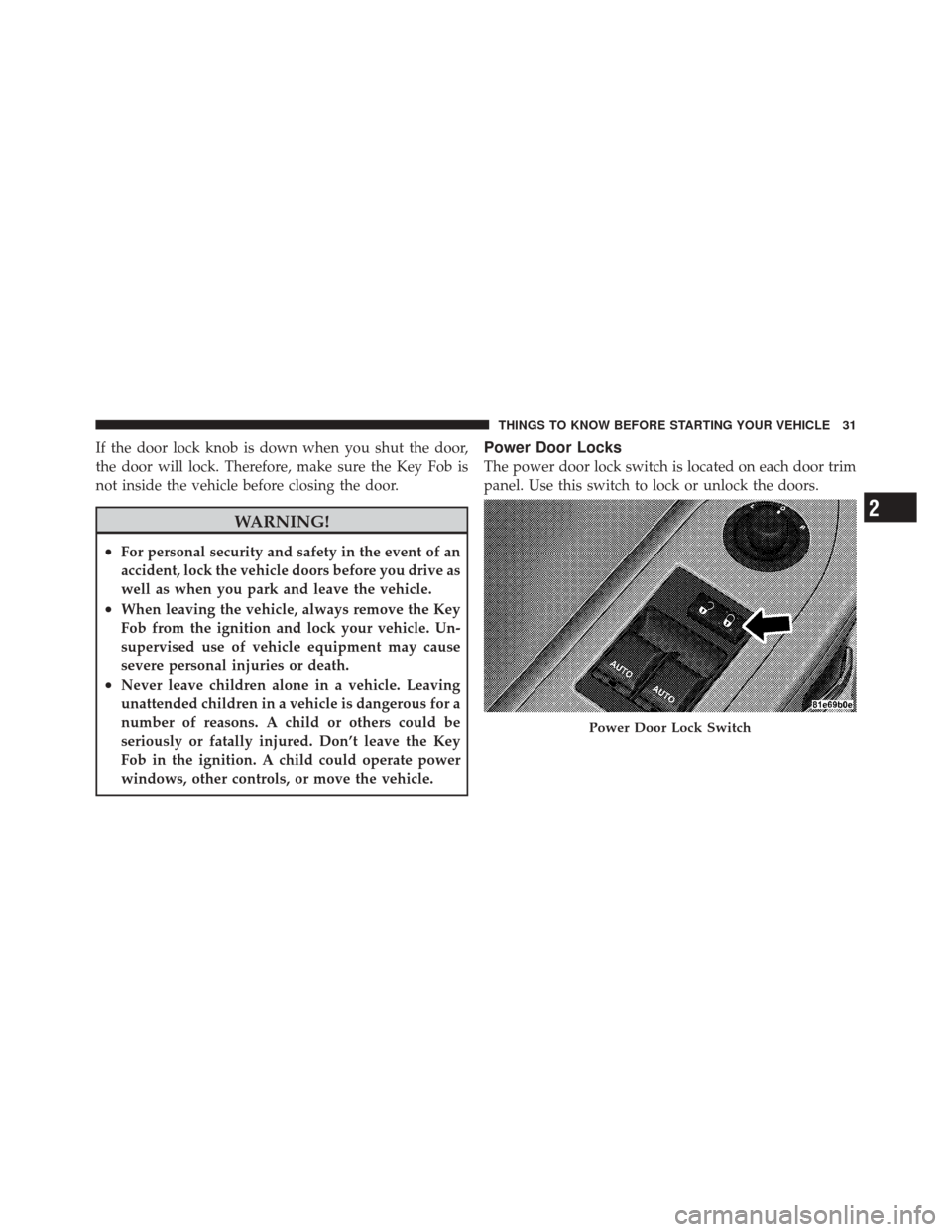
Power Door Locks
The power door lock switch is located on each door trim
panel. Use this switch to lock or unlock the doors.
Power Door Lock Switch
2
THINGS TO KNOW BEFORE STARTING YOUR VEHICLE 31
Page 34 of 460
The doors can also be locked and unlocked with the
Keyless Enter-N-Go (Passive Entry) system. For further
information, refer to “Keyless Enter-N-Go” in “Things To
Know Before Starting Your Vehicle”.
If you press the power door lock switch while the Key
Fob is in the ignition, and either door is open, the power
locks will not operate. This prevents you from acciden-
tally locking the Key Fob in the vehicle. Removing the
Key Fob or closing the door will allow the locks to
operate. If a door is open, the Key Fob is in the ignition,
and the ignition is in the OFF or ACC position, a chime
will sound as a reminder to remove the Key Fob.
Automatic Door Locks — If Equipped
The doors will lock automatically if all of the following
conditions are met:
1. The Automatic Door Locks feature is enabled
2. The transmission is in gear3. All doors are closed
4. The throttle is pressed
5. The vehicle speed is above 15 mph (24 km/h)
6. The doors were not previously locked using the power
door lock switch or Remote Keyless Entry (RKE)
transmitter
Automatic Door Locks Programming —
If Equipped
The Automatic Door Locks feature can be enabled or
disabled as follows:
•For vehicles equipped with the Electronic Vehicle
Information Center (EVIC), refer to “Electronic Vehicle
Information Center (EVIC) — If Equipped/Personal
Settings (Customer-Programmable Features)” in “Un-
derstanding Your Instrument Panel” for further infor-
mation.
32 THINGS TO KNOW BEFORE STARTING YOUR VEHICLE
Page 36 of 460
6. The vehicle speed is 0 mph (0 km/h)
Automatic Unlock Doors On Exit Programming
The Automatic Unlock Doors On Exit feature can be
enabled or disabled. Refer to “Electronic Vehicle Infor-
mation Center (EVIC)/Personal Settings (Customer-
Programmable Features)” in “Understanding Your In-
strument Panel” for further information.
•When not using the EVIC, perform the following
steps:
1. Enter the vehicle and close all doors.
2. Place the Key Fob in the ignition switch.
3. Within 15 seconds, cycle the ignition switch between
OFF and ON/RUN and then back to OFF four times
ending up in the LOCK position. However, do not start
the engine. 4. Within 30 seconds, press the power door UNLOCK
switch to unlock the doors.
5. A single chime will indicate the completion of the
programming.
NOTE:
If you do not hear the chime, it means that the
system did not enter the programming mode and you
will need to repeat the procedure.
6. Repeat these steps if you want to return this feature to
its previous setting.
NOTE: Use the Automatic Unlock Doors On Exit feature
in accordance with local laws.
KEYLESS ENTER-N-GO — IF EQUIPPED
The Passive Entry system is an enhancement to the
vehicle’s Remote Keyless Entry (RKE) system and a
feature of Keyless Enter-N-Go. This feature allows you to
lock and unlock the vehicle’s door(s) without having to
press the RKE transmitter lock or unlock buttons.
34 THINGS TO KNOW BEFORE STARTING YOUR VEHICLE
Page 38 of 460
NOTE:If “Unlock All Doors 1st Press” is programmed
all doors will unlock when you grab hold of the front
driver ’s door handle. To select between “Unlock Driver
Door 1st Press” and “Unlock All Doors 1st Press”, refer to
“Electronic Vehicle Information Center (EVIC)/Personal
Settings (Customer-Programmable Features)” in “Under-
standing Your Instrument Panel” for further information.
To Unlock From The Passenger Side:
With a valid Passive Entry RKE transmitter within 5 ft
(1.5 m) of the passenger door handle, grab the front
passenger door handle to unlock both doors automati-
cally. The interior door panel lock knob will raise when
the door is unlocked.
NOTE: Both doors will unlock when the front passenger
door handle is grabbed regardless of the driver ’s door
unlock preference setting (“Unlock Driver Door 1st
Press” or “Unlock All Doors 1st Press”). Preventing Inadvertent Locking Of Passive Entry RKE
Transmitter In Vehicle
To minimize the possibility of unintentionally locking a
Passive Entry RKE transmitter inside your vehicle, the
Passive Entry system is equipped with an automatic door
unlock feature which will function if there is no Key Fob
present in the ignition.
If one of the vehicle doors is open and the door panel
switch is used to lock the vehicle, once all open doors
have been closed the vehicle checks the inside and
outside of the vehicle for any valid Passive Entry RKE
transmitters. If one of the vehicle’s Passive Entry RKE
transmitters is detected inside the vehicle, and no other
valid Passive Entry RKE transmitters is detected outside
the vehicle, the Passive Entry System automatically un-
locks all vehicle doors and chirps the horn three times (on
the third attempt ALL doors will lock and the Passive
Entry RKE transmitter can be locked in the vehicle).
36 THINGS TO KNOW BEFORE STARTING YOUR VEHICLE
Page 189 of 460
•Right Rear Turn Signal Light Out (with a single chime)
•Personal Settings Not Available – Vehicle Not in PARK
•Left/Right Door Ajar
•Door(s) Ajar (with a single chime if vehicle is in
motion)
•Trunk Ajar (with a single chime)
•Oil Change Required
•Low Washer Fluid (with a single chime)
•Channel # Transmit
•Channel # Training
•Channel # Trained
•Clearing Channels
•Channels Cleared
•Did Not Train
•Low Tire Pressure (with a single chime)
•Service TPM System (with a single chime)
•ESP Off
•Check Gascap
•Key Fob Battery Low
•Service Keyless System
•Wrong Key
•Damaged Key
•Key not Programmed
•Push Button or Insert Key/Turn To Run (refer to
“Remote Starting System” in “Things To Know Before
Starting Your Vehicle”)
•1–4 SKIPSHIFT
4
UNDERSTANDING YOUR INSTRUMENT PANEL 187