alarm DODGE CHALLENGER SRT 2018 User Guide
[x] Cancel search | Manufacturer: DODGE, Model Year: 2018, Model line: CHALLENGER SRT, Model: DODGE CHALLENGER SRT 2018Pages: 486, PDF Size: 4.56 MB
Page 91 of 486
Security
It is advised to erase all channels before you sell or turn in
your vehicle.
To do this, push and hold the two outside buttons for 20
seconds until the orange indicator flashes. Note that all
channels will be erased. Individual channels cannot be
erased.
The HomeLink Universal Transceiver is disabled when the
Vehicle Security Alarm is active.
Troubleshooting Tips
If you are having trouble programming HomeLink, here
are some of the most common solutions:
•Replace the battery in the Garage Door Opener hand-
held transmitter.
• Push the LEARN button on the Garage Door Opener to
complete the training for a Rolling Code.
• Did you unplug the device for programming and re-
member to plug it back in?
If you have any problems, or require assistance, please call
toll-free 1-800-355-3515 or, on the Internet at
HomeLink.com for information or assistance.
WARNING!
• Vehicle exhaust contains carbon monoxide, a danger-
ous gas. Do not run your vehicle in the garage while
programming the transceiver. Exhaust gas can cause
serious injury or death.
• Your motorized door or gate will open and close
while you are programming the universal trans-
ceiver. Do not program the transceiver if people, pets
or other objects are in the path of the door or gate.
Only use this transceiver with a garage door opener
that has a “stop and reverse” feature as required by
Federal safety standards. This includes most garage
door opener models manufactured after 1982. Do not
use a garage door opener without these safety fea-
tures. Call toll-free 1-800-355-3515 or, on the Internet
at HomeLink.com for safety information or assis-
tance.
3
GETTING TO KNOW YOUR VEHICLE 89
Page 113 of 486
Loss of the battery charge may indicate one or more of the
following conditions:
•The charging system cannot deliver enough electrical
power to the vehicle system because the electrical loads
are larger than the capability of charging system. The
charging system is still functioning properly.
• Turning on all possible vehicle electrical loads (e.g.
HVAC to max settings, exterior and interior lights,
overloaded power outlets +12V, 115V AC, USB ports)
during certain driving conditions (city driving, towing,
frequent stopping).
• Installing options like additional lights, upfitter electri-
cal accessories, audio systems, alarms and similar de-
vices.
• Unusual driving cycles (short trips separated by long
parking periods).
• The vehicle was parked for an extended period of time
(weeks, months).
• The battery was recently replaced and was not charged
completely.
• The battery was discharged by an electrical load left on
when the vehicle was parked. •
The battery was used for an extended period with the
engine not running to supply radio, lights, chargers,
+12V portable appliances like vacuum cleaners, game
consoles and similar devices.
What to do when an electrical load reduction action message
is present (“Battery Saver On” or “Battery Saver Mode”)
During a trip:
• Reduce power to unnecessary loads if possible:
– Turn off redundant lights (interior or exterior)
– Check what may be plugged in to power outlets +12V, 115V AC, USB ports
– Check HVAC settings (blower, temperature)
– Check the audio settings (volume)
After a trip:
• Check if any aftermarket equipment was installed (ad-
ditional lights, upfitter electrical accessories, audio sys-
tems, alarms) and review specifications if any (load and
Ignition Off Draw currents).
• Evaluate the latest driving cycles (distance, driving time
and parking time).
• The vehicle should have service performed if the mes-
sage is still present during consecutive trips and the
evaluation of the vehicle and driving pattern did not
help to identify the cause.
4
GETTING TO KNOW YOUR INSTRUMENT PANEL 111
Page 115 of 486
The dual brake system provides a reserve braking capacity
in the event of a failure to a portion of the hydraulic
system. A leak in either half of the dual brake system is
indicated by the Brake Warning Light, which will turn on
when the brake fluid level in the master cylinder has
dropped below a specified level.
The light will remain on until the cause is corrected.
NOTE:The light may flash momentarily during sharp
cornering maneuvers, which change fluid level conditions.
The vehicle should have service performed, and the brake
fluid level checked.
If brake failure is indicated, immediate repair is necessary.
WARNING!
Driving a vehicle with the red brake light on is
dangerous. Part of the brake system may have failed. It
will take longer to stop the vehicle. You could have a
collision. Have the vehicle checked immediately. Vehicles equipped with the Anti-Lock Brake System (ABS)
are also equipped with Electronic Brake Force Distribution
(EBD). In the event of an EBD failure, the Brake Warning
Light will turn on along with the ABS Light. Immediate
repair to the ABS system is required.
Operation of the Brake Warning Light can be checked by
turning the ignition switch from the OFF position to the
ON/RUN position. The light should illuminate for ap-
proximately two seconds. The light should then turn off
unless the parking brake is applied or a brake fault is
detected. If the light does not illuminate, have the light
inspected by an authorized dealer.
The light also will turn on when the parking brake is
applied with the ignition switch in the ON/RUN position.
NOTE:
This light shows only that the parking brake is
applied. It does not show the degree of brake application.
— Vehicle Security Warning Light — If Equipped
This light will flash at a fast rate for approximately 15
seconds when the vehicle security alarm is arming, and
then will flash slowly until the vehicle is disarmed.
4
GETTING TO KNOW YOUR INSTRUMENT PANEL 113
Page 173 of 486
On the other hand, depending on the type and location of
impact, front air bags may deploy in crashes with little
vehicle front-end damage but that produce a severe initial
deceleration.
Because air bag sensors measure vehicle deceleration over
time, vehicle speed and damage by themselves are not
good indicators of whether or not an air bag should have
deployed.
Seat belts are necessary for your protection in all collisions,
and also are needed to help keep you in position, away
from an inflating air bag.
When the ORC detects a collision requiring the front air
bags, it signals the inflator units. A large quantity of
non-toxic gas is generated to inflate the front air bags.
The steering wheel hub trim cover and the upper passen-
ger side of the instrument panel separate and fold out of
the way as the air bags inflate to their full size. The front air
bags fully inflate in less time than it takes to blink your
eyes. The front air bags then quickly deflate while helping
to restrain the driver and front passenger.Knee Impact Bolsters
The Knee Impact Bolsters help protect the knees of the
driver and front passenger, and position the front occu-
pants for improved interaction with the front air bags.
WARNING!
•Do not drill, cut, or tamper with the knee impact
bolsters in any way.
• Do not mount any accessories to the knee impact
bolsters such as alarm lights, stereos, citizen band
radios, etc.
Supplemental Side Air Bags
Supplemental Seat-Mounted Side Air Bags (SABs)
This vehicle is equipped with Supplemental Seat-Mounted
Side Air Bags (SABs).
Supplemental Seat-Mounted Side Air Bags (SABs) are
located in the outboard side of the front seats. The SABs are
marked with “SRS AIRBAG” or “AIRBAG” on a label or on
the seat trim on the outboard side of the seats.
5
SAFETY 171
Page 258 of 486
General Information
The following regulatory statement applies to all Radio
Frequency (RF) devices equipped in this vehicle:
This device complies with Part 15 of the FCC Rules and
with Industry Canada license-exempt RSS standard(s).
Operation is subject to the following two conditions:
1. This device may not cause harmful interference.
2. This device must accept any interference received, in-cluding interference that may cause undesired opera-
tion.
NOTE: Changes or modifications not expressly approved
by the party responsible for compliance could void the
user ’s authority to operate the equipment.
Normal (Fixed Speed) Cruise Control Mode
In addition to Adaptive Cruise Control mode, a Normal
(Fixed Speed) Cruise Control mode is available for cruising
at fixed speeds. The Normal (Fixed Speed) Cruise Control
mode is designed to maintain a set cruising speed without
requiring the driver to operate the accelerator. Cruise
Control can only be operated if the vehicle speed is above
20 mph (32 km/h). To change between the different control modes, push the
Adaptive Cruise Control (ACC) on/off button which turns
the ACC and the Normal (Fixed Speed) Cruise Control off.
Pushing the Normal (Fixed Speed) Cruise Control on/off
button will result in turning on (changing to) the Normal
(Fixed Speed) Cruise Control mode.
WARNING!
In the Normal (Fixed Speed) Cruise Control mode, the
system will not react to vehicles ahead. In addition, the
proximity warning does not activate and no alarm will
sound even if you are too close to the vehicle ahead
since neither the presence of the vehicle ahead nor the
vehicle-to vehicle distance is detected. Be sure to
maintain a safe distance between your vehicle and the
vehicle ahead. Always be aware which mode is se-
lected.
To Set A Desired Speed
Turn the Normal (Fixed Speed) Cruise Control
on. When the vehicle has reached the desired
speed, push the SET (+) or SET (-) button and
release. Release the accelerator and the vehicle
will operate at the selected speed. Once a speed has been
256 STARTING AND OPERATING
Page 453 of 486
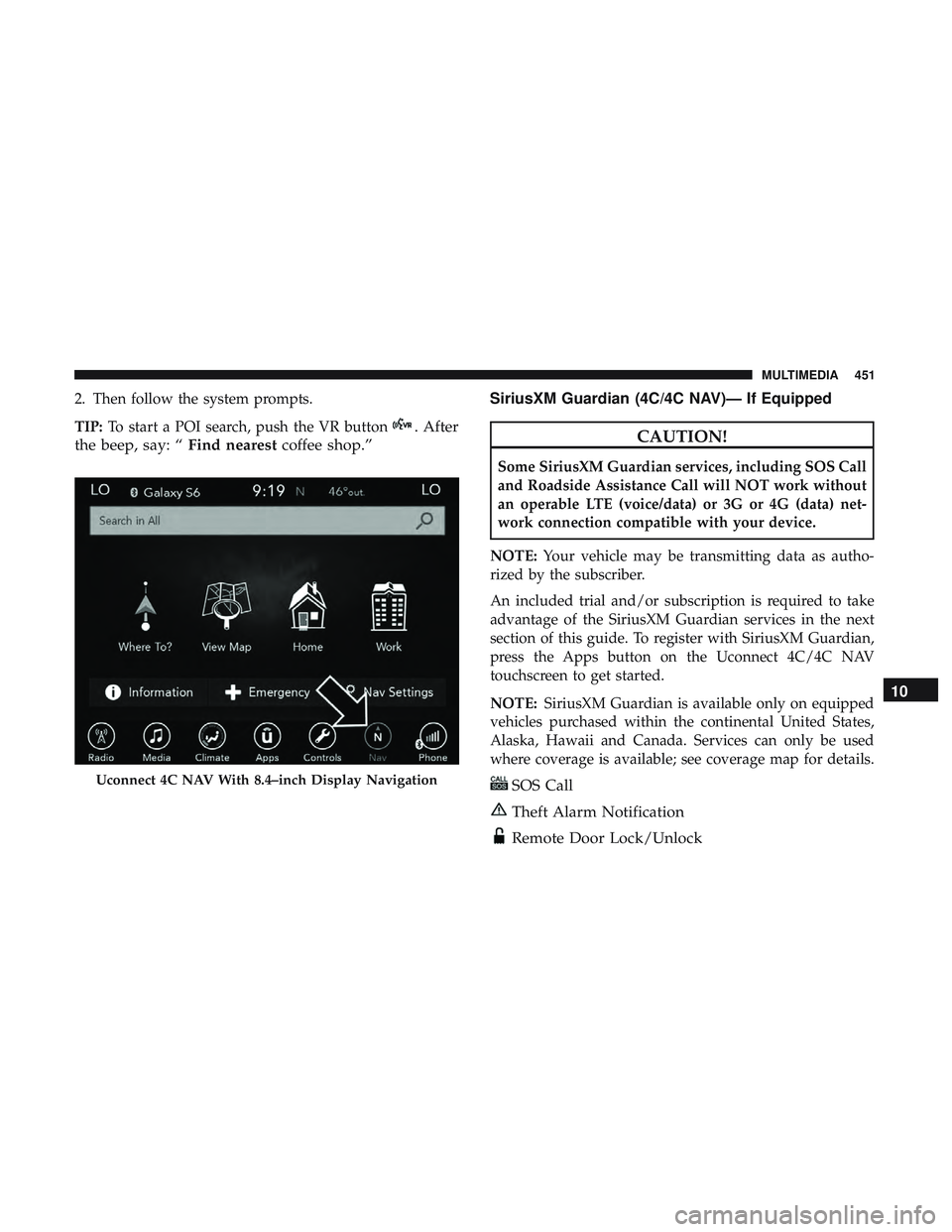
2. Then follow the system prompts.
TIP:To start a POI search, push the VR button
. After
the beep, say: “ Find nearestcoffee shop.” SiriusXM Guardian (4C/4C NAV)— If EquippedCAUTION!
Some SiriusXM Guardian services, including SOS Call
and Roadside Assistance Call will NOT work without
an operable LTE (voice/data) or 3G or 4G (data) net-
work connection compatible with your device.
NOTE: Your vehicle may be transmitting data as autho-
rized by the subscriber.
An included trial and/or subscription is required to take
advantage of the SiriusXM Guardian services in the next
section of this guide. To register with SiriusXM Guardian,
press the Apps button on the Uconnect 4C/4C NAV
touchscreen to get started.
NOTE: SiriusXM Guardian is available only on equipped
vehicles purchased within the continental United States,
Alaska, Hawaii and Canada. Services can only be used
where coverage is available; see coverage map for details.
SOS Call
Theft Alarm Notification
Remote Door Lock/Unlock
Uconnect 4C NAV With 8.4–inch Display Navigation
10
MULTIMEDIA 451
Page 470 of 486
About Your Brakes..................... .213, 374
Adaptive Cruise Control (ACC) (Cruise Control) . . . .240
Adding Engine Coolant (Antifreeze) .............337
Adding Washing Fluid ...................... .322
Additives, Fuel ........................... .377
Adjust Forward ............................ .41, 42
Rearward ........................... .41, 42
AirBag ................................ .169
Advance Front Air Bag ....................169
Air Bag Operation ....................... .170
Air Bag Warning Light .....................167
Enhanced Accident Response .............177, 312
Event Data Recorder (EDR) .................312
FrontAirBag .......................... .169
If Deployment Occurs .....................176
Knee Impact Bolsters ..................... .171
Maintaining Your Air Bag System .............179
Maintenance ........................... .179
Redundant Air Bag Warning Light ............168
Side Air Bags .......................... .171
Transporting Pets ....................... .199
Air Bag Light .......................112, 167, 201
Air Cleaner, Engine (Engine Air Cleaner Filter) ......326
Air Conditioner Maintenance ..................327 Air Conditioner Refrigerant
................327, 328
Air Conditioner System ..................... .327
Air Conditioning ............................67
Air Conditioning Filter ....................74, 328
Air Conditioning, Operating Tips ................73
Air Conditioning System ......................67
Air Filter ............................... .326
Air Pressure Tires................................. .355
Alarm Arm The System ...................... .32, 33
Panic ..................................20
Rearm The System ........................33
Security Alarm ....................... .32, 113
Alarm
System
Security Alarm ...........................32
Alterations/Modifications, Vehicle ................6
Android Auto ............................ .456
Antifreeze (Engine Coolant) ................337, 381
Disposal .............................. .339
Anti-Lock Brake System (ABS) .................128
Anti-Lock Warning Light .....................119
Apple CarPlay ........................... .457
Arming System Security Alarm ...........................32
468 INDEX
Page 476 of 486
Ignition..................................24
Switch .................................24
Information Center, Vehicle ...................101
Inside Rearview Mirror ....................54, 274
Instrument Cluster Descriptions ......................... .98, 121
Display .............................. .104
Instrument Panel Lens Cleaning ................371
Interior Appearance Care .....................370
Interior Lights ..............................62
Intermittent Wipers (Delay Wipers) ...............65
Introduction ................................4
iPod/USB/MP3 Control ..................... .442
Bluetooth Streaming Audio .................442
Jack Operation ........................... .344
Jump Starting ......................... .303, 304
Key Fob Arm The System ..........................32
Panic Alarm .............................20
Programming Additional Key Fobs ..........23, 31
Unlatch The Trunk ........................20
Key Fob Battery Service (Remote Keyless Entry) .....21
Key Fob Programming (Remote Keyless Entry) ......23Key-In Reminder
............................26
Keyless Enter-N-Go ..........................35
Enter The Trunk ..........................20
Keys ....................................17
Replacement ......................... .23, 31
Lane Change And Turn Signals .................61
Lane Change Assist ..........................61
Lap/Shoulder Belts ........................ .158
Latches ................................. .203
Hood ..................................80
Lead Free Gasoline ........................ .376
Leaks, Fluid ............................. .203
Life Of Tires ............................. .358
Light Bulbs .......................... .203, 280
Lights .................................. .203
AirBag .........................112, 167, 201
Automatic Headlights ......................59
Brake Assist Warning ..................... .134
Brake Warning .......................112,374
Bulb
Replacement ....................... .280
Courtesy/Reading .........................62
Cruise ............................... .121
Daytime Running .........................58
Dimmer Switch, Headlight ...................58
474 INDEX
Page 477 of 486
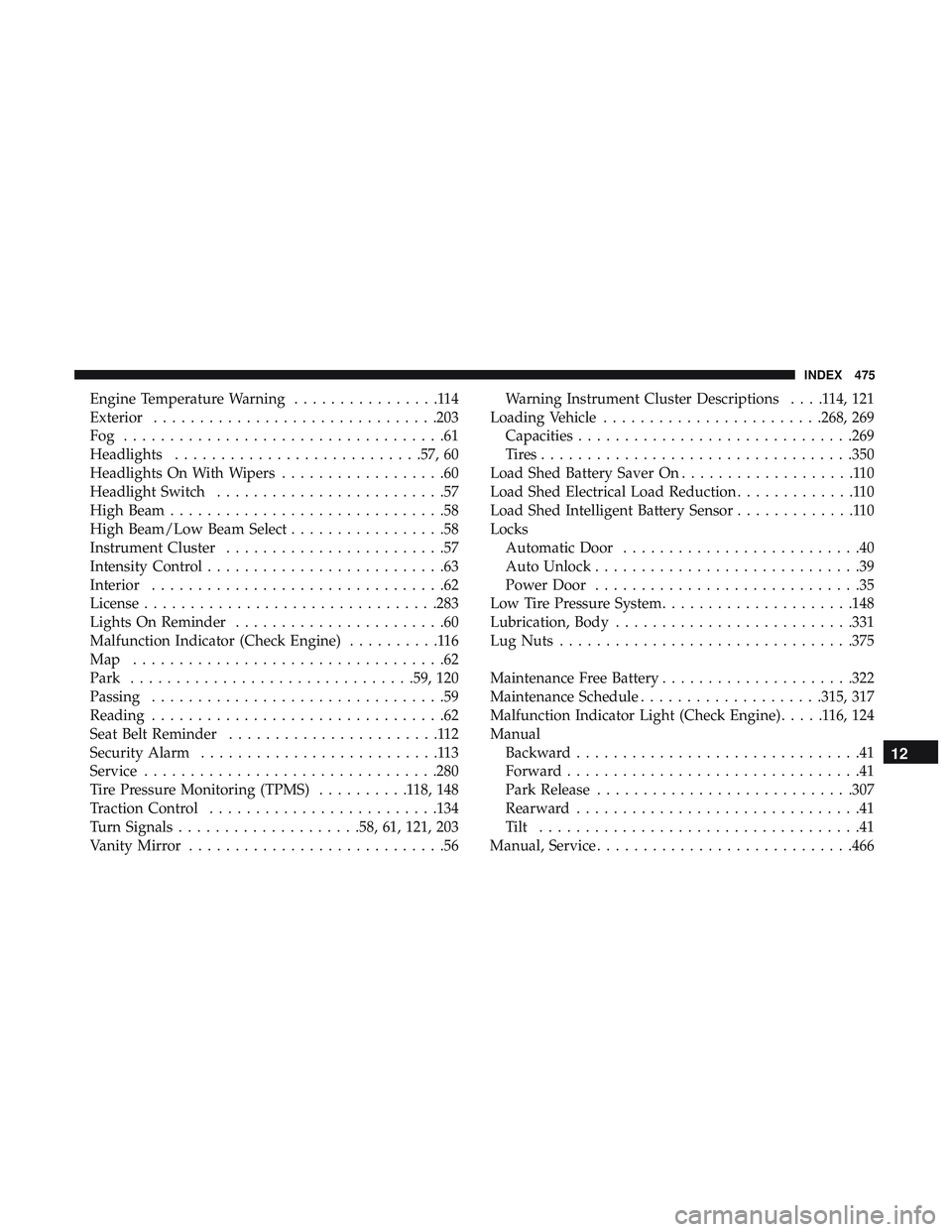
Engine Temperature Warning................114
Exterior .............................. .203
Fog ...................................61
Headlights .......................... .57, 60
Headlights On With Wipers ..................60
Headlight Switch .........................57
High Beam ..............................58
High Beam/Low Beam Select .................58
Instrument Cluster ........................57
Intensity Control ..........................63
Interior ................................62
License ............................... .283
Lights On Reminder .......................60
Malfunction Indicator (Check Engine) ..........116
Map ..................................62
Park .............................. .59, 120
Passing ................................59
Reading ................................62
Seat Belt Reminder .......................112
Security Alarm ..........................113
Service ............................... .280
Tire Pressure Monitoring (TPMS) ..........118,148
Traction Control ........................ .134
Turn Signals ....................58, 61, 121, 203
Vanity Mirror ............................56 Warning Instrument Cluster Descriptions
....114,121
Loading Vehicle ....................... .268, 269
Capacities ............................. .269
Tires................................. .350
Load Shed Battery Saver On ...................110
Load Shed Electrical Load Reduction .............110
Load Shed Intelligent Battery Sensor .............110
Locks Automatic Door ..........................40
Auto Unlock .............................39
Power Door .............................35
Low Tire Pressure System .....................148
Lubrication, Body ......................... .331
Lug Nuts ............................... .375
Maintenance Free Battery .....................322
Maintenance Schedule ....................315, 317
Malfunction Indicator Light (Check Engine) .....116,124
Manual Backward ...............................41
Forward ................................41
Park Release ........................... .307
Rearward ...............................
41
Tilt ...................................41
Manual, Service ........................... .466
12
INDEX 475
Page 478 of 486
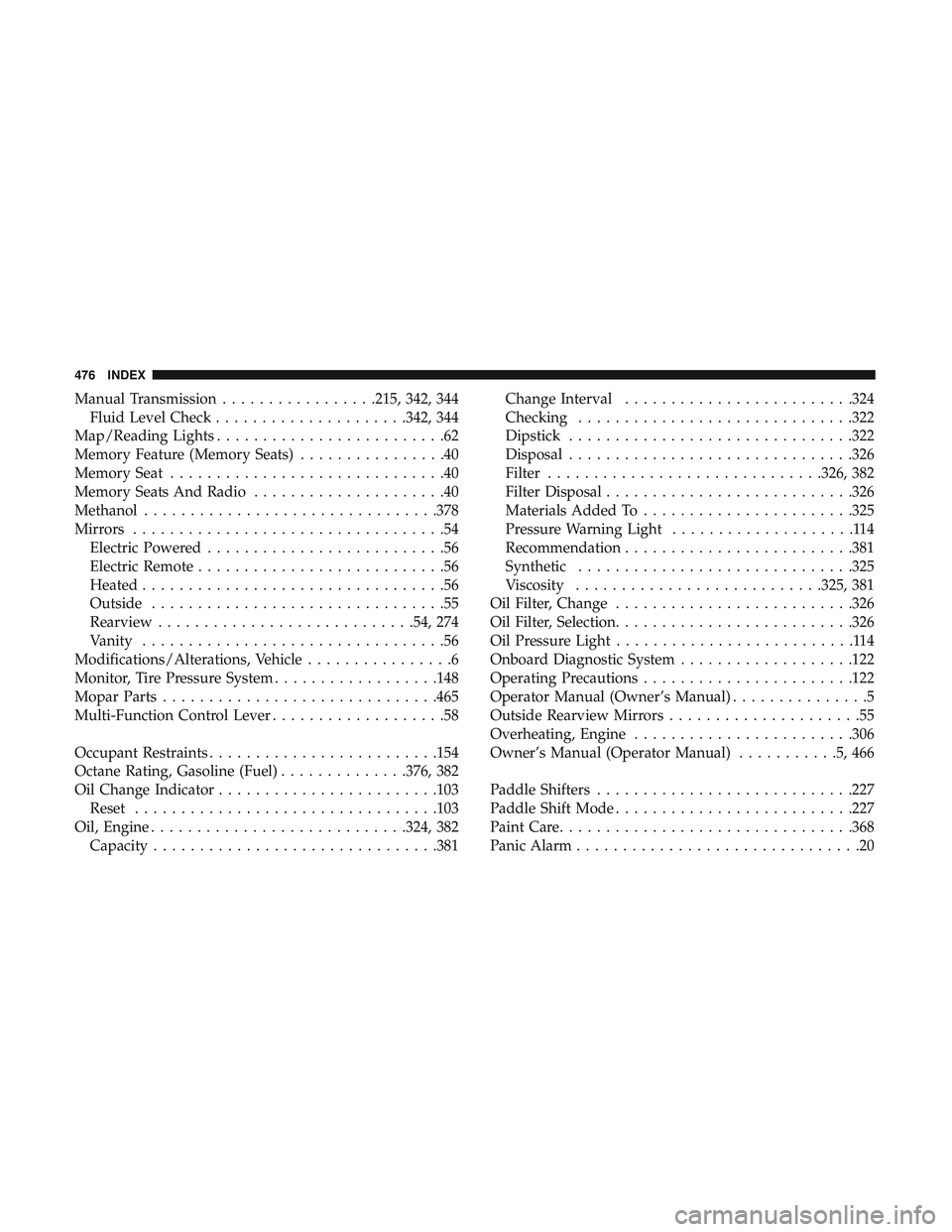
Manual Transmission.................215, 342, 344
Fluid Level Check .....................342, 344
Map/Reading Lights .........................62
Memory Feature (Memory Seats) ................40
Memory Seat ..............................40
Memory Seats And Radio .....................40
Methanol ............................... .378
Mirrors ..................................54
Electric Powered ..........................56
Electric Remote ...........................56
Heated .................................56
Outside ................................55
Rearview ........................... .54, 274
Vanity .................................56
Modifications/Alterations, Vehicle ................6
Monitor, Tire Pressure System ..................148
Mopar Parts ............................. .465
Multi-Function Control Lever ...................58
Occupant Restraints ........................ .154
Octane Rating, Gasoline (Fuel) ..............376, 382
Oil Change Indicator ....................... .103
Reset ................................ .103
Oil, Engine ........................... .324, 382
Capacity .............................. .381Change Interval
........................ .324
Checking ............................. .322
Dipstick .............................. .322
Disposal .............................. .326
Filter ............................. .326, 382
Filter Disposal .......................... .326
Materials Added To ...................... .325
Pressure Warning Light ....................114
Recommendation ........................ .381
Synthetic ............................. .325
Viscosity .......................... .325, 381
Oil Filter, Change ......................... .326
Oil Filter, Selection ......................... .326
Oil Pressure Light ..........................114
Onboard Diagnostic System ...................122
Operating
Precautions ...................... .122
Operator Manual (Owner’s Manual) ...............5
Outside Rearview Mirrors .....................55
Overheating, Engine ....................... .306
Owner’s Manual (Operator Manual) ...........5,466
Paddle Shifters ........................... .227
Paddle Shift Mode ......................... .227
Paint Care ............................... .368
Panic Alarm ...............................20
476 INDEX