torque DODGE CHALLENGER SRT 2018 User Guide
[x] Cancel search | Manufacturer: DODGE, Model Year: 2018, Model line: CHALLENGER SRT, Model: DODGE CHALLENGER SRT 2018Pages: 486, PDF Size: 4.56 MB
Page 415 of 486
2. Select the following option from the menu:•Set Widget: Top Left
• Set Widget: Top Right
• Set Widget: Bottom Left
• Set Widget: Bottom Right
3. After selecting a Widget location: select the gauge or timer to display:
• Gauge: Oil Temp
• Gauge: Oil Pressure
• Gauge: Coolant Temp
• Gauge: Battery Voltage
• Gauge: Trans Temp
• Gauge: Boost Pressure
• Gauge: Air/Fuel Ratio — If Equipped
• Gauge: I/C Coolant Temp
• Gauge: Intake Air Temp
• Gauge: Engine Torque •
Gauge: Engine Power
• Gauge: G-Force
• Gauge: Steering Angle
• Gauge: Current Gear
• Gauge: Current Speed
• Timer: 0–60 MPH
• Timer: 0–100 MPH
• Timer: 1/8 Mile
• Timer: 1/4 Mile
• Timer: Brake Distance
• Timer: Reaction Time
NOTE: Pressing the “Camera” icon in the upper right
corner of the Performance Pages screen will take a screen-
shot of the current screen and save it to a USB that is
connected.
10
MULTIMEDIA 413
Page 422 of 486
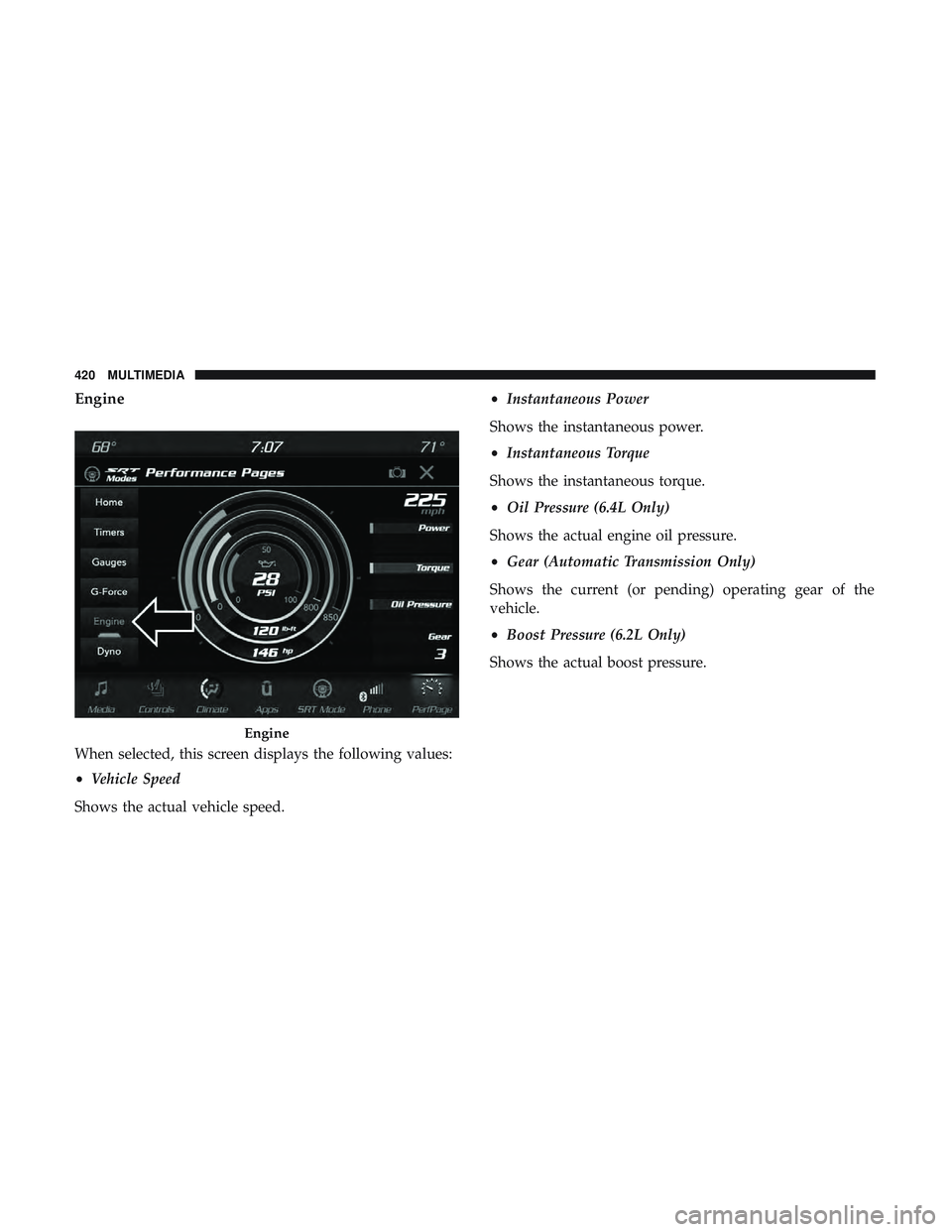
Engine
When selected, this screen displays the following values:
•Vehicle Speed
Shows the actual vehicle speed. •
Instantaneous Power
Shows the instantaneous power.
• Instantaneous Torque
Shows the instantaneous torque.
• Oil Pressure (6.4L Only)
Shows the actual engine oil pressure.
• Gear (Automatic Transmission Only)
Shows the current (or pending) operating gear of the
vehicle.
• Boost Pressure (6.2L Only)
Shows the actual boost pressure.
Engine
420 MULTIMEDIA
Page 423 of 486
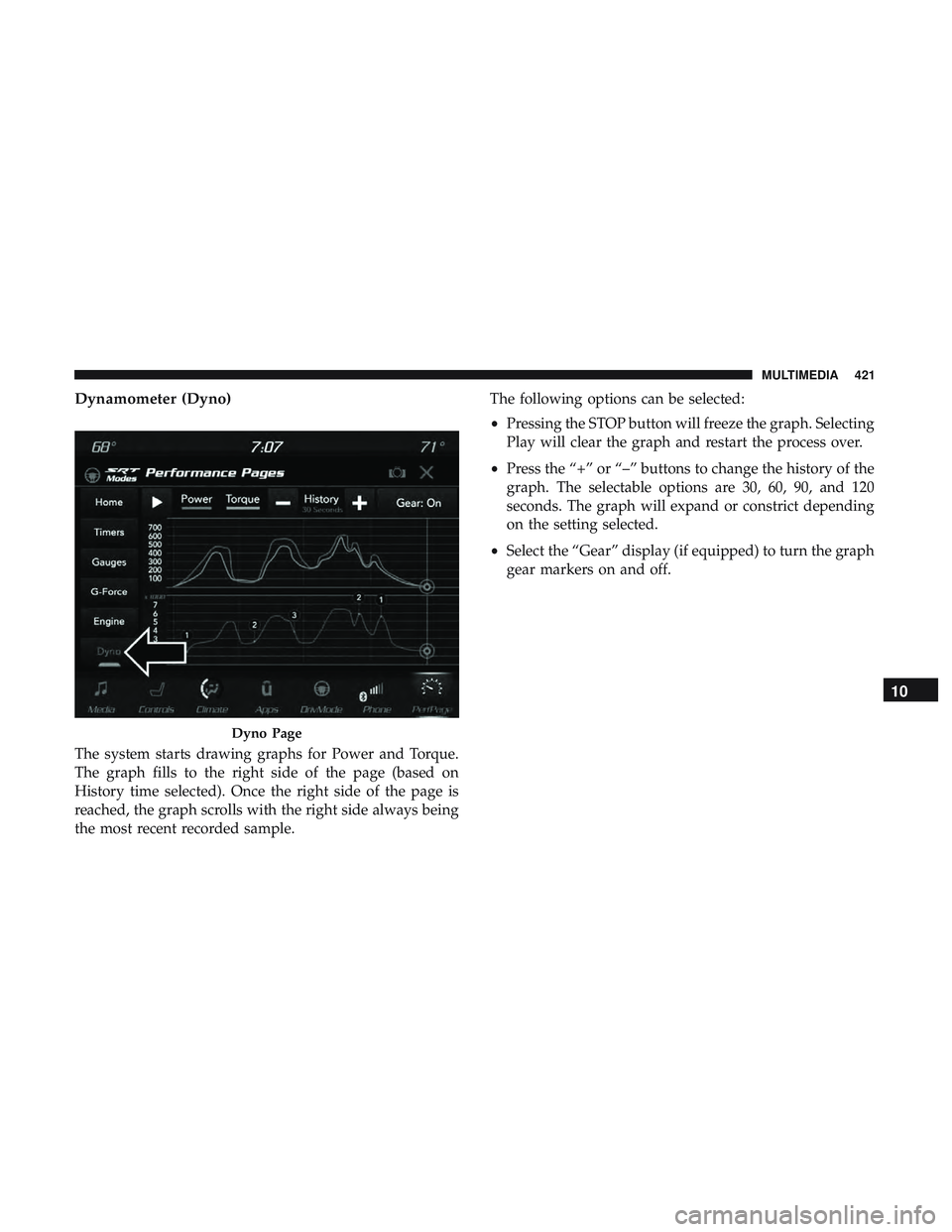
Dynamometer (Dyno)
The system starts drawing graphs for Power and Torque.
The graph fills to the right side of the page (based on
History time selected). Once the right side of the page is
reached, the graph scrolls with the right side always being
the most recent recorded sample.The following options can be selected:
•
Pressing the STOP button will freeze the graph. Selecting
Play will clear the graph and restart the process over.
• Press the “+” or “–” buttons to change the history of the
graph. The selectable options are 30, 60, 90, and 120
seconds. The graph will expand or constrict depending
on the setting selected.
• Select the “Gear” display (if equipped) to turn the graph
gear markers on and off.
Dyno Page
10
MULTIMEDIA 421
Page 482 of 486
Wheel, Heated...........................53
Wheel, Tilt ..............................52
Steering Wheel Audio Controls .................441
Steering Wheel Mounted Sound System Controls . . . .441
Storage ................................. .368
Storage, Vehicle ........................ .73, 368
Storing Your Vehicle ....................... .368
Stuck, Freeing ............................ .309
Sun Roof .................................77
Supplemental Restraint System – Air Bag ..........169
Synthetic Engine Oil ....................... .325
Telescoping Steering Column ...................52
Temperature Control, Automatic (ATC) ............72
Tilt Steering Column .........................52
Time Delay Headlight ...............................60
Tire And Loading Information Placard ............350
Tire Markings ............................ .345
Tires......................... .203, 354, 361, 367
Aging (Life Of Tires) ..................... .358
Air Pressure ........................... .354
Chains ............................... .365
Changing ............................. .344
Compact Spare ......................... .362General Information
...................354, 361
High Speed ............................ .356
Inflation Pressure ....................... .355
Jacking ............................... .344
Life Of Tires ........................... .358
Load Capacity ...................... .350, 351
Pressure Monitoring System (TPMS) ........118,148
Quality Grading ........................ .367
Radial ............................... .356
Replacement ........................... .359
Rotation .............................. .365
Safety ............................ .344, 354
Sizes ................................ .346
Snow Tires ............................ .361
Spar
e Tires ......................... .361, 363
Spinning .............................. .357
Tread Wear Indicators .....................358
Wheel Nut Torque ....................... .375
Tire Safety Information ...................... .344
Tire Service Kit ............295, 296, 297, 298, 301, 302
To Open Hood .............................80
Towing ................................. .270
Disabled Vehicle ...................310, 311, 312
Recreational ........................... .270
Towing Behind A Motorhome ..................270
480 INDEX