power steering DODGE CHALLENGER SRT 2018 Owner's Manual
[x] Cancel search | Manufacturer: DODGE, Model Year: 2018, Model line: CHALLENGER SRT, Model: DODGE CHALLENGER SRT 2018Pages: 486, PDF Size: 4.56 MB
Page 294 of 486
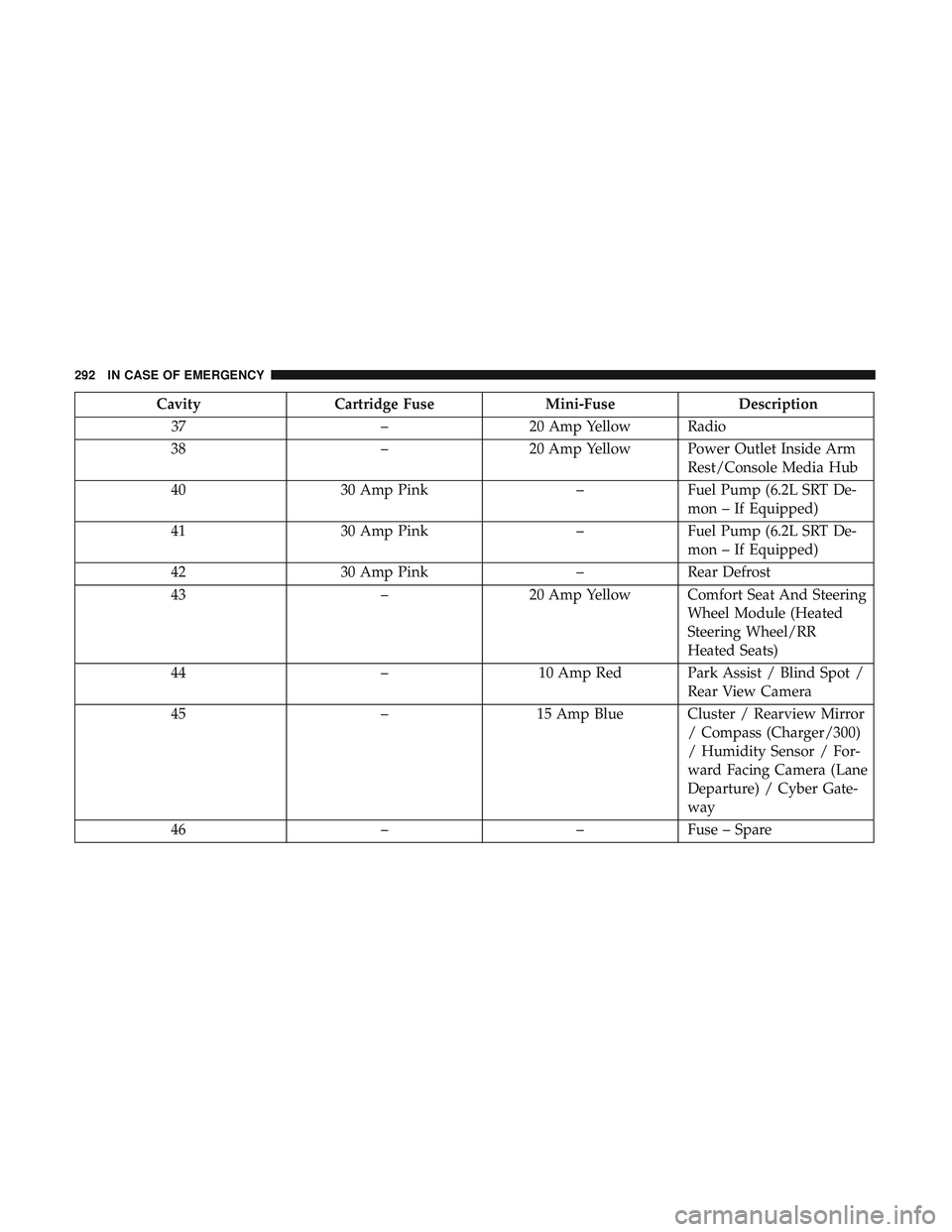
CavityCartridge Fuse Mini-FuseDescription
37 –20 Amp Yellow Radio
38 –20 Amp Yellow Power Outlet Inside Arm
Rest/Console Media Hub
40 30 Amp Pink –Fuel Pump (6.2L SRT De-
mon – If Equipped)
41 30 Amp Pink –Fuel Pump (6.2L SRT De-
mon – If Equipped)
42 30 Amp Pink –Rear Defrost
43 –20 Amp Yellow Comfort Seat And Steering
Wheel Module (Heated
Steering Wheel/RR
Heated Seats)
44 –10 Amp Red Park Assist / Blind Spot /
Rear View Camera
45 –15 Amp Blue Cluster / Rearview Mirror
/ Compass (Charger/300)
/ Humidity Sensor / For-
ward Facing Camera (Lane
Departure) / Cyber Gate-
way
46 ––Fuse – Spare
292 IN CASE OF EMERGENCY
Page 318 of 486
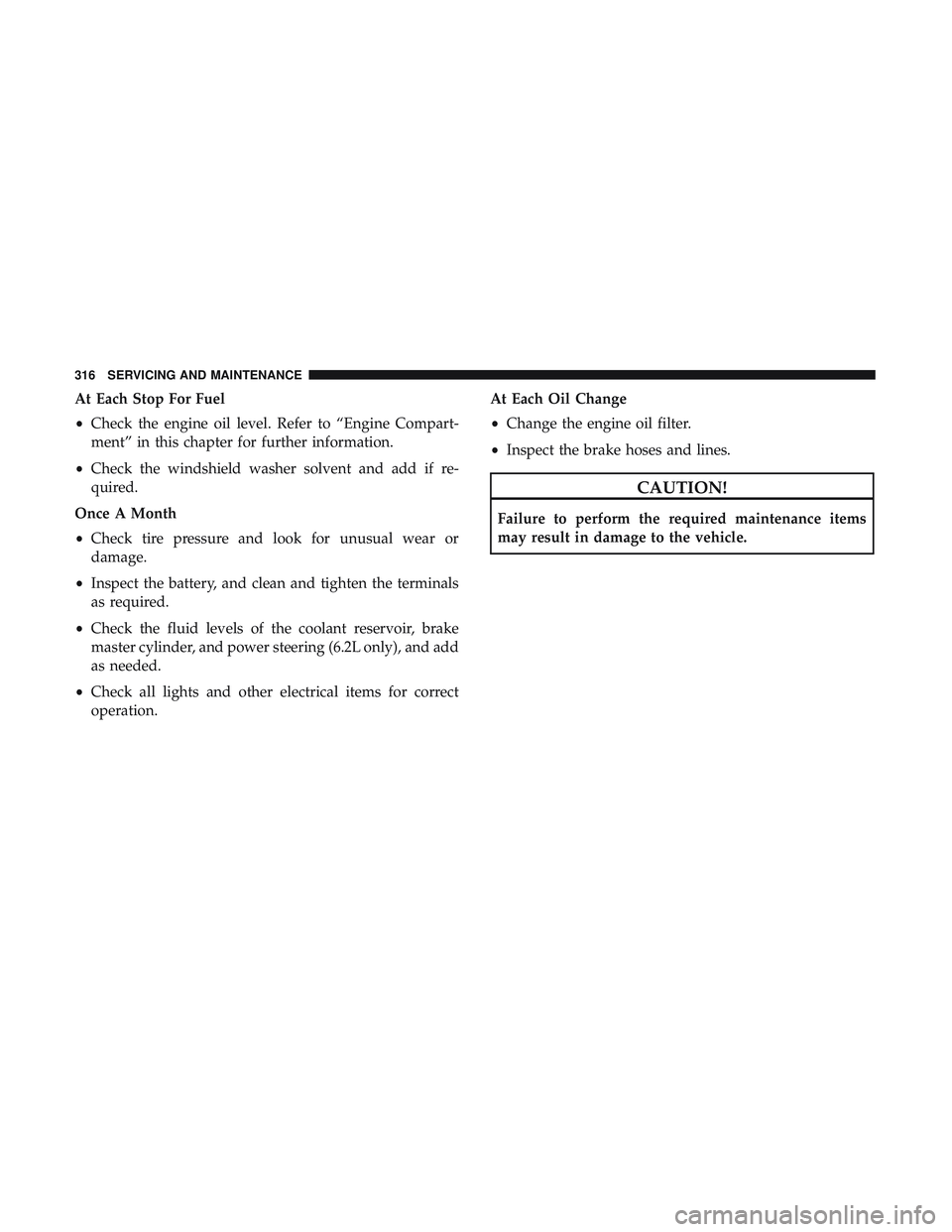
At Each Stop For Fuel
•Check the engine oil level. Refer to “Engine Compart-
ment” in this chapter for further information.
• Check the windshield washer solvent and add if re-
quired.
Once A Month
• Check tire pressure and look for unusual wear or
damage.
• Inspect the battery, and clean and tighten the terminals
as required.
• Check the fluid levels of the coolant reservoir, brake
master cylinder, and power steering (6.2L only), and add
as needed.
• Check all lights and other electrical items for correct
operation. At Each Oil Change
•
Change the engine oil filter.
• Inspect the brake hoses and lines.
CAUTION!
Failure to perform the required maintenance items
may result in damage to the vehicle.
316 SERVICING AND MAINTENANCE
Page 322 of 486
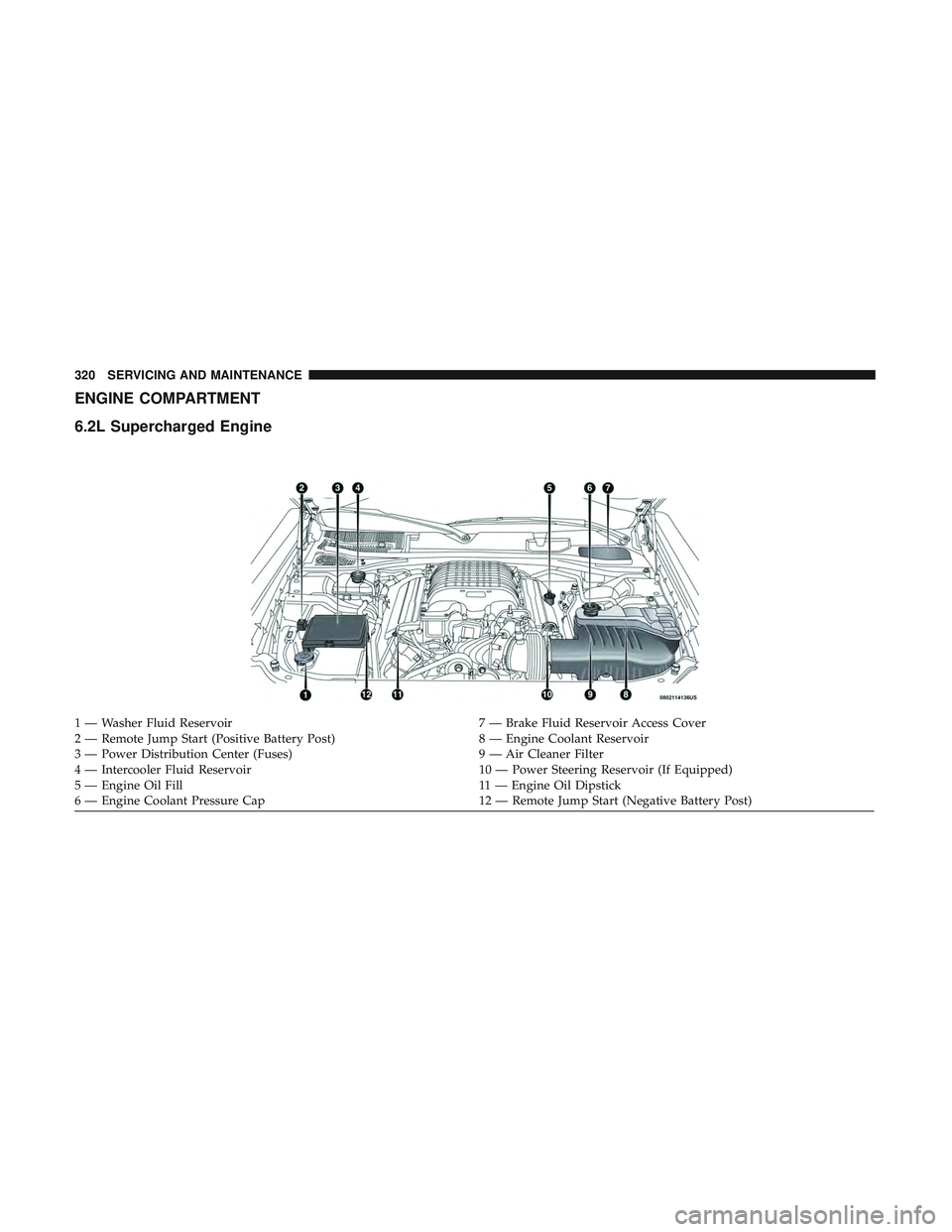
ENGINE COMPARTMENT
6.2L Supercharged Engine
1 — Washer Fluid Reservoir7 — Brake Fluid Reservoir Access Cover
2 — Remote Jump Start (Positive Battery Post) 8 — Engine Coolant Reservoir
3 — Power Distribution Center (Fuses) 9 — Air Cleaner Filter
4 — Intercooler Fluid Reservoir 10 — Power Steering Reservoir (If Equipped)
5 — Engine Oil Fill 11 — Engine Oil Dipstick
6 — Engine Coolant Pressure Cap 12 — Remote Jump Start (Negative Battery Post)
320 SERVICING AND MAINTENANCE
Page 386 of 486
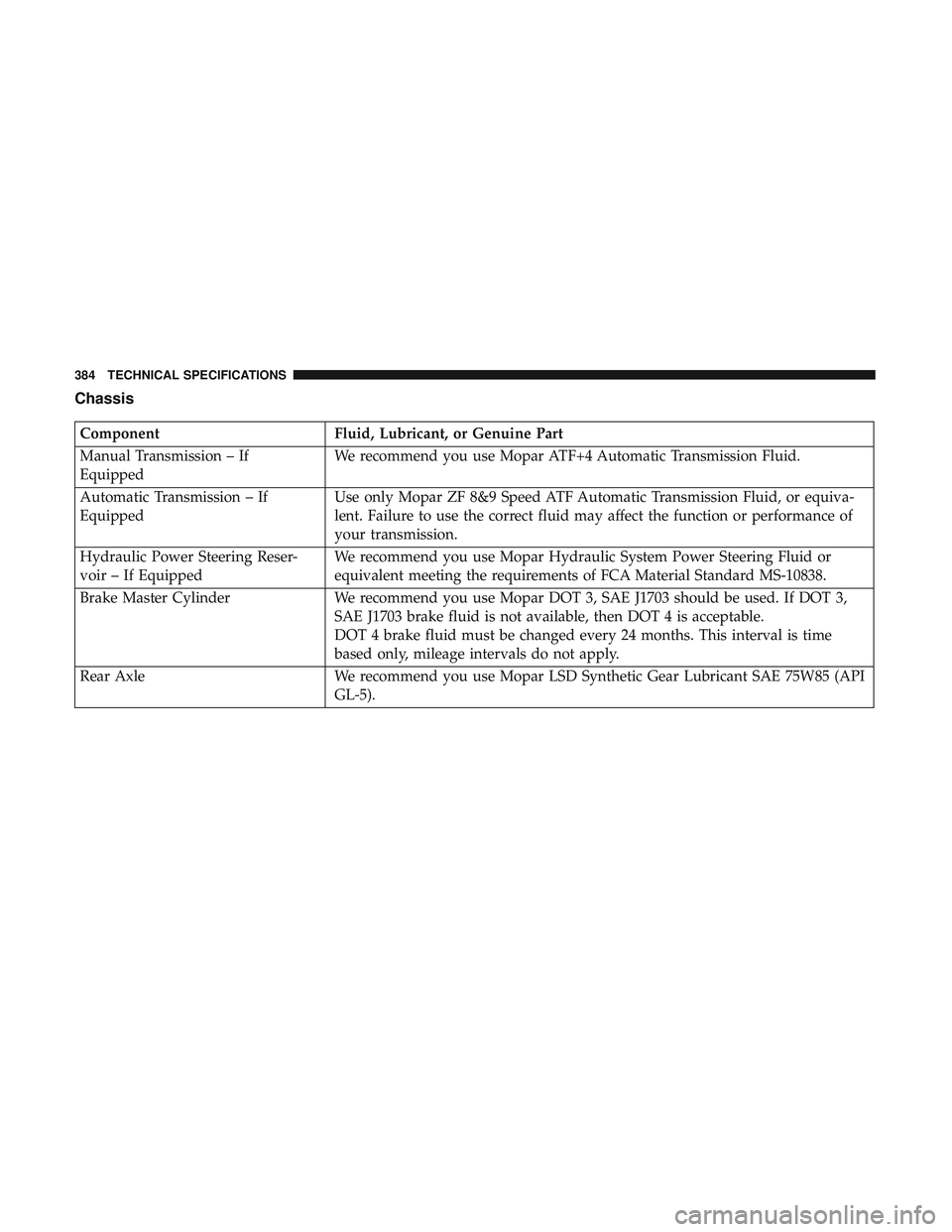
Chassis
ComponentFluid, Lubricant, or Genuine Part
Manual Transmission – If
Equipped We recommend you use Mopar ATF+4 Automatic Transmission Fluid.
Automatic Transmission – If
Equipped Use only Mopar ZF 8&9 Speed ATF Automatic Transmission Fluid, or equiva-
lent. Failure to use the correct fluid may affect the function or performance of
your transmission.
Hydraulic Power Steering Reser-
voir – If Equipped We recommend you use Mopar Hydraulic System Power Steering Fluid or
equivalent meeting the requirements of FCA Material Standard MS-10838.
Brake Master Cylinder We recommend you use Mopar DOT 3, SAE J1703 should be used. If DOT 3,
SAE J1703 brake fluid is not available, then DOT 4 is acceptable.
DOT 4 brake fluid must be changed every 24 months. This interval is time
based only, mileage intervals do not apply.
Rear Axle We recommend you use Mopar LSD Synthetic Gear Lubricant SAE 75W85 (API
GL-5).
384 TECHNICAL SPECIFICATIONS
Page 401 of 486
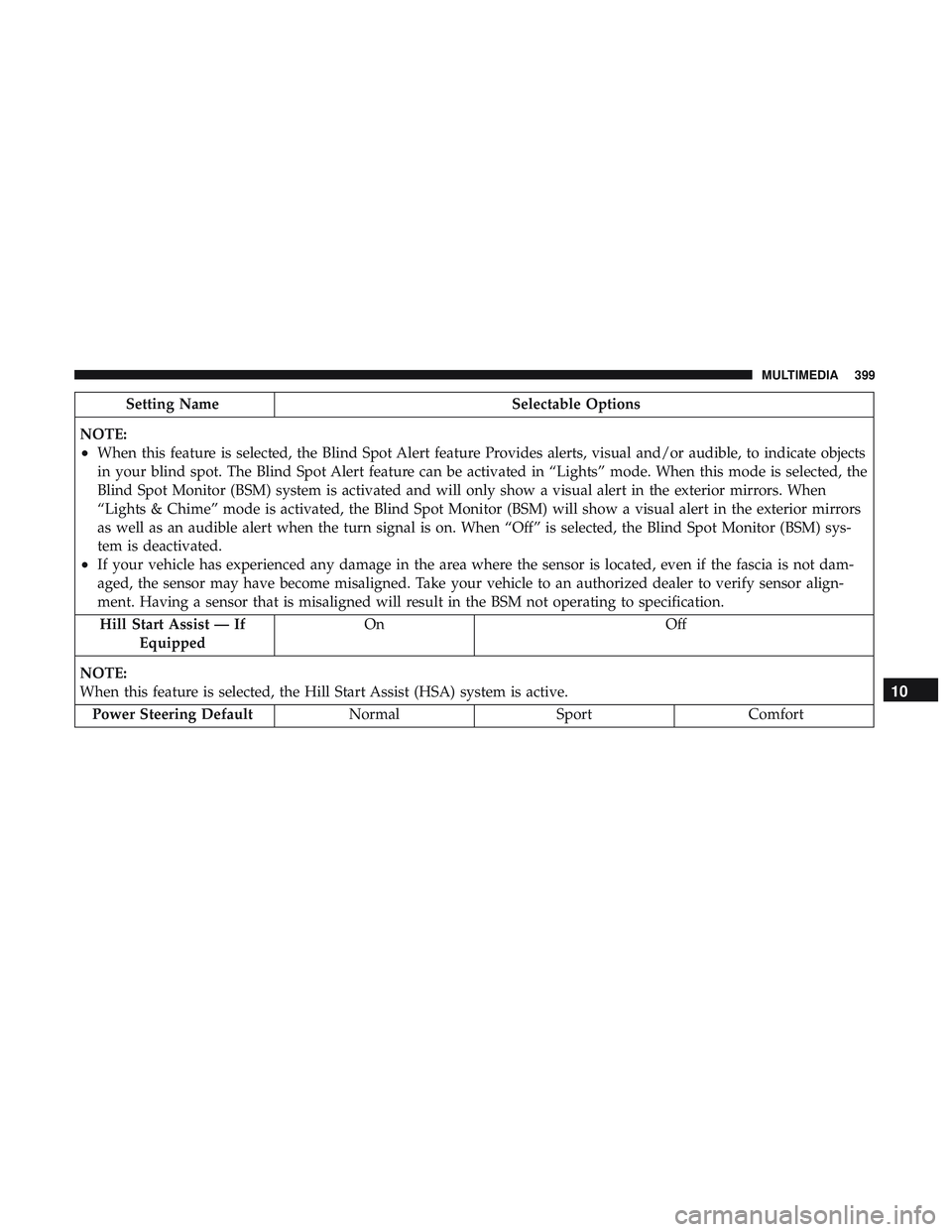
Setting NameSelectable Options
NOTE:
•When this feature is selected, the Blind Spot Alert feature Provides alerts, visual and/or audible, to indicate objects
in your blind spot. The Blind Spot Alert feature can be activated in “Lights” mode. When this mode is selected, the
Blind Spot Monitor (BSM) system is activated and will only show a visual alert in the exterior mirrors. When
“Lights & Chime” mode is activated, the Blind Spot Monitor (BSM) will show a visual alert in the exterior mirrors
as well as an audible alert when the turn signal is on. When “Off” is selected, the Blind Spot Monitor (BSM) sys-
tem is deactivated.
•If your vehicle has experienced any damage in the area where the sensor is located, even if the fascia is not dam-
aged, the sensor may have become misaligned. Take your vehicle to an authorized dealer to verify sensor align-
ment. Having a sensor that is misaligned will result in the BSM not operating to specification. Hill Start Assist — If Equipped On Off
NOTE:
When this feature is selected, the Hill Start Assist (HSA) system is active. Power Steering Default NormalSportComfort
10
MULTIMEDIA 399
Page 415 of 486
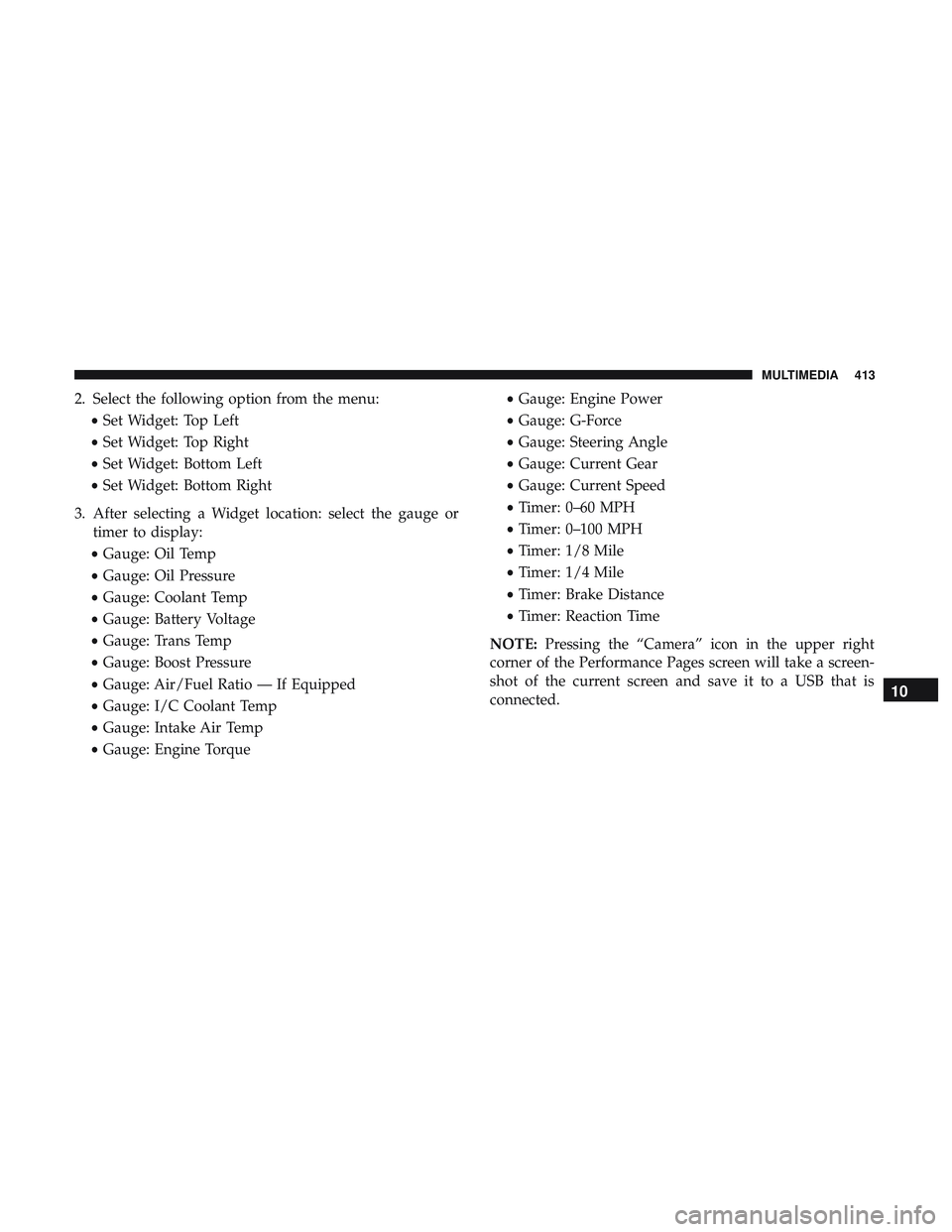
2. Select the following option from the menu:•Set Widget: Top Left
• Set Widget: Top Right
• Set Widget: Bottom Left
• Set Widget: Bottom Right
3. After selecting a Widget location: select the gauge or timer to display:
• Gauge: Oil Temp
• Gauge: Oil Pressure
• Gauge: Coolant Temp
• Gauge: Battery Voltage
• Gauge: Trans Temp
• Gauge: Boost Pressure
• Gauge: Air/Fuel Ratio — If Equipped
• Gauge: I/C Coolant Temp
• Gauge: Intake Air Temp
• Gauge: Engine Torque •
Gauge: Engine Power
• Gauge: G-Force
• Gauge: Steering Angle
• Gauge: Current Gear
• Gauge: Current Speed
• Timer: 0–60 MPH
• Timer: 0–100 MPH
• Timer: 1/8 Mile
• Timer: 1/4 Mile
• Timer: Brake Distance
• Timer: Reaction Time
NOTE: Pressing the “Camera” icon in the upper right
corner of the Performance Pages screen will take a screen-
shot of the current screen and save it to a USB that is
connected.
10
MULTIMEDIA 413
Page 429 of 486
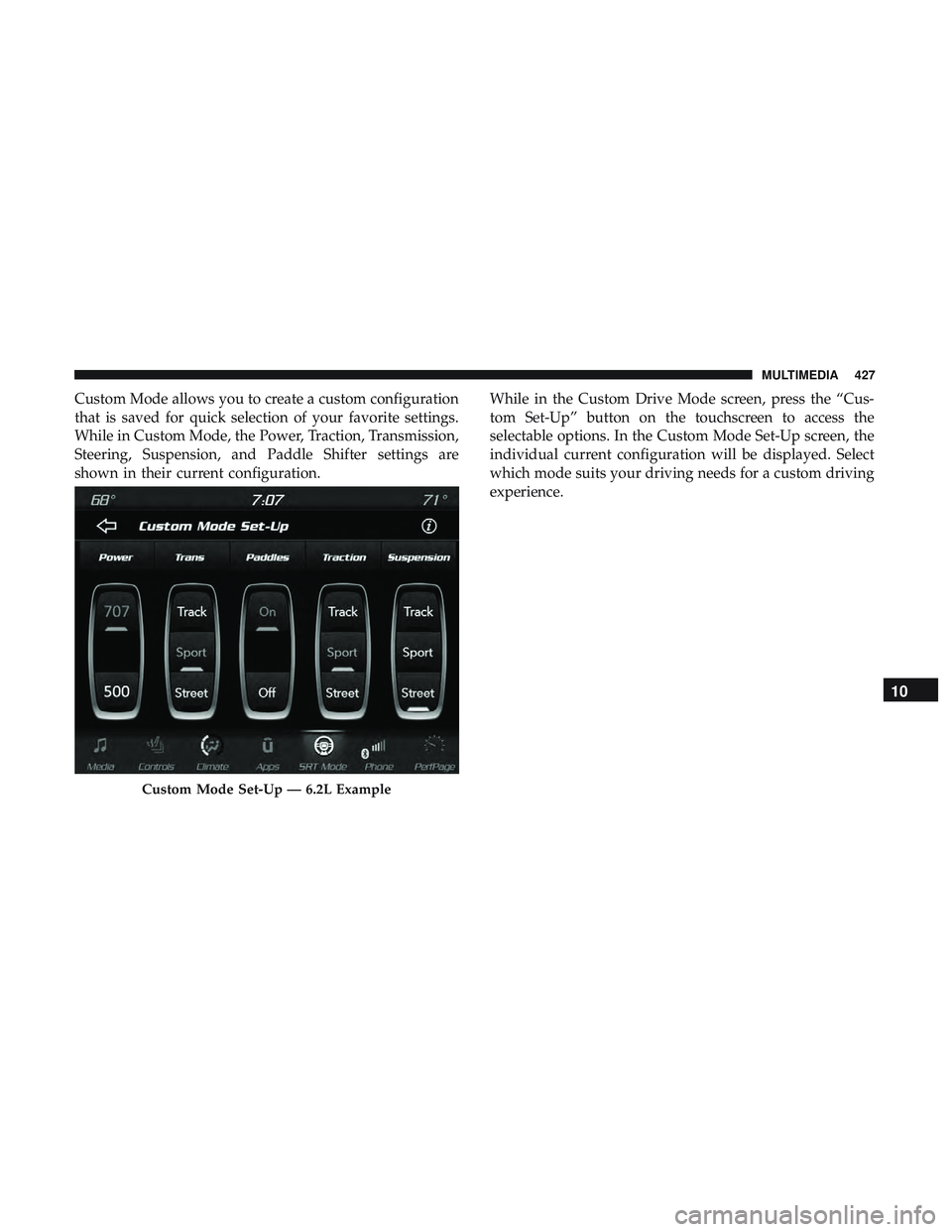
Custom Mode allows you to create a custom configuration
that is saved for quick selection of your favorite settings.
While in Custom Mode, the Power, Traction, Transmission,
Steering, Suspension, and Paddle Shifter settings are
shown in their current configuration.While in the Custom Drive Mode screen, press the “Cus-
tom Set-Up” button on the touchscreen to access the
selectable options. In the Custom Mode Set-Up screen, the
individual current configuration will be displayed. Select
which mode suits your driving needs for a custom driving
experience.
Custom Mode Set-Up — 6.2L Example
10
MULTIMEDIA 427
Page 440 of 486
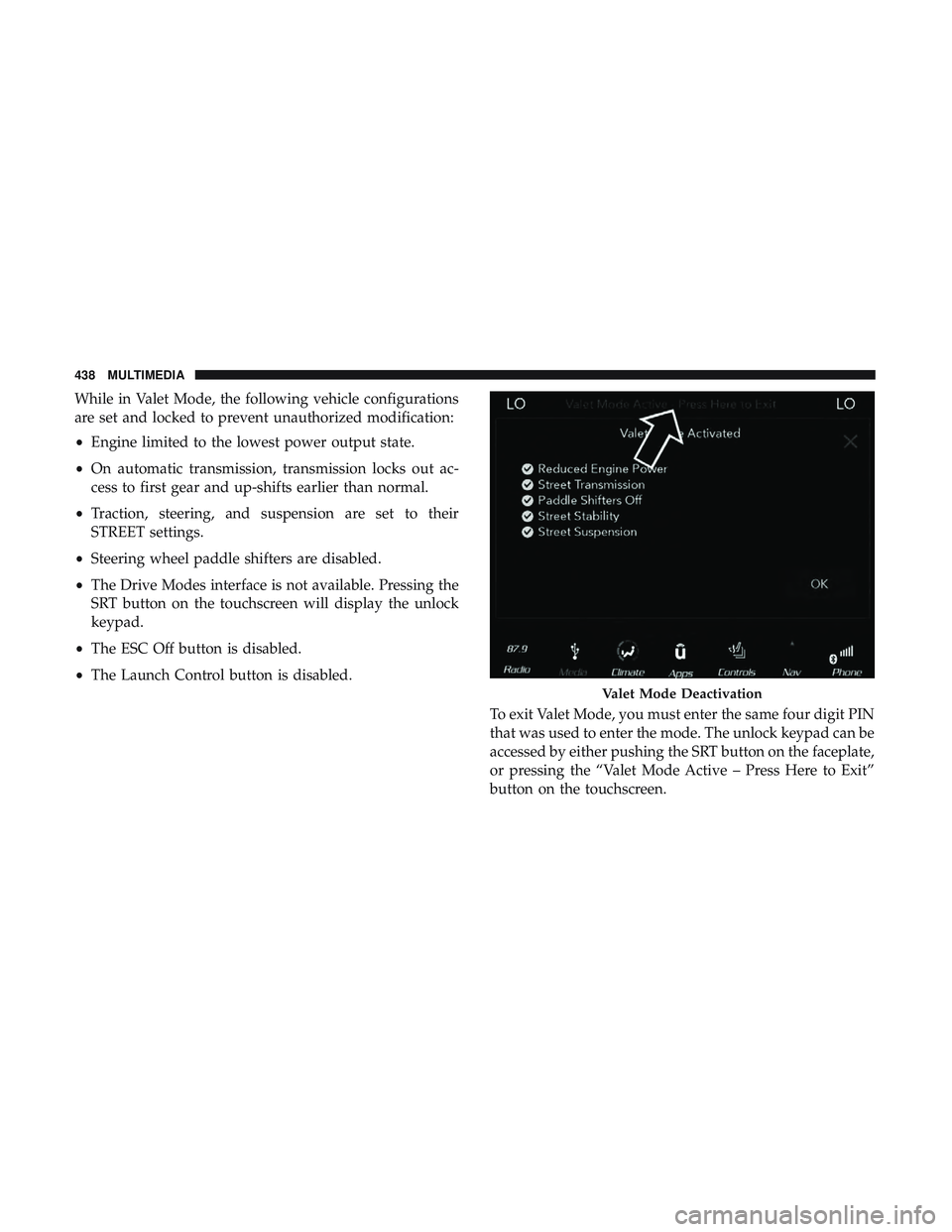
While in Valet Mode, the following vehicle configurations
are set and locked to prevent unauthorized modification:
•Engine limited to the lowest power output state.
• On automatic transmission, transmission locks out ac-
cess to first gear and up-shifts earlier than normal.
• Traction, steering, and suspension are set to their
STREET settings.
• Steering wheel paddle shifters are disabled.
• The Drive Modes interface is not available. Pressing the
SRT button on the touchscreen will display the unlock
keypad.
• The ESC Off button is disabled.
• The Launch Control button is disabled.
To exit Valet Mode, you must enter the same four digit PIN
that was used to enter the mode. The unlock keypad can be
accessed by either pushing the SRT button on the faceplate,
or pressing the “Valet Mode Active – Press Here to Exit”
button on the touchscreen.
Valet Mode Deactivation
438 MULTIMEDIA
Page 458 of 486
NOTE:
•Reply with text message is not compatible with iPhones.
• Auto reply with text message is only available on
phones that support Bluetooth MAP.
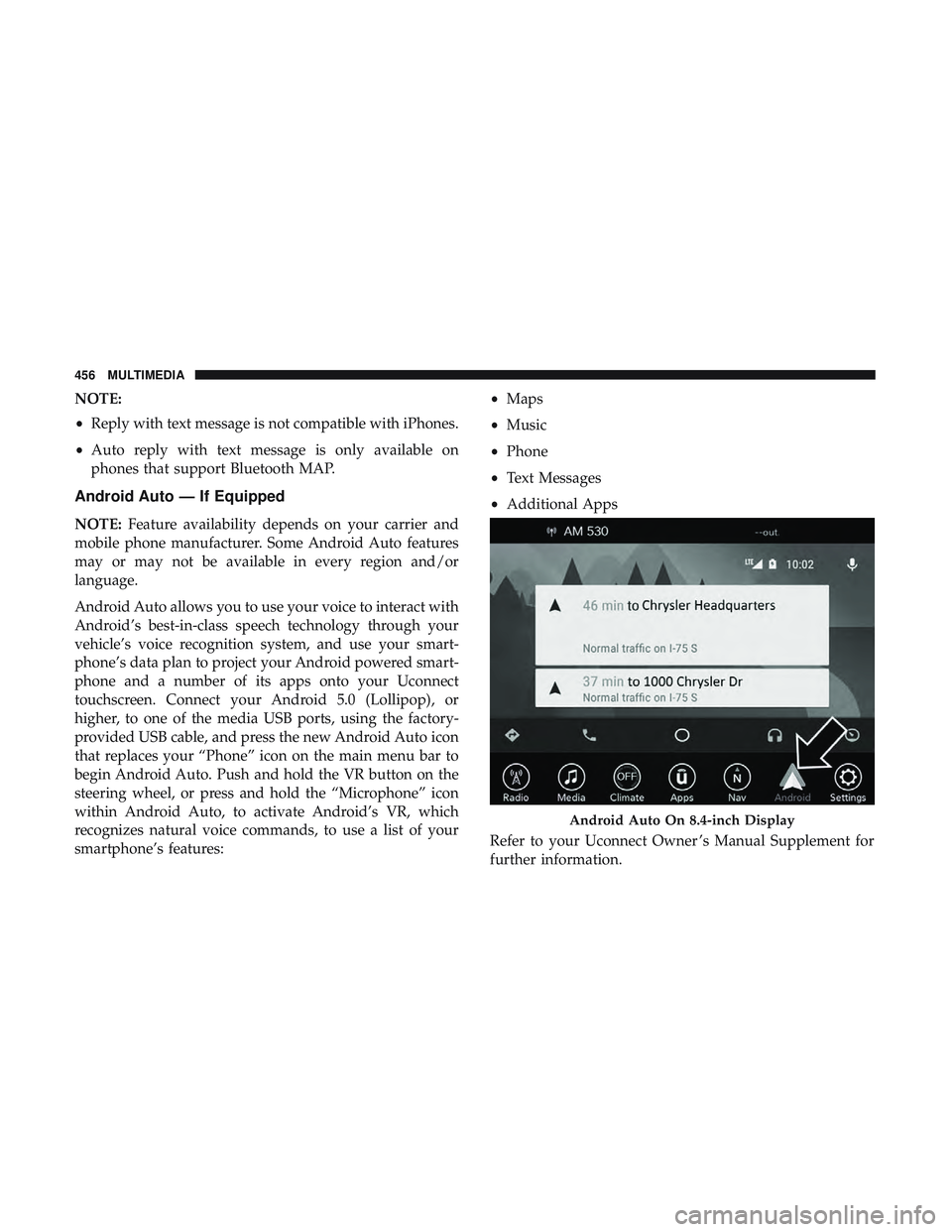
Android Auto — If Equipped
NOTE: Feature availability depends on your carrier and
mobile phone manufacturer. Some Android Auto features
may or may not be available in every region and/or
language.
Android Auto allows you to use your voice to interact with
Android’s best-in-class speech technology through your
vehicle’s voice recognition system, and use your smart-
phone’s data plan to project your Android powered smart-
phone and a number of its apps onto your Uconnect
touchscreen. Connect your Android 5.0 (Lollipop), or
higher, to one of the media USB ports, using the factory-
provided USB cable, and press the new Android Auto icon
that replaces your “Phone” icon on the main menu bar to
begin Android Auto. Push and hold the VR button on the
steering wheel, or press and hold the “Microphone” icon
within Android Auto, to activate Android’s VR, which
recognizes natural voice commands, to use a list of your
smartphone’s features: •
Maps
• Music
• Phone
• Text Messages
• Additional Apps
Refer to your Uconnect Owner ’s Manual Supplement for
further information.
Android Auto On 8.4-inch Display
456 MULTIMEDIA
Page 471 of 486
Assist, Hill Start.......................... .135
Audio Systems (Radio) ...................... .387
Auto Down Power Windows ...................76
Automatic Door Locks .....................39, 40
Automatic Headlights ........................59
Automatic High Beams .......................58
Automatic Temperature Control (ATC) ............72
Automatic Transmission ..................... .221
Adding Fluid .....................343, 382, 384
Fluid And Filter Change ...................343
Fluid Change .......................... .343
Fluid Level Check .....................342, 343
Fluid Type ...................... .342, 382, 384
Special Additives ........................ .343
Automatic Transmission Limp Home Mode .....39, 226
Autostick Operation ............................. .227
Axle Fluid ........................... .382, 384
Axle Lubrication ....................... .382, 384
Back-Up ................................ .265
Battery ...............................114,322
Charging System Light .....................114
Keyless Key Fob Replacement ................21
Location .............................. .322Belts, Seat
............................... .201
Blind Spot Monitoring ...................... .138
Body Mechanism Lubrication ..................331
B-Pillar Location .......................... .350
Brake Assist System ........................ .129
Brake Control System ....................... .129
Brake Fluid ....................... .340, 382, 384
Brake System ......................... .340, 374
Fluid Check ..................... .340, 382, 384
Master Cylinder ........................ .340
Parking .............................. .213
Warning Light .......................112,374
Brake/Transmission Interlock ..................221
Brightness, Interior Lights .....................
63
Bulb Replacement ......................... .280
Bulbs, Light .......................... .203, 280
Camera, Rear ............................ .265
Capacities, Fluid .......................... .381
Caps, Filler Fuel ................................. .267
Oil (Engine) ........................ .320, 325
Power Steering ......................... .236
Radiator (Coolant Pressure) .................338
Carbon Monoxide Warning ................200, 380
12
INDEX 469