brake light DODGE CHALLENGER SRT 2019 Owner's Manual
[x] Cancel search | Manufacturer: DODGE, Model Year: 2019, Model line: CHALLENGER SRT, Model: DODGE CHALLENGER SRT 2019Pages: 500, PDF Size: 4.73 MB
Page 228 of 500
Earlier upshifts during cruise conditions (relatively steady
speeds) may result in increased fuel economy.
Higher upshift speeds may be used to obtain a desired
acceleration rate.
NOTE:
•Your vehicle is equipped with a transmission reverse
inhibitor system. Always depress the clutch pedal fully
to the floor before shifting into reverse. When vehicle
speed is greater than 3 mph (5 km/h), the reverse
inhibitor activates to help prevent shifts into REVERSE.
When at a complete stop, you may notice lighter shift
efforts into REVERSE with the ignition switch in the ON
position (RUN position for Keyless Enter-N-Go), as
compared to the ignition LOCK position (OFF position
for Keyless Enter-N-Go). This is normal operation of the
transmission reverse inhibitor system.
• Due to the high performance nature of your drivetrain,
you may hear your transmission. This can be most
noticeable when the vehicle is idling in NEUTRAL with
the clutch engaged (clutch pedal released), but it may
also be heard when driving at low engine RPM. Also,
this may be more noticeable when the transmission is
warm. This is a normal condition and is not an indica-
tion of a problem with your clutch or transmission.1–4 Skip Shift
In Auto Drive Mode, Default, or Street Drive Modes, there
are times when you must shift the transmission directly
from first gear to fourth gear instead of from first gear to
second gear. This is to help you get the best possible fuel
economy from your vehicle. This occurs when the engine
coolant (antifreeze) is higher than 106°F (41°C), vehicle
speed is greater than 19 mph (30 km/h) but less than
21 mph (34 km/h), and the transmission is in first gear, and
the accelerator is at ¼ throttle or less.
NOTE: The1-4Skip Shift feature is disabled when
selecting Track, Sport, or Custom Drive Modes. Refer to
“SRT Drive Modes” in the “Multimedia” section for further
descriptions of these modes.
After you shift the transmission to fourth gear, you can
press the clutch in and shift to another forward gear.
Downshifting
To maintain a safe speed and prolong brake life, downshift
to maintain a safe speed when descending a steep grade.
226 STARTING AND OPERATING
Page 248 of 500
•If the button is continually pushed, the set speed will
continue to decrease until the button is released, then the
new set speed will be established.
Metric Speed (km/h)
• Pushing the SET (-)button once will result in a 1 km/h
decrease in set speed. Each subsequent tap of the button
results in a decrease of 1 km/h.
• If the button is continually pushed, the set speed will
continue to decrease until the button is released, then the
new set speed will be established.
To Accelerate For Passing
Press the accelerator as you would normally. When the
pedal is released, the vehicle will return to the set speed.
Using Speed Control On Hills
The transmission may downshift on hills to maintain the
vehicle set speed.
NOTE: The Speed Control system maintains speed up and
down hills. A slight speed change on moderate hills is
normal.
On steep hills, a greater speed loss or gain may occur so it
may be preferable to drive without Speed Control.
WARNING!
Speed Control can be dangerous where the system
cannot maintain a constant speed. Your vehicle could
go too fast for the conditions, and you could lose
control and have an accident. Do not use Speed Control
in heavy traffic or on roads that are winding, icy,
snow-covered or slippery.
To Resume Speed
To resume a previously set speed, push the RES button and
release. Resume can be used at any speed above 20 mph
(32 km/h).
To Deactivate
A soft tap on the brake pedal, pushing the CANC button,
or normal brake pressure while slowing the vehicle will
deactivate the Speed Control without erasing the set speed
from memory.
Pushing the on/off button or turning the ignition switch
OFF erases the set speed from memory.
246 STARTING AND OPERATING
Page 255 of 500
U.S. Speed (mph)
•Pushing the SET (-)button once will result in a 1 mph
decrease in set speed. Each subsequent tap of the button
results in a decrease of 1 mph.
• If the button is continually pushed, the set speed will
continue to decrease in 5 mph increments until the
button is released. The decrease in set speed is reflected
in the instrument cluster display.
Metric Speed (km/h)
• Pushing the SET (-)button once will result in a 1 km/h
decrease in set speed. Each subsequent tap of the button
results in a decrease of 1 km/h.
• If the button is continually pushed, the set speed will
continue to decrease in 10 km/h increments until the
button is released. The decrease in set speed is reflected
in the instrument cluster display.
NOTE:
• When you override and push the SET (+)button or SET
(-) buttons, the new Set Speed will be the current speed
of the vehicle. •
When you use the SET (-)button to decelerate, if the
engine’s braking power does not slow the vehicle suffi-
ciently to reach the set speed, the brake system will
automatically slow the vehicle.
• The ACC system applies the brake down to 15 mph
(24 km/h) when following a target vehicle.
• The ACC system maintains set speed when driving up
hill and down hill. However, a slight speed change on
moderate hills is normal. In addition, downshifting may
occur while climbing uphill or descending downhill.
This is normal operation and necessary to maintain set
speed. When driving up hill and down hill, the ACC
system will cancel if the braking temperature exceeds
normal range (overheated).
6
STARTING AND OPERATING 253
Page 258 of 500
The vehicle will then maintain the set distance until:
•The vehicle ahead accelerates to a speed above the set
speed.
• The vehicle ahead moves out of your lane or view of the
sensor.
• The distance setting is changed.
• The system disengages. (Refer to the information on
ACC Activation).
The maximum braking applied by ACC is limited; how-
ever, the driver can always apply the brakes manually, if
necessary.
NOTE: The brake lights will illuminate whenever the ACC
system applies the brakes.
A Proximity Warning will alert the driver if ACC predicts
that its maximum braking level is not sufficient to maintain
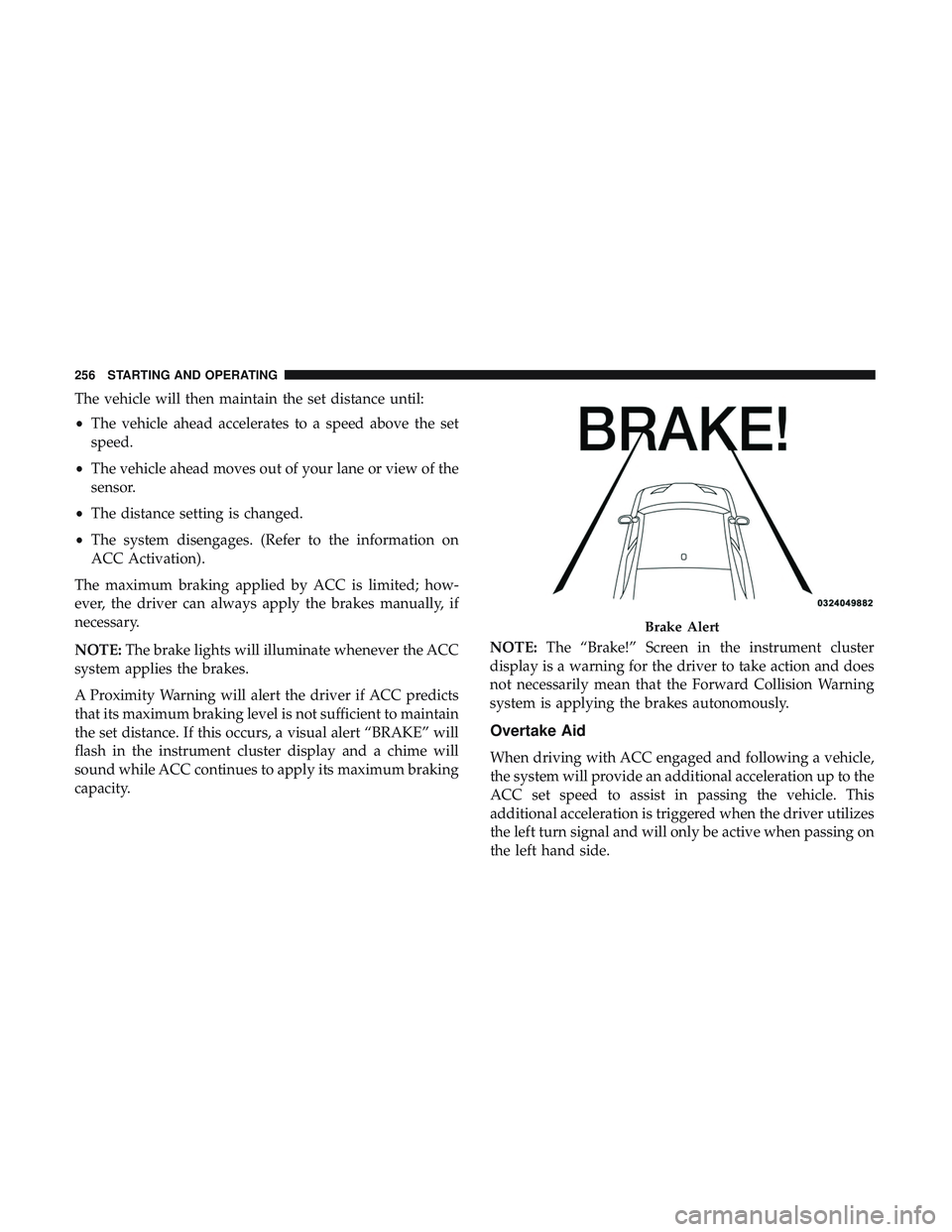
the set distance. If this occurs, a visual alert “BRAKE” will
flash in the instrument cluster display and a chime will
sound while ACC continues to apply its maximum braking
capacity. NOTE:
The “Brake!” Screen in the instrument cluster
display is a warning for the driver to take action and does
not necessarily mean that the Forward Collision Warning
system is applying the brakes autonomously.
Overtake Aid
When driving with ACC engaged and following a vehicle,
the system will provide an additional acceleration up to the
ACC set speed to assist in passing the vehicle. This
additional acceleration is triggered when the driver utilizes
the left turn signal and will only be active when passing on
the left hand side.
Brake Alert
256 STARTING AND OPERATING
Page 281 of 500
Driving Through Water
Driving through water more than a few inches/centimeters
deep will require extra caution to ensure safety and pre-
vent damage to your vehicle.
NOTE:
•Due to lower ground clearance, driving your vehicle up
steep driveways, approach ramps or near parking blocks
may cause damage to the front fascia and ground effects.
• Driving through snow more than 4 inches (100 mm)
deep may cause damage to the front fascia and ground
effects.
Flowing/Rising Water
WARNING!
Do not drive on or across a road or path where water is
flowing and/or rising (as in storm run-off). Flowing
water can wear away the road or path’s surface and
cause your vehicle to sink into deeper water. Further-
more, flowing and/or rising water can carry your ve-
hicle away swiftly. Failure to follow this warning may
result in injuries that are serious or fatal to you, your
passengers, and others around you.
Shallow Standing Water
Although your vehicle is capable of driving through shal-
low standing water, consider the following Cautions and
Warnings before doing so.
WARNING!
•Driving through standing water limits your vehicle’s
traction capabilities. Do not exceed 5 mph (8 km/h)
when driving through standing water.
• Driving through standing water limits your vehicle’s
braking capabilities, which increases stopping dis-
tances. Therefore, after driving through standing
water, drive slowly and lightly press on the brake
pedal several times to dry the brakes.
• Failure to follow these warnings may result in inju-
ries that are serious or fatal to you, your passengers,
and others around you.
6
STARTING AND OPERATING 279
Page 336 of 500
•Inspect the battery, and clean and tighten the terminals
as required.
• Check the fluid levels of the coolant reservoir, brake
master cylinder, and power steering (6.2L only), and add
as needed.
• Check all lights and other electrical items for correct
operation. At Each Oil Change
•
Change the engine oil filter.
• Inspect the brake hoses and lines.
CAUTION!
Failure to perform the required maintenance items
may result in damage to the vehicle.
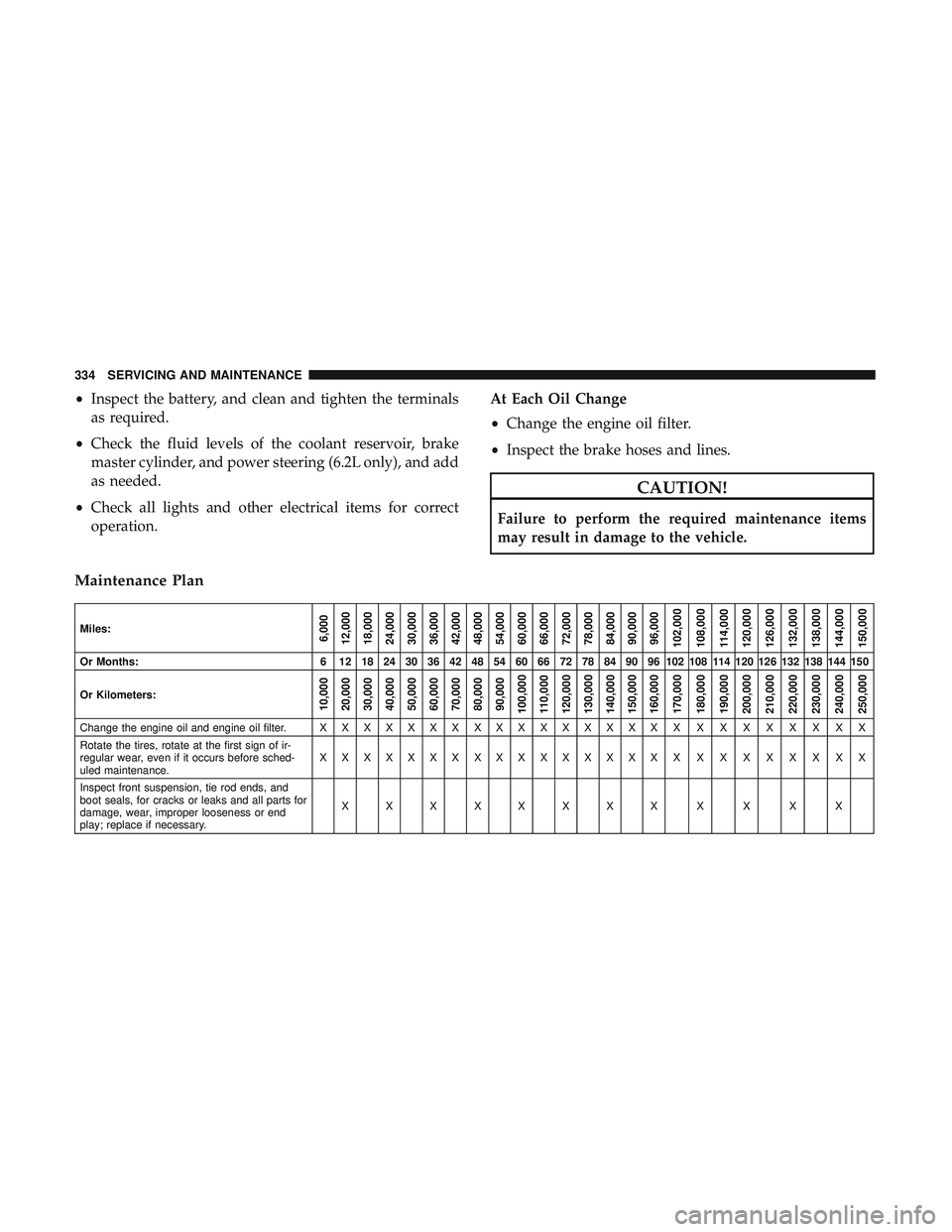
Maintenance Plan
Miles:6,000
12,000
18,000
24,000
30,000
36,000
42,000
48,000
54,000
60,000
66,000
72,000
78,000
84,000
90,000
96,000
102,000
108,000
114,000
120,000
126,000
132,000
138,000
144,000
150,000
Or Months: 6 12 18 24 30 36 42 48 54 60 66 72 78 84 90 96 102 108 114 120 126 132 138 144 150
Or Kilometers:
10,000
20,000
30,000
40,000
50,000
60,000
70,000
80,000
90,000
100,000
110,000
120,000
130,000
140,000
150,000
160,000
170,000
180,000
190,000
200,000
210,000
220,000
230,000
240,000
250,000
Change the engine oil and engine oil filter. X X X X X X X X X XXXXXXX XXXXXXXXX
Rotate the tires, rotate at the first sign of ir-
regular wear, even if it occurs before sched-
uled maintenance. XXXXXXXXXXXXXXXX X
XXXXXXXX
Inspect front suspension, tie rod ends, and
boot seals, for cracks or leaks and all parts for
damage, wear, improper looseness or end
play; replace if necessary. XXXXXXXX X X X X
334 SERVICING AND MAINTENANCE
Page 358 of 500
•Do not change the thermostat for Summer or Winter
operation. If replacement is ever necessary, install ONLY
the correct type thermostat. Other designs may result in
unsatisfactory engine coolant (antifreeze) performance,
poor gas mileage, and increased emissions.
Brake System
In order to assure brake system performance, all brake
system components should be inspected periodically. Refer
to the “Maintenance Plan” in this section for the proper
maintenance intervals.
WARNING!
Riding the brakes can lead to brake failure and possi-
bly a collision. Driving with your foot resting or riding
on the brake pedal can result in abnormally high brake
temperatures, excessive lining wear, and possible
brake damage. You would not have your full braking
capacity in an emergency.
Fluid Level Check — Brake Master Cylinder
Check the fluid level in the master cylinder immediately if
the brake system warning light indicates system failure. Check the fluid level in the master cylinder when perform-
ing underhood services.
Clean the top of the master cylinder area before removing
the cap. Add fluid to bring the level up to the top of the
“FULL” mark on the side of the master cylinder reservoir.
Overfilling of fluid is not recommended because it may
cause leaking in the system.
Add enough fluid to bring the level up to the requirements
described on the brake fluid reservoir. With disc brakes,
fluid level can be expected to fall as the brake pads wear.
However, low fluid level may be caused by a leak and a
checkup may be needed.
Use only brake fluid that has been recommended by the
manufacturer, and has been kept in a tightly closed con-
tainer to avoid contamination from foreign matter or
moisture.
Refer to “Fluids And Lubricants” in “Technical Specifica-
tions” for further information.
356 SERVICING AND MAINTENANCE
Page 392 of 500
IDENTIFICATION DATA
Vehicle Identification Number
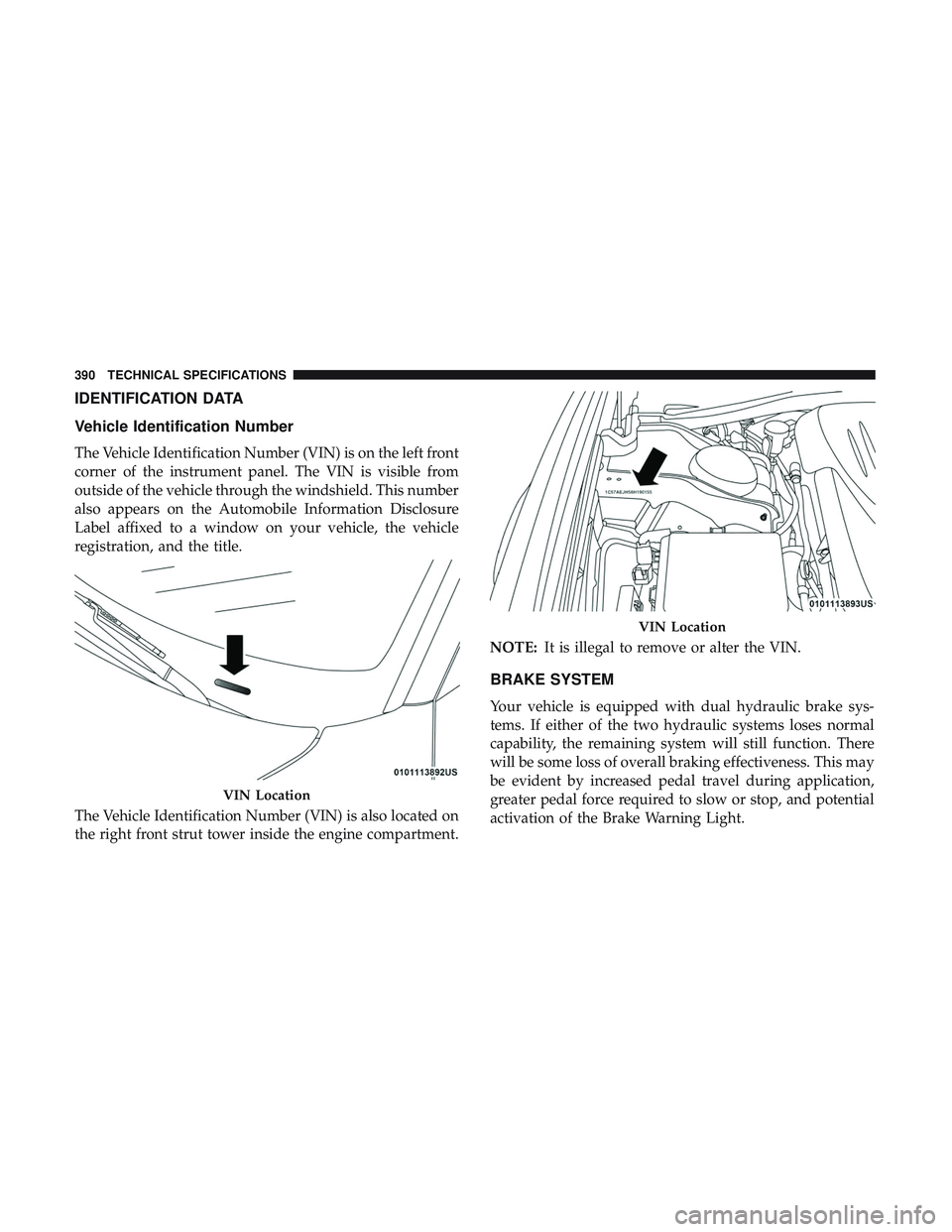
The Vehicle Identification Number (VIN) is on the left front
corner of the instrument panel. The VIN is visible from
outside of the vehicle through the windshield. This number
also appears on the Automobile Information Disclosure
Label affixed to a window on your vehicle, the vehicle
registration, and the title.
The Vehicle Identification Number (VIN) is also located on
the right front strut tower inside the engine compartment.NOTE:
It is illegal to remove or alter the VIN.
BRAKE SYSTEM
Your vehicle is equipped with dual hydraulic brake sys-
tems. If either of the two hydraulic systems loses normal
capability, the remaining system will still function. There
will be some loss of overall braking effectiveness. This may
be evident by increased pedal travel during application,
greater pedal force required to slow or stop, and potential
activation of the Brake Warning Light.
VIN Location
VIN Location
390 TECHNICAL SPECIFICATIONS
Page 393 of 500
In the event power assist is lost for any reason (for
example, repeated brake applications with the engine
OFF), the brakes will still function. The effort required to
brake the vehicle will be much greater than that required
with the power system operating.
NOTE:Your vehicle is equipped with a high performance
braking system. The brake pads are a semi-metallic com-
pound, which offer superior fade resistance for consistent
operation. A compromise to using this type of brake pad is
that the brakes may produce more brake dust and may
squeal slightly under certain weather and operating con-
ditions (i.e., during light brake applications). These are
considered normal conditions.
WHEEL AND TIRE TORQUE SPECIFICATIONS
Proper lug nut/bolt torque is very important to ensure that
the wheel is properly mounted to the vehicle. Any time a
wheel has been removed and reinstalled on the vehicle, the
lug nuts/bolts should be torqued using a properly cali-
brated torque wrench using a high quality six sided (hex)
deep wall socket.
Torque Specifications
Lug Nut/Bolt Torque **Lug Nut/Bolt
Size Lug Nut/Bolt
Socket Size
111 Ft-Lbs (150 N·m) M14 x 1.50 22 mm
**Use only your authorized dealer recommended lug nuts/
bolts and clean or remove any dirt or oil before tightening.
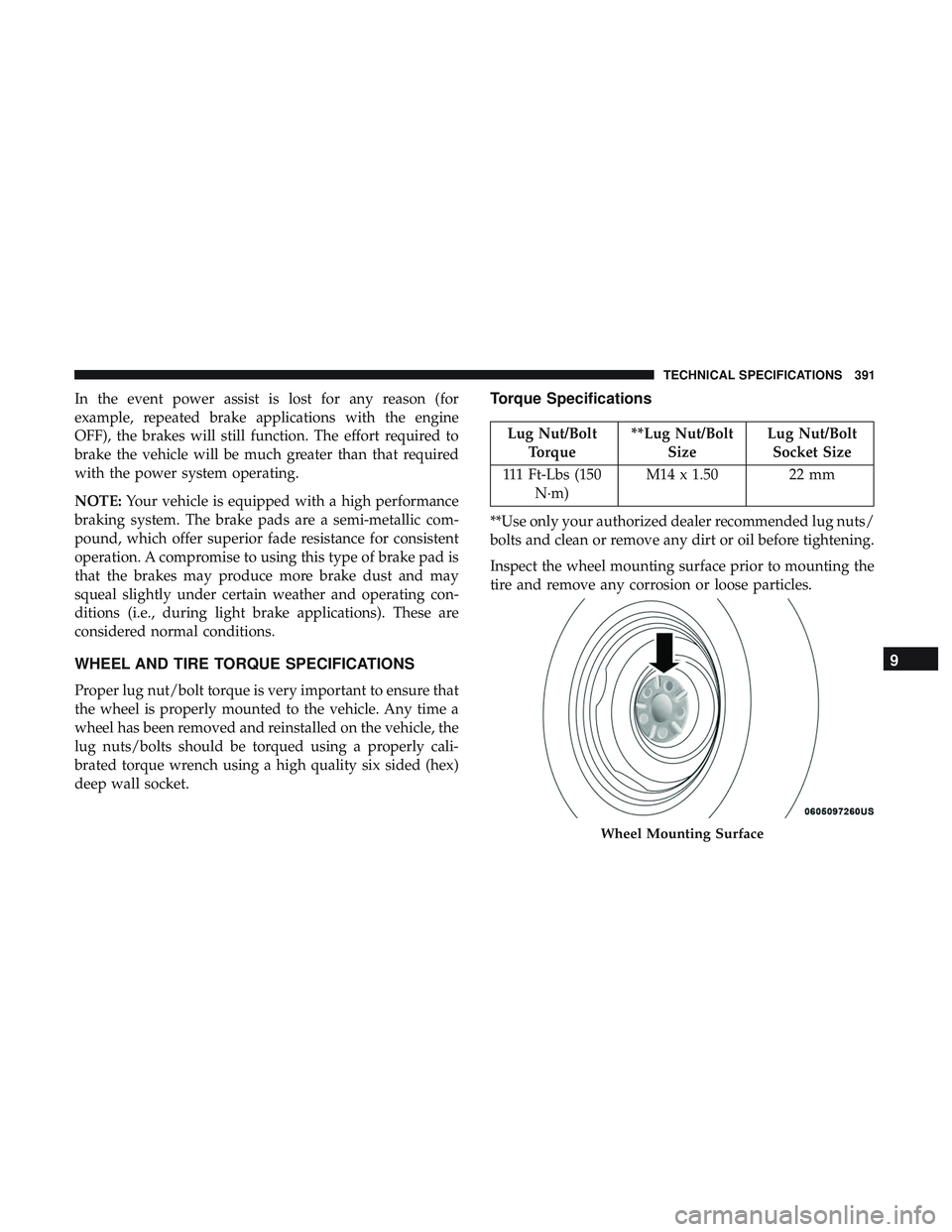
Inspect the wheel mounting surface prior to mounting the
tire and remove any corrosion or loose particles.
Wheel Mounting Surface
9
TECHNICAL SPECIFICATIONS 391
Page 484 of 500
About Your Brakes..................... .221, 390
Adaptive Cruise Control (ACC) (Cruise Control) . . . .247
Adding Engine Coolant (Antifreeze) .............353
Adding Washing Fluid .......................338
Additives, Fuel ............................393
Adjust Forward ............................ .44, 47
Rearward ............................44, 47
AirBag ................................ .173
Advance Front Air Bag ....................173
Air Bag Operation ........................175
Air Bag Warning Light .....................172
Enhanced Accident Response .............182, 329
Event Data Recorder (EDR) .................329
FrontAirBag .......................... .173
If Deployment Occurs .....................180
Knee Impact Bolsters ..................... .176
Maintaining Your Air Bag System .............183
Maintenance ............................183
Redundant Air Bag Warning Light ............173
Side Air Bags .......................... .176
Transporting Pets ........................205
Air Bag Light .......................118, 172, 206
Air Cleaner, Engine (Engine Air Cleaner Filter) ......342
Air Conditioner Maintenance ..................343 Air Conditioner Refrigerant
................343, 344
Air Conditioner System ..................... .343
Air Conditioning ........................ .70, 75
Air Conditioning Filter ....................77, 344
Air Conditioning, Operating Tips ................76
Air Conditioning System ......................70
Air Filter ............................... .342
Air Pressure Tires................................. .371
Alarm Arm The System .......................36, 37
Panic ..................................23
Rearm The System ........................37
Security Alarm ........................35, 1
19
Alarm System Security Alarm ...........................35
Alterations/Modifications Vehicle .................................5
Android Auto ............................ .471
Antifreeze (Engine Coolant) ................352, 397
Disposal ...............................354
Anti-Lock Brake System (ABS) .................134
Anti-Lock Warning Light .....................125
Apple CarPlay ............................472
482 INDEX