instrument panel DODGE CHARGER 2008 6.G User Guide
[x] Cancel search | Manufacturer: DODGE, Model Year: 2008, Model line: CHARGER, Model: DODGE CHARGER 2008 6.GPages: 466, PDF Size: 6.37 MB
Page 119 of 466

The controls for each heater are located near the bottom
center of the instrument panel. After turning on the
ignition, you can choose from High, Off, or Low heat
settings. Amber LEDs in the top portion of each switch
indicate the level of heat in use. Two LEDs will illuminate
for high, one for low, and none for off.Press the switch once to select high-level heating. Press
the switch a second time to select low-level heating. Press
the switch a third time to shut off the heating elements.
If high-level heating is selected, the system will automati-
cally switch to the low level after 30 minutes of continu-
ous operation. At that time, the number of illuminated
LEDs changes from two to one, indicating the change.
Operation on the low setting also turns off automatically
after 30 minutes.
NOTE:Once a heat setting is selected, heat will be felt
within two to five minutes.
Front Heated Seat Switch
UNDERSTANDING THE FEATURES OF YOUR VEHICLE 119
3
Page 121 of 466
When the seatback is folded to the upright position, make
sure it is latched by strongly pulling on the top of the
seatback above the seat strap.
WARNING!
²Be certain that the seatback is securely locked into
position. If the seatback in not securely locked
into position the seat will not provide the proper
stability for child seats and/or passengers. An
improperly latched seat could cause serious injury.
²The cargo area in the rear of the vehicle (with the
rear seatbacks in the locked-up or folded down
position) should not be used as a play area by
children when the vehicle is in motion. They could
be seriously injured in an accident. Children
should be seated and using the proper restraint
system.
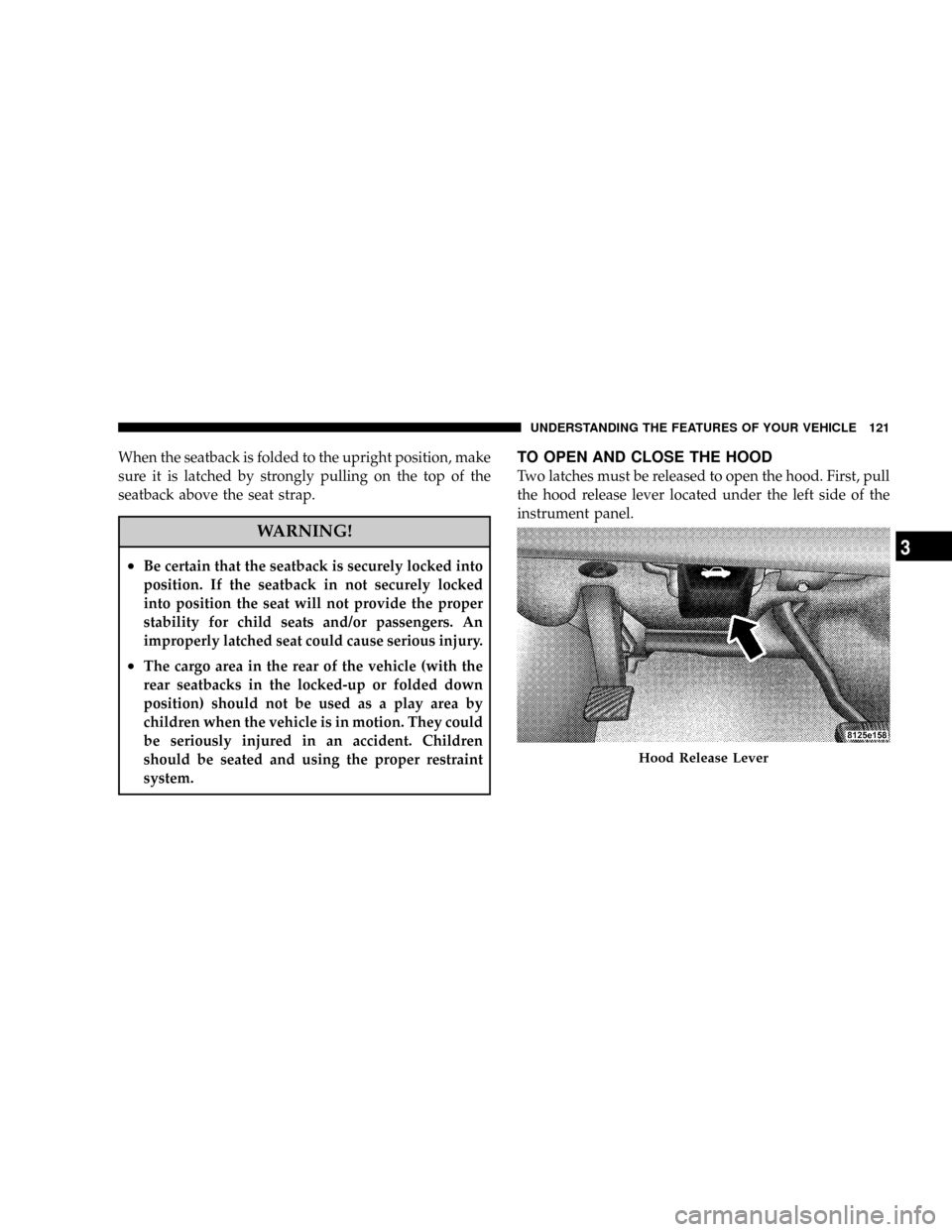
TO OPEN AND CLOSE THE HOOD
Two latches must be released to open the hood. First, pull
the hood release lever located under the left side of the
instrument panel.
Hood Release Lever
UNDERSTANDING THE FEATURES OF YOUR VEHICLE 121
3
Page 123 of 466

LIGHTS
Headlight Switch
The headlight switch is located on the left side of
the instrument panel. This switch controls the
operation of the headlights, parking lights, instru-
ment panel lights, instrument panel light dimming, inte-
rior lights, and fog lights.
Rotate the headlight switch clockwise to the first detent
for parking light and instrument panel light operation.
Turn it to the second detent for headlight, park light, and
instrument panel light operation.
Headlight Switch
UNDERSTANDING THE FEATURES OF YOUR VEHICLE 123
3
Page 129 of 466

because a door is open. This includes the glove box light,
but not the trunk light. To restore interior light operation,
either turn the ignition switch ON or cycle the light
switch.
Dimmer Control
The dimmer control is part of the
headlight switch, and is located on the
left side of the instrument panel. With
the parking lights or headlights on,
rotating the dimmer control upward
will increase the brightness of the in-
strument panel lights and, if so
equipped, the lighting in the door map pockets and cup
holders.
Dome Light Position
Rotate the dimmer control completely upward to the
second detent to turn on the interior lights. The interior
lights will remain on when the dimmer control is in this
position.
Interior light Defeat (OFF)
Rotate the dimmer control to the extreme bottom ªOFFº
position. The interior lights will remain off when the
doors are open.
Parade Mode (Daytime Brightness Feature)
Rotate the dimmer control upward to the first detent.
This feature brightens all text displays such as the
odometer, Electronic Vehicle Information Center (EVIC)
Ð if equipped, and radio when the parking lights or
headlights are on.
UNDERSTANDING THE FEATURES OF YOUR VEHICLE 129
3
Page 157 of 466

UNDERSTANDING YOUR INSTRUMENT PANEL
CONTENTS
mInstrument Panel And Controls.............161
mBase Instrument Cluster..................162
mPremium Instrument Cluster Ð If Equipped....163
mInstrument Cluster Descriptions............164
mElectronic Vehicle Information Center (EVIC) ±
If Equipped...........................175
NElectronic Vehicle Information Center (EVIC)
Displays............................177
NOil Change Required...................178
NTrip Functions.......................178NCompass Display.....................181
NTelephone Ð If Equipped...............183
NNavigation Ð If Equipped...............185
NPersonal Settings (Customer Programmable
Features)...........................186
mRadio General Information................190
NRadio Broadcast Signals.................190
NTwo Types Of Signals..................190
NElectrical Disturbances..................1904
Page 158 of 466

NAM Reception.......................190
NFM Reception........................190
mSales Code REN Ð Multimedia System Ð
If Equipped...........................191
NOperating Instructions Ð Satellite Radio
(If Equipped)........................192
NOperating Instructions Ð Hands-Free
Communication (UConnectŸ) (If Equipped) . . 192
NClock Setting Procedure.................192
mSales Code REQ Ð AM/FM Stereo Radio And
6±Disc CD/DVD Changer (MP3/WMA AUX
Jack)................................194
NOperating Instructions - Radio Mode.......195
NOperation Instructions - (Disc Mode For CD
And MP3/WMA Audio Play, DVD-Video)....203NNotes On Playing MP3/WMA Files........205
NList Button (Disc Mode For MP3/WMA
Play)..............................207
NInfo Button (Disc Mode For MP3/WMA
Play)..............................207
mSales Code RER Ð Multimedia System Ð
If Equipped...........................209
NOperating Instructions Ð Satellite Radio.....211
NOperating Instructions Ð Hands-Free
Communication (UConnectŸ) (If Equipped) . . 211
NClock Setting Procedure.................211
mSales Code RES Ð AM/FM Stereo Radio With
CD Player (MP3 AUX Jack)................213
NOperating Instructions - Radio Mode.......214
158 UNDERSTANDING YOUR INSTRUMENT PANEL
Page 159 of 466

NOperation Instructions - CD Mode For CD
And MP3 Audio Play..................219
NNotes On Playing MP3 Files.............222
NList Button (CD Mode For MP3 Play).......224
NInfo Button (CD Mode For MP3 Play).......224
mSatellite Radio (RSC) Ð If Equipped (REQ And
RES Radios Only)......................226
NSystem Activation.....................226
NElectronic Serial Number/Sirius Identification
Number (ENS/SID)....................226
NSelecting Satellite Mode.................227
NSatellite Antenna......................227
NReception Quality.....................227
NOperating Instructions - Satellite Mode......227NOperating Instructions - Hands Free Phone
(If Equipped)........................230
NOperating Instructions - Video Entertainment
System (VESt) (If Equipped).............230
mVideo Entertainment System Ð If Equipped....230
mUniversal Consumer Interface (UCI) Ð
If Equipped...........................232
NConnecting The iPodt..................233
NControlling The iPodtUsing Radio Buttons . . . 233
NPlay Mode..........................233
NList Or Browse Mode..................235
mRemote Sound System Controls.............237
mCD/DVD Disc Maintenance...............238
mRadio Operation And Cellular Phones........239
UNDERSTANDING YOUR INSTRUMENT PANEL 159
4
Page 160 of 466

mClimate Controls.......................239
NManual Air Conditioning And Heating
System.............................239
NAutomatic Temperature Control Ð
If Equipped.........................242NOperating Tips.......................247
mRear Window Features...................250
NElectric Rear Window Defroster...........250
160 UNDERSTANDING YOUR INSTRUMENT PANEL
Page 161 of 466

INSTRUMENT PANEL AND CONTROLS
1 Ð Air Outlet 6 Ð Radio 11 Ð Ignition Switch
2 Ð Instrument Cluster 7 Ð Climate Control 12 Ð Hood Release
3 Ð Hazard Switch 8 Ð Heated Seat Switch* 13 Ð Trunk Release Switch
4Ð
Electronic Stability Program Off Button*
/ Traction Control System Off Button*9 Ð Power Outlet 14 Ð Headlight Switch
5 Ð Glove Box 10 Ð Ash Tray* * If EquippedUNDERSTANDING YOUR INSTRUMENT PANEL 161
4
Page 162 of 466

BASE INSTRUMENT CLUSTER
162 UNDERSTANDING YOUR INSTRUMENT PANEL