brake DODGE CHARGER 2010 7.G User Guide
[x] Cancel search | Manufacturer: DODGE, Model Year: 2010, Model line: CHARGER, Model: DODGE CHARGER 2010 7.GPages: 80, PDF Size: 12.42 MB
Page 3 of 80
INTRODUCTION/WELCOME
WELCOME FROM CHRYSLER GROUP LLC . 2
CONTROLS AT A GLANCE
DRIVER COCKPIT.............. 4
INSTRUMENT CLUSTER ..........6
GETTING STARTED
KEYFOB...................8
THEFT ALARM................ 9
SEATBELT ................. 9
CHILD RESTRAINTS ............. 9
FRONTSEATS................11
REARSEAT .................13
HEATEDSEATS...............13
ADJUSTABLEPEDALS ...........14
TILT / TELESCOPING STEERING COLUMN . 15
PROGRAMMABLEFEATURES .......15
OPERATING YOUR VEHICLE
TURN SIGNAL/WIPER/WASHER/HIGH
BEAMLEVER ................17
HEADLIGHT SWITCH ............18
SPEED CONTROL LEVER ..........19
MANUAL CLIMATE CONTROLS ...... 20
AUTOMATIC TEMPERATURE
CONTROLS (ATC) ............. 20
POWERSUNROOF .............21
WIND BUFFETING ............. 22
ELECTRONICS
NON-TOUCH-SCREENRADIOS.......23
TOUCH-SCREENRADIOS..........25
REMOTE AUDIO CONTROLS ....... 30
UNIVERSAL CONSUMER INTERFACE . . . 30
ELECTRONIC VEHICLE INFORMATION
CENTER (EVIC) ...............31
UNIVERSAL GARAGE DOOR OPENER . . . 31
POWER OUTLET ..............32
UCONNECT™ PHONE ...........33
VOICECOMMAND .............35
UTILITY
TRAILER TOWING WEIGHTS (MAXIMUM
TRAILER WEIGHT RATINGS) ....... 36RECREATIONAL TOWING (BEHIND
MOTORHOME, ETC.)
............37
BRAKE/TRANSMISSION INTERLOCK
MANUAL OVERRIDE ........... 38
WHAT TO DO IN EMERGENCIES
24 HOUR TOWINGASSISTANCE
- U.S. ONLY ................ 39
INSTRUMENT CLUSTER WARNING
LIGHTS .................. 39
IF YOUR ENGINE OVERHEATS ...... 42
JACKING, TIRE CHANGING AND
TIREFIT TIRE REPAIR ............43
JUMP-STARTING ..............50
TOWINGADISABLEDVEHICLE.......53
FREEING A STUCK VEHICLE ........54
EVENT DATA RECORDER (EDR) ......54
MAINTAINING YOUR VEHICLE
OPENING THE HOOD............56
ENGINE COMPARTMENT ..........57
FLUIDS AND CAPACITIES ..........61
MAINTENANCE CHART .......... 64
FUSES................... 66
TIREPRESSURES............. 69
WHEEL AND WHEEL TRIM CARE ......70
EXTERIOR BULBS ..............70
CONSUMER ASSISTANCE
CHRYSLER GROUP LLC CUSTOMER
CENTER...................71
CHRYSLER CANADA INC. CUSTOMER
CENTER...................71
ASSISTANCE FOR THE HEARING
IMPAIRED..................71
PUBLICATIONS ORDERING .........71
REPORTING SAFETY DEFECTS IN THE
50 UNITED STATES AND
WASHINGTON, D.C. ............72
TIRE WARRANTY ..............72
MOPAR ACCESSORIES
MOPAR®ACCESSORIES..........75
TABLE OF CONTENTS
Page 8 of 80
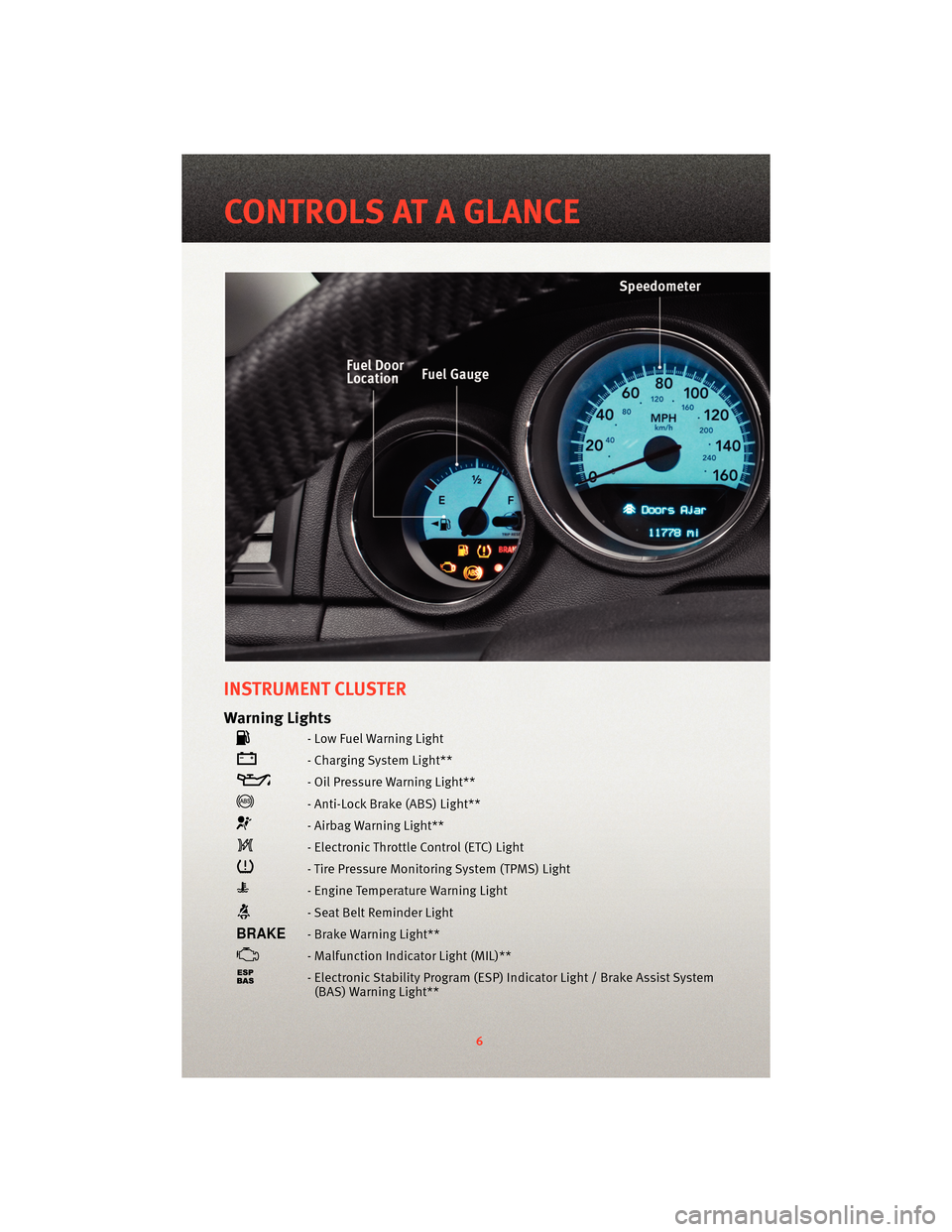
INSTRUMENT CLUSTER
Warning Lights
- Low Fuel Warning Light
- Charging System Light**
- Oil Pressure Warning Light**
- Anti-Lock Brake (ABS) Light**
- Airbag Warning Light**
- Electronic Throttle Control (ETC) Light
- Tire Pressure Monitoring System (TPMS) Light
- Engine Temperature Warning Light
- Seat Belt Reminder Light
- Brake Warning Light**
- Malfunction Indicator Light (MIL)**
- Electronic Stability Program (ESP) Indicator Light / Brake Assist System
(BAS) Warning Light**
6
CONTROLS AT A GLANCE
Page 10 of 80
KEY FOB
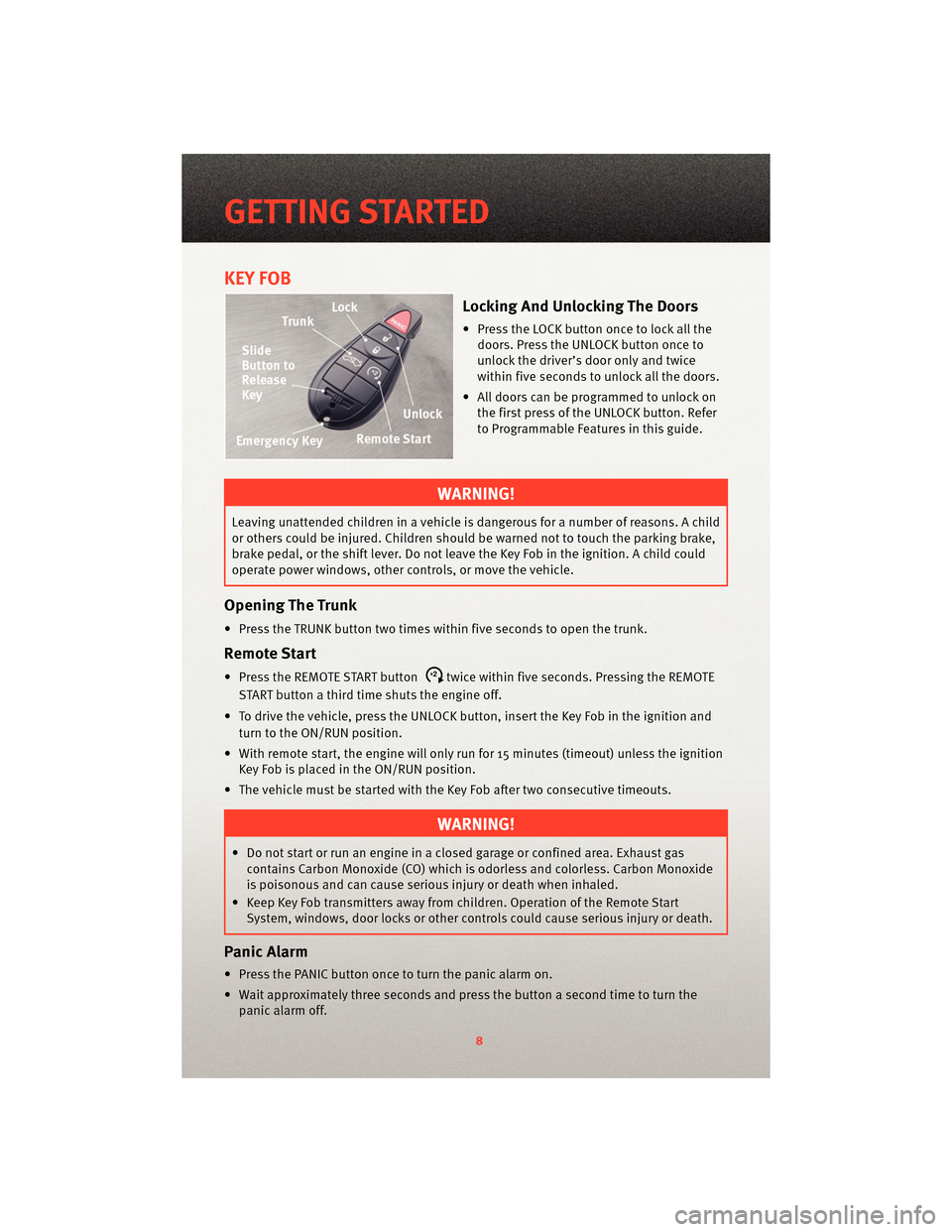
Locking And Unlocking The Doors
• Press the LOCK button once to lock all thedoors. Press the UNLOCK button once to
unlock the driver’s door only and twice
within five seconds to unlock all the doors.
• All doors can be programmed to unlock on the first press of the UNLOCK button. Refer
to Programmable Features in this guide.
WARNING!
Leaving unattended children in a vehicle is dangerous for a number of reasons. A child
or others could be injured. Children should be warned not to touch the parking brake,
brake pedal, or the shift lever. Do not leave the Key Fob in the ignition. A child could
operate power windows, other controls, or move the vehicle.
Opening The Trunk
• Press the TRUNK button two times w ithin five seconds to open the trunk.
Remote Start
• Press the REMOTE START buttonx2twice within five seconds. Pressing the REMOTE
START button a third time shuts the engine off.
• To drive the vehicle, press the UNLOCK button, insert the Key Fob in the ignition and turn to the ON/RUN position.
• With remote start, the engine will only run for 15 minutes (timeout) unless the ignition Key Fob is placed in the ON/RUN position.
• The vehicle must be started with the Key Fob after two consecutive timeouts.
WARNING!
• Do not start or run an engine in a closed garage or confined area. Exhaust gas contains Carbon Monoxide (CO) which is odorless and colorless. Carbon Monoxide
is poisonous and can cause serious injury or death when inhaled.
• Keep Key Fob transmitters away from children. Operation of the Remote Start System, windows, door locks or other controls could cause serious injury or death.
Panic Alarm
• Press the PANIC button once to turn the panic alarm on.
• Wait approximately three seconds and p ress the button a second time to turn the
panic alarm off.
GETTING STARTED
8
Page 21 of 80
SPEED CONTROL LEVER
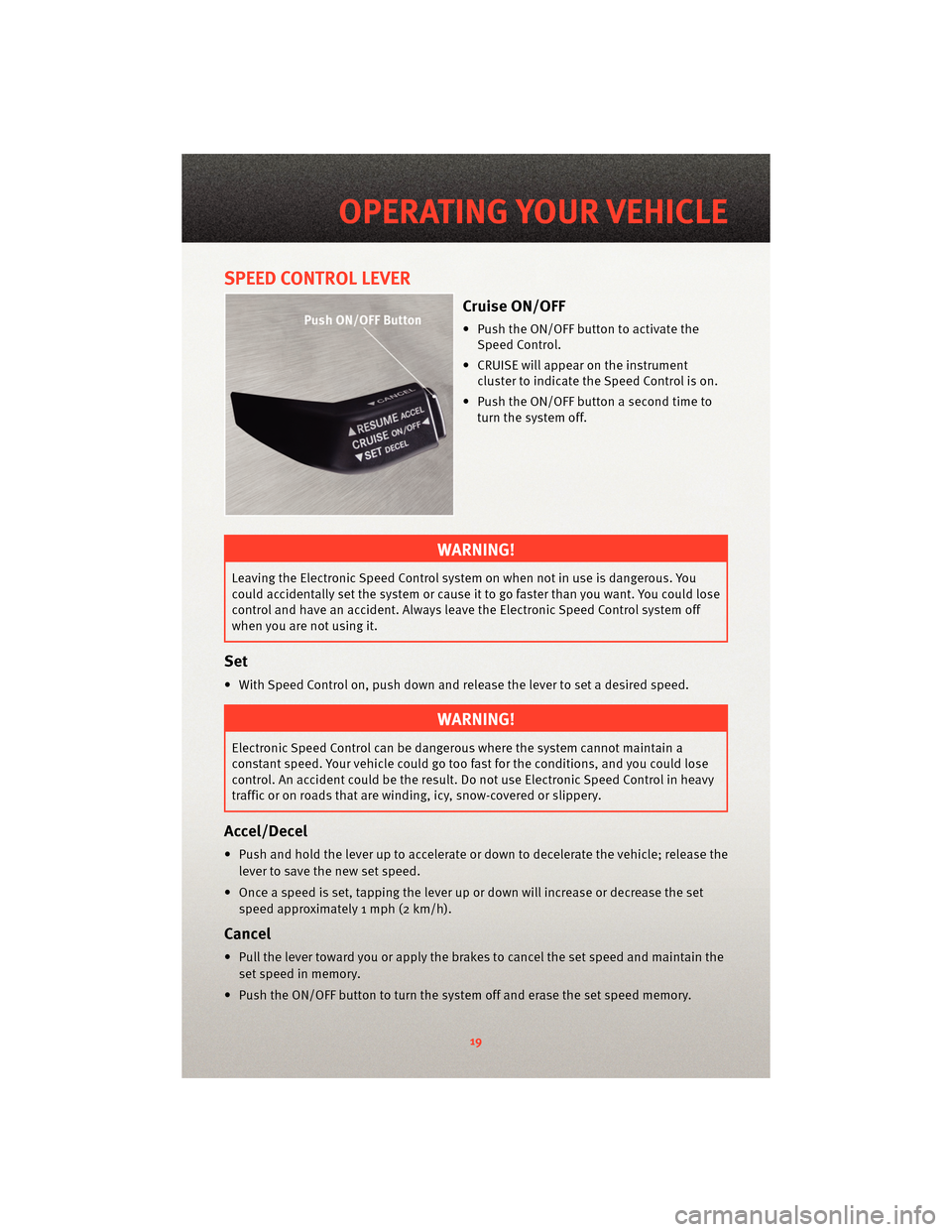
Cruise ON/OFF
• Push the ON/OFF button to activate theSpeed Control.
• CRUISE will appear on the instrument cluster to indicate the Speed Control is on.
• Push the ON/OFF button a second time to turn the system off.
WARNING!
Leaving the Electronic Speed Control system on when not in use is dangerous. You
could accidentally set the system or cause it to go faster than you want. You could lose
control and have an accident. Always leave the Electronic Speed Control system off
when you are not using it.
Set
• With Speed Control on, push down and release the lever to set a desired speed.
WARNING!
Electronic Speed Control can be dangerous where the system cannot maintain a
constant speed. Your vehicle could go too fast for the conditions, and you could lose
control. An accident could be the result. Do not use Electronic Speed Control in heavy
traffic or on roads that are winding, icy, snow-covered or slippery.
Accel/Decel
• Push and hold the lever up to accelerate or down to decelerate the vehicle; release the
lever to save the new set speed.
• Once a speed is set, tapping the lever up or down will increase or decrease the set speed approximately 1 mph (2 km/h).
Cancel
• Pull the lever toward you or apply the brakes to cancel the set speed and maintain theset speed in memory.
• Push the ON/OFF button to turn the system off and erase the set speed memory.
19
OPERATING YOUR VEHICLE
Page 39 of 80
RECREATIONAL TOWING
(BEHIND MOTORHOME,
ETC.)
Two-Wheel Drive And All-Wheel
Drive
• Recreational towing (with all fourwheels on the ground) is allowed
ONLY if the rear driveshaft is removed
and the transmission is in NEUTRAL
(for both RWD and AWD vehicles).
• Refer to your Owner's Manual on the DVD for further details.
WARNING!
If the driveshaft is removed, the
vehicle can roll even if the
transmission is in PARK, which could
cause serious injury or death.
• The parking brake must be firmly engaged and the wheels chocked
during driveshaft removal and
installation. The parking brake must
remain engaged unless the vehicle is
securely and properly connected to
the tow vehicle, or the driveshaft is
completely reinstalled. See your
authorized dealer for proper
driveshaft removal and reinstallation
procedures, including flange
orientation/alignment, use of
thread-locking compound, proper bolt
torque specifications, etc.
CAUTION!
Towing this vehicle in violation of the
above requirements can cause severe
transmission and/or transfer case
damage. Damage from improper
towing is not covered under your new
vehicle warranties.
37
UTILITY
Page 40 of 80
BRAKE/TRANSMISSION
INTERLOCK MANUAL
OVERRIDE
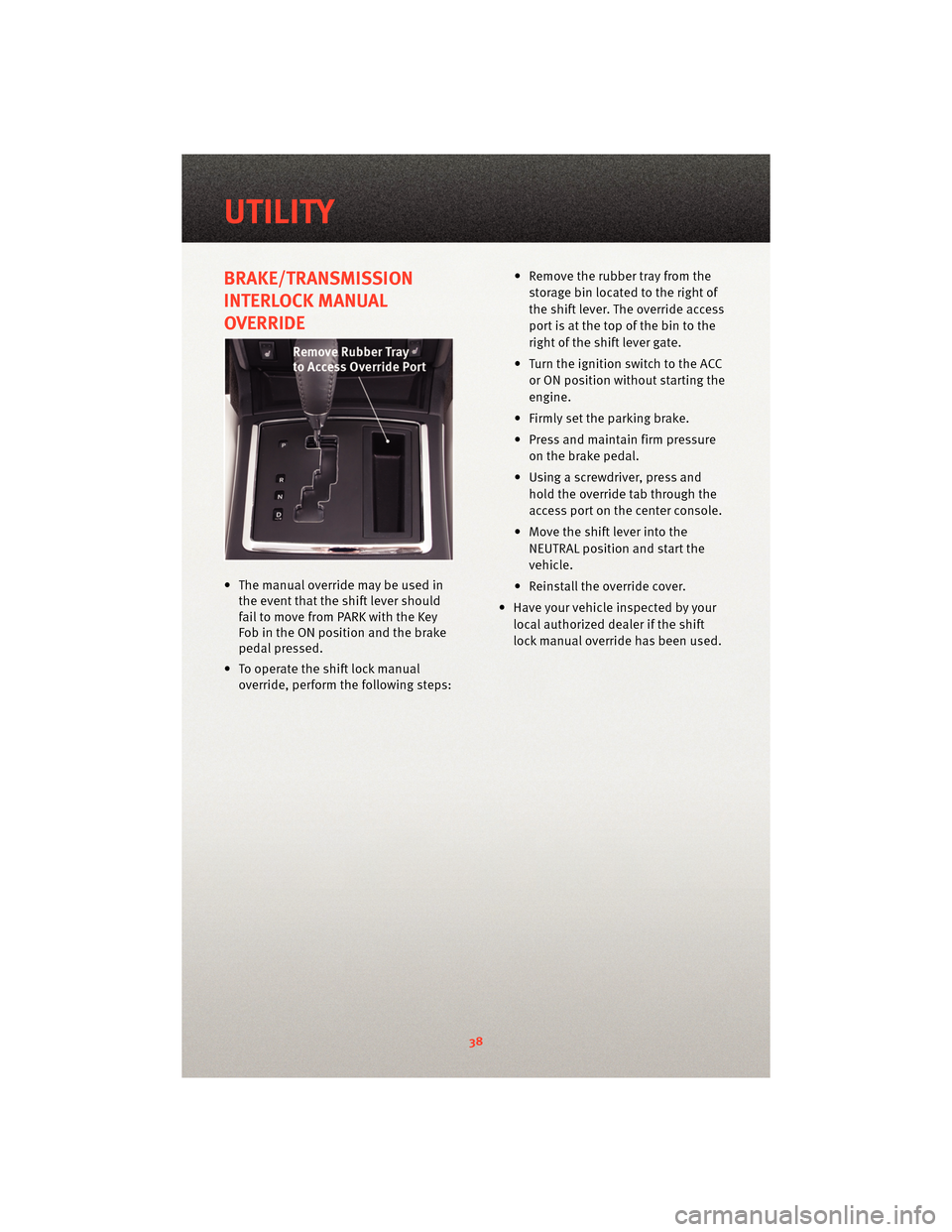
• The manual override may be used inthe event that the shift lever should
fail to move from PARK with the Key
Fob in the ON position and the brake
pedal pressed.
• To operate the shift lock manual override, perform the following steps: • Remove the rubber tray from the
storage bin located to the right of
the shift lever. The override access
port is at the top of the bin to the
right of the shift lever gate.
• Turn the ignition switch to the ACC or ON position without starting the
engine.
• Firmly set the parking brake.
• Press and maintain firm pressure on the brake pedal.
• Using a screwdriver, press and hold the override tab through the
access port on the center console.
• Move the shift lever into the NEUTRAL position and start the
vehicle.
• Reinstall the override cover.
• Have your vehicle inspected by your local authorized dealer if the shift
lock manual override has been used.
UTILITY
38
Page 42 of 80
• We recommend that you do not operate the vehicle or engine damage will occur. Havethe vehicle serviced immediately.
WARNING!
A hot engine cooling system is dangero us. You or others could be badly burned by
steam or boiling coolant. You may want to call an authorized dealership for service if
your vehicle overheats.
- Brake Warning Light
• The Brake Warning light illuminates when there is either a system malfunction or the
parking brake is applied. If the light is on and the parking brake is not applied, it
indicates a possible brake hydraulic malfunction, brake booster problem or an
Anti-Lock Brake System problem.
• We recommend you do not operate the vehicle. Have the vehicle serviced immediately.
WARNING!
Driving a vehicle with the red brake light on is dangerous. Part of the brake system
may have failed. It will take longer to stop the vehicle. You could have an accident.
Have the vehicle checked immediately.
- Malfunction Indicator Light (MIL)
• Certain conditions, such as a loose or m issing gas cap,poor fuel quality, etc., may
illuminate the MIL after engine start. The vehicle should be serviced if the light stays
on through several typical driving cycles. In most situations, the vehicle will drive
normally and not require towing.
• If the MIL flashes when the engine is running, serious conditions may exist that could lead to immediate loss of power or severe catalytic converter damage. We recommend
you do not operate the vehicle. Hav e the vehicle serviced immediately.
- Electronic StabilityProgram (ESP) Indicator Light/Brake Assist
System (BAS) Warning Light
• If the ESP/BAS warning light comes on continuously with the engine running, a
malfunction has been detected.
• If this light remains on after several ignition cycles, and the vehicle has been driven several miles (kilometers) at speeds g reater than 30 mph (48 km/h), we recommend
you do not operate the vehicle. Hav e the vehicle serviced immediately.
- Charging System Light
• This light shows the status of the electrical ch arging system. If the charging system
light remains on, it means that the vehicle is experiencing a problem with the charging
system.
WHAT TO DO IN EMERGENCIES
40
Page 43 of 80
• We recommend you do not continue driving if the charging system light is on. Have thevehicle serviced immediately.
- Oil Pressure Warning Light
• This light indicates low engine oil pressure. If the light turns on while driving, stop thevehicle and shut off the engine as soon as possible. A chime will sound for four
minutes when this light turns on.
• We recommend you do not operate the vehicle or engine damage will occur. Have the vehicle serviced immediately.
- Anti-Lock Brake (ABS) Light
• This light monitors the Anti-Lock Brake System (ABS).
• If the light is not on during starting, stays on, or turns on while driving, we recommendyou do not operate the vehicle. Hav e the vehicle serviced immediately.
- Electronic Throttle Control (ETC) Light
• This light informs you of a problem with the Electronic Throttle Control (ETC) system.
• If a problem is detected, the light will come on while the engine is running. Cycle the
ignition when the vehicle has completely stopped and the shift lever is placed in the
PARK position; the light should turn off.
• If the light remains lit with the engine running, your vehicle will usually be drivable; however, see an authorized dealer for service as soon as possible. If the light is
flashing when the engine is running, immedi ate service is required and you may
experience reduced performance, an elevat ed/rough idle or engine stall and your
vehicle may require towing. We recommend you do not operate the vehicle. Have the
vehicle serviced immediately.
- Airbag Warning Light
• If the light is not on during starting, stays on, or turns on while driving, we recommend you do not operate the vehicle. Hav e the vehicle serviced immediately.
tCASE Message
• If the tCASE message appears after engine start up, or during driving, it means the
AWD system is not functioning properly. We recommend you do not operate the
vehicle. Have the vehicle serviced immediately.
SERVICE AWD SYSTEM Message
• If the SERVICE AWD SYSTEM warning message appears after engine start up, or during
driving, it means the AWD system is not functioning properly. We recommend you do
not operate the vehicle. Have the vehicle serviced immediately.
Fuel Cap/Loose Gas Cap Message
• If a “gas cap” message (shown as gASCAP) appears, tighten the gas cap until a
“clicking” sound is heard.
• Press the odometer reset button to turn the message off.
41
WHAT TO DO IN EMERGENCIES
Page 47 of 80
• The jack and spare tire or TIREFIT kit are stowed under an access cover in the trunk.
• Lift the access cover using the pull strap and remove the fastener securing the sparetire.
• After removing the spare tire, remove the fastener securing the jack.
Preparations For Jacking Or TIREFIT Tire Repair
• Park on a firm, level surface. Avoid ice or slippery areas.
• Set the parking brake and shif t the transmission into PARK.
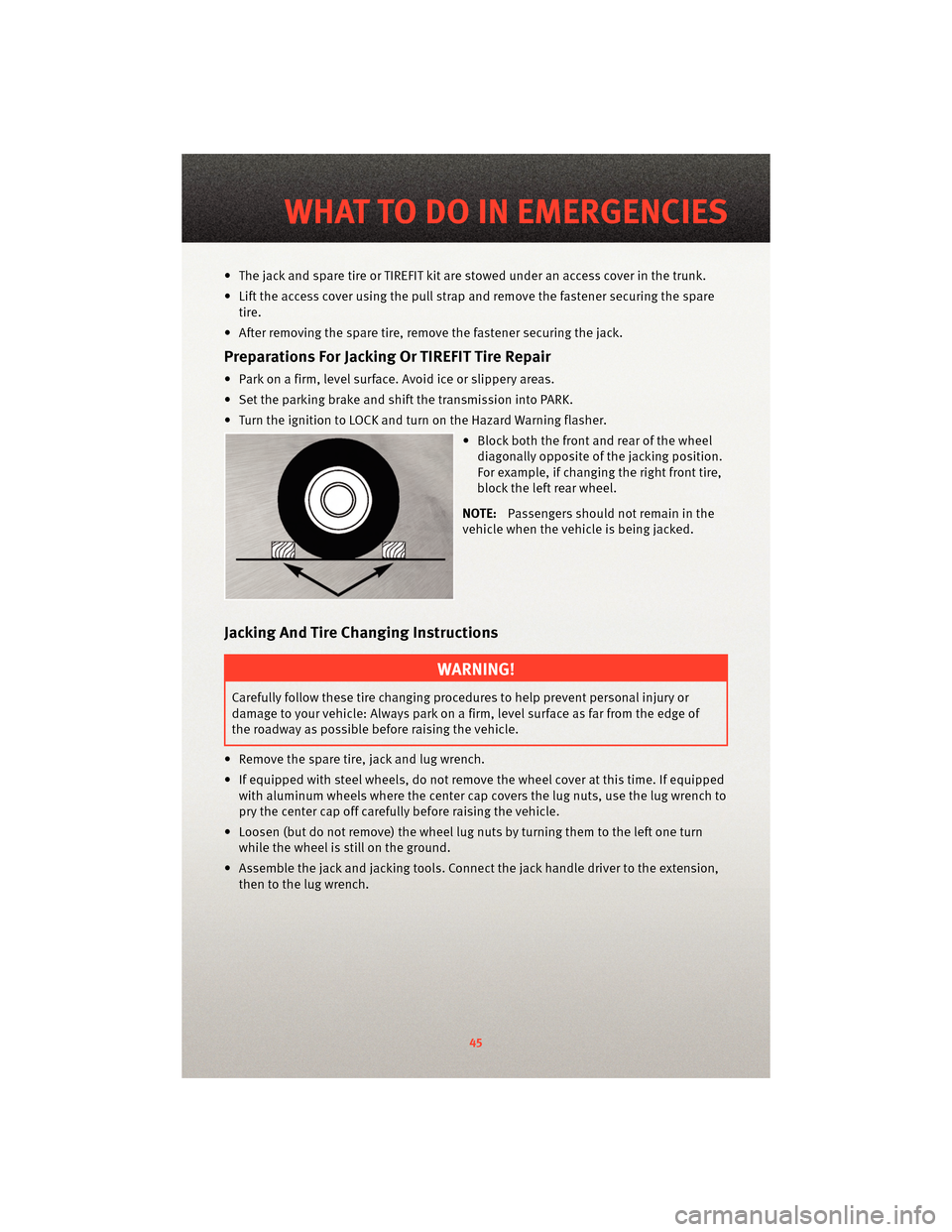
• Turn the ignition to LOCK and turn on the Hazard Warning flasher. • Block both the front and rear of the wheeldiagonally opposite of the jacking position.
For example, if changing the right front tire,
block the left rear wheel.
NOTE: Passengers should not remain in the
vehicle when the vehicle is being jacked.
Jacking And Tire Changing Instructions
WARNING!
Carefully follow these tire changing p rocedures to help prevent personal injury or
damage to your vehicle: Always park on a firm, level surface as far from the edge of
the roadway as possible before raising the vehicle.
• Remove the spare tire, jack and lug wrench.
• If equipped with steel wheels, do not remove the wheel cover at this time. If equipped with aluminum wheels where the center cap covers the lug nuts, use the lug wrench to
pry the center cap off carefully before raising the vehicle.
• Loosen (but do not remove) the wheel lug nuts by turning them to the left one turn while the wheel is still on the ground.
• Assemble the jack and jacking tools. Connect the jack handle driver to the extension, then to the lug wrench.
45
WHAT TO DO IN EMERGENCIES
Page 53 of 80
Remote Battery Posts
WARNING!
• Take care to avoid the radiator cooling fan whenever the hood is raised. It can start
anytime the ignition switch is on. You can be injured by moving fan blades.
• Remove any metal jewelry such as watch bands or bracelets that might make an inadvertent electrical contact. You could be seriously injured.
• Batteries contain sulfuric acid that can burn your skin or eyes and generate hydrogen gas which is flammable and explosive. Keep open flames or sparks away
from the battery.
• Set the parking brake, shift the autom atic transmission into PARK and turn the ignition
to LOCK.
• Turn off the heater, radio, and all unnecessary electrical accessories.
• If using a another vehicle to jump-start the battery, park the vehicle within the jumper
cables reach, set the parking brake and make sure the ignition is OFF.
WARNING!
Do not allow vehicles to touch each other as this could establish a ground connection
and personal injury could result.
Jump-Starting Procedure
WARNING!
Failure to follow this procedure could result in personal injury or property damage due
to battery explosion.
CAUTION!
Failure to follow these procedures could result in damage to the charging system of
the booster vehicle or the discharged vehicle.
• Connect the positive (+)end of the jumper cable to the remote positive (+)post of the
discharged vehicle.
• Connect the opposite end of the positive (+)jumper cable to the positive (+)post of
the booster battery.
• Connect the negative end (-)of the jumper cable to the negative (-)post of the booster
battery.
• Connect the opposite end of the negative (-)jumper cable to the remote negative (-)
post of the vehicle with the discharged battery.
51
WHAT TO DO IN EMERGENCIES