heater DODGE CHARGER 2011 7.G Owners Manual
[x] Cancel search | Manufacturer: DODGE, Model Year: 2011, Model line: CHARGER, Model: DODGE CHARGER 2011 7.GPages: 104, PDF Size: 4.53 MB
Page 21 of 104
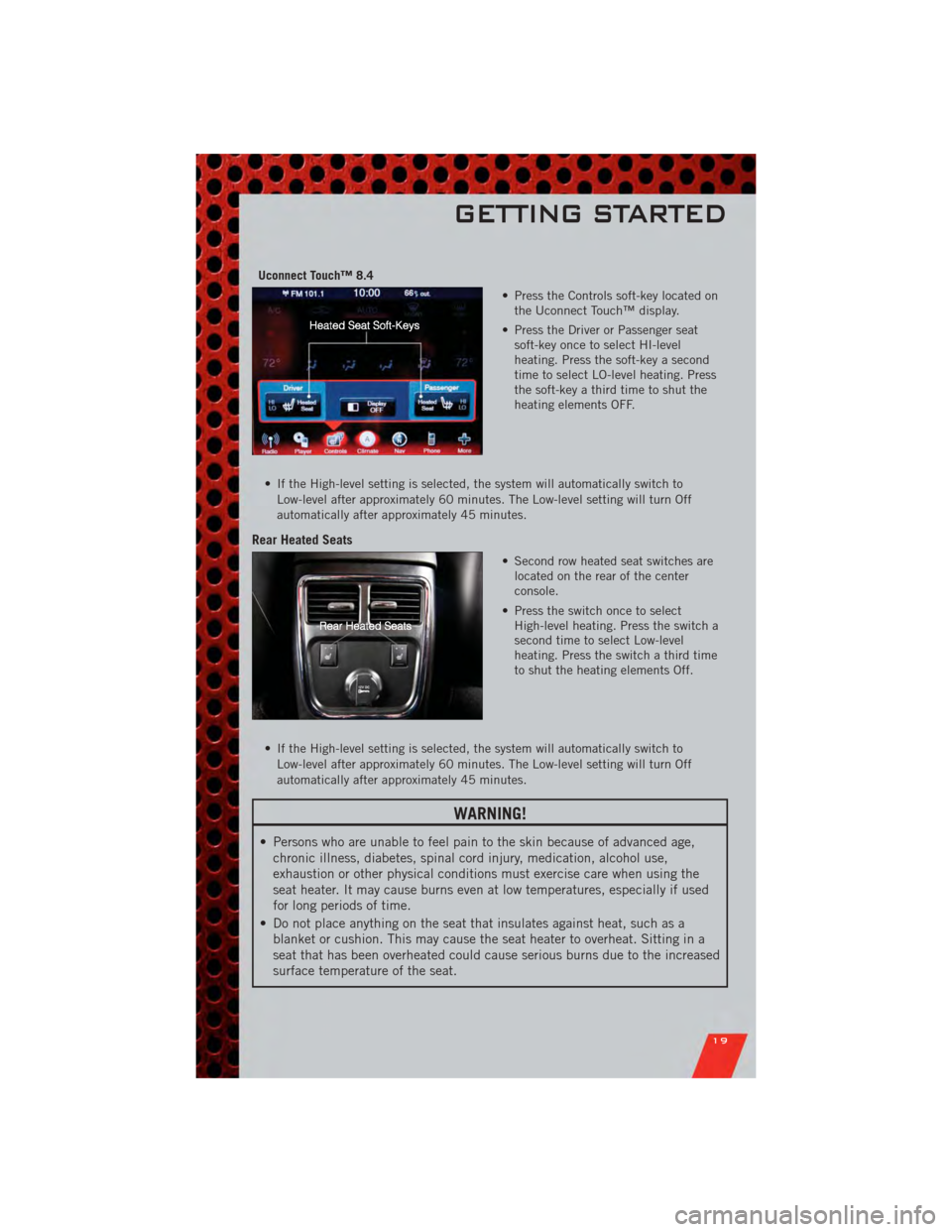
Uconnect Touch™ 8.4• Press the Controls soft-key located onthe Uconnect Touch™ display.
• Press the Driver or Passenger seat soft-key once to select HI-level
heating. Press the soft-key a second
time to select LO-level heating. Press
the soft-key a third time to shut the
heating elements OFF.
• If the High-level setting is selected, the system will automatically switch to Low-level after approximately 60 minutes. The Low-level setting will turn Off
automatically after approximately 45 minutes.
Rear Heated Seats
• Second row heated seat switches arelocated on the rear of the center
console.
• Press the switch once to select High-level heating. Press the switch a
second time to select Low-level
heating. Press the switch a third time
to shut the heating elements Off.
• If the High-level setting is selected, the system will automatically switch to Low-level after approximately 60 minutes. The Low-level setting will turn Off
automatically after approximately 45 minutes.
WARNING!
• Persons who are unable to feel pain to the skin because of advanced age,chronic illness, diabetes, spinal cord injury, medication, alcohol use,
exhaustion or other physical conditions must exercise care when using the
seat heater. It may cause burns even at low temperatures, especially if used
for long periods of time.
• Do not place anything on the seat that insulates against heat, such as a blanket or cushion. This may cause the seat heater to overheat. Sitting in a
seat that has been overheated could cause serious burns due to the increased
surface temperature of the seat.
GETTING STARTED
19
Page 49 of 104
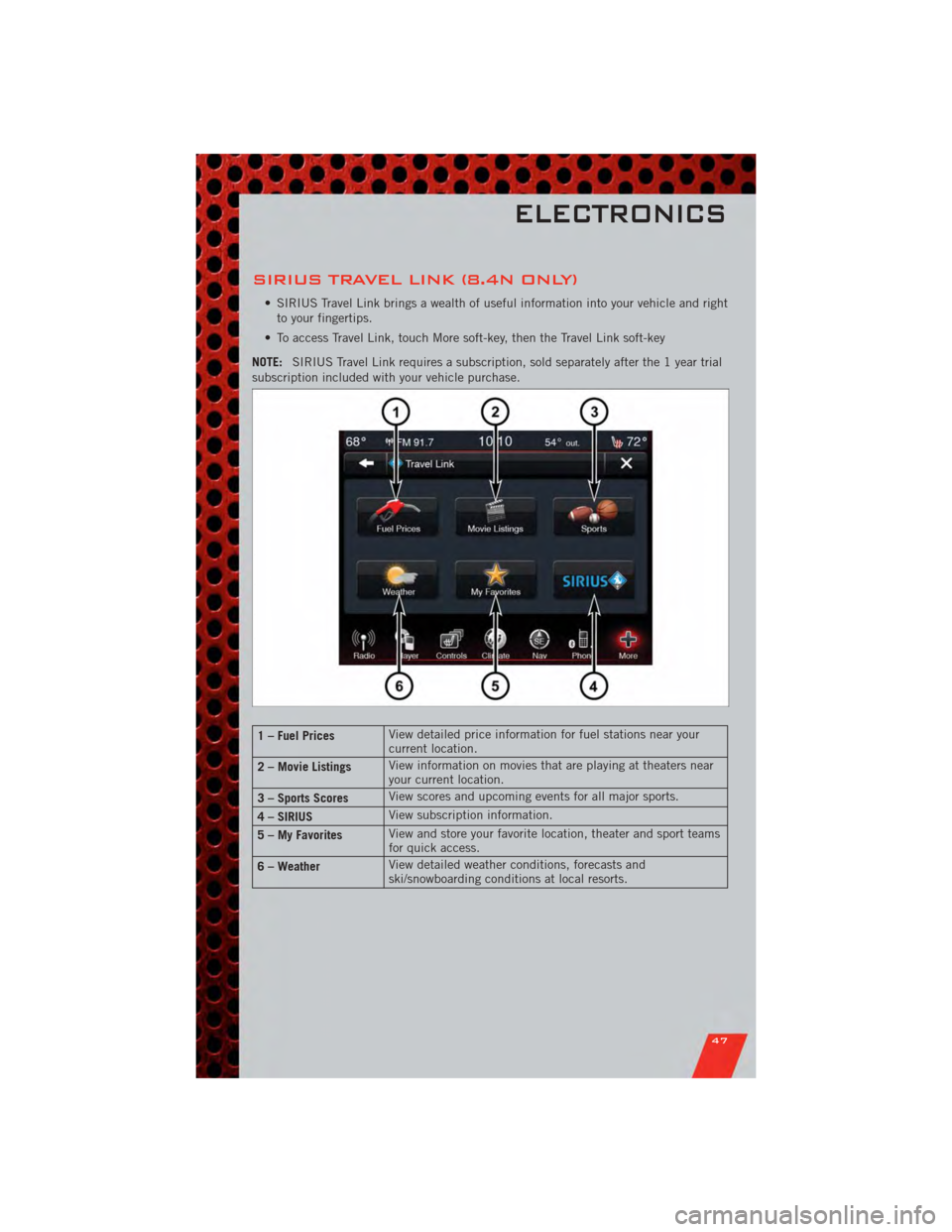
SIRIUS TRAVEL LINK (8.4N ONLY)
• SIRIUS Travel Link brings a wealth of useful information into your vehicle and rightto your fingertips.
• To access Travel Link, touch More soft-key, then the Travel Link soft-key
NOTE: SIRIUS Travel Link requires a subscription, sold separately after the 1 year trial
subscription included with your vehicle purchase.
1 – Fuel Prices View detailed price information for fuel stations near your
current location.
2 – Movie Listings View information on movies that are playing at theaters near
your current location.
3 – Sports Scores View scores and upcoming events for all major sports.
4 – SIRIUS View subscription information.
5 – My Favorites View and store your favorite location, theater and sport teams
for quick access.
6 – Weather View detailed weather conditions, forecasts and
ski/snowboarding conditions at local resorts.
ELECTRONICS
47
Page 68 of 104
• If the light remains lit with the engine running, your vehicle will usually bedrivable; however, see an authorized service center immediately. If the light is
flashing when the engine is running, immediate service is required and you may
experience reduced performance, an elevated/rough idle or engine stall and your
vehicle may require towing.
- Air Bag Warning Light
• If the light is not on during starting, stays on, or turns on while driving, have thevehicle serviced by an authorized service center immediately.
SERVICE AWD SYSTEM Message
• If the SERVICE AWD SYSTEM warning message appears after engine start up, orduring driving, it means the AWD system is not functioning properly. We
recommend you do not operate the vehicle. Have the vehicle serviced immediately.
Oil Change Indicator
Message
• If an “oil change” message (shown as Oil Change Required) appears and a single chime sounds, it is time for your next required oil change.
Resetting The Light After Servicing
• Without pressing the brake pedal, push the ENGINE START/STOP button and cycle the ignition to the ON/RUN position (Do not start the engine.)
• Fully depress the accelerator pedal three times within 10 seconds.
• Without pressing the brake pedal, push the ENGINE START/STOP button once to return the ignition to the OFF/LOCK position.
IF YOUR ENGINE OVERHEATS
• In any of the following situations, you can reduce the potential for overheating bytaking the appropriate action.
• On the highways — slow down.
• In city traffic — while stopped, place the transmission in NEUTRAL, but do not increase engine idle speed.
NOTE: There are steps that you can take to slow down an impending overheat
condition:
• If your air conditioner (A/C) is on, turn it off. The A/C system adds heat to the engine cooling system and turning the A/C off can help remove this heat.
• You can also turn the temperature control to maximum heat, the mode control to floor and the blower control to high. This allows the heater core to act as a
supplement to the radiator and aids in removing heat from the engine cooling
system.
WHAT TO DO IN EMERGENCIES
66
Page 72 of 104
WARNING!(Continued)
• A loose tire or jack, thrown forward in a collision or hard stop, could endangerthe occupants of the vehicle. Always stow the jack parts and the spare tire in
the places provided.
JUMP-STARTING
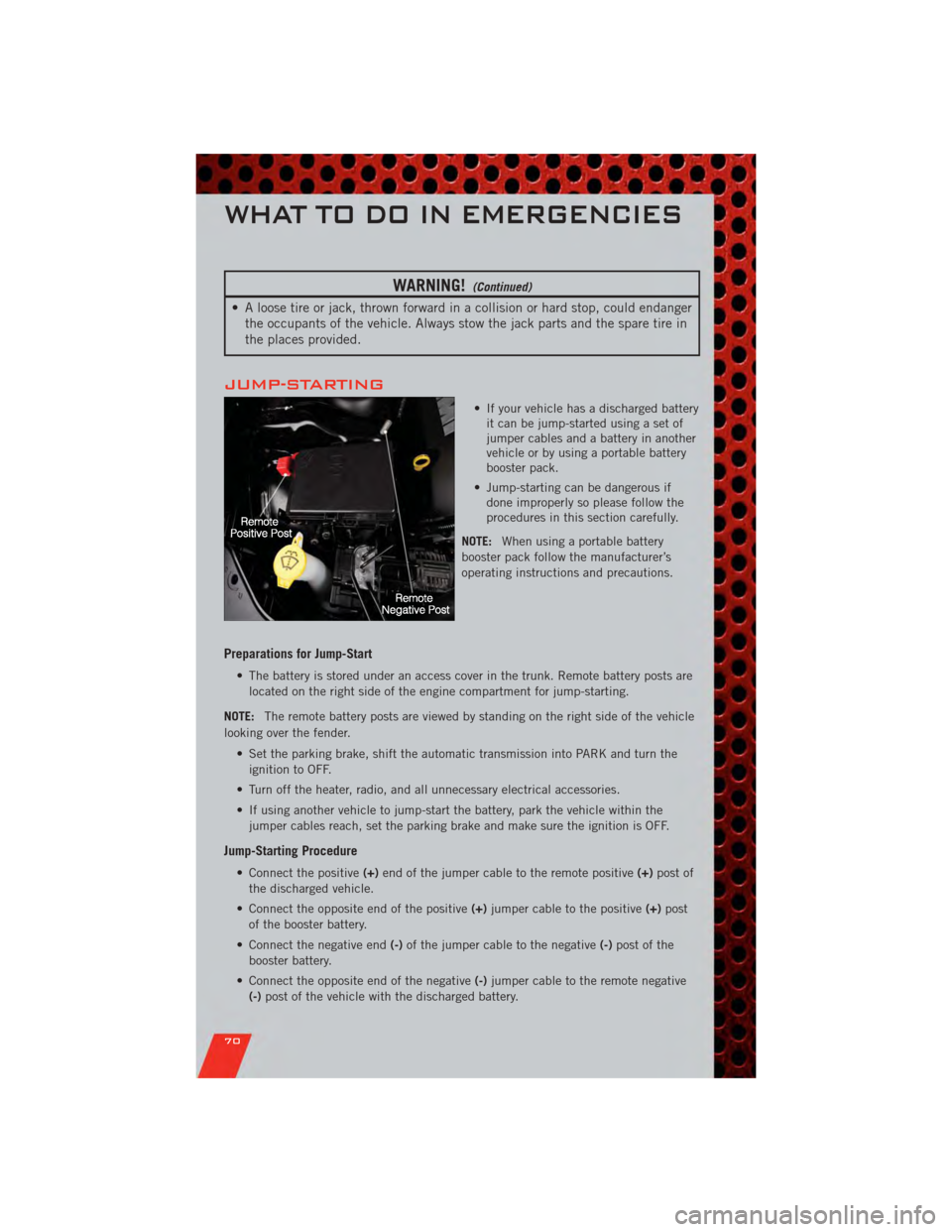
• If your vehicle has a discharged batteryit can be jump-started using a set of
jumper cables and a battery in another
vehicle or by using a portable battery
booster pack.
• Jump-starting can be dangerous if done improperly so please follow the
procedures in this section carefully.
NOTE: When using a portable battery
booster pack follow the manufacturer’s
operating instructions and precautions.
Preparations for Jump-Start
• The battery is stored under an access cover in the trunk. Remote battery posts are
located on the right side of the engine compartment for jump-starting.
NOTE: The remote battery posts are viewed by standing on the right side of the vehicle
looking over the fender.
• Set the parking brake, shift the automatic transmission into PARK and turn theignition to OFF.
• Turn off the heater, radio, and all unnecessary electrical accessories.
• If using another vehicle to jump-start the battery, park the vehicle within the jumper cables reach, set the parking brake and make sure the ignition is OFF.
Jump-Starting Procedure
• Connect the positive (+)end of the jumper cable to the remote positive (+)post of
the discharged vehicle.
• Connect the opposite end of the positive (+)jumper cable to the positive (+)post
of the booster battery.
• Connect the negative end (-)of the jumper cable to the negative (-)post of the
booster battery.
• Connect the opposite end of the negative (-)jumper cable to the remote negative
(-) post of the vehicle with the discharged battery.
WHAT TO DO IN EMERGENCIES
70
Page 83 of 104
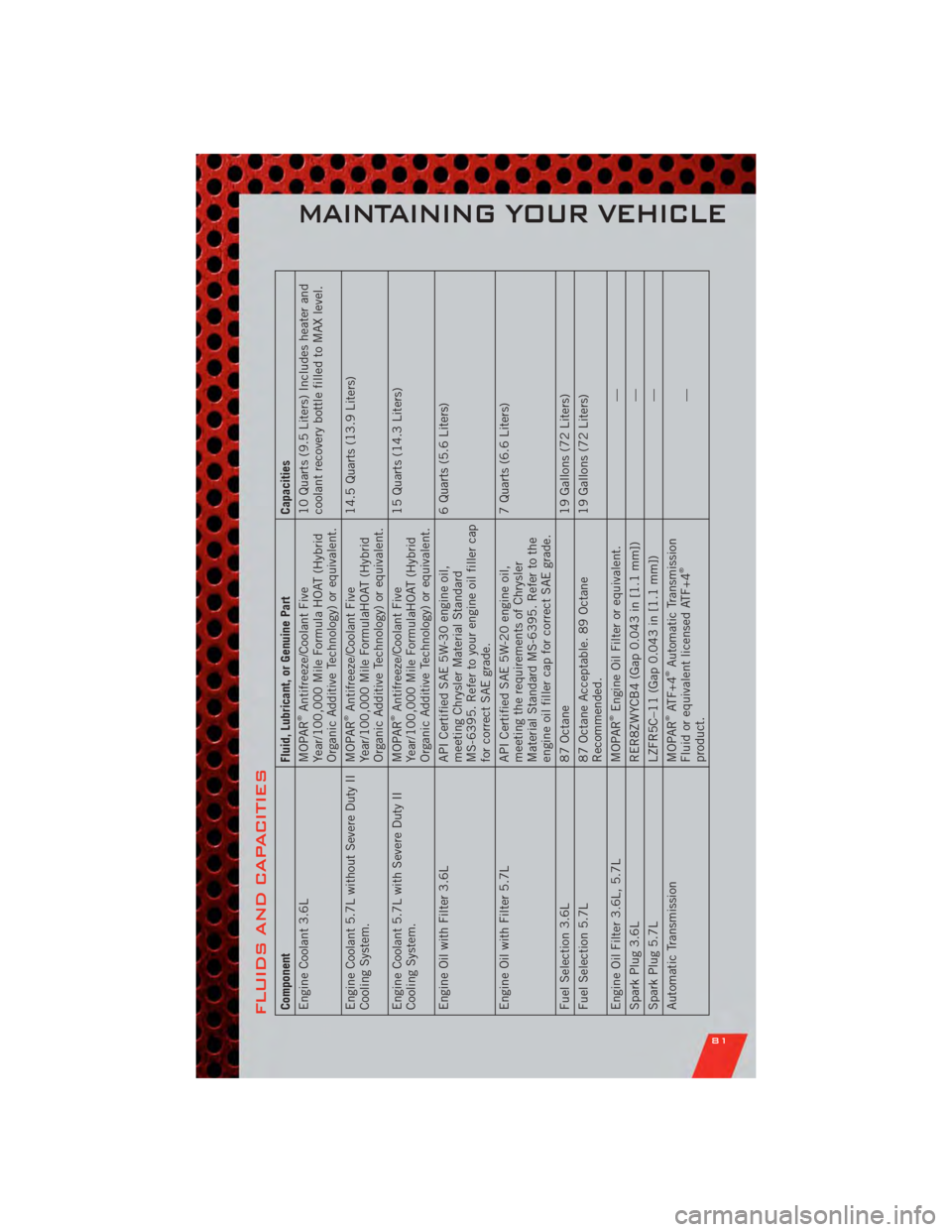
FLUIDS AND CAPACITIESComponentFluid, Lubricant, or Genuine PartCapacities
Engine Coolant 3.6L MOPAR
®Antifreeze/Coolant Five
Year/100,000 Mile Formula HOAT (Hybrid
Organic Additive Technology) or equivalent. 10 Quarts (9.5 Liters) Includes heater and
coolant recovery bottle filled to MAX level.
Engine Coolant 5.7L without Severe Duty II
Cooling System. MOPAR®Antifreeze/Coolant Five
Year/100,000 Mile FormulaHOAT (Hybrid
Organic Additive Technology) or equivalent. 14.5 Quarts (13.9 Liters)
Engine Coolant 5.7L with Severe Duty II
Cooling System. MOPAR®Antifreeze/Coolant Five
Year/100,000 Mile FormulaHOAT (Hybrid
Organic Additive Technology) or equivalent. 15 Quarts (14.3 Liters)
Engine Oil with Filter 3.6L API Certified SAE 5W-30 engine oil,
meeting Chrysler Material Standard
MS-6395. Refer to your engine oil filler cap
for correct SAE grade. 6 Quarts (5.6 Liters)
Engine Oil with Filter 5.7L API Certified SAE 5W-20 engine oil,
meeting the requirements of Chrysler
Material Standard MS-6395. Refer to the
engine oil filler cap for correct SAE grade. 7 Quarts (6.6 Liters)
Fuel Selection 3.6L 87 Octane19 Gallons (72 Liters)
Fuel Selection 5.7L 87 Octane Acceptable. 89 Octane
Recommended. 19 Gallons (72 Liters)
Engine Oil Filter 3.6L, 5.7L MOPAR®Engine Oil Filter or equivalent. —
Spark Plug 3.6L RER8ZWYCB4 (Gap 0.043 in [1.1 mm]) —
Spark Plug 5.7L LZFR5C–11 (Gap 0.043 in [1.1 mm]) —
Automatic Transmission MOPAR®ATF+4
®Automatic Transmission
Fluid or equivalent licensed ATF+4
®
product. —
MAINTAINING YOUR VEHICLE
81