brake DODGE CHARGER 2011 7.G User Guide
[x] Cancel search | Manufacturer: DODGE, Model Year: 2011, Model line: CHARGER, Model: DODGE CHARGER 2011 7.GPages: 566, PDF Size: 11.25 MB
Page 221 of 566
To Vary The Speed Setting
While ACC is set, you can increase the set speed by
pressing and holding the RES+button. If the button is
continually pressed, the set speed will continue to in-
crease in 5 mph (8 km/h) increments until the button is
released. The increase in set speed is reflected in the EVIC
display.
Pressing the RES +button once will result ina1mph
(1.6 km/h) increase in set speed. Each subsequent tap of
the button results in an increase of 1 mph (1.6 km/h).
While ACC is set, the set speed can be decreased by
pressing and holding the SET -button. If the button is
continually pressed, the set speed will continue to de-
crease in 5 mph (8 km/h) increments until the button is
released. The decrease in set speed is reflected in the
EVIC display. Pressing the SET
-button once will result ina1mph
(1.6 km/h) decrease in set speed. Each subsequent tap of
the button results in a decrease of 1 mph (1.6 km/h).
NOTE:
•When you use the SET -button to decelerate, if the
engine’s braking power does not slow the vehicle
sufficiently to reach the set speed, the brake system
will automatically slow the vehicle.
•The ACC system can only apply a maximum of 25% of
the vehicle’s braking capability and will not bring the
vehicle to a complete stop.
•The ACC system maintains set speed when driving up
hill and down hill. However, a slight speed change on
moderate hills is normal. In addition, downshifting
may occur while climbing uphill or descending down-
hill. This is normal operation and necessary to main-
tain set speed.
3
UNDERSTANDING THE FEATURES OF YOUR VEHICLE 219
Page 223 of 566
•The distance setting is changed.
•The system disengages. (Refer to the information on
ACC Activation).
The maximum braking applied by ACC is limited; how-
ever, the driver can always apply the brakes manually, if
necessary.
NOTE: The brake lights will illuminate whenever the
ACC system applies the brakes.
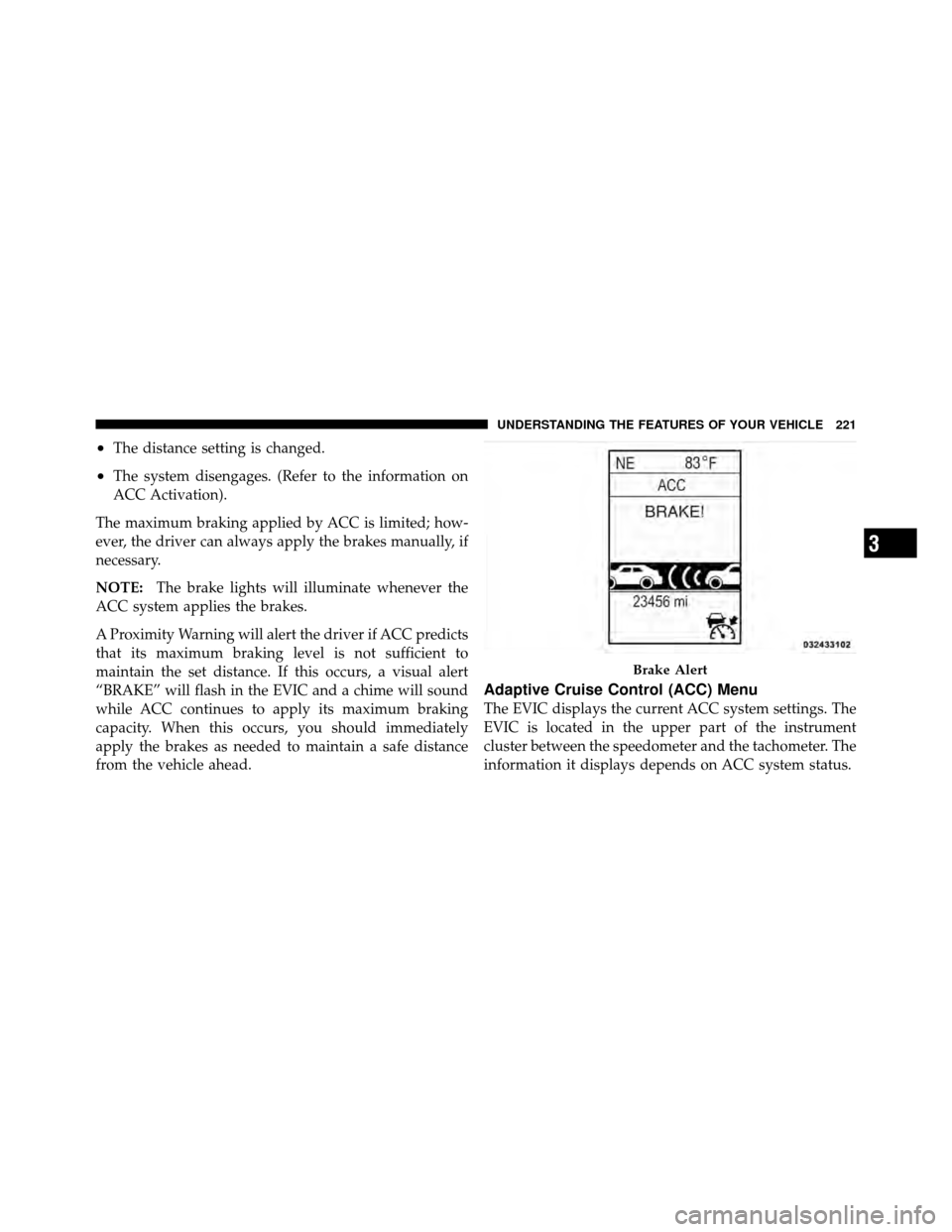
A Proximity Warning will alert the driver if ACC predicts
that its maximum braking level is not sufficient to
maintain the set distance. If this occurs, a visual alert
“BRAKE” will flash in the EVIC and a chime will sound
while ACC continues to apply its maximum braking
capacity. When this occurs, you should immediately
apply the brakes as needed to maintain a safe distance
from the vehicle ahead.
Adaptive Cruise Control (ACC) Menu
The EVIC displays the current ACC system settings. The
EVIC is located in the upper part of the instrument
cluster between the speedometer and the tachometer. The
information it displays depends on ACC system status.
Brake Alert
3
UNDERSTANDING THE FEATURES OF YOUR VEHICLE 221
Page 228 of 566
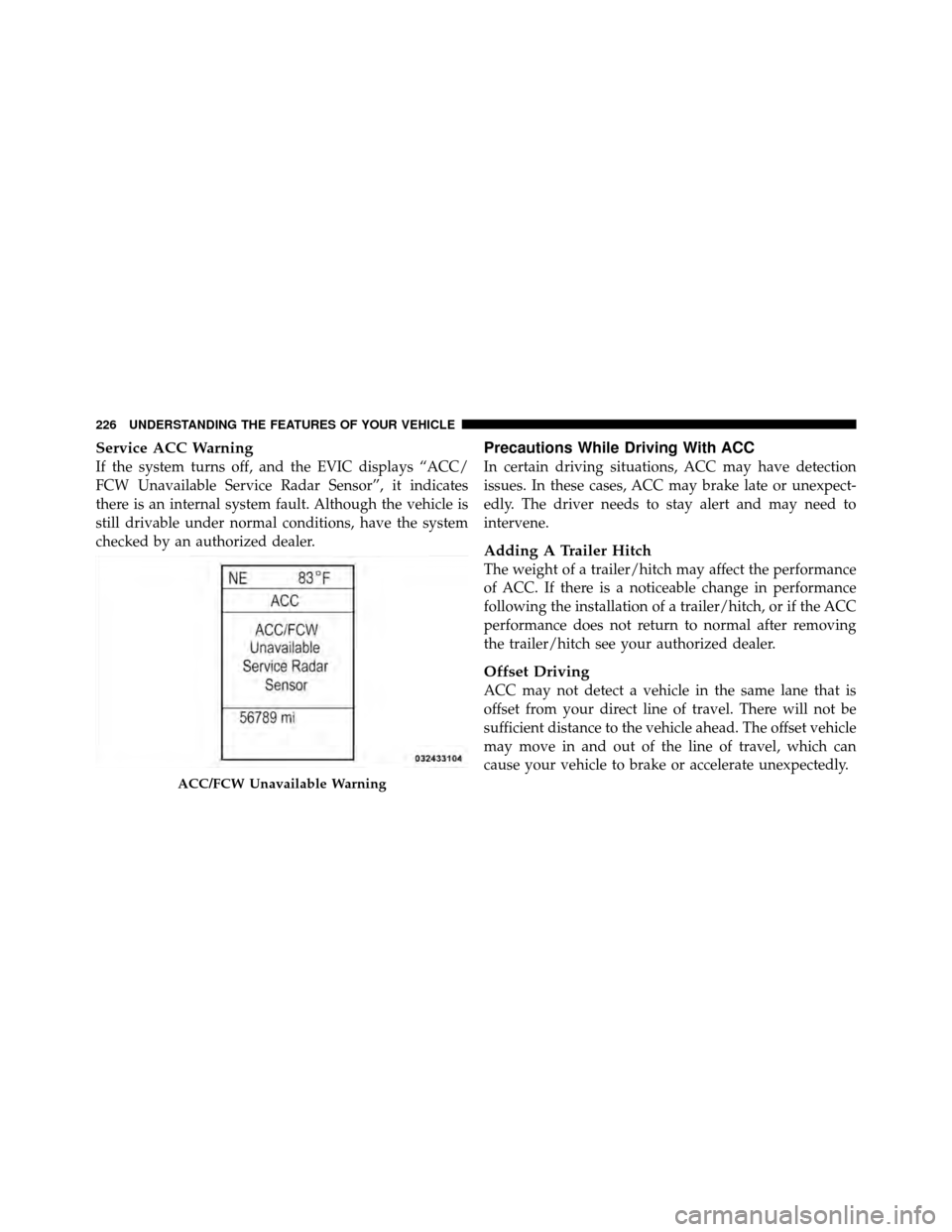
Service ACC Warning
If the system turns off, and the EVIC displays “ACC/
FCW Unavailable Service Radar Sensor”, it indicates
there is an internal system fault. Although the vehicle is
still drivable under normal conditions, have the system
checked by an authorized dealer.
Precautions While Driving With ACC
In certain driving situations, ACC may have detection
issues. In these cases, ACC may brake late or unexpect-
edly. The driver needs to stay alert and may need to
intervene.
Adding A Trailer Hitch
The weight of a trailer/hitch may affect the performance
of ACC. If there is a noticeable change in performance
following the installation of a trailer/hitch, or if the ACC
performance does not return to normal after removing
the trailer/hitch see your authorized dealer.
Offset Driving
ACC may not detect a vehicle in the same lane that is
offset from your direct line of travel. There will not be
sufficient distance to the vehicle ahead. The offset vehicle
may move in and out of the line of travel, which can
cause your vehicle to brake or accelerate unexpectedly.
ACC/FCW Unavailable Warning
226 UNDERSTANDING THE FEATURES OF YOUR VEHICLE
Page 229 of 566
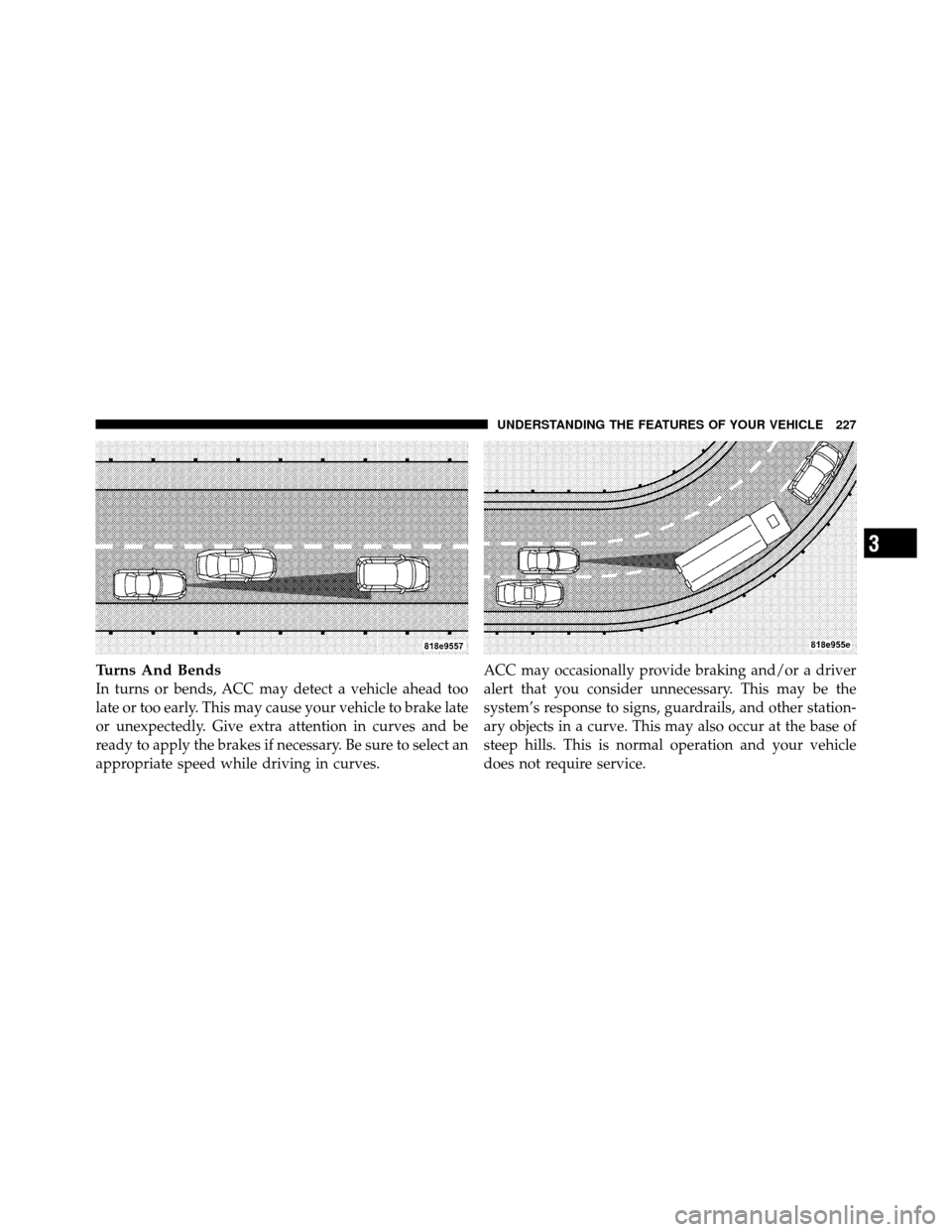
Turns And Bends
In turns or bends, ACC may detect a vehicle ahead too
late or too early. This may cause your vehicle to brake late
or unexpectedly. Give extra attention in curves and be
ready to apply the brakes if necessary. Be sure to select an
appropriate speed while driving in curves.ACC may occasionally provide braking and/or a driver
alert that you consider unnecessary. This may be the
system’s response to signs, guardrails, and other station-
ary objects in a curve. This may also occur at the base of
steep hills. This is normal operation and your vehicle
does not require service.
3
UNDERSTANDING THE FEATURES OF YOUR VEHICLE 227
Page 230 of 566
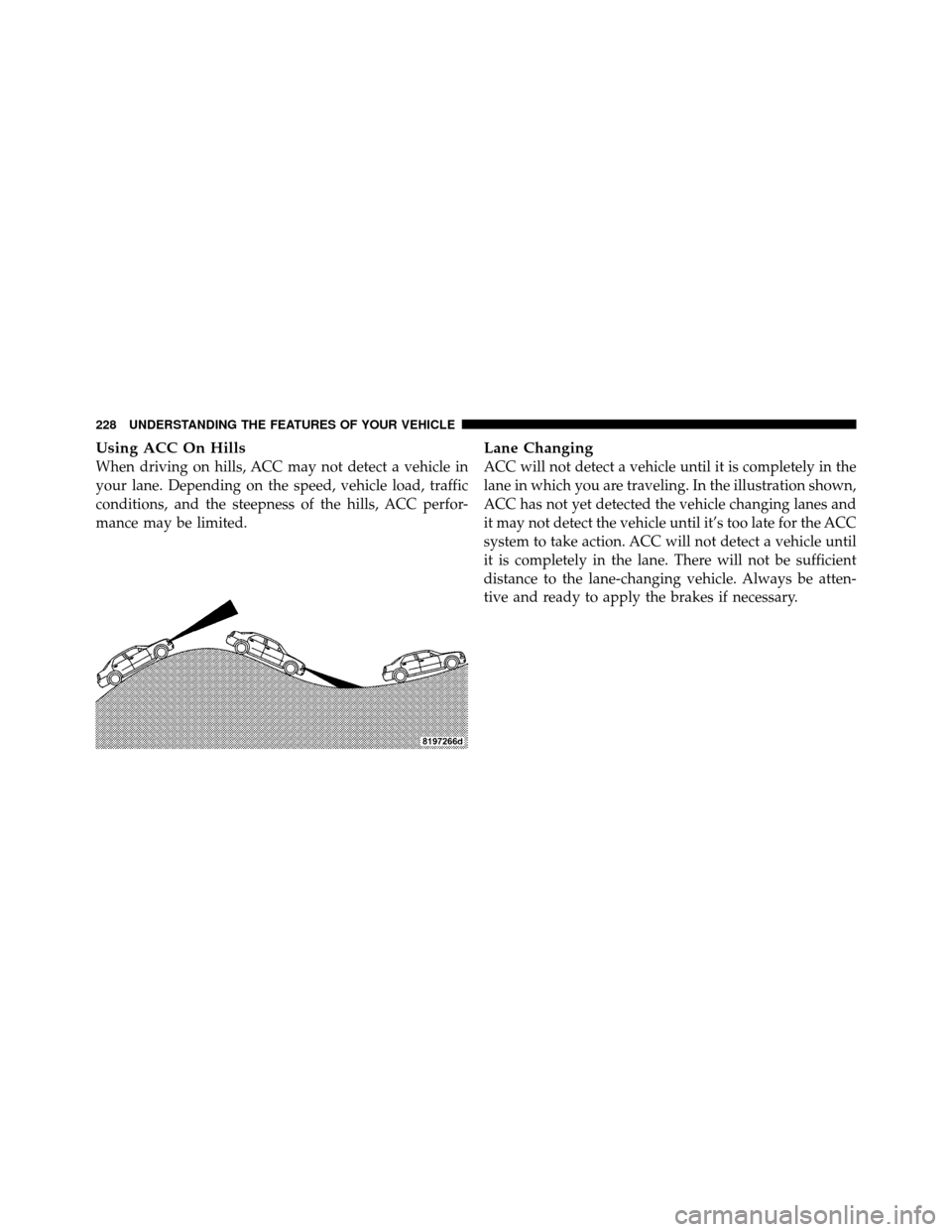
Using ACC On Hills
When driving on hills, ACC may not detect a vehicle in
your lane. Depending on the speed, vehicle load, traffic
conditions, and the steepness of the hills, ACC perfor-
mance may be limited.
Lane Changing
ACC will not detect a vehicle until it is completely in the
lane in which you are traveling. In the illustration shown,
ACC has not yet detected the vehicle changing lanes and
it may not detect the vehicle until it’s too late for the ACC
system to take action. ACC will not detect a vehicle until
it is completely in the lane. There will not be sufficient
distance to the lane-changing vehicle. Always be atten-
tive and ready to apply the brakes if necessary.
228 UNDERSTANDING THE FEATURES OF YOUR VEHICLE
Page 232 of 566
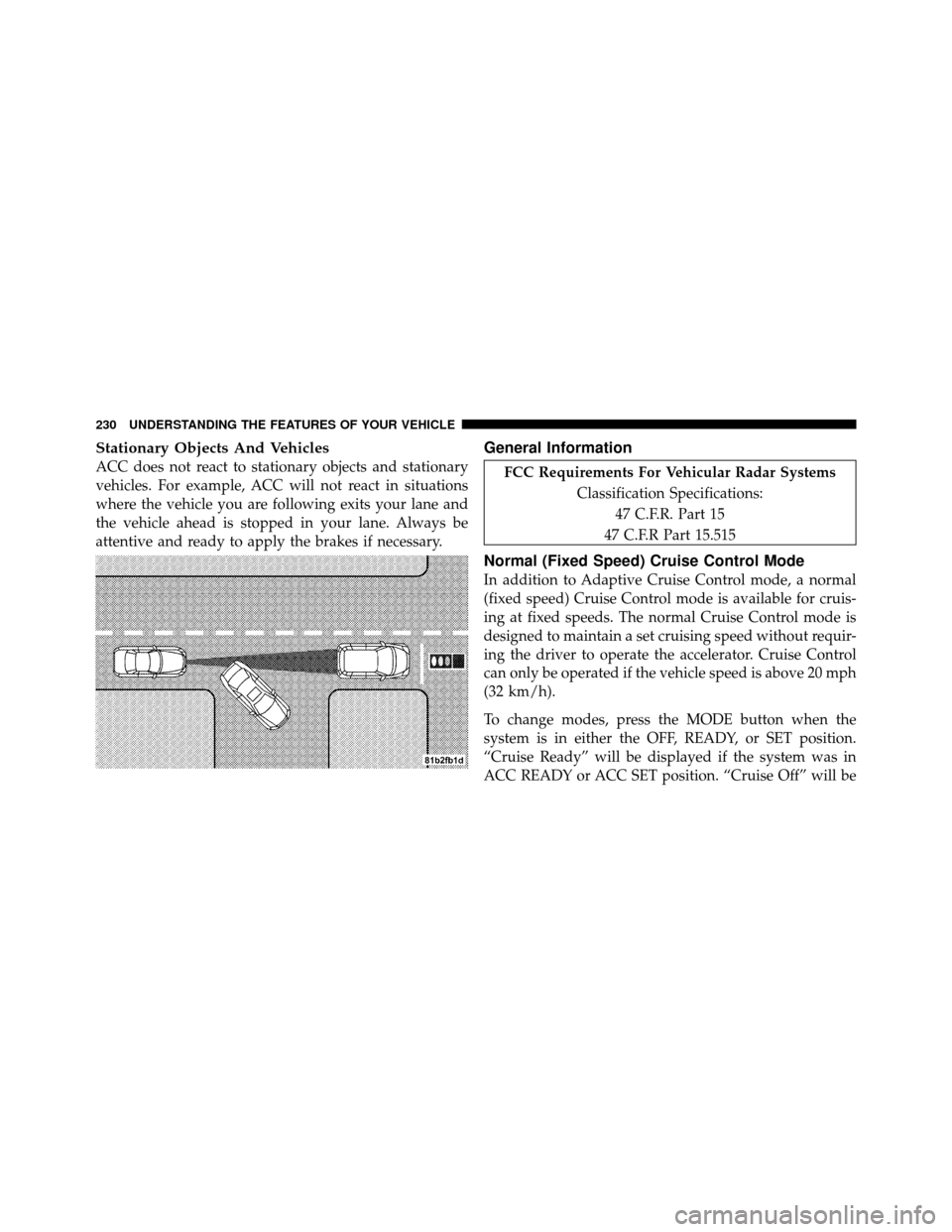
Stationary Objects And Vehicles
ACC does not react to stationary objects and stationary
vehicles. For example, ACC will not react in situations
where the vehicle you are following exits your lane and
the vehicle ahead is stopped in your lane. Always be
attentive and ready to apply the brakes if necessary.
General Information
FCC Requirements For Vehicular Radar SystemsClassification Specifications:47 C.F.R. Part 15
47 C.F.R Part 15.515
Normal (Fixed Speed) Cruise Control Mode
In addition to Adaptive Cruise Control mode, a normal
(fixed speed) Cruise Control mode is available for cruis-
ing at fixed speeds. The normal Cruise Control mode is
designed to maintain a set cruising speed without requir-
ing the driver to operate the accelerator. Cruise Control
can only be operated if the vehicle speed is above 20 mph
(32 km/h).
To change modes, press the MODE button when the
system is in either the OFF, READY, or SET position.
“Cruise Ready” will be displayed if the system was in
ACC READY or ACC SET position. “Cruise Off” will be
230 UNDERSTANDING THE FEATURES OF YOUR VEHICLE
Page 233 of 566
displayed if the system was in the ACC OFF position. To
switch back to Adaptive Cruise Control mode, press the
MODE button a second time.
WARNING!
In the normal Cruise Control mode, the system will
not react to vehicles ahead. In addition, the proximity
warning does not activate and no alarm will sound
even if you are too close to the vehicle ahead since
neither the presence of the vehicle ahead nor the
vehicle-to vehicle distance is detected. Be sure to
maintain a safe distance between your vehicle and
the vehicle ahead. Always be aware which mode is
selected.
To Set A Desired Speed
When the vehicle reaches the speed desired, press the
SET-button and release. The EVIC will display the set
speed. NOTE:
You must observe the display when setting or
changing speed, not the speedometer.
To Vary The Speed Setting
There are two ways to change the set speed:
•Use the accelerator pedal to adjust the vehicle to the
desired speed and press the SET -button.
•Tap the RES +or SET -button to increase or decrease
the set speed in 1 mph (1.6 km/h) increments respec-
tively. Hold the RES +or SET -button for 5 mph
(8 km/h) increments.
To Cancel
The system will disable normal Cruise Control without
erasing the memory if:
•You softly tap or depress the brake pedal.
•You press the CANCEL button.
3
UNDERSTANDING THE FEATURES OF YOUR VEHICLE 231
Page 234 of 566
•The Electronic Stability Control/Traction Control Sys-
tem (ESC/TCS) activates.
To Resume
Press the RES+button and then remove your foot from
the accelerator pedal. The EVIC will display the last set
speed.
To Turn Off
The system will turn off and erase the set speed in
memory if:
•You push and release the ON/OFF button.
•You turn off the ignition.
•You switch off ESC.
If the Cruise Control system is turned off and reactivated,
the system will return to the last driver setting (ACC or
Normal Cruise Control).
Forward Collision Warning — If Equipped
Forward Collision Warning (FCW) warns the driver of a
potential collision with the vehicle in front of you and
prompts the driver to take action in order to avoid the
collision.
FCW monitors the information from the forward looking
sensor as well as the Electronic Brake Controller (EBC),
wheel speed sensors, i.e., to calculate a probable rear-end
collision. When the system determines that a rear-end
collision is probable a warning message (both audible
and visual) will be displayed on the EVIC. When the
system determines a collision with the vehicle in front of
you is no longer probable, the warning message will be
deactivated.
232 UNDERSTANDING THE FEATURES OF YOUR VEHICLE
Page 278 of 566
7. Odometer Display / Electronic Vehicle Information
Center (EVIC) Display
Odometer Display
The odometer display shows the total distance the ve-
hicle has been driven.
U.S. Federal regulations require that upon transfer of
vehicle ownership, the seller certify to the purchaser the
correct mileage that the vehicle has been driven. If your
odometer needs to be repaired or serviced, the repair
technician should leave the odometer reading the same
as it was before the repair or service. If s/he cannot do so,
then the odometer must be set at zero, and a sticker must
be placed in the door jamb stating what the mileage was
before the repair or service. It is a good idea for you to
make a record of the odometer reading before the repair/
service, so that you can be sure that it is properly reset, or
that the door jamb sticker is accurate if the odometer
must be reset at zero.Electronic Vehicle Information Center (EVIC) Display
The Electronic Vehicle Information Center (EVIC) fea-
tures a driver-interactive display that is located in the
instrument cluster. For further information, refer to
“Electronic Vehicle Information Center (EVIC)”.
8. Anti-Lock Brake (ABS) Light
This light monitors the Anti-Lock Brake System
(ABS). The light will turn on when the ignition
switch is turned to the ON/RUN position and
may stay on for as long as four seconds.
If the ABS light remains on or turns on while driving, it
indicates that the Anti-Lock portion of the brake system
is not functioning and that service is required. However,
the conventional brake system will continue to operate
normally if the BRAKE warning light is not on.
276 UNDERSTANDING YOUR INSTRUMENT PANEL
Page 279 of 566
If the ABS light is on, the brake system should be serviced
as soon as possible to restore the benefits of Anti-Lock
brakes. If the ABS light does not turn on when the
ignition switch is turned to the ON/RUN position, have
the light inspected by an authorized dealer.
9. Tire Pressure Monitoring Telltale Light —
If EquippedEach tire, including the spare (if provided),
should be checked monthly when cold and
inflated to the inflation pressure recommended
by the vehicle manufacturer on the vehicle
placard or tire inflation pressure label. (If your vehicle
has tires of a different size than the size indicated on the
vehicle placard or tire inflation pressure label, you should
determine the proper tire inflation pressure for those
tires.) As an added safety feature, your vehicle has been
equipped with a Tire Pressure Monitoring System
(TPMS) that illuminates a low tire pressure telltale when
one or more of your tires is significantly under-inflated.
Accordingly, when the low tire pressure telltale illumi-
nates, you should stop and check your tires as soon as
possible, and inflate them to the proper pressure. Driving
on a significantly under-inflated tire causes the tire to
overheat and can lead to tire failure. Under-inflation also
reduces fuel efficiency and tire tread life, and may affect
the vehicle’s handling and stopping ability.
Please note that the TPMS is not a substitute for proper
tire maintenance, and it is the driver ’s responsibility to
maintain correct tire pressure, even if under-inflation has
not reached the level to trigger illumination of the TPMS
low tire pressure telltale.
4
UNDERSTANDING YOUR INSTRUMENT PANEL 277