remote start DODGE CHARGER 2011 7.G User Guide
[x] Cancel search | Manufacturer: DODGE, Model Year: 2011, Model line: CHARGER, Model: DODGE CHARGER 2011 7.GPages: 566, PDF Size: 11.25 MB
Page 24 of 566
the current setting, refer to “Uconnect Touch™ Settings”
in “Understanding Your Instrument Panel” for further
information.
Turn Headlights On With Remote Key Unlock
This feature activates the headlights for up to 90 seconds
when the doors are unlocked with the RKE transmitter.
The time for this feature is programmable on vehicles
equipped through Uconnect Touch™. To change the
current setting, refer to “Uconnect Touch™ Settings” in
“Understanding Your Instrument Panel” for further
information.
To Lock The Doors
Press and release the LOCK button on the RKE transmit-
ter to lock all doors. The turn signal lights will flash and
the horn will chirp to acknowledge the signal.
If the vehicle is equipped with Passive Entry, refer to
“Keyless Enter-N-Go” under “Things To Know Before
Starting Your Vehicle” for further information.
Sound Horn With Remote Key Lock
This feature will cause the horn to chirp when the doors
are locked with the RKE transmitter. This feature can be
turned on or turned off. To change the current setting,
refer to “Uconnect Touch™ Settings” in “Understanding
Your Instrument Panel” for further information.
To Unlatch The Trunk
Press the TRUNK button on the RKE transmitter two
times within five seconds to unlatch the trunk.
If the vehicle is equipped with Passive Entry, refer to
“Keyless Enter-N-Go” under “Things To Know Before
Starting Your Vehicle” for further information.
22 THINGS TO KNOW BEFORE STARTING YOUR VEHICLE
Page 27 of 566
•This device must accept any interference received,
including interference that may cause undesired
operation.
NOTE: Changes or modifications not expressly ap-
proved by the party responsible for compliance could
void the user’s authority to operate the equipment.
If your RKE transmitter fails to operate from a normal
distance, check for these two conditions:
1. A weak battery in the RKE transmitter. The expected
life of the battery is a minimum of three years.
2. Closeness to a radio transmitter such as a radio station
tower, airport transmitter, and some mobile or CB radios.
REMOTE STARTING SYSTEM — IF EQUIPPED
This system uses the Key Fob with Remote
Keyless Entry (RKE) transmitter to start the
engine conveniently from outside the vehicle while still maintaining security. The system has a range
of approximately 300 ft (91 m).
NOTE:
•The vehicle must be equipped with an automatic
transmission to be equipped with Remote Start.
•Obstructions between the vehicle and the Key Fob
may reduce this range.
How To Use Remote Start
All of the following conditions must be met before the
engine will remote start:
•Shift lever in PARK
•Doors closed
•Hood closed
•Trunk closed
•HAZARD switch off
2
THINGS TO KNOW BEFORE STARTING YOUR VEHICLE 25
Page 28 of 566
•BRAKE switch inactive (brake pedal not pressed)
•Battery at an acceptable charge level
•RKE PANIC button not pressed.
•System not disabled from previous remote start event
•Vehicle theft alarm not active
•Ignition in OFF position
WARNING!
•Do not start or run an engine in a closed garage or
confined area. Exhaust gas contains Carbon Mon-
oxide (CO) which is odorless and colorless. Car-
bon Monoxide is poisonous and can cause serious
injury or death when inhaled.(Continued)
WARNING! (Continued)
•Keep Remote Keyless Entry (RKE) transmitters
away from children. Operation of the Remote Start
System, windows, door locks or other controls
could cause serious injury or death.
Remote Start Abort Message On Electronic Vehicle
Information Center (EVIC) — If Equipped
The following messages will display in the EVIC if the
vehicle fails to remote start or exits remote start prema-
turely:
•Remote Start Aborted — Door Ajar
•Remote Start Aborted — Hood Ajar
•Remote Start Aborted — Trunk Ajar
•Remote Start Aborted — Fuel Low
•Remote Start Disabled — Start Vehicle To Reset
26 THINGS TO KNOW BEFORE STARTING YOUR VEHICLE
Page 29 of 566
The EVIC message stays active until the ignition is cycled
to the ON/RUN position.
To Enter Remote Start Mode
Press and release the REMOTE START button
on the RKE transmitter twice within five sec-
onds. The vehicle doors will lock, the parking
lights will flash and the horn will chirp twice (if
programmed). Then, the engine will start and the vehicle
will remain in the Remote Start mode for a 15-minute
cycle.
NOTE:
•If an engine fault is present or fuel level is low, the
vehicle will start and then shut down in 10 seconds.
•The park lamps will turn on and remain on during
Remote Start mode.
•For security, power window and power sunroof op-
eration (if equipped) are disabled when the vehicle is
in the Remote Start mode.
•The engine can be started two consecutive times (two
15-minute cycles) with the RKE transmitter. However,
the ignition must be cycled to the RUN position before
you can repeat the start sequence for a third cycle.
To Exit Remote Start Mode Without Driving The
Vehicle
Press and release the REMOTE START button one time or
allow the engine to run for the entire 15 minute cycle.
NOTE: To avoid unintentional shutdowns, the system
will disable the one time press of the REMOTE START
button for two seconds after receiving a valid Remote
Start request.
2
THINGS TO KNOW BEFORE STARTING YOUR VEHICLE 27
Page 30 of 566
To Exit Remote Start Mode And Drive The Vehicle
Before the end of 15 minute cycle, press and release the
UNLOCK button on the RKE transmitter to unlock the
doors and disarm the Vehicle Security Alarm (if
equipped). Then, prior to the end of the 15 minute cycle,
press and release the START/STOP button.
NOTE:The message “Push Start Button” will display in
the EVIC until you push the START button.
DOOR LOCKS
Manual Door Locks
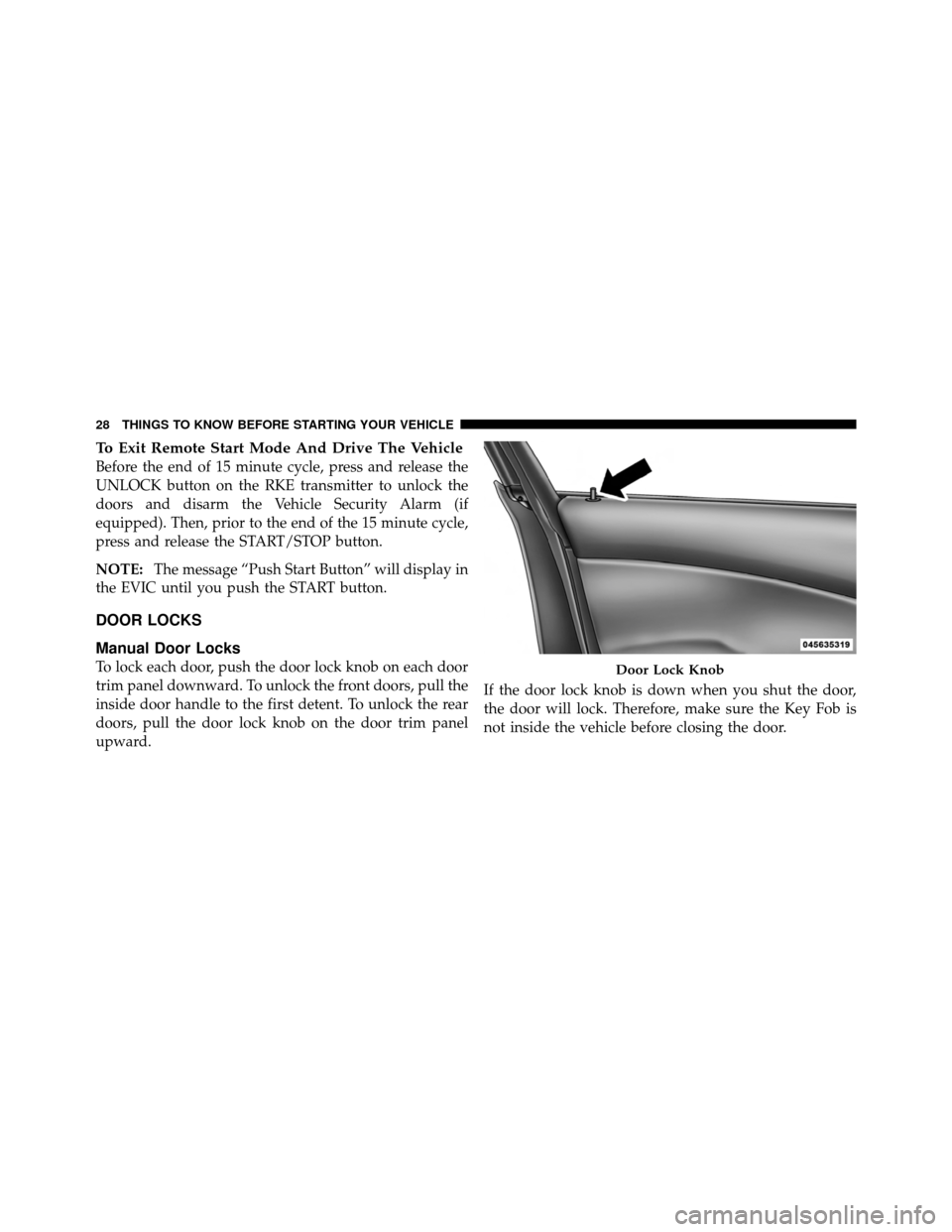
To lock each door, push the door lock knob on each door
trim panel downward. To unlock the front doors, pull the
inside door handle to the first detent. To unlock the rear
doors, pull the door lock knob on the door trim panel
upward. If the door lock knob is down when you shut the door,
the door will lock. Therefore, make sure the Key Fob is
not inside the vehicle before closing the door.Door Lock Knob
28 THINGS TO KNOW BEFORE STARTING YOUR VEHICLE
Page 32 of 566
The doors can also be locked and unlocked with the
Keyless Enter-N-Go (Passive Entry) system. For further
information, refer to “Keyless Enter-N-Go” in “Things To
Know Before Starting Your Vehicle”.
If you press the power door lock switch while the
ignition is in the ACC or ON/RUN position, and any
front door is open, the power locks will not operate. This
prevents you from accidentally locking the Key Fob in
the vehicle. Cycling the ignition to the OFF position or
closing the door will allow the locks to operate. If a door
is open, and the ignition is in the ACC or ON/RUN
position, a chime will sound as a reminder to remove the
Key Fob.
Automatic Door Locks
The doors will lock automatically on vehicles with power
door locks if all of the following conditions are met:
1. The Automatic Door Locks feature is enabled.2. The transmission is in gear.
3. All doors are closed.
4. The throttle is pressed.
5. The vehicle speed is above 15 mph (24 km/h).
6. The doors were not previously locked using the power
door lock switch or Remote Keyless Entry (RKE)
transmitter.
To change the current setting, refer to “Uconnect Touch™
Settings” in “Understanding Your Instrument Panel” for
further information.
NOTE:
Use the Automatic Door Locks feature in accor-
dance with local laws.
30 THINGS TO KNOW BEFORE STARTING YOUR VEHICLE
Page 37 of 566
WARNING!
Avoid trapping anyone in a vehicle in a collision.
Remember that the rear doors can only be opened
from the outside when the Child-Protection locks are
engaged.
NOTE: For emergency exit with the system engaged,
move the lock knob up (unlocked position), roll down the
window and open the door with the outside door handle.
KEYLESS ENTER-N-GO
The Passive Entry system is an enhancement to the
vehicle’s Remote Keyless Entry (RKE) system and a
feature of Keyless Enter-N-Go. This feature allows you to
lock and unlock the vehicle’s door(s) without having to
press the RKE transmitter lock or unlock buttons. NOTE:
•Passive Entry may be programmed ON/OFF; refer to
“Uconnect Touch™ Settings” in “Understanding Your
Instrument Panel” for further information.
•If wearing gloves on your hands, or if it has been
raining on the Passive Entry door handle, the unlock
sensitivity can be affected, resulting in a slower re-
sponse time.
•If the vehicle is unlocked by the RKE transmitter or
Passive Entry and no door goes ajar within 60 seconds,
the vehicle will re-lock and if equipped will arm the
theft alarm.
2
THINGS TO KNOW BEFORE STARTING YOUR VEHICLE 35
Page 45 of 566
The trunk lid can be released from
outside the vehicle by pressing the
TRUNK button on the Remote
Keyless Entry (RKE) transmitter
twice within five seconds.
With the ignition in the ON/RUN position, the Trunk
Open symbol will display in the instrument cluster
indicating that the trunk is open. The odometer display
will reappear once the trunk is closed.
With the ignition in the OFF position or the key removed
from the ignition switch, the Trunk Open symbol will
display until the trunk is closed. Refer to “Keyless Enter-N-Go” in “Things To Know
Before Starting Your Vehicle” for more information on
trunk operation with the Passive Entry feature.
TRUNK SAFETY WARNING
WARNING!
Do not allow children to have access to the trunk,
either by climbing into the trunk from outside, or
through the inside of the vehicle. Always close the
trunk lid when your vehicle is unattended. Once in
the trunk, young children may not be able to escape,
even if they entered through the rear seat. If trapped
in the trunk, children can die from suffocation or
heat stroke.
Trunk Emergency Release
As a security measure, a Trunk Internal Emergency
Release lever is built into the trunk latching mechanism.
Trunk Release
Button
2
THINGS TO KNOW BEFORE STARTING YOUR VEHICLE 43
Page 177 of 566
Front Heated Seat Operations — Vehicles
Equipped With Uconnect Touch™ 8.4 and 8.4 Nav:
Press the “Controls” soft-key located on the Uconnect
Touch™ display.Press the “Driver” or “Passenger” seat soft-key
once to select HI-level heating. Press the soft-
key a second time to select LO-level heating.
Press the soft-key a third time to shut the
heating elements OFF.
NOTE: Once a heat setting is selected, heat will be felt
within two to five minutes.
When the HI-level setting is selected, the heater will
provide a boosted heat level during the first four minutes
of operation. Then, the heat output will drop to the
normal HI-level. If the HI-level setting is selected, the system will automatically switch to LO-level after a
maximum of 60 minutes of continuous operation. At that
time, the display will change from HI to LO, indicating
the change. The LO-level setting will turn OFF automati-
cally after a maximum of 45 minutes.
Vehicle Equipped With Remote Start
On models that are equipped with remote start, the
driver ’s heated seat can be programmed to come on
during a remote start. Refer to “Remote Starting System
— If Equipped” in “Things To Know Before Starting Your
Vehicle” for further information.
Rear Heated Seats
On some models, the two outboard seats are equipped
with heated seats. The heated seat switches for these
seats are located on the rear of the center console.
3
UNDERSTANDING THE FEATURES OF YOUR VEHICLE 175
Page 207 of 566
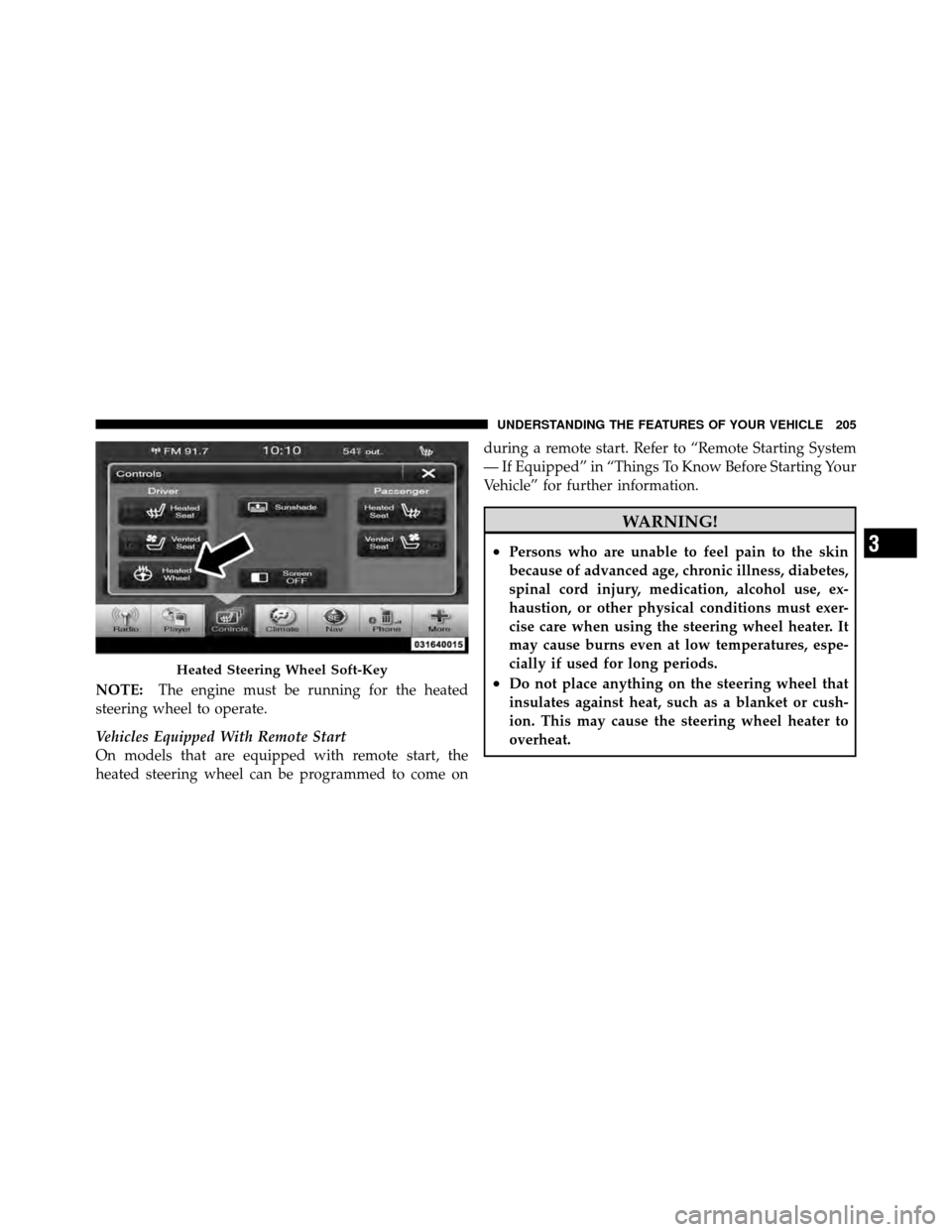
NOTE:The engine must be running for the heated
steering wheel to operate.
Vehicles Equipped With Remote Start
On models that are equipped with remote start, the
heated steering wheel can be programmed to come on during a remote start. Refer to “Remote Starting System
— If Equipped” in “Things To Know Before Starting Your
Vehicle” for further information.
WARNING!
•Persons who are unable to feel pain to the skin
because of advanced age, chronic illness, diabetes,
spinal cord injury, medication, alcohol use, ex-
haustion, or other physical conditions must exer-
cise care when using the steering wheel heater. It
may cause burns even at low temperatures, espe-
cially if used for long periods.
•Do not place anything on the steering wheel that
insulates against heat, such as a blanket or cush-
ion. This may cause the steering wheel heater to
overheat.Heated Steering Wheel Soft-Key
3
UNDERSTANDING THE FEATURES OF YOUR VEHICLE 205