ignition DODGE CHARGER 2012 7.G Owners Manual
[x] Cancel search | Manufacturer: DODGE, Model Year: 2012, Model line: CHARGER, Model: DODGE CHARGER 2012 7.GPages: 594, PDF Size: 4.48 MB
Page 470 of 594
WARNING!
•A loose tire or jack thrown forward in a collision
or hard stop could endanger the occupants of the
vehicle. Always stow the jack parts and the spare
tire in the places provided.
•Have the deflated (flat) tire repaired or replaced
immediately.
Preparations For Jacking
1. Park the vehicle on a firm, level surface as far from the
edge of the roadway as possible. Avoid icy or slippery
areas.
WARNING!
Do not attempt to change a tire on the side of the
vehicle close to moving traffic, pull far enough off
the road to avoid being hit when operating the jack
or changing the wheel.
2. Turn on the Hazard Warning flasher.
3. Set the parking brake.
4. Place the shift lever into PARK.
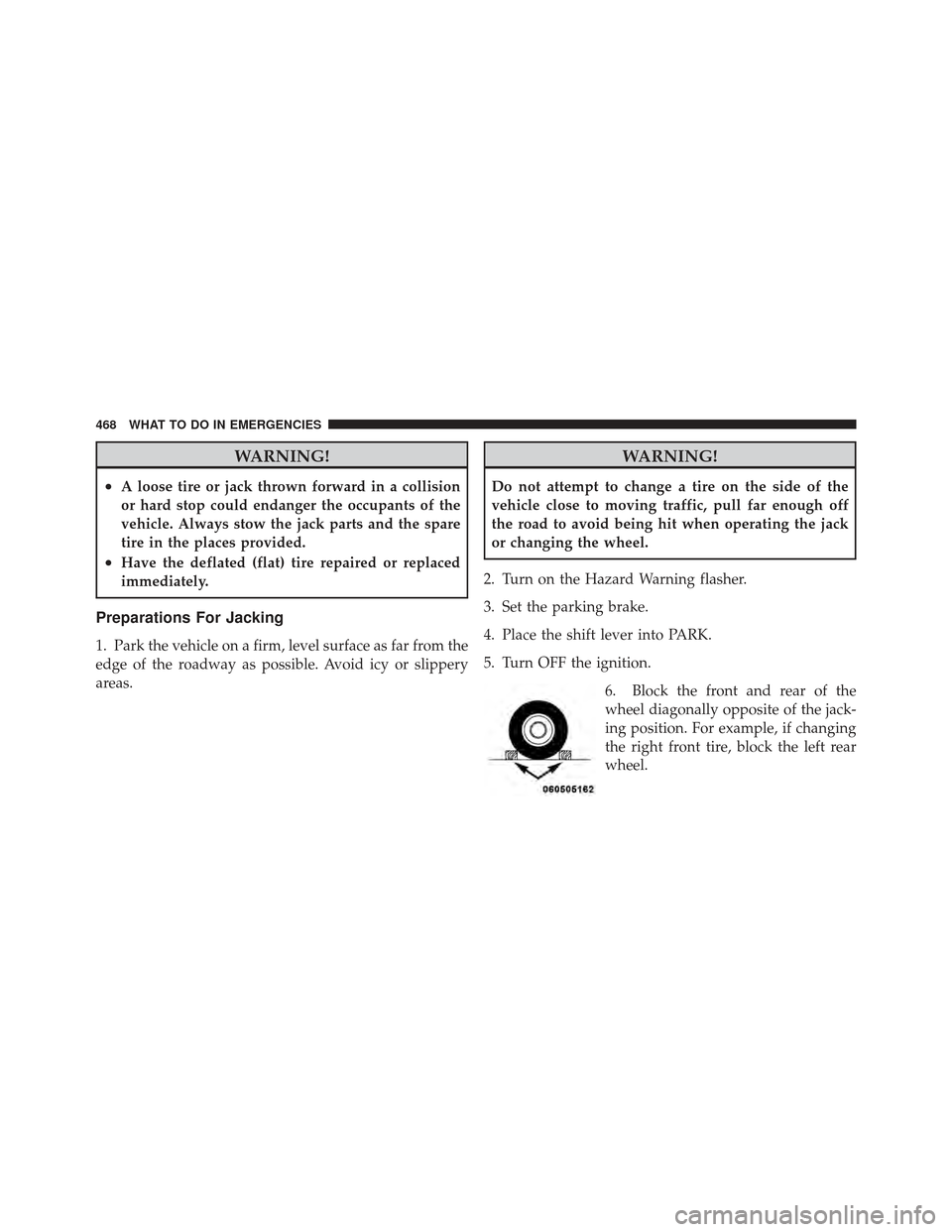
5. Turn OFF the ignition. 6. Block the front and rear of the
wheel diagonally opposite of the jack-
ing position. For example, if changing
the right front tire, block the left rear
wheel.
468 WHAT TO DO IN EMERGENCIES
Page 478 of 594
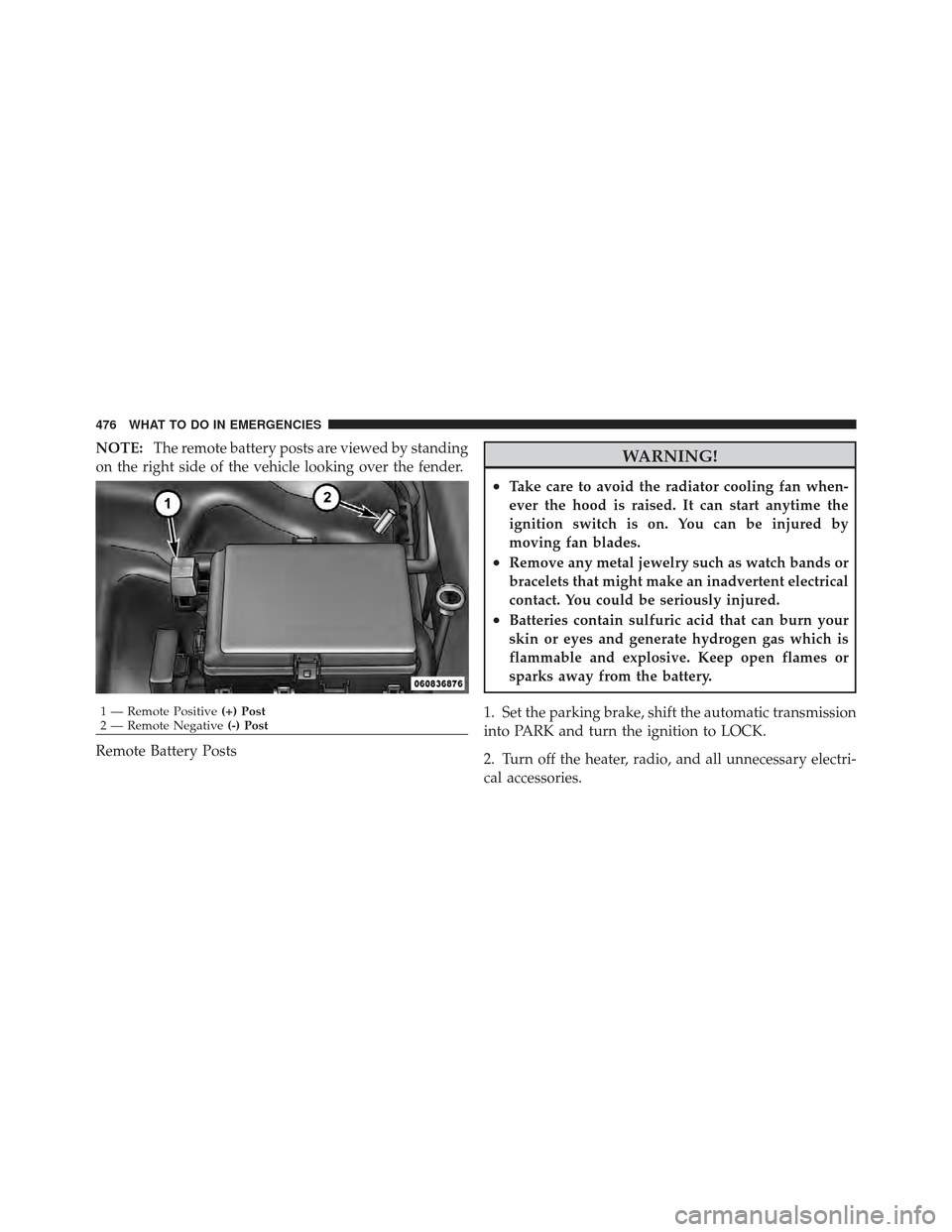
NOTE:The remote battery posts are viewed by standing
on the right side of the vehicle looking over the fender.
Remote Battery PostsWARNING!
•Take care to avoid the radiator cooling fan when-
ever the hood is raised. It can start anytime the
ignition switch is on. You can be injured by
moving fan blades.
•Remove any metal jewelry such as watch bands or
bracelets that might make an inadvertent electrical
contact. You could be seriously injured.
•Batteries contain sulfuric acid that can burn your
skin or eyes and generate hydrogen gas which is
flammable and explosive. Keep open flames or
sparks away from the battery.
1. Set the parking brake, shift the automatic transmission
into PARK and turn the ignition to LOCK.
2. Turn off the heater, radio, and all unnecessary electri-
cal accessories.
1 — Remote Positive (+) Post
2 — Remote Negative (-) Post
476 WHAT TO DO IN EMERGENCIES
Page 479 of 594
3. If using another vehicle to jump-start the battery, park
the vehicle within the jumper cables reach, set the
parking brake and make sure the ignition is OFF.
WARNING!
Do not allow vehicles to touch each other as this
could establish a ground connection and personal
injury could result.
Jump-Starting Procedure
WARNING!
Failure to follow this procedure could result in per-
sonal injury or property damage due to battery ex-
plosion.
CAUTION!
Failure to follow these procedures could result in
damage to the charging system of the booster vehicle
or the discharged vehicle.
1. Connect the positive (+)end of the jumper cable to the
remote positive (+)post of the discharged vehicle.
2. Connect the opposite end of the positive (+)jumper
cable to the positive (+)post of the booster battery.
3. Connect the negative end (-)of the jumper cable to the
negative (-)post of the booster battery.
4. Connect the opposite end of the negative (-)jumper
cable to the remote negative (-)post of the vehicle with
the discharged battery.
6
WHAT TO DO IN EMERGENCIES 477
Page 486 of 594
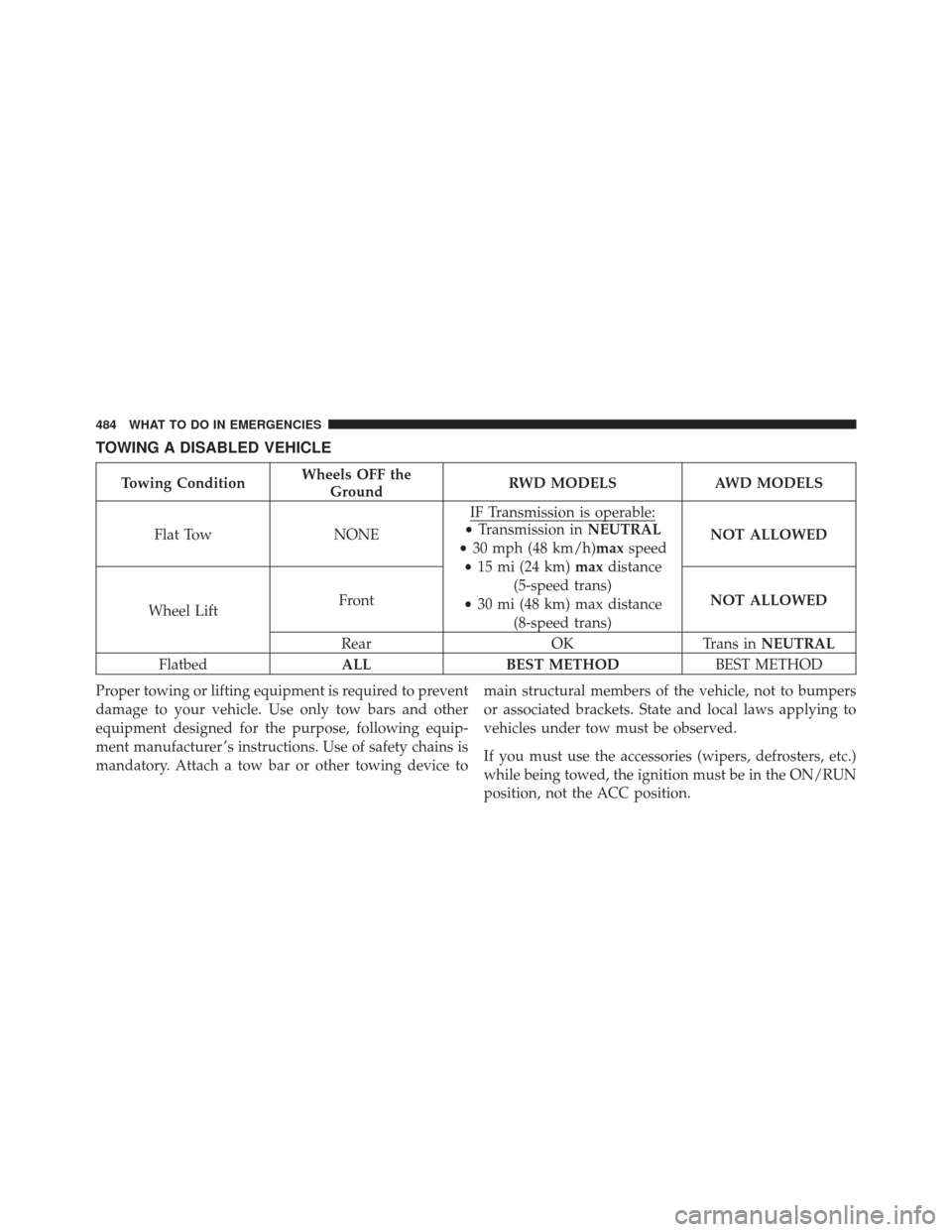
TOWING A DISABLED VEHICLE
Towing ConditionWheels OFF the
Ground RWD MODELS AWD MODELS
Flat Tow NONEIF Transmission is operable:
•
Transmission in NEUTRAL
• 30 mph (48 km/h)max speed
• 15 mi (24 km) maxdistance
(5-speed trans)
• 30 mi (48 km) max distance
(8-speed trans) NOT ALLOWED
Wheel Lift Front
NOT ALLOWED
Rear OKTrans inNEUTRAL
Flatbed ALLBEST METHOD BEST METHOD
Proper towing or lifting equipment is required to prevent
damage to your vehicle. Use only tow bars and other
equipment designed for the purpose, following equip-
ment manufacturer ’s instructions. Use of safety chains is
mandatory. Attach a tow bar or other towing device to main structural members of the vehicle, not to bumpers
or associated brackets. State and local laws applying to
vehicles under tow must be observed.
If you must use the accessories (wipers, defrosters, etc.)
while being towed, the ignition must be in the ON/RUN
position, not the ACC position.
484 WHAT TO DO IN EMERGENCIES
Page 488 of 594
If the transmission is not operable, or the vehicle must be
towed faster than 30 mph (48 km/h) or farther than
15 miles (24 km) for 5-speed transmission, or 30 miles
(48 km) for 8-speed transmission, tow with the rear
wheels OFF the ground (on a flatbed, or with the rear
wheels raised using a wheel lift and the transmission in
NEUTRAL).
CAUTION!
Failure to follow these towing methods can cause
severe transmission damage. Such damage is not
covered by the New Vehicle Limited Warranty.Vehicles equipped with AWD can be towed with the
transmission in NEUTRAL and the rear wheels OFF the
ground with no limitation on speed or distance.
Without The Ignition Key
Special care must be taken when the vehicle is towed
with the ignition in the OFF position. The only approved
method of towing without the ignition key is with a
flatbed truck. Proper towing equipment is necessary to
prevent damage to the vehicle.
486 WHAT TO DO IN EMERGENCIES
Page 494 of 594
For states that require an Inspection and Mainte-
nance (I/M), this check verifies the “Malfunction
Indicator Light (MIL)” is functioning and is not
on when the engine is running, and that the OBD II
system is ready for testing.
Normally, the OBD II system will be ready. The OBD II
system may notbe ready if your vehicle was recently
serviced, recently had a dead battery or a battery replace-
ment. If the OBD II system should be determined not
ready for the I/M test, your vehicle may fail the test.
Your vehicle has a simple ignition key-actuated test,
which you can use prior to going to the test station. To
check if your vehicle’s OBD II system is ready, you must
do the following:
1. Turn the ignition switch to the ON position, but do not
crank or start the engine. 2. If you crank or start the engine, you will have to start
this test over.
3. As soon as you turn the ignition switch to the ON
position, you will see the MIL symbol come on as part of
a normal bulb check.
4. Approximately 15 seconds later, one of two things will
happen:
a. The MIL will flash for about 10 seconds and then
return to being fully illuminated until you turn OFF
the ignition or start the engine. This means that your
vehicle’s OBD II system is not readyand you should
not proceed to the I/M station.
b. The MIL will not flash at all and will remain fully
illuminated until you turn OFF the ignition or start the
engine. This means that your vehicle’s OBD II system
is ready and you can proceed to the I/M station.
492 MAINTAINING YOUR VEHICLE
Page 510 of 594
To minimize the possibility of catalytic converter dam-
age:
•Do not shut off the engine or interrupt the ignition,
when the transmission is in gear and the vehicle is in
motion.
•Do not try to start the engine by pushing or towing the
vehicle.
•Do not idle the engine with any spark plug wires
disconnected or removed, such as when diagnostic
testing, or for prolonged periods during very rough
idle or malfunctioning operating conditions.
Cooling System
WARNING!
•When working near the radiator cooling fan, dis-
connect the fan motor lead or turn the ignition
switch to the LOCK position. The fan is tempera-
ture controlled and can start at any time the
ignition switch is in the ON position.
•You or others can be badly burned by hot engine
coolant (antifreeze) or steam from your radiator. If
you see or hear steam coming from under the
hood, do not open the hood until the radiator has
had time to cool. Never try to open a cooling
system pressure cap when the radiator is hot.
508 MAINTAINING YOUR VEHICLE
Page 532 of 594
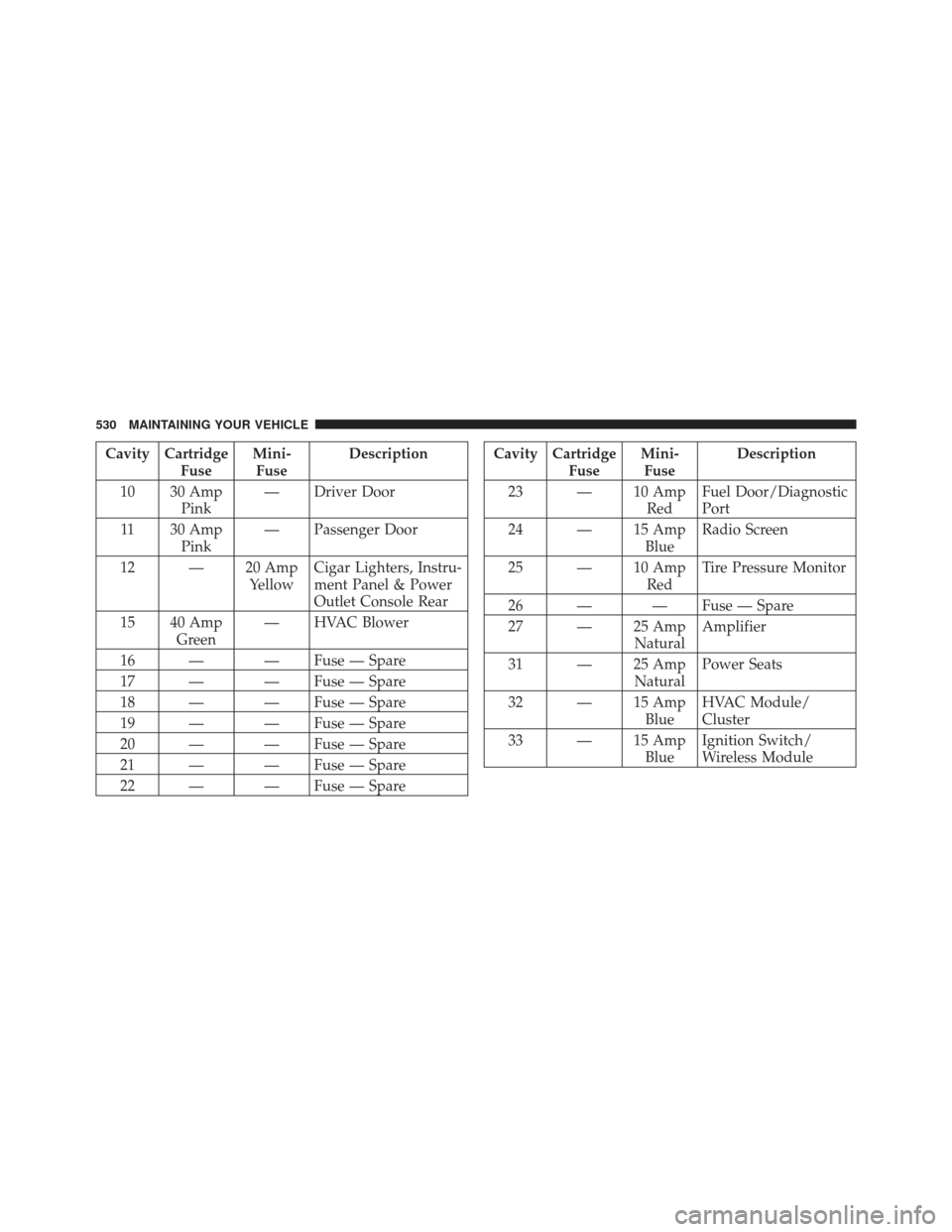
Cavity CartridgeFuseMini-
Fuse Description
10 30 Amp Pink — Driver Door
11 30 Amp Pink — Passenger Door
12 — 20 Amp YellowCigar Lighters, Instru-
ment Panel & Power
Outlet Console Rear
15 40 Amp Green — HVAC Blower
16 — — Fuse — Spare
17 — — Fuse — Spare
18 — — Fuse — Spare
19 — — Fuse — Spare
20 — — Fuse — Spare
21 — — Fuse — Spare
22 — — Fuse — SpareCavity Cartridge FuseMini-
Fuse Description
23 — 10 Amp RedFuel Door/Diagnostic
Port
24 — 15 Amp BlueRadio Screen
25 — 10 Amp RedTire Pressure Monitor
26 — — Fuse — Spare
27 — 25 Amp NaturalAmplifier
31 — 25 Amp NaturalPower Seats
32 — 15 Amp BlueHVAC Module/
Cluster
33 — 15 Amp BlueIgnition Switch/
Wireless Module
530 MAINTAINING YOUR VEHICLE
Page 580 of 594
Delay............................. 201
High Beam/Low Beam Select Switch ...... 205
Lights On Reminder .................. 202
On With Wipers ................... 200,211
Passing ............................ 205
Switch ............................ 199
Time Delay ......................... 201
Washers ........................... 505
Heated Mirrors .......................... 98
Heated Seats ........................... 182
Heater, Engine Block ..................... 368
High Beam/Low Beam Select (Dimmer) Switch . . 205
Hill Start Assist ......................... 400
Hitches Trailer Towing ....................... 452
Holder, Coin ........................... 279
Holder, Cup ........................... 275
HomeLink® (Garage Door Opener) Transmitter . . 258
Hood Release .......................... 198 Ignition
Key ............................... 12
Illuminated Entry ........................ 20
Immobilizer (Sentry Key) ................... 15
Infant Restraint ........................ 70,71
Information Center, Vehicle ................. 300
Inside Rearview Mirror .................... 94
Instrument Cluster .................... 288,290
Instrument Panel and Controls .............. 287
Instrument Panel Lens Cleaning ............. 523
Integrated Power Module (Fuses) ............ 524
Interior Appearance Care .................. 522
Interior Fuses .......................... 524
Interior Lights .......................... 207
Intermittent Wipers (Delay Wipers) ........... 210
Introduction ............................. 4
Jack Location ........................... 466
Jack Operation .......................... 469
578 INDEX