wheel DODGE CHARGER 2012 7.G User Guide
[x] Cancel search | Manufacturer: DODGE, Model Year: 2012, Model line: CHARGER, Model: DODGE CHARGER 2012 7.GPages: 594, PDF Size: 4.48 MB
Page 121 of 594
These can be accessed by touching the recent calls
soft-key on the Phone main screen.
You can also press the
button and say “Show my
incoming calls” from any screen and the Incoming calls
will be displayed.
NOTE: Incoming can also be replaced with “Outgoing”,
“Recent” or “Missed”.
Answer Or Reject An Incoming Call — No Call
Currently In Progress
When you receive a call on your mobile phone, the
Uconnect™ Phone will interrupt the vehicle audio sys-
tem, if on, and will display a pop-up showing Answer or
Ignore. Press the Answer soft-key or the
button on
the steering wheel to accept the call.
Answer Or Reject An Incoming Call — Call
Currently In Progress
If a call is currently in progress and you have another
incoming call, you will hear the same network tones for
call waiting that you normally hear when using your
mobile phone. Uconnect™ Phone will then interrupt the
vehicle audio system, if on, and will display a pop-up
showing Answer, Ignore or Transfer. Press the
button
to place the current call on hold and answer the incoming
call.
NOTE: The Uconnect™ Phone compatible phones in the
market today do not support rejecting an incoming call
when another call is in progress. Therefore, the user can
only answer an incoming call or ignore it.
3
UNDERSTANDING THE FEATURES OF YOUR VEHICLE 119
Page 134 of 594
Uconnect™ Phone works no matter where you stow your
mobile phone (be it your purse, pocket, or briefcase), as
long as your phone is turned on and has been paired to
the vehicle’s Uconnect™ Phone. The Uconnect™ Phone
allows up to ten mobile phones or audio devices to be
linked to the system. Only one linked (or paired) mobile
phone and one audio device can be used with the system
at a time. The system is available in English, Spanish, or
French languages.
Uconnect™ Phone ButtonThe Uconnect™ Phone
Button is used to
get into the phone mode and make calls, show
recent, incoming, outgoing calls, view phone-
book etc., When you press the button you will
hear a BEEP. The beep is your signal to give a command. Uconnect™ Voice Command Button
The Uconnect™ Voice Command
Button
is only used for “barge in” and when you are
already in a call and you want to send Tones or
make another call.
The
button is also used to access the Voice
Commands for the Uconnect™ Voice Command features
if your vehicle is equipped. Please see the Uconnect™
Voice Command section for direction on how to use the
button.
The Uconnect™ Phone is fully integrated with the vehi-
cle’s audio system. The volume of the Uconnect™ Phone
can be adjusted either from the radio volume control
knob or from the steering wheel radio control (right
switch), if so equipped.
132 UNDERSTANDING THE FEATURES OF YOUR VEHICLE
Page 215 of 594
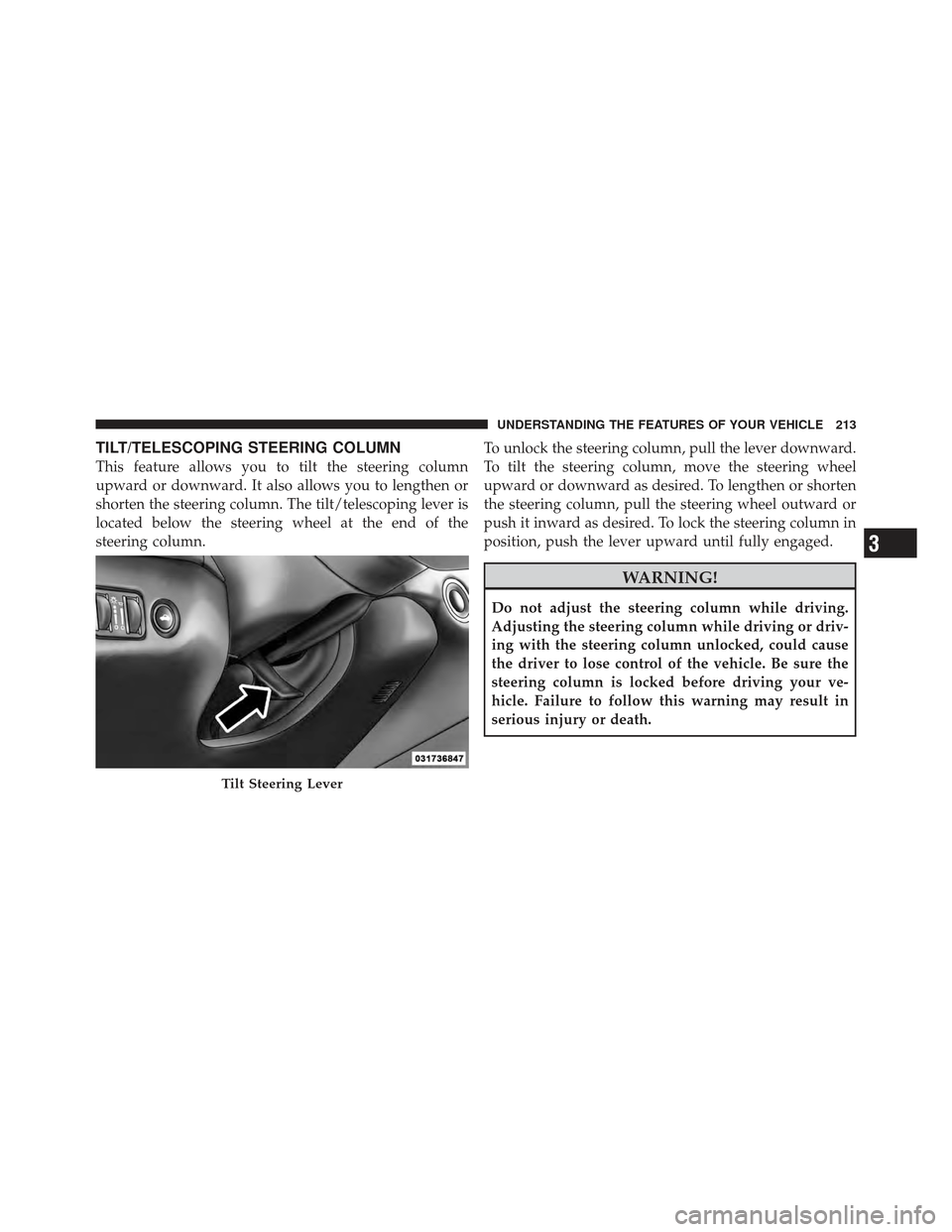
TILT/TELESCOPING STEERING COLUMN
This feature allows you to tilt the steering column
upward or downward. It also allows you to lengthen or
shorten the steering column. The tilt/telescoping lever is
located below the steering wheel at the end of the
steering column.To unlock the steering column, pull the lever downward.
To tilt the steering column, move the steering wheel
upward or downward as desired. To lengthen or shorten
the steering column, pull the steering wheel outward or
push it inward as desired. To lock the steering column in
position, push the lever upward until fully engaged.
WARNING!
Do not adjust the steering column while driving.
Adjusting the steering column while driving or driv-
ing with the steering column unlocked, could cause
the driver to lose control of the vehicle. Be sure the
steering column is locked before driving your ve-
hicle. Failure to follow this warning may result in
serious injury or death.
Tilt Steering Lever
3
UNDERSTANDING THE FEATURES OF YOUR VEHICLE 213
Page 217 of 594
WARNING!
Do not adjust the steering column while driving.
Adjusting the steering column while driving or driv-
ing with the steering column unlocked, could cause
the driver to lose control of the vehicle. Be sure the
steering column is locked before driving your ve-
hicle. Failure to follow this warning may result in
serious injury or death.
HEATED STEERING WHEEL — IF EQUIPPED
The steering wheel contains a heating element that helps
warm your hands in cold weather. The heated steering
wheel has only one temperature setting. Once the heated
steering wheel has been turned on it will operate for
approximately 58 to 70 minutes before automatically
shutting off. The heated steering wheel can shut off early
or may not turn on when the steering wheel is already
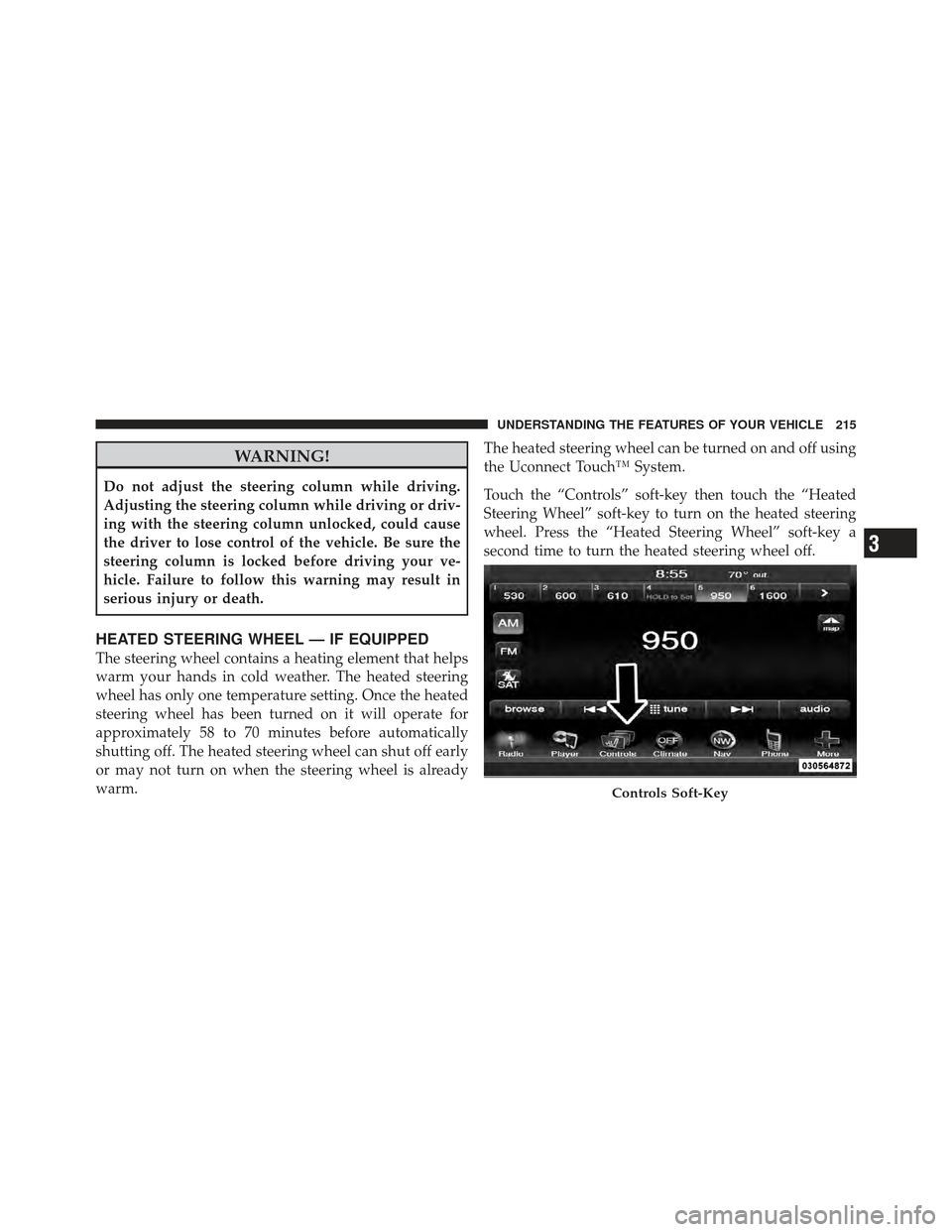
warm.The heated steering wheel can be turned on and off using
the Uconnect Touch™ System.
Touch the “Controls” soft-key then touch the “Heated
Steering Wheel” soft-key to turn on the heated steering
wheel. Press the “Heated Steering Wheel” soft-key a
second time to turn the heated steering wheel off.
Controls Soft-Key
3
UNDERSTANDING THE FEATURES OF YOUR VEHICLE 215
Page 218 of 594
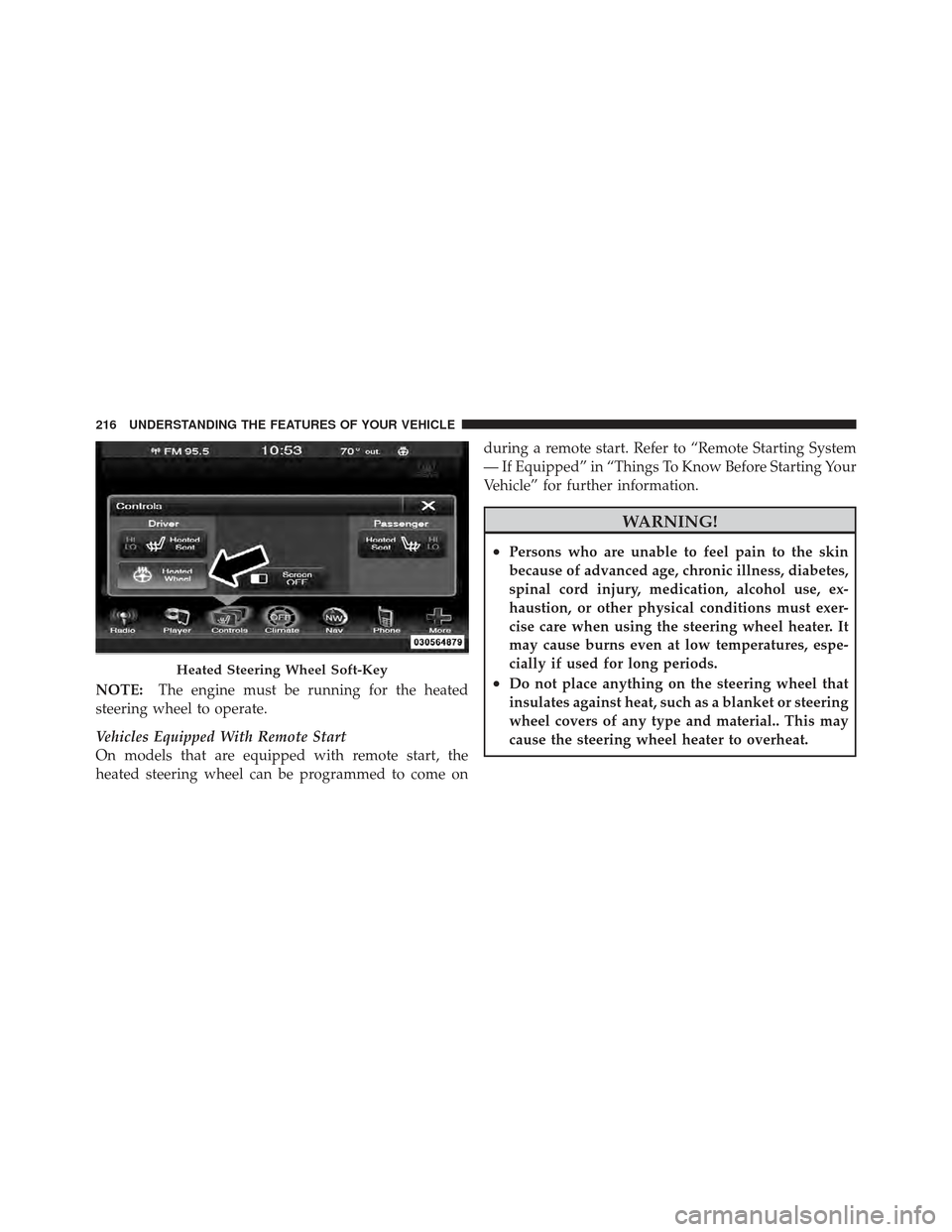
NOTE:The engine must be running for the heated
steering wheel to operate.
Vehicles Equipped With Remote Start
On models that are equipped with remote start, the
heated steering wheel can be programmed to come on during a remote start. Refer to “Remote Starting System
— If Equipped” in “Things To Know Before Starting Your
Vehicle” for further information.
WARNING!
•Persons who are unable to feel pain to the skin
because of advanced age, chronic illness, diabetes,
spinal cord injury, medication, alcohol use, ex-
haustion, or other physical conditions must exer-
cise care when using the steering wheel heater. It
may cause burns even at low temperatures, espe-
cially if used for long periods.
•Do not place anything on the steering wheel that
insulates against heat, such as a blanket or steering
wheel covers of any type and material.. This may
cause the steering wheel heater to overheat.Heated Steering Wheel Soft-Key
216 UNDERSTANDING THE FEATURES OF YOUR VEHICLE
Page 219 of 594
ADJUSTABLE PEDALS — IF EQUIPPED
The adjustable pedals system is designed to allow a
greater range of driver comfort for steering wheel tilt and
seat position. This feature allows the brake, accelerator,
and clutch pedals (if equipped) to move toward or away
from the driver to provide improved position with the
steering wheel.
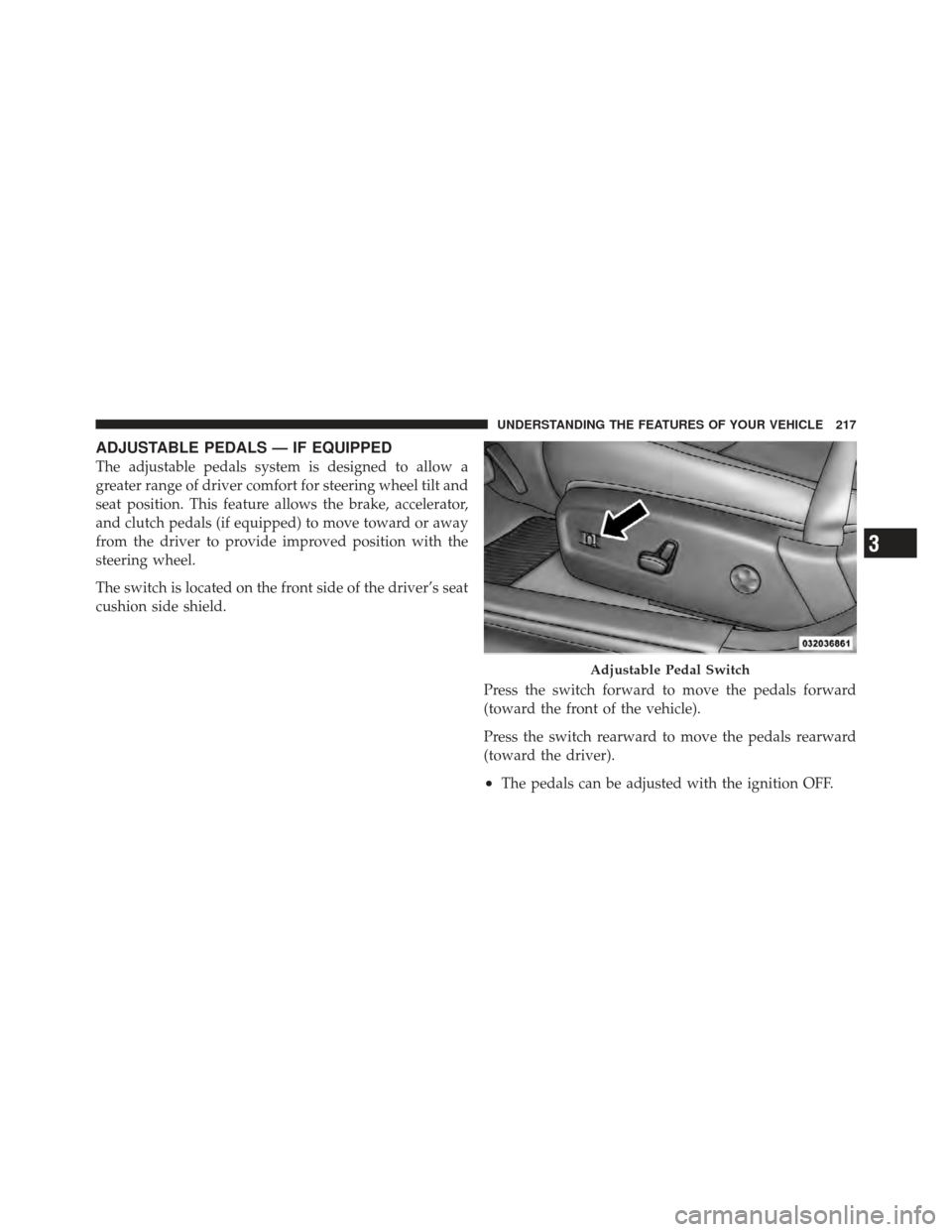
The switch is located on the front side of the driver’s seat
cushion side shield.Press the switch forward to move the pedals forward
(toward the front of the vehicle).
Press the switch rearward to move the pedals rearward
(toward the driver).
•The pedals can be adjusted with the ignition OFF.
Adjustable Pedal Switch
3
UNDERSTANDING THE FEATURES OF YOUR VEHICLE 217
Page 220 of 594
•The pedalscannotbe adjusted when the vehicle is in
REVERSE or when the Electronic Speed Control sys-
tem is on. The following messages will be displayed
on vehicles equipped with the Electronic Vehicle In-
formation System (EVIC) if the pedals are attempted to
be adjusted when the system is locked out (“Adjust-
able Pedal Disabled — Cruise Control Engaged” or
“Adjustable Pedal Disabled — Vehicle In Reverse”).
CAUTION!
Do not place any article under the adjustable pedals
or impede its ability to move as it may cause damage
to the pedal controls. Pedal travel may become lim-
ited if movement is stopped by an obstruction in the
adjustable pedal’s path.
WARNING!
Do not adjust the pedals while the vehicle is moving.
You could lose control and have an accident. Always
adjust the pedals while the vehicle is parked.
ELECTRONIC SPEED CONTROL — IF EQUIPPED
When engaged, the Electronic Speed Control takes over
accelerator operations at speeds greater than 25 mph
(40 km/h).
The Electronic Speed Control buttons are located on the
right side of the steering wheel.
218 UNDERSTANDING THE FEATURES OF YOUR VEHICLE
Page 222 of 594
To Set A Desired Speed
Turn the Electronic Speed Control ON. When the vehicle
has reached the desired speed, press the SET (-) button
and release. Release the accelerator and the vehicle will
operate at the selected speed.
NOTE:
•The vehicle should be traveling at a steady speed and
on level ground before pressing the SET button.
•The Electronic Speed Control may not engage if a
different size tire is installed on one wheel, such as the
compact spare tire (if equipped).
To Deactivate
A soft tap on the brake pedal, pushing the CANCEL
button, or normal brake pressure while slowing the
vehicle will deactivate Electronic Speed Control without
erasing the set speed memory. Pressing the ON/OFF
button or turning the ignition switch OFF erases the set
speed memory.
To Resume Speed
To resume a previously set speed, push the RES (+)
button and release. Resume can be used at any speed
above 20 mph (32 km/h).
To Vary The Speed Setting
When the Electronic Speed Control is set, you can in-
crease speed by pushing the RES (+) button. If the button
is continually pressed, the set speed will continue to
increase until the button is released, then the new set
speed will be established.
Pressing the RES (+) button once will result ina1mph
(1.6 km/h) increase in set speed. Each subsequent tap of
the button results in an increase of 1 mph (1.6 km/h).
220 UNDERSTANDING THE FEATURES OF YOUR VEHICLE
Page 226 of 594
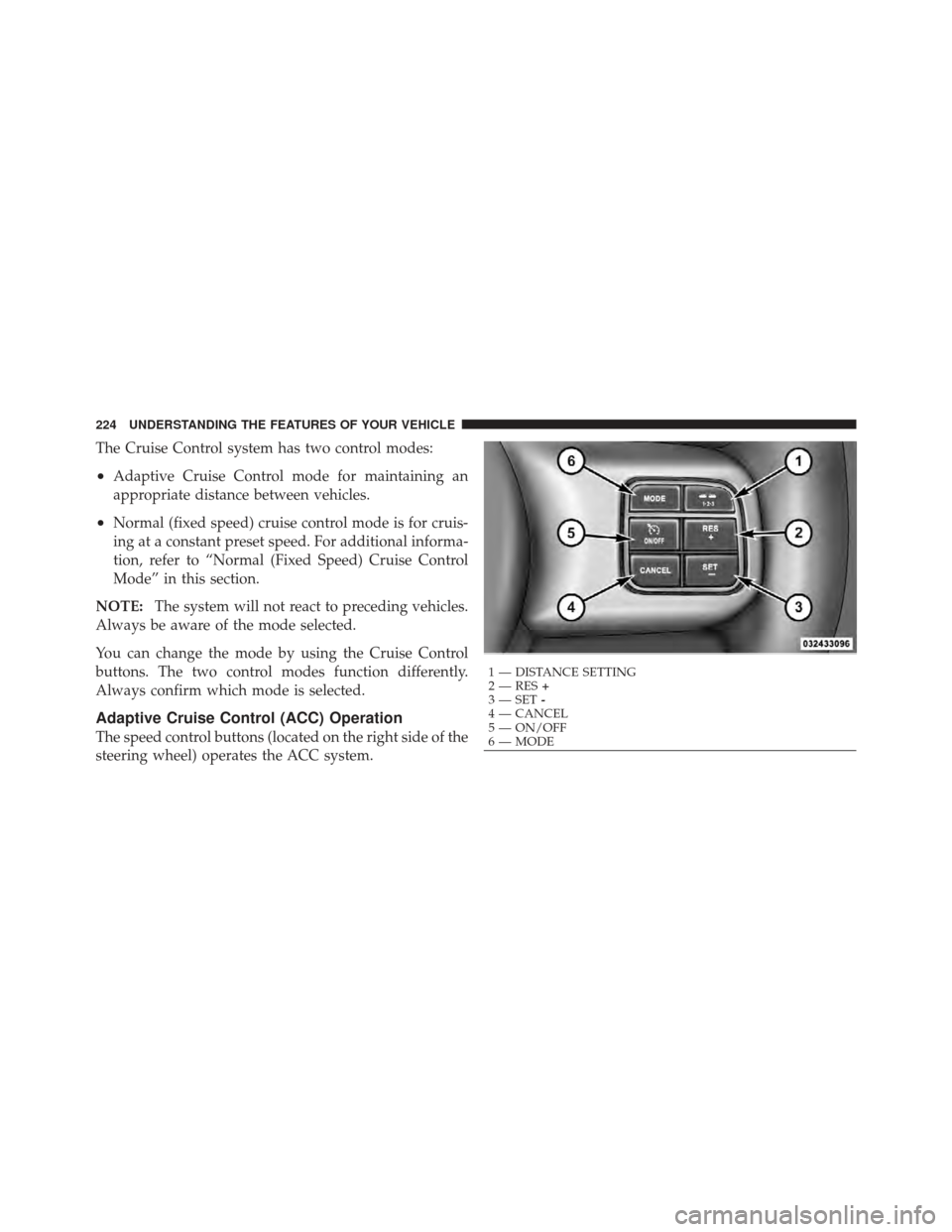
The Cruise Control system has two control modes:
•Adaptive Cruise Control mode for maintaining an
appropriate distance between vehicles.
•Normal (fixed speed) cruise control mode is for cruis-
ing at a constant preset speed. For additional informa-
tion, refer to “Normal (Fixed Speed) Cruise Control
Mode” in this section.
NOTE: The system will not react to preceding vehicles.
Always be aware of the mode selected.
You can change the mode by using the Cruise Control
buttons. The two control modes function differently.
Always confirm which mode is selected.
Adaptive Cruise Control (ACC) Operation
The speed control buttons (located on the right side of the
steering wheel) operates the ACC system.
1 — DISTANCE SETTING
2 — RES +
3 — SET -
4 — CANCEL
5 — ON/OFF
6 — MODE
224 UNDERSTANDING THE FEATURES OF YOUR VEHICLE
Page 245 of 594
To Resume
Press the RES+button and then remove your foot from
the accelerator pedal. The EVIC will display the last set
speed.
To Turn Off
The system will turn off and erase the set speed in
memory if:
•You push and release the ON/OFF button.
•You turn off the ignition.
•You switch off ESC.
If the Cruise Control system is turned off and reactivated,
the system will return to the last driver setting (ACC or
Normal Cruise Control).
Forward Collision Warning — If Equipped
Forward Collision Warning (FCW) warns the driver of a
potential collision with the vehicle in front of you and
prompts the driver to take action in order to avoid the
collision.
FCW monitors the information from the forward looking
sensor as well as the Electronic Brake Controller (EBC),
wheel speed sensors, i.e., to calculate a probable rear-end
collision. When the system determines that a rear-end
collision is probable a warning message (both audible
and visual) will be displayed on the EVIC. When the
system determines a collision with the vehicle in front of
you is no longer probable, the warning message will be
deactivated.
NOTE: The minimum speed for FCW activation is
10 mph (16 km/h).
3
UNDERSTANDING THE FEATURES OF YOUR VEHICLE 243