radio DODGE CHARGER 2013 7.G Owner's Manual
[x] Cancel search | Manufacturer: DODGE, Model Year: 2013, Model line: CHARGER, Model: DODGE CHARGER 2013 7.GPages: 132, PDF Size: 4.77 MB
Page 68 of 132
UNIVERSAL GARAGE DOOR OPENER (HomeLink®)
•HomeLink® replaces up to three hand-held transmitters that operate devices such as garage
door openers, motorized gates, lighting or home security systems. The HomeLink® unit is
powered by your vehicles 12 Volt battery.
• The HomeLink® buttons that are located in the overhead console or sunvisor designate the three different HomeLink® channels.
• The HomeLink® indicator is located above the center button.
Before You Begin Programming HomeLink®
•Ensure that your vehicle is parked outside
of the garage before you begin program-
ming.
• For efficient programming and accurate transmission of the radio-frequency sig-
nal, it is recommended that a new battery
be placed in the hand-held transmitter of
the device that is being programmed to
the HomeLink® system.
•
Erase all channels before you begin pro-
gramming. To erase the channels, place
the ignition switch into the ON/RUN posi-
tion, then press and hold the two outside
HomeLink® buttons (I and III) for up to 20 seconds or until the red indicator flashes.
NOTE:
Erasing all channels should only be performed when programming HomeLink® for the first
time. Do not erase channels when programming additional buttons.
• If you have any problems, or require assistance, please call toll-free 1–800–355–3515 or, on the Internet at www.HomeLink.com for information or assistance.
Programming A Rolling Code
• For programming Garage Door Openers that were manufactured after 1995. These Garage Door Openers can be identified by the “LEARN” or “TRAIN” button located where
the hanging antenna is attached to the Garage Door Opener. It is NOT the button that is
normally used to open and close the door. The name and color of the button may vary by
manufacturer.
• Place the ignition switch into the ON/RUN position.
• Place the hand-held transmitter 1 to 3 in (3 to 8 cm) away from the HomeLink® button you wish to program while keeping the HomeLink® indicator light in view.
• Simultaneously press and hold both the HomeLink® button you want to program and the hand-held transmitter button.
ELECTRONICS
66
Page 94 of 132
JUMP-STARTING
• If your vehicle has a discharged battery itcan be jump-started using a set of jumper
cables and a battery in another vehicle or
by using a portable battery booster pack.
• Jump-starting can be dangerous if done improperly so please follow the proce-
dures in this section carefully.
NOTE:
When using a portable battery booster pack
follow the manufacturer’s operating instruc-
tions and precautions.
Preparations for Jump-Start
• The battery is stored under an access cover in the trunk. Remote battery posts
are located on the right side of the engine compartment for jump-starting.
NOTE:
The remote battery posts are viewed by standing on the right side of the vehicle looking over
the fender.
• Set the parking brake, shift the automatic transmission into PARK and turn the ignition to OFF.
• Turn off the heater, radio, and all unnecessary electrical accessories.
• If using another vehicle to jump-start the battery, park the vehicle within the jumper cables reach, set the parking brake and make sure the ignition is OFF.
Jump-Starting Procedure
• Connect the positive (+)end of the jumper cable to the remote positive (+)post of the
discharged vehicle.
• Connect the opposite end of the positive (+)jumper cable to the positive (+)post of the
booster battery.
• Connect the negative end (-)of the jumper cable to the negative (-)post of the booster
battery.
• Connect the opposite end of the negative (-)jumper cable to the remote negative (-)post
of the vehicle with the discharged battery.
• Start the engine in the vehicle that has the booster battery, let the engine idle a few minutes, and then start the engine in the vehicle with the discharged battery.
• Once the engine is started, remove the jumper cables in the reverse sequence:
• Disconnect the negative (-)jumper cable from the remote negative (-)post of the vehicle
with the discharged battery.
WHAT TO DO IN EMERGENCIES
92
Page 118 of 132
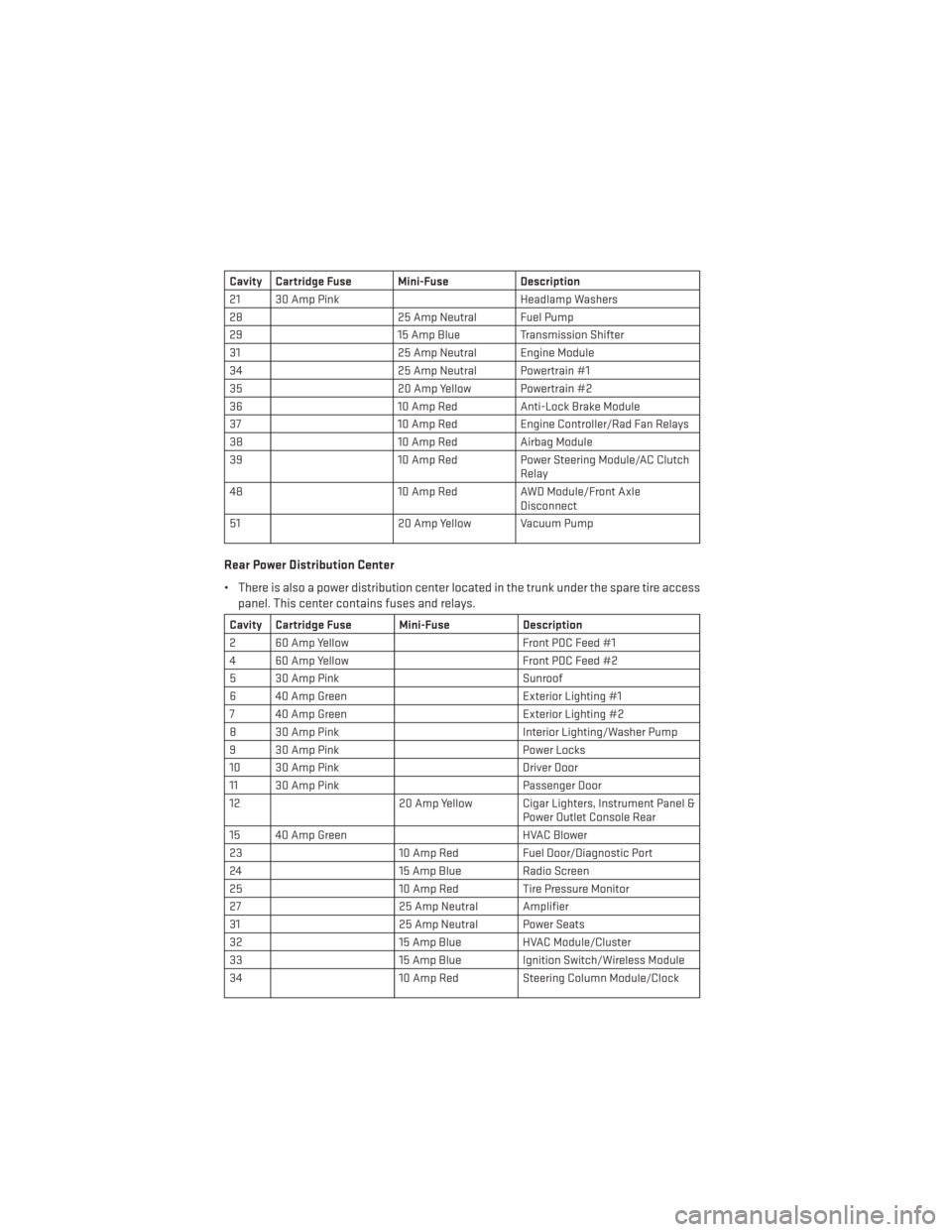
Cavity Cartridge Fuse Mini-FuseDescription
21 30 Amp Pink Headlamp Washers
28 25 Amp Neutral Fuel Pump
29 15 Amp Blue Transmission Shifter
31 25 Amp Neutral Engine Module
34 25 Amp Neutral Powertrain #1
35 20 Amp Yellow Powertrain #2
36 10 Amp RedAnti-Lock Brake Module
37 10 Amp RedEngine Controller/Rad Fan Relays
38 10 Amp RedAirbag Module
39 10 Amp RedPower Steering Module/AC Clutch
Relay
48 10 Amp RedAWD Module/Front Axle
Disconnect
51 20 Amp Yellow Vacuum Pump
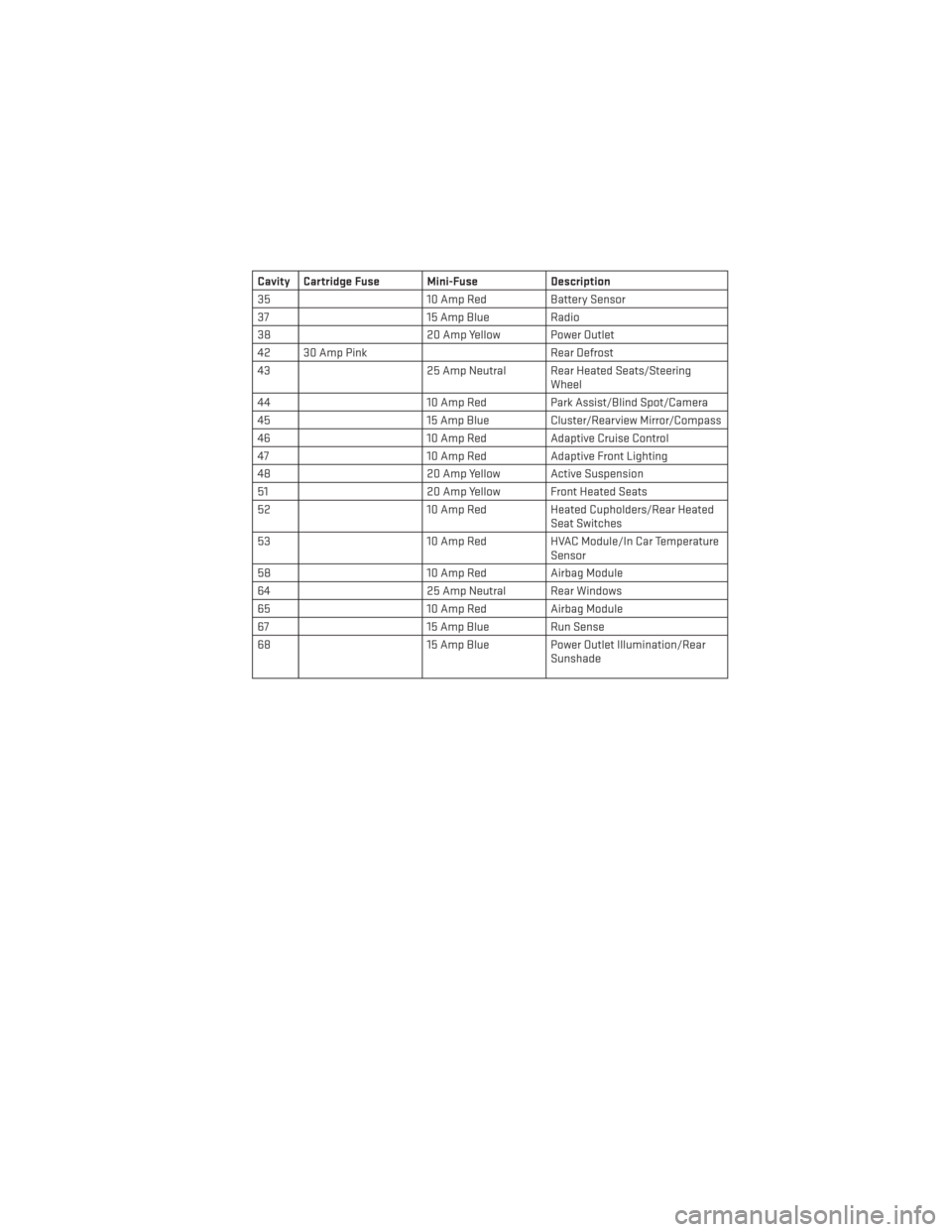
Rear Power Distribution Center
• There is also a power distribution center located in the trunk under the spare tire access
panel. This center contains fuses and relays.
Cavity Cartridge Fuse Mini-Fuse Description
2 60 Amp Yellow Front PDC Feed #1
4 60 Amp Yellow Front PDC Feed #2
5 30 Amp Pink Sunroof
6 40 Amp Green Exterior Lighting #1
7 40 Amp Green Exterior Lighting #2
8 30 Amp Pink Interior Lighting/Washer Pump
9 30 Amp Pink Power Locks
10 30 Amp Pink Driver Door
11 30 Amp Pink Passenger Door
12 20 Amp Yellow Cigar Lighters, Instrument Panel &
Power Outlet Console Rear
15 40 Amp Green HVAC Blower
23 10 Amp RedFuel Door/Diagnostic Port
24 15 Amp Blue Radio Screen
25 10 Amp RedTire Pressure Monitor
27 25 Amp Neutral Amplifier
31 25 Amp Neutral Power Seats
32 15 Amp Blue HVAC Module/Cluster
33 15 Amp Blue Ignition Switch/Wireless Module
34 10 Amp RedSteering Column Module/Clock
MAINTAINING YOUR VEHICLE
116
Page 119 of 132
Cavity Cartridge Fuse Mini-FuseDescription
35 10 Amp RedBattery Sensor
37 15 Amp Blue Radio
38 20 Amp Yellow Power Outlet
42 30 Amp Pink Rear Defrost
43 25 Amp Neutral Rear Heated Seats/Steering
Wheel
44 10 Amp RedPark Assist/Blind Spot/Camera
45 15 Amp Blue Cluster/Rearview Mirror/Compass
46 10 Amp RedAdaptive Cruise Control
47 10 Amp RedAdaptive Front Lighting
48 20 Amp Yellow Active Suspension
51 20 Amp Yellow Front Heated Seats
52 10 Amp RedHeated Cupholders/Rear Heated
Seat Switches
53 10 Amp RedHVAC Module/In Car Temperature
Sensor
58 10 Amp RedAirbag Module
64 25 Amp Neutral Rear Windows
65 10 Amp RedAirbag Module
67 15 Amp Blue Run Sense
68 15 Amp Blue Power Outlet Illumination/Rear
Sunshade
MAINTAINING YOUR VEHICLE
117
Page 123 of 132
CHRYSLER GROUP LLC CUSTOMER CENTER
P.O. Box 21–8004 Auburn Hills, MI 48321–8004 Phone: 1–800–423–6343
CHRYSLER CANADA INC. CUSTOMER CENTER
P.O. Box 1621 Windsor, Ontario N9A 4H6 Phone: 1–800–465–2001 (English)
Phone: 1–800–387–9983 (French)
ASSISTANCE FOR THE HEARING IMPAIRED
• To assist customers who have hearing difficulties, the manufacturer has installed spe-cial TDD (Telecommunication Devices for the Deaf) equipment at its customer center.
Any hearing or speech impaired customer, who has access to a TDD or a conventional
teletypewriter (TTY) in the United States, can communicate with the manufacturer by
dialing 1–800–380–CHRY. Canadian residents with hearing difficulties that require
assistance can use the special needs relay service offered by Bell Canada. For TTY
teletypewriter users, dial 711 and for Voice callers, dial 1–800–855–0511 to connect with a
Bell Relay Service operator.
WARNING!
Engine exhaust, some of its constituents, and certain vehicle components contain, or
emit, chemicals known to the State of California to cause cancer and birth defects, or
other reproductive harm. In addition, certain fluids contained in vehicles and certain
products of component wear contain, or emit, chemicals known to the State of California
to cause cancer and birth defects, or other reproductive harm.
PUBLICATIONS ORDERING
• If you are the first registered retail owner of your vehicle, you may obtain one free
printed copy of the Owner's Manual, Warranty Booklet or Radio Manuals on your DVD by
calling 1–800–423–6343 (U.S.) or 1–800–387–1143 (Canada) or by contacting your dealer.
• Replacement User Guide kits or DVDs or, if you prefer, additional printed copies of the Owner's Manual, Warranty Booklet or Radio Manuals may be purchased by visiting
www.techauthority.com or by calling 1–800–890–4038 (U.S.) or 1–800–387–1143
(Canada). Visa, Master Card, American Express and Discover orders are accepted. If you
prefer mailing your order, please call the above numbers for an order form.
NOTE:
• A street address is required when ordering manuals (no P.O. Boxes).
• The Owner's Manual and User Guide electronic files are also available on the Chrysler, Jeep, Ram Truck and Dodge websites.
• Click on the “For Owners” tab, select “Owner/Service Manuals”, then select your desired model year and vehicle from the drop down lists.
CONSUMER ASSISTANCE
121
Page 125 of 132
AUTHENTIC ACCESSORIES BY MOPAR®
• The following highlights just some of the many Authentic Dodge Accessories by Moparfeaturing a fit, finish, and functionality specifically for your Dodge Charger.
• In choosing Authentic Accessories you gain far more than expressive style, premium protection, or extreme entertainment, you also benefit from enhancing your vehicle with
accessories that have been thoroughly tested and factory-approved.
• For the full line of Authentic Dodge Accessories by Mopar, visit your local Dodge dealer- ship or online at mopar.com.
EXTERIOR:
• Rear Spoiler • Chrome Grill Insert • Fog Lights
• Molded Splash Guards • Lower Front Fascia Air Dam • Front End Cover
• Custom Wheels • Graphics Packages
INTERIOR:
• Premium Carpet Floor Mats • Katzkin Leather Seats • Bright Pedal Kit
• Door Sill Guards • Premium Carpet Cargo Mat • T-Handle Shifter
• Instrument Panel Bezel Kits
CARRIERS:
• Cargo Carriers • Sport Utility Bars• Bike Carriers
• Water Sports Carriers
ELECTRONICS:
• Portable Navigation Systems • Uconnect® Web (WiFi) • Remote Start
• iPod® Adapter • Radio Upgrades
• DVD Rear Seat Video™
• Kicker® Sound System • Uconnect® Phone • Electronic Vehicle Tracking
System
• Ecometer
• iPod® is a registered trademark of Apple, Inc.
• Kicker® is a registered trademark of Stillwater Designs and Audio, Inc.
MOPAR ACCESSORIES
123
Page 129 of 132
FREQUENTLY ASKED QUESTIONS
GETTING STARTED
• How do I install my LATCH Equipped Child Seat? pg. 15
• How do I program my Front Seat Memory? pg. 17
ELECTRONICS
• How do I know which radio I have?• Uconnect® 4.3, 4.3S pg. 41
• Uconnect® 8.4, 8.4N pg. 42
• How do I select the AUX music source? pg. 48
• How do I set the clock on my radio?
• Uconnect® 4.3, 4.3S pg. 41
• Uconnect® 8.4, 8.4N pg. 42
• How do I use the Navigation feature? pg. 50
• How do I pair my cell phone via Bluetooth® with the Uconnect® Hands-Free Voice Activation System? pg. 56
• How do I hear the audio from my iPod® through the USB port using the radio?
• Uconnect® 4.3, 4.3S pg. 48
• Uconnect® 8.4, 8.4N pg. 48
• How do I configure my Universal Garage Door Opener (HomeLink)? pg. 66
UTILITY
• How do I know how much I can tow with my Dodge Charger? pg. 70
WHAT TO DO IN EMERGENCIES
• What do I do if my TPMS warning light is blinking? pg. 76
• How do I change a flat tire? pg. 81
• How do I Jump-Start my vehicle? pg. 92
MAINTAINING YOUR VEHICLE
• Where is my Fuse Block located? pg. 115
• What type of oil do I use? pg. 105
• How often should I change my engine’s oil? pg. 108
• What should my tire pressure be set at? pg. 119
FAQ (How To?)
127
Page 131 of 132
if you are the first registered retail owner of your
vehi\fle, you may obtain a \fom\bl\vimentary \brinted
\fo\by of the Owner’s Manual, Navigation/
U\fonne\ft
® Manuals or Warranty Booklet by \falling
1-800-423-6343 (U.s .) or 1-800-387-1143 (Canada)
or by \fonta\fting your dealer.
This User Guide is intended to familiarize you with the im\bortant features of your vehi\fle.
t he DVD enclosed contai\ons your o \fner’s manual, \bavigation/u connect® manuals, w arranty
Booklets, t ire warranty and roadside assistance (ne\f vehicles purchased in the u.s.\o) or
roadside assistance\o (ne\f vehicles purchased in canada) \oin electronic format. We ho\be you
find it useful. re\bla\fement DVD kits may be \bur\fhased by visiting w\vww.te\fhauthority.\fom.
Co\byright 2013 Chrysler Grou\b LLC.
importa\bt
The driver’s \brimary res\bonsibility is the safe o\beration of the \vvehi\fle. Driving whi\vle distra\fted
\fan result in loss of vehi\fle \fontrol, resulting in a \folli\vsion and \bersonal injury. Chrysler Grou\b
LLC strongly re\fommends that the d\vriver use extreme \faution when us\ving any devi\fe or f\veature
that may take their attention \voff the road. Use of any el\ve\ftri\fal devi\fes su\fh\v as \fell \bhones,
\fom\buters, \bortable radios, vehi\fle navigation or other d\vevi\fes by the driver while the vehi\fle is
moving is dangerous and \fould lead \vto a serious \follisi\von. Texting while driving \vis also
dangerous and should never be done while th\ve vehi\fle is moving. i f you find yourself unable to
devote your full attention\v to vehi\fle o\beration, \bu\vll off the road to a safe lo\fation and sto\b your
vehi\fle. s ome states or Provin\fes \brohibit the use of \f\vellular tele\bhones \vor texting while
driving. i t is always the driver’s res\bonsibility to \fom\bly with all lo\v\fal laws.
Driving after drink\ving \fan lead to an a\f\fident. Your \ber\fe\btions
are less shar\b, your reflexes are slower, and your judgment is
im\baired when you have been drinking. Ne\vver drink and then \vdrive.
war\bi\bg!
Drunken driving is one o\vf the most frequent \fauses of a\f\v\fidents.
Your driving ability \fan be seriously \vim\baired with blood al\foh\vol
levels far below the legal \vminimum. i f you are drinking, don’t
drive. r ide with a designa\vted non-drinking d\vriver, \fall a \fab,
a friend, or use \bubli\v\f trans\bortation.
D riV i\bg a\bD alcohol
DoDge.com
This guide has been\v \bre\bared to hel\b you get qui\fkly a\fqu\vainted with your new
Dodge and to \brovide a \fonvenient referen\fe sour\fe for \fommon questions.\v
However, it is not a subst\vitute for your Owner’s Manual.
For \fom\blete o\beratio\vnal instru\ftions, m\vaintenan\fe \bro\fedures and im\bortant
safety messages, \blease \v\fonsult your Owner’s Manual, Navigation/U\fonne\ft
®
Manuals and other \vWarning Labels in your vehi\fle.
Not all features shown in this g\vuide may a\b\bly to your vehi\fle. For additional
information on a\f\fessor\vies to hel\b \bersonalize your vehi\fle, visit www.mo\bar.\fom
or your lo\fal Dodge dea\vler.
1371738_13d_Dodge_Charger_UG_121912.indd 212/18/12 5:11 PM5x8.25 Chrysler PDF maker.indd 312/18/12 5:15 PM