door lock DODGE CHARGER 2013 7.G User Guide
[x] Cancel search | Manufacturer: DODGE, Model Year: 2013, Model line: CHARGER, Model: DODGE CHARGER 2013 7.GPages: 132, PDF Size: 4.77 MB
Page 7 of 132
A. Driver's Memory Buttons pg. 17
B. Headlight Switch pg. 25
C. Turn Signal/Wiper/Washer/High BeamsLever (behind steering wheel) pg. 24
D. Instrument Cluster pg. 5
E. Electronic Vehicle Information Center (EVIC) Messages pg. 7
F. Ignition Start/Stop Button (behind steering wheel) pg. 11
G. Uconnect® System pg. 42 H. SWITCH PANEL
• Hazard Switch
• A/C pg. 35
• Recirculation pg. 35
• Front Defrost
• Rear Defrost
• Electronic Stability Control(ESC) Off pg. 78
I. Climate Control Hard-Keys pg. 35
J. Transmission Shift Lever
K. Electronic Speed Control pg. 26 L. Electronic Vehicle Information Center
(EVIC) Controls pg. 63
M. Trunk Release Button
N. Parking Brake Pedal
O. Hood Release (behind steering wheel) pg. 99
P. Power Mirrors
Q. Power Windows
R. Power Door Locks
S. Fuel Door Release (driver's door panel)
CONTROLS AT A GLANCE
5
Page 10 of 132
KEY FOB
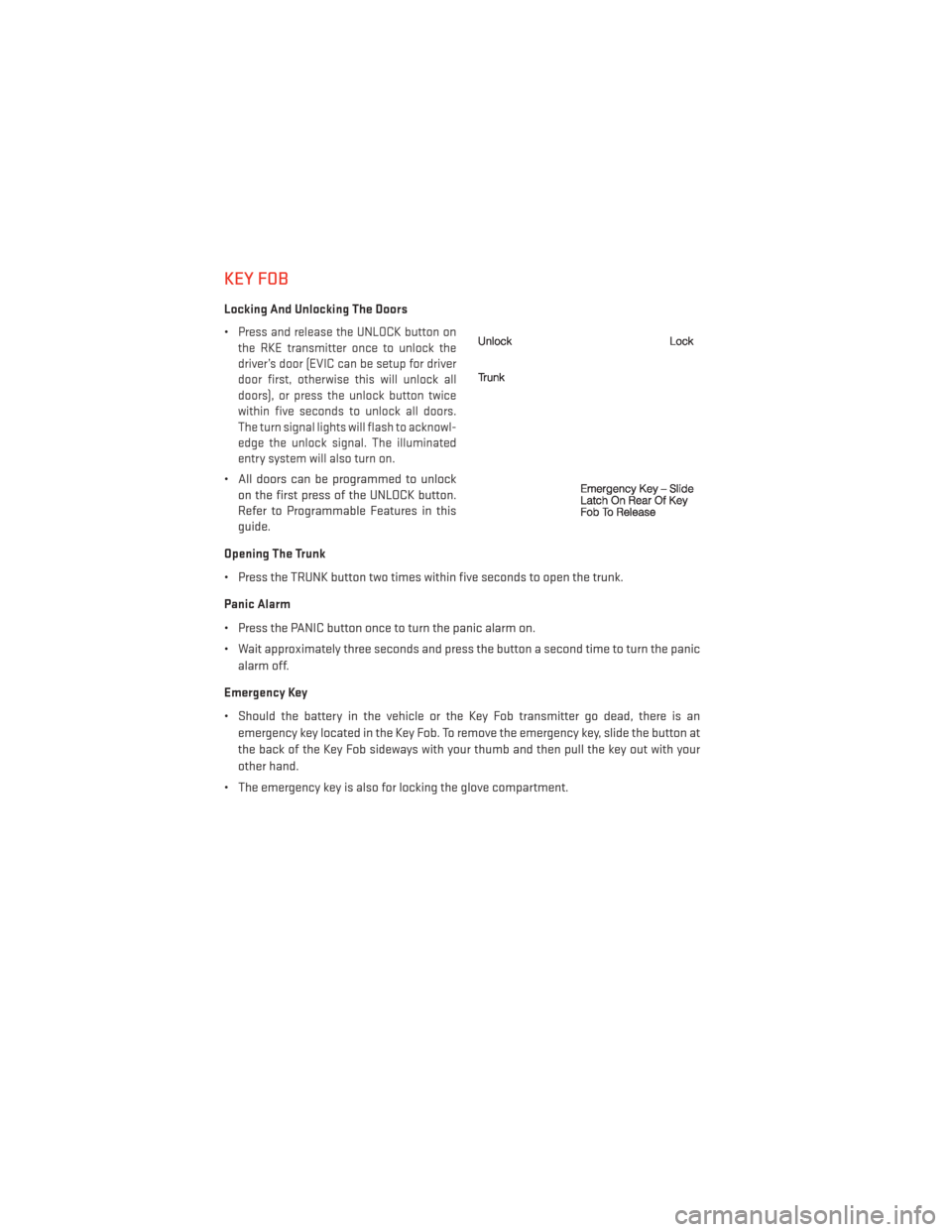
Locking And Unlocking The Doors
•
Press and release the UNLOCK button on
the RKE transmitter once to unlock the
driver’s door (EVIC can be setup for driver
door first, otherwise this will unlock all
doors), or press the unlock button twice
within five seconds to unlock all doors.
The turn signal lights will flash to acknowl-
edge the unlock signal. The illuminated
entry system will also turn on.
• All doors can be programmed to unlock on the first press of the UNLOCK button.
Refer to Programmable Features in this
guide.
Opening The Trunk
• Press the TRUNK button two times within five seconds to open the trunk.
Panic Alarm
• Press the PANIC button once to turn the panic alarm on.
• Wait approximately three seconds and press the button a second time to turn the panic alarm off.
Emergency Key
• Should the battery in the vehicle or the Key Fob transmitter go dead, there is an emergency key located in the Key Fob. To remove the emergency key, slide the button at
the back of the Key Fob sideways with your thumb and then pull the key out with your
other hand.
• The emergency key is also for locking the glove compartment.
GETTING STARTED
8
Page 11 of 132
WARNING!
• Never use the PARK position as a substitute for the parking brake. Always apply theparking brake fully when parked to guard against vehicle movement and possible
injury or damage.
• When leaving the vehicle, always remove the key fob from the ignition and lock your vehicle.
• Never leave children alone in a vehicle, or with access to an unlocked vehicle. Allowing children to be in a vehicle unattended is dangerous for a number of reasons.
A child or others could be seriously or fatally injured. Children should be warned not
to touch the parking brake, brake pedal or the shift lever.
• Do not leave the key fob in or near the vehicle, or in a location accessible to children,
and do not leave a vehicle equipped with Keyless Enter-N-Go™ in the ACC or ON/RUN
mode. A child could operate power windows, other controls, or move the vehicle.
REMOTE START
• Press the REMOTE START buttonx2on the Key Fob twice within five seconds. Pressing
the REMOTE START button a third time shuts the engine off.
•
To drive the vehicle, press the UNLOCK button and cycle the ignition to the ON/RUN position.
• With remote start, the engine will only run for 15 minutes (timeout) unless the ignition is cycled to the ON/RUN position.
• The vehicle must be cycled to the ON/RUN position after two consecutive timeouts.
WARNING!
• Do not start or run an engine in a closed garage or confined area. Exhaust gas contains Carbon Monoxide (CO) which is odorless and colorless. Carbon Monoxide is
poisonous and can cause you or others to be severely injured or killed when inhaled.
• Keep Key Fob transmitters away from children. Operation of the Remote Start
System, windows, door locks or other controls could cause you and others to be
severely injured or killed.
KEYLESS ENTER-N-GO™
• The Keyless Enter-N-Go™ system is an enhancement to the vehicle's Key Fob. Thisfeature allows you to lock and unlock the vehicle's door(s) and trunk without having to
press the Key Fob lock or unlock buttons, as well as starting and stopping the vehicle with
the press of a button.
GETTING STARTED
9
Page 12 of 132
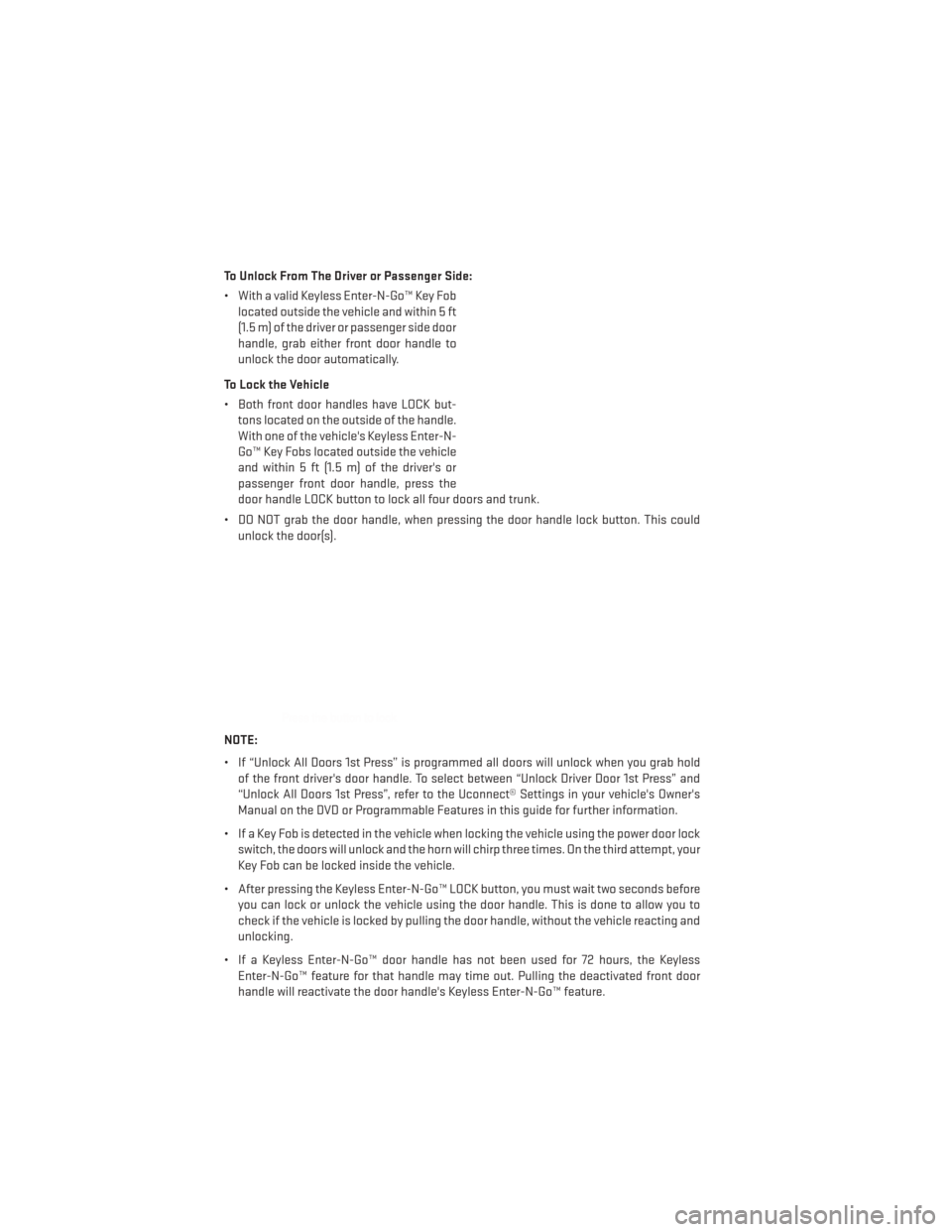
To Unlock From The Driver or Passenger Side:
• With a valid Keyless Enter-N-Go™ Key Foblocated outside the vehicle and within 5 ft
(1.5 m) of the driver or passenger side door
handle, grab either front door handle to
unlock the door automatically.
To Lock the Vehicle
• Both front door handles have LOCK but- tons located on the outside of the handle.
With one of the vehicle's Keyless Enter-N-
Go™ Key Fobs located outside the vehicle
and within 5 ft (1.5 m) of the driver's or
passenger front door handle, press the
door handle LOCK button to lock all four doors and trunk.
• DO NOT grab the door handle, when pressing the door handle lock button. This could unlock the door(s).
NOTE:
• If “Unlock All Doors 1st Press” is programmed all doors will unlock when you grab hold of the front driver's door handle. To select between “Unlock Driver Door 1st Press” and
“Unlock All Doors 1st Press”, refer to the Uconnect® Settings in your vehicle's Owner's
Manual on the DVD or Programmable Features in this guide for further information.
• If a Key Fob is detected in the vehicle when locking the vehicle using the power door lock switch, the doors will unlock and the horn will chirp three times. On the third attempt, your
Key Fob can be locked inside the vehicle.
• After pressing the Keyless Enter-N-Go™ LOCK button, you must wait two seconds before you can lock or unlock the vehicle using the door handle. This is done to allow you to
check if the vehicle is locked by pulling the door handle, without the vehicle reacting and
unlocking.
• If a Keyless Enter-N-Go™ door handle has not been used for 72 hours, the Keyless Enter-N-Go™ feature for that handle may time out. Pulling the deactivated front door
handle will reactivate the door handle's Keyless Enter-N-Go™ feature.
GETTING STARTED
10
Page 14 of 132
Accessory Positions with Engine Off
NOTE:
The following functions are with the driver’s foot OFF the Brake Pedal (transmission in PARK
or NEUTRAL).
Starting With The Ignition Switch In The OFF Position:
• Press the ENGINE START/STOP button once to change the ignition switch to the ACCposition.
• Press the ENGINE START/STOP button a second time to change the ignition switch to the ON/RUN position.
• Press the ENGINE START/STOP button a third time to return the ignition switch to the OFF position.
NOTE:
If the ignition switch is left in the ACC or
ON/RUN (engine not running) position and
the transmission is in PARK, the system will
automatically time out after 30 minutes of
inactivity and the ignition will switch to the
OFF position.
THEFT ALARM
To Arm:
• Press the Keyless Enter-N-Go™ Start/Stop button until the Electronic Vehicle Informa- tion Center (EVIC) indicates that the vehicle ignition is “OFF”. Press the power door lock
switch while the door is open, press the Key Fob LOCK button, or with one of the Key Fobs
located outside the vehicle and within 5 ft (1.5 m) of the driver's and passenger front door
handles, press the Keyless Enter-N-Go™ LOCK button located on the door handle.
NOTE:
After pressing the Keyless Enter-N-Go™ LOCK button, you must wait two seconds before
you can lock or unlock the vehicle via the door handle.
To Disarm:
• Press the Key Fob UNLOCK button or with one of the Key Fobs located outside the vehicle and within 5 ft (1.5 m) of the driver's and passenger front door handles, grab the Keyless
Enter-N-Go™ door handle and enter the vehicle, then press the Keyless Enter-N-Go™
Start/Stop button (requires at least one valid Key Fob in the vehicle).
GETTING STARTED
12
Page 19 of 132
FRONT SEATS
Power Seats
•
The power seat switches are located on the
outboard side of the front seat cushions.
• The power seat switch controls forward/ back, up/down and tilt adjustment.
• The recline switch controls the angle of the seatback. Press the switch forward or
rearward and the seatback will move in
either direction.
Power Lumbar
• Push the switch forward to increase the lumbar support. Push the switch rearward
to decrease the lumbar support.
• Pushing upward or downward on the switch will raise and lower the position of
the support.
Memory Seat
• The memory seat feature allows you to save two different driver seating posi-
tions, driver's outside mirror, adjustable
brake and accelerator pedals, power tilt
and telescopic steering column and radio
station preset settings. The memory seat
buttons are located on the driver's door
panel.
• Adjust all memory profile settings, press the SET (S) button then press 1 or 2 within
five seconds.
• Your Key Fob can be programmed to recall one of two pre-programmed memory profiles by pressing the UNLOCK button on the
Key Fob.
GETTING STARTED
17
Page 67 of 132
Uconnect® 4.3 Customer Programmable Features
•
The Uconnect® 4.3 system allows you to access Customer Programmable feature settings
such as Display, Clock, Safety/Assistance, Lights, Doors & Locks, Heated Seats, Engine
Off Operation, Compass Settings, Audio, Phone/Bluetooth and SiriusXM Setup through
hard-keys and soft-keys.
• Press the Settings hard-key to on the right side of the unit to access the Settings screen, use the Page Up/Down soft-keys to scroll through the following settings. The following
feature settings are available:
• Display • Clock
• Safety / Assistance • Doors & Locks
• Heated Seats • Engine Off Options
• Compass Settings • Audio
• Phone / Bluetooth • SiriusXM Setup
• Auto-On Comfort & Remote Start • Lights
Uconnect® 8.4 Customer Programmable Features
• The Uconnect® 8.4 system allows you to access Customer Programmable feature set- tings such as Display, Clock, Safety/Assistance, Lights, Doors & Locks, Heated Seats,
Engine Off Operation, Compass Settings, Audio, Phone/Bluetooth and SiriusXM Setup
through soft-keys.
• Touch the More soft-key on the bottom of the screen, then touch the Settings soft-key to access the Settings screen. When making a selection, scroll up or down until the
preferred setting is highlighted, then press and release the preferred setting until a
check-mark appears next to the setting, showing that setting has been selected. The
following feature settings are available:
• Display • Clock
• Safety / Assistance • Doors & Locks
• Auto-On Comfort & Remote Start • Engine Off Options
• Compass Settings • Audio
• Phone / Bluetooth • SiriusXM Setup
ELECTRONICS
65
Page 70 of 132
Using HomeLink®
•
To operate, press and release the programmed HomeLink® button. Activation will now
occur for the programmed device (i.e., garage door opener, gate operator, security system,
entry door lock, home/office lighting, etc.,). The hand-held transmitter of the device may
also be used at any time.
WARNING!
• Your motorized door or gate will open and close while you are programming the
universal transceiver. Do not program the transceiver if people or pets are in the path
of the door or gate.
• Do not run your vehicle in a closed garage or confined area while programming the
transceiver. Exhaust gas from your vehicle contains Carbon Monoxide (CO) which is
odorless and colorless. Carbon Monoxide is poisonous when inhaled and can cause
you and others to be severely injured or killed.
POWER OUTLET
• There are three 12 Volt electrical outletson this vehicle.
• The front 12 Volt power outlet has power available only when the ignition is placed
in the ACC or RUN position.
• The center console outlet is powered di- rectly from the battery (power available at
all times). Items plugged into this outlet
may discharge the battery and/or prevent
the engine from starting.
• There is also a 12 volt power outlet located on the back of the center console for rear passengers. This power outlet has power
available only when the ignition is placed in the ACC or RUN position.
ELECTRONICS
68
Page 118 of 132
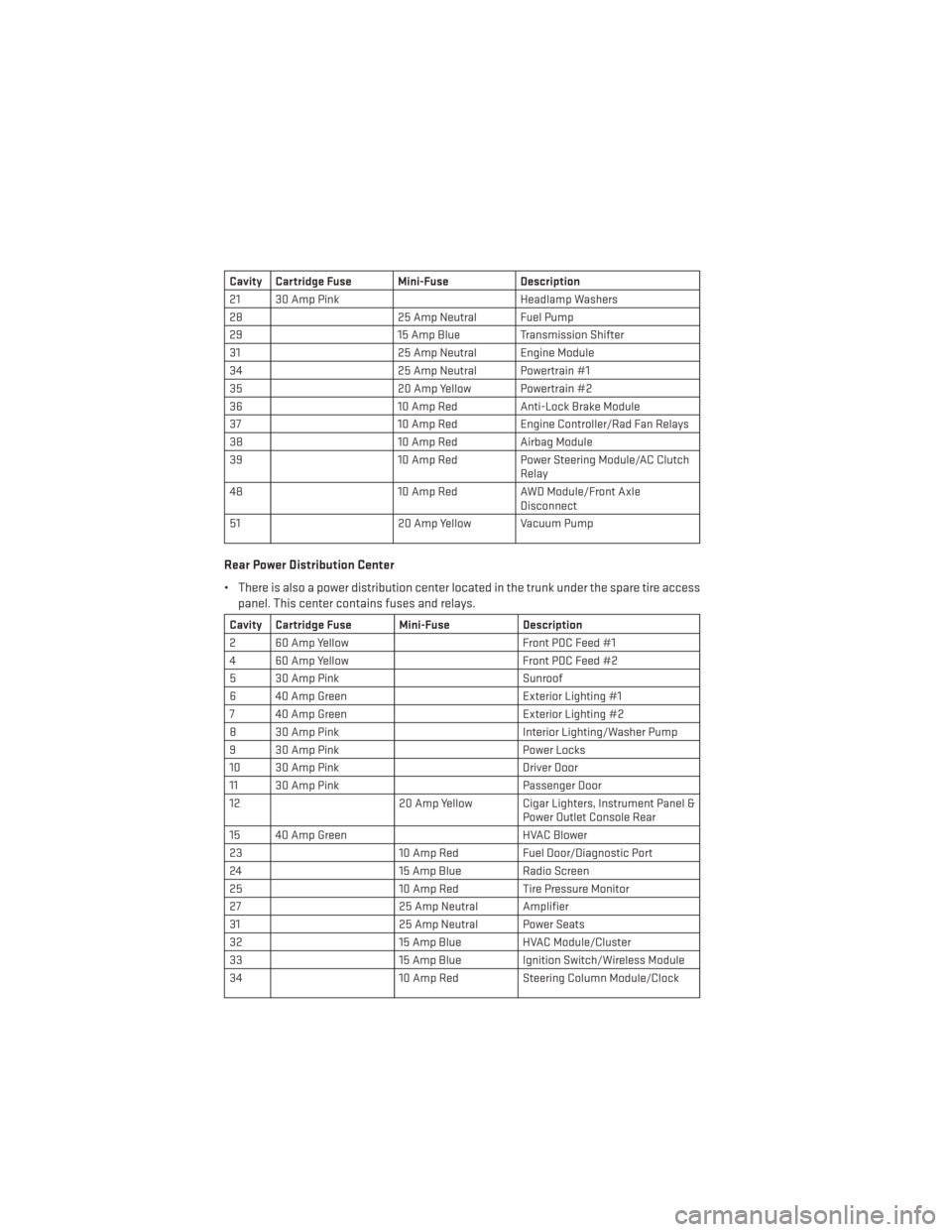
Cavity Cartridge Fuse Mini-FuseDescription
21 30 Amp Pink Headlamp Washers
28 25 Amp Neutral Fuel Pump
29 15 Amp Blue Transmission Shifter
31 25 Amp Neutral Engine Module
34 25 Amp Neutral Powertrain #1
35 20 Amp Yellow Powertrain #2
36 10 Amp RedAnti-Lock Brake Module
37 10 Amp RedEngine Controller/Rad Fan Relays
38 10 Amp RedAirbag Module
39 10 Amp RedPower Steering Module/AC Clutch
Relay
48 10 Amp RedAWD Module/Front Axle
Disconnect
51 20 Amp Yellow Vacuum Pump
Rear Power Distribution Center
• There is also a power distribution center located in the trunk under the spare tire access
panel. This center contains fuses and relays.
Cavity Cartridge Fuse Mini-Fuse Description
2 60 Amp Yellow Front PDC Feed #1
4 60 Amp Yellow Front PDC Feed #2
5 30 Amp Pink Sunroof
6 40 Amp Green Exterior Lighting #1
7 40 Amp Green Exterior Lighting #2
8 30 Amp Pink Interior Lighting/Washer Pump
9 30 Amp Pink Power Locks
10 30 Amp Pink Driver Door
11 30 Amp Pink Passenger Door
12 20 Amp Yellow Cigar Lighters, Instrument Panel &
Power Outlet Console Rear
15 40 Amp Green HVAC Blower
23 10 Amp RedFuel Door/Diagnostic Port
24 15 Amp Blue Radio Screen
25 10 Amp RedTire Pressure Monitor
27 25 Amp Neutral Amplifier
31 25 Amp Neutral Power Seats
32 15 Amp Blue HVAC Module/Cluster
33 15 Amp Blue Ignition Switch/Wireless Module
34 10 Amp RedSteering Column Module/Clock
MAINTAINING YOUR VEHICLE
116
Page 129 of 132
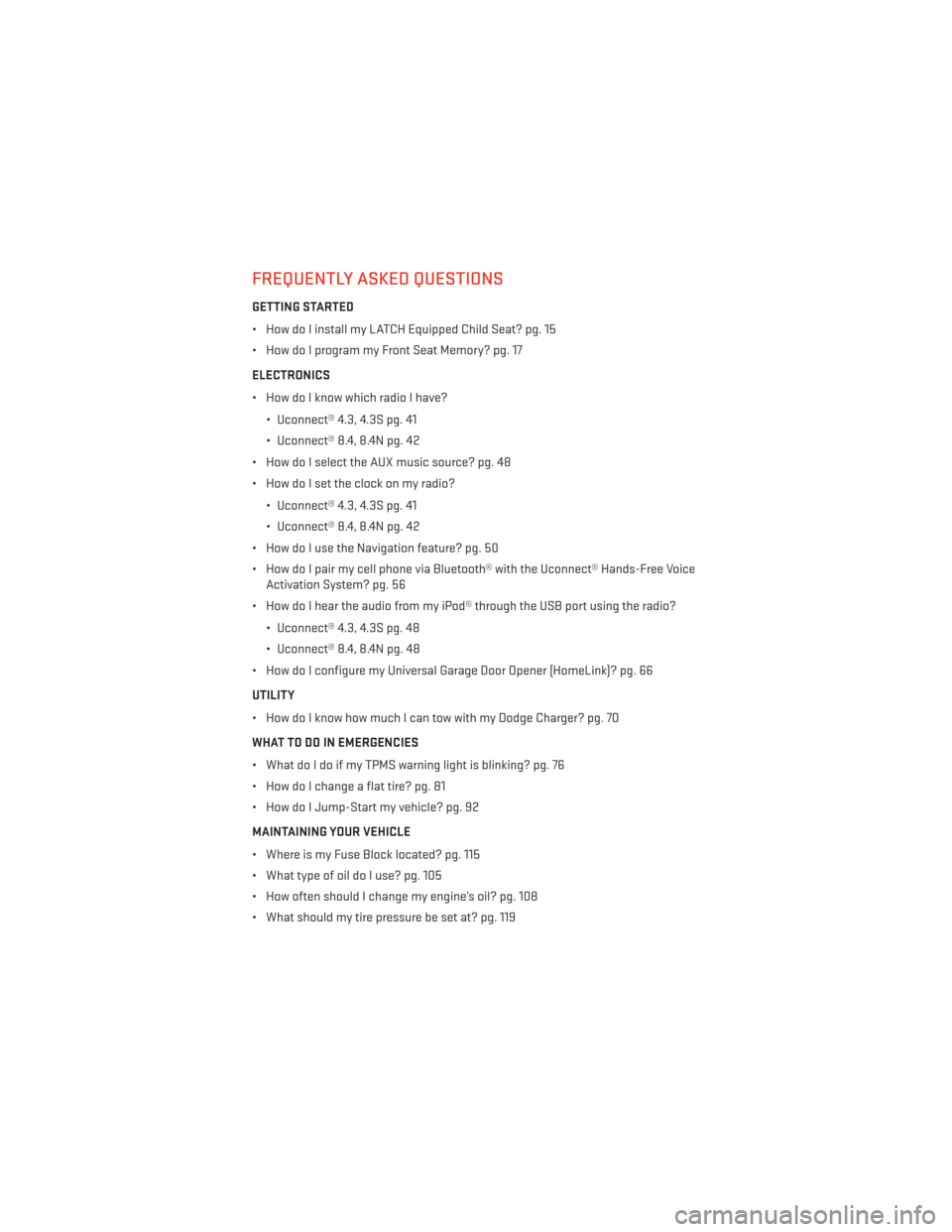
FREQUENTLY ASKED QUESTIONS
GETTING STARTED
• How do I install my LATCH Equipped Child Seat? pg. 15
• How do I program my Front Seat Memory? pg. 17
ELECTRONICS
• How do I know which radio I have?• Uconnect® 4.3, 4.3S pg. 41
• Uconnect® 8.4, 8.4N pg. 42
• How do I select the AUX music source? pg. 48
• How do I set the clock on my radio?
• Uconnect® 4.3, 4.3S pg. 41
• Uconnect® 8.4, 8.4N pg. 42
• How do I use the Navigation feature? pg. 50
• How do I pair my cell phone via Bluetooth® with the Uconnect® Hands-Free Voice Activation System? pg. 56
• How do I hear the audio from my iPod® through the USB port using the radio?
• Uconnect® 4.3, 4.3S pg. 48
• Uconnect® 8.4, 8.4N pg. 48
• How do I configure my Universal Garage Door Opener (HomeLink)? pg. 66
UTILITY
• How do I know how much I can tow with my Dodge Charger? pg. 70
WHAT TO DO IN EMERGENCIES
• What do I do if my TPMS warning light is blinking? pg. 76
• How do I change a flat tire? pg. 81
• How do I Jump-Start my vehicle? pg. 92
MAINTAINING YOUR VEHICLE
• Where is my Fuse Block located? pg. 115
• What type of oil do I use? pg. 105
• How often should I change my engine’s oil? pg. 108
• What should my tire pressure be set at? pg. 119
FAQ (How To?)
127