ad blue DODGE CHARGER 2014 7.G Owner's Guide
[x] Cancel search | Manufacturer: DODGE, Model Year: 2014, Model line: CHARGER, Model: DODGE CHARGER 2014 7.GPages: 635, PDF Size: 4.72 MB
Page 370 of 635
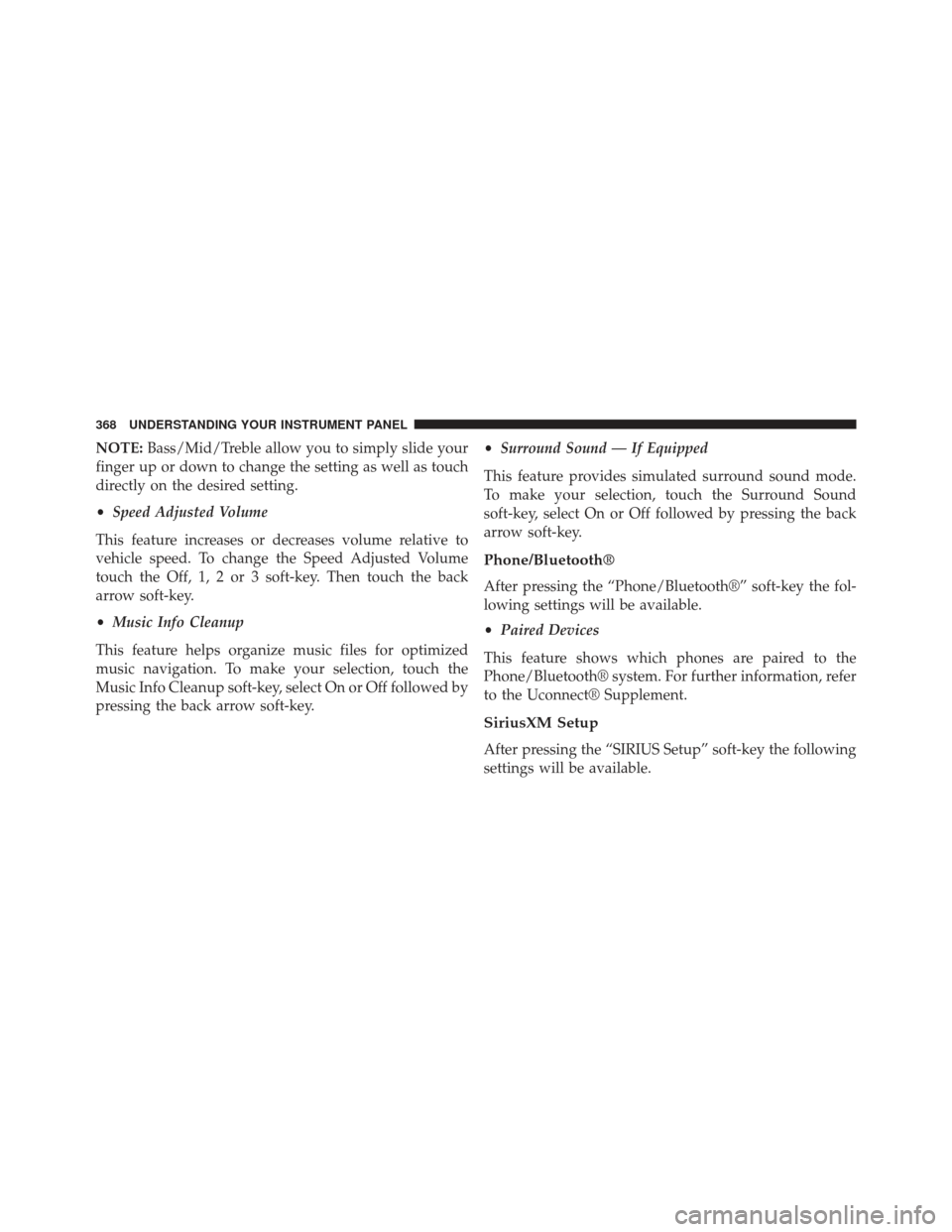
NOTE:Bass/Mid/Treble allow you to simply slide your
finger up or down to change the setting as well as touch
directly on the desired setting.
• Speed Adjusted Volume
This feature increases or decreases volume relative to
vehicle speed. To change the Speed Adjusted Volume
touch the Off, 1, 2 or 3 soft-key. Then touch the back
arrow soft-key.
• Music Info Cleanup
This feature helps organize music files for optimized
music navigation. To make your selection, touch the
Music Info Cleanup soft-key, select On or Off followed by
pressing the back arrow soft-key. •
Surround Sound — If Equipped
This feature provides simulated surround sound mode.
To make your selection, touch the Surround Sound
soft-key, select On or Off followed by pressing the back
arrow soft-key.
Phone/Bluetooth®
After pressing the “Phone/Bluetooth®” soft-key the fol-
lowing settings will be available.
• Paired Devices
This feature shows which phones are paired to the
Phone/Bluetooth® system. For further information, refer
to the Uconnect® Supplement.
SiriusXM Setup
After pressing the “SIRIUS Setup” soft-key the following
settings will be available.
368 UNDERSTANDING YOUR INSTRUMENT PANEL
Page 382 of 635
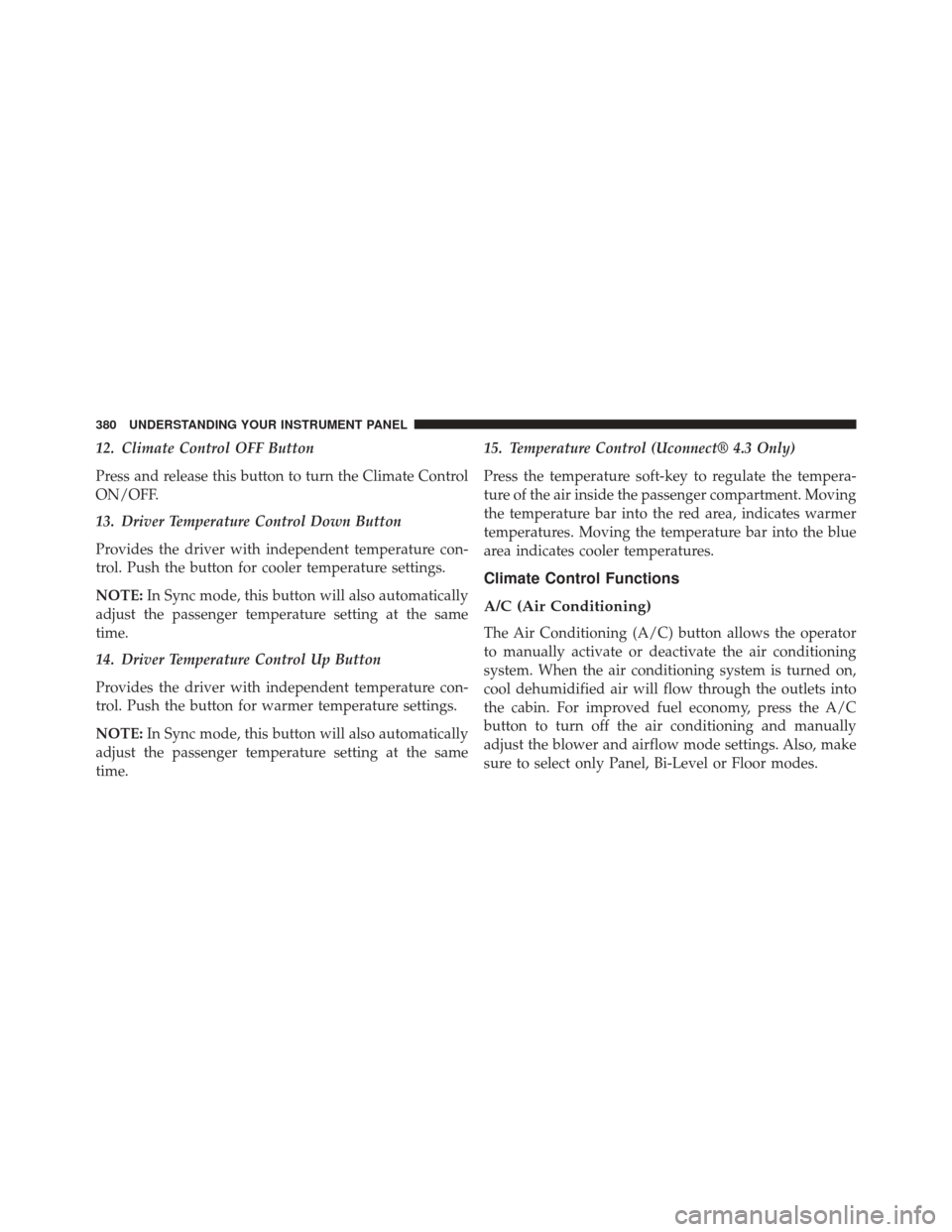
12. Climate Control OFF Button
Press and release this button to turn the Climate Control
ON/OFF.
13. Driver Temperature Control Down Button
Provides the driver with independent temperature con-
trol. Push the button for cooler temperature settings.
NOTE:In Sync mode, this button will also automatically
adjust the passenger temperature setting at the same
time.
14. Driver Temperature Control Up Button
Provides the driver with independent temperature con-
trol. Push the button for warmer temperature settings.
NOTE: In Sync mode, this button will also automatically
adjust the passenger temperature setting at the same
time. 15. Temperature Control (Uconnect® 4.3 Only)
Press the temperature soft-key to regulate the tempera-
ture of the air inside the passenger compartment. Moving
the temperature bar into the red area, indicates warmer
temperatures. Moving the temperature bar into the blue
area indicates cooler temperatures.
Climate Control Functions
A/C (Air Conditioning)
The Air Conditioning (A/C) button allows the operator
to manually activate or deactivate the air conditioning
system. When the air conditioning system is turned on,
cool dehumidified air will flow through the outlets into
the cabin. For improved fuel economy, press the A/C
button to turn off the air conditioning and manually
adjust the blower and airflow mode settings. Also, make
sure to select only Panel, Bi-Level or Floor modes.
380 UNDERSTANDING YOUR INSTRUMENT PANEL
Page 576 of 635
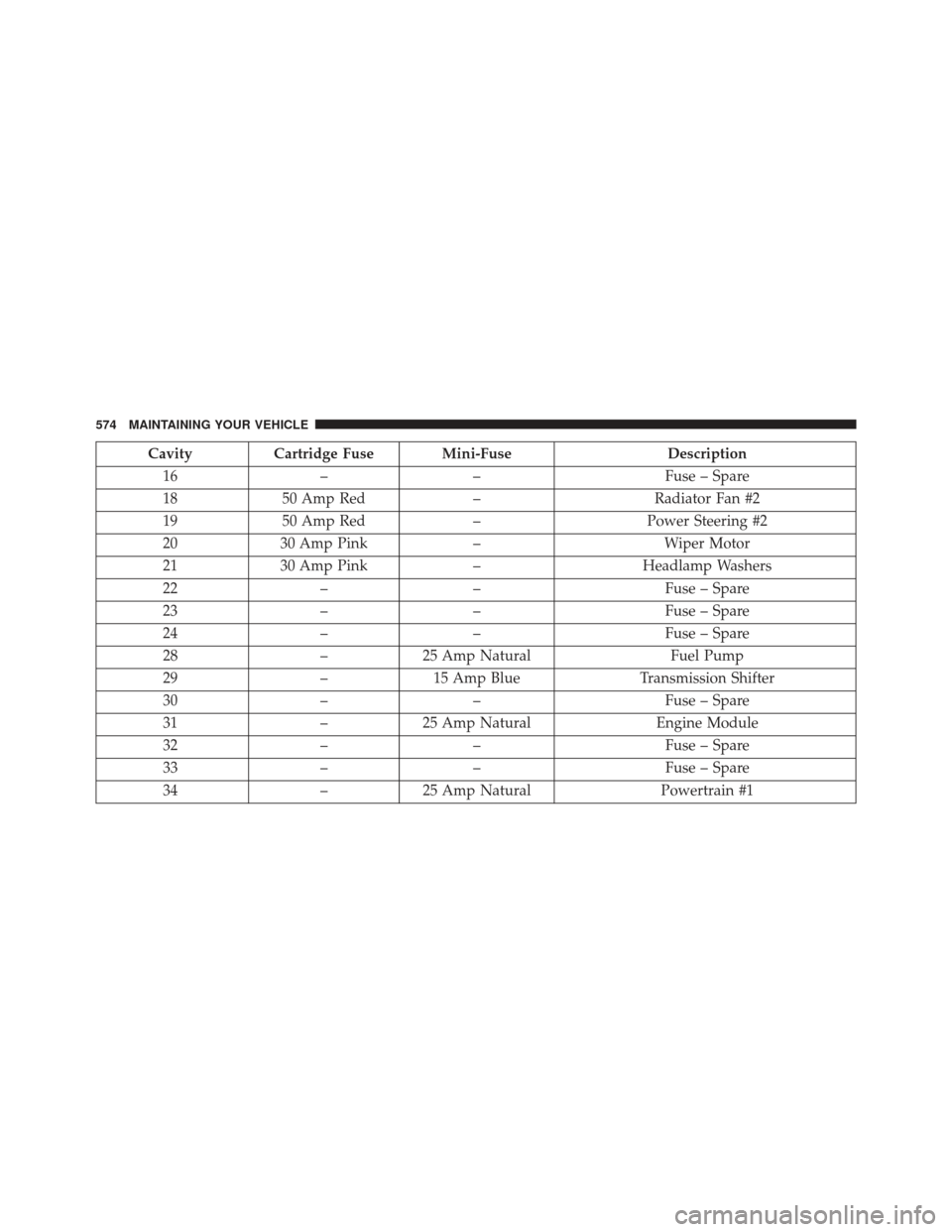
CavityCartridge Fuse Mini-Fuse Description
16 –– Fuse – Spare
18 50 Amp Red –Radiator Fan #2
19 50 Amp Red –Power Steering #2
20 30 Amp Pink –Wiper Motor
21 30 Amp Pink –Headlamp Washers
22 –– Fuse – Spare
23 –– Fuse – Spare
24 –– Fuse – Spare
28 –25 Amp Natural Fuel Pump
29 –15 Amp Blue Transmission Shifter
30 –– Fuse – Spare
31 –25 Amp Natural Engine Module
32 –– Fuse – Spare
33 –– Fuse – Spare
34 –25 Amp Natural Powertrain #1
574 MAINTAINING YOUR VEHICLE
Page 581 of 635
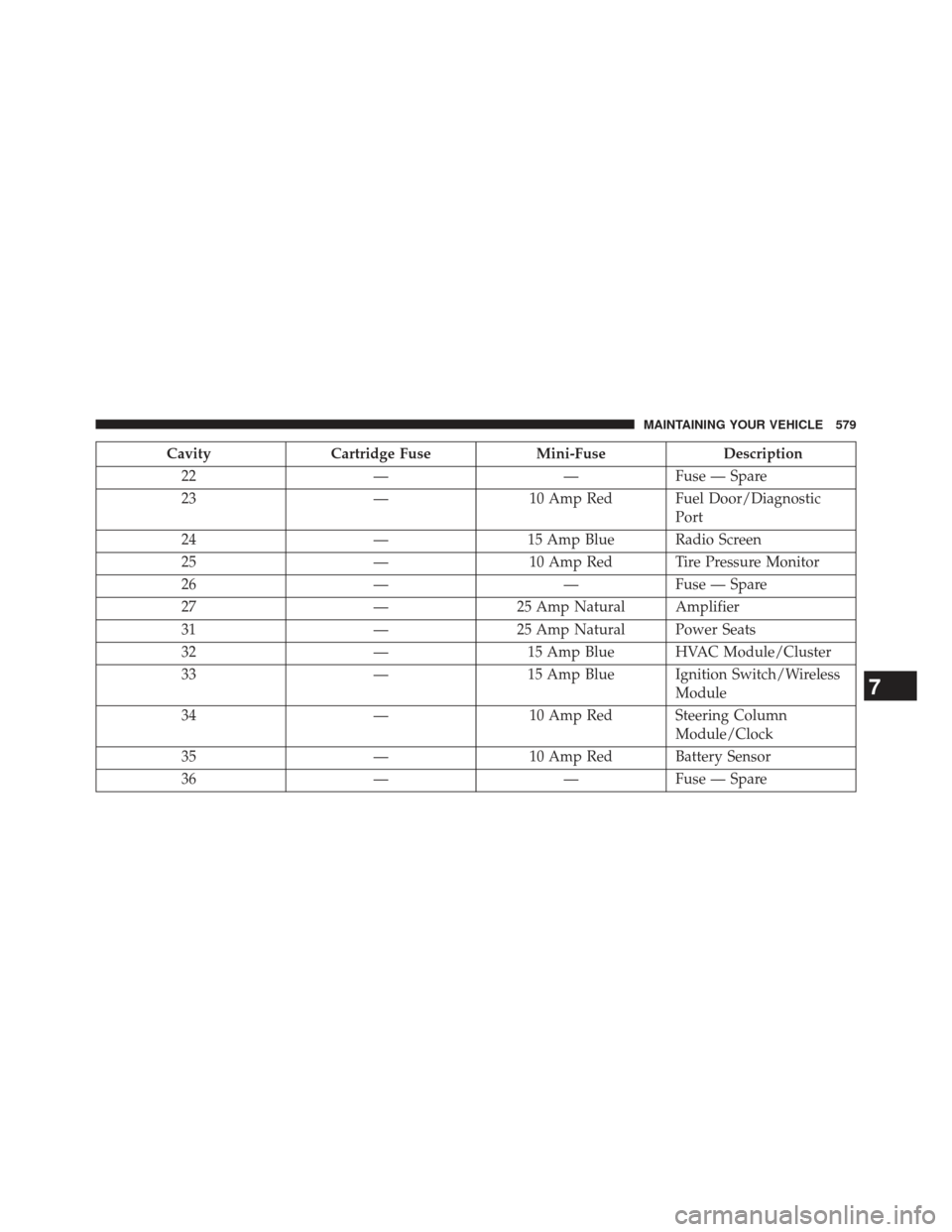
CavityCartridge Fuse Mini-FuseDescription
22 ——Fuse — Spare
23 —10 Amp Red Fuel Door/Diagnostic
Port
24 —15 Amp Blue Radio Screen
25 —10 Amp Red Tire Pressure Monitor
26 ——Fuse — Spare
27 —25 Amp Natural Amplifier
31 —25 Amp Natural Power Seats
32 —15 Amp Blue HVAC Module/Cluster
33 —15 Amp Blue Ignition Switch/Wireless
Module
34 —10 Amp Red Steering Column
Module/Clock
35 —10 Amp Red Battery Sensor
36 ——Fuse — Spare
7
MAINTAINING YOUR VEHICLE 579
Page 582 of 635
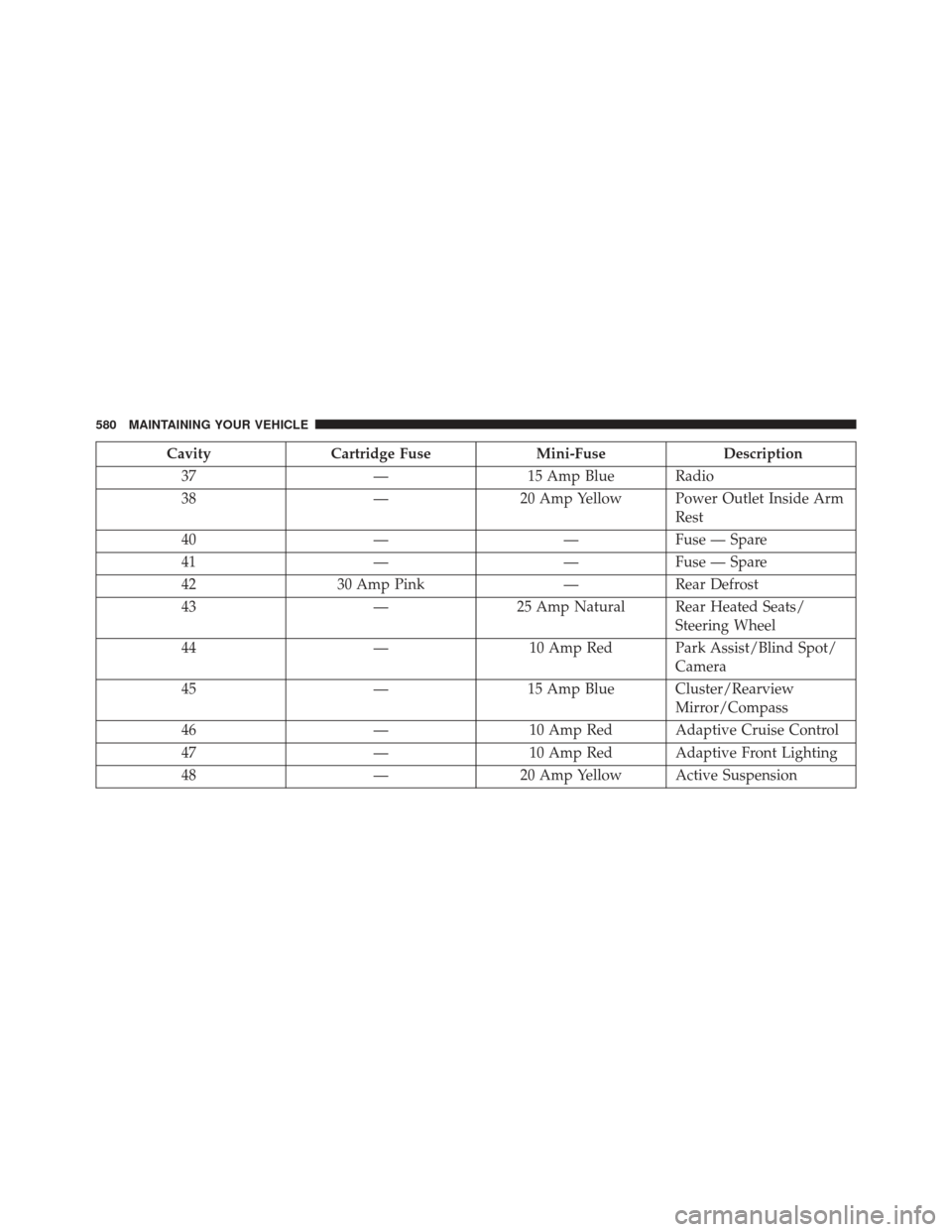
CavityCartridge Fuse Mini-FuseDescription
37 —15 Amp Blue Radio
38 —20 Amp Yellow Power Outlet Inside Arm
Rest
40 ——Fuse — Spare
41 ——Fuse — Spare
42 30 Amp Pink —Rear Defrost
43 —25 Amp Natural Rear Heated Seats/
Steering Wheel
44 —10 Amp Red Park Assist/Blind Spot/
Camera
45 —15 Amp Blue Cluster/Rearview
Mirror/Compass
46 —10 Amp Red Adaptive Cruise Control
47 —10 Amp Red Adaptive Front Lighting
48 —20 Amp Yellow Active Suspension
580 MAINTAINING YOUR VEHICLE
Page 584 of 635
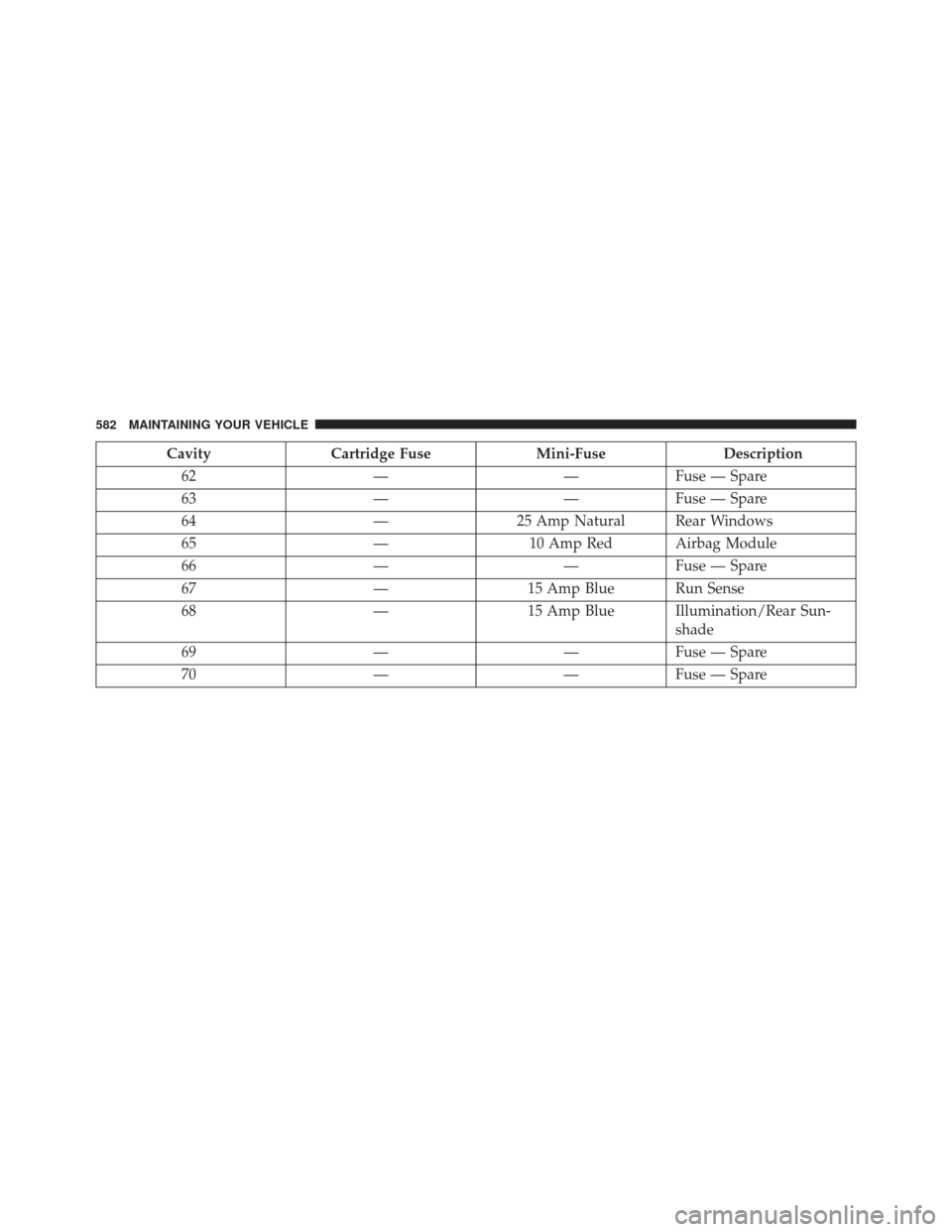
CavityCartridge Fuse Mini-FuseDescription
62 ——Fuse — Spare
63 ——Fuse — Spare
64 —25 Amp Natural Rear Windows
65 —10 Amp Red Airbag Module
66 ——Fuse — Spare
67 —15 Amp Blue Run Sense
68 —15 Amp Blue Illumination/Rear Sun-
shade
69 ——Fuse — Spare
70 ——Fuse — Spare
582 MAINTAINING YOUR VEHICLE
Page 588 of 635
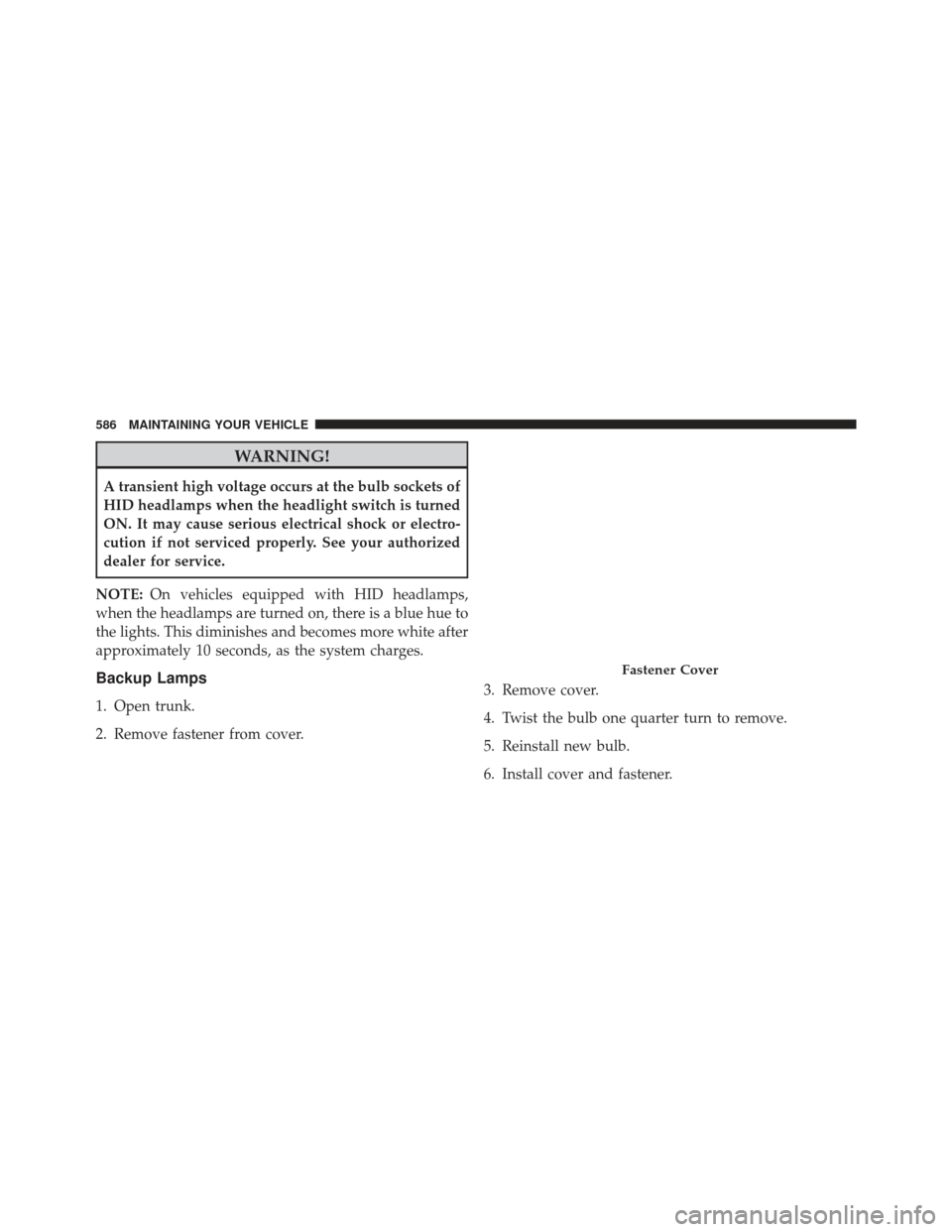
WARNING!
A transient high voltage occurs at the bulb sockets of
HID headlamps when the headlight switch is turned
ON. It may cause serious electrical shock or electro-
cution if not serviced properly. See your authorized
dealer for service.
NOTE: On vehicles equipped with HID headlamps,
when the headlamps are turned on, there is a blue hue to
the lights. This diminishes and becomes more white after
approximately 10 seconds, as the system charges.
Backup Lamps
1. Open trunk.
2. Remove fastener from cover. 3. Remove cover.
4. Twist the bulb one quarter turn to remove.
5. Reinstall new bulb.
6. Install cover and fastener.
Fastener Cover
586 MAINTAINING YOUR VEHICLE
Page 613 of 635
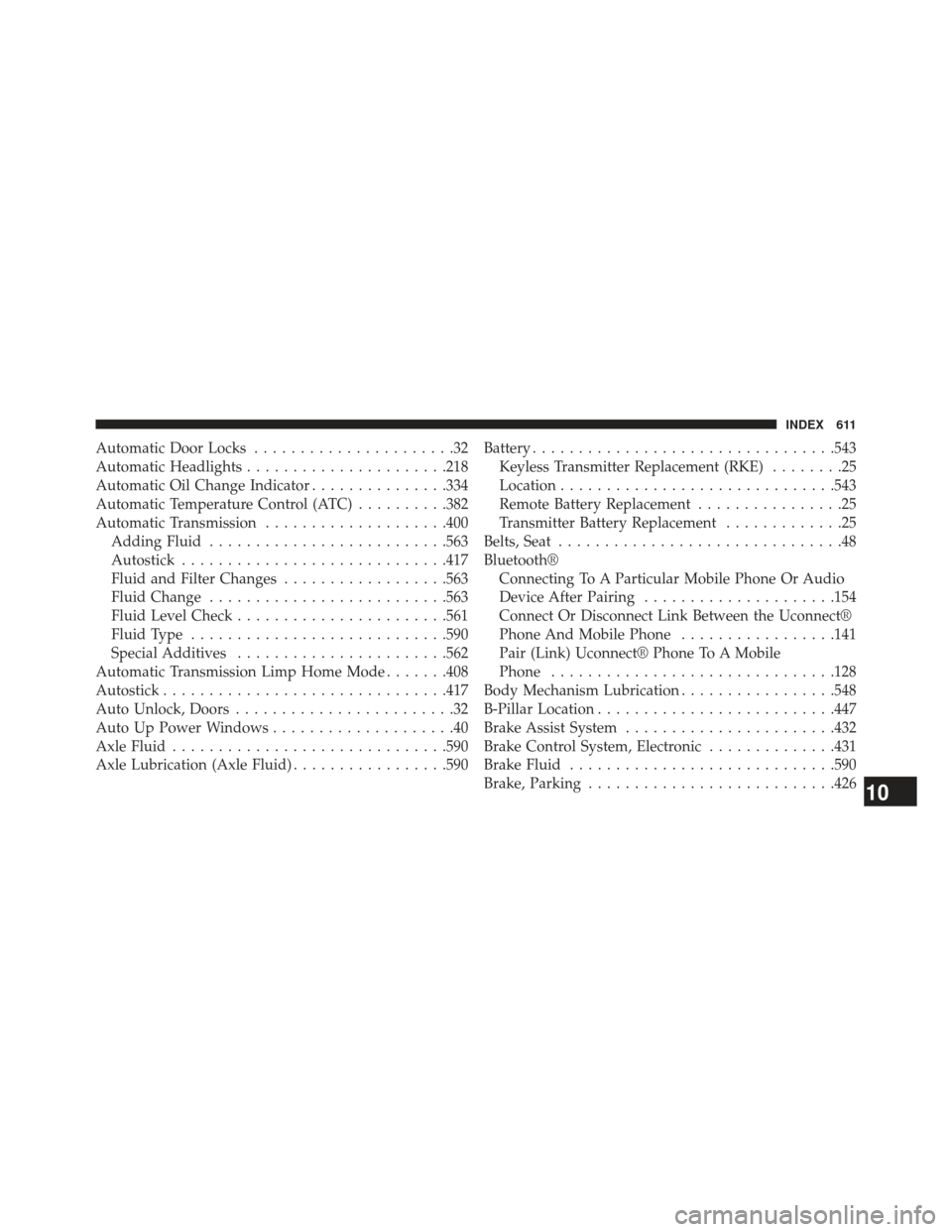
Automatic Door Locks......................32
Automatic Headlights ..................... .218
Automatic Oil Change Indicator ...............334
Automatic Temperature Control (ATC) ..........382
Automatic Transmission ....................400
Adding Fluid ......................... .563
Autostick ............................ .417
Fluid and Filter Changes ..................563
Fluid Change ......................... .563
Fluid Level Check ...................... .561
Fluid Type ........................... .590
Special Additives ...................... .562
Automatic Transmission Limp Home Mode .......408
Autostick .............................. .417
Auto Unlock, Doors ........................32
Auto Up Power Windows ....................40
Axle Fluid ............................. .590
Axle Lubrication (Axle Fluid) .................590Battery
................................ .543
Keyless Transmitter Replacement (RKE) ........25
Location ............................. .543
Remote Battery Replacement ................25
Transmitter Battery Replacement .............25
Belts, Seat ...............................48
Bluetooth® Connecting To A Particular Mobile Phone Or Audio
Device After Pairing .....................154
Connect Or Disconnect Link Between the Uconnect®
Phone And Mobile Phone .................141
Pair (Link) Uconnect® Phone To A Mobile
Phone .............................. .128
Body Mechanism Lubrication .................548
B-Pillar Location ......................... .447
Brake Assist System ...................... .432
Brake Control System, Electronic ..............431
Brake Fluid ............................ .590
Brake, Parking .......................... .426
10
INDEX 611
Page 621 of 635
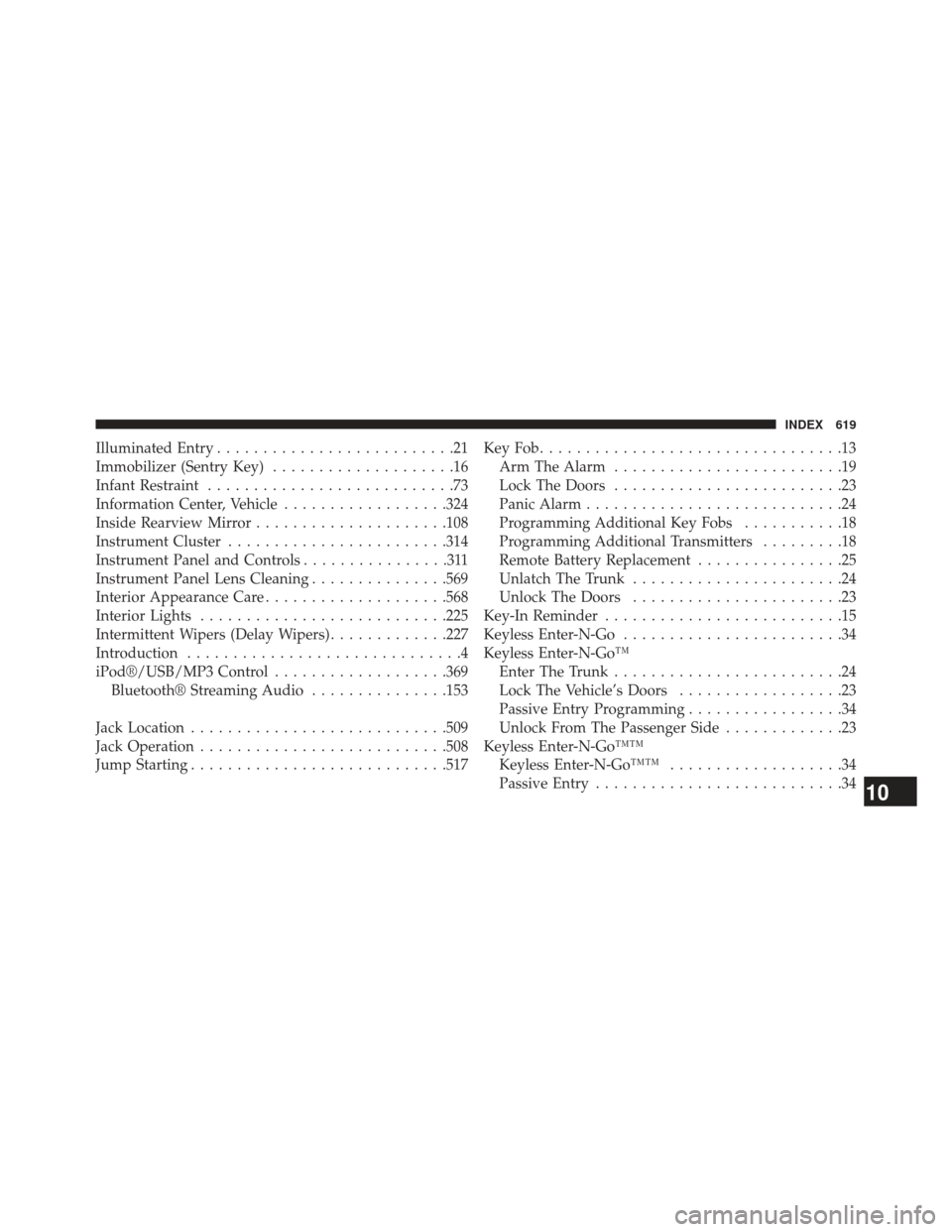
Illuminated Entry..........................21
Immobilizer (Sentry Key) ....................16
Infant Restraint ...........................73
Information Center, Vehicle ..................324
Inside Rearview Mirror .....................108
Instrument Cluster ....................... .314
Instrument Panel and Controls ................311
Instrument Panel Lens Cleaning ...............569
Interior Appearance Care ....................568
Interior Lights .......................... .225
Intermittent Wipers (Delay Wipers) .............227
Introduction ..............................4
iPod®/USB/MP3 Control ...................369
Bluetooth® Streaming Audio ...............153
Jack Location ........................... .509
Jack Operation .......................... .508
Jump Starting ........................... .517KeyFob.................................13
Arm The Alarm .........................19
Lock The Doors .........................23
Panic Alarm ............................24
Programming Additional Key Fobs ...........18
Programming Additional Transmitters .........18
Remote Battery Replacement ................25
Unlatch The Trunk .......................24
Unlock The Doors .......................23
Key-In Reminder ..........................15
Keyless Enter-N-Go ........................34
Keyless Enter-N-Go™ Enter The Trunk .........................24
Lock The Vehicle’s Doors ..................23
Passive Entry Programming .................34
Unlock From The Passenger Side .............23
Keyless Enter-N-Go™™ Keyless Enter-N-Go™™ ...................34
Passive Entry ...........................34
10
INDEX 619