brake light DODGE CHARGER 2014 7.G User Guide
[x] Cancel search | Manufacturer: DODGE, Model Year: 2014, Model line: CHARGER, Model: DODGE CHARGER 2014 7.GPages: 148, PDF Size: 3.77 MB
Page 8 of 148
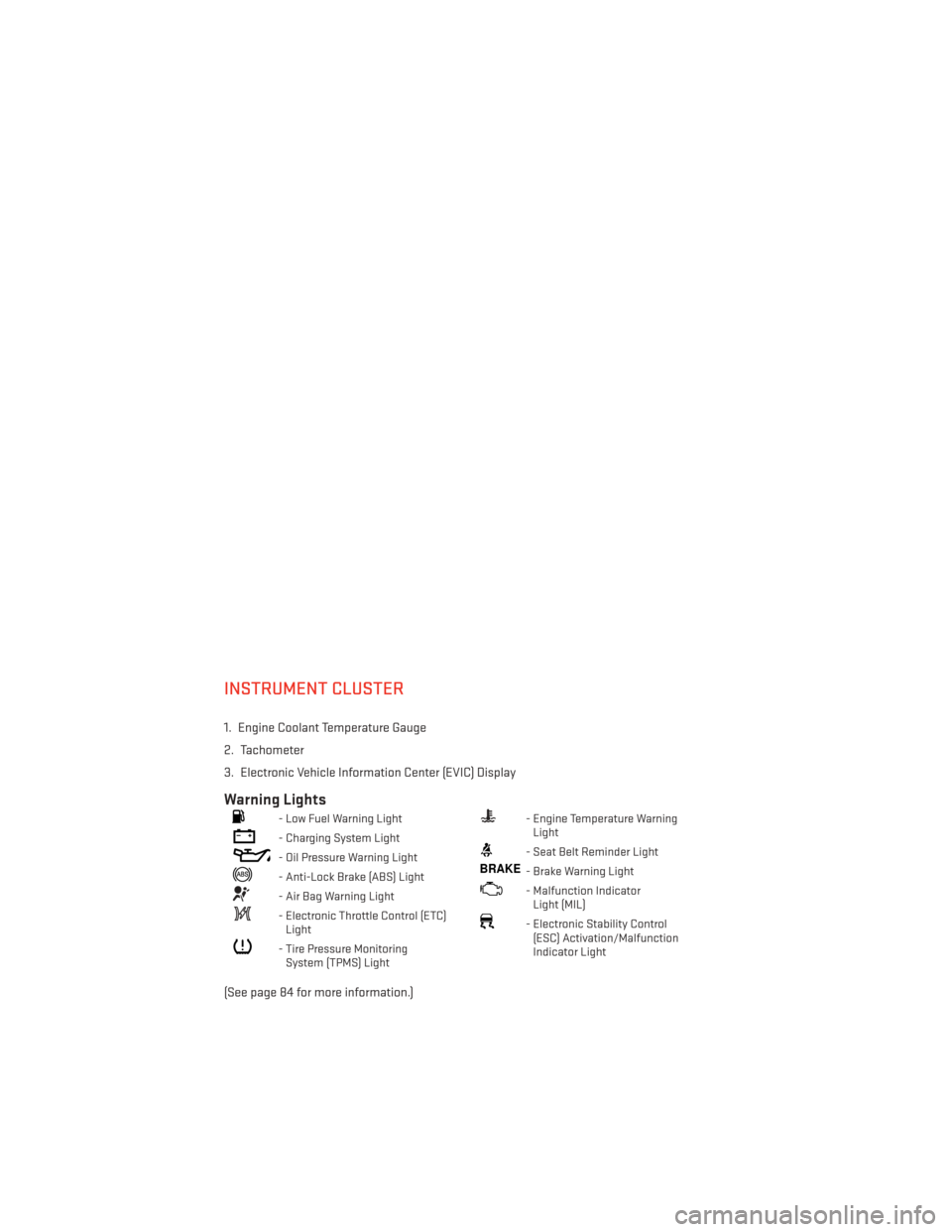
INSTRUMENT CLUSTER
1. Engine Coolant Temperature Gauge
2. Tachometer
3. Electronic Vehicle Information Center (EVIC) Display
Warning Lights
- Low Fuel Warning Light
- Charging System Light
- Oil Pressure Warning Light
- Anti-Lock Brake (ABS) Light
- Air Bag Warning Light
- Electronic Throttle Control (ETC)Light
- Tire Pressure MonitoringSystem (TPMS) Light
- Engine Temperature WarningLight
- Seat Belt Reminder Light
BRAKE- Brake Warning Light
- Malfunction IndicatorLight (MIL)
- Electronic Stability Control(ESC) Activation/Malfunction
Indicator Light
(See page 84 for more information.)
CONTROLS AT A GLANCE
6
Page 9 of 148
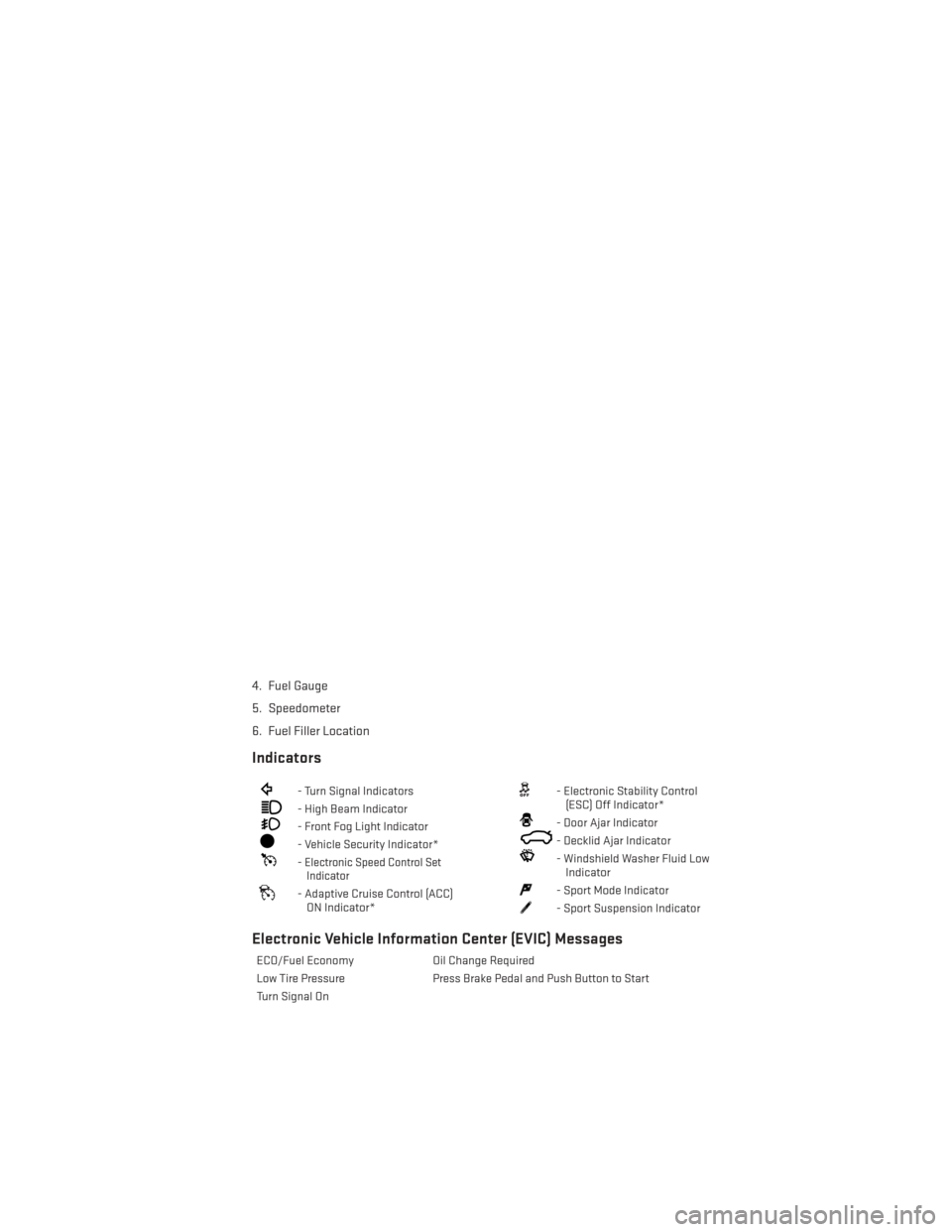
4. Fuel Gauge
5. Speedometer
6. Fuel Filler Location
Indicators
- Turn Signal Indicators
- High Beam Indicator
- Front Fog Light Indicator
- Vehicle Security Indicator*
-Electronic Speed Control SetIndicator
- Adaptive Cruise Control (ACC)
ON Indicator*
- Electronic Stability Control(ESC) Off Indicator*
- Door Ajar Indicator
- Decklid Ajar Indicator
- Windshield Washer Fluid LowIndicator
- Sport Mode Indicator
- Sport Suspension Indicator
Electronic Vehicle Information Center (EVIC) Messages
ECO/Fuel Economy Oil Change Required
Low Tire Pressure Press Brake Pedal and Push Button to Start
Turn Signal On
CONTROLS AT A GLANCE
7
Page 14 of 148
To Enter The Trunk
• With a valid Keyless Enter-N-Go™ Key Foblocated outside the vehicle and within 5 ft
(1.5 m) of the deck lid, press the button on
the right side of Center High Mounted
Stop Light (CHMSL) which is located on
the deck lid.
• Whenever the vehicle is unlocked, you can enter the trunk by pressing the button
on the right side of the CHMSl.
NOTE:
Refer to your Owner's Manual on the DVD for
further information.
Engine Starting/Stopping
Starting
With a valid Keyless Enter-N-Go™ Key Fob
inside the vehicle:
1. Shift the transmission into PARK or NEUTRAL.
2. While pressing the brake pedal, press the ENGINE START/STOP button once. If the
engine fails to start, the starter will disen-
gage automatically after 10 seconds.
3. To stop the cranking of the engine prior to the engine starting, press the button
again.
1 — Trunk Button
1 — Engine START/STOP Button
GETTING STARTED
12
Page 39 of 148
ELECTRONIC SHIFTER — 3.6L ENGINE
•Your vehicle is equipped with a fuel efficient
8 speed transmission. The electronic shift
lever in this vehicle does not slide like a
conventional shifter. Instead, the shift lever
is spring loaded and moves forward and
rearward, always returning to the center po-
sition after each gear is selected.
•The transmission gear range (PRND) is dis-
played both on the shift lever and in the
Electronic Vehicle Information Center
(EVIC).
Shifting From PARK To DRIVE
• Firmly depress the brake pedal, press the
lock button on the shift lever, then pull
and hold the shift lever fully rearward until
“D” is highlighted in the EVIC.
• To shift back into PARK from DRIVE, bring the vehicle to a complete stop, firmly de-
press the brake pedal, press the lock but-
ton on the shift lever, then push and hold
the shift lever fully forward until “P” is
highlighted in the EVIC.
Shifting From REVERSE To NEUTRAL
• Pull the shift lever rearward to the first detent and release. “N” will be highlighted
in the EVIC.
• To shift back into REVERSE from NEU- TRAL, firmly depress the brake pedal,
press the lock button on the shift lever, then push the shift lever forward to the first detent
and release. “R” will be highlighted in the EVIC.
Shifting From NEUTRAL To DRIVE
• Firmly depress the brake pedal, press the lock button on the shift lever, then pull the shift lever rearward and release. “D” will be highlighted in the EVIC.
• To shift back into NEUTRAL from DRIVE, firmly depress the brake pedal, press the lock button on the shift lever, then push the shift lever forward and release. “N” will be
highlighted in the EVIC.
OPERATING YOUR VEHICLE
37
Page 40 of 148
Shifting From REVERSE To DRIVE
• Bring the vehicle to a complete stop, firmly depress the brake pedal, then pull the shiftlever fully rearward and release when “D” is highlighted in the EVIC.
• To shift back into REVERSE from DRIVE, bring the vehicle to a complete stop, firmly depress the brake pedal, press the lock button on the shift lever, then push the shift lever
forward to the second detent and release when “R” is highlighted in the EVIC.
Shifting From DRIVE To SPORT/LOW
Vehicles Equipped With SPORT Mode
• To shift from DRIVE to SPORT, pull the shift lever rearward until “S” is highlighted in the EVIC.
• To shift back into DRIVE from SPORT, pull the shift lever rearward until “D” is highlighted in the EVIC.
Vehicles Equipped With LOW Mode
• To shift from DRIVE to LOW, pull the shift lever rearward until “L” is highlighted in the EVIC.
• To shift back into DRIVE from LOW, pull the shift lever rearward until “D” is highlighted in the EVIC.
TRANSMISSION MODES/AUTOSTICK®
Sport Mode (If Equipped)
Sport mode is driver selectable and provides more aggressive shifting, for spirited driving.
• Shifting into SPORT mode can be done anytime the vehicle is in the “D” Drive position.Simply tap the shift lever rearward and release when “S” is highlighted in the EVIC.
Tapping the shift lever rearward a second time will return the vehicle to the “D” Drive
position.
NOTE:
When the vehicle is in SPORT mode, a “SPORT” message and green flag icon will be
illuminated in the instrument cluster.
Low Mode (If Equipped)
• LOW range should be used for engine braking when descending very steep grades. In this range, the transmission will downshift for increased engine braking. To switch between
DRIVE and LOW modes, tap the shift lever rearward.
Shifting into LOW can be done anytime the vehicle is in the “D” DRIVE position.
OPERATING YOUR VEHICLE
38
Page 88 of 148
WARNING!
A hot engine cooling system is dangerous. You or others could be badly burned by steam
or boiling coolant.
BRAKE- Brake Warning Light
The Brake Warning light illuminates when there is either a system malfunction or the
parking brake is applied. If the light is on and the parking brake is not applied, it indicates a
possible brake hydraulic malfunction, brake booster problem or an Anti-Lock Brake System
problem.
Please have your vehicle serviced immediately.
WARNING!
Driving a vehicle with the red brake light on is dangerous. Part of the brake system may
have failed. It will take longer to stop the vehicle. You could have a collision. Have the
vehicle checked immediately.
- Malfunction Indicator Light (MIL)
Certain conditions, such as a poor fuel quality, etc., may illuminate the MIL after engine
start. The vehicle should be serviced if the light stays on through several typical driving
cycles. In most situations, the vehicle will drive normally and not require towing.
If the MIL flashes when the engine is running, serious conditions may exist that could lead
to immediate loss of power or severe catalytic converter damage. We recommend you do
not operate the vehicle. Have the vehicle serviced immediately.
- Electronic Stability Control (ESC) OFF Indicator Light
This light indicates the Electronic Stability Control (ESC) is off.
- Charging System Light
This light shows the status of the electrical charging system. If the charging system light
remains on, it means that the vehicle is experiencing a problem with the charging system.
We recommend you do not continue driving if the charging system light is on. Have the
vehicle serviced immediately.
- Oil Pressure Warning Light
This light indicates low engine oil pressure. If the light turns on while driving, stop the vehicle and
shut off the engine as soon as possible. A chime will sound when this light turns on.
We recommend you do not operate the vehicle or engine damage will occur. Have the
vehicle serviced immediately.
WHAT TO DO IN EMERGENCIES
86
Page 89 of 148
- Anti-Lock Brake (ABS) Light
This light monitors the Anti-Lock Brake System (ABS).
If the light is not on during starting, stays on, or turns on while driving, we recommend you
contact the nearest authorized dealer and have the vehicle serviced immediately.
- Electronic Throttle Control (ETC) Indicator Light
This light informs you of a problem with the system.
If a problem is detected, the light will come on while the engine is running. Cycle the ignition
when the vehicle has completely stopped and the shift lever is placed in the PARK position;
the light should turn off.
If the light remains lit with the engine running, your vehicle will usually be drivable; however,
see an authorized dealer immediately. If the light is flashing when the engine is running,
immediate service is required and you may experience reduced performance, an elevated/
rough idle or engine stall and your vehicle may require towing.
- Air Bag Warning Light
If the light is not on during starting, stays on, or turns on while driving, have the vehicle
serviced by an authorized dealer immediately.
SERVICE AWD SYSTEM Message
If the SERVICE AWD SYSTEM warning message appears after engine start up, or during
driving, it means the AWD system is not functioning properly. We recommend you do not
operate the vehicle. Have the vehicle serviced immediately.
– Sport Shifting
This light will illuminate whenSPORT MODEis selected. This mode provides performance
based transmission shifting depending on the driver requested throttle position.
– Sport Suspension Indicator
The light will illuminate when SPORTorTrack MODE is selected. This mode provides
performance based tuning with improved handling through an electronic controlled damp-
ing system.
Oil Change Due
Your vehicle is equipped with an engine oil change indicator system. The “Oil Change Due”
message will flash in the EVIC display for approximately 10 seconds after a single chime
has sounded to indicate the next scheduled oil change interval. The engine oil change
indicator system is duty cycle based, which means the engine oil change interval may
fluctuate dependent upon your personal driving style.
WHAT TO DO IN EMERGENCIES
87
Page 90 of 148
Resetting The Light After Servicing
Vehicles Equipped With Keyless Enter-N-Go™
• Without pressing the brake pedal, push the ENGINE START/STOP button and cycle theignition to the ON/RUN position (do not start the engine.)
• Fully depress the accelerator pedal, slowly, three times within 10 seconds.
• Without pressing the brake pedal, push the ENGINE START/STOP button once to return the ignition to the OFF/LOCK position.
Vehicles Not Equipped With Keyless Enter-N-Go™
• Turn the ignition switch to the ON/RUN position (do not start the engine.)
• Fully depress the accelerator pedal, slowly, three times within 10 seconds.
• Turn the ignition switch to the OFF/LOCK position.
NOTE:
If the indicator message illuminates when you start the vehicle, the oil change indicator
system did not reset. If necessary, repeat this procedure.
IF YOUR ENGINE OVERHEATS
In any of the following situations, you can reduce the potential for overheating by taking the
appropriate action:
• On the highways — slow down.
• In city traffic — while stopped, shift the transmission to NEUTRAL, but do not increase engine idle speed.
NOTE:
There are steps that you can take to slow down an impending overheat condition:
• If your air conditioner (A/C) is on, turn it off. The A/C system adds heat to the engine cooling system and turning the A/C off can help remove this heat.
• You can also turn the temperature control to maximum heat, the mode control to floor and the blower control to high. This allows the heater core to act as a supplement to the
radiator and aids in removing heat from the engine cooling system.
CAUTION!
Driving with a hot cooling system could damage your vehicle. If the temperature gauge
reads HOT (H), pull over and stop the vehicle. Idle the vehicle with the air conditioner
turned off until the pointer drops back into the normal range. If the pointer remains on
HOT (H), and you hear continuous chimes, turn the engine off immediately, and call for
service.
WHAT TO DO IN EMERGENCIES
88
Page 119 of 148
Your authorized dealer will reset the oil change indicator message after completing the
scheduled oil change. If a scheduled oil change is performed by someone other than your
authorized dealer, the message can be reset by referring to the steps described under
“Instrument Cluster Warning Lights” in “What To Do In Emergencies” in this guide or
“Electronic Vehicle Information Center (EVIC)” in “Understanding Your Instrument Panel” in
your Owners Manual on the DVD for further information.
NOTE:
Under no circumstances should oil change intervals exceed 10,000 miles (16,000 km) or
twelve months, whichever comes first.
Severe Duty All Models
Change Engine Oil at 4000 miles (6,500 km) if the vehicle is operated in a dusty and off road
environment. This type of vehicle use is considered Severe Duty
Once A Month Or Before A Long Trip:
• Check engine oil level
• Check windshield washer fluid level
• Check tire pressure and look for unusual wear or damage. Rotate tires at the first sign ofirregular wear, even if it occurs before your next scheduled service.
• Check the fluid levels of the coolant reservoir, brake master cylinder, and power steering and fill as needed.
• Check function of all interior and exterior lights
Required Maintenance Intervals.
Refer to the maintenance schedules on the following page for the required maintenance
intervals.
At Every Oil Change Interval As Indicated By Oil Change Indicator System:
• Change oil and filter
• Rotate the tires. Rotate at the first sign of irregular wear, even if it occurs before your
next scheduled service
• Inspect battery and clean and tighten terminals as required
• Inspect brake pads, shoes, rotors, drums, hoses and park brake
• Inspect engine cooling system protection and hoses
• Inspect exhaust system
• Inspect engine air cleaner if using in dusty or off-road conditions
MAINTAINING YOUR VEHICLE
117
Page 124 of 148
Once A Month
• Check tire pressure and look for unusual wear or damage.
• Inspect the battery, and clean and tighten the terminals as required.
• Check the fluid levels of the coolant reservoir, brake master cylinder, and power steering,and add as needed.
• Check all lights and other electrical items for correct operation.
At Each Oil Change
• Change the engine oil filter.
• Inspect the brake hoses and lines.
CAUTION!
Failure to perform the required maintenance items may result in damage to the vehicle.
MAINTAINING YOUR VEHICLE
122