automatic transmission DODGE CHARGER 2015 7.G User Guide
[x] Cancel search | Manufacturer: DODGE, Model Year: 2015, Model line: CHARGER, Model: DODGE CHARGER 2015 7.GPages: 638, PDF Size: 16.56 MB
Page 400 of 638
After Starting
The idle speed is controlled automatically and it will
decrease as the engine warms up.
ENGINE BLOCK HEATER — IF EQUIPPED
The engine block heater warms the engine, and permits
quicker starts in cold weather. Connect the cord to a
standard 110-115 Volt AC electrical outlet with a
grounded, three-wire extension cord.
The engine block heater must be plugged in at least one
hour to have an adequate warming effect on the engine.
The engine block heater cord is routed under the hood on
the driver side of the vehicle. It has a removable cap that
is located near the air box.
WARNING!
Remember to disconnect the engine block heater
cord before driving. Damage to the 110-115 Volt
electrical cord could cause electrocution.
AUTOMATIC TRANSMISSION
WARNING!
•It is dangerous to shift out of PARK or NEUTRAL
if the engine speed is higher than idle speed. If
your foot is not firmly pressing the brake pedal, the
vehicle could accelerate quickly forward or in re-
verse. You could lose control of the vehicle and hit
someone or something. Only shift into gear when
the engine is idling normally and your foot is
firmly pressing the brake pedal.
(Continued)
398 STARTING AND OPERATING
Page 403 of 638
Eight-Speed Automatic Transmission
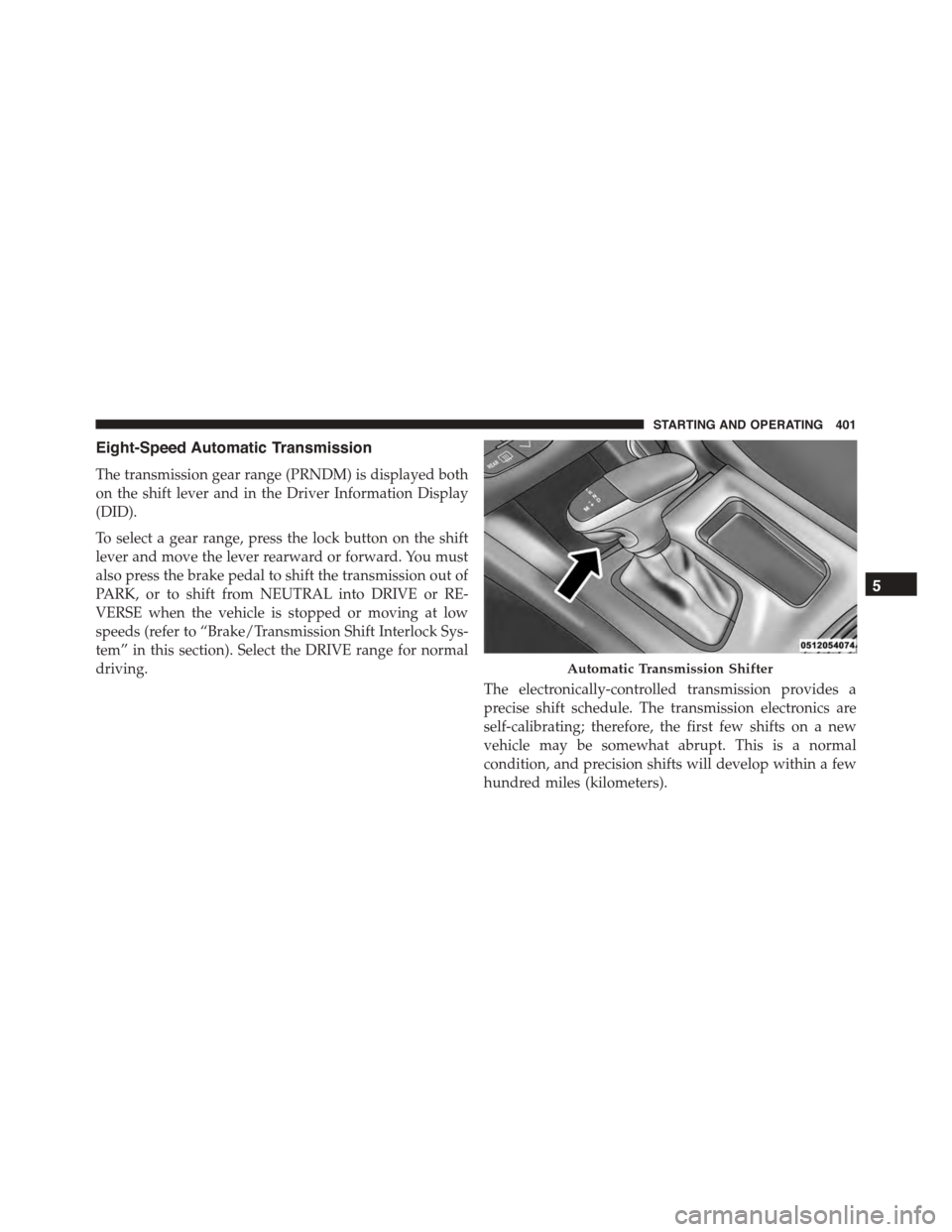
The transmission gear range (PRNDM) is displayed both
on the shift lever and in the Driver Information Display
(DID).
To select a gear range, press the lock button on the shift
lever and move the lever rearward or forward. You must
also press the brake pedal to shift the transmission out of
PARK, or to shift from NEUTRAL into DRIVE or RE-
VERSE when the vehicle is stopped or moving at low
speeds (refer to “Brake/Transmission Shift Interlock Sys-
tem” in this section). Select the DRIVE range for normal
driving.
The electronically-controlled transmission provides a
precise shift schedule. The transmission electronics are
self-calibrating; therefore, the first few shifts on a new
vehicle may be somewhat abrupt. This is a normal
condition, and precision shifts will develop within a few
hundred miles (kilometers).
Automatic Transmission Shifter
5
STARTING AND OPERATING 401
Page 408 of 638
WARNING!
Do not coast in NEUTRAL and never turn off the
ignition to coast down a hill. These are unsafe
practices that limit your response to changing traffic
or road conditions. You might lose control of the
vehicle and have a collision.
CAUTION!
Towing the vehicle, coasting, or driving for any other
reason with the transmission in NEUTRAL can cause
severe transmission damage. Refer to “Recreational
Towing” in “Starting And Operating” and “Towing A
Disabled Vehicle” in “What To Do In Emergencies”
for further information.
DRIVE (D)
This range should be used for most city and highway
driving. It provides the smoothest upshifts and down-
shifts, and the best fuel economy. The transmission
automatically upshifts through all forward gears. The
DRIVE position provides optimum driving characteris-
tics under all normal operating conditions.
When frequent transmission shifting occurs (such as
when operating the vehicle under heavy loading condi-
tions, in hilly terrain or traveling into strong head winds),
use the AutoStick shift control (refer to#AutoStick#in this
section for further information) to select a lower gear.
Under these conditions, using a lower gear will improve
performance and extend transmission life by reducing
excessive shifting and heat buildup.
During extremely cold temperatures (-22°F [-30°C] or
below), transmission operation may be modified depend-
ing on engine and transmission temperature as well as
406 STARTING AND OPERATING
Page 410 of 638
3. Press and hold the ignition switch until the engine
turns OFF.
4. Wait approximately 30 seconds.
5. Restart the engine.
6. Shift into the desired gear range. If the problem is no
longer detected, the transmission will return to normal
operation.
NOTE:Even if the transmission can be reset, we recom-
mend that you visit your authorized dealer at your
earliest possible convenience. Your authorized dealer has
diagnostic equipment to determine if the problem could
recur.
If the transmission cannot be reset, authorized dealer
service is required.
AUTOSTICK
AutoStick is a driver-interactive transmission feature
providing manual shift control, giving you more control
of the vehicle. AutoStick allows you to maximize engine
braking, eliminate undesirable upshifts and downshifts,
and improve overall vehicle performance. This system
can also provide you with more control during passing,
city driving, cold slippery conditions, mountain driving,
trailer towing, and many other situations.
Operation
When the shift lever is in the DRIVE (D) position, the
transmission will operate automatically, shifting between
the eight available gears. To activate AutoStick, move the
shift lever into the MANUAL (M) position (beside the
DRIVE position). The current transmission gear will be
displayed in the instrument cluster, along with a high-
lighted#M#(Manual) indication. When the shift lever is
in the MANUAL (M) position, tap the shift lever forward
408 STARTING AND OPERATING
Page 411 of 638
(-) (or tap the (-) shift paddle on the steering wheel, if
equipped) to downshift the transmission to the next
lower gear, or tap the lever rearward (+) (or tap the (+)
shift paddle, if equipped) to command an upshift.
NOTE:Tapping one of the steering wheel-mounted shift
paddles (+/-), if equipped, while the shift lever is in
DRIVE, will activate a temporary AutoStick mode. Tap-
ping (-) to enter AutoStick mode will downshift the
transmission to the next lower gear, while using (+) to
enter AutoStick mode will retain the current gear. The
current gear will be displayed in the instrument cluster,
but the#M#will not be highlighted. The transmission will
revert back to normal operation (if the shift lever remains
in DRIVE) after a period of time, depending on accelera-
tor pedal activity.
In AutoStick mode, the transmission will shift up or
down when (+/-) is manually selected by the driver
(using the shift lever, or the shift paddles [if equipped]),
unless an engine lugging or overspeed condition would
result. It will remain in the selected gear until another
upshift or downshift is chosen, except as described
below.
•In temporary AutoStick mode (shift lever in DRIVE), the
transmission will automatically shift up when maxi-
mum engine speed is reached. If the accelerator is fully
depressed, the transmission will downshift when pos-
sible (based on current vehicle speed and gear, except
6.4L models). Lack of accelerator pedal activity will
cause the transmission to revert to automatic operation.
•If normal AutoStick mode is engaged (shift lever in
MANUAL position), manual gear selection will be
maintained until the shift lever is returned to DRIVE,
or as described below. The transmission will not
upshift automatically at redline in this mode, nor will
downshifts be obtained if the accelerator pedal is
pressed to the floor.
5
STARTING AND OPERATING 409
Page 412 of 638
•The transmission will automatically downshift as the
vehicle slows (to prevent engine lugging) and will
display the current gear.
•The transmission will automatically downshift to first
gear when coming to a stop. After a stop, the driver
should manually upshift (+) the transmission as the
vehicle is accelerated.
•You can start out, from a stop, in first or second gear.
Tapping (+) (at a stop) will allow starting in second
gear. Starting out in second gear can be helpful in
snowy or icy conditions.
•If a requested downshift would cause the engine to
over-speed, that shift will not occur.
•The system will ignore attempts to upshift at too low
of a vehicle speed.
•Holding the (-) paddle depressed (if equipped), or
holding the shift lever in the (-) position, will down-
shift the transmission to the lowest gear possible at the
current speed.
•Transmission shifting will be more noticeable when
AutoStick is engaged.
•The system may revert to automatic shift mode if a
fault or overheat condition is detected.
To disengage AutoStick mode, return the shift lever to the
DRIVE position, or press and hold the (+) shift paddle (if
equipped, and the shift lever is already in DRIVE) until
“D” is once again indicated in the instrument cluster. You
can shift in or out of the AutoStick mode at any time
without taking your foot off the accelerator pedal.
410 STARTING AND OPERATING
Page 413 of 638
WARNING!
Do not downshift for additional engine braking on a
slippery surface. The drive wheels could lose their
grip and the vehicle could skid, causing a collision or
personal injury.
SPORT MODE — WITHOUT PERFORMANCE
CONTROL
Your vehicle is equipped with a Sport Mode feature. This
mode is a configuration set up for typical enthusiast
driving. The engine, transmission, and steering systems
are all set to their SPORT settings. Sport Mode will
provide improved throttle response and modified shift-
ing for an enhanced driving experience, as well the
greatest amount of steering feel. This mode may be
activated and deactivated by pressing the Sport button
on the instrument panel switch bank.
For vehicles equipped with Drive Modes, Refer to “Per-
formance Control — If Equipped” within “Uconnect
Settings” in “Understanding Your Instrument Panel”
chapter for further information.
ALL-WHEEL DRIVE (AWD) — IF EQUIPPED
This vehicle is equipped with an active on-demand
All-Wheel Drive (AWD) system which makes available
optimum traction for a wide variety of road surface and
driving conditions. The system minimizes wheel slip by
automatically redirecting torque to the front and rear
wheels as necessary.
To maximize fuel economy, your AWD vehicle automati-
cally defaults to rear-wheel drive (RWD) when road and
environmental conditions are such that wheel slip is
unlikely to occur. When specific road and environmental
conditions require increased levels of road traction, the
vehicle automatically shifts into AWD mode. Automatic
5
STARTING AND OPERATING 411
Page 486 of 638
Trailer Towing Weights (Maximum Trailer Weight
Ratings)
The following chart provides the maximum trailer
weight ratings towable for your given drivetrain.
Engine/TransmissionFrontal AreaMax. GTW (Gross
Trailer Weight)
Max. Tongue Weight (See
Note)
3.6L Automatic22 sq ft (2.04 sq m) 1,000 lbs (454 kg)100 lbs (45 kg)
5.7L Automatic32 sq ft (2.97 sq m) 1,000 lbs (454 kg)100 lbs (45 kg)
Refer to local laws for maximum trailer towing speeds.
NOTE:The trailer tongue weight must be considered as
part of the combined weight of occupants and cargo, and
it should never exceed the weight referenced on the “Tire
and Loading Information” placard. Refer to “Tire Safety
Information” in “Starting and Operating” for further
information.
Trailer And Tongue Weight
Always load a trailer with 60% to 65% of the weight in
the front of the trailer. This places 10% to 15% of the
Gross Trailer Weight (GTW) on the tow hitch of your
vehicle. Loads balanced over the wheels or heavier in the
rear can cause the trailer to swayseverelyside to side
484 STARTING AND OPERATING
Page 488 of 638
Towing Requirements
To promote proper break-in of your new vehicle drive-
train components the following guidelines are recom-
mended:
WARNING!
Improper towing can lead to an injury collision.
Follow these guidelines to make your trailer towing
as safe as possible:
•Make certain that the load is secured in the trailer
and it will not shift during travel. When trailering
cargo that is not fully secured, dynamic load shifts
can occur that may be difficult for the driver to
control. You could lose control of your vehicle and
have a collision.
(Continued)
WARNING!(Continued)
•When hauling cargo or towing a trailer, do not
overload your vehicle or trailer. Overloading can
cause a loss of control, poor performance, or dam-
age to brakes, axle, engine, transmission, steering,
suspension, chassis structure, or tires.
•Safety chains must always be used between your
vehicle and trailer. Always connect the chains to
the frame or hook retainers of the vehicle hitch.
Cross the chains under the trailer tongue and allow
enough slack for turning corners.
•Vehicles with trailers should not be parked on a
grade. When parking, apply the parking brake on
the tow vehicle. Put the tow vehicle automatic
transmission in PARK. Always, block or%chock%
the trailer wheels.
•GCWR must not be exceeded.
(Continued)
486 STARTING AND OPERATING
Page 493 of 638
Towing Tips
Before setting out on a trip, practice turning, stopping,
and backing up the trailer in an area located away from
heavy traffic.
Automatic Transmission
The DRIVE range can be selected when towing. The
transmission controls include a drive strategy to avoid
frequent shifting when towing. However, if frequent
shifting does occur while in DRIVE, you can use the
AutoStick shift control to select a lower gear.
NOTE:Using a lower gear while operating the vehicle
under heavy loading conditions will improve perfor-
mance and extend transmission life by reducing exces-
sive shifting and heat buildup. This action will also
provide better engine braking.
Electronic Speed Control — If Equipped
•Do not use in hilly terrain or with heavy loads.
•When using the speed control, if you experience speed
drops greater than 10 mph (16 km/h), disengage until
you can get back to cruising speed.
•Use speed control in flat terrain and with light loads to
maximize fuel efficiency.
AutoStick
•When using the AutoStick shift control, select the
highest gear that allows for adequate performance and
avoids frequent downshifts. For example, choose “5” if
the desired speed can be maintained. Choose “4” or
“3” if needed to maintain the desired speed.
5
STARTING AND OPERATING 491