sport mode DODGE CHARGER 2015 7.G Owners Manual
[x] Cancel search | Manufacturer: DODGE, Model Year: 2015, Model line: CHARGER, Model: DODGE CHARGER 2015 7.GPages: 638, PDF Size: 16.56 MB
Page 98 of 638
5. Remove slack in the tether strap according to the child
restraint manufacturer ’s instructions.
WARNING!
•An incorrectly anchored tether strap could lead to
increased head motion and possible injury to the
child. Use only the anchorage position directly
behind the child seat to secure a child restraint top
tether strap.
•If your vehicle is equipped with a split rear seat,
make sure the tether strap does not slip into the
opening between the seatbacks as you remove
slack in the strap.
Transporting Pets
Air Bags deploying in the front seat could harm your pet.
An unrestrained pet will be thrown about and possibly
injured, or injure a passenger during panic braking or in
a collision.
Pets should be restrained in the rear seat in pet harnesses
or pet carriers that are secured by seat belts.
ENGINE BREAK-IN RECOMMENDATIONS
A long break-in period is not required for the drivetrain
(engine, transmission, clutch, and rear axle) in your new
vehicle.
Drive moderately during the first 300 mi (500 km). After
the initial 60 mi (100 km), speeds up to 50 or 55 mph (80
or 90 km/h) are desirable.
96 THINGS TO KNOW BEFORE STARTING YOUR VEHICLE
Page 270 of 638
9. Electronic Stability Control (ESC) OFF Indicator
Light — If Equipped
This light indicates the Electronic Stability Con-
trol (ESC) is off.
With Drive Modes, the ESC OFF indicator will
be lit any time the Traction modes is set to Sport, Track,
or Full OFF.
10. Speedometer
Indicates vehicle speed.
11. Electronic Stability Control (ESC) Activation/
Malfunction Indicator Light
The “ESC Activation/Malfunction Indicator
Light” in the instrument cluster will come on
when the ignition is placed in the ON/RUN
position. It should go out with the engine
running. If the “ESC Activation/Malfunction Indicator
Light” comes on continuously with the engine running, a
malfunction has been detected in the ESC system. If this
light remains on after several ignition cycles, and the
vehicle has been driven several miles (kilometers) at
speeds greater than 30 mph (48 km/h), see your autho-
rized dealer as soon as possible to have the problem
diagnosed and corrected.
NOTE:
•The “ESC Off Indicator Light” and the “ESC
Activation/Malfunction Indicator Light” will come
on momentarily each time the ignition is placed in
the ON/RUN position.
•Each time the ignition is placed in the ON/RUN
position, the ESC system will be ON, even if it was
turned off previously.
•The ESC system will make buzzing or clicking
sounds when it is active. This is normal; the sounds
will stop when ESC becomes inactive following the
maneuver that caused the ESC activation.
268 UNDERSTANDING YOUR INSTRUMENT PANEL
Page 335 of 638
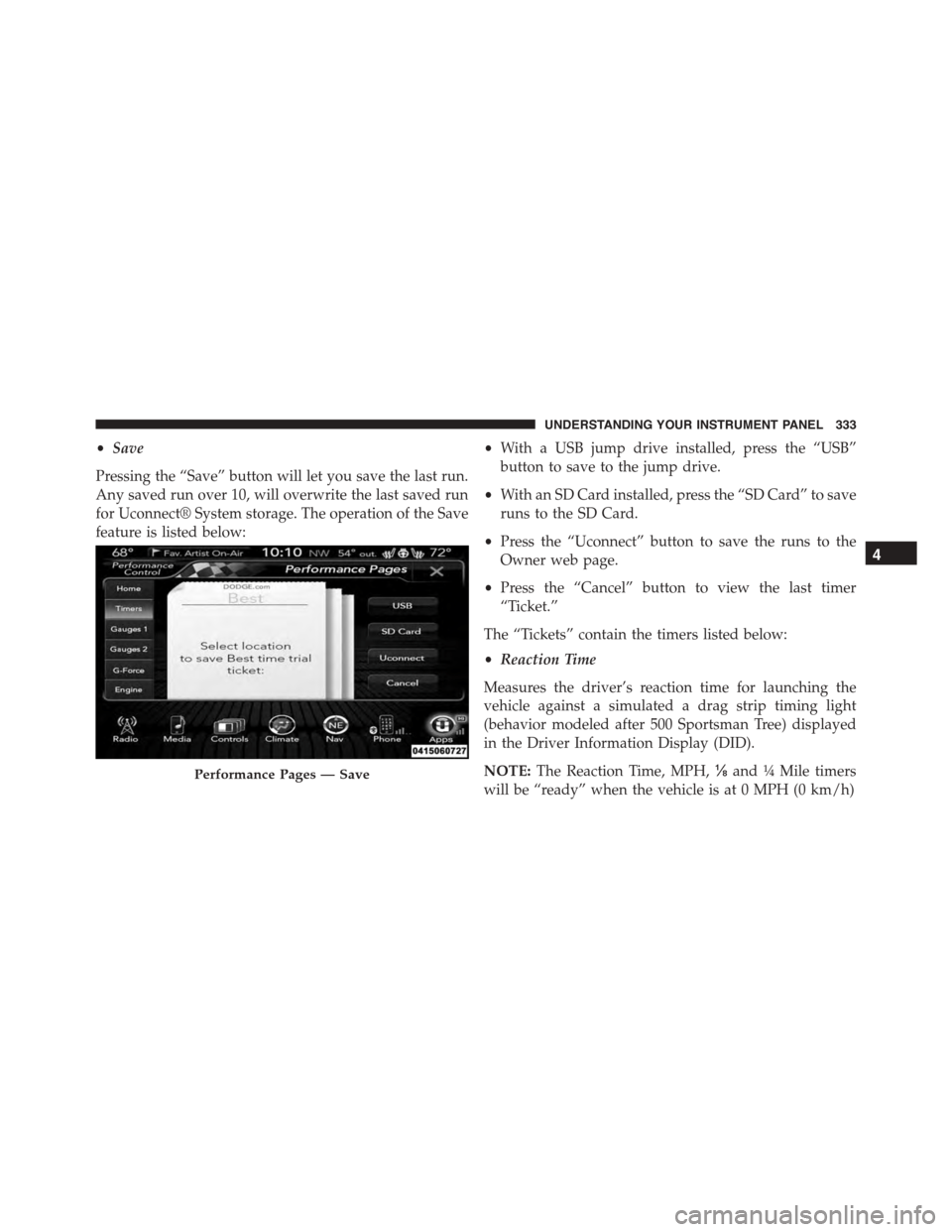
•Save
Pressing the “Save” button will let you save the last run.
Any saved run over 10, will overwrite the last saved run
for Uconnect® System storage. The operation of the Save
feature is listed below:
•With a USB jump drive installed, press the “USB”
button to save to the jump drive.
•With an SD Card installed, press the “SD Card” to save
runs to the SD Card.
•Press the “Uconnect” button to save the runs to the
Owner web page.
•Press the “Cancel” button to view the last timer
“Ticket.”
The “Tickets” contain the timers listed below:
•Reaction Time
Measures the driver’s reaction time for launching the
vehicle against a simulated a drag strip timing light
(behavior modeled after 500 Sportsman Tree) displayed
in the Driver Information Display (DID).
NOTE:The Reaction Time, MPH,⅛and¼Mile timers
will be “ready” when the vehicle is at 0 MPH (0 km/h)
Performance Pages — Save
4
UNDERSTANDING YOUR INSTRUMENT PANEL 333
Page 343 of 638
system is not intended to compensate for lack of driver
experience or familiarity with the race track. Use of this
feature in low traction (cold, wet, gravel, etc.) conditions
may results in excess wheel slip outside this systems
control resulting in an aborted launch.
NOTE:
•Launch control should not be used on public roads.
Always check track conditions and the surrounding
area.
•Launch Control is not available for the first 500 miles
of the vehicle’s life.
•Launch Control should only be used when the engine
and transmission are at operating temperature.
•Launch Control is intended to be used on dry, paved
road surfaces only. Use on slippery or loose surfaces
may cause damage to vehicle components and is not
recommended.
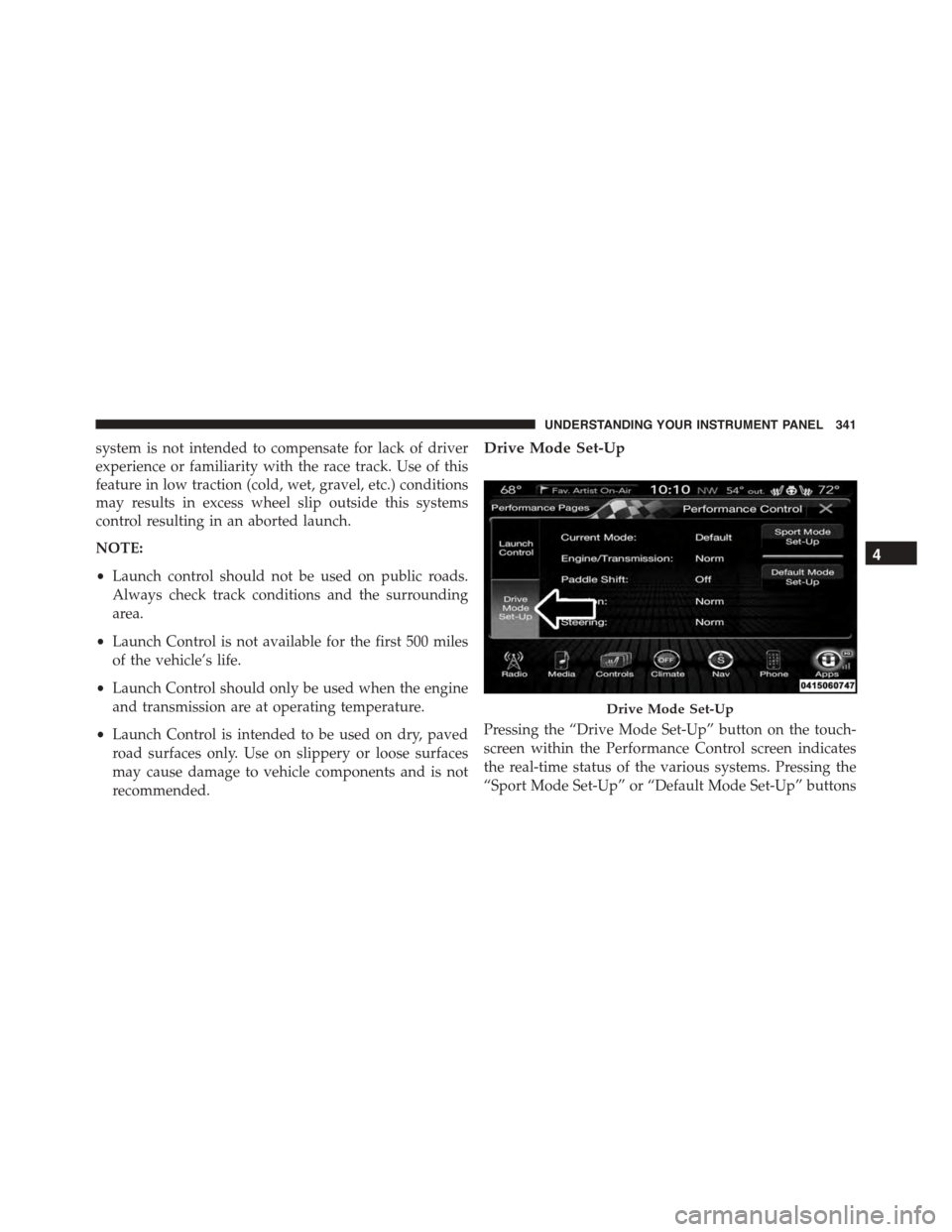
Drive Mode Set-Up
Pressing the “Drive Mode Set-Up” button on the touch-
screen within the Performance Control screen indicates
the real-time status of the various systems. Pressing the
“Sport Mode Set-Up” or “Default Mode Set-Up” buttons
Drive Mode Set-Up
4
UNDERSTANDING YOUR INSTRUMENT PANEL 341
Page 344 of 638
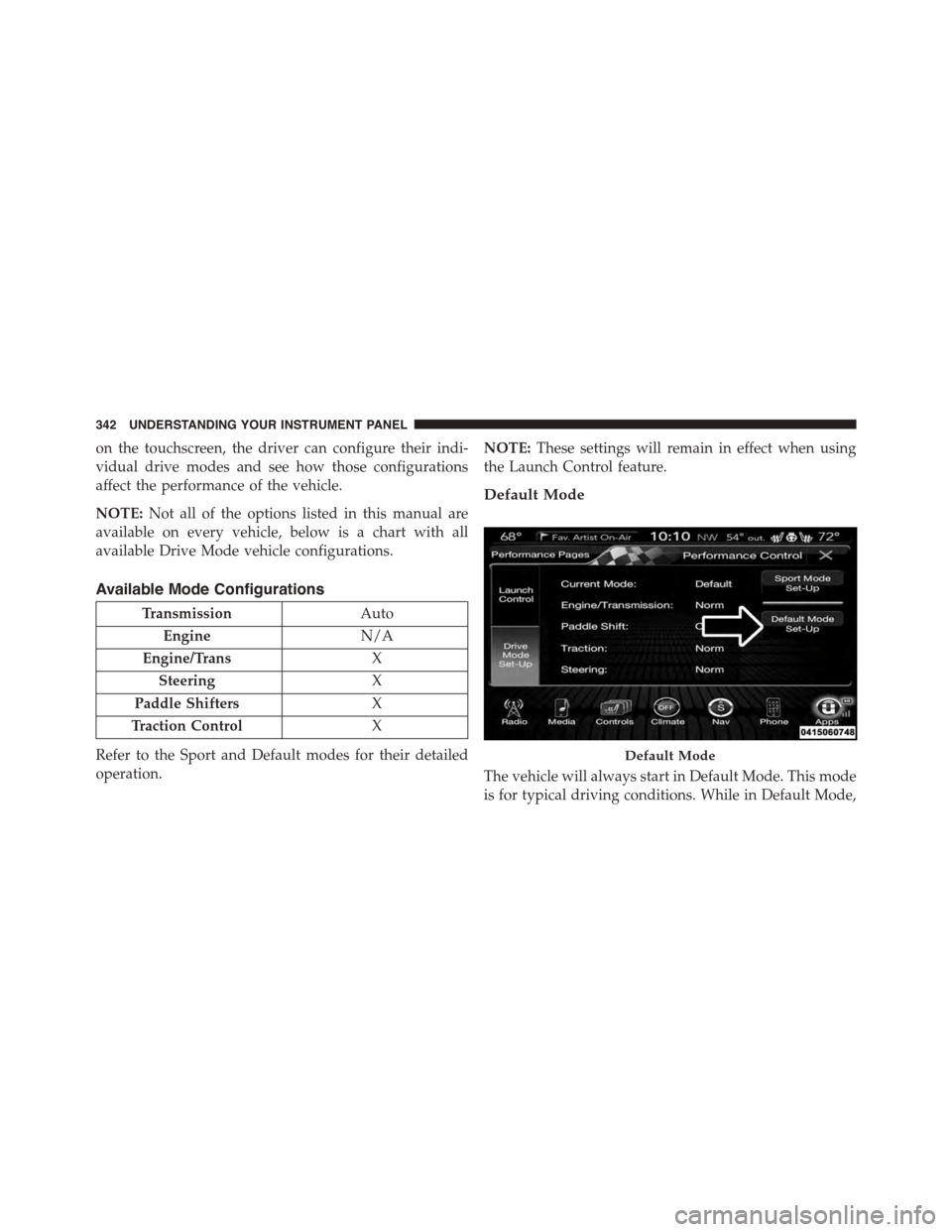
on the touchscreen, the driver can configure their indi-
vidual drive modes and see how those configurations
affect the performance of the vehicle.
NOTE:Not all of the options listed in this manual are
available on every vehicle, below is a chart with all
available Drive Mode vehicle configurations.
Available Mode Configurations
TransmissionAuto
EngineN/A
Engine/TransX
SteeringX
Paddle ShiftersX
Traction ControlX
Refer to the Sport and Default modes for their detailed
operation.
NOTE:These settings will remain in effect when using
the Launch Control feature.
Default Mode
The vehicle will always start in Default Mode. This mode
is for typical driving conditions. While in Default Mode,
Default Mode
342 UNDERSTANDING YOUR INSTRUMENT PANEL
Page 345 of 638
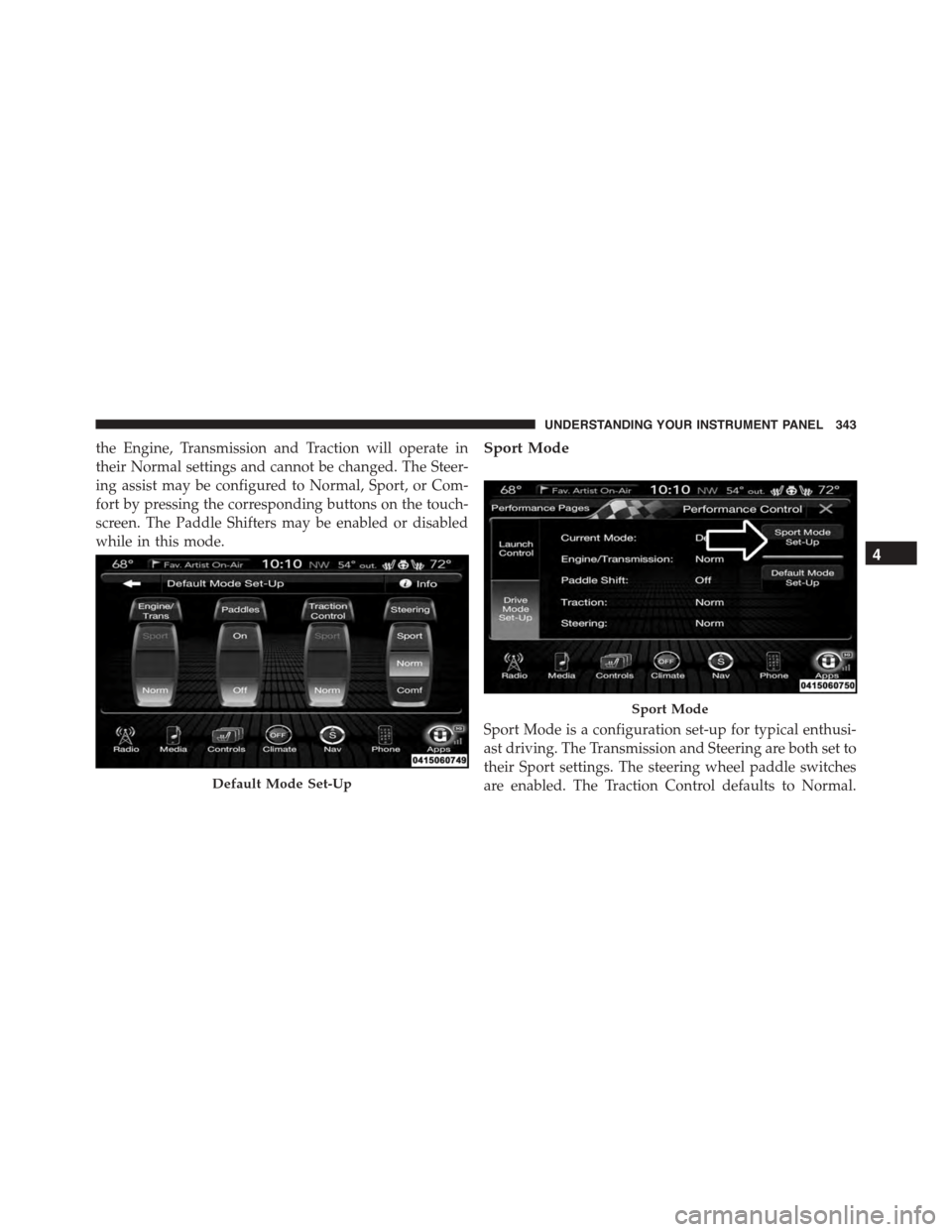
the Engine, Transmission and Traction will operate in
their Normal settings and cannot be changed. The Steer-
ing assist may be configured to Normal, Sport, or Com-
fort by pressing the corresponding buttons on the touch-
screen. The Paddle Shifters may be enabled or disabled
while in this mode.
Sport Mode
Sport Mode is a configuration set-up for typical enthusi-
ast driving. The Transmission and Steering are both set to
their Sport settings. The steering wheel paddle switches
are enabled. The Traction Control defaults to Normal.Default Mode Set-Up
Sport Mode
4
UNDERSTANDING YOUR INSTRUMENT PANEL 343
Page 346 of 638
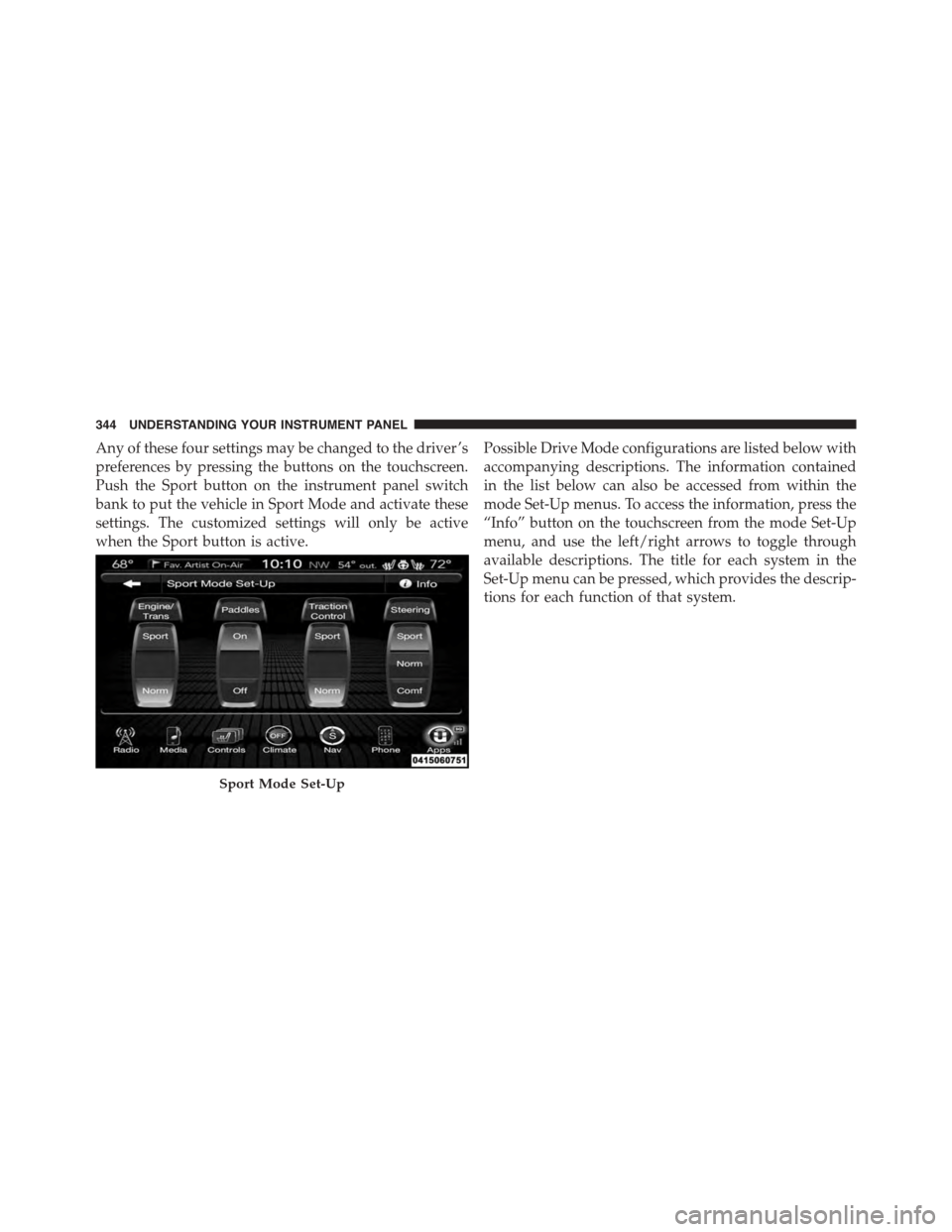
Any of these four settings may be changed to the driver ’s
preferences by pressing the buttons on the touchscreen.
Push the Sport button on the instrument panel switch
bank to put the vehicle in Sport Mode and activate these
settings. The customized settings will only be active
when the Sport button is active.
Possible Drive Mode configurations are listed below with
accompanying descriptions. The information contained
in the list below can also be accessed from within the
mode Set-Up menus. To access the information, press the
“Info” button on the touchscreen from the mode Set-Up
menu, and use the left/right arrows to toggle through
available descriptions. The title for each system in the
Set-Up menu can be pressed, which provides the descrip-
tions for each function of that system.
Sport Mode Set-Up
344 UNDERSTANDING YOUR INSTRUMENT PANEL
Page 391 of 638
STARTING AND OPERATING
CONTENTS
!STARTING PROCEDURES................393
▫Automatic Transmission................393
▫Keyless Enter-N-Go™..................394
▫Normal Starting.......................394
▫Extreme Cold Weather (Below –20°F Or
−29°C).............................396
▫If Engine Fails To Start.................396
▫After Starting........................398
!ENGINE BLOCK HEATER — IF EQUIPPED . . .398
!AUTOMATIC TRANSMISSION............398
▫Key Ignition Park Interlock...............400
▫Brake/Transmission Shift Interlock System . . .400
▫Eight-Speed Automatic Transmission.......401
!AUTOSTICK..........................408
▫Operation...........................408
!SPORT MODE — WITHOUT PERFORMANCE
CONTROL............................411
!ALL-WHEEL DRIVE (AWD) — IF EQUIPPED . .411
!DRIVING ON SLIPPERY SURFACES.........412
▫Acceleration.........................412
▫Traction............................413
5
Page 413 of 638
WARNING!
Do not downshift for additional engine braking on a
slippery surface. The drive wheels could lose their
grip and the vehicle could skid, causing a collision or
personal injury.
SPORT MODE — WITHOUT PERFORMANCE
CONTROL
Your vehicle is equipped with a Sport Mode feature. This
mode is a configuration set up for typical enthusiast
driving. The engine, transmission, and steering systems
are all set to their SPORT settings. Sport Mode will
provide improved throttle response and modified shift-
ing for an enhanced driving experience, as well the
greatest amount of steering feel. This mode may be
activated and deactivated by pressing the Sport button
on the instrument panel switch bank.
For vehicles equipped with Drive Modes, Refer to “Per-
formance Control — If Equipped” within “Uconnect
Settings” in “Understanding Your Instrument Panel”
chapter for further information.
ALL-WHEEL DRIVE (AWD) — IF EQUIPPED
This vehicle is equipped with an active on-demand
All-Wheel Drive (AWD) system which makes available
optimum traction for a wide variety of road surface and
driving conditions. The system minimizes wheel slip by
automatically redirecting torque to the front and rear
wheels as necessary.
To maximize fuel economy, your AWD vehicle automati-
cally defaults to rear-wheel drive (RWD) when road and
environmental conditions are such that wheel slip is
unlikely to occur. When specific road and environmental
conditions require increased levels of road traction, the
vehicle automatically shifts into AWD mode. Automatic
5
STARTING AND OPERATING 411
Page 414 of 638
AWD operation could be activated by outside tempera-
ture, wheel slip, or other predetermined conditions (there
may be a slight delay for AWD engagement after a wheel
slip condition occurs). AWD can also be manually se-
lected by activating AutoStick mode (+/-), engaging
Sport Mode or activating the windshield wipers for an
extended period of time. Drive mode, RWD or AWD, can
be found in the Driver Information Display (DID). Refer
to “Driver Information Display (DID)” in “Understand-
ing Your Instrument Panel” for further information.
NOTE:If the “SERVICE AWD SYSTEM” warning mes-
sage appears after engine start up, or during driving, it
means that the AWD system is not functioning properly
and that service is required. Refer to “Driver Information
Display (DID)” in “Understanding Your Instrument
Panel” for further information.
CAUTION!
All wheels must have the same size and type tires.
Unequal tire sizes must not be used. Unequal tire
size may cause failure of the front differential and/or
the transfer case.
DRIVING ON SLIPPERY SURFACES
Acceleration
Rapid acceleration on snow covered, wet, or other slip-
pery surfaces may cause the driving wheels to pull
erratically to the right or left. This phenomenon occurs
when there is a difference in the surface traction under
the rear (driving) wheels.
412 STARTING AND OPERATING