radio DODGE CHARGER 2015 7.G Owner's Manual
[x] Cancel search | Manufacturer: DODGE, Model Year: 2015, Model line: CHARGER, Model: DODGE CHARGER 2015 7.GPages: 236, PDF Size: 35.67 MB
Page 71 of 236
5. The Uconnect®Store will display a “Purchase Overview” message confirming the
financial details of your purchase. Click the “Purchase” key to continue.
6. The Uconnect®Store will ask you to “Confirm Payment” using your default payment
method on file in your Payment Account. Click the “Complete” key to continue.
7. The Uconnect®Payment Account will then ask for your “Payment Account PIN,”
which you established when setting up your Uconnect®payment account. After
entering this four digit PIN, click the “Complete” key to make the purchase.
8. You will receive a confirmation message that your purchase has been submitted. Click
the “OK” button to end the process.
Purchasing WiFi Hotspot While In Your Vehicle
Yo u m u s t s e t u p a U c o n n e c t®Access Payment Account online
(log in to moparownerconnect.com, go to Edit Profile, then Uconnect®Payment Account,
to set up and manage your Payment Account).
1. To purchase WiFi while in your vehicle, ensure the vehicle is running and in Park. Press
the “Apps” button on the touchscreen, then select WiFi within the “Apps” menu.
Follow the on-screen instructions. When asked for your payment PIN, use the 4-digit
PIN you established when setting up your payment account on Mopar Owner Connect.
NOTE:
This may be different than the Uconnect®Security PIN you established for using features
such as Remote Vehicle Start. After purchasing WiFi, it may take up to 30 minutes (with
the vehicle running) before the WiFi will be active in your vehicle.
2. Select WiFi again, then note the hotspot name. Select this network when connecting
devices to the hotspot. Also click on View/Edit Passphrase, then note the security
passphrase you will need to connect to the network on each device.
If your devices cannot see the WiFi Hotspot network after 30 minutes, please contact
Uconnect®Care by pushing the ASSIST button on the rearview mirror, or by calling
1-855-792-4241.
Using Uconnect® Access
Getting Started With Apps
Applications (Apps) and features in your Uconnect®Access system deliver services that
are customized for the driver and are certified by FCA US LLC. Two different types are:
1.Built-In Features—usethebuilt-in3GCellularNetworkonyourUconnect®8.4A/
8.4AN radio.
2.Uconnect® Access Via Mobile(if equipped) — Via Mobile uses the Uconnect®Access
app and your smartphone's data plan to access your personal Pandora®,iHeartRadio,
Aha™ by HARMAN and Slacker Radio accounts from the vehicle and control them
using the vehicle touchscreen. Customer’s data plan charges will apply. Available on
Uconnect®8.4A and 8.4AN Radios (if equipped).
ELECTRONICS
69
Page 72 of 236
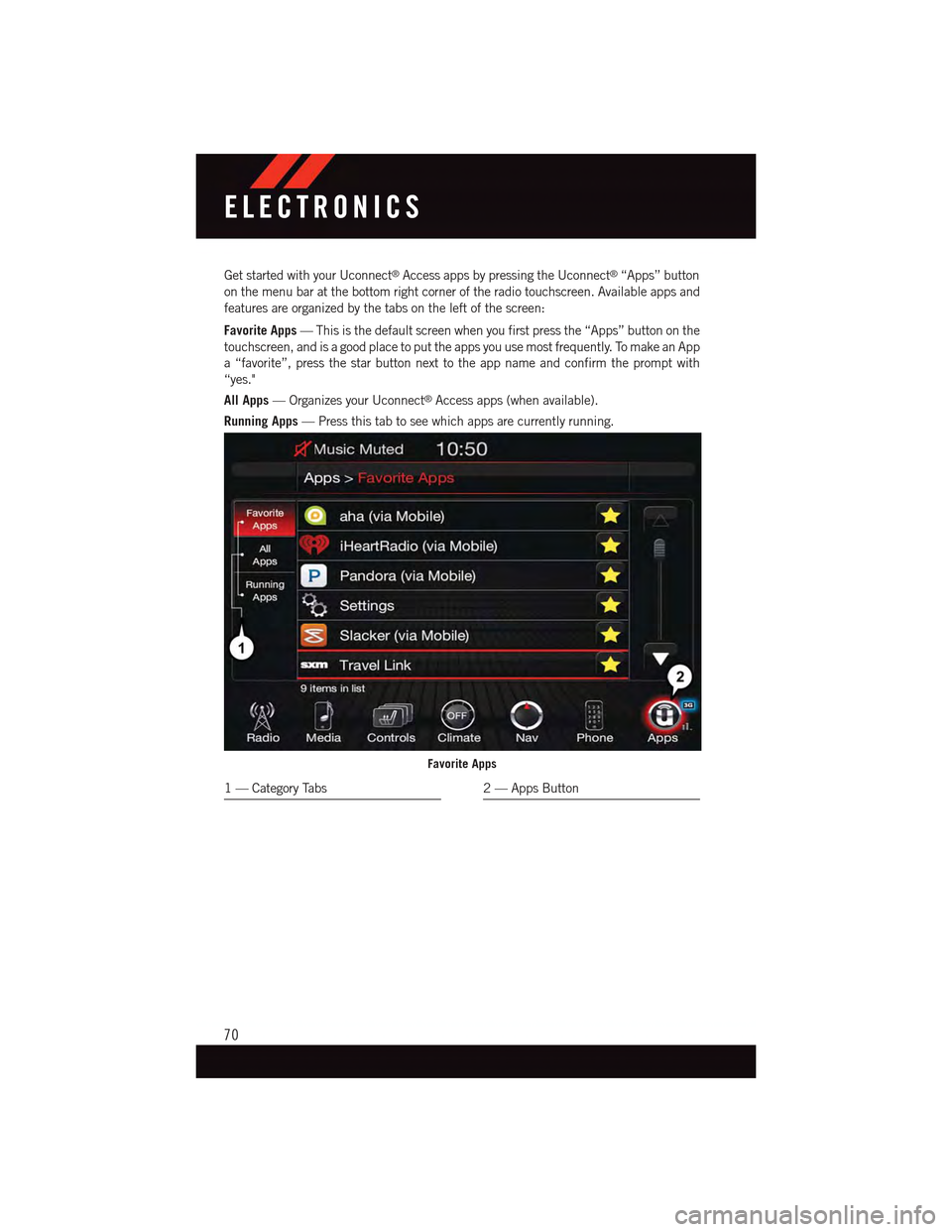
Get started with your Uconnect®Access apps by pressing the Uconnect®“Apps” button
on the menu bar at the bottom right corner of the radio touchscreen. Available apps and
features are organized by the tabs on the left of the screen:
Favorite Apps—Thisisthedefaultscreenwhenyoufirstpressthe“Apps”buttononthe
touchscreen, and is a good place to put the apps you use most frequently. To make an App
a“favorite”,pressthestarbuttonnexttotheappnameandconfirmthepromptwith
“yes."
All Apps—OrganizesyourUconnect®Access apps (when available).
Running Apps—Pressthistabtoseewhichappsarecurrentlyrunning.
Favorite Apps
1—CategoryTabs2—AppsButton
ELECTRONICS
70
Page 73 of 236
Maintaining Your Uconnect® Access Account
Reinstalling An App (Uconnect® 8.4A/8.4AN)
Yo u c a n e a s i l y c o r r e c t m a n y A p p l i c a t i o n r e l a t e d i s s u e s y o u m a y b e e x p e r i e n c i n g b y
resetting the App back to the factory setting. From the vehicle’s radio touchscreen,
complete the following steps:
1. Press the Uconnect®“Apps” button and open the Uconnect®Store. Go to My Apps.
2. In My Apps, select “Settings,” then “Reinstall App.” Press “Continue.”
3. Your Apps have been successfully re-installed.
Canceling Your Subscription
Should you want to cancel your subscription, you can remove your account information
using the same procedure contained in the Selling Your Vehicle section.
Selling Your Vehicle
When you sell your vehicle, we recommend that you remove your Uconnect®Access
Account information from the vehicle. You can do this using the radio touchscreen in the
vehicle or on the Mopar Owner Connect website (moparownerconnect.com). Removing
your account information cancels your subscription and makes your vehicle factory-ready
for a new owner/subscriber.
1. From your vehicle’s radio touchscreen, select “Uconnect®Store” from the Apps Menu.
2. Select “My Apps,” then “Settings.” Press “Remove Uconnect®Account.”
3. Enter your Uconnect®Security PIN, and select “Continue.”
For additional information on Uconnect®:
•U.S.residents-visitDriveUconnect.comorcall1-877-855-8400.
•CanadianResidents-visitDriveUconnect.caorcall,1-800-465-2001(English)or
1-800-387-9983 (French).
ELECTRONICS
71
Page 74 of 236
Built-In Features (Uconnect® 8.4A/8.4AN)
CAUTION!
•Ignoringtherearviewmirrorlightcouldmeanyoumaynothave9-1-1Callservice
if needed. If the rearview mirror light is illuminated, have an authorized dealer
service the 9-1-1 Call system immediately.
•TheOccupantRestraintController(ORC)turnsontheAirBagWarningLightonthe
instrument panel if a malfunction is detected in any part of the air bag system. If the
Air Bag Warning Light is illuminated, the air bag system may not be working
properly and the 9-1-1 system may not be able to send a signal to a 9-1-1 operator.
If the Air Bag Warning Light is illuminated, have an authorized dealer service your
vehicle immediately.
•Ifanyoneinthevehiclecouldbeindanger(e.g.,fireorsmokeisvisible,dangerous
road conditions or location), do not wait for voice contact from a 9-1-1 operator. All
occupants should exit the vehicle immediately and move to a safe location.
•Donotaddanyaftermarketelectricalequipmenttothevehicle’selectricalsystem.
This may prevent your vehicle from sending a signal to initiate an emergency call.
To a v o i d i n t e r f e r e n c e t h a t c a n c a u s e t h e 9 - 1 - 1 C a l l s y s t e m t o f a i l , n e v e r a d d
aftermarket equipment (e.g., two-way mobile radio, CB radio, data recorder, etc.) to
your vehicle’s electrical system or modify the antennas on your vehicle. IF YOUR
VEHICLE LOSES BATTERY POWER FOR ANY REASON (INCLUDING DURING OR
AFTER AN ACCIDENT), THE UCONNECT®FEATURES, APPS AND SERVICES,
AMONG OTHERS, WILL NOT OPERATE.
1.Assist Call—TherearviewmirrorcontainsanASSISTpushbuttonwhich(once
registered) automatically connects the vehicle occupants to one of these predefined
destinations for immediate support:
•Roadside Assistance Call—If you get
aflattire,orneedatow,you’llbe
connected to someone who can help
anytime. Additional fees may apply.
Additional information in this section.
•Uconnect® Access Care—Invehicle
support for Uconnect®Access Sys-
tem, Apps and Features.
•Vehicle Care—Totalsupportforyour
FCA US LLC vehicle.ASSIST/9-1-1 Buttons
1—ASSISTButton2—9-1-1Button
ELECTRONICS
72
Page 75 of 236
2.Emergency 9-1-1 Call (If Equipped)—Therearviewmirrorcontainsa9-1-1button
that, when pressed, may place a call from your vehicle to a local 9-1-1 operator to
request help from local police, fire or ambulance personnel. If this button is acciden-
tally pushed, you will have 10 seconds to stop the call. To cancel, push the 9-1-1 Call
button again or press the “cancel” button shown on the touchscreen. After 10 seconds
has passed, the 9-1-1 call will be placed and only the 9-1-1 operator can cancel it. The
LED light on the rearview mirror will turn green once a connection to a 9-1-1 operator
has been made. The green LED light will turn off once the 9-1-1 call is terminated.
Have an authorized dealer service the vehicle if the rearview mirror light is continu-
ously red. On equipped vehicles, this feature requires a functioning electrical system
and wireless coverage to function properly.If a connection is made between a 9-1-1
operator and your vehicle, you understand and agree that 9-1-1 operators may, like
any other 9-1-1 call, record conversations and sounds in and near your vehicle upon
connection.
3.Roadside Assistance (If Equipped)—Ifyourvehicleisequippedwiththisfeatureand
within wireless range, you may be able to connect to Roadside Assistance by pushing
the “ASSIST” button on the rearview mirror. You will be presented with Assist Care
options. Make a selection by pressing the prompts displayed on the radio. If Roadside
Assistance is provided to your vehicle, you agree to be responsible for any additional
roadside assistance service costs that you may incur. To provide Uconnect®Services to
you, we may record and monitor your conversations with Roadside Assistance,
Uconnect®Care or Vehicle Care, whether such conversations are initiated through the
Uconnect®Services in your vehicle, or via a landline or mobile telephone, and may
share information obtained through such recording and monitoring in accordance with
regulatory requirements. You acknowledge, agree and consent to any recording,
monitoring or sharing of information obtained through any such call recordings.
4.Yelp®—Customershavetheabilitytosearchfornearbydestinationsorapointof
interest (POI) either by category or custom search by using keywords (for example,
“Italian restaurant”). Searching can be done by either voice or by using the touch-
screen keypad. Using the touchscreen, launch Yelp®by selecting the “Apps” icon,
press the “All Apps” tab, and then press “Yelp.” Using voice recognition, push the
Voice Command (VR) button on the steering wheel and say “Launch Yelp®.”
5.Security Alarm Notification—TheSecurityAlarmNotificationfeaturenotifiesyouvia
email or text (SMS) message when the vehicle’s factory-installed security alarm system
has been set-off. There are a number of reasons why your alarm may have been
triggered, one of which could be that your vehicle was stolen. If so, please see the
details of the Stolen Vehicle Assistance service below. When you register, Security
Alarm Notification is automatically set to send you an email at the mail address you
provide should the alarm go off. You may also opt to have a text message sent to your
mobile device.
ELECTRONICS
73
Page 79 of 236
Uconnect® Access Via Mobile — If Equipped (Available On Uconnect®
8.4A/8.4AN)
Via Mobile uses the Uconnect®Access app and your smartphone's data plan to access
your personal Pandora®,iHeartRadio,Aha™byHARMANandSlackerRadioaccounts
from the vehicle and control them using the vehicle touchscreen. Customer’s data plan
charges will apply.
To g e t s t a r t e d u s i n g V i a M o b i l e a p p s , f i r s t r e g i s t e r y o u r U c o n n e c t®Access system where
you'll be guided through the setup of your Via Mobile (requires a compatible Android
or iPhone®smartphone). Please refer to “Uconnect®Access Registration” for more
information.
The Uconnect®Access app is compatible with select iPhone®and Android smartphones.
Visit UconnectPhone.com to confirm that your smartphone is compatible with
Uconnect®.Onceyou’veconfirmedyoursmartphoneiscompatible,pairittothevehicle
touchscreen via Bluetooth®to use Via Mobile apps. If using an iPhone®,aUSBcableis
also supported for the data connection.
Launch the Uconnect®Access App on your smartphone, and login with your username
and password that was set up during registration, (this is your moparownerconnect.com
login). Accept the Terms and Conditions.
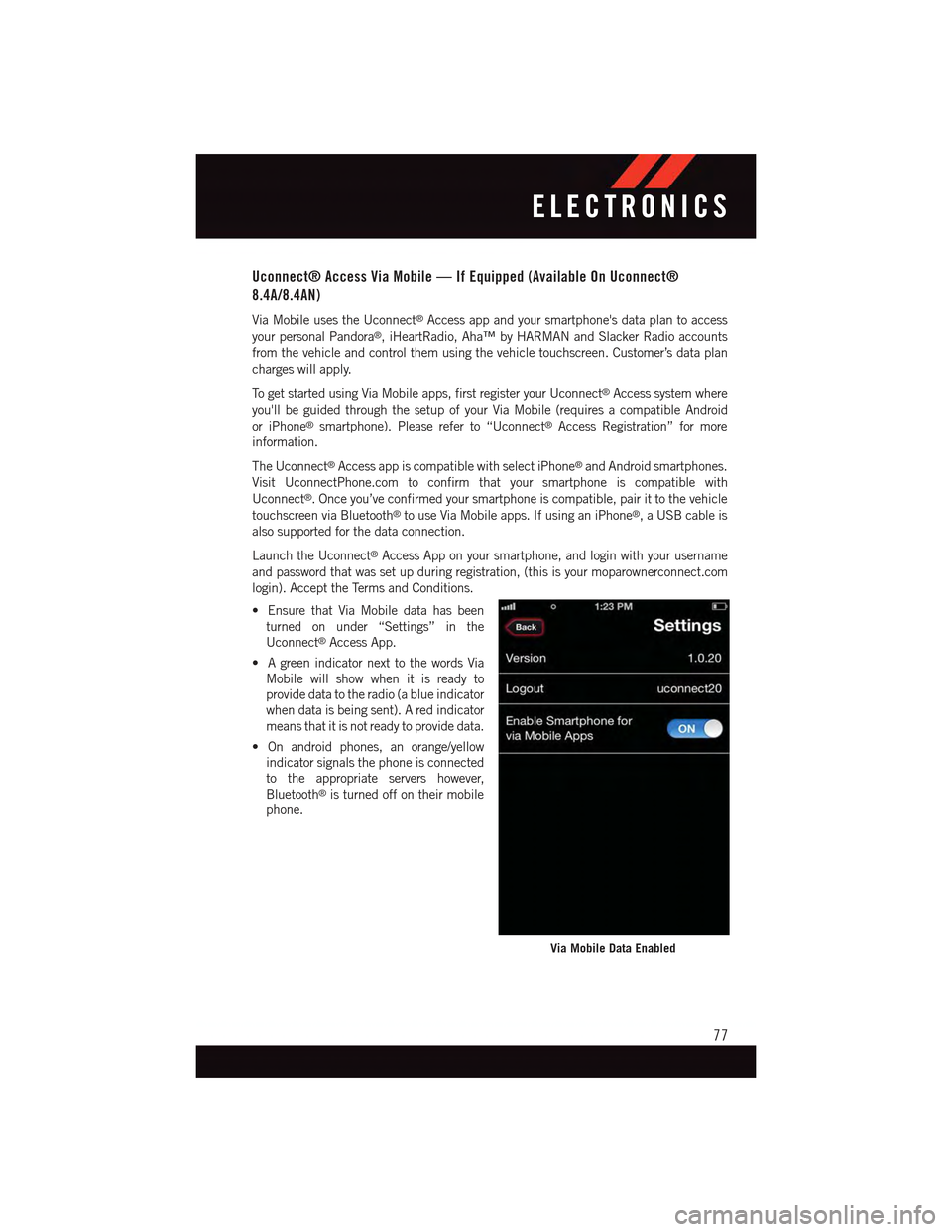
•EnsurethatViaMobiledatahasbeen
turned on under “Settings” in the
Uconnect®Access App.
•AgreenindicatornexttothewordsVia
Mobile will show when it is ready to
provide data to the radio (a blue indicator
when data is being sent). A red indicator
means that it is not ready to provide data.
•Onandroidphones,anorange/yellow
indicator signals the phone is connected
to the appropriate servers however,
Bluetooth®is turned off on their mobile
phone.
Via Mobile Data Enabled
ELECTRONICS
77
Page 81 of 236
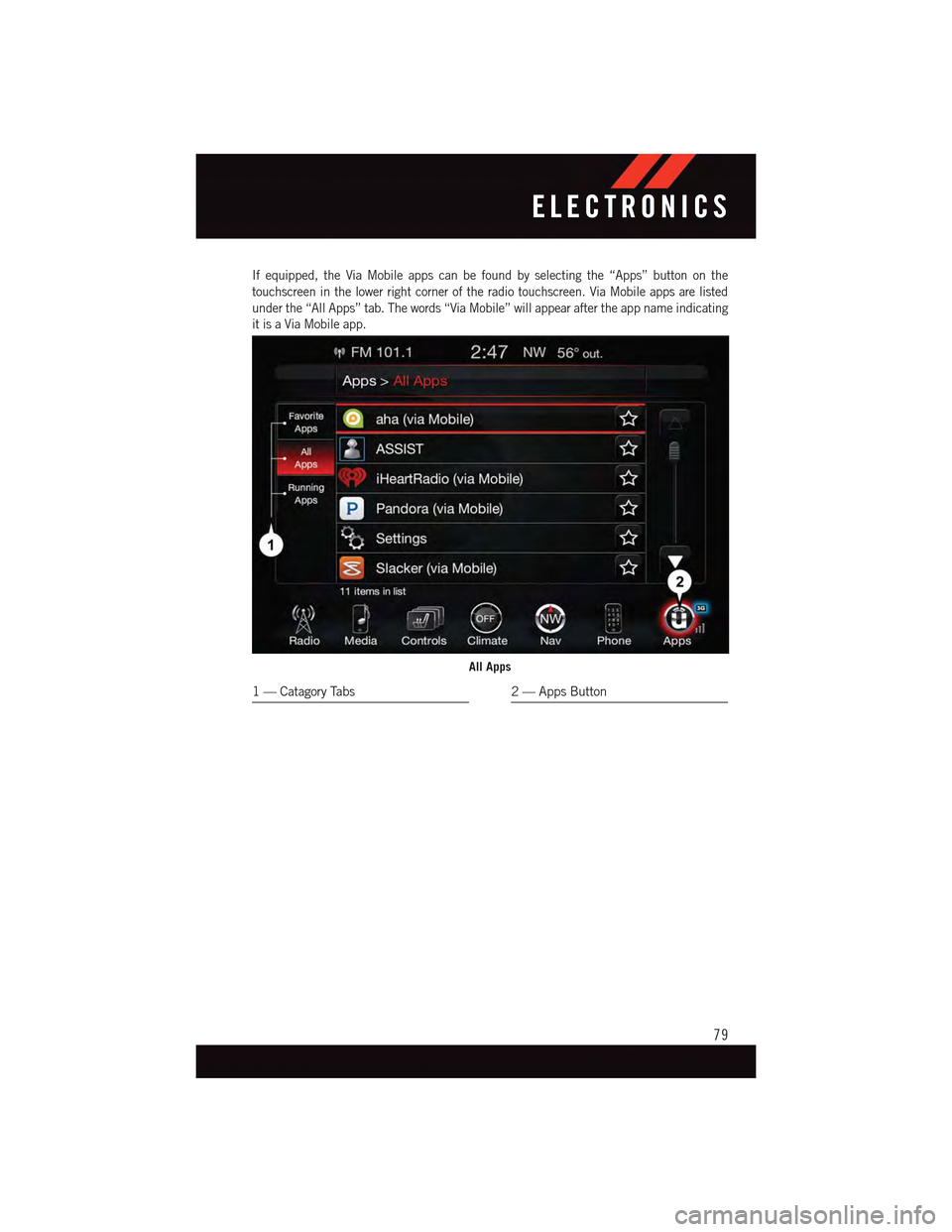
If equipped, the Via Mobile apps can be found by selecting the “Apps” button on the
touchscreen in the lower right corner of the radio touchscreen. Via Mobile apps are listed
under the “All Apps” tab. The words “Via Mobile” will appear after the app name indicating
it is a Via Mobile app.
All Apps
1—CatagoryTabs2—AppsButton
ELECTRONICS
79
Page 82 of 236
Via Mobile apps can also be launched through Voice Recognition by pressing the
VR button on the steering wheel and stating “launch” and then the name of the app.
For example, you can say “launch Aha Via Mobile.”
NOTE:
For detailed information on how to use Via Mobile apps visit the Mopar Owner Connect
website (moparownerconnect.com) and login using the username and password you set
up when registering for Uconnect®Access.
AmessagewillbedisplayedtoremindyouthatViaMobileappsutilizethedataplanon
your connected smartphone to provide content. Many smartphones have a limit to how
much data they can utilize before incurring additional charges. The amount of data being
used varies by smartphone device, cellular service provider and specific app. Check your
mobile phone service plan for more details.* Press “OK” to continue or the “X” to exit.
(*Additional smartphone data usage charges may apply.)
Via Mobile Apps — If Equipped
•Aha™ by HARMAN—Aha™byHARMANmakesiteasytoinstantlyaccessyour
favorite Web content on the go. Choose from over 40,000+ stations spanning internet
radio, personalized music, news, entertainment, hotels, weather, audiobooks,
Facebook®,Twitter®,andmore.
•iHeartRadio—iHeartRadioprovidesinstantaccesstomorethan1,500liveradio
stations from across the country and allows listeners to create custom music stations
inspired by their favorite artists or songs.
•Pandora®—Pandora®gives people the music and comedy they love anytime,
anywhere. Personalized stations launch instantly, with the input of a favorite artist,
track, comedian, or genre.
•Slacker Radio—Enjoymillionsofsongsandhundredsofhandcraftedstations.
NOTE:
For detailed information on how to use Via Mobile apps visit the Mopar Owner Connect
website (moparownerconnect.com) and log in using the username and password you set
up when registering for Uconnect®Access.
ELECTRONICS
80
Page 83 of 236
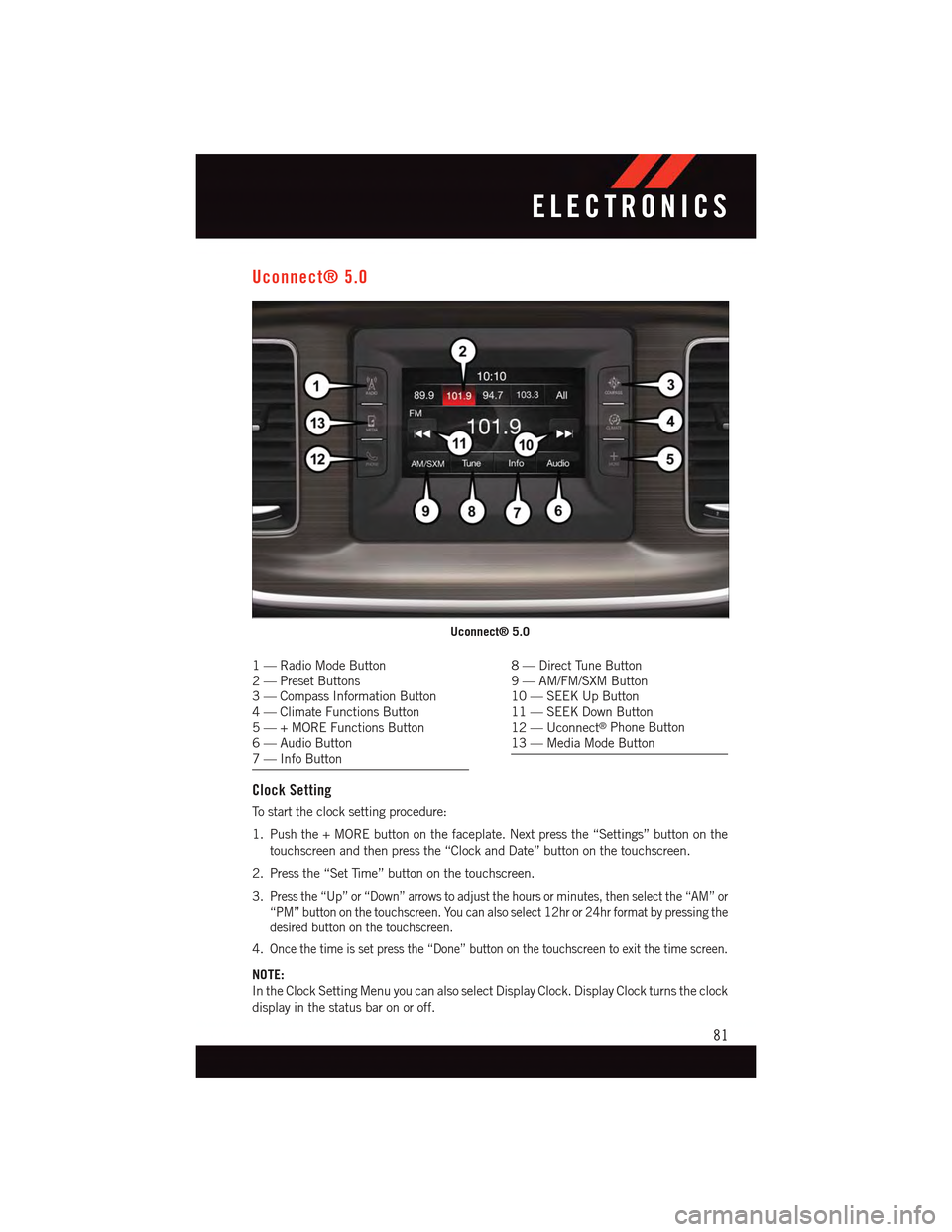
Uconnect® 5.0
1—RadioModeButton2—PresetButtons3—CompassInformationButton4—ClimateFunctionsButton5—+MOREFunctionsButton6—AudioButton7—InfoButton
8—DirectTuneButton9—AM/FM/SXMButton10 — SEEK Up Button11 — SEEK Down Button12 — Uconnect®Phone Button13 — Media Mode Button
Clock Setting
To s t a r t t h e c l o c k s e t t i n g p r o c e d u r e :
1. Push the + MORE button on the faceplate. Next press the “Settings” button on the
touchscreen and then press the “Clock and Date” button on the touchscreen.
2. Press the “Set Time” button on the touchscreen.
3.Press the “Up” or “Down” arrows to adjust the hours or minutes, then select the “AM” or
“PM” button on the touchscreen. You can also select 12hr or 24hr format by pressing the
desired button on the touchscreen.
4.Once the time is set press the “Done” button on the touchscreen to exit the time screen.
NOTE:
In the Clock Setting Menu you can also select Display Clock. Display Clock turns the clock
display in the status bar on or off.
Uconnect® 5.0
ELECTRONICS
81
Page 84 of 236
Equalizer, Balance And Fade
To a d j u s t t h e A u d i o s e t t i n g s :
1. Push the + MORE button on the faceplate, then press the “Settings” button on the
touchscreen.
2. Scroll down and press the “Audio” button on the touchscreen to open the Audio menu.
The Audio Menu shows the following options for you to customize your audio settings.
Equalizer
•Pressthe“Equalizer”buttononthetouchscreentoadjusttheBass,MidandTreble.
Use the “+” or “–” button on the touchscreen to adjust the equalizer to your desired
settings. Press the “back arrow” button on the touchscreen when done.
Balance/Fade
•Pressthe“Balance/Fade”buttononthetouchscreentoadjustthesoundfromthe
speakers. Use the “arrow” button on the touchscreen to adjust the sound level from the
front and rear or right and left side speakers. Press the Center “C” button on the
touchscreen to reset the balance and fade to the factory setting. Press the “back arrow”
button on the touchscreen when done.
Speed Adjustable
•Pressthe“SpeedAdjustedVolume”buttononthetouchscreentoselectbetweenOFF,
1, 2 or 3. This will decrease the radio volume relative to a decrease in vehicle speed.
Press the “back arrow” button on the touchscreen when done.
Loudness
•Pressthe“Loudness”buttononthetouchscreentoselecttheLoudnessfeature.When
this feature is activated it improves sound quality at lower volumes. Press the “back
arrow” button on the touchscreen when done.
Radio Operation
Seek Up/Seek Down
•PresstoseekthroughradiostationsinAM,FMorSXMbands.
•Holdeitherbuttontobypassstationswithoutstopping.
Store Radio Presets
When you are receiving a station that you wish to commit into memory, press and hold the
desired numbered button on the touchscreen for more that two seconds or until you hear
aconfirmationbeep.
The Radio stores up to 12 presets in each of the Radio modes. Four presets are visible at
the top of the radio screen. Pressing the “All” button on the touchscreen on the radio
home screen will display all of the preset stations for that mode.
ELECTRONICS
82