mirror DODGE CHARGER 2017 7.G Owner's Manual
[x] Cancel search | Manufacturer: DODGE, Model Year: 2017, Model line: CHARGER, Model: DODGE CHARGER 2017 7.GPages: 530, PDF Size: 4.72 MB
Page 263 of 530
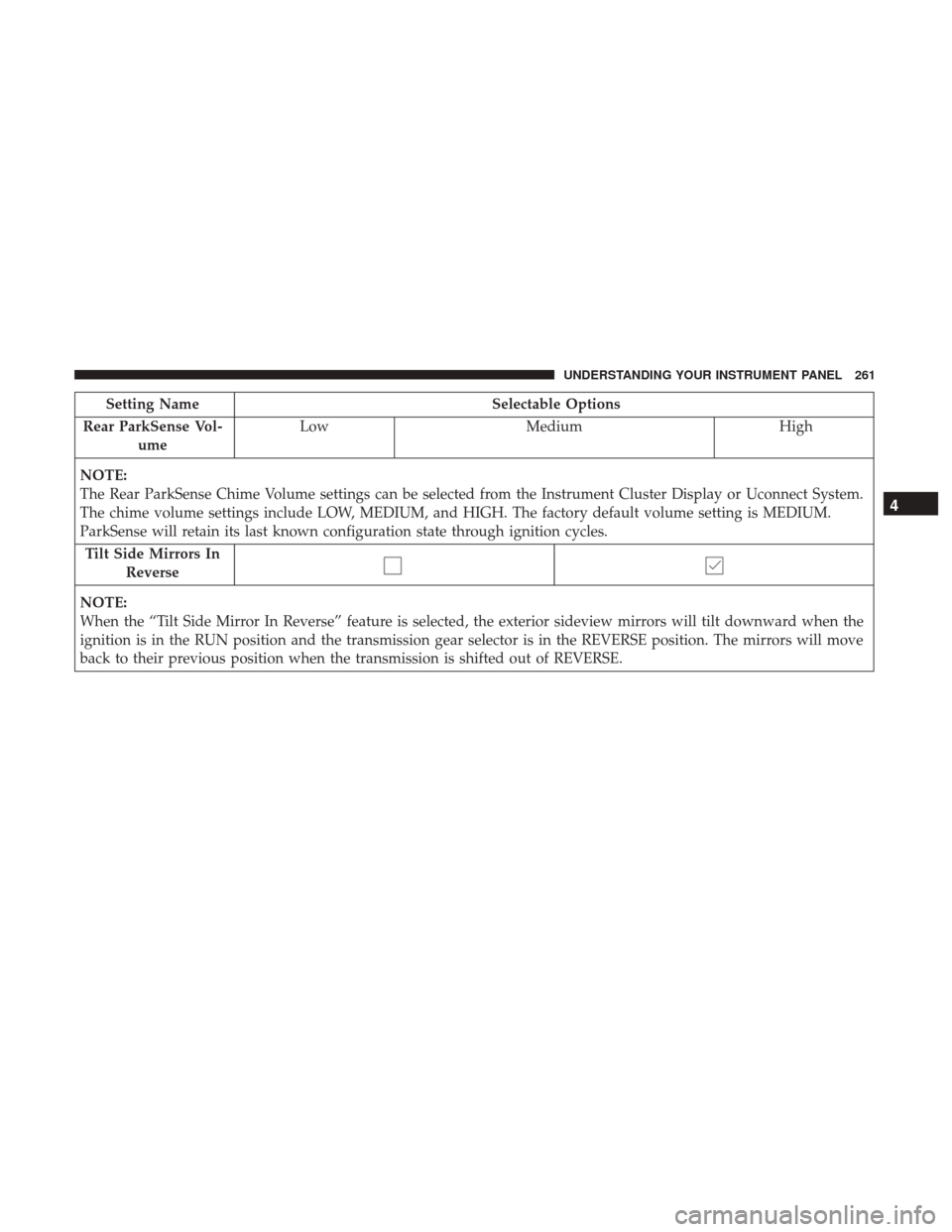
Setting NameSelectable Options
Rear ParkSense Vol- ume Low
Medium High
NOTE:
The Rear ParkSense Chime Volume settings can be selected from the Instrument Cluster Display or Uconnect System.
The chime volume settings include LOW, MEDIUM, and HIGH. The factory default volume setting is MEDIUM.
ParkSense will retain its last known configuration state through ignition cycles. Tilt Side Mirrors In Reverse
NOTE:
When the “Tilt Side Mirror In Reverse” feature is selected, the exterior sideview mirrors will tilt downward when the
ignition is in the RUN position and the transmission gear selector is in the REVERSE position. The mirrors will move
back to their previous position when the transmission is shifted out of REVERSE.
4
UNDERSTANDING YOUR INSTRUMENT PANEL 261
Page 264 of 530
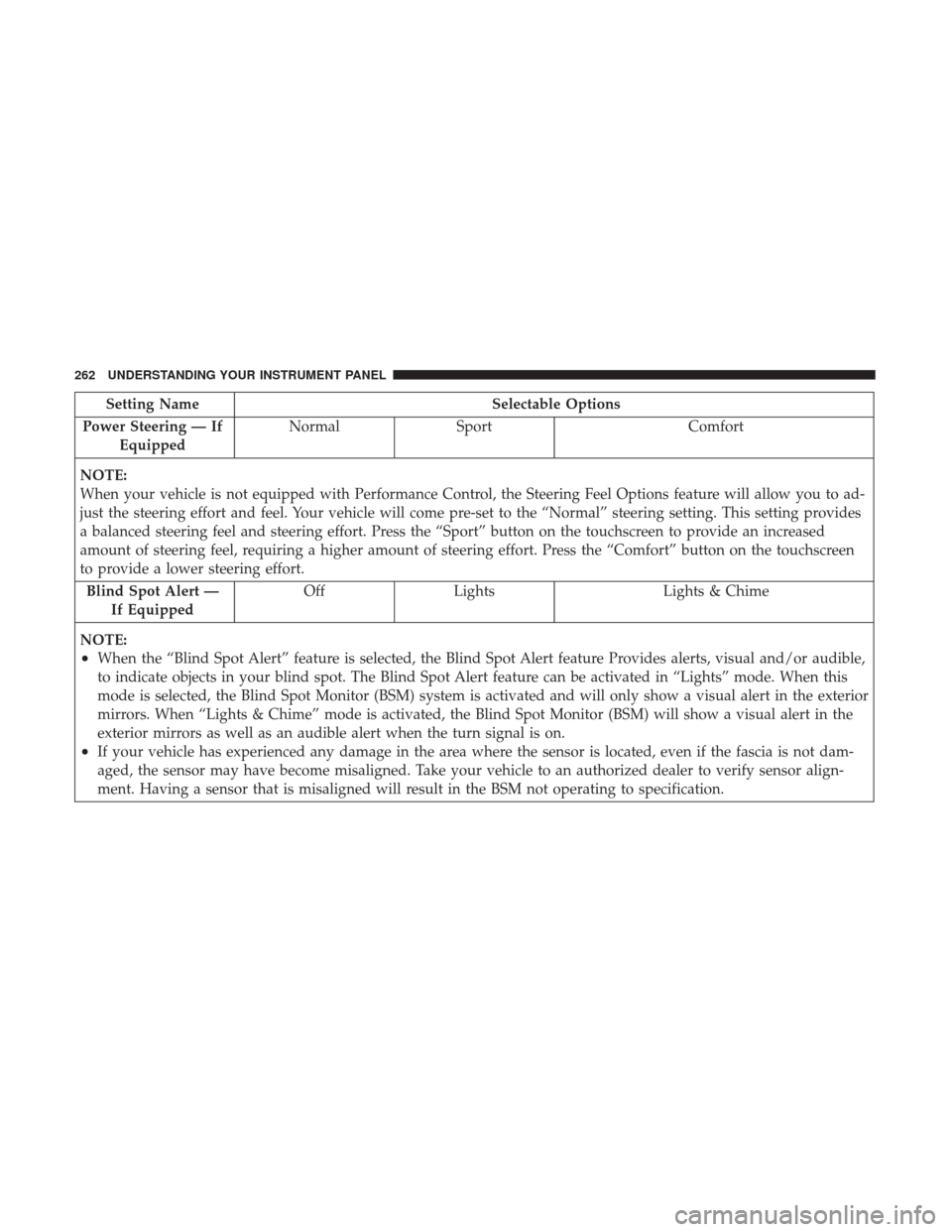
Setting NameSelectable Options
Power Steering — If Equipped Normal
Sport Comfort
NOTE:
When your vehicle is not equipped with Performance Control, the Steering Feel Options feature will allow you to ad-
just the steering effort and feel. Your vehicle will come pre-set to the “Normal” steering setting. This setting provides
a balanced steering feel and steering effort. Press the “Sport” button on the touchscreen to provide an increased
amount of steering feel, requiring a higher amount of steering effort. Press the “Comfort” button on the touchscreen
to provide a lower steering effort. Blind Spot Alert — If Equipped Off
Lights Lights & Chime
NOTE:
•When the “Blind Spot Alert” feature is selected, the Blind Spot Alert feature Provides alerts, visual and/or audible,
to indicate objects in your blind spot. The Blind Spot Alert feature can be activated in “Lights” mode. When this
mode is selected, the Blind Spot Monitor (BSM) system is activated and will only show a visual alert in the exterior
mirrors. When “Lights & Chime” mode is activated, the Blind Spot Monitor (BSM) will show a visual alert in the
exterior mirrors as well as an audible alert when the turn signal is on.
•If your vehicle has experienced any damage in the area where the sensor is located, even if the fascia is not dam-
aged, the sensor may have become misaligned. Take your vehicle to an authorized dealer to verify sensor align-
ment. Having a sensor that is misaligned will result in the BSM not operating to specification.
262 UNDERSTANDING YOUR INSTRUMENT PANEL
Page 269 of 530
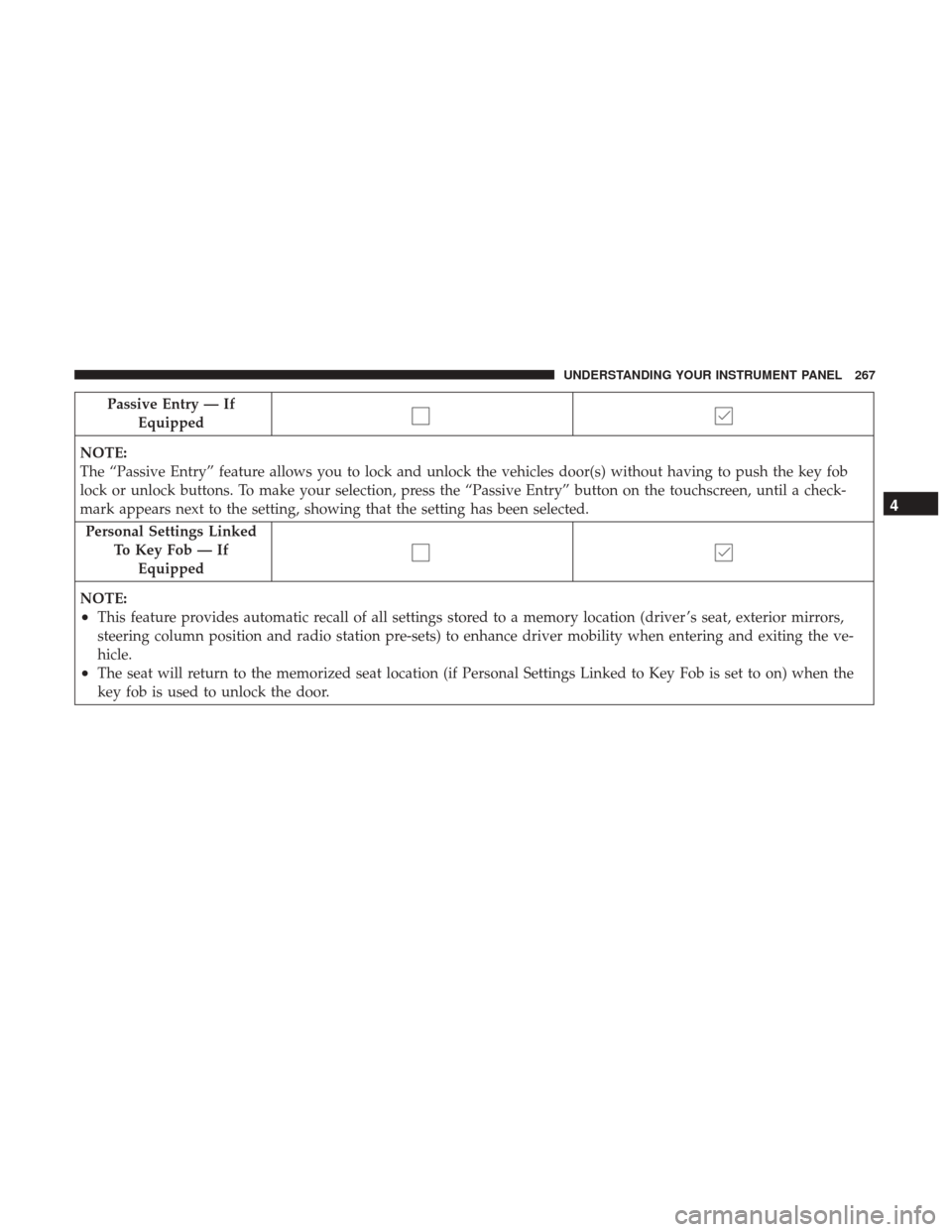
Passive Entry — IfEquipped
NOTE:
The “Passive Entry” feature allows you to lock and unlock the vehicles door(s) without having to push the key fob
lock or unlock buttons. To make your selection, press the “Passive Entry” button on the touchscreen, until a check-
mark appears next to the setting, showing that the setting has been selected. Personal Settings Linked To Key Fob — IfEquipped
NOTE:
•This feature provides automatic recall of all settings stored to a memory location (driver ’s seat, exterior mirrors,
steering column position and radio station pre-sets) to enhance driver mobility when entering and exiting the ve-
hicle.
•The seat will return to the memorized seat location (if Personal Settings Linked to Key Fob is set to on) when the
key fob is used to unlock the door.
4
UNDERSTANDING YOUR INSTRUMENT PANEL 267
Page 300 of 530
IconDescription
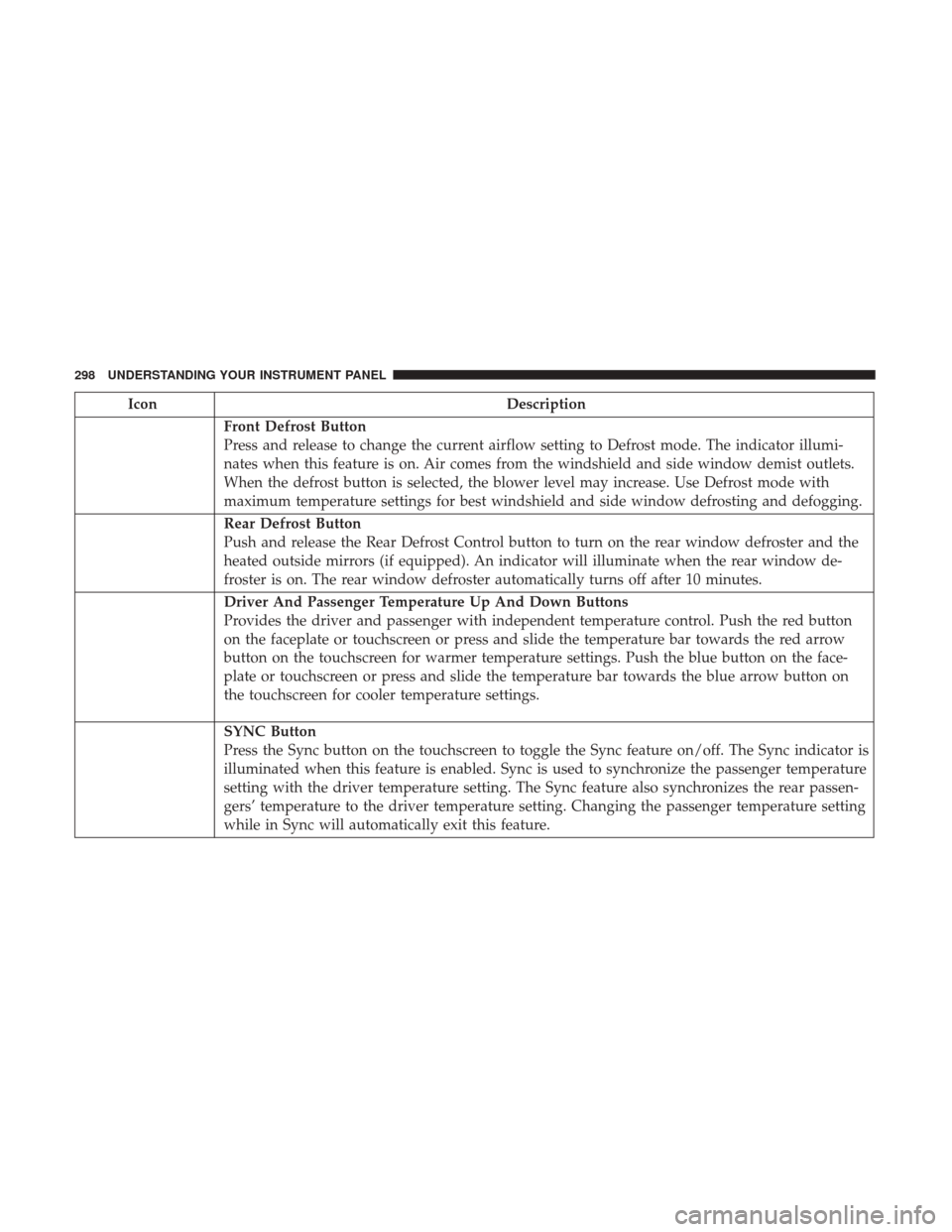
Front Defrost Button
Press and release to change the current airflow setting to Defrost mode. The indicator illumi-
nates when this feature is on. Air comes from the windshield and side window demist outlets.
When the defrost button is selected, the blower level may increase. Use Defrost mode with
maximum temperature settings for best windshield and side window defrosting and defogging.
Rear Defrost Button
Push and release the Rear Defrost Control button to turn on the rear window defroster and the
heated outside mirrors (if equipped). An indicator will illuminate when the rear window de-
froster is on. The rear window defroster automatically turns off after 10 minutes.
Driver And Passenger Temperature Up And Down Buttons
Provides the driver and passenger with independent temperature control. Push the red button
on the faceplate or touchscreen or press and slide the temperature bar towards the red arrow
button on the touchscreen for warmer temperature settings. Push the blue button on the face-
plate or touchscreen or press and slide the temperature bar towards the blue arrow button on
the touchscreen for cooler temperature settings.
SYNC Button
Press the Sync button on the touchscreen to toggle the Sync feature on/off. The Sync indicator is
illuminated when this feature is enabled. Sync is used to synchronize the passenger temperature
setting with the driver temperature setting. The Sync feature also synchronizes the rear passen-
gers’ temperature to the driver temperature setting. Changing the passenger temperature setting
while in Sync will automatically exit this feature.
298 UNDERSTANDING YOUR INSTRUMENT PANEL
Page 307 of 530
IconDescription
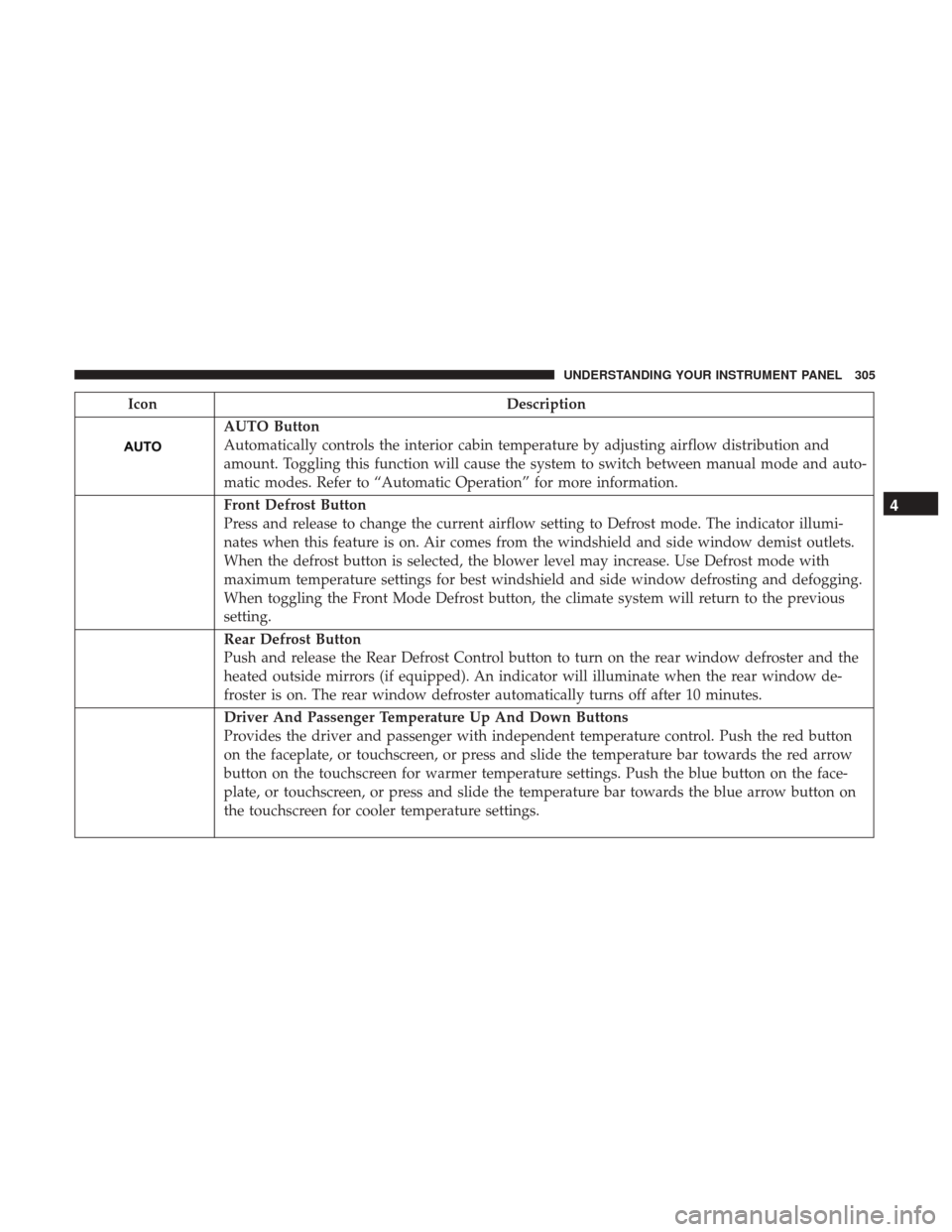
AUTO Button
Automatically controls the interior cabin temperature by adjusting airflow distribution and
amount. Toggling this function will cause the system to switch between manual mode and auto-
matic modes. Refer to “Automatic Operation” for more information.
Front Defrost Button
Press and release to change the current airflow setting to Defrost mode. The indicator illumi-
nates when this feature is on. Air comes from the windshield and side window demist outlets.
When the defrost button is selected, the blower level may increase. Use Defrost mode with
maximum temperature settings for best windshield and side window defrosting and defogging.
When toggling the Front Mode Defrost button, the climate system will return to the previous
setting.
Rear Defrost Button
Push and release the Rear Defrost Control button to turn on the rear window defroster and the
heated outside mirrors (if equipped). An indicator will illuminate when the rear window de-
froster is on. The rear window defroster automatically turns off after 10 minutes.
Driver And Passenger Temperature Up And Down Buttons
Provides the driver and passenger with independent temperature control. Push the red button
on the faceplate, or touchscreen, or press and slide the temperature bar towards the red arrow
button on the touchscreen for warmer temperature settings. Push the blue button on the face-
plate, or touchscreen, or press and slide the temperature bar towards the blue arrow button on
the touchscreen for cooler temperature settings.
4
UNDERSTANDING YOUR INSTRUMENT PANEL 305
Page 333 of 530
STARTING PROCEDURES
Before starting your vehicle, adjust your seat, adjust the
inside and outside mirrors, fasten your seat belt, and if
present, instruct all other occupants to buckle their seat
belts.
WARNING!
•When leaving the vehicle, always make sure the
keyless ignition node is in “OFF” mode, remove the
key fob from the vehicle and lock the vehicle.
• Never leave children alone in a vehicle, or with
access to an unlocked vehicle. Leaving children in a
vehicle unattended is dangerous for a number of
reasons. A child or others could be seriously or
fatally injured. Children should be warned not to
touch the parking brake, brake pedal or the trans-
mission gear selector.
• Do not leave the key fob in or near the vehicle (or in
a location accessible to children), and do not leave
the ignition (of a vehicle equipped with Keyless
Enter-N-Go) in the ACC or ON/RUN mode. A child
could operate power windows, other controls, or
move the vehicle.
(Continued)
WARNING! (Continued)
•Do not leave children or animals inside parked
vehicles in hot weather. Interior heat build-up may
cause serious injury or death.
Automatic Transmission
The gear selector must be in the PARK position before you
can start the engine. Apply the brakes before shifting into
any driving gear.
CAUTION!
Damage to the transmission may occur if the following
precautions are not observed:
• Do not shift from REVERSE, PARK, or NEUTRAL
into any forward gear when the engine is above idle
speed.
• Shift into PARK only after the vehicle has come to a
complete stop.
• Shift into or out of REVERSE only after the vehicle
has come to a complete stop and the engine is at idle
speed.
• Before shifting into any gear, make sure your foot is
firmly on the brake pedal.
5
STARTING AND OPERATING 331
Page 473 of 530
Glass Surfaces
All glass surfaces should be cleaned on a regular basis with
Mopar Glass Cleaner, or any commercial household-type
glass cleaner. Never use an abrasive type cleaner. Use
caution when cleaning the inside rear window equipped
with electric defrosters or windows equipped with radio
antennas. Do not use scrapers or other sharp instrument
that may scratch the elements.
When cleaning the rear view mirror, spray cleaner on the
towel or cloth that you are using. Do not spray cleaner
directly on the mirror.
Cleaning Plastic Instrument Cluster Lenses
The lenses in front of the instruments in this vehicle are
molded in clear plastic. When cleaning the lenses, care
must be taken to avoid scratching the plastic.
1. Clean with a wet soft cloth. A mild soap solution may beused, but do not use high alcohol content or abrasive
cleaners. If soap is used, wipe clean with a clean damp
cloth.
2. Dry with a soft cloth.
Seat Belt Maintenance
Do not bleach, dye, or clean the belts with chemical
solvents or abrasive cleaners. This will weaken the fabric.
Sun damage can also weaken the fabric.
If the belts need cleaning, use Mopar Total Clean, a mild
soap solution, or lukewarm water. Do not remove the belts
from the vehicle to wash them. Dry with a soft cloth.
Replace the belts if they appear frayed or worn or if the
buckles do not work properly.
WARNING!
A frayed or torn belt could rip apart in a collision and
leave you with no protection. Inspect the belt system
periodically, checking for cuts, frays, or loose parts.
Damaged parts must be replaced immediately. Do not
disassemble or modify the system. Seat belt assemblies
must be replaced after a collision if they have been
damaged (i.e., bent retractor, torn webbing, etc.).
Cleaning The Center Console Cupholders
Clean with a damp cloth or towel using a mild detergent
with the cupholder in the center console.
NOTE: The cupholder cannot be removed.
7
MAINTAINING YOUR VEHICLE 471
Page 481 of 530
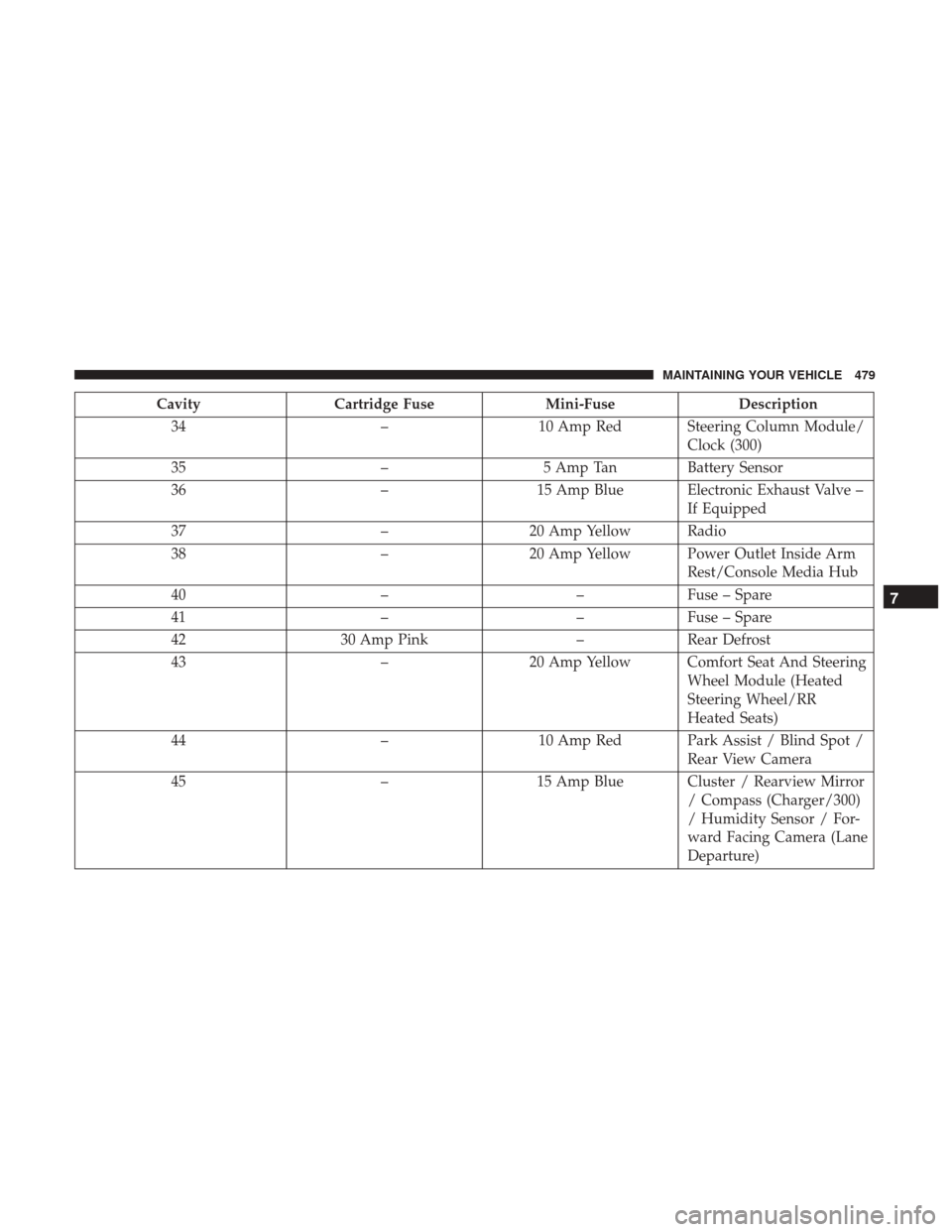
CavityCartridge Fuse Mini-FuseDescription
34 –10 Amp Red Steering Column Module/
Clock (300)
35 –5 Amp Tan Battery Sensor
36 –15 Amp Blue Electronic Exhaust Valve –
If Equipped
37 –20 Amp Yellow Radio
38 –20 Amp Yellow Power Outlet Inside Arm
Rest/Console Media Hub
40 ––Fuse – Spare
41 ––Fuse – Spare
42 30 Amp Pink –Rear Defrost
43 –20 Amp Yellow Comfort Seat And Steering
Wheel Module (Heated
Steering Wheel/RR
Heated Seats)
44 –10 Amp Red Park Assist / Blind Spot /
Rear View Camera
45 –15 Amp Blue Cluster / Rearview Mirror
/ Compass (Charger/300)
/ Humidity Sensor / For-
ward Facing Camera (Lane
Departure)
7
MAINTAINING YOUR VEHICLE 479
Page 483 of 530
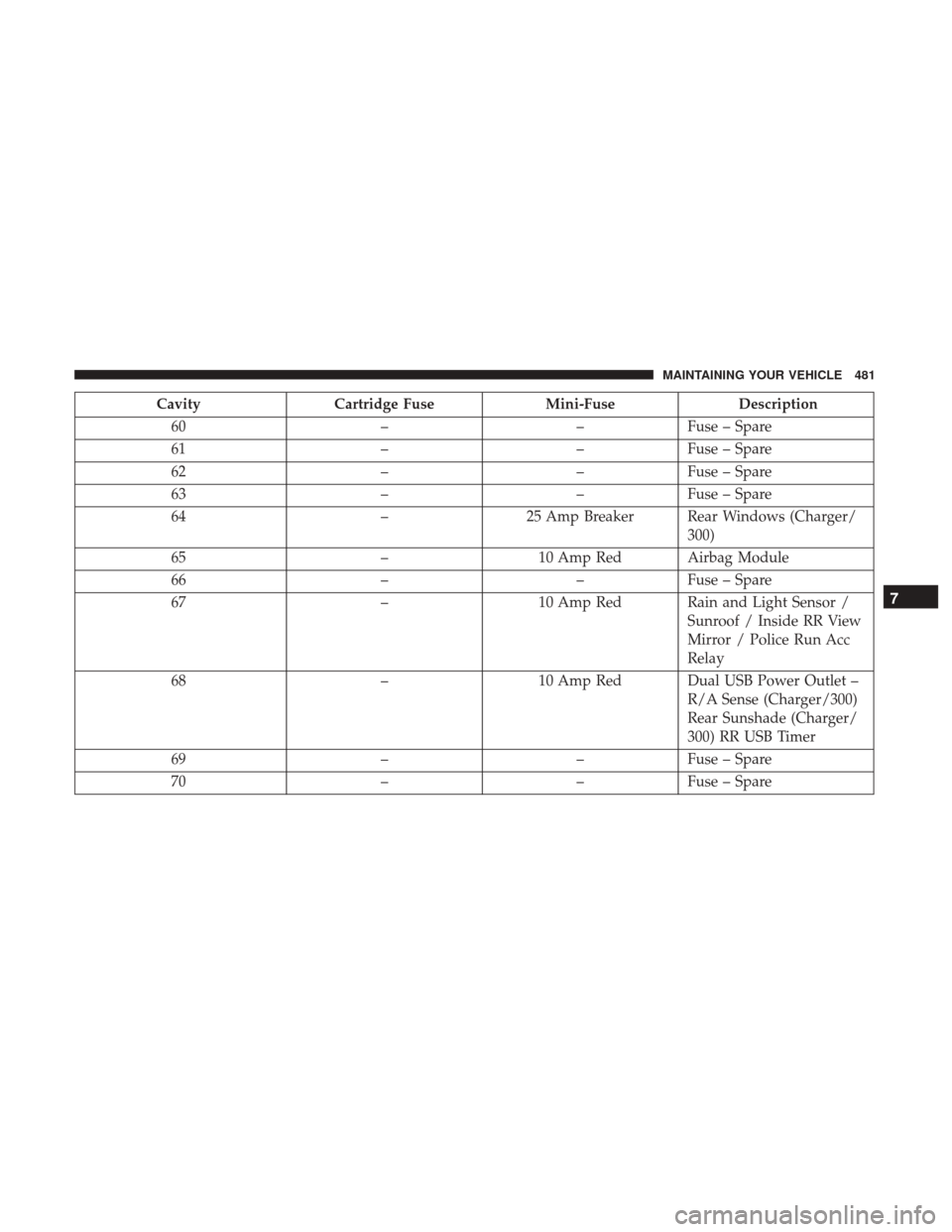
CavityCartridge Fuse Mini-FuseDescription
60 ––Fuse – Spare
61 ––Fuse – Spare
62 ––Fuse – Spare
63 ––Fuse – Spare
64 –25 Amp Breaker Rear Windows (Charger/
300)
65 –10 Amp Red Airbag Module
66 ––Fuse – Spare
67 –10 Amp Red Rain and Light Sensor /
Sunroof / Inside RR View
Mirror / Police Run Acc
Relay
68 –10 Amp Red Dual USB Power Outlet –
R/A Sense (Charger/300)
Rear Sunshade (Charger/
300) RR USB Timer
69 ––Fuse – Spare
70 ––Fuse – Spare
7
MAINTAINING YOUR VEHICLE 481
Page 515 of 530
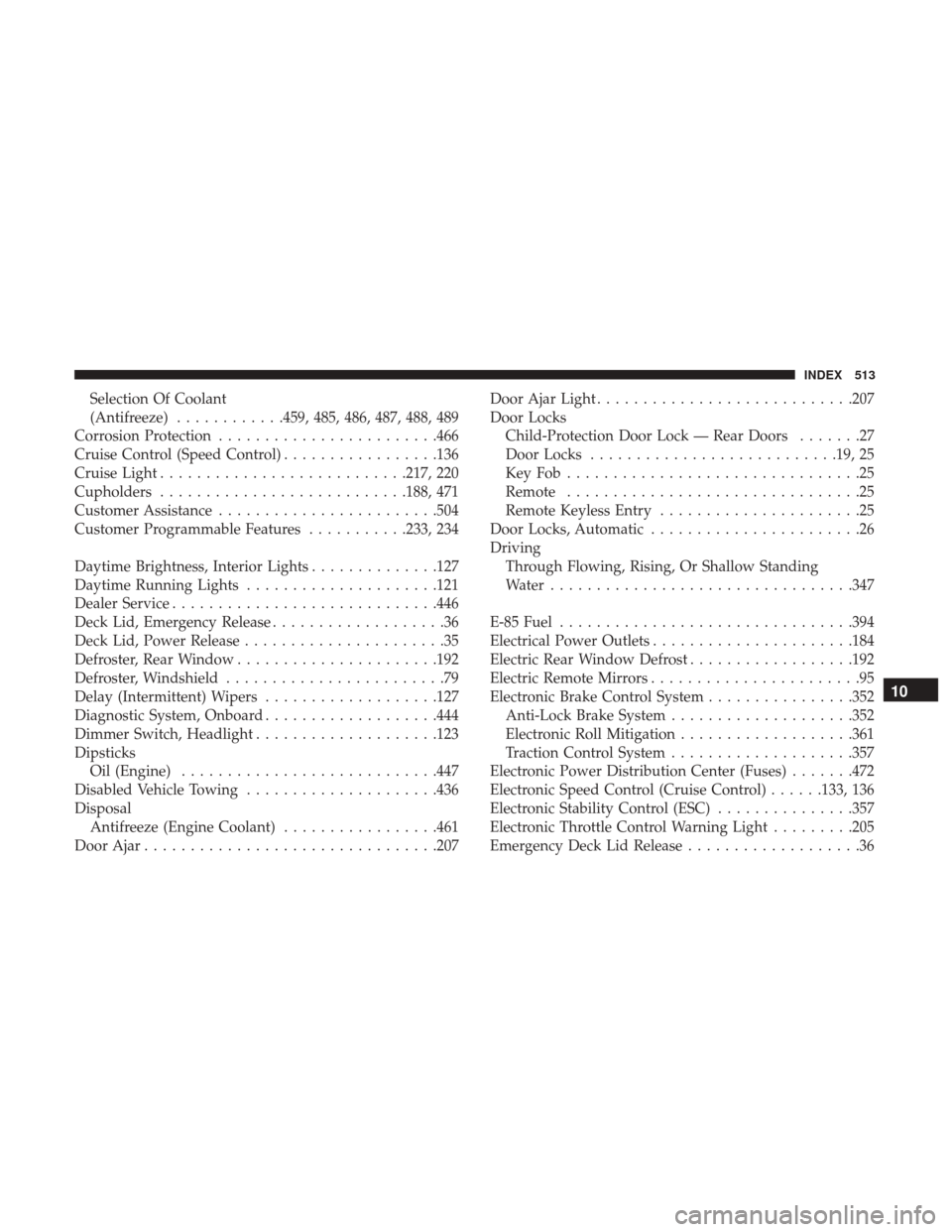
Selection Of Coolant
(Antifreeze)............459, 485, 486, 487, 488, 489
Corrosion Protection ....................... .466
Cruise Control (Speed Control) .................136
Cruise Light .......................... .217, 220
Cupholders .......................... .188, 471
Customer Assistance ....................... .504
Customer Programmable Features ...........233, 234
Daytime Brightness, Interior Lights ..............127
Daytime Running Lights .....................121
Dealer Service ............................ .446
Deck Lid, Emergency Release ...................36
Deck Lid, Power Release ......................35
Defroster, Rear Window ..................... .192
Defroster, Windshield ........................79
Delay (Intermittent) Wipers ...................127
Diagnostic System, Onboard ...................444
Dimmer Switch, Headlight ....................123
Dipsticks Oil (Engine) ........................... .447
Disabled Vehicle Towing .....................436
Disposal Antifreeze (Engine Coolant) .................461
Door Ajar ............................... .207Door Ajar Light
........................... .207
Door Locks Child-Protection Door Lock — Rear Doors .......27
Door Locks .......................... .19, 25
KeyFob................................25
Remote ................................25
Remote Keyless Entry ......................25
Door Locks, Automatic .......................26
Driving Through Flowing, Rising, Or Shallow Standing
Water ................................ .347
E-85 Fuel ............................... .394
Electrical Power Outlets ..................... .184
Electric Rear Window Defrost ..................192
Electric Remote Mirrors .......................95
Electronic Brake Control System ................352
Anti-Lock Brake System ....................352
Electronic Roll Mitigation ...................361
T
raction Control System ....................357
Electronic Power Distribution Center (Fuses) .......472
Electronic Speed Control (Cruise Control) ......133, 136
Electronic Stability Control (ESC) ...............357
Electronic Throttle Control Warning Light .........205
Emergency Deck Lid Release ...................36
10
INDEX 513