wheel DODGE CHARGER 2017 7.G Owner's Guide
[x] Cancel search | Manufacturer: DODGE, Model Year: 2017, Model line: CHARGER, Model: DODGE CHARGER 2017 7.GPages: 530, PDF Size: 4.72 MB
Page 232 of 530
Battery Saver On/Battery Saver Mode Message —
Electrical Load Reduction Actions — If Equipped
This vehicle is equipped with an Intelligent Battery Sensor
(IBS) to perform additional monitoring of the electrical
system and status of the vehicle battery.
In cases when the IBS detects charging system failure, or
the vehicle battery conditions are deteriorating, electrical
load reduction actions will take place to extend the driving
time and distance of the vehicle. This is done by reducing
power to or turning off non-essential electrical loads.
Load reduction is only active when the engine is running.
It will display a message if there is a risk of battery
depletion to the point where the vehicle may stall due to
lack of electrical supply, or will not restart after the current
drive cycle.
When load reduction is activated, the message “Battery
Saver On” or “Battery Saver Mode” will appear in the
instrument cluster.
These messages indicate the vehicle battery has a low state
of charge and continues to lose electrical charge at a rate
that the charging system cannot sustain.NOTE:
•
The charging system is independent from load reduc-
tion. The charging system performs a diagnostic on the
charging system continuously.
• If the Battery Charge Warning Light is on it may indicate
a problem with the charging system. Refer to “Battery
Charge Warning Light” in “Understanding Your Instru-
ment Panel” for further information.
The electrical loads that may be switched off (if equipped),
and vehicle functions which can be affected by load
reduction:
• Heated Seat/Vented Seats/Heated Wheel
• Heated/Cooled Cup Holders — If Equipped
• Rear Defroster And Heated Mirrors
• HVAC System
• 115V AC Power Inverter System
• Audio and Telematics System
Loss of the battery charge may indicate one or more of the
following conditions:
• The charging system cannot deliver enough electrical
power to the vehicle system because the electrical loads
230 UNDERSTANDING YOUR INSTRUMENT PANEL
Page 262 of 530
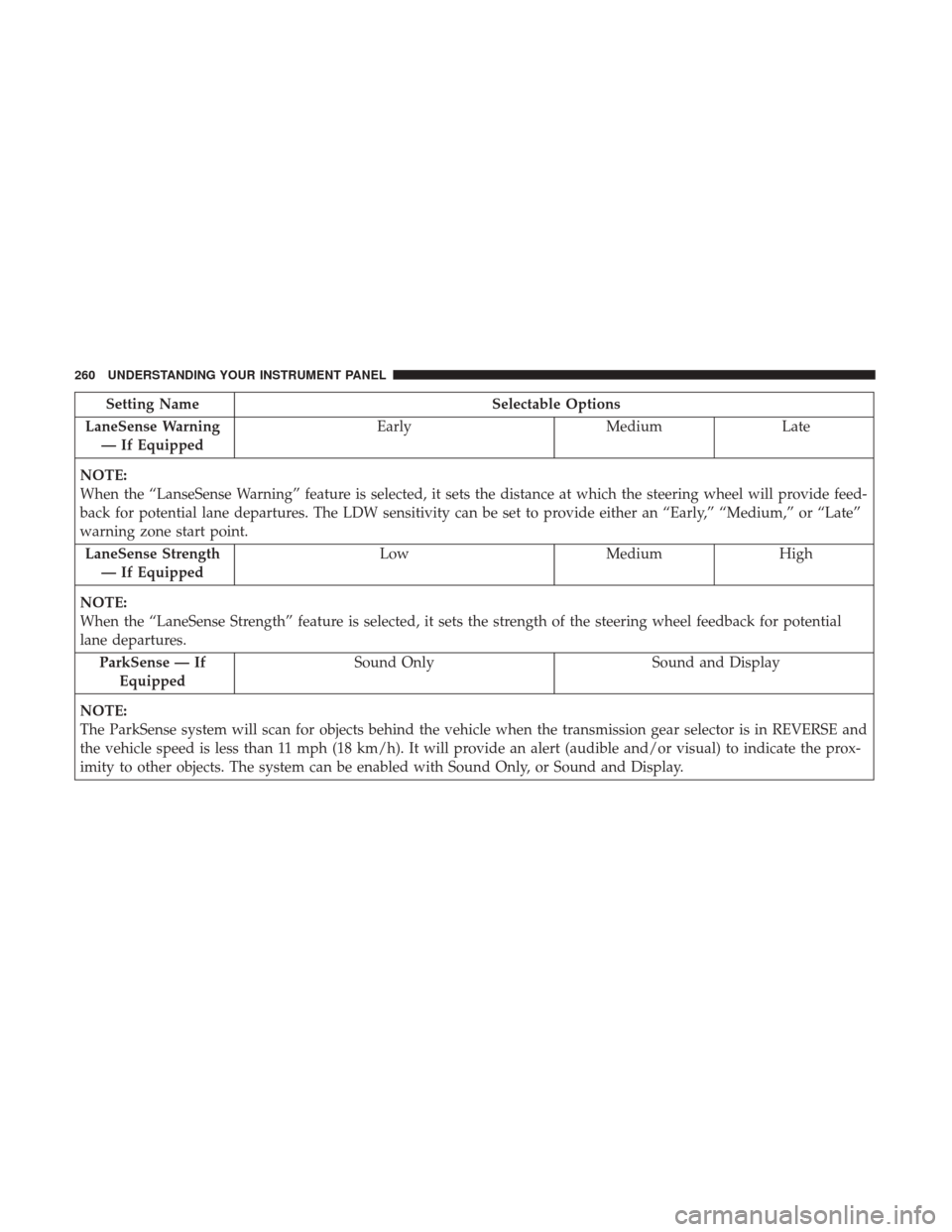
Setting NameSelectable Options
LaneSense Warning — If Equipped Early
MediumLate
NOTE:
When the “LanseSense Warning” feature is selected, it sets the distance at which the steering wheel will provide feed-
back for potential lane departures. The LDW sensitivity can be set to provide either an “Early,” “Medium,” or “Late”
warning zone start point. LaneSense Strength — If Equipped Low
MediumHigh
NOTE:
When the “LaneSense Strength” feature is selected, it sets the strength of the steering wheel feedback for potential
lane departures. ParkSense — If Equipped Sound Only
Sound and Display
NOTE:
The ParkSense system will scan for objects behind the vehicle when the transmission gear selector is in REVERSE and
the vehicle speed is less than 11 mph (18 km/h). It will provide an alert (audible and/or visual) to indicate the prox-
imity to other objects. The system can be enabled with Sound Only, or Sound and Display.
260 UNDERSTANDING YOUR INSTRUMENT PANEL
Page 270 of 530
Auto Comfort Systems — If Equipped
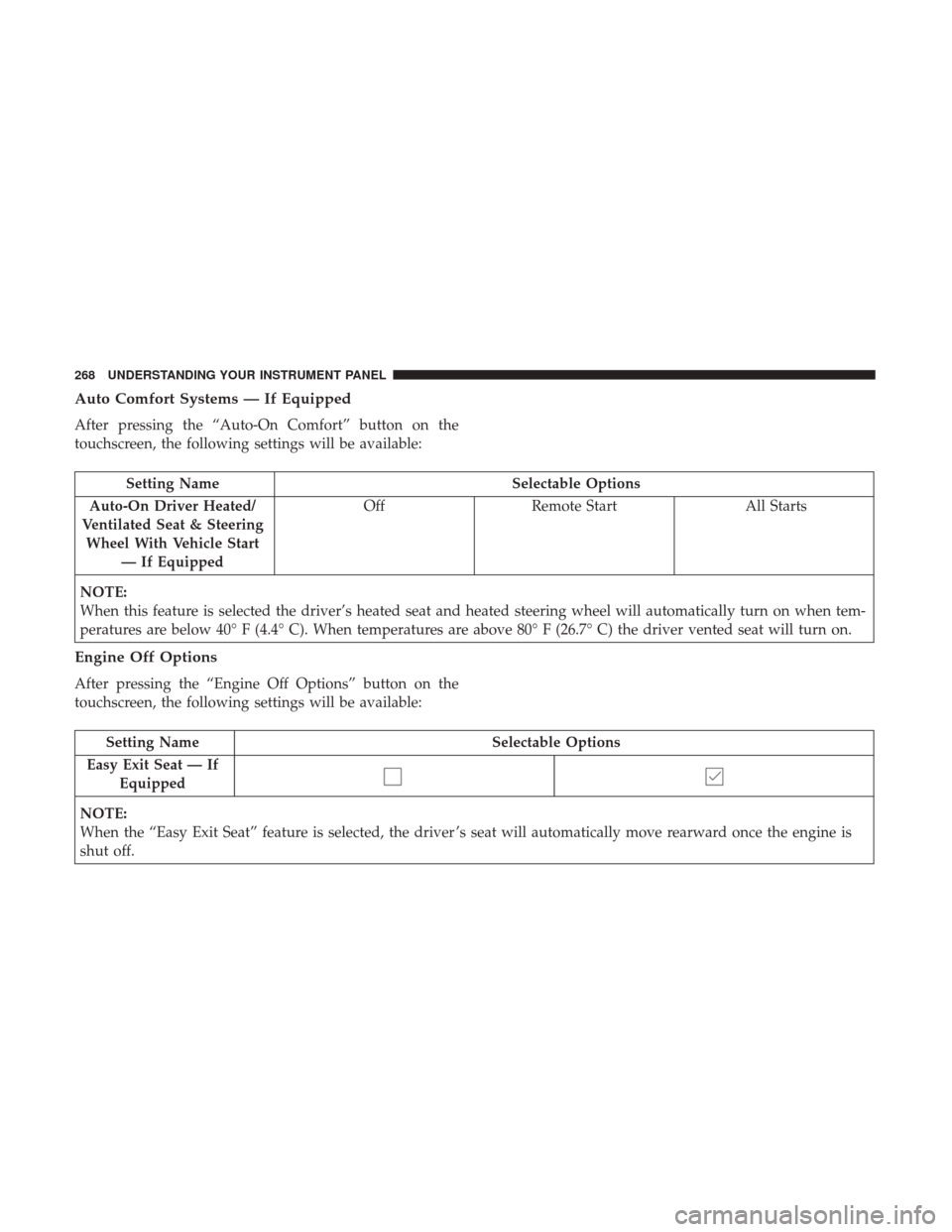
After pressing the “Auto-On Comfort” button on the
touchscreen, the following settings will be available:
Setting NameSelectable Options
Auto-On Driver Heated/
Ventilated Seat & Steering Wheel With Vehicle Start — If Equipped Off
Remote Start All Starts
NOTE:
When this feature is selected the driver’s heated seat and heated steering wheel will automatically turn on when tem-
peratures are below 40° F (4.4° C). When temperatures are above 80° F (26.7° C) the driver vented seat will turn on.
Engine Off Options
After pressing the “Engine Off Options” button on the
touchscreen, the following settings will be available:
Setting Name Selectable Options
Easy Exit Seat — If Equipped
NOTE:
When the “Easy Exit Seat” feature is selected, the driver ’s seat will automatically move rearward once the engine is
shut off.
268 UNDERSTANDING YOUR INSTRUMENT PANEL
Page 283 of 530
•Longitudinal G-Force Acceleration and Braking
The longitudinal g-force measures the acceleration and
braking force of the vehicle.
• Peak G-Forces Acceleration and Braking, Left and
Right
This shows the maximum g-forces that have been achieved
since the last reset from the instrument cluster display.
Peak values are maintained through ignition cycles by the
instrument cluster display until they are cleared by the
driver.
• Vehicle Speed
Vehicle Speed measures the current speed of the vehicle in
either mph or km/h, starting at 0 with no maximum value.
• Steering Wheel Angle
Steering Wheel Angle utilizes the steering angle sensor to
measure the degree of the steering wheel relative to zero.
The zero degree measurement indicates a steering wheel
straight ahead position. When the steering angle value is
negative, this indicates a turn to the left, and when the
steering angle value is positive, a turn to the right.Engine
When selected, this screen displays the following values:
• Vehicle Speed
Shows the actual vehicle speed.
• Instantaneous Horsepower/Kilowatts
Shows the instantaneous horsepower.
Performance Pages — Engine
4
UNDERSTANDING YOUR INSTRUMENT PANEL 281
Page 285 of 530
This vehicle is equipped with a Launch Control system that
is designed to allow the driver to achieve maximum
vehicle acceleration in a straight line. Launch Control is a
form of traction control that manages tire slip while
launching the vehicle. This feature is intended for use
during race events on a closed course where consistent
quarter mile and zero to sixty times are desired. The system
is not intended to compensate for lack of driver experienceor familiarity with the race track. Use of this feature in low
traction (cold, wet, gravel, etc.) conditions may results in
excess wheel slip outside this systems control resulting in
an aborted launch.
NOTE:
•
Launch control should not be used on public roads.
Always check track conditions and the surrounding
area.
• Launch Control is not available for the first 500 miles of
the vehicle’s life.
• Launch Control should only be used when the engine
and transmission are at operating temperature.
• Launch Control is intended to be used on dry, paved
road surfaces only. Use on slippery or loose surfaces
may cause damage to vehicle components and is not
recommended.
Launch Control
4
UNDERSTANDING YOUR INSTRUMENT PANEL 283
Page 288 of 530
Sport Mode
Sport Mode is a configuration set-up for typical enthusiast
driving. The Transmission and Steering are both set to their
Sport settings. The steering wheel paddle switches are
enabled. The Traction Control defaults to Normal. Any of
these four settings may be changed to the driver ’s prefer-
ences by pressing the buttons on the touchscreen. Push the
Sport button on the instrument panel switch bank to putthe vehicle in Sport Mode and activate these settings. The
customized settings will only be active when the Sport
button is active.
Possible Drive Mode configurations are listed below with
accompanying descriptions. The information contained in
the list below can also be accessed from within the mode
Set-Up menus. To access the information, press the “Info”
button on the touchscreen from the mode Set-Up menu,
Sport Mode
Sport Mode Set-Up
286 UNDERSTANDING YOUR INSTRUMENT PANEL
Page 290 of 530
Paddle Shifters — If Equipped With Automatic
Transmission
•ON
Press the “ON” button on the touchscreen to enable
steering wheel Paddle Shifters. •
OFF
Press the “OFF” button on the touchscreen to disable
steering wheel Paddle Shifters.
Traction
• SPORT
Press the “SPORT” button on the touchscreen to turn off
traction control and reduce stability control.
Paddle – Automatic Transmission
Traction Control
288 UNDERSTANDING YOUR INSTRUMENT PANEL
Page 294 of 530
Located on the rear of the front center console are dual USB
“Charge Only” ports.
The USB “Charge Only” ports will recharge battery oper-
ated USB devices when connected.
STEERING WHEEL AUDIO CONTROLS — IF
EQUIPPED
The remote sound system controls are located on the rear
surface of the steering wheel. Reach behind the wheel to
access the switches.The right-hand control is a rocker-type switch with a
push-button in the center and controls the volume and
mode of the sound system. Pushing the top of the rocker
switch will increase the volume, and pushing the bottom of
the rocker switch will decrease the volume.
Pushing the center button will make the radio switch
between the various modes available (AM/FM/SAT/
AUX, etc.).
The left-hand control is a rocker-type switch with a push-
button in the center. The function of the left-hand control is
different depending on which mode you are in.
Rear USB Charging Ports
Remote Sound Controls (Back View Of Steering Wheel)
292 UNDERSTANDING YOUR INSTRUMENT PANEL
Page 301 of 530
IconDescription
Faceplate Knob
Touchscreen Buttons
Blower Control
Blower Control is used to regulate the amount of air forced through the climate system. There
are seven blower speeds available. The speeds can be selected using either the blower control
knob on the faceplate or the buttons on the touchscreen.
• Faceplate: The blower speed increases as you turn the blower control knob clockwise from
the lowest blower setting. The blower speed decreases as you turn the blower control knob
counterclockwise.
• Touchscreen: Use the small blower icon to reduce the blower setting and the large blower
icon to increase the blower setting. Blower can also be selected by pressing the blower bar
area between the icons.
Panel ModeModes Control
Push the button in the center of the knob to change the airflow distribution mode. The airflow
distribution mode can be adjusted so air comes from the instrument panel outlets, floor outlets,
defrost outlets and demist outlets. The Mode settings are as follows:
Panel Mode
Air comes from the outlets in the instrument panel. Each of these outlets can be individually
adjusted to direct the flow of air. The air vanes of the center outlets and outboard outlets can be
moved up and down or side to side to regulate airflow direction. There is a shut off wheel lo-
cated below the air vanes to shut off or adjust the amount of airflow from these outlets.
4
UNDERSTANDING YOUR INSTRUMENT PANEL 299
Page 308 of 530
IconDescription
SYNC Button
Press the Sync button on the touchscreen to toggle the Sync feature on/off. The Sync indicator is
illuminated when this feature is enabled. Sync is used to synchronize the passenger temperature
setting with the driver temperature setting. Changing the passenger temperature setting while
in Sync will automatically exit this feature.
Faceplate Knob
Touchscreen Buttons
Blower Control
Blower Control is used to regulate the amount of air forced through the climate system. There
are seven blower speeds available. The speeds can be selected using either the blower control
knob on the faceplate or the buttons on the touchscreen.
• Faceplate: The blower speed increases as you turn the blower control knob clockwise from
the lowest blower setting. The blower speed decreases as you turn the blower control knob
counterclockwise.
• Touchscreen: Use the small blower icon to reduce the blower setting and the large blower
icon to increase the blower setting. Blower can also be selected by pressing the blower bar
area between the icons.
Panel ModePanel Mode
Air comes from the outlets in the instrument panel. Each of these outlets can be individually
adjusted to direct the flow of air. The air vanes of the center outlets and outboard outlets can be
moved up and down or side to side to regulate airflow direction. There is a shut off wheel lo-
cated below the air vanes to shut off or adjust the amount of airflow from these outlets.
306 UNDERSTANDING YOUR INSTRUMENT PANEL