lights DODGE CHARGER 2017 7.G Workshop Manual
[x] Cancel search | Manufacturer: DODGE, Model Year: 2017, Model line: CHARGER, Model: DODGE CHARGER 2017 7.GPages: 530, PDF Size: 4.72 MB
Page 271 of 530
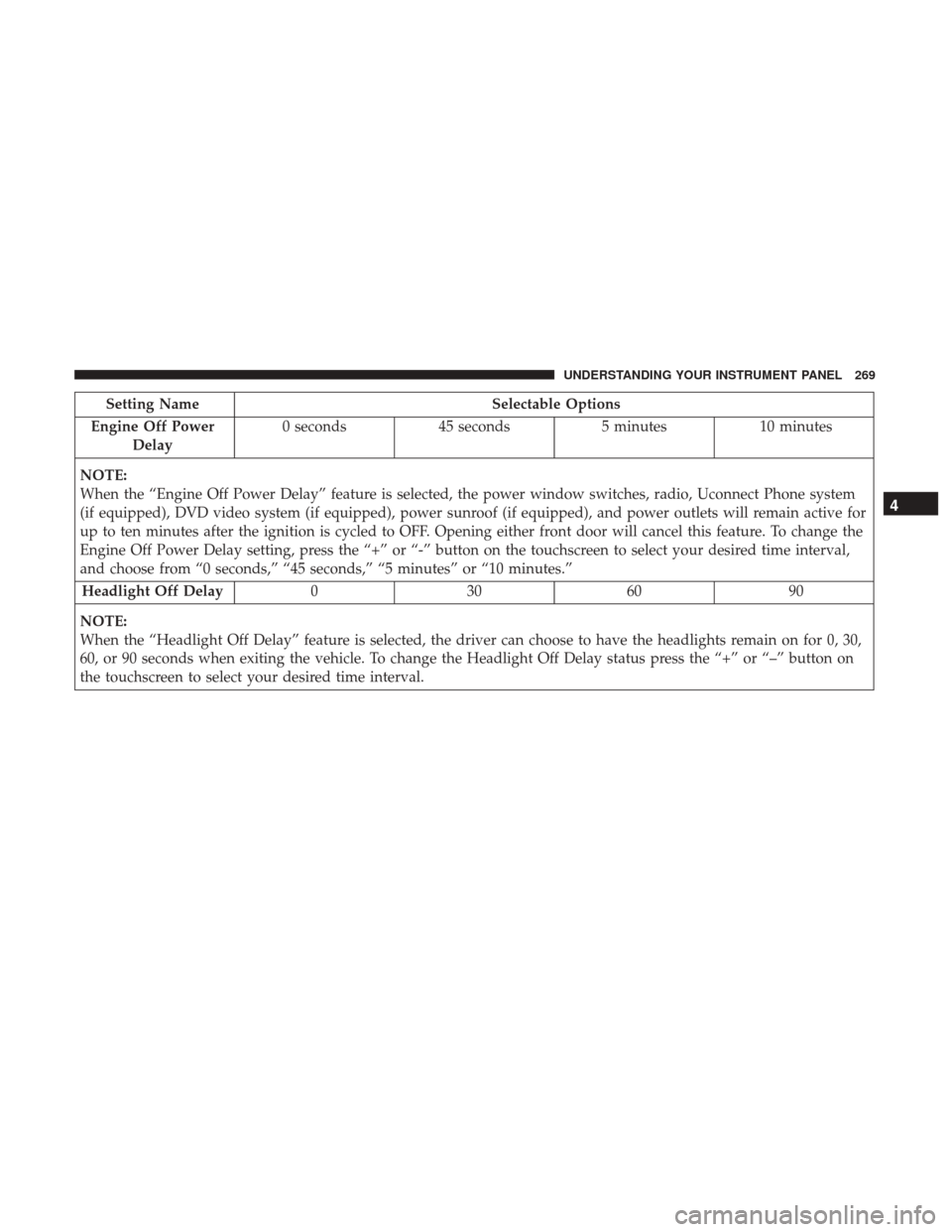
Setting NameSelectable Options
Engine Off Power Delay 0 seconds
45 seconds 5 minutes10 minutes
NOTE:
When the “Engine Off Power Delay” feature is selected, the power window switches, radio, Uconnect Phone system
(if equipped), DVD video system (if equipped), power sunroof (if equipped), and power outlets will remain active for
up to ten minutes after the ignition is cycled to OFF. Opening either front door will cancel this feature. To change the
Engine Off Power Delay setting, press the “+” or “-” button on the touchscreen to select your desired time interval,
and choose from “0 seconds,” “45 seconds,” “5 minutes” or “10 minutes.” Headlight Off Delay 030609 0
NOTE:
When the “Headlight Off Delay” feature is selected, the driver can choose to have the headlights remain on for 0, 30,
60, or 90 seconds when exiting the vehicle. To change the Headlight Off Delay status press the “+” or “–” button on
the touchscreen to select your desired time interval.
4
UNDERSTANDING YOUR INSTRUMENT PANEL 269
Page 323 of 530
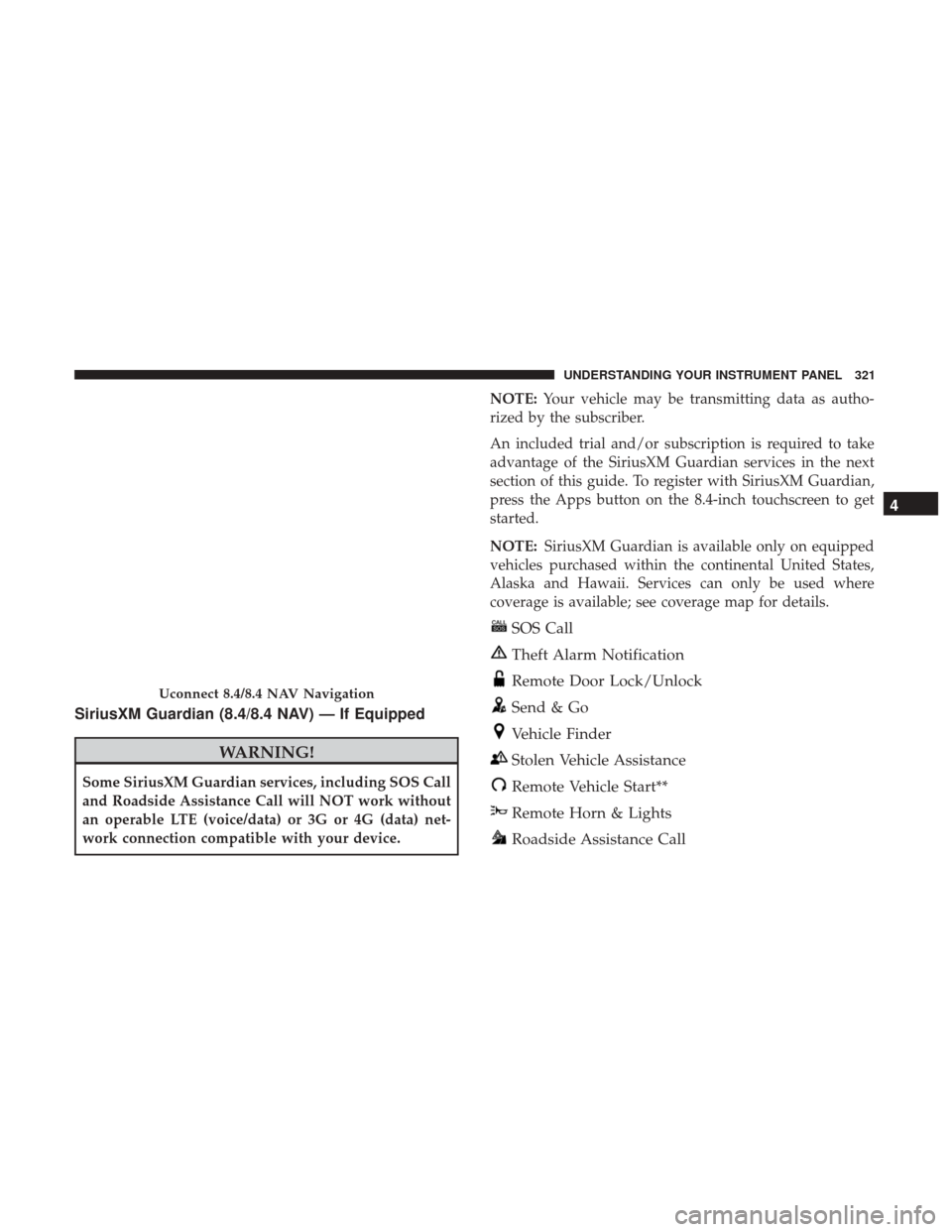
SiriusXM Guardian (8.4/8.4 NAV) — If Equipped
WARNING!
Some SiriusXM Guardian services, including SOS Call
and Roadside Assistance Call will NOT work without
an operable LTE (voice/data) or 3G or 4G (data) net-
work connection compatible with your device.NOTE:
Your vehicle may be transmitting data as autho-
rized by the subscriber.
An included trial and/or subscription is required to take
advantage of the SiriusXM Guardian services in the next
section of this guide. To register with SiriusXM Guardian,
press the Apps button on the 8.4-inch touchscreen to get
started.
NOTE: SiriusXM Guardian is available only on equipped
vehicles purchased within the continental United States,
Alaska and Hawaii. Services can only be used where
coverage is available; see coverage map for details.
SOS Call
Theft Alarm Notification
Remote Door Lock/Unlock
Send & Go
Vehicle Finder
Stolen Vehicle Assistance
Remote Vehicle Start**
Remote Horn & Lights
Roadside Assistance Call
Uconnect 8.4/8.4 NAV Navigation
4
UNDERSTANDING YOUR INSTRUMENT PANEL 321
Page 325 of 530
•Press the Info button on the navigation bar at the bottom
of the app for Vehicle Info.
• Press the Remote button on the navigation bar at the
bottom of the app to Lock/Unlock, Remote Start, and
activate your horn and lights remotely.
• Press the Location button on the navigation bar at the
bottom of the app to bring up a map to locate your
vehicle or send a location to your vehicle’s navigation
system.
• Press the Settings button in the upper left corner of the
app to bring up app settings and access the Assist Call
Centers.
NOTE: For further information please visit
DriveUconnect.com.
SiriusXM Travel Link (8.4/8.4 NAV)
Need to find a gas station, view local movie listings, check
a sports score or the 5 - day weather forecast? SiriusXM
Travel Link is a suite of services that brings a wealth of
information right to your Uconnect 8.4 NAV system. (Not
available for 8.4 system or vehicles sold in the Canadian
market.) Push the VR button
. After the beep, say one of the
following commands:
• Show fuel prices
• Show 5 - day weather forecast
• Show extended weather
TIP: Traffic alerts are not accessible with Voice Command.
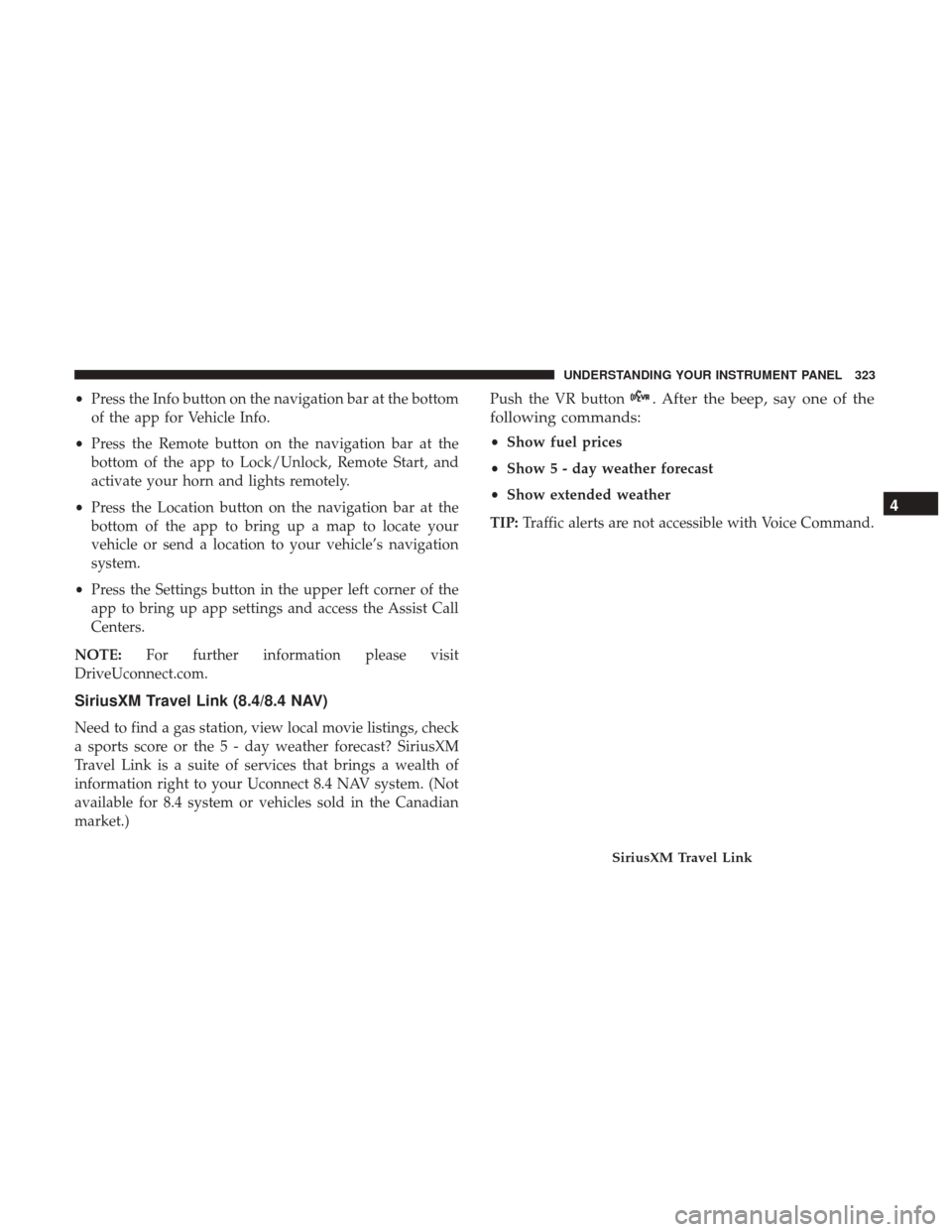
SiriusXM Travel Link
4
UNDERSTANDING YOUR INSTRUMENT PANEL 323
Page 410 of 530
Towing Requirements — Trailer Lights And Wiring
(If Equipped)
Whenever you pull a trailer, regardless of the trailer size,
stoplights and turn signals on the trailer are required for
motoring safety.
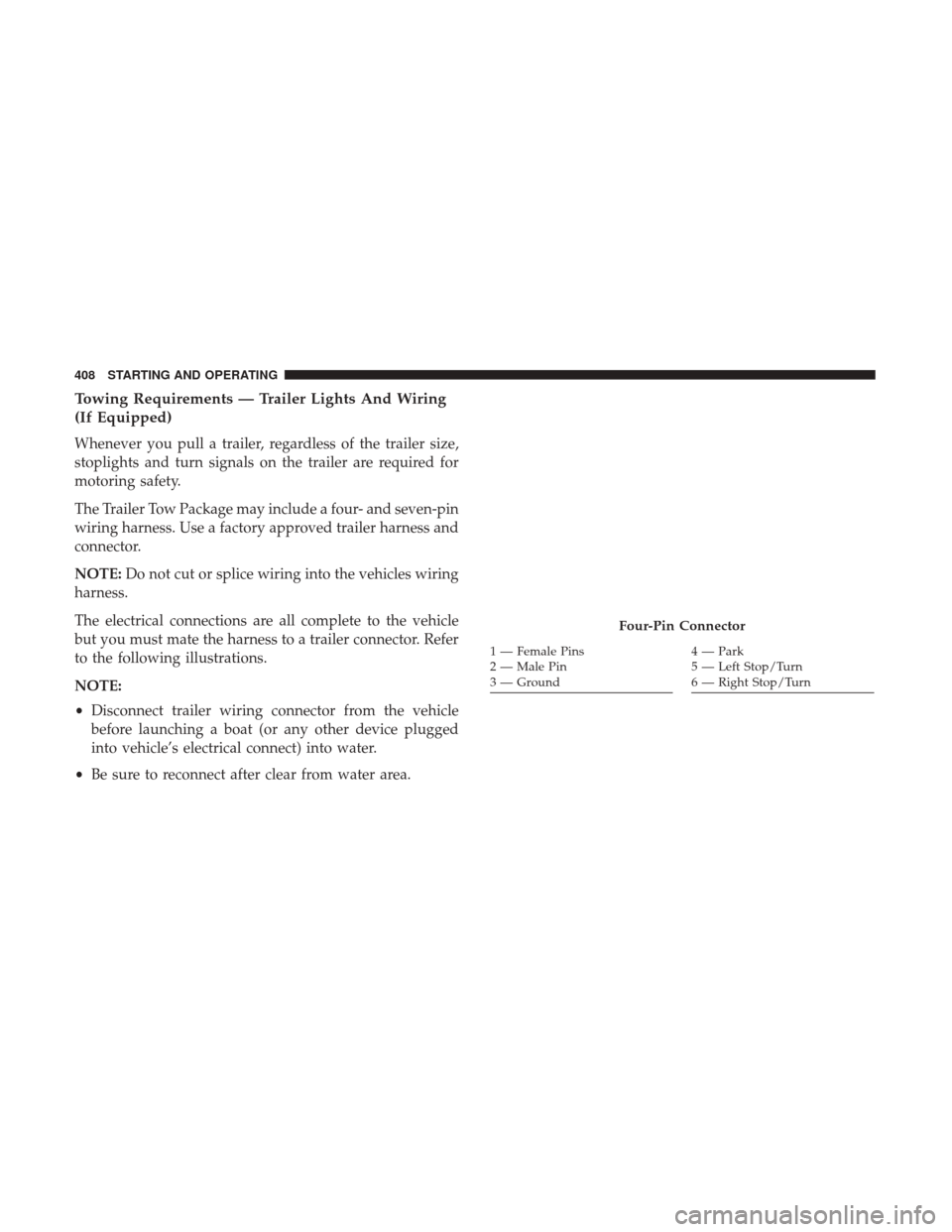
The Trailer Tow Package may include a four- and seven-pin
wiring harness. Use a factory approved trailer harness and
connector.
NOTE:Do not cut or splice wiring into the vehicles wiring
harness.
The electrical connections are all complete to the vehicle
but you must mate the harness to a trailer connector. Refer
to the following illustrations.
NOTE:
• Disconnect trailer wiring connector from the vehicle
before launching a boat (or any other device plugged
into vehicle’s electrical connect) into water.
• Be sure to reconnect after clear from water area.
Four-Pin Connector
1 — Female Pins
2 — Male Pin
3 — Ground4 — Park
5 — Left Stop/Turn
6 — Right Stop/Turn
408 STARTING AND OPERATING
Page 472 of 530
Interior Care
Use Mopar Total Clean to clean fabric upholstery and
carpeting.
Use Mopar Total Clean to clean vinyl upholstery.
Mopar Total Clean is specifically recommended for leather
upholstery.
Your leather upholstery can be best preserved by regular
cleaning with a damp soft cloth. Small particles of dirt can
act as an abrasive and damage the leather upholstery and
should be removed promptly with a damp cloth. Stubborn
soils can be removed easily with a soft cloth and Mopar
Total Clean. Care should be taken to avoid soaking your
leather upholstery with any liquid. Please do not use
polishes, oils, cleaning fluids, solvents, detergents, or
ammonia-based cleaners to clean your leather upholstery.
Application of a leather conditioner is not required to
maintain the original condition.
WARNING!
Do not use volatile solvents for cleaning purposes.
Many are potentially flammable, and if used in closed
areas they may cause respiratory harm.
CAUTION!
•Direct contact of air fresheners, insect repellents,
suntan lotions, or hand sanitizers to the plastic,
painted, or decorated surfaces of the interior may
cause permanent damage. Wipe away immediately.
• Damage caused by these type of products may not be
covered by your New Vehicle Limited Warranty.
• Do not use Alcohol and Alcohol-based and/or Keton
based cleaning products to clean leather seats, as
damage to the seat may result.
Cleaning Headlights
Your vehicle is equipped with plastic headlights and fog
lights that are lighter and less susceptible to stone breakage
than glass headlights.
Plastic is not as scratch resistant as glass and therefore
different lens cleaning procedures must be followed.
To minimize the possibility of scratching the lenses and
reducing light output, avoid wiping with a dry cloth. To
remove road dirt, wash with a mild soap solution followed
by rinsing.
Do not use abrasive cleaning components, solvents, steel
wool or other aggressive material to clean the lenses.
470 MAINTAINING YOUR VEHICLE
Page 486 of 530
2. Remove the large dust cap from the headlamp housingby turning it counterclockwise, turn the bulb counter-
clockwise and remove.
CAUTION!
Do not touch the new bulb with your fingers. Oil
contamination will severely shorten bulb life. If the
bulb comes in contact with an oily surface, clean the
bulb with rubbing alcohol.
3. Disconnect the bulb from the socket assembly and install the replacement bulb.
4. Reinstall the bulb and socket assembly into the head- lamp assembly, and then turn it clockwise.
5. Reinstall the dust cap.
Front Low/High Beam Headlamp And Park/Turn
Lamp — Models With High Intensity Discharge
Headlamps (HID)
HID Headlamps
The headlamps are a type of high voltage discharge tube.
High voltage can remain in the circuit even with the
headlamp switch off and the key removed. Because of this,
you should not attempt to service a headlamp bulb yourself. If a headlamp bulb fails, take your vehicle to an
authorized dealer for service.
WARNING!
A transient high voltage occurs at the bulb sockets of
HID headlamps when the headlight switch is turned
ON. It may cause serious electrical shock or electrocu-
tion if not serviced properly. See your authorized
dealer for service.
NOTE: On vehicles equipped with HID headlamps, when
the headlamps are turned on, there is a blue hue to the
lights. This diminishes and becomes more white after
approximately 10 seconds, as the system charges.
Front/Rear Side Marker Lamp
The Side Markers use LED sources that are not serviceable
separately. The Side Markers must be replaced as an
assembly, see your authorized dealer.
Front Fog Lamp
The Front Fog Lamps use LED sources that are not
serviceable separately. The Front Fog Lamp must be re-
placed as an assembly, see your authorized dealer.
484 MAINTAINING YOUR VEHICLE
Page 496 of 530
MAINTENANCE SCHEDULE — 3.6L
Your vehicle is equipped with an automatic oil change
indicator system. The oil change indicator system will
remind you that it is time to take your vehicle in for
scheduled maintenance.
Based on engine operation conditions, the oil change
indicator message will illuminate. This means that service
is required for your vehicle. Operating conditions such as
frequent short-trips, trailer tow, extremely hot or cold
ambient temperatures, and E85 fuel usage will influence
when the “Change Oil” or “Oil Change Required” message
is displayed. Severe Operating Conditions can cause the
change oil message to illuminate as early as 3,500 miles
(5,600 km) since last reset. Have your vehicle serviced as
soon as possible, within the next 500 miles (805 km).
The message “Oil Change Required” will be displayed in
the instrument cluster and a single chime will sound,
indicating that an oil change is necessary.
Your authorized dealer will reset the oil change indicator
message after completing the scheduled oil change. If a sched-
uled oil change is performed by someone other than your
authorized dealer, the message can be reset by referring to the
steps described under “Instrument Cluster Display” in “Un-
derstanding Your Instrument Panel” for further information.
NOTE:Under no circumstances should oil change inter-
vals exceed 10,000 miles (16,000 km) or twelve months or
350 hours of engine run time, whichever comes first. The
350 hours of engine run or idle time is generally only a
concern for fleet customers.
Severe Duty All Models
Change Engine Oil at 4,000 miles (6,500 km) if the vehicle
is operated in a dusty and off road environment or is
operated predominately at idle or only very low engine
RPM’s. This type of vehicle use is considered Severe Duty.
Once A Month Or Before A Long Trip:
• Check engine oil level.
• Check windshield washer fluid level.
• Check tire pressure and look for unusual wear or
damage. Rotate tires at the first sign of irregular wear,
even if it occurs before your next scheduled service.
• Check the fluid levels of the coolant reservoir, brake
master cylinder, and power steering and fill as needed.
• Check function of all interior and exterior lights.
494 MAINTENANCE SCHEDULES
Page 497 of 530
MAINTENANCE SCHEDULE — 5.7L
Your vehicle is equipped with an automatic oil change
indicator system. The oil change indicator system will
remind you that it is time to take your vehicle in for
scheduled maintenance.
Based on engine operation conditions, the oil change
indicator message will illuminate. This means that service
is required for your vehicle. Operating conditions such as
frequent short-trips, trailer tow, extremely hot or cold
ambient temperatures, and E85 fuel usage will influence
when the “Change Oil” or “Oil Change Required” message
is displayed. Severe Operating Conditions can cause the
change oil message to illuminate as early as 3,500 miles
(5,600 km) since last reset. Have your vehicle serviced as
soon as possible, within the next 500 miles (805 km).
The message “Oil Change Required” will be displayed in
the instrument cluster and a single chime will sound,
indicating that an oil change is necessary.
Your authorized dealer will reset the oil change indicator
message after completing the scheduled oil change. If a
scheduled oil change is performed by someone other than
your authorized dealer, the message can be reset byreferring to the steps described under “Instrument Cluster
Display” in “Understanding Your Instrument Panel” for
further information.
NOTE:
Under no circumstances should oil change intervals
exceed 10,000 miles (16,000 km), twelve months or 350 hours of
engine run time, whichever comes first. The 350 hours of engine
run or idle time is generally only a concern for fleet customers.
Severe Duty All Models
Change Engine Oil at 4,000 miles (6,500 km) if the vehicle
is operated in a dusty and off-road environment or is
operated predominately at idle or only very low engine
RPM’s. This type of vehicle use is considered Severe Duty.
Once A Month Or Before A Long Trip:
• Check engine oil level.
• Check windshield washer fluid level.
• Check tire pressure and look for unusual wear or
damage. Rotate tires at the first sign of irregular wear,
even if it occurs before your next scheduled service.
• Check the fluid levels of the coolant reservoir, brake
master cylinder, and power steering and fill as needed.
• Check function of all interior and exterior lights.
8
MAINTENANCE SCHEDULES 495
Page 502 of 530
•Check the fluid levels of the coolant reservoir, brake master
cylinder, and power steering (6.2L Only), and add as needed.
• Check all lights and other electrical items for correct
operation.
At Each Oil Change
• Change the engine oil filter. •
Inspect the brake hoses and lines.CAUTION!
Failure to perform the required maintenance items
may result in damage to the vehicle.
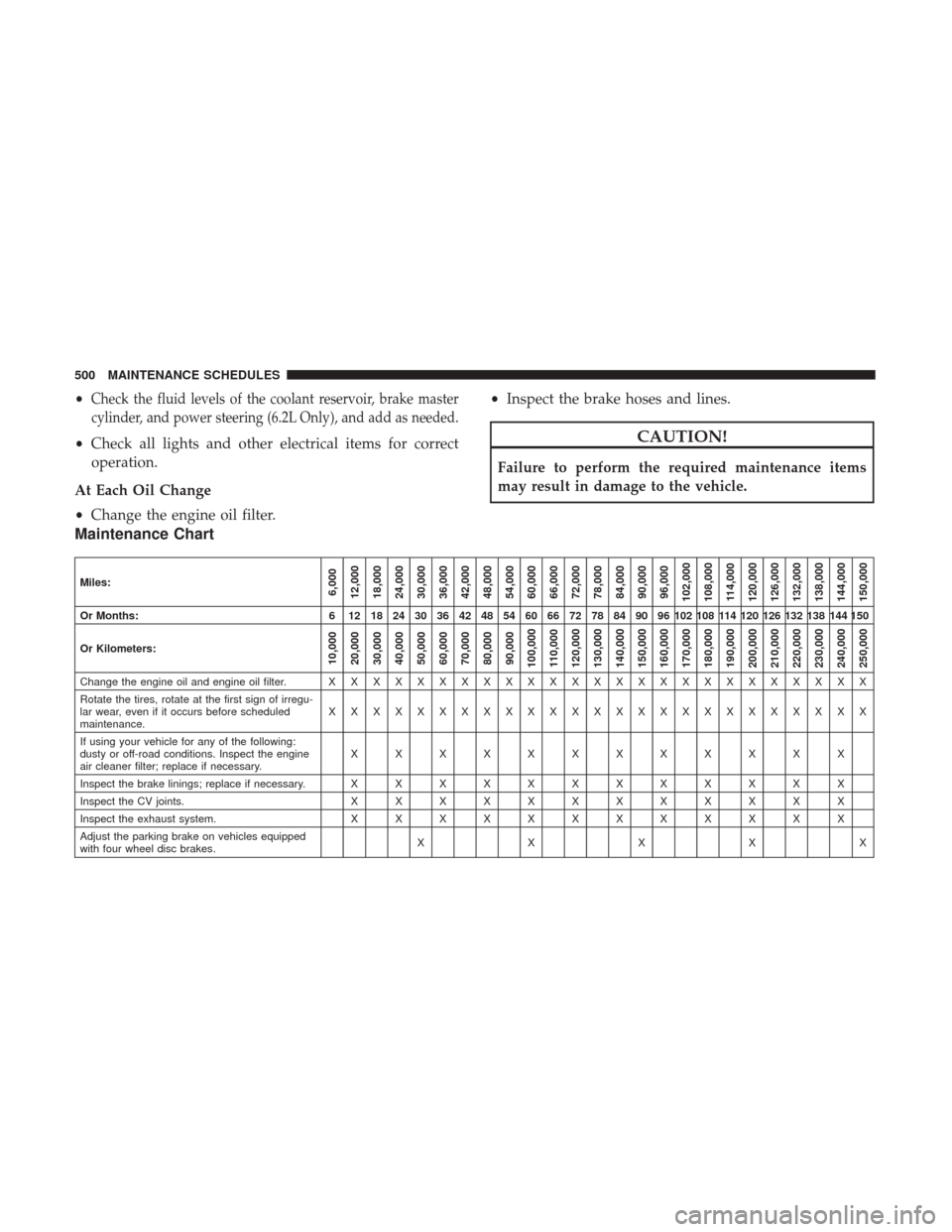
Maintenance Chart
Miles:6,000
12,000
18,000
24,000
30,000
36,000
42,000
48,000
54,000
60,000
66,000
72,000
78,000
84,000
90,000
96,000
102,000
108,000 114,000
120,000
126,000
132,000
138,000
144,000
150,000
Or Months: 6 12 18 24 30 36 42 48 54 60 66 72 78 84 90 96 102 108 114 120 126 132 138 144 150
Or Kilometers:
10,000
20,000
30,000
40,000
50,000
60,000
70,000
80,000
90,000
100,000
110,000
120,000
130,000
140,000
150,000
160,000
170,000
180,000
190,000
200,000
210,000
220,000
230,000
240,000
250,000
Change the engine oil and engine oil filter. X X XXXXXXXXXXXXXXXXXXXXXXX
Rotate the tires, rotate at the first sign of irregu-
lar wear, even if it occurs before scheduled
maintenance. XXXXXXXXXXXXXXXXXXXXXXXXX
If using your vehicle for any of the following:
dusty or off-road conditions. Inspect the engine
air cleaner filter; replace if necessary. XXXXXXXXXXXX
Inspect the brake linings; replace if necessary. X X X X X X X X X X X X
Inspect the CV joints. X X X X X X X X X X X X
Inspect the exhaust system. X X X X X X X X X X X X
Adjust the parking brake on vehicles equipped
with four wheel disc brakes. XXXXX
500 MAINTENANCE SCHEDULES
Page 513 of 530
Appearance Care.......................... .466
Arming System (Security Alarm) ................16
Assist, Hill Start .......................... .355
Auto Down Power Windows ...................33
Automatic Door Locks ........................26
Automatic Headlights .......................119
Automatic High Beams ..................... .120
Automatic Temperature Control (ATC) ...........309
Automatic Transmission ..................336, 465
Adding Fluid .....................465, 487, 490
Autostick ............................. .343
Fluid And Filter Changes ...................465
Fluid Change .......................... .465
Fluid Level Check .....................464, 465
Fluid Type ......................... .487, 490
Special Additives ........................ .464
Automatic Transmission Limp Home Mode ........342
Autostick ............................... .343
Operation ............................. .343
Auto Unlock, Doors .........................26
Auto Up Power Windows .....................34
AW D Towing ............................... .437
Axle Fluid ........................... .487, 490Axle Lubrication
....................... .487, 490
Battery .............................. .204, 451
Charging System Light ....................204
Keyless Key Fob Replacement ................20
Location .............................. .451
Belts, Seat .................................78
Body Mechanism Lubrication ..................455
B-Pillar Location .......................... .367
Brake Assist System ........................ .354
Brake Control System, Electronic ................352
Brake Fluid .......................... .487, 490
Brake, Parking ............................ .350
Brakes ................................. .351
Brake System ......................... .351,
462
Fluid Check ..................... .463, 487, 490
Master Cylinder ........................ .463
Parking .............................. .350
Warning Light ...................... .202, 351
Brake/Transmission Interlock ..................336
Break-In Recommendations, New Vehicle ..........75
Brightness, Interior Lights ....................126
Bulb Replacement ...................... .482, 483
Bulbs, Light ........................... .81, 482
10
INDEX 511