engine DODGE CHARGER 2018 Owners Manual
[x] Cancel search | Manufacturer: DODGE, Model Year: 2018, Model line: CHARGER, Model: DODGE CHARGER 2018Pages: 553, PDF Size: 5.3 MB
Page 433 of 553
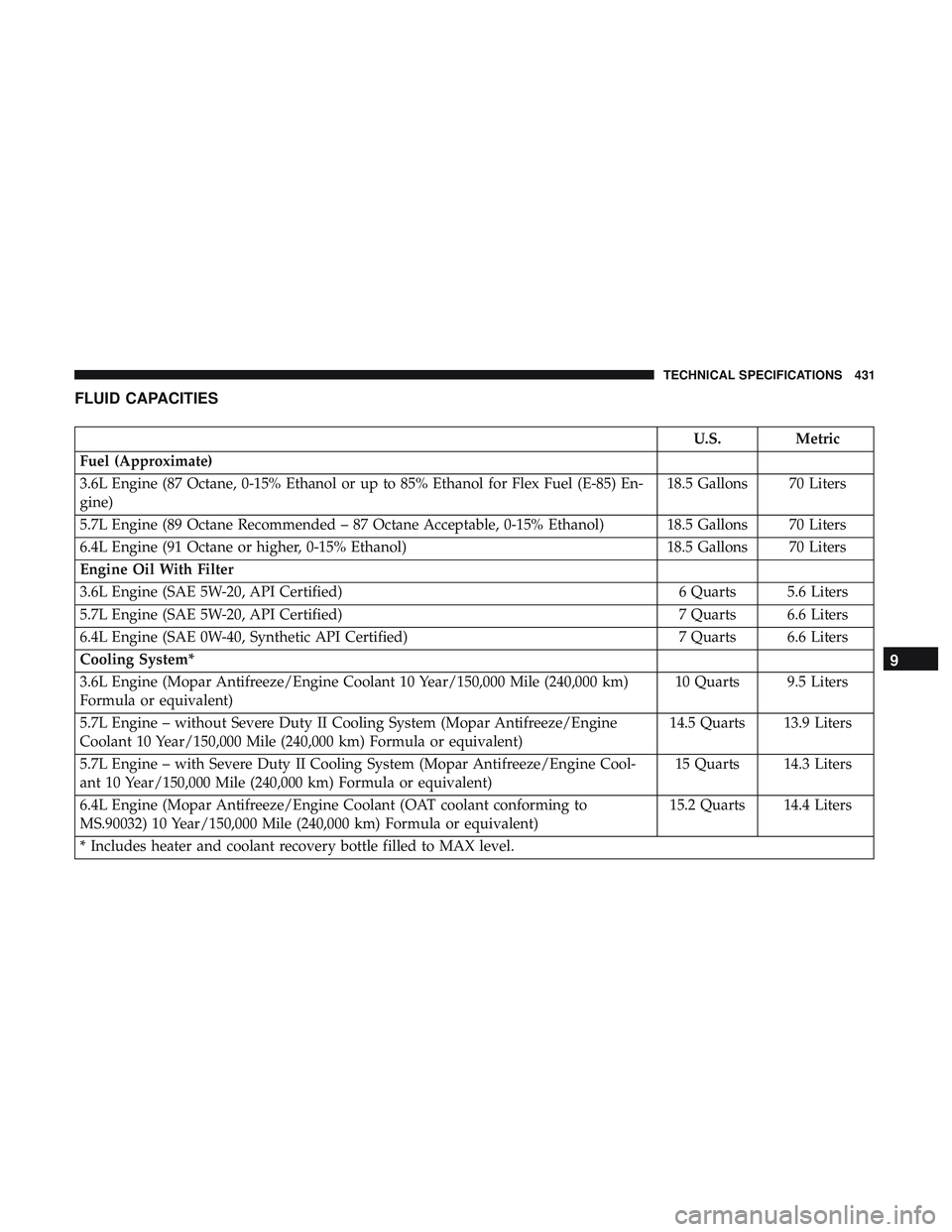
FLUID CAPACITIES
U.S.Metric
Fuel (Approximate)
3.6L Engine (87 Octane, 0-15% Ethanol or up to 85% Ethanol for Flex Fuel (E-85) En-
gine) 18.5 Gallons 70 Liters
5.7L Engine (89 Octane Recommended – 87 Octane Acceptable, 0-15% Ethanol) 18.5 Gallons 70 Liters
6.4L Engine (91 Octane or higher, 0-15% Ethanol) 18.5 Gallons 70 Liters
Engine Oil With Filter
3.6L Engine (SAE 5W-20, API Certified) 6 Quarts 5.6 Liters
5.7L Engine (SAE 5W-20, API Certified) 7 Quarts 6.6 Liters
6.4L Engine (SAE 0W-40, Synthetic API Certified) 7 Quarts 6.6 Liters
Cooling System*
3.6L Engine (Mopar Antifreeze/Engine Coolant 10 Year/150,000 Mile (240,000 km)
Formula or equivalent) 10 Quarts 9.5 Liters
5.7L Engine – without Severe Duty II Cooling System (Mopar Antifreeze/Engine
Coolant 10 Year/150,000 Mile (240,000 km) Formula or equivalent) 14.5 Quarts 13.9 Liters
5.7L Engine – with Severe Duty II Cooling System (Mopar Antifreeze/Engine Cool-
ant 10 Year/150,000 Mile (240,000 km) Formula or equivalent) 15 Quarts 14.3 Liters
6.4L Engine (Mopar Antifreeze/Engine Coolant (OAT coolant conforming to
MS.90032) 10 Year/150,000 Mile (240,000 km) Formula or equivalent) 15.2 Quarts 14.4 Liters
* Includes heater and coolant recovery bottle filled to MAX level.
9
TECHNICAL SPECIFICATIONS 431
Page 434 of 553
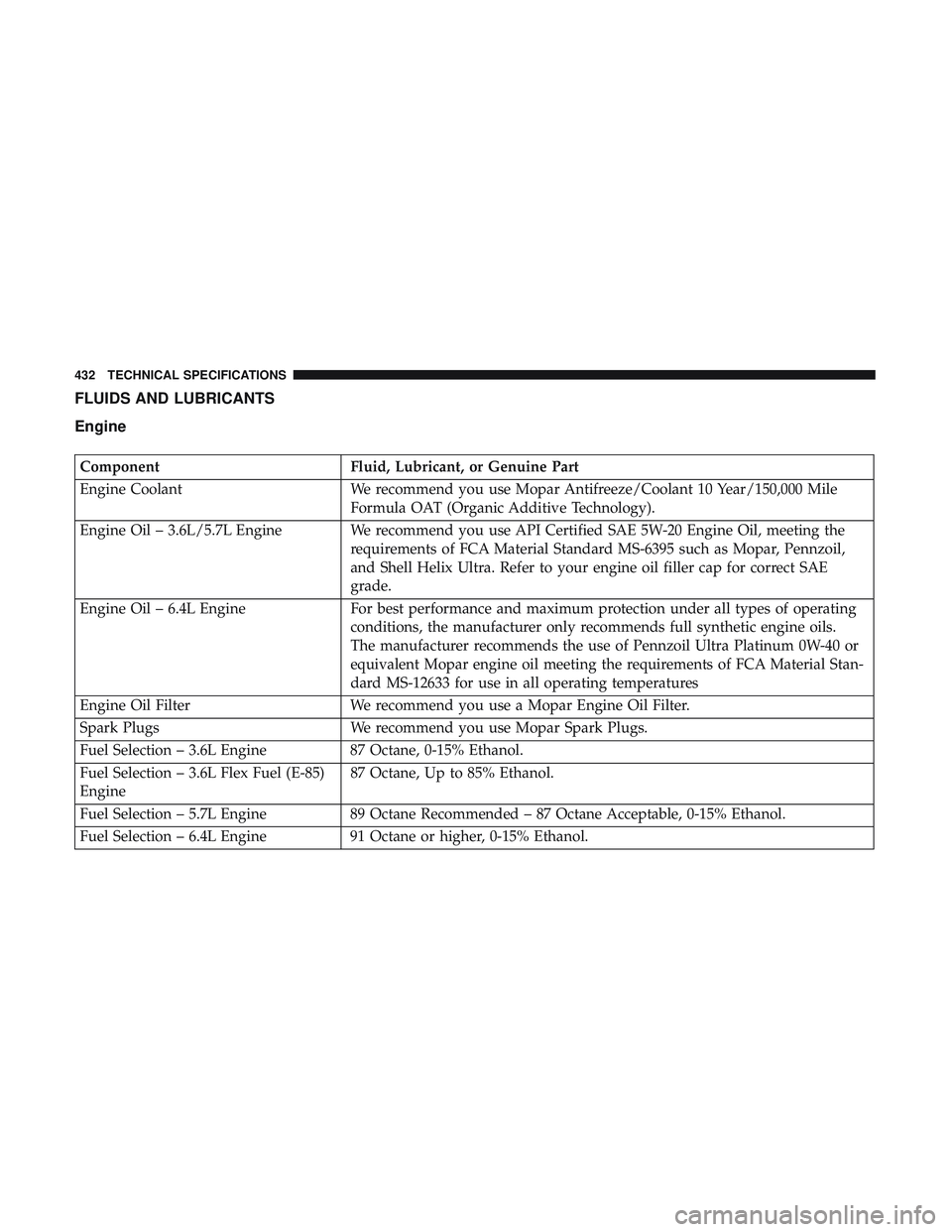
FLUIDS AND LUBRICANTS
Engine
ComponentFluid, Lubricant, or Genuine Part
Engine Coolant We recommend you use Mopar Antifreeze/Coolant 10 Year/150,000 Mile
Formula OAT (Organic Additive Technology).
Engine Oil – 3.6L/5.7L Engine We recommend you use API Certified SAE 5W-20 Engine Oil, meeting the requirements of FCA Material Standard MS-6395 such as Mopar, Pennzoil,
and Shell Helix Ultra. Refer to your engine oil filler cap for correct SAE
grade.
Engine Oil – 6.4L Engine For best performance and maximum protection under all types of operating
conditions, the manufacturer only recommends full synthetic engine oils.
The manufacturer recommends the use of Pennzoil Ultra Platinum 0W-40 or
equivalent Mopar engine oil meeting the requirements of FCA Material Stan-
dard MS-12633 for use in all operating temperatures
Engine Oil Filter We recommend you use a Mopar Engine Oil Filter.
Spark Plugs We recommend you use Mopar Spark Plugs.
Fuel Selection – 3.6L Engine 87 Octane, 0-15% Ethanol.
Fuel Selection – 3.6L Flex Fuel (E-85)
Engine 87 Octane, Up to 85% Ethanol.
Fuel Selection – 5.7L Engine 89 Octane Recommended – 87 Octane Acceptable, 0-15% Ethanol.
Fuel Selection – 6.4L Engine 91 Octane or higher, 0-15% Ethanol.
432 TECHNICAL SPECIFICATIONS
Page 435 of 553
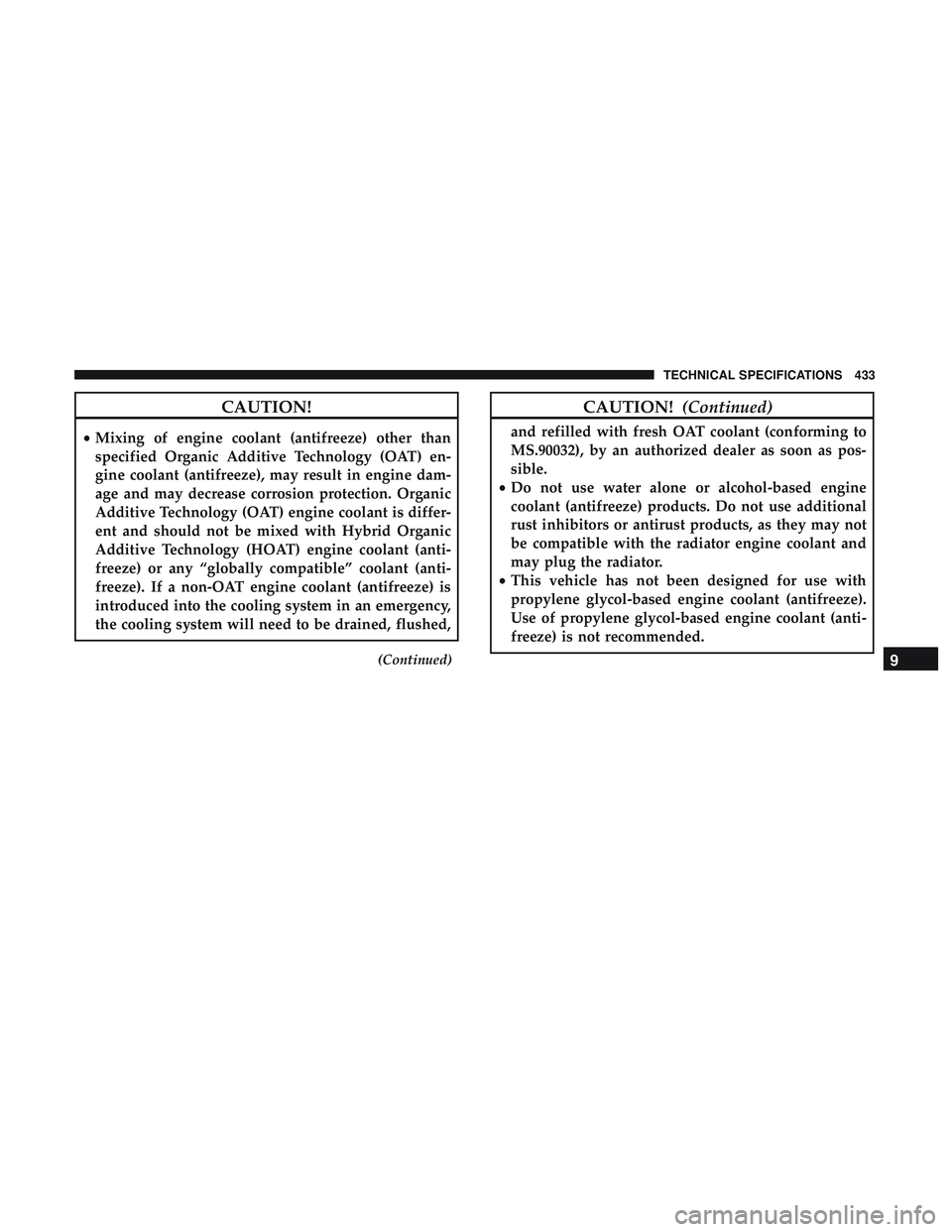
CAUTION!
•Mixing of engine coolant (antifreeze) other than
specified Organic Additive Technology (OAT) en-
gine coolant (antifreeze), may result in engine dam-
age and may decrease corrosion protection. Organic
Additive Technology (OAT) engine coolant is differ-
ent and should not be mixed with Hybrid Organic
Additive Technology (HOAT) engine coolant (anti-
freeze) or any “globally compatible” coolant (anti-
freeze). If a non-OAT engine coolant (antifreeze) is
introduced into the cooling system in an emergency,
the cooling system will need to be drained, flushed,
(Continued)
CAUTION! (Continued)
and refilled with fresh OAT coolant (conforming to
MS.90032), by an authorized dealer as soon as pos-
sible.
• Do not use water alone or alcohol-based engine
coolant (antifreeze) products. Do not use additional
rust inhibitors or antirust products, as they may not
be compatible with the radiator engine coolant and
may plug the radiator.
• This vehicle has not been designed for use with
propylene glycol-based engine coolant (antifreeze).
Use of propylene glycol-based engine coolant (anti-
freeze) is not recommended.
9
TECHNICAL SPECIFICATIONS 433
Page 436 of 553
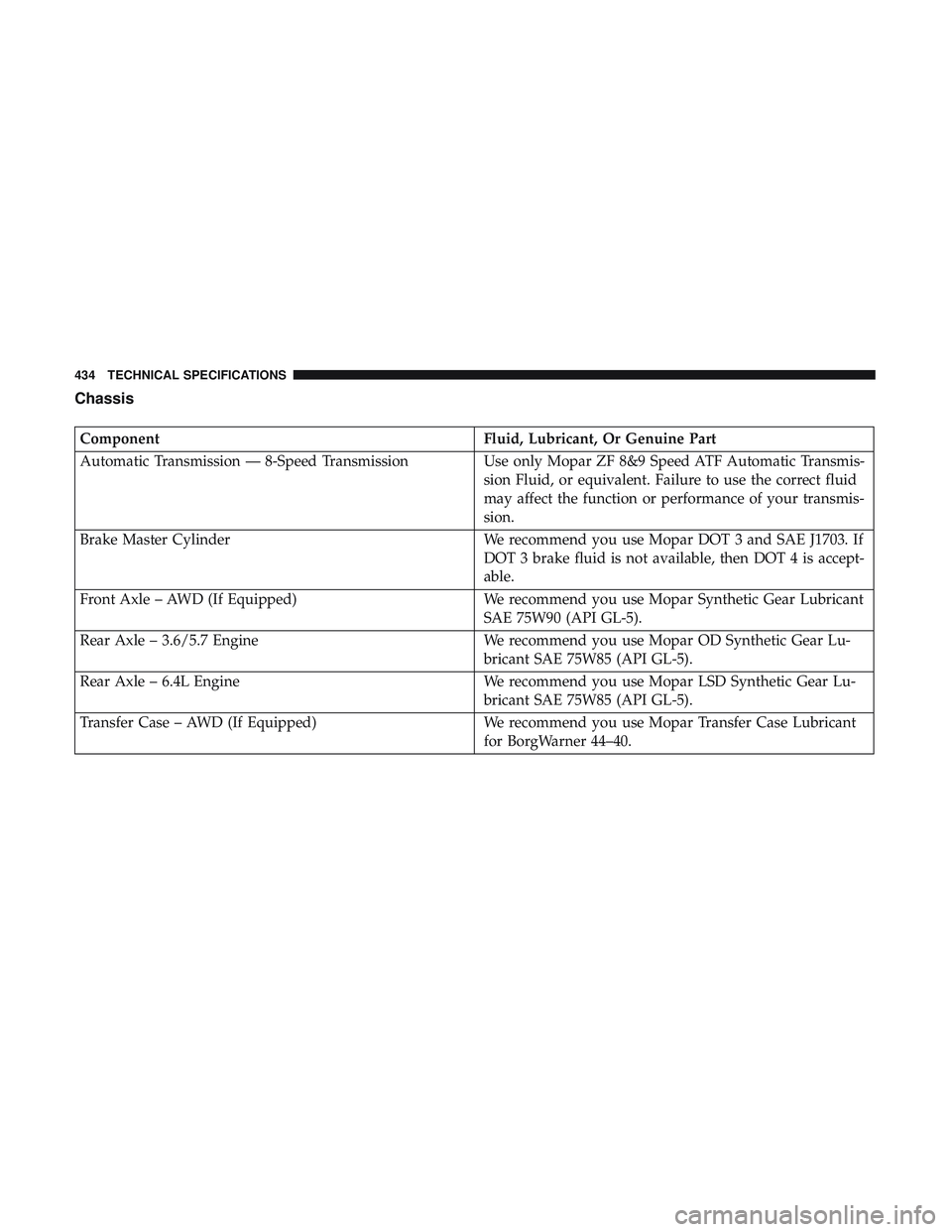
Chassis
ComponentFluid, Lubricant, Or Genuine Part
Automatic Transmission — 8-Speed Transmission Use only Mopar ZF 8&9 Speed ATF Automatic Transmis-
sion Fluid, or equivalent. Failure to use the correct fluid
may affect the function or performance of your transmis-
sion.
Brake Master Cylinder We recommend you use Mopar DOT 3 and SAE J1703. If
DOT 3 brake fluid is not available, then DOT 4 is accept-
able.
Front Axle – AWD (If Equipped) We recommend you use Mopar Synthetic Gear Lubricant
SAE 75W90 (API GL-5).
Rear Axle – 3.6/5.7 Engine We recommend you use Mopar OD Synthetic Gear Lu-
bricant SAE 75W85 (API GL-5).
Rear Axle – 6.4L Engine We recommend you use Mopar LSD Synthetic Gear Lu-
bricant SAE 75W85 (API GL-5).
Transfer Case – AWD (If Equipped) We recommend you use Mopar Transfer Case Lubricant
for BorgWarner 44–40.
434 TECHNICAL SPECIFICATIONS
Page 452 of 553
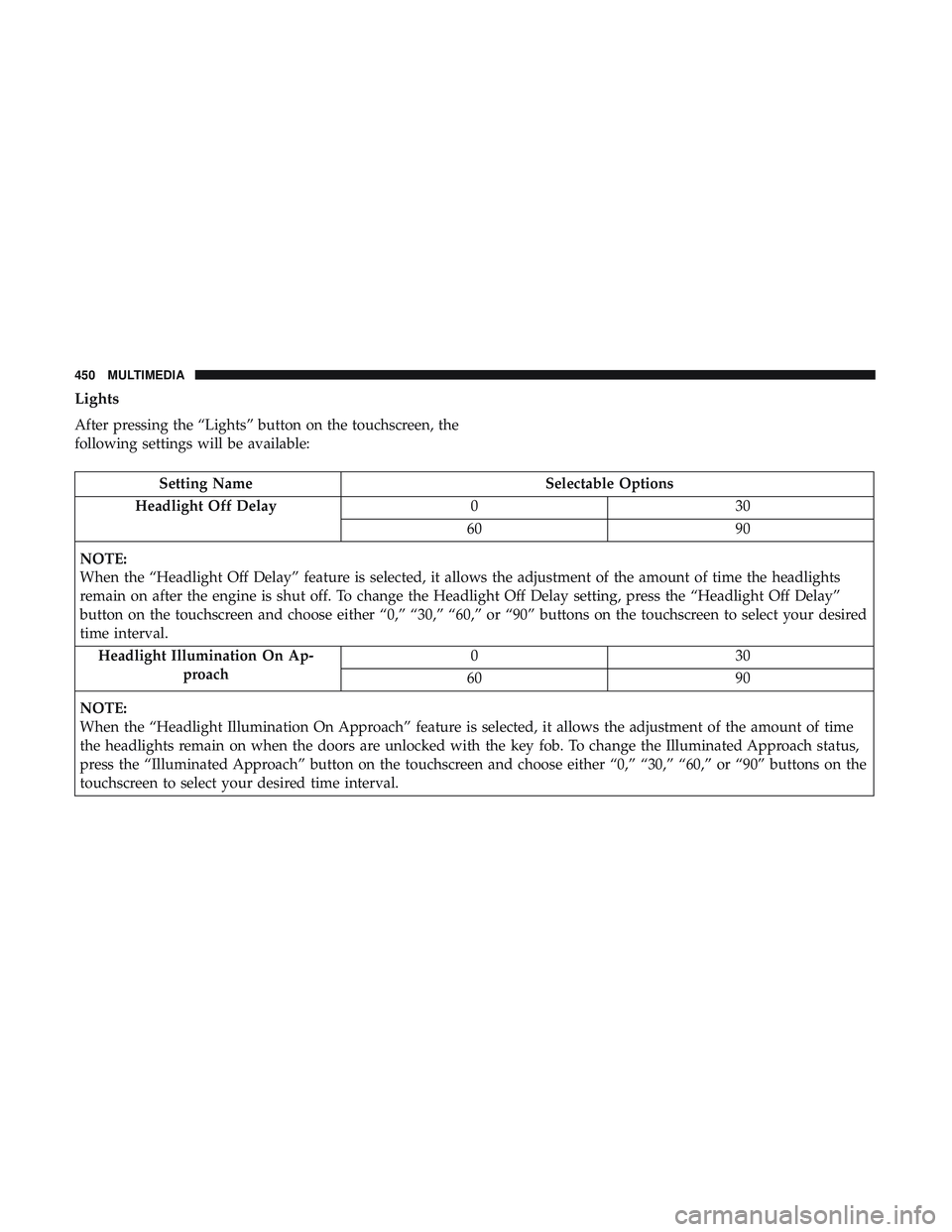
Lights
After pressing the “Lights” button on the touchscreen, the
following settings will be available:
Setting NameSelectable Options
Headlight Off Delay 030
60 90
NOTE:
When the “Headlight Off Delay” feature is selected, it allows the adjustment of the amount of time the headlights
remain on after the engine is shut off. To change the Headlight Off Delay setting, press the “Headlight Off Delay”
button on the touchscreen and choose either “0,” “30,” “60,” or “90” buttons on the touchscreen to select your desired
time interval. Headlight Illumination On Ap- proach 03
0
60 90
NOTE:
When the “Headlight Illumination On Approach” feature is selected, it allows the adjustment of the amount of time
the headlights remain on when the doors are unlocked with the key fob. To change the Illuminated Approach status,
press the “Illuminated Approach” button on the touchscreen and choose either “0,” “30,” “60,” or “90” buttons on the
touchscreen to select your desired time interval.
450 MULTIMEDIA
Page 453 of 553
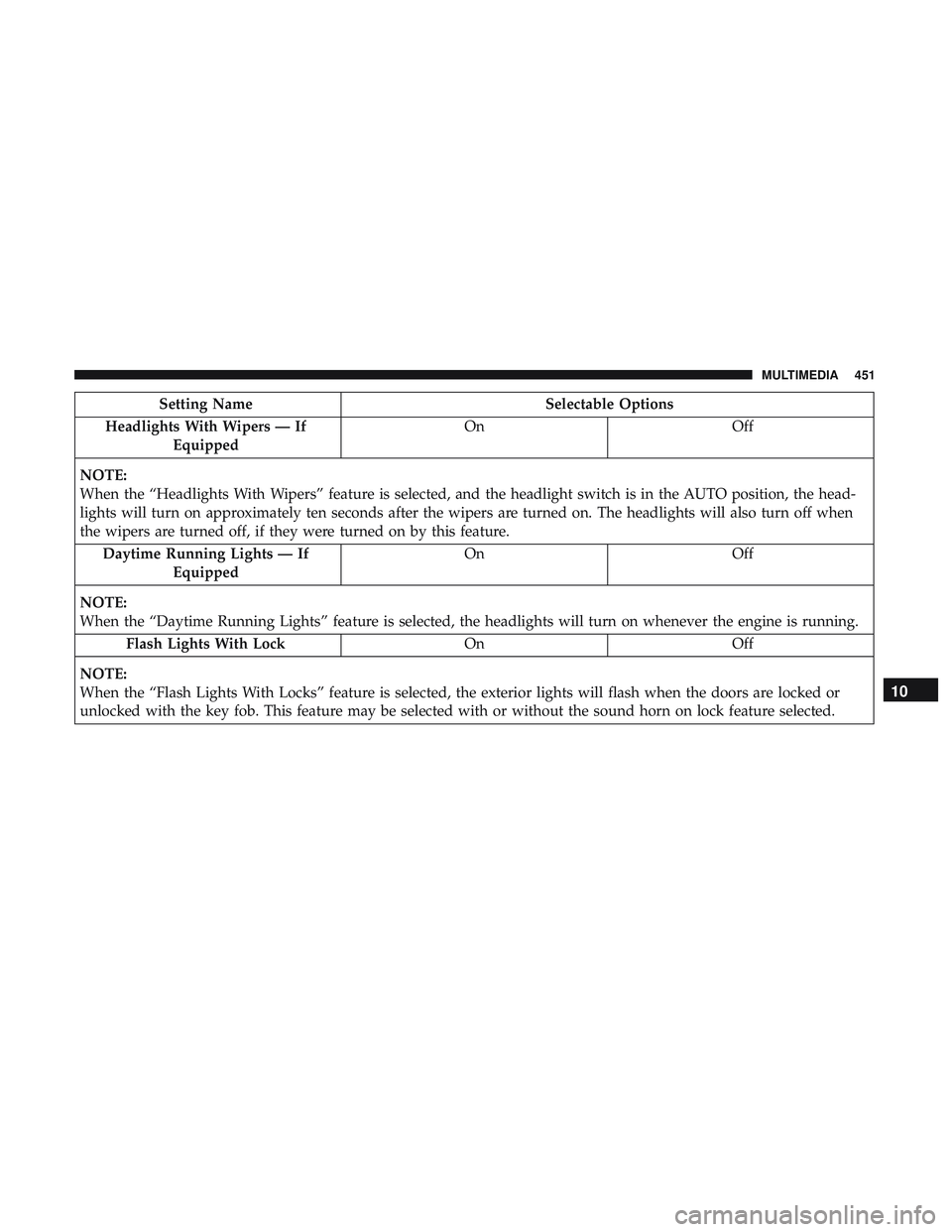
Setting NameSelectable Options
Headlights With Wipers — If Equipped On
Off
NOTE:
When the “Headlights With Wipers” feature is selected, and the headlight switch is in the AUTO position, the head-
lights will turn on approximately ten seconds after the wipers are turned on. The headlights will also turn off when
the wipers are turned off, if they were turned on by this feature. Daytime Running Lights — If Equipped On
Off
NOTE:
When the “Daytime Running Lights” feature is selected, the headlights will turn on whenever the engine is running. Flash Lights With Lock OnOff
NOTE:
When the “Flash Lights With Locks” feature is selected, the exterior lights will flash when the doors are locked or
unlocked with the key fob. This feature may be selected with or without the sound horn on lock feature selected.
10
MULTIMEDIA 451
Page 456 of 553
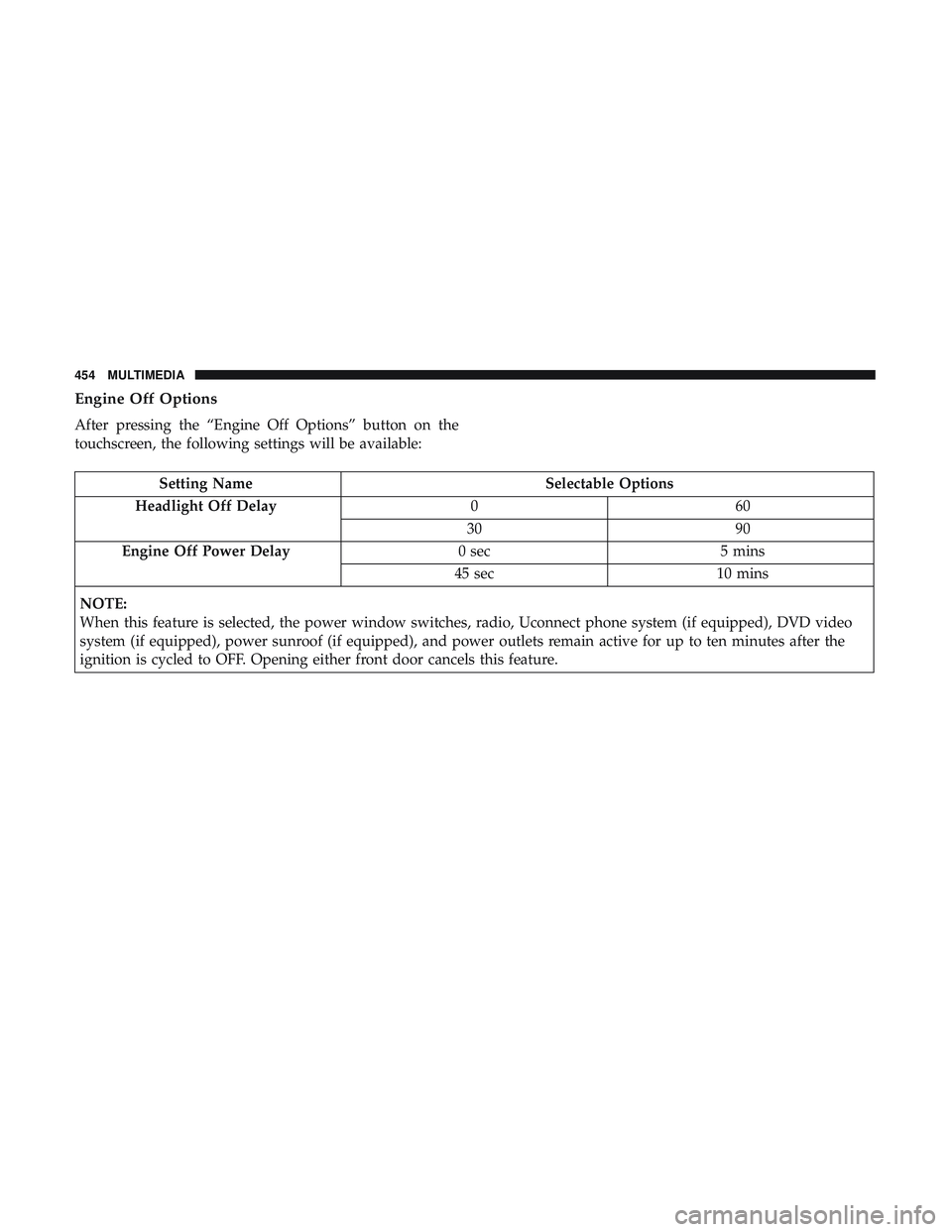
Engine Off Options
After pressing the “Engine Off Options” button on the
touchscreen, the following settings will be available:
Setting NameSelectable Options
Headlight Off Delay 060
30 90
Engine Off Power Delay 0 sec5 mins
45 sec 10 mins
NOTE:
When this feature is selected, the power window switches, radio, Uconnect phone system (if equipped), DVD video
system (if equipped), power sunroof (if equipped), and power outlets remain active for up to ten minutes after the
ignition is cycled to OFF. Opening either front door cancels this feature.
454 MULTIMEDIA
Page 465 of 553
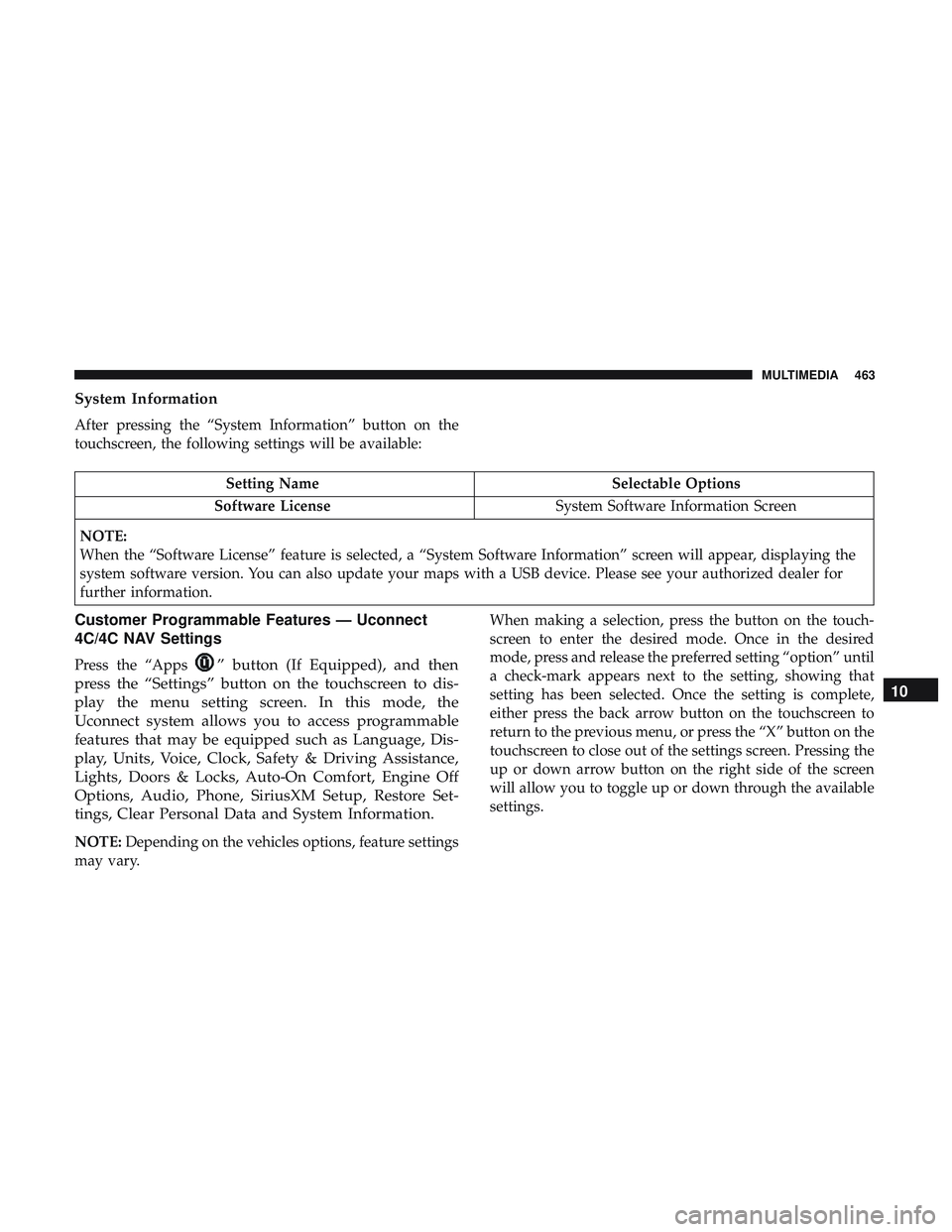
System Information
After pressing the “System Information” button on the
touchscreen, the following settings will be available:
Setting NameSelectable Options
Software License System Software Information Screen
NOTE:
When the “Software License” feature is selected, a “System Software Information” screen will appear, displaying the
system software version. You can also update your maps with a USB device. Please see your authorized dealer for
further information.
Customer Programmable Features — Uconnect
4C/4C NAV Settings
Press the “Apps” button (If Equipped), and then
press the “Settings” button on the touchscreen to dis-
play the menu setting screen. In this mode, the
Uconnect system allows you to access programmable
features that may be equipped such as Language, Dis-
play, Units, Voice, Clock, Safety & Driving Assistance,
Lights, Doors & Locks, Auto-On Comfort, Engine Off
Options, Audio, Phone, SiriusXM Setup, Restore Set-
tings, Clear Personal Data and System Information.
NOTE: Depending on the vehicles options, feature settings
may vary. When making a selection, press the button on the touch-
screen to enter the desired mode. Once in the desired
mode, press and release the preferred setting “option” until
a check-mark appears next to the setting, showing that
setting has been selected. Once the setting is complete,
either press the back arrow button on the touchscreen to
return to the previous menu, or press the “X” button on the
touchscreen to close out of the settings screen. Pressing the
up or down arrow button on the right side of the screen
will allow you to toggle up or down through the available
settings.
10
MULTIMEDIA 463
Page 481 of 553
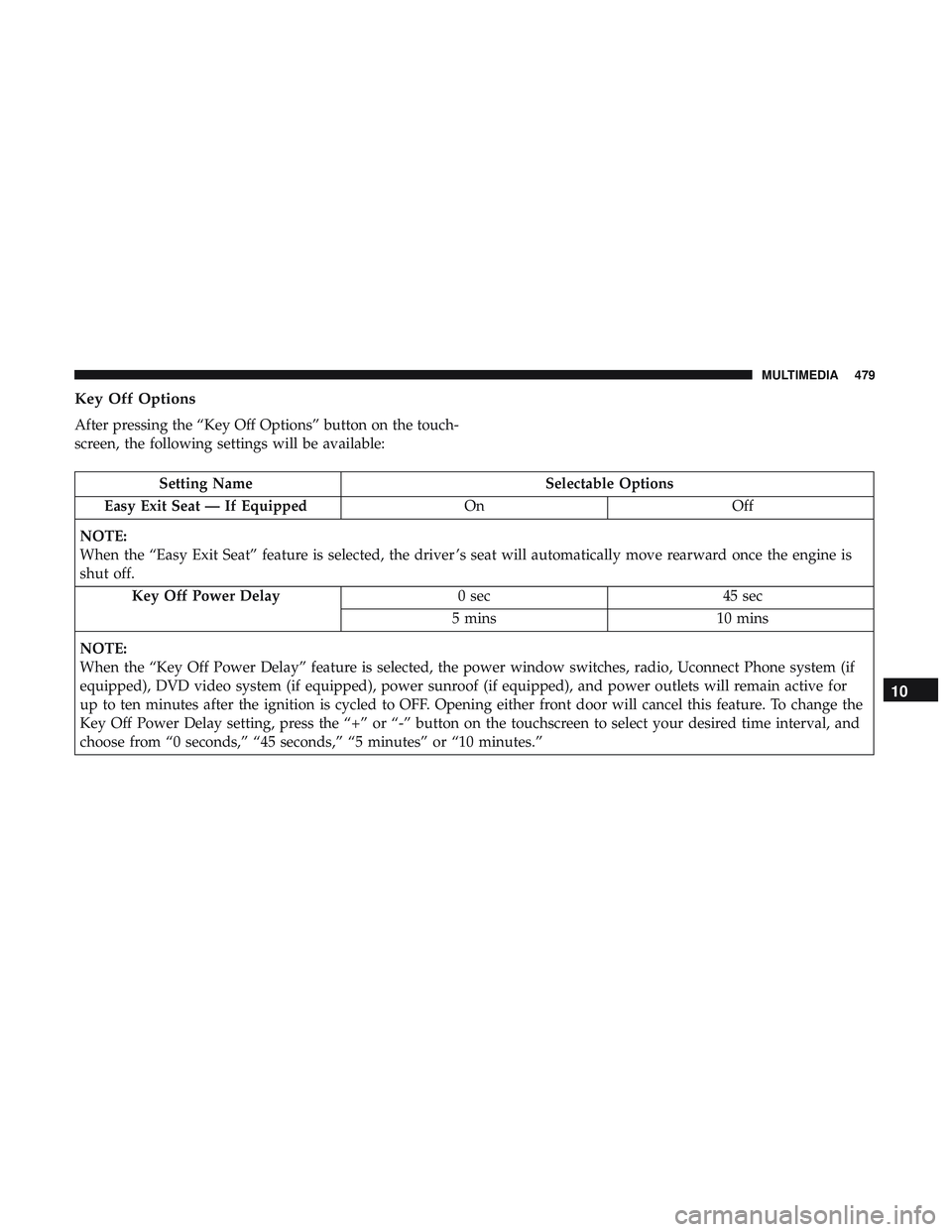
Key Off Options
After pressing the “Key Off Options” button on the touch-
screen, the following settings will be available:
Setting NameSelectable Options
Easy Exit Seat — If Equipped OnOff
NOTE:
When the “Easy Exit Seat” feature is selected, the driver ’s seat will automatically move rearward once the engine is
shut off. Key Off Power Delay 0 sec45 sec
5 mins 10 mins
NOTE:
When the “Key Off Power Delay” feature is selected, the power window switches, radio, Uconnect Phone system (if
equipped), DVD video system (if equipped), power sunroof (if equipped), and power outlets will remain active for
up to ten minutes after the ignition is cycled to OFF. Opening either front door will cancel this feature. To change the
Key Off Power Delay setting, press the “+” or “-” button on the touchscreen to select your desired time interval, and
choose from “0 seconds,” “45 seconds,” “5 minutes” or “10 minutes.”
10
MULTIMEDIA 479
Page 488 of 553
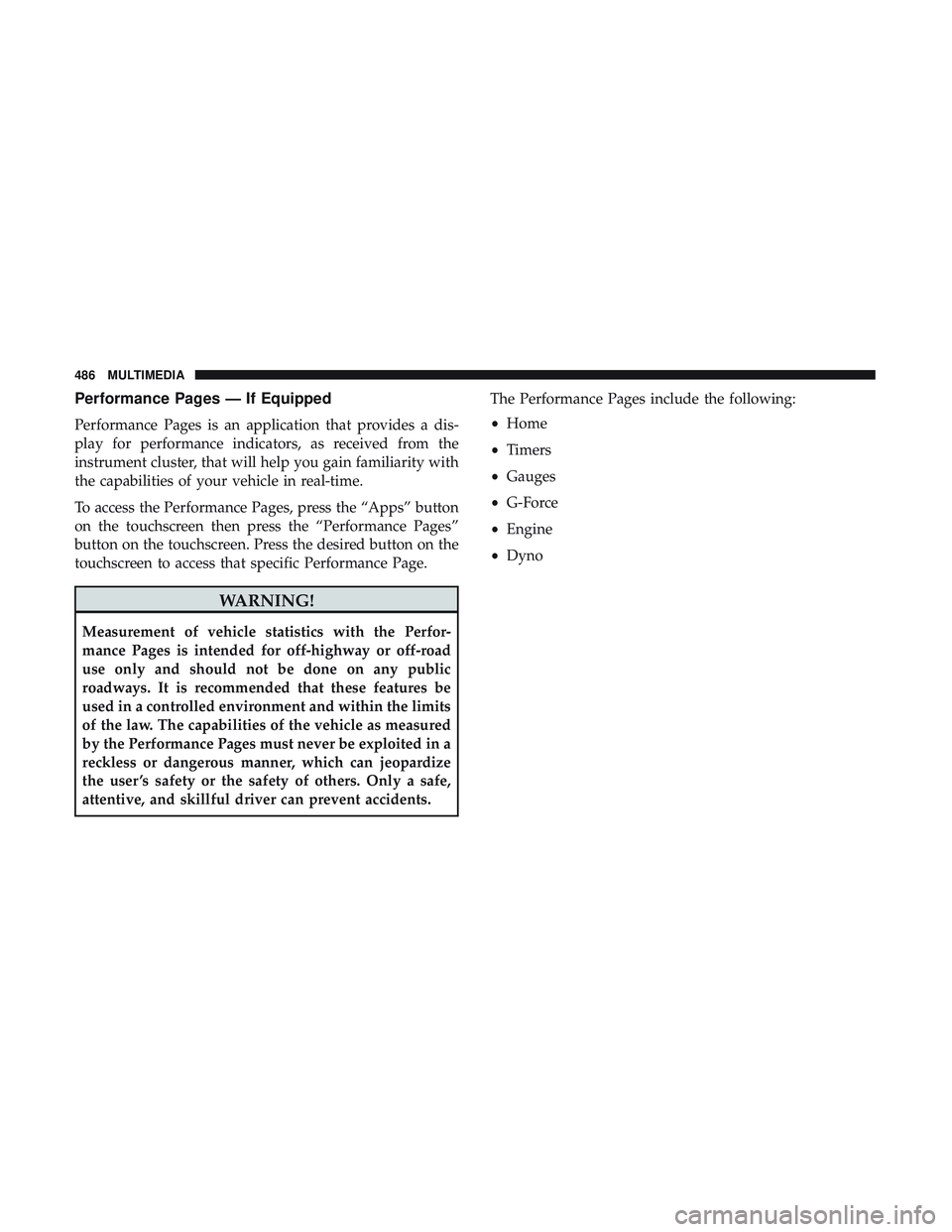
Performance Pages — If Equipped
Performance Pages is an application that provides a dis-
play for performance indicators, as received from the
instrument cluster, that will help you gain familiarity with
the capabilities of your vehicle in real-time.
To access the Performance Pages, press the “Apps” button
on the touchscreen then press the “Performance Pages”
button on the touchscreen. Press the desired button on the
touchscreen to access that specific Performance Page.
WARNING!
Measurement of vehicle statistics with the Perfor-
mance Pages is intended for off-highway or off-road
use only and should not be done on any public
roadways. It is recommended that these features be
used in a controlled environment and within the limits
of the law. The capabilities of the vehicle as measured
by the Performance Pages must never be exploited in a
reckless or dangerous manner, which can jeopardize
the user ’s safety or the safety of others. Only a safe,
attentive, and skillful driver can prevent accidents.The Performance Pages include the following:
•
Home
• Timers
• Gauges
• G-Force
• Engine
• Dyno
486 MULTIMEDIA