radio controls DODGE CHARGER 2020 User Guide
[x] Cancel search | Manufacturer: DODGE, Model Year: 2020, Model line: CHARGER, Model: DODGE CHARGER 2020Pages: 412, PDF Size: 18.96 MB
Page 371 of 412
MULTIMEDIA369
Apple CarPlay® Integration
NOTE:
Feature availability depends on your carrier and
mobile phone manufacturer. Some Apple
CarPlay® features may or may not be available
in every region and/or language.
Uconnect works seamlessly with Apple
CarPlay®, the smarter, more secure way to use
your iPhone® in the car, and stay focused on
the road. Use your Uconnect Touchscreen
display, the vehicle's knobs and controls, and
your voice with Siri to get access to Apple
Music®, Maps, Messages, and more.
To use Apple CarPlay®, make sure you are
using iPhone® 5 or later, have Siri enabled in
Settings, ensure your iPhone® is unlocked for
the very first connection only, and then use the
following procedure:
1. Connect your iPhone® to one of the media
USB ports in your vehicle.
NOTE:
Be sure to use the factory-provided Lightning
cable that came with your phone, as after -
market cables may not work.
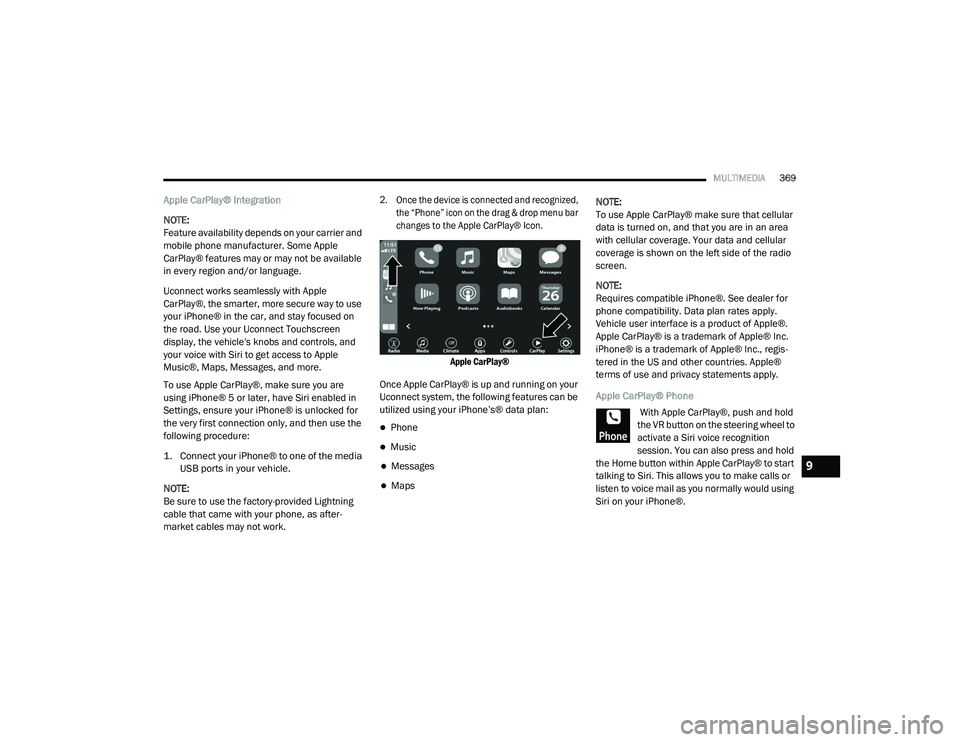
2. Once the device is connected and recognized, the “Phone” icon on the drag & drop menu bar
changes to the Apple CarPlay® Icon.
Apple CarPlay®
Once Apple CarPlay® is up and running on your
Uconnect system, the following features can be
utilized using your iPhone’s® data plan:
Phone
Music
Messages
Maps NOTE:
To use Apple CarPlay® make sure that cellular
data is turned on, and that you are in an area
with cellular coverage. Your data and cellular
coverage is shown on the left side of the radio
screen.
NOTE:
Requires compatible iPhone®. See dealer for
phone compatibility. Data plan rates apply.
Vehicle user interface is a product of Apple®.
Apple CarPlay® is a trademark of Apple® Inc.
iPhone® is a trademark of Apple® Inc., regis
-
tered in the US and other countries. Apple®
terms of use and privacy statements apply.
Apple CarPlay® Phone
With Apple CarPlay®, push and hold
the VR button on the steering wheel to
activate a Siri voice recognition
session. You can also press and hold
the Home button within Apple CarPlay® to start
talking to Siri. This allows you to make calls or
listen to voice mail as you normally would using
Siri on your iPhone®.
9
20_LD_OM_EN_USC_t.book Page 369
Page 384 of 412
382MULTIMEDIA
Fully Closed Windows
Dry Weather Conditions
Operation From The Driver's Seat
Performance such as audio clarity, echo, and
loudness to a large degree rely on the phone
and network, and not the Uconnect Phone.
Echo at the far end can sometimes be reduced
by lowering the in-vehicle audio volume.
Bluetooth® Communication Link
Mobile phones have been found to lose
connection to the Uconnect Phone. When this
happens, the connection can generally be
re-established by switching the mobile phone
OFF/ON. Your mobile phone is recommended to
remain in Bluetooth® ON mode.
Power-Up
After switching the ignition key from OFF to
either the ON/RUN or ACC position, or after a
language change, you must wait at least 15
seconds prior to using the system.
STEERING WHEEL AUDIO CONTROLS —
IF EQUIPPED
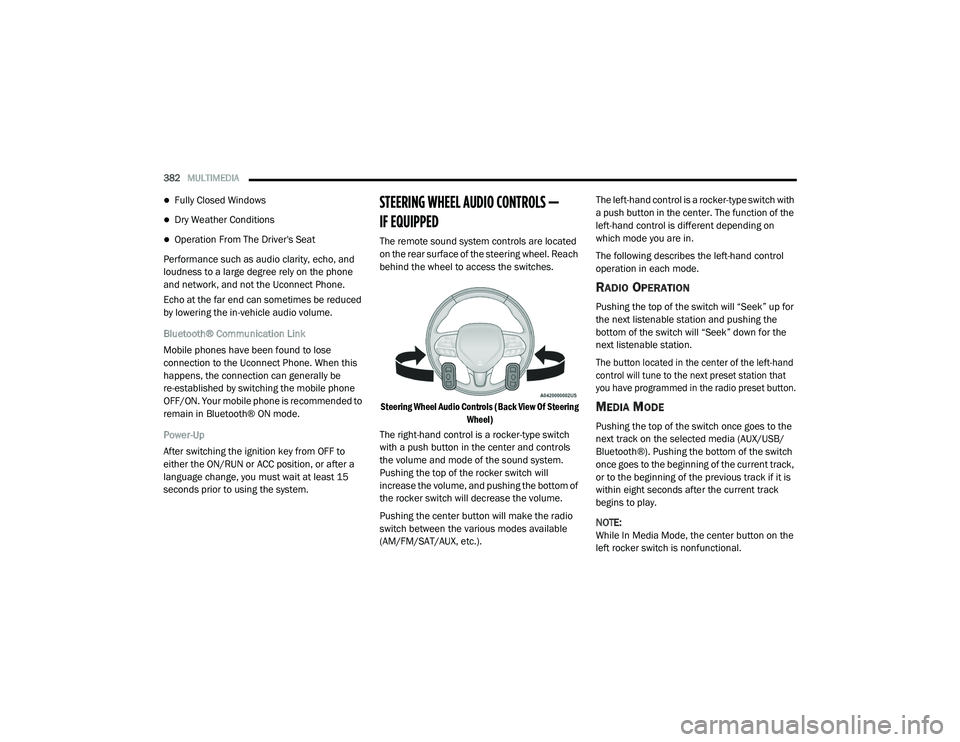
The remote sound system controls are located
on the rear surface of the steering wheel. Reach
behind the wheel to access the switches.
Steering Wheel Audio Controls (Back View Of Steering Wheel)
The right-hand control is a rocker-type switch
with a push button in the center and controls
the volume and mode of the sound system.
Pushing the top of the rocker switch will
increase the volume, and pushing the bottom of
the rocker switch will decrease the volume.
Pushing the center button will make the radio
switch between the various modes available
(AM/FM/SAT/AUX, etc.). The left-hand control is a rocker-type switch with
a push button in the center. The function of the
left-hand control is different depending on
which mode you are in.
The following describes the left-hand control
operation in each mode.
RADIO OPERATION
Pushing the top of the switch will “Seek” up for
the next listenable station and pushing the
bottom of the switch will “Seek” down for the
next listenable station.
The button located in the center of the left-hand
control will tune to the next preset station that
you have programmed in the radio preset button.
MEDIA MODE
Pushing the top of the switch once goes to the
next track on the selected media (AUX/USB/
Bluetooth®). Pushing the bottom of the switch
once goes to the beginning of the current track,
or to the beginning of the previous track if it is
within eight seconds after the current track
begins to play.
NOTE:
While In Media Mode, the center button on the
left rocker switch is nonfunctional.
20_LD_OM_EN_USC_t.book Page 382
Page 404 of 412
402 Operating Instructions
............................... 129Pregnant Women...................................... 132Pretensioners............................................ 132Rear Seat.................................................. 127Reminder.................................................. 126Seat Belt Extender.................................... 131Seat Belt Pretensioner.............................. 132Untwisting Procedure................................ 130Seat Belts Maintenance................................ 306Seats................................................. 32, 34, 36Adjustment........................................... 32, 34Easy Entry................................................... 35Head Restraints................................... 38, 39Heated........................................................ 36Height Adjustment....................................... 34Power.......................................................... 34Rear Folding......................................... 32, 33Seatback Release................................ 32, 33Tilting................................................... 32, 34Vented......................................................... 37Ventilated.................................................... 37Security Alarm.......................................... 24, 98Arm The System.......................................... 24Selection Of Coolant (Antifreeze)......... 315, 318Sentry KeyKey Programming........................................ 23Sentry Key (Immobilizer).................................. 22Sentry Key Replacement.......................... 17, 23Service Assistance......................................... 391Service Contract............................................ 392
Service Manuals........................................... 394Shifting......................................................... 165Automatic Transmission.................. 165, 167Shoulder Belts.............................................. 127Side View Mirror Adjustment............................ 43Signals, Turn................................. 48, 103, 157Siri................................................................ 388Sirius Satellite Radio..................................... 358Favorites................................................... 360Replay...................................................... 359SiriusXM Satellite RadioBrowse in SXM......................................... 360Favorites................................................... 360Replay...................................................... 359Snow Chains (Tire Chains)................... 301, 302Snow Tires.................................................... 298Spare Tires........................ 230, 298, 299, 300Spark Plugs.......................................... 315, 318SpecificationsFuel (Gasoline)................................ 315, 318Oil.................................................... 315, 318Speed ControlAccel/Decel..................................... 176, 177Accel/Decel (ACC Only)............................. 181Cancel...................................................... 177Resume.................................................... 177Set............................................................ 176Speed Control (Cruise Control)............ 175, 177Sport Mode................................................... 174
Starting......................................................... 159Automatic Transmission........................... 159Button..........................................................18Cold Weather............................................ 162Engine Fails To Start................................. 162Starting And Operating.................................. 159Starting Procedures...................................... 159Steering...........................................................40Column Lock................................................40Power........................................................ 174Tilt Column...................................................40Wheel, Heated.............................................41Wheel, Tilt....................................................40Steering Wheel Audio Controls...................... 382Steering Wheel Mounted Sound
System Controls............................................ 382Storage.................................................. 76, 304Storage, Vehicle..................................... 63, 304Store Radio Presets...................................... 357Storing Your Vehicle...................................... 304Stuck, Freeing............................................... 244Sun Roof...................................................66, 68Sunglasses Storage.........................................79Supplemental Restraint System – Air Bag.... 135Synthetic Engine Oil...................................... 274
T
Telescoping Steering Column...........................40Temperature Control, Automatic (ATC).............62Tilt Steering Column.........................................40
20_LD_OM_EN_USC_t.book Page 402