climate control DODGE CHARGER 2020 Owner's Manual
[x] Cancel search | Manufacturer: DODGE, Model Year: 2020, Model line: CHARGER, Model: DODGE CHARGER 2020Pages: 412, PDF Size: 18.96 MB
Page 305 of 412
SERVICING AND MAINTENANCE303
TIRE ROTATION RECOMMENDATIONS —
SRT
Tires on the front and rear axles of vehicles
operate at different loads and perform different
steering, driving, and braking functions. For
these reasons, they wear at unequal rates.
These effects can be reduced by timely rotation
of tires. The benefits of rotation are especially
worthwhile with aggressive tread designs such
as those on all season type tires. Rotation will
increase tread life, help to maintain mud, snow
and wet traction levels, and contribute to a
smooth, quiet ride.
Refer to “Scheduled Servicing” in “Servicing
And Maintenance” for the proper maintenance
intervals. The reasons for any rapid or unusual
wear should be corrected prior to rotation being
performed.
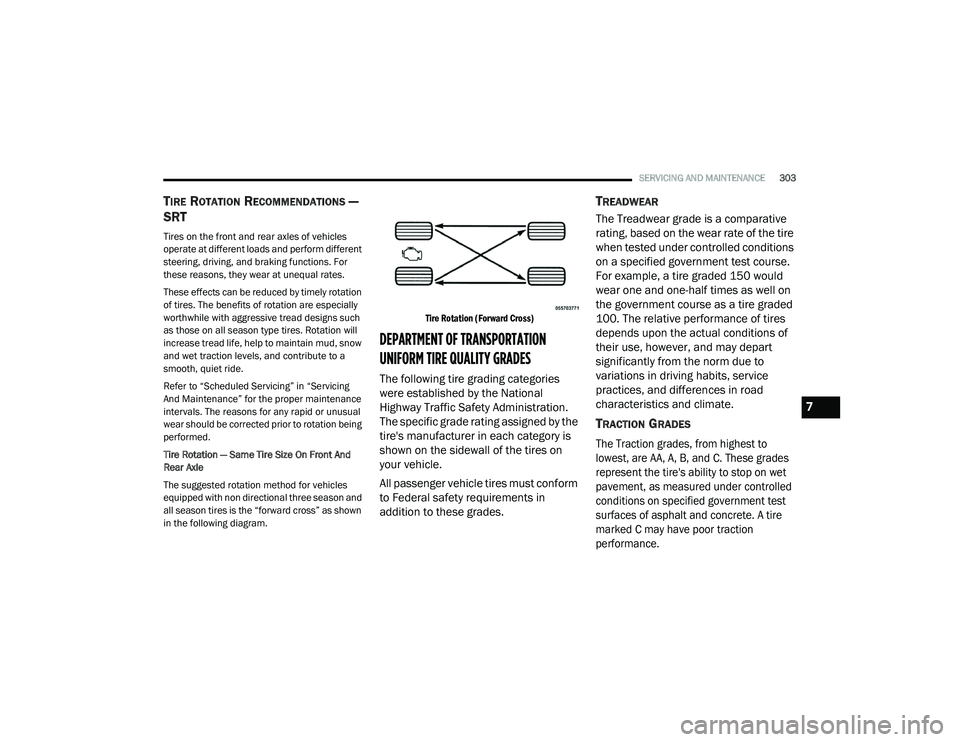
Tire Rotation — Same Tire Size On Front And
Rear Axle
The suggested rotation method for vehicles
equipped with non directional three season and
all season tires is the “forward cross” as shown
in the following diagram.
Tire Rotation (Forward Cross)
DEPARTMENT OF TRANSPORTATION
UNIFORM TIRE QUALITY GRADES
The following tire grading categories
were established by the National
Highway Traffic Safety Administration.
The specific grade rating assigned by the
tire's manufacturer in each category is
shown on the sidewall of the tires on
your vehicle.
All passenger vehicle tires must conform
to Federal safety requirements in
addition to these grades.
TREADWEAR
The Treadwear grade is a comparative
rating, based on the wear rate of the tire
when tested under controlled conditions
on a specified government test course.
For example, a tire graded 150 would
wear one and one-half times as well on
the government course as a tire graded
100. The relative performance of tires
depends upon the actual conditions of
their use, however, and may depart
significantly from the norm due to
variations in driving habits, service
practices, and differences in road
characteristics and climate.
TRACTION GRADES
The Traction grades, from highest to
lowest, are AA, A, B, and C. These grades
represent the tire's ability to stop on wet
pavement, as measured under controlled
conditions on specified government test
surfaces of asphalt and concrete. A tire
marked C may have poor traction
performance.
7
20_LD_OM_EN_USC_t.book Page 303
Page 357 of 412
MULTIMEDIA355
Do not spray any liquid or caustic chemicals
directly on the screen! Use a clean and dry
microfiber lens cleaning cloth in order to
clean the touchscreen.
If necessary, use a lint-free cloth dampened
with a cleaning solution, such as isopropyl
alcohol or an isopropyl alcohol and water
solution ratio of 50:50. Be sure to follow the
solvent manufacturer's precautions and
directions.
UCONNECT 4 WITH 7-INCH DISPLAY
INTRODUCTION
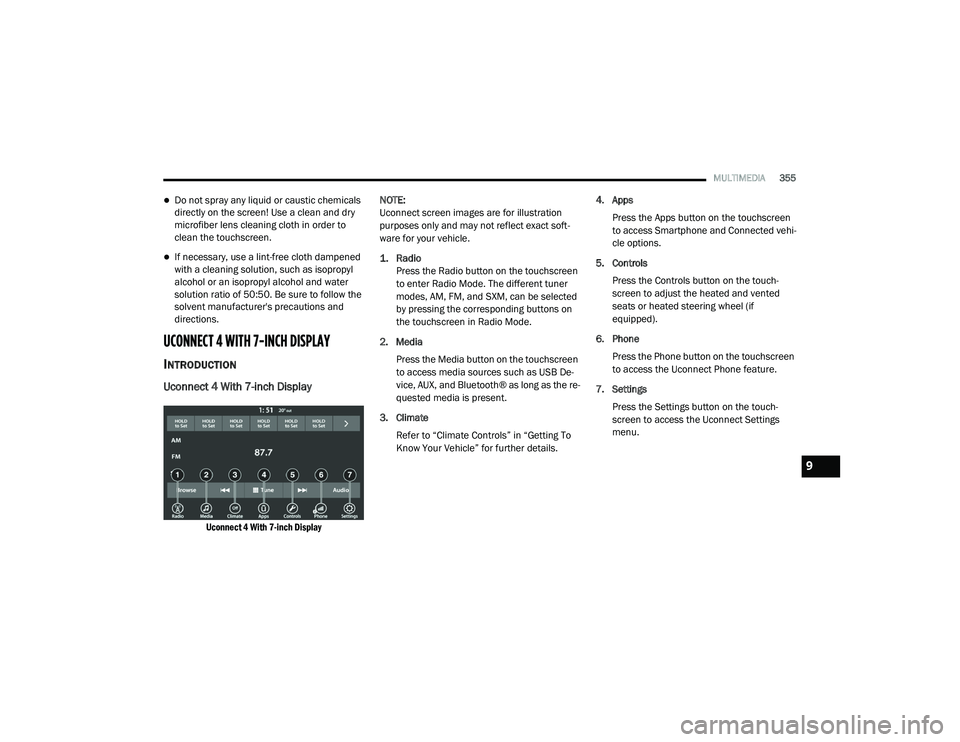
Uconnect 4 With 7-inch Display
Uconnect 4 With 7-inch Display
NOTE:
Uconnect screen images are for illustration
purposes only and may not reflect exact soft
-
ware for your vehicle.
1. Radio
Press the Radio button on the touchscreen
to enter Radio Mode. The different tuner
modes, AM, FM, and SXM, can be selected
by pressing the corresponding buttons on
the touchscreen in Radio Mode.
2. Media Press the Media button on the touchscreen
to access media sources such as USB De -
vice, AUX, and Bluetooth® as long as the re -
quested media is present.
3. Climate Refer to “Climate Controls” in “Getting To
Know Your Vehicle” for further details. 4. Apps
Press the Apps button on the touchscreen
to access Smartphone and Connected vehi -
cle options.
5. Controls Press the Controls button on the touch -
screen to adjust the heated and vented
seats or heated steering wheel (if
equipped).
6. Phone Press the Phone button on the touchscreen
to access the Uconnect Phone feature.
7. Settings Press the Settings button on the touch -
screen to access the Uconnect Settings
menu.
9
20_LD_OM_EN_USC_t.book Page 355
Page 390 of 412
388MULTIMEDIA
Apple® iPhone® iOS 6 or later supports reading
incoming text messages only. For further
information on how to enable this feature on
your Apple® iPhone®, refer to your iPhone’s®
“User Manual”.
TIP:
Voice Text Reply is not compatible with
iPhone®, but if your vehicle is equipped with
Siri® Eyes Free, you can use your voice to send
a text message.
CLIMATE
Adjust vehicle temperatures hands-free and
keep everyone comfortable while you keep
moving ahead. (If vehicle is equipped with
climate control.)
Push the VR button. After the beep, say one of
the following commands:
“ Set driver temperature to 70 degrees ”
“Set passenger temperature to 70 degrees ”
TIP:
Voice Command for Climate may only be used
to adjust the interior temperature of your
vehicle. Voice Command will not work to adjust
the heated seats or steering wheel if equipped.
NAVIGATION (4C NAV)
The Uconnect navigation feature helps you save
time and become more productive when you
know exactly how to get to where you want to go.
1. To enter a destination, push the VR button
. After the beep, say: “ Find address
800
Chrysler Drive Auburn Hills, Michigan.”
2. Then follow the system prompts.
TIP:
To start a POI search, push the VR button .
After the beep, say: “ Find nearest coffee shop.”
SIRI® EYES FREE — IF EQUIPPED
Siri lets you use your voice to send text
messages, select media, place phone calls and
much more. Siri uses your natural language to
understand what you mean and responds back
to confirm your requests. The system is
designed to keep your eyes on the road and
your hands on the wheel by letting Siri help you
perform useful tasks.
To enable Siri, push and hold, then release the
Uconnect Voice Recognition (VR) button on the
steering wheel. After you hear a double beep
you can ask Siri to play podcasts and music, get directions, read text messages, and many other
useful requests.
DO NOT DISTURB
With Do Not Disturb, you can disable
notifications from incoming calls and texts,
allowing you to keep your eyes on the road and
hands on the wheel. For your convenience,
there is a counter display to keep track of your
missed calls and text messages while you were
using Do Not Disturb.
Do Not Disturb can automatically reply with a
text message, a call or both, when declining an
incoming call and send it to voicemail.
Automatic reply messages can be:
“I am driving right now, I will get back to you
shortly”.
Create a custom auto reply message up to
160 characters.
NOTE:
Only the first 25 characters can be seen on the
touchscreen while typing a custom message.
While in Do Not Disturb, Conference Call can be
selected so you can still place a second call
without being interrupted by incoming calls.
20_LD_OM_EN_USC_t.book Page 388
Page 398 of 412
396 Autostick Operation
.................................................. 172AUX Cord........................................................ 383Aux Mode....................................................... 365Auxiliary Electrical Outlet (Power Outlet).......... 78AWDTowing....................................................... 249Axle Fluid........................... 315, 317, 318, 320Axle Lubrication................. 315, 317, 318, 320
B
Back-Up......................................................... 199Battery.................................................... 96, 271Charging System Light................................. 96Keyless Key Fob Replacement.................... 15Location.................................................... 271Belts, Seat..................................................... 156BluetoothConnect Or Disconnect Link Between the Uconnect Phone And Mobile Phone
...... 381Connecting To A Particular Mobile Phone Or Audio Device After Pairing................376Bluetooth Mode............................................. 366Body Mechanism Lubrication........................ 277B-Pillar Location............................................. 290Brake Assist System...................................... 107Brake Control System.................................... 107Brake Fluid...............284, 315, 317, 318, 320
Brake System...................................... 284, 308Fluid Check.......... 284, 315, 317, 318, 320Master Cylinder........................................ 284Parking..................................................... 164Warning Light.....................................95, 308Brake/Transmission Interlock...................... 167Break-In Recommendations, New Vehicle.... 163Brightness, Interior Lights................................ 50Bulb Replacement........................................ 217Bulbs, Light.......................................... 157, 217
C
Camera, Rear................................................ 199Capacities, Fluid.................................. 313, 314Caps, FillerOil (Engine)...................................... 266, 274Radiator (Coolant Pressure)..................... 282Car Washes................................................... 305Carbon Monoxide Warning................... 155, 312CargoVehicle Loading........................................ 202Cargo Area Cover............................................. 70Cargo Compartment........................................ 70Cellular Phone.............................................. 383Certification Label......................................... 202Chains, Tire.......................................... 301, 302Changing A Flat Tire...................................... 286Chart, Tire Sizing........................................... 287
Check Engine Light (Malfunction
Indicator Light).............................................. 105Checking Your Vehicle For Safety.................. 155Checks, Safety.............................................. 155Child Restraint.............................................. 143Child RestraintsBooster Seats........................................... 145Child Seat Installation............................... 152How To Stow An unused ALR Seat Belt..... 150Infant And Child Restraints....................... 144Lower Anchors And Tethers For Children.. 147Older Children And Child Restraints.......... 145Seating Positions...................................... 146Child Safety Locks............................................30Clean Air Gasoline......................................... 310CleaningWheels...................................................... 300Climate Control................................................52Automatic....................................................57Manual........................................................53Coin Holder......................................................76Cold Weather Operation................................ 162Compact Spare Tire...................................... 299ConsoleFloor............................................................76Contract, Service........................................... 392Cooling Pressure Cap (Radiator Cap)............ 282
20_LD_OM_EN_USC_t.book Page 396