door lock DODGE CHARGER 2020 Owner's Guide
[x] Cancel search | Manufacturer: DODGE, Model Year: 2020, Model line: CHARGER, Model: DODGE CHARGER 2020Pages: 412, PDF Size: 18.96 MB
Page 228 of 412
226IN CASE OF EMERGENCY
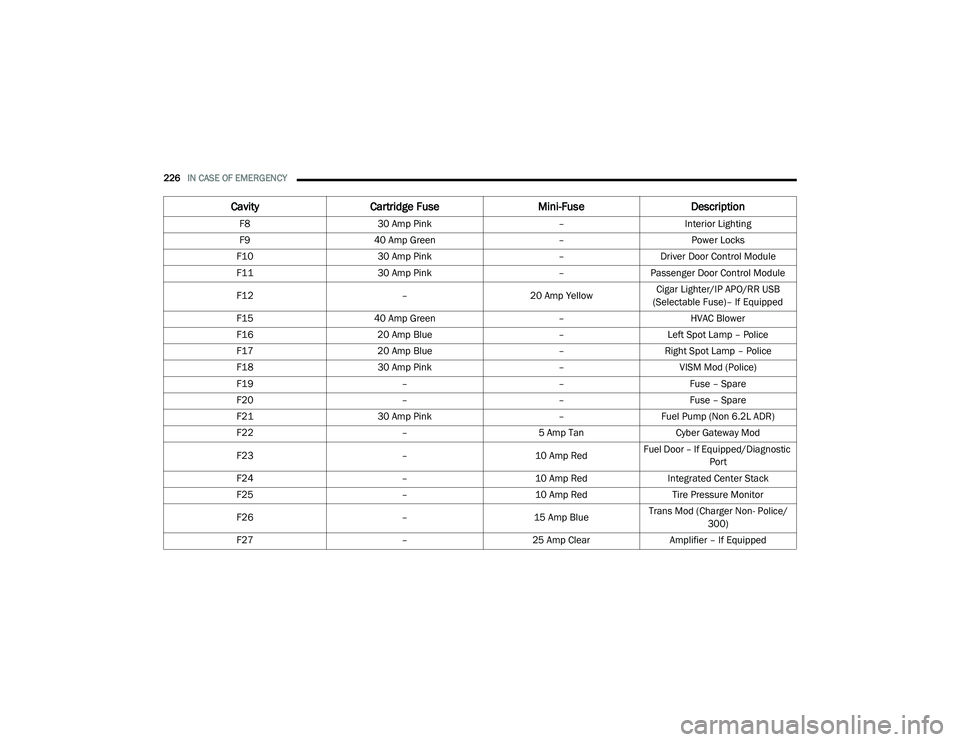
F8 30 Amp Pink –Interior Lighting
F9 40 Amp Green –Power Locks
F10 30 Amp Pink –Driver Door Control Module
F11 30 Amp Pink –Passenger Door Control Module
F12 –20 Amp YellowCigar Lighter/IP APO/RR USB
(Selectable Fuse)– If Equipped
F15 40 Amp Green –HVAC Blower
F16 20 Amp Blue –Left Spot Lamp – Police
F17 20 Amp Blue –Right Spot Lamp – Police
F18 30 Amp Pink –VISM Mod (Police)
F19 ––Fuse – Spare
F20 ––Fuse – Spare
F21 30 Amp Pink –Fuel Pump (Non 6.2L ADR)
F22 –5 Amp Tan Cyber Gateway Mod
F23 –10 Amp RedFuel Door – If Equipped/Diagnostic
Port
F24 –10 Amp RedIntegrated Center Stack
F25 –10 Amp Red Tire Pressure Monitor
F26 –15 Amp BlueTrans Mod (Charger Non- Police/
300)
F27 –25 Amp Clear Amplifier – If Equipped
CavityCartridge Fuse Mini-FuseDescription
20_LD_OM_EN_USC_t.book Page 226
Page 241 of 412
IN CASE OF EMERGENCY239
(E) After Driving:
Pull over to a safe location. Refer to “(A)
Whenever You Stop To Use Tire Service Kit”
before continuing.
1. Push in the Mode Select Knob (5) and turn
to the Air Mode position.
2. Uncoil the power plug and insert the plug into the vehicle's 12 Volt power outlet.
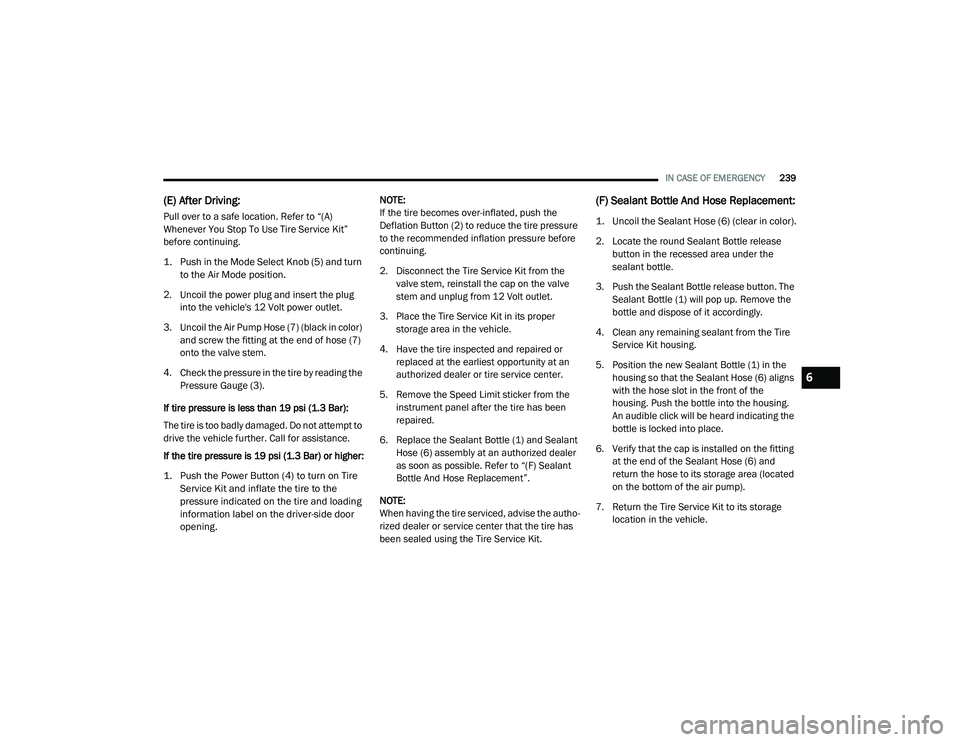
3. Uncoil the Air Pump Hose (7) (black in color) and screw the fitting at the end of hose (7)
onto the valve stem.
4. Check the pressure in the tire by reading the Pressure Gauge (3).
If tire pressure is less than 19 psi (1.3 Bar):
The tire is too badly damaged. Do not attempt to
drive the vehicle further. Call for assistance.
If the tire pressure is 19 psi (1.3 Bar) or higher:
1. Push the Power Button (4) to turn on Tire Service Kit and inflate the tire to the
pressure indicated on the tire and loading
information label on the driver-side door
opening.
NOTE:
If the tire becomes over-inflated, push the
Deflation Button (2) to reduce the tire pressure
to the recommended inflation pressure before
continuing.
2. Disconnect the Tire Service Kit from the
valve stem, reinstall the cap on the valve
stem and unplug from 12 Volt outlet.
3. Place the Tire Service Kit in its proper storage area in the vehicle.
4. Have the tire inspected and repaired or replaced at the earliest opportunity at an
authorized dealer or tire service center.
5. Remove the Speed Limit sticker from the instrument panel after the tire has been
repaired.
6. Replace the Sealant Bottle (1) and Sealant Hose (6) assembly at an authorized dealer
as soon as possible. Refer to “(F) Sealant
Bottle And Hose Replacement”.
NOTE:
When having the tire serviced, advise the autho -
rized dealer or service center that the tire has
been sealed using the Tire Service Kit.
(F) Sealant Bottle And Hose Replacement:
1. Uncoil the Sealant Hose (6) (clear in color).
2. Locate the round Sealant Bottle release button in the recessed area under the
sealant bottle.
3. Push the Sealant Bottle release button. The Sealant Bottle (1) will pop up. Remove the
bottle and dispose of it accordingly.
4. Clean any remaining sealant from the Tire Service Kit housing.
5. Position the new Sealant Bottle (1) in the housing so that the Sealant Hose (6) aligns
with the hose slot in the front of the
housing. Push the bottle into the housing.
An audible click will be heard indicating the
bottle is locked into place.
6. Verify that the cap is installed on the fitting at the end of the Sealant Hose (6) and
return the hose to its storage area (located
on the bottom of the air pump).
7. Return the Tire Service Kit to its storage location in the vehicle.
6
20_LD_OM_EN_USC_t.book Page 239
Page 279 of 412
SERVICING AND MAINTENANCE277
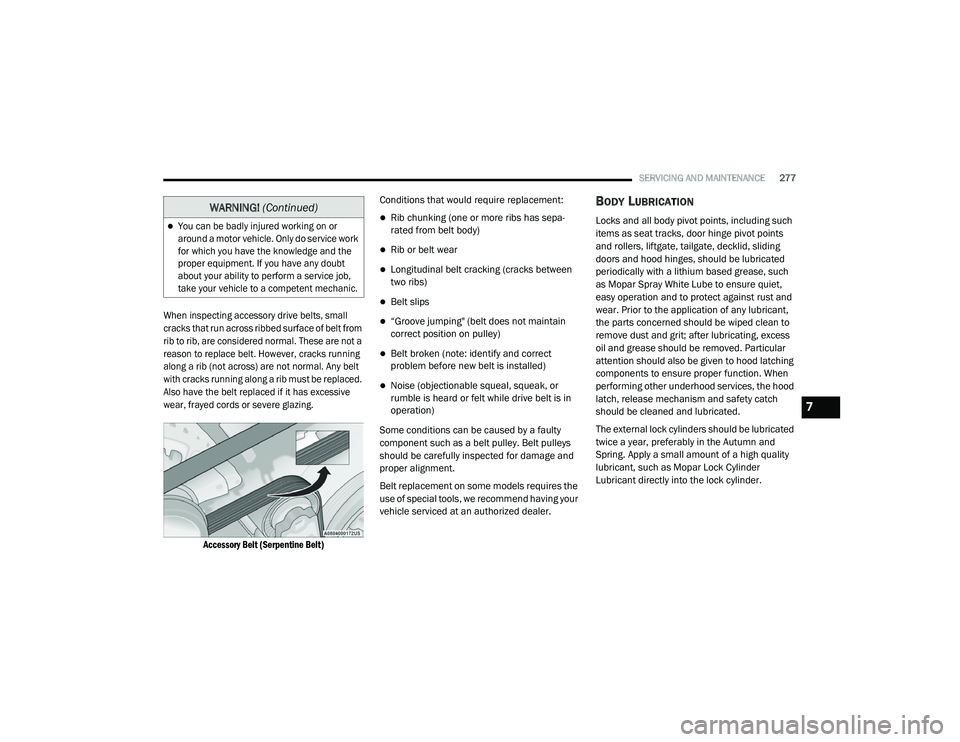
When inspecting accessory drive belts, small
cracks that run across ribbed surface of belt from
rib to rib, are considered normal. These are not a
reason to replace belt. However, cracks running
along a rib (not across) are not normal. Any belt
with cracks running along a rib must be replaced.
Also have the belt replaced if it has excessive
wear, frayed cords or severe glazing.
Accessory Belt (Serpentine Belt)
Conditions that would require replacement:
Rib chunking (one or more ribs has sepa
-
rated from belt body)
Rib or belt wear
Longitudinal belt cracking (cracks between
two ribs)
Belt slips
“Groove jumping" (belt does not maintain
correct position on pulley)
Belt broken (note: identify and correct
problem before new belt is installed)
Noise (objectionable squeal, squeak, or
rumble is heard or felt while drive belt is in
operation)
Some conditions can be caused by a faulty
component such as a belt pulley. Belt pulleys
should be carefully inspected for damage and
proper alignment.
Belt replacement on some models requires the
use of special tools, we recommend having your
vehicle serviced at an authorized dealer.
BODY LUBRICATION
Locks and all body pivot points, including such
items as seat tracks, door hinge pivot points
and rollers, liftgate, tailgate, decklid, sliding
doors and hood hinges, should be lubricated
periodically with a lithium based grease, such
as Mopar Spray White Lube to ensure quiet,
easy operation and to protect against rust and
wear. Prior to the application of any lubricant,
the parts concerned should be wiped clean to
remove dust and grit; after lubricating, excess
oil and grease should be removed. Particular
attention should also be given to hood latching
components to ensure proper function. When
performing other underhood services, the hood
latch, release mechanism and safety catch
should be cleaned and lubricated.
The external lock cylinders should be lubricated
twice a year, preferably in the Autumn and
Spring. Apply a small amount of a high quality
lubricant, such as Mopar Lock Cylinder
Lubricant directly into the lock cylinder.
You can be badly injured working on or
around a motor vehicle. Only do service work
for which you have the knowledge and the
proper equipment. If you have any doubt
about your ability to perform a service job,
take your vehicle to a competent mechanic.
WARNING! (Continued)
7
20_LD_OM_EN_USC_t.book Page 277
Page 333 of 412
MULTIMEDIA331
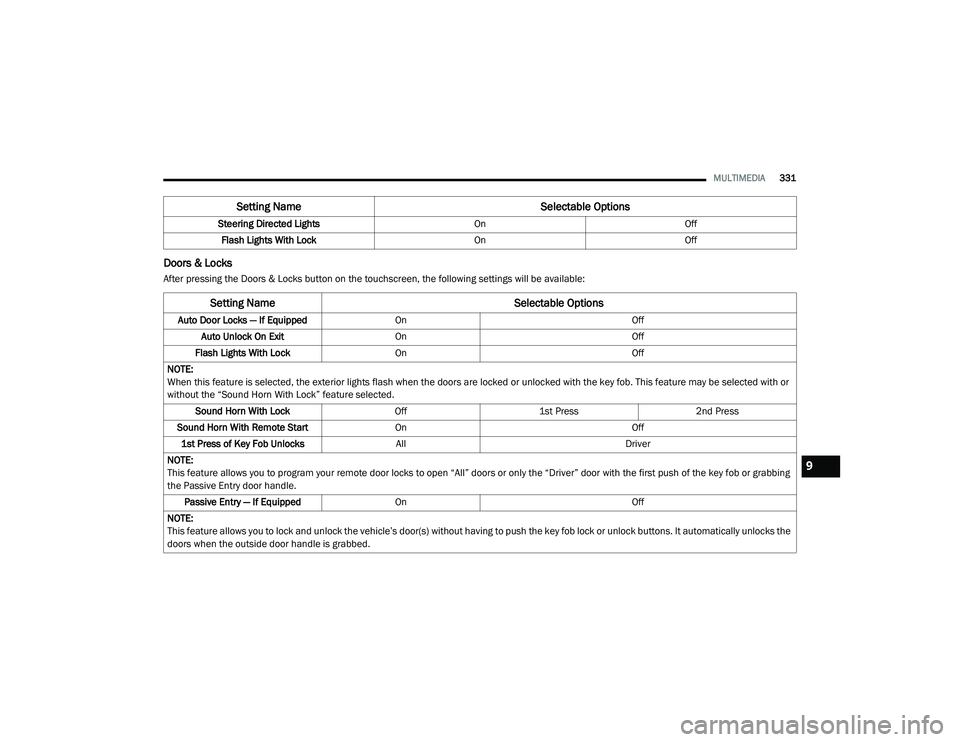
Doors & Locks
After pressing the Doors & Locks button on the touchscreen, the following settings will be available:Steering Directed Lights
OnOff
Flash Lights With Lock OnOff
Setting Name Selectable Options
Setting NameSelectable Options
Auto Door Locks — If EquippedOn Off
Auto Unlock On Exit On Off
Flash Lights With Lock On Off
NOTE:
When this feature is selected, the exterior lights flash when the doors are locked or unlocked with the key fob. This feature may be selected with or
without the “Sound Horn With Lock” feature selected. Sound Horn With Lock Off1st Press 2nd Press
Sound Horn With Remote Start On Off
1st Press of Key Fob Unlocks All Driver
NOTE:
This feature allows you to program your remote door locks to open “All” doors or only the “Driver” door with the first push of the key fob or grabbing
the Passive Entry door handle. Passive Entry — If Equipped On Off
NOTE:
This feature allows you to lock and unlock the vehicle’s door(s) without having to push the key fob lock or unlock buttons. It automatically unlocks the
doors when the outside door handle is grabbed.
9
20_LD_OM_EN_USC_t.book Page 331
Page 334 of 412
332MULTIMEDIA
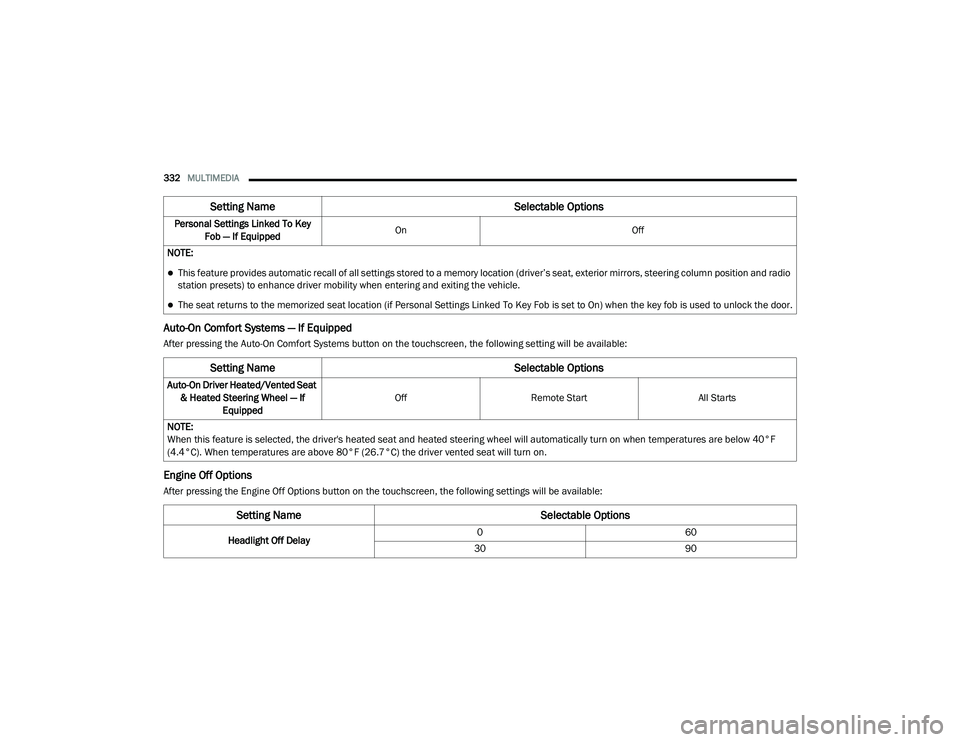
Auto-On Comfort Systems — If Equipped
After pressing the Auto-On Comfort Systems button on the touchscreen, the following setting will be available:
Engine Off Options
After pressing the Engine Off Options button on the touchscreen, the following settings will be available:Personal Settings Linked To Key
Fob — If Equipped On
Off
NOTE:
This feature provides automatic recall of all settings stored to a memory location (driver’s seat, exterior mirrors, steering column position and radio
station presets) to enhance driver mobility when entering and exiting the vehicle.
The seat returns to the memorized seat location (if Personal Settings Linked To Key Fob is set to On) when the key fob is used to unlock the door.
Setting Name Selectable Options
Setting NameSelectable Options
Auto-On Driver Heated/Vented Seat
& Heated Steering Wheel — If Equipped Off
Remote Start All Starts
NOTE:
When this feature is selected, the driver's heated seat and heated steering wheel will automatically turn on when temperatures are below 40°F
(4.4°C). When temperatures are above 80°F (26.7°C) the driver vented seat will turn on.
Setting Name Selectable Options
Headlight Off Delay0
60
30 90
20_LD_OM_EN_USC_t.book Page 332
Page 339 of 412
MULTIMEDIA337
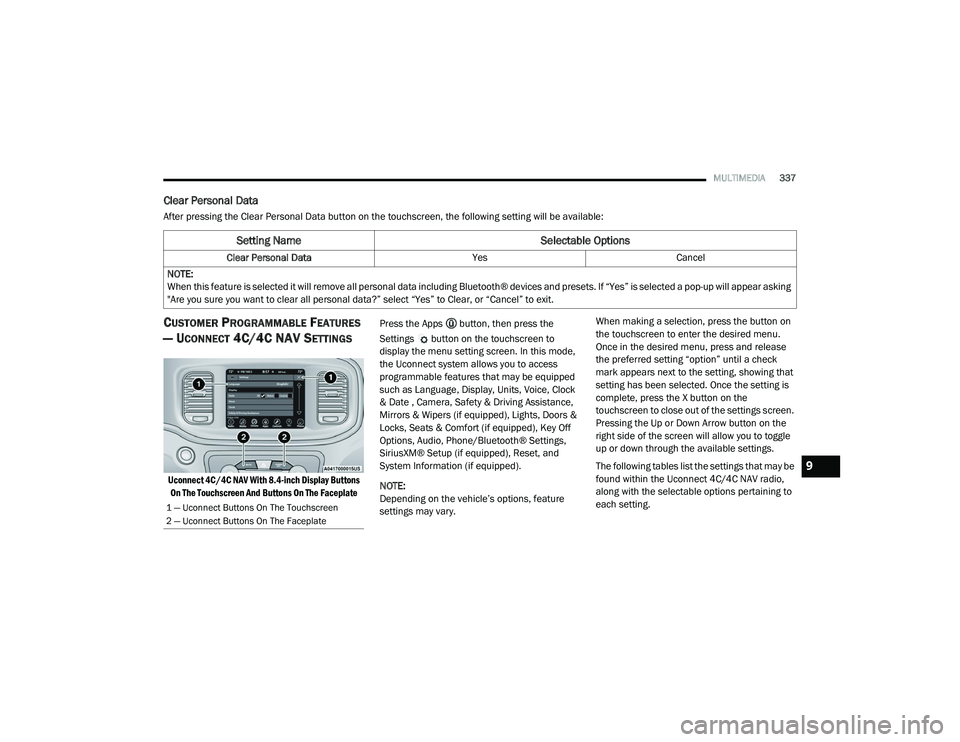
Clear Personal Data
After pressing the Clear Personal Data button on the touchscreen, the following setting will be available:
CUSTOMER PROGRAMMABLE FEATURES
— U
CONNECT 4C/4C NAV SETTINGS
Uconnect 4C/4C NAV With 8.4-inch Display Buttons
On The Touchscreen And Buttons On The Faceplate
Press the Apps button, then press the
Settings button on the touchscreen to
display the menu setting screen. In this mode,
the Uconnect system allows you to access
programmable features that may be equipped
such as Language, Display, Units, Voice, Clock
& Date , Camera, Safety & Driving Assistance,
Mirrors & Wipers (if equipped), Lights, Doors &
Locks, Seats & Comfort (if equipped), Key Off
Options, Audio, Phone/Bluetooth® Settings,
SiriusXM® Setup (if equipped), Reset, and
System Information (if equipped).
NOTE:
Depending on the vehicle’s options, feature
settings may vary. When making a selection, press the button on
the touchscreen to enter the desired menu.
Once in the desired menu, press and release
the preferred setting “option” until a check
mark appears next to the setting, showing that
setting has been selected. Once the setting is
complete, press the X button on the
touchscreen to close out of the settings screen.
Pressing the Up or Down Arrow button on the
right side of the screen will allow you to toggle
up or down through the available settings.
The following tables list the settings that may be
found within the Uconnect 4C/4C NAV radio,
along with the selectable options pertaining to
each setting.
Setting Name
Selectable Options
Clear Personal DataYesCancel
NOTE:
When this feature is selected it will remove all personal data including Bluetooth® devices and presets. If “Yes” is selected a pop-up will appear asking
"Are you sure you want to clear all personal data?” select “Yes” to Clear, or “Cancel” to exit.
1 — Uconnect Buttons On The Touchscreen
2 — Uconnect Buttons On The Faceplate
9
20_LD_OM_EN_USC_t.book Page 337
Page 348 of 412
346MULTIMEDIA
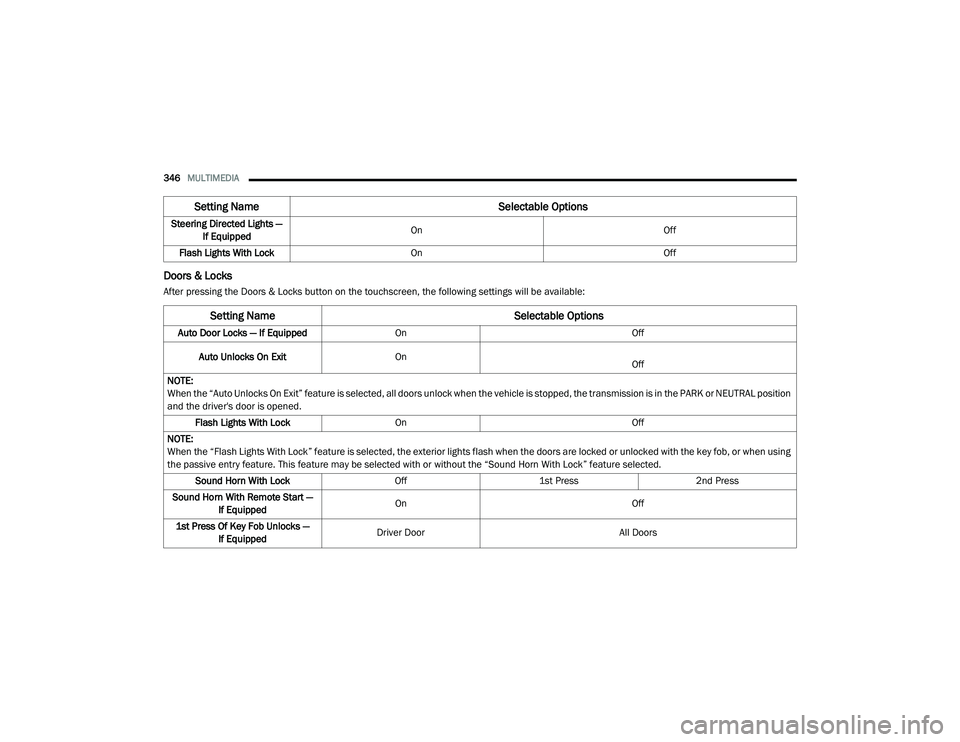
Doors & Locks
After pressing the Doors & Locks button on the touchscreen, the following settings will be available:Steering Directed Lights —
If Equipped On
Off
Flash Lights With Lock On Off
Setting Name Selectable Options
Setting NameSelectable Options
Auto Door Locks — If EquippedOn Off
Auto Unlocks On Exit On
Off
NOTE:
When the “Auto Unlocks On Exit” feature is selected, all doors unlock when the vehicle is stopped, the transmission is in the PARK or NEUTRAL position
and the driver's door is opened. Flash Lights With Lock On Off
NOTE:
When the “Flash Lights With Lock” feature is selected, the exterior lights flash when the doors are locked or unlocked with the key fob, or when using
the passive entry feature. This feature may be selected with or without the “Sound Horn With Lock” feature selected. Sound Horn With Lock Off1st Press 2nd Press
Sound Horn With Remote Start — If Equipped On
Off
1st Press Of Key Fob Unlocks — If Equipped Driver Door
All Doors
20_LD_OM_EN_USC_t.book Page 346
Page 349 of 412
MULTIMEDIA347
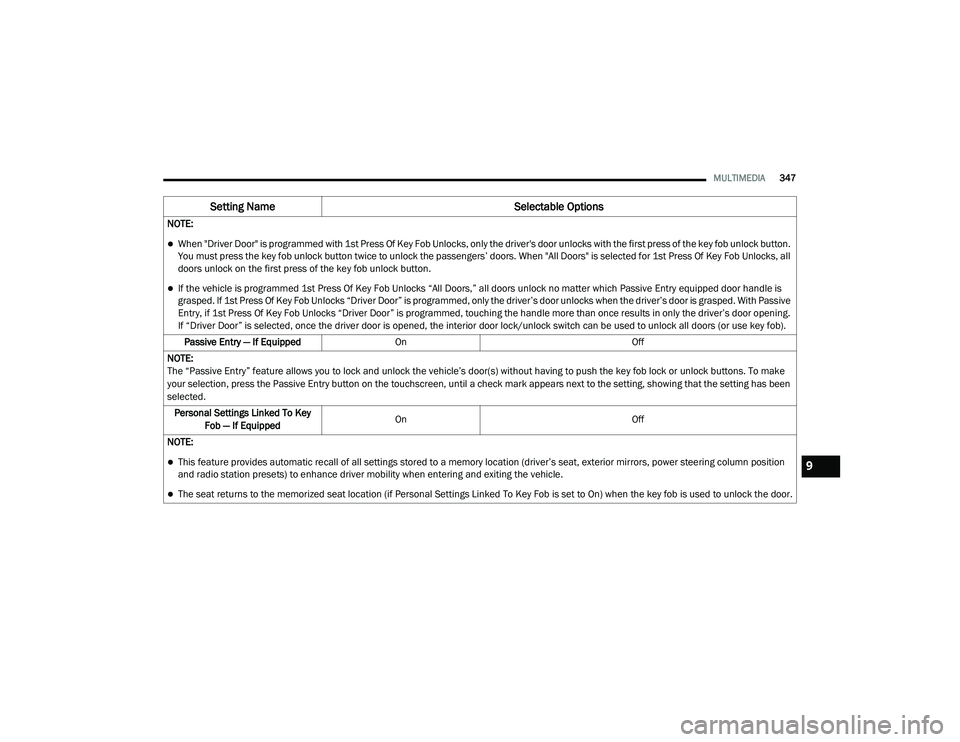
NOTE:
When "Driver Door" is programmed with 1st Press Of Key Fob Unlocks, only the driver's door unlocks with the first press of the key fob unlock button.
You must press the key fob unlock button twice to unlock the passengers’ doors. When "All Doors" is selected for 1st Press Of Key Fob Unlocks, all
doors unlock on the first press of the key fob unlock button.
If the vehicle is programmed 1st Press Of Key Fob Unlocks “All Doors,” all doors unlock no matter which Passive Entry equipped door handle is
grasped. If 1st Press Of Key Fob Unlocks “Driver Door” is programmed, only the driver’s door unlocks when the driver’s door is grasped. With Passive
Entry, if 1st Press Of Key Fob Unlocks “Driver Door” is programmed, touching the handle more than once results in only the driver’s door opening.
If “Driver Door” is selected, once the driver door is opened, the interior door lock/unlock switch can be used to unlock all doors (or use key fob).
Passive Entry — If Equipped On Off
NOTE:
The “Passive Entry” feature allows you to lock and unlock the vehicle’s door(s) without having to push the key fob lock or unlock buttons. To make
your selection, press the Passive Entry button on the touchscreen, until a check mark appears next to the setting, showing that the setting has been
selected. Personal Settings Linked To Key Fob — If Equipped On
Off
NOTE:
This feature provides automatic recall of all settings stored to a memory location (driver’s seat, exterior mirrors, power steering column position
and radio station presets) to enhance driver mobility when entering and exiting the vehicle.
The seat returns to the memorized seat location (if Personal Settings Linked To Key Fob is set to On) when the key fob is used to unlock the door.
Setting Name Selectable Options
9
20_LD_OM_EN_USC_t.book Page 347
Page 397 of 412
395
INDEX
A
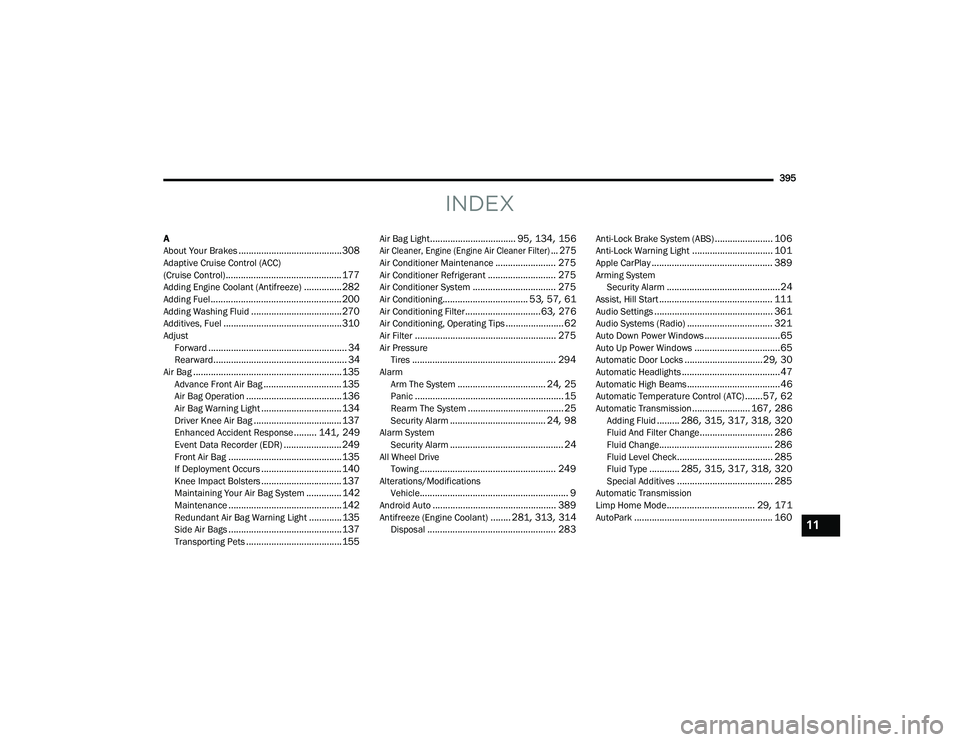
About Your Brakes......................................... 308Adaptive Cruise Control (ACC)
(Cruise Control).............................................. 177Adding Engine Coolant (Antifreeze)............... 282Adding Fuel.................................................... 200Adding Washing Fluid.................................... 270Additives, Fuel............................................... 310AdjustForward....................................................... 34Rearward..................................................... 34Air Bag........................................................... 135Advance Front Air Bag............................... 135Air Bag Operation...................................... 136Air Bag Warning Light................................ 134Driver Knee Air Bag................................... 137Enhanced Accident Response......... 141, 249Event Data Recorder (EDR)....................... 249Front Air Bag............................................. 135If Deployment Occurs................................ 140Knee Impact Bolsters................................ 137Maintaining Your Air Bag System.............. 142Maintenance............................................. 142Redundant Air Bag Warning Light.............135Side Air Bags............................................. 137Transporting Pets...................................... 155
Air Bag Light.................................. 95, 134, 156
Air Cleaner, Engine (Engine Air Cleaner Filter)... 275
Air Conditioner Maintenance........................ 275Air Conditioner Refrigerant........................... 275Air Conditioner System................................. 275Air Conditioning.................................. 53, 57, 61Air Conditioning Filter..............................63, 276Air Conditioning, Operating Tips....................... 62Air Filter........................................................ 275Air PressureTires......................................................... 294AlarmArm The System................................... 24, 25Panic........................................................... 15Rearm The System...................................... 25Security Alarm...................................... 24, 98Alarm SystemSecurity Alarm............................................. 24All Wheel DriveTowing...................................................... 249Alterations/ModificationsVehicle........................................................... 9Android Auto................................................. 389Antifreeze (Engine Coolant)........ 281, 313, 314Disposal................................................... 283
Anti-Lock Brake System (ABS)....................... 106Anti-Lock Warning Light................................ 101Apple CarPlay................................................ 389Arming SystemSecurity Alarm.............................................24Assist, Hill Start............................................. 111Audio Settings............................................... 361Audio Systems (Radio).................................. 321Auto Down Power Windows..............................65Auto Up Power Windows..................................65Automatic Door Locks...............................29, 30Automatic Headlights.......................................47Automatic High Beams.....................................46Automatic Temperature Control (ATC).......57, 62Automatic Transmission....................... 167, 286Adding Fluid......... 286, 315, 317, 318, 320Fluid And Filter Change............................. 286Fluid Change............................................. 286Fluid Level Check...................................... 285Fluid Type............ 285, 315, 317, 318, 320Special Additives...................................... 285Automatic Transmission
Limp Home Mode................................... 29, 171AutoPark....................................................... 16011
20_LD_OM_EN_USC_t.book Page 395
Page 399 of 412
397
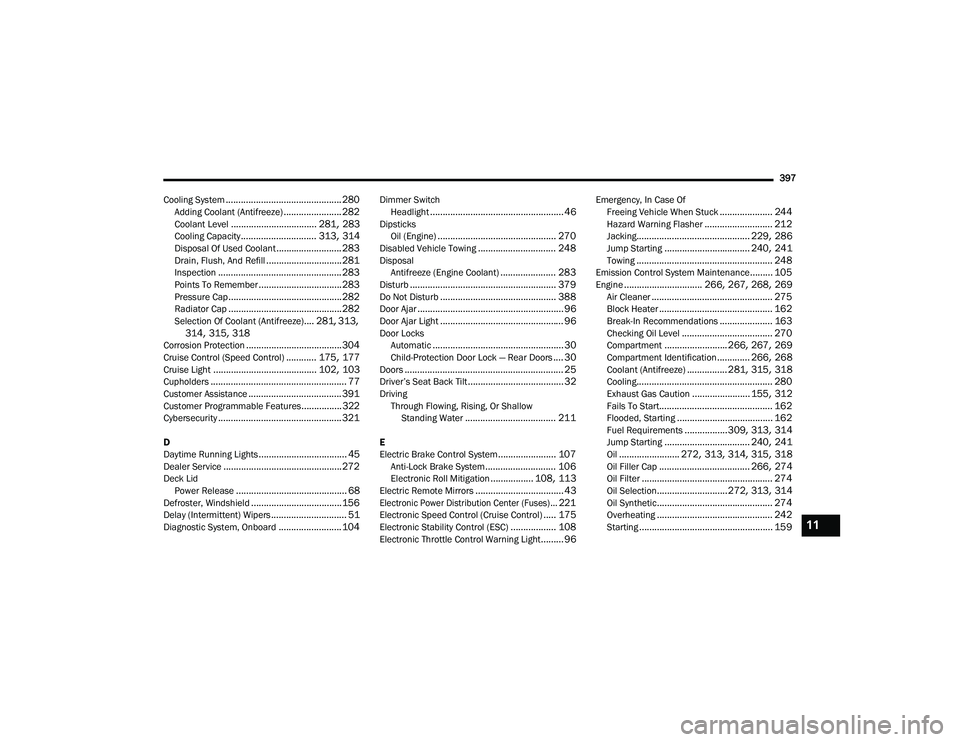
Cooling System
.............................................. 280Adding Coolant (Antifreeze)....................... 282Coolant Level.................................. 281, 283Cooling Capacity.............................. 313, 314Disposal Of Used Coolant.......................... 283Drain, Flush, And Refill.............................. 281Inspection................................................. 283Points To Remember................................. 283Pressure Cap............................................. 282Radiator Cap............................................. 282Selection Of Coolant (Antifreeze).... 281, 313, 314, 315, 318Corrosion Protection...................................... 304Cruise Control (Speed Control)............ 175, 177Cruise Light......................................... 102, 103Cupholders...................................................... 77Customer Assistance..................................... 391Customer Programmable Features................322Cybersecurity................................................. 321
D
Daytime Running Lights................................... 45Dealer Service............................................... 272Deck Lid Power Release............................................ 68Defroster, Windshield.................................... 156Delay (Intermittent) Wipers.............................. 51Diagnostic System, Onboard......................... 104
Dimmer SwitchHeadlight..................................................... 46DipsticksOil (Engine)............................................... 270Disabled Vehicle Towing............................... 248DisposalAntifreeze (Engine Coolant)...................... 283Disturb.......................................................... 379Do Not Disturb.............................................. 388Door Ajar.......................................................... 96Door Ajar Light................................................. 96Door LocksAutomatic.................................................... 30Child-Protection Door Lock — Rear Doors.... 30Doors............................................................... 25Driver’s Seat Back Tilt...................................... 32DrivingThrough Flowing, Rising, Or Shallow Standing Water
.................................... 211
E
Electric Brake Control System....................... 107Anti-Lock Brake System............................ 106Electronic Roll Mitigation................. 108, 113Electric Remote Mirrors................................... 43
Electronic Power Distribution Center (Fuses)... 221
Electronic Speed Control (Cruise Control)..... 175Electronic Stability Control (ESC).................. 108Electronic Throttle Control Warning Light......... 96
Emergency, In Case OfFreeing Vehicle When Stuck..................... 244Hazard Warning Flasher........................... 212Jacking............................................. 229, 286Jump Starting.................................. 240, 241Towing...................................................... 248Emission Control System Maintenance......... 105Engine............................... 266, 267, 268, 269Air Cleaner................................................ 275Block Heater............................................. 162Break-In Recommendations..................... 163Checking Oil Level.................................... 270Compartment......................... 266, 267, 269Compartment Identification............. 266, 268Coolant (Antifreeze)................ 281, 315, 318Cooling...................................................... 280Exhaust Gas Caution....................... 155, 312Fails To Start............................................. 162Flooded, Starting...................................... 162Fuel Requirements.................309, 313, 314Jump Starting.................................. 240, 241Oil........................ 272, 313, 314, 315, 318Oil Filler Cap.................................... 266, 274Oil Filter.................................................... 274Oil Selection............................ 272, 313, 314Oil Synthetic.............................................. 274Overheating.............................................. 242Starting..................................................... 15911
20_LD_OM_EN_USC_t.book Page 397