brake DODGE CHARGER 2020 Owners Manual
[x] Cancel search | Manufacturer: DODGE, Model Year: 2020, Model line: CHARGER, Model: DODGE CHARGER 2020Pages: 412, PDF Size: 18.96 MB
Page 6 of 412
4
SAFETY
SAFETY FEATURES ............................................ 106
Anti-Lock Brake System (ABS) ................. 106
Electronic Brake Control (EBC) System ...107
AUXILIARY DRIVING SYSTEMS ........................ 113
Blind Spot Monitoring (BSM) —
If Equipped .................................................113 Forward Collision Warning (FCW) With
Mitigation Operation ..................................118
Tire Pressure Monitoring System (TPMS) ... 120
OCCUPANT RESTRAINT SYSTEMS .................. 125
Occupant Restraint Systems Features ....125
Important Safety Precautions ...................125Seat Belt Systems ..................................... 126Supplemental Restraint Systems (SRS) ...134Child Restraints..........................................143Transporting Pets ......................................155
SAFETY TIPS ...................................................... 155
Transporting Passengers ..........................155
Exhaust Gas ...............................................155Safety Checks You Should Make
Inside The Vehicle ..................................... 156 Periodic Safety Checks You Should
Make Outside The Vehicle ........................ 157
STARTING AND OPERATING
STARTING THE ENGINE ....................................159
Automatic Transmission ........................... 159
Normal Starting ......................................... 159
Keyless Enter-N-Go — Ignition ................... 162
Cold Weather Operation (Below –22°F
Or −30°C) ................................................. 162 If Engine Fails To Start .............................. 162
After Starting .............................................. 162
ENGINE BLOCK HEATER — IF EQUIPPED .......162
ENGINE BREAK-IN RECOMMENDATIONS —
3.6L & 5.7L ........................................................ 163
ENGINE BREAK-IN RECOMMENDATIONS —
6.2L & 6.4L ......................................................... 163
PARKING BRAKE ................................................ 164
AUTOMATIC TRANSMISSION ............................ 165 Ignition Park Interlock ............................... 166Brake/Transmission Shift Interlock
System ....................................................... 167 Eight-Speed Automatic Transmission ...... 167
SPORT MODE — WITHOUT PERFORMANCE
CONTROL............................................................. 174
FUEL SAVER TECHNOLOGY 5.7L AND
6.4L ONLY — IF EQUIPPED ................................174
ELECTRIC POWER STEERING ........................... 174 SPEED CONTROL — IF EQUIPPED.................... 175
To Activate.................................................. 175
To Set A Desired Speed ........................... 176
To Vary The Speed Setting ....................... 176To Accelerate For Passing ........................ 177
To Resume Speed .................................... 177To Deactivate ............................................ 177
ADAPTIVE CRUISE CONTROL (ACC) —
IF EQUIPPED ...................................................... 177
Adaptive Cruise Control (ACC) Operation ... 179
Activating Adaptive Cruise Control (ACC) ... 179
To Activate/Deactivate.............................. 180
To Set A Desired ACC Speed..................... 180
To Cancel ................................................... 181
To Turn Off ................................................. 181To Resume ................................................. 181To Vary The ACC Speed ............................. 181
Setting The Following Distance In ACC .... 183
Overtake Aid............................................... 184
ACC Operation At Stop............................... 184Adaptive Cruise Control (ACC) Menu ........ 185
Display Warnings And Maintenance ........ 185
Precautions While Driving With ACC......... 187
General Information .................................. 189
Normal (Fixed Speed) Cruise
Control Mode ............................................. 189
20_LD_OM_EN_USC_t.book Page 4
Page 8 of 412
6
ENGINE COMPARTMENT .................................. 266 3.6L Engine ...............................................2665.7L Engine ...............................................2676.2L Supercharged Engine ......................268
6.4L Engine ...............................................269Checking Oil Level — 3.6L And 5.7L
Engine.........................................................270 Checking Oil Level — 6.2L Supercharged
Engine And 6.4L Engine ...........................270 Adding Washer Fluid..................................270Maintenance-Free Battery .......................271
Pressure Washing ......................................271
DEALER SERVICE .............................................. 272
Engine Oil .................................................. 272Engine Oil Filter ..........................................274Engine Air Cleaner Filter ...........................275
Air Conditioner Maintenance ...................275Accessory Drive Belt Inspection................276Body Lubrication ........................................277
Windshield Wiper Blades ..........................278
Exhaust System .........................................279
Cooling System .........................................280
Brake System ............................................284
Automatic Transmission ............................285
Rear Axle ....................................................286
RAISING THE VEHICLE ...................................... 286 TIRES....................................................................286
Tire Safety Information ............................. 286Tires — General Information .................... 293
Tire Types ................................................... 298
Spare Tires — If Equipped ......................... 298
Wheel And Wheel Trim Care .................... 300
Tire Chains And Traction Devices —
Non-SRT ..................................................... 301 Tire Chains And Traction Devices — SRT.. 302
Tire Rotation Recommendations —
Non-SRT ..................................................... 302
Tire Rotation Recommendations — SRT .... 303
DEPARTMENT OF TRANSPORTATION UNIFORM
TIRE QUALITY GRADES .....................................303
Treadwear .................................................. 303
Traction Grades ......................................... 303
Temperature Grades ................................. 304
VEHICLE STORAGE .............................................304
BODYWORK ........................................................ 304
Protection From Atmospheric Agents....... 304
Body And Underbody Maintenance .......... 305Preserving The Bodywork .......................... 305
INTERIORS ......................................................... 306
Seats And Fabric Parts .............................. 306
Plastic And Coated Parts ........................... 306
Leather Parts ............................................. 307
Glass Surfaces .......................................... 307
TECHNICAL SPECIFICATIONS
IDENTIFICATION DATA ...................................... 308Vehicle Identification Number .................. 308
BRAKE SYSTEM ................................................ 308
WHEEL AND TIRE TORQUE
SPECIFICATIONS ................................................ 308
Torque Specifications................................ 308
FUEL REQUIREMENTS ...................................... 309
3.6L Engine ................................................ 309
5.7L Engine ................................................ 310
6.2L And 6.4L Engine................................ 310
Reformulated Gasoline ............................ 310Materials Added To Fuel ........................... 310
Gasoline/Oxygenate Blends ..................... 311
Do Not Use E-85 In Non-Flex Fuel
Vehicles ...................................................... 311 CNG And LP Fuel System Modifications .. 312MMT In Gasoline........................................ 312
Fuel System Cautions................................ 312
Carbon Monoxide Warnings...................... 312
FLUID CAPACITIES — NON-SRT ....................... 313
FLUID CAPACITIES — SRT ................................ 314
FLUIDS AND LUBRICANTS — NON-SRT .......... 315 Engine ........................................................ 315
Chassis ....................................................... 317
FLUIDS AND LUBRICANTS — SRT ................... 318
Engine ........................................................ 318
Chassis ....................................................... 320
20_LD_OM_EN_USC_t.book Page 6
Page 20 of 412
18GETTING TO KNOW YOUR VEHICLE
(Continued)
IGNITION SWITCH
KEYLESS PUSH BUTTON IGNITION
This feature allows the driver to operate the
ignition with the push of a button as long as the
key fob is in the passenger compartment.
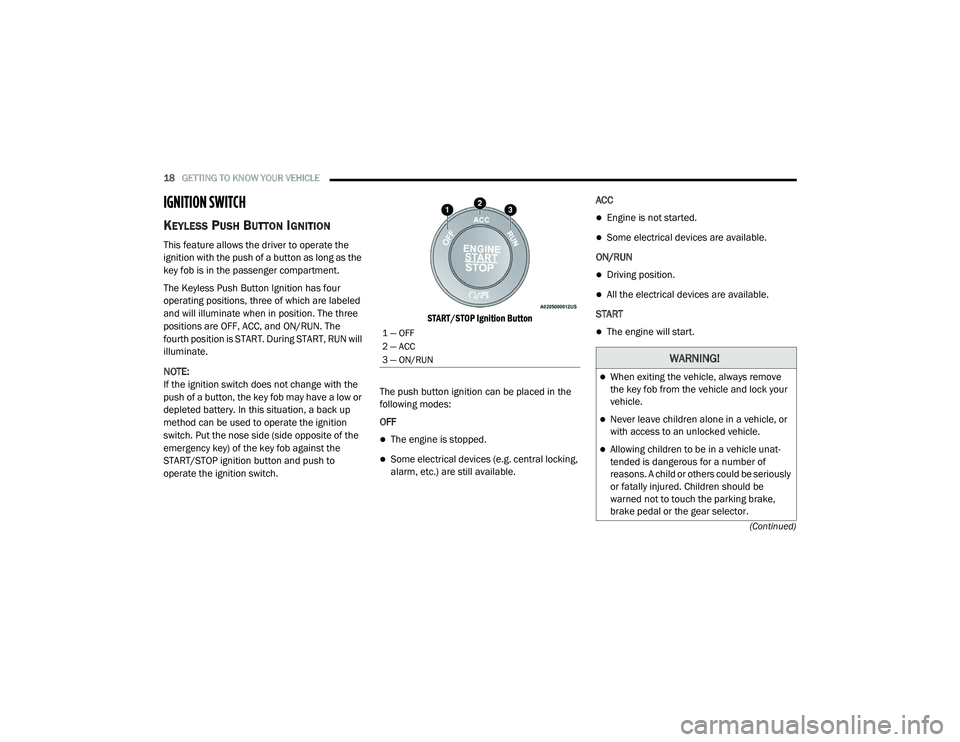
The Keyless Push Button Ignition has four
operating positions, three of which are labeled
and will illuminate when in position. The three
positions are OFF, ACC, and ON/RUN. The
fourth position is START. During START, RUN will
illuminate.
NOTE:
If the ignition switch does not change with the
push of a button, the key fob may have a low or
depleted battery. In this situation, a back up
method can be used to operate the ignition
switch. Put the nose side (side opposite of the
emergency key) of the key fob against the
START/STOP ignition button and push to
operate the ignition switch.
START/STOP Ignition Button
The push button ignition can be placed in the
following modes:
OFF
The engine is stopped.
Some electrical devices (e.g. central locking,
alarm, etc.) are still available. ACC
Engine is not started.
Some electrical devices are available.
ON/RUN
Driving position.
All the electrical devices are available.
START
The engine will start.1 — OFF
2 — ACC
3 — ON/RUN
WARNING!
When exiting the vehicle, always remove
the key fob from the vehicle and lock your
vehicle.
Never leave children alone in a vehicle, or
with access to an unlocked vehicle.
Allowing children to be in a vehicle unat -
tended is dangerous for a number of
reasons. A child or others could be seriously
or fatally injured. Children should be
warned not to touch the parking brake,
brake pedal or the gear selector.
20_LD_OM_EN_USC_t.book Page 18
Page 21 of 412
GETTING TO KNOW YOUR VEHICLE19
(Continued)
NOTE:
Refer to "Starting The Engine" in "Starting And
Operating" for further information.
VEHICLE ON MESSAGE
When opening the driver's door with the ignition
in the ON/RUN position (engine not running), a
chime will sound to remind you to place the
ignition in the OFF position. In addition to the chime, the Vehicle On
message will display in the cluster (if equipped).
NOTE:
The power window switches and power sunroof
(if equipped) will remain active for three
minutes after the ignition is placed in the OFF
position. Opening either front door will cancel
this feature. The time for this feature is
programmable.
Do not leave the key fob in or near the vehicle,
or in a location accessible to children, and do
not leave the ignition of a vehicle equipped
with Keyless Enter-N-Go in the ON/RUN
mode. A child could operate power windows,
other controls, or move the vehicle.
Do not leave children or animals inside
parked vehicles in hot weather. Interior heat
build-up may cause serious injury or death.
CAUTION!
An unlocked vehicle is an invitation for
thieves. Always remove key fob from the
vehicle and lock all doors when leaving the
vehicle unattended.
WARNING!
(Continued)
WARNING!
Before exiting a vehicle, always come to a
complete stop, then shift the automatic
transmission into PARK, apply the parking
brake, place the engine in the OFF position,
remove the key fob from the vehicle and lock
your vehicle. If equipped with Keyless
Enter-N-Go, always make sure the keyless
ignition is in the OFF position, remove the
key fob from the vehicle and lock the vehicle.
Never leave children alone in a vehicle, or
with access to an unlocked vehicle.
Allowing children to be in a vehicle unat -
tended is dangerous for a number of
reasons. A child or others could be seriously
or fatally injured. Children should be
warned not to touch the parking brake,
brake pedal or the gear selector.
Do not leave the key fob in or near the
vehicle, or in a location accessible to chil -
dren, and do not leave the ignition of a
vehicle equipped with Keyless Enter-N-Go
in the ON/RUN position. A child could
operate power windows, other controls, or
move the vehicle.
Do not leave children or animals inside
parked vehicles in hot weather. Interior
heat build-up may cause serious injury or
death.
CAUTION!
An unlocked vehicle is an invitation for
thieves. Always remove key fob from the
vehicle and lock all doors when leaving the
vehicle unattended.
WARNING! (Continued)
2
20_LD_OM_EN_USC_t.book Page 19
Page 22 of 412
20GETTING TO KNOW YOUR VEHICLE
(Continued)
REMOTE START — IF EQUIPPED
HOW TO USE REMOTE START —
I
F EQUIPPED
Push remote start button on the key
fob twice within five seconds. Pushing
the remote start button a third time
shuts the engine off.
To drive the vehicle, push the unlock button,
and place the ignition in the ON/RUN position.
NOTE:
With remote start, the engine will only run for
15 minutes (timeout) unless the ignition is
placed in the ON/RUN position.
The vehicle must be started using the key fob
after two consecutive timeouts.
All of the following conditions must be met
before the engine will remote start:
Gear selector in PARK
Doors closed
Hood closed
Trunk closed
Hazard switch off
Brake switch inactive (brake pedal not
pushed)
Battery at an acceptable charge level
Check engine light shall not be present
PANIC button not pushed
System not disabled from previous remote
start event
Vehicle alarm system indicator flashing
Ignition in the STOP/OFF position
Fuel level meets minimum requirement
Vehicle security alarm is not signaling an
intrusion
REMOTE START ABORT MESSAGE ON
T
HE INSTRUMENT CLUSTER DISPLAY —
I
F EQUIPPED
The following messages will display in the
instrument cluster display if the vehicle fails to
remote start or exits remote start prematurely:
Remote Start Aborted — Door Open
Remote Start Aborted — Hood Open
Remote Start Aborted — Fuel Low
Remote Start Aborted — Trunk Open
Remote Start Disabled — Start Vehicle To
Reset
The message will stay active until the ignition is
placed in the ON/RUN position.
WARNING!
Do not start or run an engine in a closed
garage or confined area. Exhaust gas
contains Carbon Monoxide (CO) which is
odorless and colorless. Carbon Monoxide is
poisonous and can cause serious injury or
death when inhaled.
Keep key fobs away from children. Opera -
tion of the Remote Start System, windows,
door locks or other controls could cause
serious injury or death.
WARNING! (Continued)
20_LD_OM_EN_USC_t.book Page 20
Page 23 of 412
GETTING TO KNOW YOUR VEHICLE21
TO ENTER REMOTE START MODE
Push and release the remote start button on the
key fob twice within five seconds. The vehicle
doors will lock, the parking lights will flash, and
the horn will chirp twice (if programmed). Then,
the engine will start, and the vehicle will remain
in the Remote Start mode for a 15 minute cycle.
NOTE:
If an engine fault is present or fuel level is
low, the vehicle will start and then shut down
in 10 seconds.
The parking lights will turn on and remain on
during Remote Start mode.
For security, power window and power
sunroof operation (if equipped) are disabled
when the vehicle is in the Remote Start
mode.
The engine can be started two consecutive
times with the key fob. However, the ignition
must be cycled by pushing the START/STOP
ignition button twice (or the ignition switch
must be placed in the ON/RUN position)
before you can repeat the start sequence for
a third cycle.
TO EXIT REMOTE START MODE
W
ITHOUT DRIVING THE VEHICLE
Push and release the remote start button one
time or allow the engine to run for the entire
15 minute cycle.
NOTE:
To avoid unintentional shutdowns, the system
will disable for two seconds after receiving a
valid remote start request.
TO EXIT REMOTE START MODE AND
D
RIVE THE VEHICLE
Before the end of 15 minute cycle, push and
release the unlock button on the key fob to
unlock the doors and disarm the vehicle
security alarm (if equipped). Then, prior to the
end of the 15 minute cycle, push and release
the START/STOP ignition button.
NOTE:
For vehicles not equipped with the Keyless
Enter-N-Go — Passive Entry feature, the igni -
tion switch must be in the ON/RUN position
in order to drive the vehicle.
For vehicles equipped with the Keyless
Enter-N-Go — Passive Entry feature, the message
“Remote Start Active — Push Start Button” will
show in the instrument cluster display until you
push the START/STOP ignition button.
To Cancel Remote Start
Remote Starting will also cancel if any of the
following occur:
The engine stalls or engine speed exceeds
2500 RPM.
Any engine warning lights come on.
Low Fuel Light turns on.
The hood is opened.
The hazard switch is pushed.
The gear selector is moved out of PARK.
The brake pedal is pushed.
REMOTE START COMFORT SYSTEMS —
I
F EQUIPPED
When remote start is activated, the heated
steering wheel and driver heated seat features
will automatically turn on in cold weather. In
warm weather, the driver vented seat feature
2
20_LD_OM_EN_USC_t.book Page 21
Page 28 of 412
26GETTING TO KNOW YOUR VEHICLE
POWER DOOR LOCKS
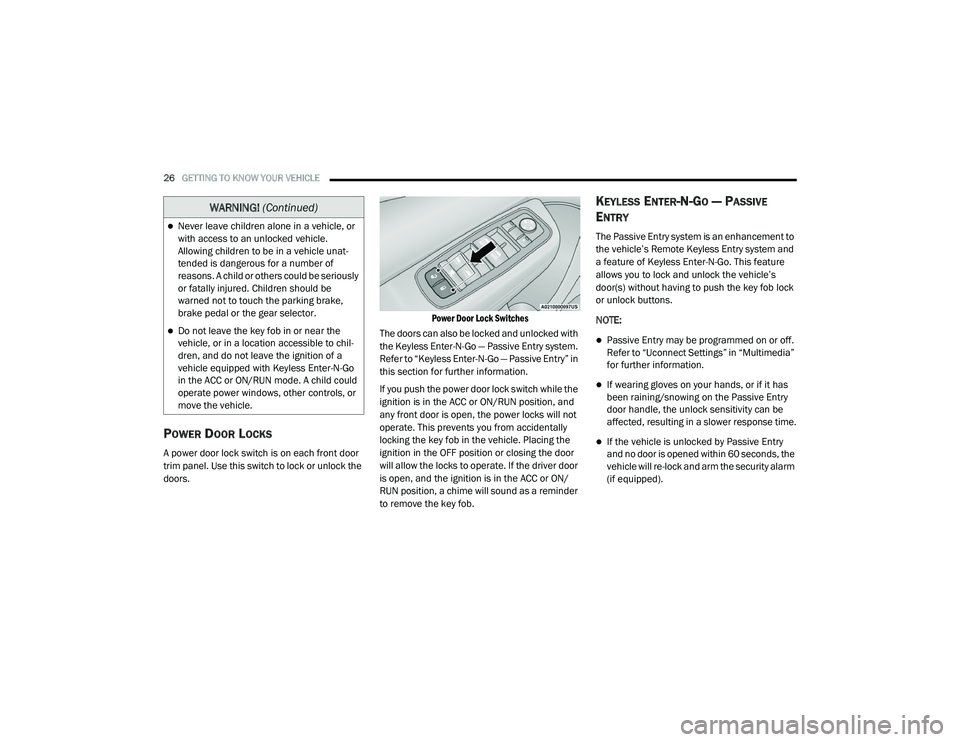
A power door lock switch is on each front door
trim panel. Use this switch to lock or unlock the
doors.
Power Door Lock Switches
The doors can also be locked and unlocked with
the Keyless Enter-N-Go — Passive Entry system.
Refer to “Keyless Enter-N-Go — Passive Entry” in
this section for further information.
If you push the power door lock switch while the
ignition is in the ACC or ON/RUN position, and
any front door is open, the power locks will not
operate. This prevents you from accidentally
locking the key fob in the vehicle. Placing the
ignition in the OFF position or closing the door
will allow the locks to operate. If the driver door
is open, and the ignition is in the ACC or ON/
RUN position, a chime will sound as a reminder
to remove the key fob.
KEYLESS ENTER-N-GO — PASSIVE
E
NTRY
The Passive Entry system is an enhancement to
the vehicle’s Remote Keyless Entry system and
a feature of Keyless Enter-N-Go. This feature
allows you to lock and unlock the vehicle’s
door(s) without having to push the key fob lock
or unlock buttons.
NOTE:
Passive Entry may be programmed on or off.
Refer to “Uconnect Settings” in “Multimedia”
for further information.
If wearing gloves on your hands, or if it has
been raining/snowing on the Passive Entry
door handle, the unlock sensitivity can be
affected, resulting in a slower response time.
If the vehicle is unlocked by Passive Entry
and no door is opened within 60 seconds, the
vehicle will re-lock and arm the security alarm
(if equipped).
Never leave children alone in a vehicle, or
with access to an unlocked vehicle.
Allowing children to be in a vehicle unat -
tended is dangerous for a number of
reasons. A child or others could be seriously
or fatally injured. Children should be
warned not to touch the parking brake,
brake pedal or the gear selector.
Do not leave the key fob in or near the
vehicle, or in a location accessible to chil-
dren, and do not leave the ignition of a
vehicle equipped with Keyless Enter-N-Go
in the ACC or ON/RUN mode. A child could
operate power windows, other controls, or
move the vehicle.
WARNING! (Continued)
20_LD_OM_EN_USC_t.book Page 26
Page 47 of 412
GETTING TO KNOW YOUR VEHICLE45
EXTERIOR LIGHTS
HEADLIGHT SWITCH
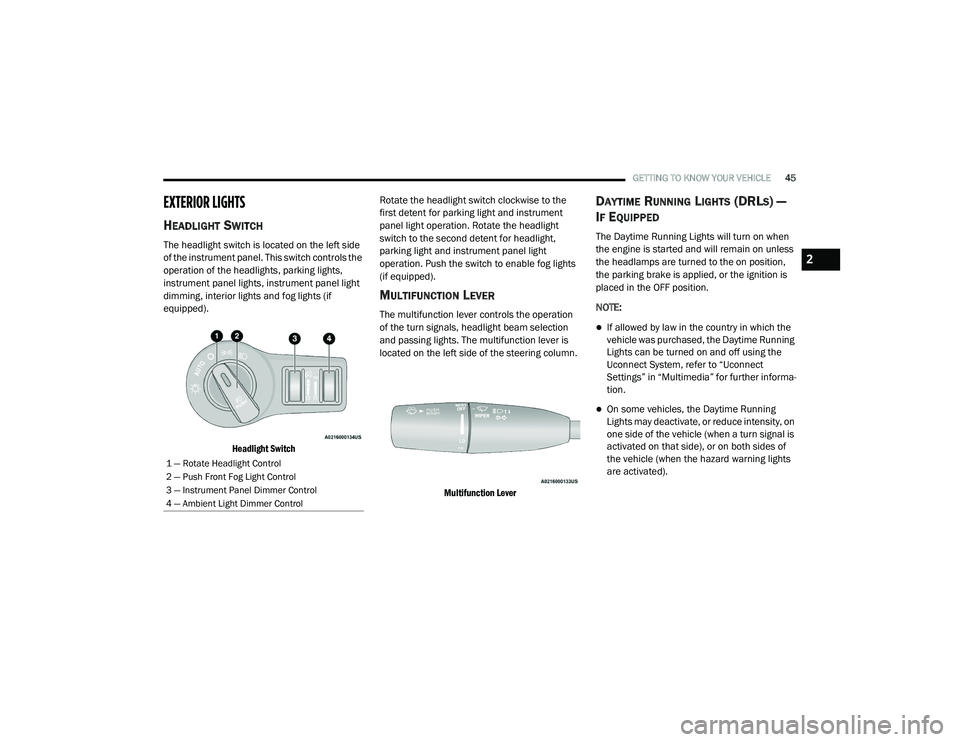
The headlight switch is located on the left side
of the instrument panel. This switch controls the
operation of the headlights, parking lights,
instrument panel lights, instrument panel light
dimming, interior lights and fog lights (if
equipped).
Headlight Switch
Rotate the headlight switch clockwise to the
first detent for parking light and instrument
panel light operation. Rotate the headlight
switch to the second detent for headlight,
parking light and instrument panel light
operation. Push the switch to enable fog lights
(if equipped).
MULTIFUNCTION LEVER
The multifunction lever controls the operation
of the turn signals, headlight beam selection
and passing lights. The multifunction lever is
located on the left side of the steering column.
Multifunction Lever
DAYTIME RUNNING LIGHTS (DRLS) —
I
F EQUIPPED
The Daytime Running Lights will turn on when
the engine is started and will remain on unless
the headlamps are turned to the on position,
the parking brake is applied, or the ignition is
placed in the OFF position.
NOTE:
If allowed by law in the country in which the
vehicle was purchased, the Daytime Running
Lights can be turned on and off using the
Uconnect System, refer to “Uconnect
Settings” in “Multimedia” for further informa -
tion.
On some vehicles, the Daytime Running
Lights may deactivate, or reduce intensity, on
one side of the vehicle (when a turn signal is
activated on that side), or on both sides of
the vehicle (when the hazard warning lights
are activated).
1 — Rotate Headlight Control
2 — Push Front Fog Light Control
3 — Instrument Panel Dimmer Control
4 — Ambient Light Dimmer Control
2
20_LD_OM_EN_USC_t.book Page 45
Page 89 of 412
GETTING TO KNOW YOUR INSTRUMENT PANEL87
NOTE:
Holding the up or down or left or
right arrow button will continuously loop
through the currently selected menu or
options presented on the screen.
Upon returning to a main menu, the last
submenu screen viewed within that main
menu will be displayed.
OK Button:
For Digital Speedometer:
Pushing the OK button changes units (mph or
km/h).
For Screen Setup:
OK button allows user to enter menu and
submenus.
Within each submenu layer, the up and
down arrow buttons will allow the user to
select the item of interest.
Pushing the OK button makes the selection
and a confirmation screen will appear
(returning the user to the first page of the
submenu).
Pushing the left arrow button will exit each
submenu layer and return to the main menu.
ENGINE OIL LIFE RESET
Oil Change Required
Your vehicle is equipped with an engine oil
change indicator system. The “Oil Change
Required” message will display in the
instrument cluster display for five seconds after
a single chime has sounded, to indicate the next
scheduled oil change interval. The engine oil
change indicator system is duty cycle based,
which means the engine oil change interval may
fluctuate, dependent upon your personal
driving style.
Unless reset, this message will continue to
display each time you place the ignition in the
ON/RUN position. To turn off the message
temporarily, push and release the OK or arrow
buttons. To reset the oil change indicator
system (after performing the scheduled
maintenance), refer to the following procedure.
Vehicles Equipped With Keyless Enter-N-Go —
Ignition
Use the steering wheel instrument cluster
display controls for the following procedure(s):
1. Without pressing the brake pedal, push the
ENGINE START/STOP button and place the
ignition in the ON/RUN position (do not
start the engine).
2. Push and release the down arrow button
to scroll downward through the main menu
to “Vehicle Info.”
3. Push and release the right arrow button
to access the ”Oil Life” screen.
4. Push and hold the OK button to reset oil life.
If conditions are met, the gauge and
numeric display will update to show 100%.
If conditions are not met a pop-up message
of "To reset oil life engine must be off with
ignition in run” will be displayed (for five
seconds), and the user will remain at the Oil
Life screen.
5. Push and release the up or down
arrow button to exit the submenu screen.
NOTE:
If the indicator message illuminates when you
start the vehicle, the oil change indicator
system did not reset. If necessary, repeat this
procedure.
3
20_LD_OM_EN_USC_t.book Page 87
Page 90 of 412
88GETTING TO KNOW YOUR INSTRUMENT PANEL
Secondary Method Of Resetting Engine Oil Life
1. Without pressing the brake pedal, push the
ENGINE START/STOP button and place the
ignition to the ON/RUN position (do not
start the engine).
2. Fully press the accelerator pedal, slowly, three times within ten seconds.
3. Without pushing the brake pedal, push the ENGINE START/STOP button once to return
the ignition to the OFF/LOCK position.
NOTE:
If the indicator message illuminates when you
start the vehicle, the oil change indicator
system did not reset. If necessary, repeat this
procedure.
PERFORMANCE SHIFT INDICATOR (PSI)
— I
F EQUIPPED
The Performance Shift Indicator (PSI) is enabled
on vehicles with manual transmission, or when
a vehicle with automatic transmission is in
manual shift mode. The PSI provides the driver
with a visual indication within the instrument
cluster display when the driver configured gear
shift point has been reached and the driver is still accelerating. This indication notifies the
driver to change gear corresponding to the
configured RPMs in the head unit.
INSTRUMENT CLUSTER DISPLAY
S
ELECTABLE MENU ITEMS
Push and release the up or down arrow
button until the desired Selectable Menu item is
displayed in the instrument cluster display.
Follow the Menu or submenu prompts as
desired.
Speedometer
Push and release the up or down arrow
button until the speedometer menu is displayed
in the instrument cluster display. Push and
release the OK button to toggle units (km/h or
mph) of the speedometer.
Vehicle Info
Push and release the up or down arrow
button until the “Vehicle Info” menu is displayed
in the instrument cluster display. Push and
release the right or left arrow button to
scroll through the submenus items of “Vehicle
Info.” Follow the directional prompts to access or reset any of the following “Vehicle Info”
submenu items:
Tire Pressure
Coolant Temp
Trans Temp
Oil Temp
Oil Pressure
Oil Life
Battery Voltage
Storage Mode - Through this option, the
vehicle can be placed into Storage Mode.
AWD Status — If Equipped
Intake Air Temperature — If Equipped
Engine Torque — If Equipped
Engine Power — If Equipped
Air-Fuel Ratio — If Equipped
Boost Pressure — If Equipped
InterCooler (I/C) Temperature — If Equipped
20_LD_OM_EN_USC_t.book Page 88