radio controls DODGE CHARGER 2022 User Guide
[x] Cancel search | Manufacturer: DODGE, Model Year: 2022, Model line: CHARGER, Model: DODGE CHARGER 2022Pages: 312, PDF Size: 18.99 MB
Page 164 of 312
162MULTIMEDIA
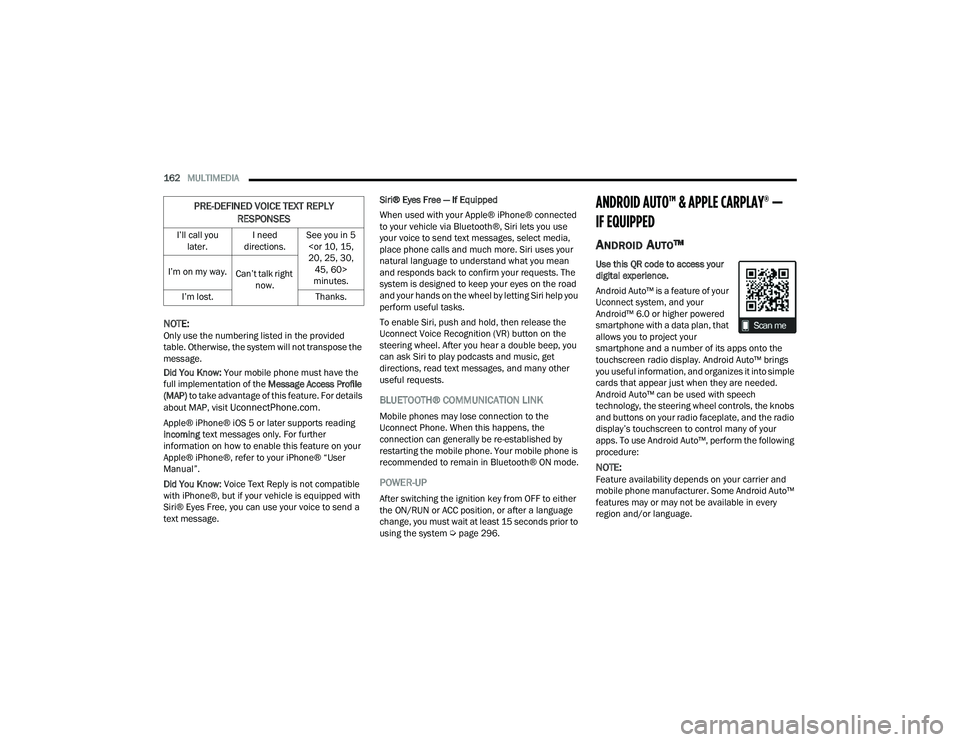
NOTE:Only use the numbering listed in the provided
table. Otherwise, the system will not transpose the
message.
Did You Know: Your mobile phone must have the
full implementation of the Message Access Profile
(MAP) to take advantage of this feature. For details
about MAP, visit
UconnectPhone.com.
Apple® iPhone® iOS 5 or later supports reading
incoming text messages only. For further
information on how to enable this feature on your
Apple® iPhone®, refer to your iPhone® “User
Manual”.
Did You Know: Voice Text Reply is not compatible
with iPhone®, but if your vehicle is equipped with
Siri® Eyes Free, you can use your voice to send a
text message. Siri® Eyes Free — If Equipped
When used with your Apple® iPhone® connected
to your vehicle via Bluetooth®, Siri lets you use
your voice to send text messages, select media,
place phone calls and much more. Siri uses your
natural language to understand what you mean
and responds back to confirm your requests. The
system is designed to keep your eyes on the road
and your hands on the wheel by letting Siri help you
perform useful tasks.
To enable Siri, push and hold, then release the
Uconnect Voice Recognition (VR) button on the
steering wheel. After you hear a double beep, you
can ask Siri to play podcasts and music, get
directions, read text messages, and many other
useful requests.BLUETOOTH® COMMUNICATION LINK
Mobile phones may lose connection to the
Uconnect Phone. When this happens, the
connection can generally be re-established by
restarting the mobile phone. Your mobile phone is
recommended to remain in Bluetooth® ON mode.
POWER-UP
After switching the ignition key from OFF to either
the ON/RUN or ACC position, or after a language
change, you must wait at least 15 seconds prior to
using the system Ú
page 296.
ANDROID AUTO™ & APPLE CARPLAY® —
IF EQUIPPED
ANDROID AUTO™
Use this QR code to access your
digital experience.
Android Auto™ is a feature of your
Uconnect system, and your
Android™ 6.0 or higher powered
smartphone with a data plan, that
allows you to project your
smartphone and a number of its apps onto the
touchscreen radio display. Android Auto™ brings
you useful information, and organizes it into simple
cards that appear just when they are needed.
Android Auto™ can be used with speech
technology, the steering wheel controls, the knobs
and buttons on your radio faceplate, and the radio
display’s touchscreen to control many of your
apps. To use Android Auto™, perform the following
procedure:
NOTE:Feature availability depends on your carrier and
mobile phone manufacturer. Some Android Auto™
features may or may not be available in every
region and/or language.
I’ll call you
later. I need
directions. See you in 5
minutes.
I’m on my way.
Can’t talk right
now.
I’m lost. Thanks.
PRE-DEFINED VOICE TEXT REPLY
RESPONSES
22_LD_OM_EN_USC_t.book Page 162
Page 167 of 312
MULTIMEDIA165
APPLE CARPLAY®
Use this QR code to access your
digital experience.
Uconnect works seamlessly with
Apple CarPlay®, the smarter,
more secure way to use your
iPhone® in the car, and stay
focused on the road. Use your
Uconnect Touchscreen display, the vehicle's knobs
and controls, and your voice with Siri to get access
to Apple Music®, Maps, Messages, and more.
NOTE:Feature availability depends on your carrier and
mobile phone manufacturer. Some Apple
CarPlay® features may or may not be available in
every region and/or language.
To use Apple CarPlay®, make sure you are using
iPhone® 5 or later, have Siri enabled in Settings,
ensure your iPhone® is unlocked for the very first
connection only, and then use the following
procedure:
1. Connect your iPhone® to one of the media
USB ports in your vehicle.
NOTE:Be sure to use the factory-provided Lightning cable
that came with your phone, as aftermarket cables
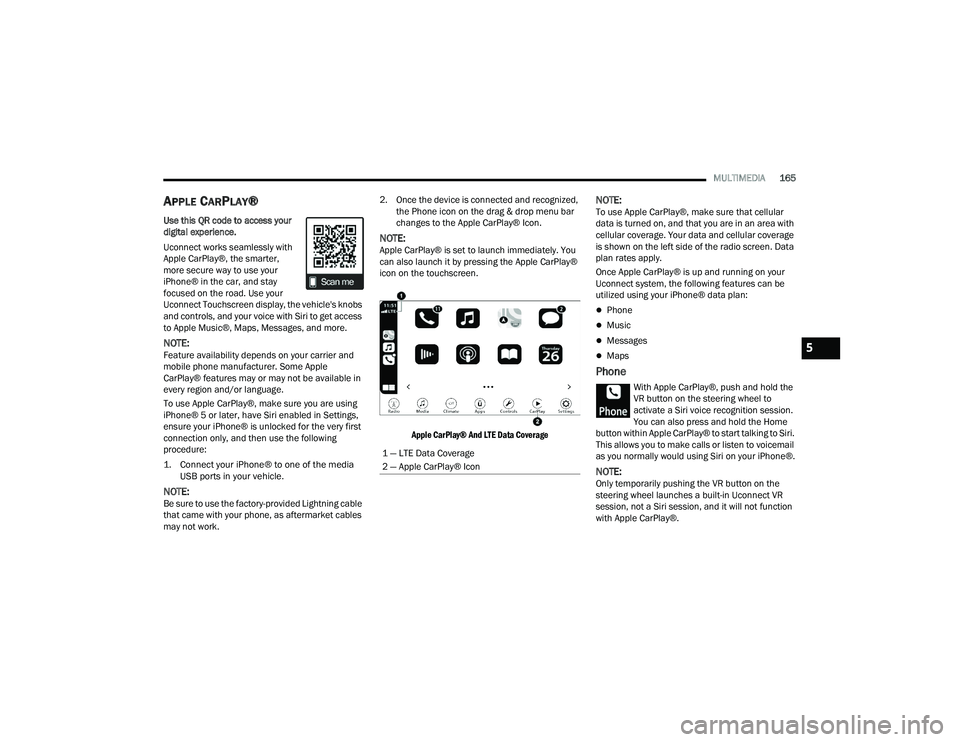
may not work. 2. Once the device is connected and recognized,
the Phone icon on the drag & drop menu bar
changes to the Apple CarPlay® Icon.
NOTE:Apple CarPlay® is set to launch immediately. You
can also launch it by pressing the Apple CarPlay®
icon on the touchscreen.
Apple CarPlay® And LTE Data Coverage
NOTE:To use Apple CarPlay®, make sure that cellular
data is turned on, and that you are in an area with
cellular coverage. Your data and cellular coverage
is shown on the left side of the radio screen. Data
plan rates apply.
Once Apple CarPlay® is up and running on your
Uconnect system, the following features can be
utilized using your iPhone® data plan:
Phone
Music
Messages
Maps
Phone
With Apple CarPlay®, push and hold the
VR button on the steering wheel to
activate a Siri voice recognition session.
You can also press and hold the Home
button within Apple CarPlay® to start talking to Siri.
This allows you to make calls or listen to voicemail
as you normally would using Siri on your iPhone®.
NOTE:Only temporarily pushing the VR button on the
steering wheel launches a built-in Uconnect VR
session, not a Siri session, and it will not function
with Apple CarPlay®.
1 — LTE Data Coverage
2 — Apple CarPlay® Icon
5
22_LD_OM_EN_USC_t.book Page 165
Page 306 of 312
304 R
Radial Ply Tires
.............................................. 274Radiator Cap (Coolant Pressure Cap)............ 249Radio Presets...................................................... 147Radio Controls............................................... 142Radio Mode................................................... 142Radio Operation.................................. 142, 167Radio Remote Controls.................................. 141Rain Sensitive Wiper System........................... 50Rear Axle (Differential)................................... 252Rear Camera................................................. 112Rear Cross Path............................................. 176Rear ParkSense System................................ 105Rear Seats, Folding......................................... 32Rear Wheel Drive (RWD)Towing....................................................... 233Recreational Towing...................................... 121Reformulated Gasoline.................................. 288Refrigerant.................................................... 243Release, Hood................................................. 65Reminder, Lights On........................................ 46Reminder, Seat Belt...................................... 184Remote ControlStarting System........................................... 17Remote Keyless EntryArm The Alarm............................................. 20Programming Additional Key Fobs.............. 15Unlatch The Trunk....................................... 14
Remote Sound System (Radio) Control......... 141Remote StartingExit Remote Start Mode.............................. 18
Uconnect Customer Programmable Features.... 19
Uconnect Settings....................................... 19Remote Starting System.................................. 17Remote Trunk Release.................................... 65Replacement Bulbs...................................... 261Replacement Tires........................................ 276Reporting Safety Defects.............................. 295Restraints, Child........................................... 198Restraints, Head....................................... 36, 37Rocking Vehicle When Stuck........................ 231Rotation, Tires.............................................. 281
S
Safety........................................................... 140Safety Checks Inside Vehicle........................ 210Safety Checks Outside Vehicle..................... 211Safety Defects, Reporting............................. 295Safety Features............................................. 140Safety Information, Tire................................ 264Safety Tips.................................................... 209Safety, Exhaust Gas...................................... 211Satellite Radio.............................................. 143Saved Radio Stations................................... 147Schedule, Maintenance................................ 234Seat Belt Reminder.......................................... 78
Seat Belts............................................ 184, 210Adjustable Shoulder Belt.......................... 187Adjustable Upper Shoulder Anchorage..... 187
Adjustable Upper Shoulder Belt Anchorage.. 187
Automatic Locking Retractor (ALR)........... 189Child Restraints........................................ 198Energy Management Feature................... 188Extender................................................... 188Front Seat............................... 184, 185, 186Inspection................................................. 210Lap/Shoulder Belt Operation.................... 186Lap/Shoulder Belt Untwisting................... 187Lap/Shoulder Belts................................... 185Operating Instructions.............................. 186Pregnant Women...................................... 188Pretensioners........................................... 188Rear Seat.................................................. 185Reminder.................................................. 184Seat Belt Extender.................................... 188Seat Belt Pretensioner.............................. 188Untwisting Procedure................................ 187Seat Belts Maintenance................................ 284
22_LD_OM_EN_USC_t.book Page 304
Page 307 of 312
305
Seats
................................................. 31, 33, 34Adjustment........................................... 31, 33Easy Entry................................................... 34Head Restraints................................... 36, 37Heated........................................................ 34Height Adjustment....................................... 33Power.......................................................... 33Rear Folding......................................... 31, 32Seatback Release................................ 31, 32Tilting................................................... 31, 33Vented......................................................... 36Ventilated.................................................... 36Security Alarm................................... 20, 21, 78Arm The System.......................................... 20Selection Of Coolant (Antifreeze)...................291Sentry Key (Immobilizer).................................. 15Service Assistance......................................... 293Service Contract............................................ 294Service Manuals............................................ 295Settings, Audio.............................................. 148Shifting............................................................ 89Automatic Transmission....................... 89, 90Shoulder Belts............................................... 185Side View Mirror Adjustment........................... 39Signals, Turn.................................... 47, 81, 211Sirius Satellite Radio..................................... 143Favorites................................................... 146Replay....................................................... 144
SiriusXM Satellite Radio Browse in SXM......................................... 146Favorites................................................... 146Replay...................................................... 144Snow Chains (Tire Chains)............................ 280Snow Tires.................................................... 277Spare Tires................................. 217, 277, 278SpecificationsFuel (Gasoline)......................................... 291Oil............................................................. 291Speed ControlAccel/Decel.......................................... 95, 96Accel/Decel (ACC Only)............................. 100Cancel......................................................... 96Resume....................................................... 96Set............................................................... 95Speed Control (Cruise Control)................. 95, 96Sport Mode...................................................... 94Starting............................................................ 84Automatic Transmission.............................. 84Button......................................................... 16Cold Weather............................................... 87Engine Fails To Start.................................... 87Remote........................................................ 17Starting And Operating..................................... 84Starting Procedures......................................... 84
Steering...........................................................26Column Lock................................................26Power...........................................................94Tilt Column............................................ 26, 27Wheel, Heated.............................................27Wheel, Tilt.............................................26, 27Steering Wheel Audio Controls...................... 141Steering Wheel Mounted Sound System....... 141Storage.................................................. 57, 282Storage, Vehicle..................................... 57, 282Store Radio Presets...................................... 147Storing Your Vehicle...................................... 282Stuck, Freeing............................................... 231Sun Roof...................................................63, 64Sunglasses Storage.........................................58Supplemental Restraint System – Air Bag.... 191Symbol Glossary................................................. 9Synthetic Engine Oil...................................... 242System, Remote Starting.................................17
T
Telescoping Steering Column.................... 26, 27Temperature Control, Automatic (ATC).............56Tilt Steering Column..................................26, 27Time DelayHeadlight.....................................................46
11
22_LD_OM_EN_USC_t.book Page 305