Passenger seat controls DODGE CHARGER 2022 Owners Manual
[x] Cancel search | Manufacturer: DODGE, Model Year: 2022, Model line: CHARGER, Model: DODGE CHARGER 2022Pages: 312, PDF Size: 18.99 MB
Page 7 of 312
5
TRAILER TOWING ................................................ 115 Common Towing Definitions ......................... 115Trailer Hitch Classification ............................ 117
Trailer Towing Weights (Maximum Trailer
Weight Ratings) ............................................. 117
Trailer And Tongue Weight ........................... 118
Towing Requirements ................................... 118Towing Tips ................................................... 120
RECREATIONAL TOWING
(BEHIND MOTORHOME) ..................................... 121
DRIVING TIPS ....................................................... 121
Driving On Slippery Surfaces ........................ 121
Driving Through Water ................................. 122
MULTIMEDIA
UCONNECT SYSTEMS ......................................... 123
CYBERSECURITY ................................................. 123
UCONNECT SETTINGS ........................................ 123Customer Programmable Features .............. 124
UCONNECT INTRODUCTION................................ 137
System Overview .......................................... 137
Drag & Drop Menu Bar ................................. 140Safety And General Information ................... 140 UCONNECT MODES ............................................. 141
Steering Wheel Audio Controls —
If Equipped..................................................... 141Radio Mode .................................................. 142
Media Mode .................................................. 150
Phone Mode ................................................. 152
ANDROID AUTO™ & APPLE CARPLAY® —
IF EQUIPPED ........................................................ 162
Android Auto™ .............................................. 162
Apple CarPlay® ............................................. 165Android Auto™ And Apple CarPlay® Tips
And Tricks ...................................................... 167
RADIO OPERATION AND MOBILE PHONES ..... 167
Regulatory And Safety Information .............. 167SAFETY
SAFETY FEATURES .............................................. 168 Anti-Lock Brake System (ABS) ..................... 168
Electronic Brake Control (EBC) System ....... 169
AUXILIARY DRIVING SYSTEMS.......................... 174
Blind Spot Monitoring (BSM) —
If Equipped..................................................... 174Forward Collision Warning (FCW) With
Mitigation Operation ..................................... 177
Tire Pressure Monitoring System (TPMS) .... 179 OCCUPANT RESTRAINT SYSTEMS ................... 183
Occupant Restraint Systems Features ....... 183
Important Safety Precautions ...................... 183
Seat Belt Systems ........................................ 184
Supplemental Restraint Systems (SRS) ...... 190Child Restraints ............................................. 198
SAFETY TIPS ........................................................ 209
Transporting Passengers.............................. 209
Transporting Pets ......................................... 209
Connected Vehicles ...................................... 209
Safety Checks You Should Make Inside
The Vehicle ................................................... 210
Periodic Safety Checks You Should Make
Outside The Vehicle ...................................... 211
Exhaust Gas................................................... 211
Carbon Monoxide Warnings ......................... 212
22_LD_OM_EN_USC_t.book Page 5
Page 36 of 312
34GETTING TO KNOW YOUR VEHICLE
(Continued)
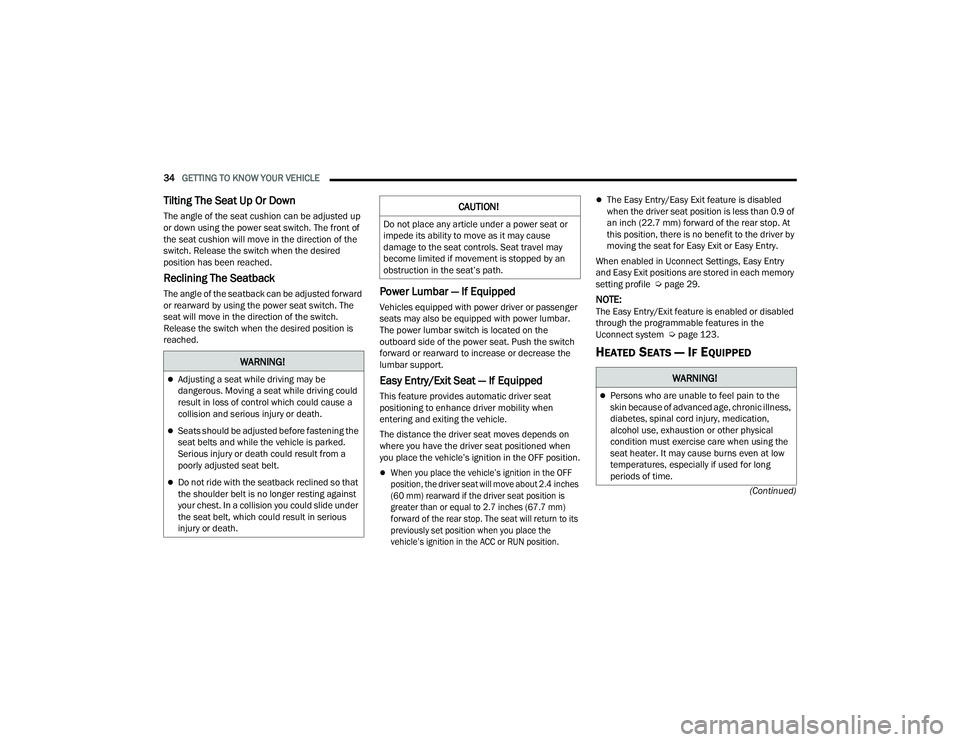
Tilting The Seat Up Or Down
The angle of the seat cushion can be adjusted up
or down using the power seat switch. The front of
the seat cushion will move in the direction of the
switch. Release the switch when the desired
position has been reached.
Reclining The Seatback
The angle of the seatback can be adjusted forward
or rearward by using the power seat switch. The
seat will move in the direction of the switch.
Release the switch when the desired position is
reached.Power Lumbar — If Equipped
Vehicles equipped with power driver or passenger
seats may also be equipped with power lumbar.
The power lumbar switch is located on the
outboard side of the power seat. Push the switch
forward or rearward to increase or decrease the
lumbar support.
Easy Entry/Exit Seat — If Equipped
This feature provides automatic driver seat
positioning to enhance driver mobility when
entering and exiting the vehicle.
The distance the driver seat moves depends on
where you have the driver seat positioned when
you place the vehicle’s ignition in the OFF position.
When you place the vehicle’s ignition in the OFF
position, the driver seat will move about 2.4 inches
(60 mm) rearward if the driver seat position is
greater than or equal to 2.7 inches (67.7 mm)
forward of the rear stop. The seat will return to its
previously set position when you place the
vehicle’s ignition in the ACC or RUN position.
The Easy Entry/Easy Exit feature is disabled
when the driver seat position is less than 0.9 of
an inch (22.7 mm) forward of the rear stop. At
this position, there is no benefit to the driver by
moving the seat for Easy Exit or Easy Entry.
When enabled in Uconnect Settings, Easy Entry
and Easy Exit positions are stored in each memory
setting profile Ú page 29.
NOTE:The Easy Entry/Exit feature is enabled or disabled
through the programmable features in the
Uconnect system Ú page 123.
HEATED SEATS — IF EQUIPPEDWARNING!
Adjusting a seat while driving may be
dangerous. Moving a seat while driving could
result in loss of control which could cause a
collision and serious injury or death.
Seats should be adjusted before fastening the
seat belts and while the vehicle is parked.
Serious injury or death could result from a
poorly adjusted seat belt.
Do not ride with the seatback reclined so that
the shoulder belt is no longer resting against
your chest. In a collision you could slide under
the seat belt, which could result in serious
injury or death.
CAUTION!
Do not place any article under a power seat or
impede its ability to move as it may cause
damage to the seat controls. Seat travel may
become limited if movement is stopped by an
obstruction in the seat’s path.
WARNING!
Persons who are unable to feel pain to the
skin because of advanced age, chronic illness,
diabetes, spinal cord injury, medication,
alcohol use, exhaustion or other physical
condition must exercise care when using the
seat heater. It may cause burns even at low
temperatures, especially if used for long
periods of time.
22_LD_OM_EN_USC_t.book Page 34
Page 37 of 312
GETTING TO KNOW YOUR VEHICLE35
Front Heated Seats
The front heated seats control buttons
are located within the Uconnect system.
You can gain access to the control
buttons through the climate screen and
the controls screen.
You can choose from HI, LO, or OFF heat settings.
The indicator arrows in the touchscreen buttons
indicate the level of heat in use. Two indicator
arrows will illuminate for HI, and one for LO.
Turning the heating elements off will return the
user to the radio screen.
Press the heated seat button once to turn the HI
setting on.
Press the heated seat button a second time to
turn the LO setting on.
Press the heated seat button a third time to turn
the heating elements off. If the HI-level setting is selected, the system will
automatically switch to LO-level after
approximately 60 minutes of continuous
operation. At that time, the display will change
from HI to LO, indicating the change. The LO-level
setting will turn off automatically after
approximately 45 minutes.
NOTE:
Once a heat setting is selected, heat will be felt
within two to five minutes.
The engine must be running for the heated
seats to operate.
For information on use with the Remote Start
system, see Ú page 19.
Rear Heated Seats
On some models, the two rear outboard
seats may be equipped with heated
seats. There are two heated seat
switches that allow the rear passengers
to operate the seats independently. The heated
seat switches for each heater are located on the
rear of the center console.
You can choose from HI, LO, or OFF heat settings.
The indicator lights in each switch indicate the
level of heat in use. Two indicator lights will
illuminate for HI, one for LO, and none for off.
Push the switch once to turn the HI setting on.
Push the switch a second time to turn the LO
setting on.
Push the switch a third time to turn the heating
elements off.
If the HI-level setting is selected, the system will
automatically switch to LO-level after
approximately 60 minutes of continuous
operation. At that time, the number of illuminated
LEDs changes from two to one, indicating the
change. The LO-level setting will turn off
automatically after approximately 45 minutes.
Do not place anything on the seat or seatback
that insulates against heat, such as a blanket
or cushion. This may cause the seat heater to
overheat. Sitting in a seat that has been over -
heated could cause serious burns due to the
increased surface temperature of the seat.
WARNING!
WARNING!
Persons who are unable to feel pain to the skin
because of advanced age, chronic illness,
diabetes, spinal cord injury, medication, alcohol
use, exhaustion or other physical condition
must exercise care when using the seat heater.
It may cause burns even at low temperatures,
especially if used for long periods of time.
Do not place anything on the seat or seatback
that insulates against heat, such as a blanket
or cushion. This may cause the seat heater to
overheat. Sitting in a seat that has been over -
heated could cause serious burns due to the
increased surface temperature of the seat.
2
22_LD_OM_EN_USC_t.book Page 35
Page 65 of 312
GETTING TO KNOW YOUR VEHICLE63
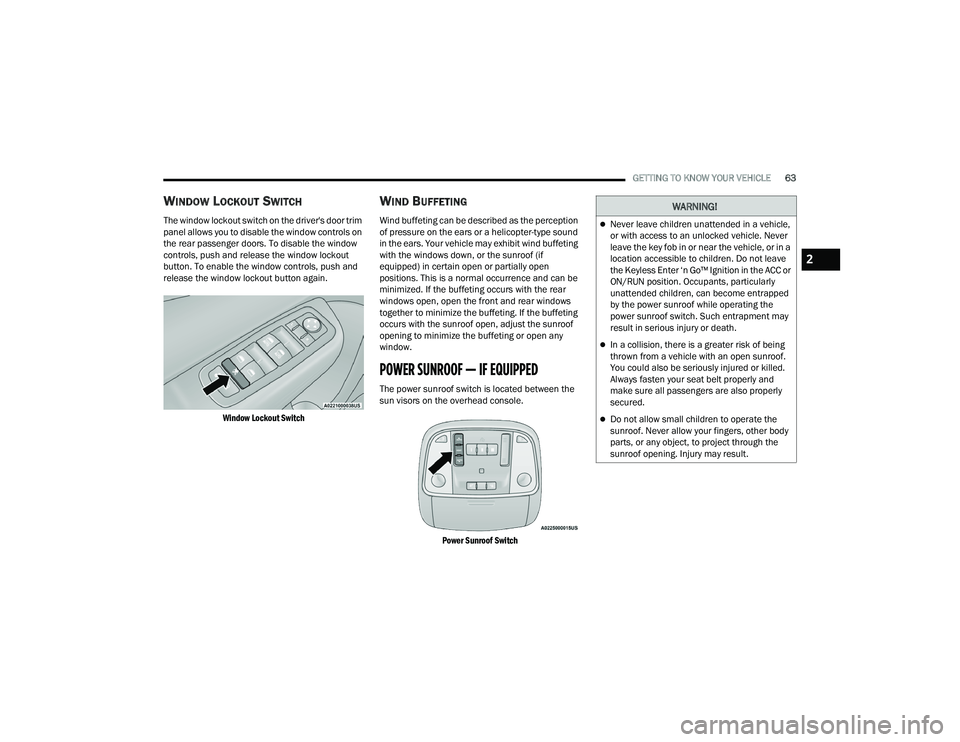
WINDOW LOCKOUT SWITCH
The window lockout switch on the driver's door trim
panel allows you to disable the window controls on
the rear passenger doors. To disable the window
controls, push and release the window lockout
button. To enable the window controls, push and
release the window lockout button again.
Window Lockout Switch
WIND BUFFETING
Wind buffeting can be described as the perception
of pressure on the ears or a helicopter-type sound
in the ears. Your vehicle may exhibit wind buffeting
with the windows down, or the sunroof (if
equipped) in certain open or partially open
positions. This is a normal occurrence and can be
minimized. If the buffeting occurs with the rear
windows open, open the front and rear windows
together to minimize the buffeting. If the buffeting
occurs with the sunroof open, adjust the sunroof
opening to minimize the buffeting or open any
window.
POWER SUNROOF — IF EQUIPPED
The power sunroof switch is located between the
sun visors on the overhead console.
Power Sunroof Switch
WARNING!
Never leave children unattended in a vehicle,
or with access to an unlocked vehicle. Never
leave the key fob in or near the vehicle, or in a
location accessible to children. Do not leave
the Keyless Enter ‘n Go™ Ignition in the ACC or
ON/RUN position. Occupants, particularly
unattended children, can become entrapped
by the power sunroof while operating the
power sunroof switch. Such entrapment may
result in serious injury or death.
In a collision, there is a greater risk of being
thrown from a vehicle with an open sunroof.
You could also be seriously injured or killed.
Always fasten your seat belt properly and
make sure all passengers are also properly
secured.
Do not allow small children to operate the
sunroof. Never allow your fingers, other body
parts, or any object, to project through the
sunroof opening. Injury may result.
2
22_LD_OM_EN_USC_t.book Page 63