audio DODGE CHARGER 2023 Owners Manual
[x] Cancel search | Manufacturer: DODGE, Model Year: 2023, Model line: CHARGER, Model: DODGE CHARGER 2023Pages: 292, PDF Size: 13.05 MB
Page 6 of 292

4
SPORT MODE — WITHOUT PERFORMANCE
CONTROL .............................................................................84
FUEL SAVER TECHNOLOGY 5.7L ONLY —
IF EQUIPPED ........................................................................84
ELECTRIC POWER STEERING ............................................85
CRUISE CONTROL SYSTEMS — IF EQUIPPED .................85
Cruise Control.............................................................. 85
Adaptive Cruise Control (ACC) .................................... 87
PARKSENSE REAR PARK ASSIST — IF EQUIPPED .........94 ParkSense Sensors ..................................................... 94
ParkSense Display ...................................................... 94
ParkSense Warning Display ....................................... 96
Enabling And Disabling ParkSense............................ 96
Service The ParkSense Park Assist System .............. 97
Cleaning The ParkSense System ............................... 97
ParkSense System Usage Precautions ..................... 97
LANESENSE — IF EQUIPPED .............................................98 LaneSense Operation ................................................. 98
Turning LaneSense On Or Off..................................... 98
LaneSense Warning Message.................................... 98
Changing LaneSense Status .................................... 100
PARKVIEW REAR BACK UP CAMERA ........................... 100
REFUELING THE VEHICLE ............................................... 101
VEHICLE LOADING ........................................................... 102 Vehicle Certification Label ....................................... 102
Gross Vehicle Weight Rating (GVWR) ...................... 102
Gross Axle Weight Rating (GAWR) ........................... 102
Overloading ............................................................... 103
Loading ................................................................... 103 TRAILER TOWING ........................................................... 103
Common Towing Definitions .................................... 103Trailer Hitch Classification ....................................... 105
Trailer Towing Weights
(Maximum Trailer Weight Ratings) .......................... 105
Trailer And Tongue Weight ...................................... 106
Towing Requirements............................................... 106
Towing Tips ............................................................... 108
RECREATIONAL TOWING (BEHIND MOTORHOME) ..... 109
DRIVING TIPS ................................................................... 109 Driving On Slippery Surfaces ................................... 109Driving Through Water ............................................. 110
MULTIMEDIA
UCONNECT SYSTEMS ..................................................... 111
CYBERSECURITY ............................................................. 111
UCONNECT SETTINGS .................................................... 112 Customer Programmable Features ......................... 112
UCONNECT INTRODUCTION............................................ 126 System Overview ...................................................... 126
Drag & Drop Menu Bar ............................................ 128
Safety And General Information ............................. 128
UCONNECT MODES ......................................................... 129 Steering Wheel Audio Controls ................................ 129
Radio Mode .............................................................. 130
Media Mode ............................................................. 138
Phone Mode ............................................................. 140
ANDROID AUTO™ & APPLE CARPLAY® —
IF EQUIPPED ..................................................................... 149 Android Auto™ ......................................................... 149Apple CarPlay® ......................................................... 151Android Auto™ And Apple CarPlay® Tips
And Tricks.................................................................. 152 PERFORMANCE PAGES ................................................... 153
Home.......................................................................... 153Timers ........................................................................ 155
Gauges ....................................................................... 157
G-Force ....................................................................... 157
Engine ........................................................................ 158
Dynamometer (Dyno) ................................................ 158
DODGE DRIVE MODES — IF EQUIPPED .........................159 Performance Control — If Equipped ......................... 159
RADIO OPERATION AND MOBILE PHONES ..................163 Regulatory And Safety Information .......................... 163
SAFETY
SAFETY FEATURES ...........................................................164Anti-Lock Brake System (ABS) ................................. 164
Electronic Brake Control (EBC) System ................... 165
AUXILIARY DRIVING SYSTEMS .......................................169 Blind Spot Monitoring (BSM) — If Equipped ............ 169
Forward Collision Warning (FCW) With
Mitigation Operation ................................................. 172
Tire Pressure Monitoring System (TPMS) ............... 174
OCCUPANT RESTRAINT SYSTEMS .................................177 Occupant Restraint Systems Features ................... 177
Important Safety Precautions................................... 177
Seat Belt Systems .................................................... 178
Supplemental Restraint Systems (SRS) .................. 183Child Restraints ........................................................ 190
23_LD_OM_EN_USC_t.book Page 4
Page 69 of 292
GETTING TO KNOW YOUR INSTRUMENT PANEL67
Audio
This menu displays the Audio information of the currently
playing audio source (e.g. FM radio).
Messages
This feature shows the number of stored warning
messages, if any. Pushing the right or left arrow
button will allow you to scroll through the stored
messages.
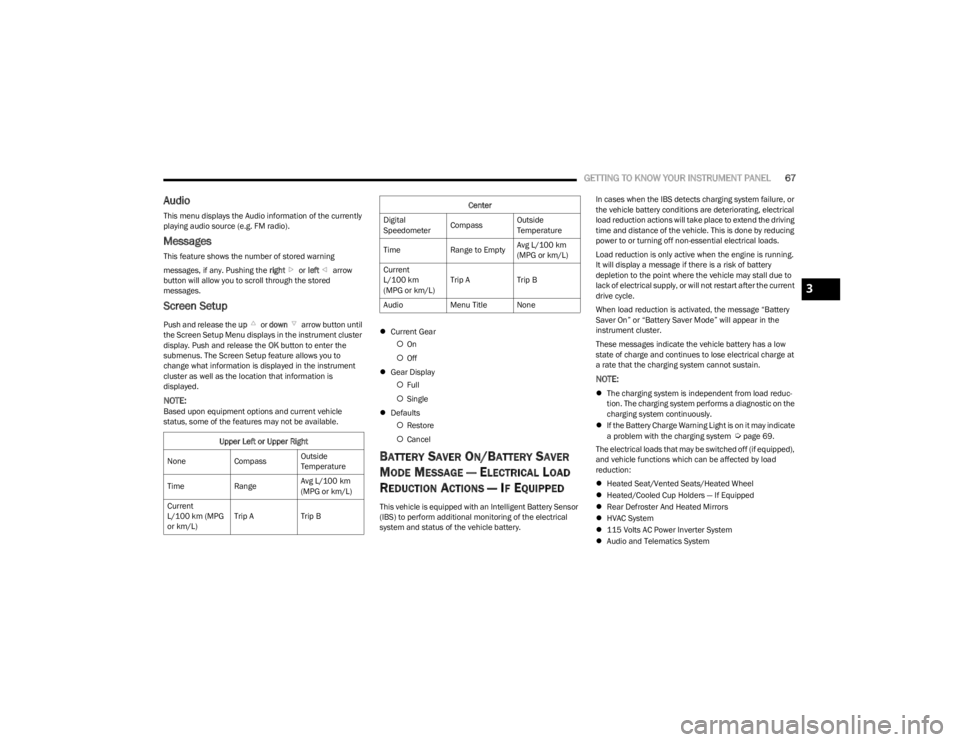
Screen Setup
Push and release the up or down arrow button until
the Screen Setup Menu displays in the instrument cluster
display. Push and release the OK button to enter the
submenus. The Screen Setup feature allows you to
change what information is displayed in the instrument
cluster as well as the location that information is
displayed.
NOTE:Based upon equipment options and current vehicle
status, some of the features may not be available.
Current Gear
On
Off
Gear Display
Full
Single
Defaults
Restore
Cancel
BATTERY SAVER ON/BATTERY SAVER
M
ODE MESSAGE — ELECTRICAL LOAD
R
EDUCTION ACTIONS — IF EQUIPPED
This vehicle is equipped with an Intelligent Battery Sensor
(IBS) to perform additional monitoring of the electrical
system and status of the vehicle battery. In cases when the IBS detects charging system failure, or
the vehicle battery conditions are deteriorating, electrical
load reduction actions will take place to extend the driving
time and distance of the vehicle. This is done by reducing
power to or turning off non-essential electrical loads.
Load reduction is only active when the engine is running.
It will display a message if there is a risk of battery
depletion to the point where the vehicle may stall due to
lack of electrical supply, or will not restart after the current
drive cycle.
When load reduction is activated, the message “Battery
Saver On” or “Battery Saver Mode” will appear in the
instrument cluster.
These messages indicate the vehicle battery has a low
state of charge and continues to lose electrical charge at
a rate that the charging system cannot sustain.
NOTE:
The charging system is independent from load reduc -
tion. The charging system performs a diagnostic on the
charging system continuously.
If the Battery Charge Warning Light is on it may indicate
a problem with the charging system
Úpage 69.
The electrical loads that may be switched off (if equipped),
and vehicle functions which can be affected by load
reduction:
Heated Seat/Vented Seats/Heated Wheel
Heated/Cooled Cup Holders — If Equipped
Rear Defroster And Heated Mirrors
HVAC System
115 Volts AC Power Inverter System
Audio and Telematics System
Upper Left or Upper Right
None CompassOutside
Temperature
Time RangeAvg L/100 km
(MPG or km/L)
Current
L/100 km (MPG
or km/L) Trip A
Trip B
Center
Digital
Speedometer CompassOutside
Temperature
Time Range to EmptyAvg L/100 km
(MPG or km/L)
Current
L/100 km
(MPG or km/L) Trip A
Trip B
Audio Menu Title None
3
23_LD_OM_EN_USC_t.book Page 67
Page 70 of 292
68GETTING TO KNOW YOUR INSTRUMENT PANEL
Loss of the battery charge may indicate one or more of the
following conditions:
The charging system cannot deliver enough electrical
power to the vehicle system because the electrical
loads are larger than the capability of the charging
system. The charging system is still functioning
properly.
Turning on all possible vehicle electrical loads (e.g.
HVAC to max settings, exterior and interior lights,
overloaded power outlets +12 Volts, 115 Volts AC, USB
ports) during certain driving conditions (city driving,
towing, frequent stopping).
Installing options like additional lights, upfitter elec -
trical accessories, audio systems, alarms and similar
devices.
Unusual driving cycles (short trips separated by long
parking periods).
The vehicle was parked for an extended period of time
(weeks, months).
The battery was recently replaced and was not charged
completely.
The battery was discharged by an electrical load left on
when the vehicle was parked.
The battery was used for an extended period with the
engine not running to supply radio, lights, chargers,
+12 Volts portable appliances like vacuum cleaners,
game consoles and similar devices. What to do when an electrical load reduction action
message is present
(“Battery Saver On” or “Battery Saver Mode”)
During a trip:
Reduce power to unnecessary loads if possible:
Turn off redundant lights (interior or exterior)
Check what may be plugged in to power outlets
+12 Volts, 115 Volts AC, USB ports
Check HVAC settings (blower, temperature)
Check the audio settings (volume)
After a trip:
Check if any aftermarket equipment was installed
(additional lights, upfitter electrical accessories, audio
systems, alarms) and review specifications if any (load
and Ignition Off Draw currents).
Evaluate the latest driving cycles (distance, driving
time and parking time).
The vehicle should have service performed if the
message is still present during consecutive trips and
the evaluation of the vehicle and driving pattern did not
help to identify the cause.
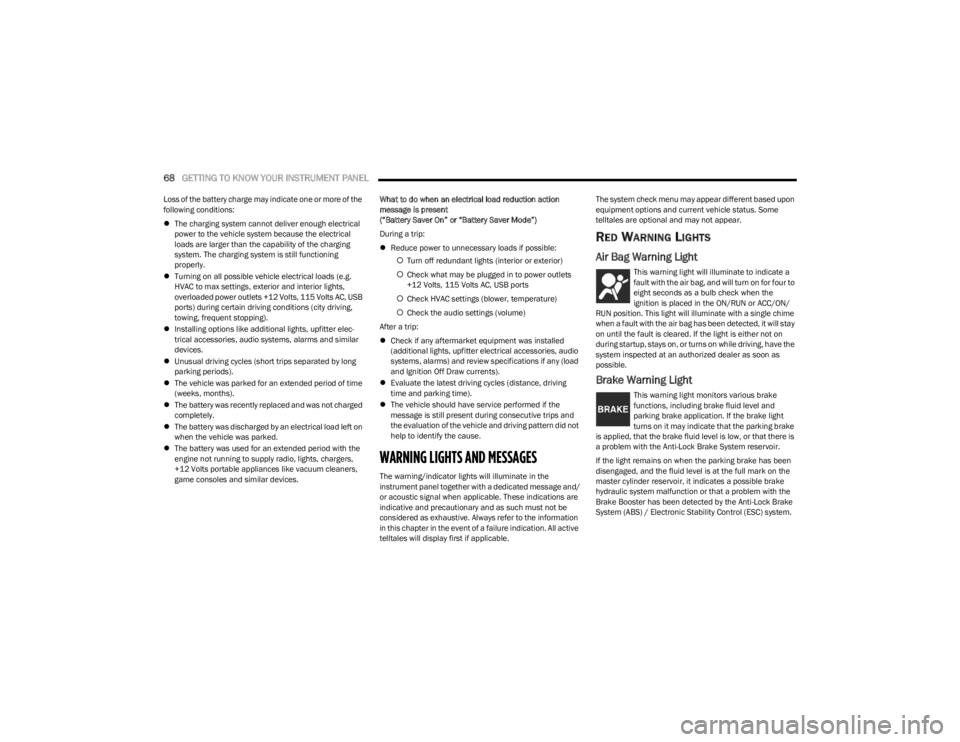
WARNING LIGHTS AND MESSAGES
The warning/indicator lights will illuminate in the
instrument panel together with a dedicated message and/
or acoustic signal when applicable. These indications are
indicative and precautionary and as such must not be
considered as exhaustive. Always refer to the information
in this chapter in the event of a failure indication. All active
telltales will display first if applicable. The system check menu may appear different based upon
equipment options and current vehicle status. Some
telltales are optional and may not appear.
RED WARNING LIGHTS
Air Bag Warning Light
This warning light will illuminate to indicate a
fault with the air bag, and will turn on for four to
eight seconds as a bulb check when the
ignition is placed in the ON/RUN or ACC/ON/
RUN position. This light will illuminate with a single chime
when a fault with the air bag has been detected, it will stay
on until the fault is cleared. If the light is either not on
during startup, stays on, or turns on while driving, have the
system inspected at an authorized dealer as soon as
possible.
Brake Warning Light
This warning light monitors various brake
functions, including brake fluid level and
parking brake application. If the brake light
turns on it may indicate that the parking brake
is applied, that the brake fluid level is low, or that there is
a problem with the Anti-Lock Brake System reservoir.
If the light remains on when the parking brake has been
disengaged, and the fluid level is at the full mark on the
master cylinder reservoir, it indicates a possible brake
hydraulic system malfunction or that a problem with the
Brake Booster has been detected by the Anti-Lock Brake
System (ABS) / Electronic Stability Control (ESC) system.
23_LD_OM_EN_USC_t.book Page 68
Page 98 of 292
96STARTING AND OPERATING
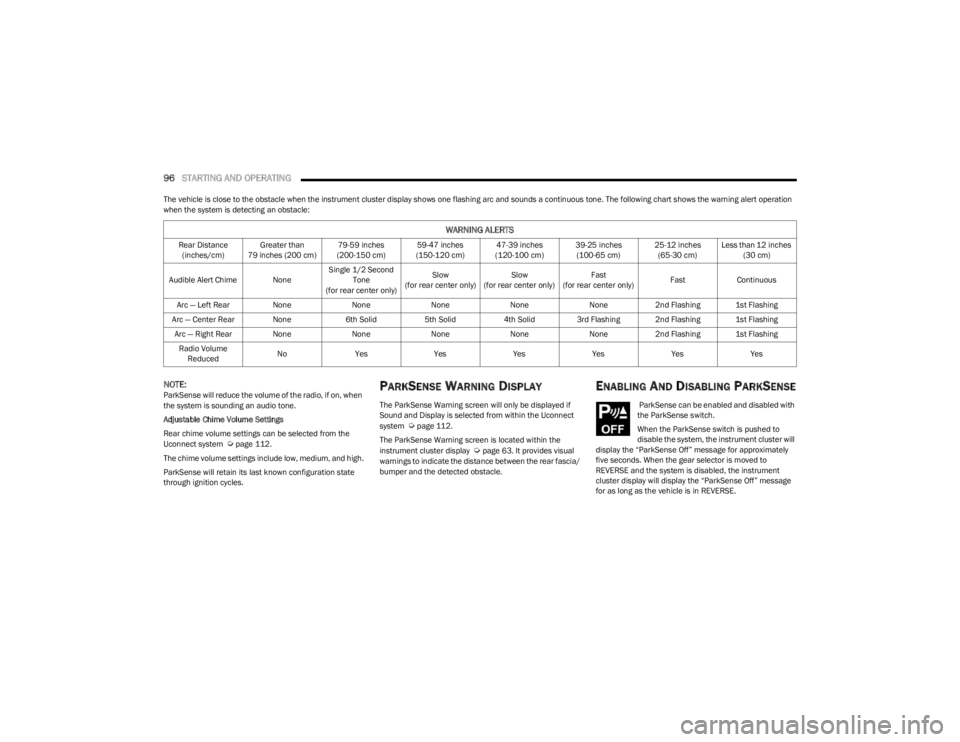
The vehicle is close to the obstacle when the instrument cluster display shows one flashing arc and sounds a continuous tone. The following chart shows the warning alert operation
when the system is detecting an obstacle:
NOTE:ParkSense will reduce the volume of the radio, if on, when
the system is sounding an audio tone.
Adjustable Chime Volume Settings
Rear chime volume settings can be selected from the
Uconnect system
Úpage 112.
The chime volume settings include low, medium, and high.
ParkSense will retain its last known configuration state
through ignition cycles.
PARKSENSE WARNING DISPLAY
The ParkSense Warning screen will only be displayed if
Sound and Display is selected from within the Uconnect
system
Úpage 112.
The ParkSense Warning screen is located within the
instrument cluster display
Úpage 63. It provides visual
warnings to indicate the distance between the rear fascia/
bumper and the detected obstacle.
ENABLING AND DISABLING PARKSENSE
ParkSense can be enabled and disabled with
the ParkSense switch.
When the ParkSense switch is pushed to
disable the system, the instrument cluster will
display the “ParkSense Off” message for approximately
five seconds. When the gear selector is moved to
REVERSE and the system is disabled, the instrument
cluster display will display the “ParkSense Off” message
for as long as the vehicle is in REVERSE.
WARNING ALERTS
Rear Distance (inches/cm) Greater than
79 inches (200 cm) 79-59 inches
(200-150 cm) 59-47 inches
(150-120 cm) 47-39 inches
(120-100 cm) 39-25 inches
(100-65 cm) 25-12 inches
(65-30 cm) Less than 12 inches
(30 cm)
Audible Alert Chime None Single 1/2 Second
Tone
(for rear center only) Slow
(for rear center only) Slow
(for rear center only) Fast
(for rear center only) Fast
Continuous
Arc — Left Rear NoneNoneNoneNoneNone2nd Flashing 1st Flashing
Arc — Center Rear None 6th Solid5th Solid4th Solid3rd Flashing 2nd Flashing 1st Flashing
Arc — Right Rear None NoneNoneNoneNone2nd Flashing 1st Flashing
Radio Volume Reduced No
Yes YesYesYesYesYes
23_LD_OM_EN_USC_t.book Page 96
Page 99 of 292

STARTING AND OPERATING97
The ParkSense switch LED will be on when ParkSense is
disabled or requires service. The ParkSense switch LED
will be off when the system is enabled. If the ParkSense
switch is pushed and the system requires service, the
ParkSense switch LED will blink momentarily and then the
LED will be on.
SERVICE THE PARKSENSE PARK ASSIST
S
YSTEM
During vehicle start up, when the ParkSense Rear Park
Assist System has detected a faulted condition, the
instrument cluster display will actuate a single chime,
once per ignition cycle, and it will display the “PARKSENSE
UNAVAILABLE WIPE REAR SENSORS” or the “PARKSENSE
UNAVAILABLE SERVICE REQUIRED” message. When the
gear selector is moved to REVERSE and the system has
detected a faulted condition, the instrument cluster
display will show the "PARKSENSE UNAVAILABLE WIPE
REAR SENSORS" or "PARKSENSE UNAVAILABLE SERVICE
REQUIRED" message for as long as the vehicle is in
REVERSE. Under this condition, ParkSense will not
operate.
If “PARKSENSE UNAVAILABLE WIPE REAR SENSORS”
appears in the instrument cluster display, make sure the
outer surface and the underside of the rear fascia/
bumper is clean and clear of snow, ice, mud, dirt or other
obstruction and then cycle the ignition. If the message
continues to appear, see an authorized dealer.
If “PARKSENSE UNAVAILABLE SERVICE REQUIRED”
appears in the instrument cluster display, see an
authorized dealer.
CLEANING THE PARKSENSE SYSTEM
Clean the ParkSense sensors with water, car wash soap
and a soft cloth. Do not use rough or hard cloths. Do not
scratch or poke the sensors. Otherwise, you could damage
the sensors.
PARKSENSE SYSTEM USAGE
P
RECAUTIONS
NOTE:
Ensure that the rear fascia/bumper is free of snow, ice,
mud, dirt and debris to keep the ParkSense system
operating properly.
Jackhammers, large trucks, and other vibrations could
affect the performance of ParkSense.
When you turn ParkSense off in DRIVE, the instrument
cluster will display "PARKSENSE OFF" for five seconds.
Furthermore, once you turn ParkSense off, it remains
off until you turn it on again, even if you cycle the igni -
tion.
When you move the gear selector to the REVERSE posi -
tion and ParkSense is turned off, the instrument
cluster display will show the “PARKSENSE OFF”
message for as long as the vehicle is in REVERSE.
ParkSense will reduce the volume of the radio when it
is sounding an audio tone.
Clean the ParkSense sensors regularly, taking care not
to scratch or damage them. The sensors must not be
covered with ice, snow, slush, mud, dirt or debris.
Failure to do so can result in the system not working
properly. The ParkSense system might not detect an
obstacle behind the fascia/bumper, or it could provide
a false indication that an obstacle is behind the fascia/
bumper.
Use the ParkSense switch to turn the ParkSense
system off if objects such as bicycle carriers, trailer
hitches, etc. are placed within 12 inches (30 cm) from
the rear fascia/bumper. Failure to do so can result in
the system misinterpreting a close object as a sensor
problem, causing the “PARKSENSE UNAVAILABLE
WIPE REAR SENSORS” message to be displayed in the
instrument cluster.
WARNING!
Drivers must be careful when backing up even when
using ParkSense. Always check carefully behind your
vehicle, look behind you, and be sure to check for
pedestrians, animals, other vehicles, obstructions, and
blind spots before backing up. You are responsible for
safety and must continue to pay attention to your
surroundings. Failure to do so can result in serious
injury or death.
4
23_LD_OM_EN_USC_t.book Page 97
Page 117 of 292

MULTIMEDIA115
Voice
Clock
When the Voice button is pressed on the touchscreen, the system displays the options related to the vehicle’s Voice Recognition feature.
NOTE:Depending on the vehicle’s options, feature settings may vary.
Setting Name Description
Voice Response LengthThis setting will change the response length for the Voice Recognition system. The “Brief”
setting provides a shortened audio description from the system. The “Detailed” setting provides the full audio description from the system.
Show Command List This setting will allow you to turn the Command List on or off. The “Always” setting will
always show the Command List. The “With Help” setting will show the Command List and provide a brief description of what the command does. The “Never” setting will turn the Command List off.
When the Clock button is pressed on the touchscreen, the system displays the different options related to the vehicle’s internal clock.
NOTE:Depending on the vehicle’s options, feature settings may vary.
Setting Name Description
Sync Time With GPSThis setting will sync the time to the GPS receiver in the system. The system will control
the time via the GPS location.
Time Format This setting will allow you set the time format (AM/PM). Sync Time With GPS must be off
for this setting to be available. The “12 hrs” setting will set the time to a 12-hour format. The “24 hrs” setting will set the time to a 24-hour format.
5
23_LD_OM_EN_USC_t.book Page 115
Page 125 of 292

MULTIMEDIA123
Audio
When the Audio button is pressed on the touchscreen, the system displays options related to the vehicle’s sound system. These settings can change the audio location within the
vehicle, adjust the bass or treble levels, and auto-play settings from an audio device or smartphone.
NOTE:Depending on the vehicle’s options, feature settings may vary.
Setting Name Description
Balance/FadeThis setting will adjust audio levels from specific speakers in the front/back and left/right
of the vehicle. The Speaker icon can be moved to set audio location.
Equalizer This setting will adjust the “Bass”, “Mid”, and “Treble” ranges of the audio.
Speed Adjusted Volume This setting will adjust audio volume as speeds increase. At a higher setting, the
volume will increase more as the vehicle speeds up. The available settings are “Off”, “1”, “2”, and “3”.
Surround Sound This setting will turn the Surround Sound system on or off.
AUX Volume Offset This setting will tune the audio levels from a device connected through the AUX port.
The available settings are “+” and “-”.
Auto Play This setting will automatically begin playing audio from a connected device.
5
23_LD_OM_EN_USC_t.book Page 123
Page 126 of 292

124MULTIMEDIA
Phone/Bluetooth®
SiriusXM® Setup — If Equipped
When the Phone/Bluetooth® button is pressed on the touchscreen, the system displays the options related to Bluetooth® connectivity from an external audio device or smartphone.
The list of paired audio devices or smartphones can be accessed from this menu.
NOTE:Depending on the vehicle’s options, feature settings may vary.
Setting Name Description
Phone Pop-Ups Displayed In ClusterThis setting will activate phone message pop-ups in the Instrument Cluster Display.
Do Not Disturb This setting will open the Do Not Disturb settings menu. The following settings are
“Auto Reply” (both, text, call), “Auto Reply Message” (custom, default), and “Custom Auto Reply Message” (create message).
Paired Phones And Audio Devices This setting will show the list of paired phones and audio devices.
Projection Manager This setting will activate your smartphone to project on the vehicle’s touchscreen.
When the SiriusXM® Setup button is pressed on the touchscreen, the system displays options related to SiriusXM® Satellite Radio. These settings can be used to skip specific radio
channels and restart favorite songs from the beginning.
NOTE:
A subscription to SiriusXM® Satellite Radio is required for these settings to be functional.
Depending on the vehicle’s options, feature settings may vary.
Setting Name Description
Tune StartThis setting will play the current song from the beginning when you tune to a music
channel using one of the 12 presets.
23_LD_OM_EN_USC_t.book Page 124
Page 129 of 292
MULTIMEDIA127
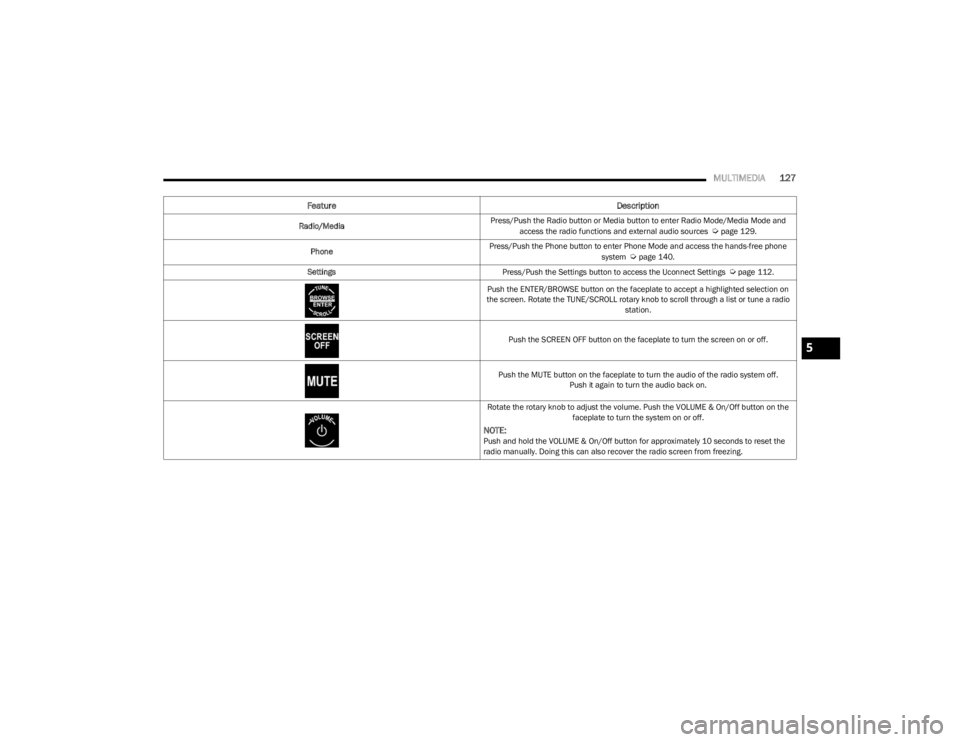
Feature Description
Radio/MediaPress/Push the Radio button or Media button to enter Radio Mode/Media Mode and
access the radio functions and external audio sources Úpage 129.
Phone Press/Push the Phone button to enter Phone Mode and access the hands-free phone
system
Úpage 140.
Settings Press/Push the Settings button to access the Uconnect Settings
Úpage 112.
Push the ENTER/BROWSE button on the faceplate to accept a highlighted selection on
the screen. Rotate the TUNE/SCROLL rotary knob to scroll through a list or tune a radio station.
Push the SCREEN OFF button on the faceplate to turn the screen on or off.
Push the MUTE button on the faceplate to turn the audio of the radio system off. Push it again to turn the audio back on.
Rotate the rotary knob to adjust the volume. Push the VOLUME & On/Off button on the faceplate to turn the system on or off.
NOTE:Push and hold the VOLUME & On/Off button for approximately 10 seconds to reset the
radio manually. Doing this can also recover the radio screen from freezing.
5
23_LD_OM_EN_USC_t.book Page 127
Page 131 of 292
MULTIMEDIA129
Safe Usage Of The Uconnect System
The Uconnect system is a sophisticated electronic
device. Do not let young children use the system.
Permanent hearing loss may occur if you play your
music or sound system at loud volumes. Exercise
caution when setting the volume on the system.
Keep drinks, rain and other sources of moisture away
from the system. Besides damage to the system, mois -
ture can cause electric shocks as with any electronic
device.
NOTE:Many features of this system are speed dependent.
For your own safety, it is not possible to use some of the
touchscreen features while the vehicle is in motion.
Care And Maintenance
Do not press the touchscreen with any hard or sharp
objects (pen, USB stick, jewelry, etc.), which could
scratch the surface.
Do not spray any liquid or chemicals directly on the
screen! Use a clean and dry microfiber lens cleaning
cloth in order to clean the touchscreen.
If necessary, use a lint-free cloth dampened with a
cleaning solution, such as isopropyl alcohol or an
isopropyl alcohol and water solution ratio of 50:50.
Be sure to follow the solvent manufacturer's precau -
tions and directions
Úpage 277.
UCONNECT MODES
STEERING WHEEL AUDIO CONTROLS
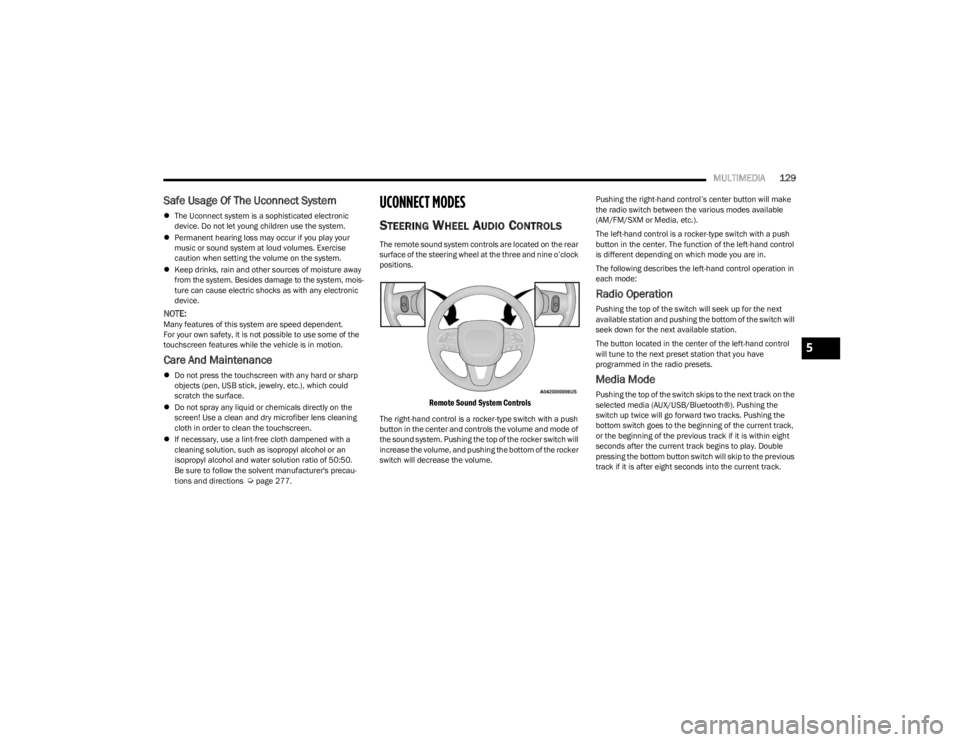
The remote sound system controls are located on the rear
surface of the steering wheel at the three and nine o’clock
positions.
Remote Sound System Controls
The right-hand control is a rocker-type switch with a push
button in the center and controls the volume and mode of
the sound system. Pushing the top of the rocker switch will
increase the volume, and pushing the bottom of the rocker
switch will decrease the volume. Pushing the right-hand control’s center button will make
the radio switch between the various modes available
(AM/FM/SXM or Media, etc.).
The left-hand control is a rocker-type switch with a push
button in the center. The function of the left-hand control
is different depending on which mode you are in.
The following describes the left-hand control operation in
each mode:
Radio Operation
Pushing the top of the switch will seek up for the next
available station and pushing the bottom of the switch will
seek down for the next available station.
The button located in the center of the left-hand control
will tune to the next preset station that you have
programmed in the radio presets.
Media Mode
Pushing the top of the switch skips to the next track on the
selected media (AUX/USB/Bluetooth®). Pushing the
switch up twice will go forward two tracks. Pushing the
bottom switch goes to the beginning of the current track,
or the beginning of the previous track if it is within eight
seconds after the current track begins to play. Double
pressing the bottom button switch will skip to the previous
track if it is after eight seconds into the current track.
5
23_LD_OM_EN_USC_t.book Page 129