phone DODGE CHARGER 2023 Owners Manual
[x] Cancel search | Manufacturer: DODGE, Model Year: 2023, Model line: CHARGER, Model: DODGE CHARGER 2023Pages: 292, PDF Size: 13.05 MB
Page 2 of 292

The driver’s primary responsibility is the safe operation of the vehicle. Driving w\
hile distracted can result in loss of vehicle control, resulting in an accident and personal
injury. FCA US LLC strongly recommends that the driver use extreme caution whe\
n using any device or feature that may take their attention off the road. Use of any electrical
devices, such as cellular telephones, computers, portable radios, vehicl\
e navigation or other devices, by the driver while the vehicle is moving is dangerous and could lead
to a serious accident. Texting while driving is also dangerous and should never be done while th\
e vehicle is moving. If you find yourself unable to devote your full attention
to vehicle operation, pull off the road to a safe location and stop your\
vehicle. Some states or provinces prohibit the use of cellular telephones or texting while driving. It is
always the driver’s responsibility to comply with all local laws.
This Owner’s Manual has been prepared to help you get acquainted with your new Dodge brand vehicle and to provide a convenient reference source for common questions.
Not all features shown in this manual may apply to your vehicle. For add\
itional information, visit mopar.com/om (U.S.), owners.mopar.ca (Canada) or your local Dodge brand
dealer.
DRIVING AND ALCOHOL
Drunk driving is one of the most frequent causes of accidents. Your driving ability can be seriously impaired with blood alcohol levels far
below the legal minimum. If you are drinking, don’t drive. Ride with \
a designated non-drinking driver, call a cab, a rideshare, a friend, or use public
transportation.
WARNING
Driving after drinking can lead to an accident. Your perceptions are less sharp, your reflexes are slower and your judg\
ment is impaired when you have
been drinking. Never drink and then drive.
WARNING: Operating, servicing and maintaining a passenger vehicle or off-highway \
motor vehicle can expose you to
chemicals including engine exhaust, carbon monoxide, phthalates, and lea\
d, which are known to the State of California to
cause cancer and birth defects or other reproductive harm. To minimize exposure, avoid breathing exhaust, do not idle the
engine except as necessary, service your vehicle in a well-ventilated area and wear gloves or wash\
your hands frequently
when servicing your vehicle. For more information go to www.P65Warnings.ca.gov/passenger-vehicle.
This Owner’s Manual illustrates and describes the operation of features and equipme\
nt that are either standard or optional on this vehicle. This manual may\
also include a description of features and equipment that are no longer available or were not ordered \
on this vehicle. Please disregard any features and equipment described i\
n this manual that are not on this vehicle. FCA US LLC reserves the right to make changes in design and specifications\
, and/or make additions to or improvements to its products without impos\
ing any obligation upon itself to install them on products previously manufactured.
With respect to any vehicles sold in Canada, the name FCA US LLC shall b\
e deemed to be deleted and the name FCA Canada Inc. used in substitution\
therefore.
This Owner’s Manual is intended to familiarize you with the important features of y\
our vehicle. Your most up-to-date Owner’s Manual, Navigation/Uconnect manuals and Warranty Booklet can be found by visiting the website on the back cover.
U.S. Residents: If you are the first registered retail owner of your v\
ehicle, you may obtain a complimentary printed copy of the Warranty Booklet by calling 1-800-423-6343 or by contacting your dealer. Replacement kits can be purchased by visiting www.techauthority.com.
Canadian Residents: If you are the first registered retail owner of yo\
ur vehicle, you may obtain a complimentary printed copy of the W arranty Booklet or purchase a replacement kit by calling 1-800-387-1143 or by contacting your dealer.
FCA US LLC reserves the right to modify the terms or discontinue the Roa\
dside Assistance Program at any time. The Roadside Assistance Program i\
s subject to restrictions and conditions of use, that are determined solely by FCA US LLC.
ROADSIDE ASSISTANCE 24 HOURS, 7 DAYS A WEEK AT YOUR SERVICE. CALL 1-800-521-2779 OR VISIT CHRYSLER.RSAHELP.COM (USA) CALL 1-800-363-4869 OR VISIT FCA.ROADSIDEAID.COM (CANADA) SERVICES: Flat Tire Service, Out Of Gas/Fuel Delivery, Battery Jump Assistance, Lockout Service and Towing Service
Please see the Customer Assistance chapter in this Owner’s Manual for further information.
Page 6 of 292

4
SPORT MODE — WITHOUT PERFORMANCE
CONTROL .............................................................................84
FUEL SAVER TECHNOLOGY 5.7L ONLY —
IF EQUIPPED ........................................................................84
ELECTRIC POWER STEERING ............................................85
CRUISE CONTROL SYSTEMS — IF EQUIPPED .................85
Cruise Control.............................................................. 85
Adaptive Cruise Control (ACC) .................................... 87
PARKSENSE REAR PARK ASSIST — IF EQUIPPED .........94 ParkSense Sensors ..................................................... 94
ParkSense Display ...................................................... 94
ParkSense Warning Display ....................................... 96
Enabling And Disabling ParkSense............................ 96
Service The ParkSense Park Assist System .............. 97
Cleaning The ParkSense System ............................... 97
ParkSense System Usage Precautions ..................... 97
LANESENSE — IF EQUIPPED .............................................98 LaneSense Operation ................................................. 98
Turning LaneSense On Or Off..................................... 98
LaneSense Warning Message.................................... 98
Changing LaneSense Status .................................... 100
PARKVIEW REAR BACK UP CAMERA ........................... 100
REFUELING THE VEHICLE ............................................... 101
VEHICLE LOADING ........................................................... 102 Vehicle Certification Label ....................................... 102
Gross Vehicle Weight Rating (GVWR) ...................... 102
Gross Axle Weight Rating (GAWR) ........................... 102
Overloading ............................................................... 103
Loading ................................................................... 103 TRAILER TOWING ........................................................... 103
Common Towing Definitions .................................... 103Trailer Hitch Classification ....................................... 105
Trailer Towing Weights
(Maximum Trailer Weight Ratings) .......................... 105
Trailer And Tongue Weight ...................................... 106
Towing Requirements............................................... 106
Towing Tips ............................................................... 108
RECREATIONAL TOWING (BEHIND MOTORHOME) ..... 109
DRIVING TIPS ................................................................... 109 Driving On Slippery Surfaces ................................... 109Driving Through Water ............................................. 110
MULTIMEDIA
UCONNECT SYSTEMS ..................................................... 111
CYBERSECURITY ............................................................. 111
UCONNECT SETTINGS .................................................... 112 Customer Programmable Features ......................... 112
UCONNECT INTRODUCTION............................................ 126 System Overview ...................................................... 126
Drag & Drop Menu Bar ............................................ 128
Safety And General Information ............................. 128
UCONNECT MODES ......................................................... 129 Steering Wheel Audio Controls ................................ 129
Radio Mode .............................................................. 130
Media Mode ............................................................. 138
Phone Mode ............................................................. 140
ANDROID AUTO™ & APPLE CARPLAY® —
IF EQUIPPED ..................................................................... 149 Android Auto™ ......................................................... 149Apple CarPlay® ......................................................... 151Android Auto™ And Apple CarPlay® Tips
And Tricks.................................................................. 152 PERFORMANCE PAGES ................................................... 153
Home.......................................................................... 153Timers ........................................................................ 155
Gauges ....................................................................... 157
G-Force ....................................................................... 157
Engine ........................................................................ 158
Dynamometer (Dyno) ................................................ 158
DODGE DRIVE MODES — IF EQUIPPED .........................159 Performance Control — If Equipped ......................... 159
RADIO OPERATION AND MOBILE PHONES ..................163 Regulatory And Safety Information .......................... 163
SAFETY
SAFETY FEATURES ...........................................................164Anti-Lock Brake System (ABS) ................................. 164
Electronic Brake Control (EBC) System ................... 165
AUXILIARY DRIVING SYSTEMS .......................................169 Blind Spot Monitoring (BSM) — If Equipped ............ 169
Forward Collision Warning (FCW) With
Mitigation Operation ................................................. 172
Tire Pressure Monitoring System (TPMS) ............... 174
OCCUPANT RESTRAINT SYSTEMS .................................177 Occupant Restraint Systems Features ................... 177
Important Safety Precautions................................... 177
Seat Belt Systems .................................................... 178
Supplemental Restraint Systems (SRS) .................. 183Child Restraints ........................................................ 190
23_LD_OM_EN_USC_t.book Page 4
Page 14 of 292
12
GETTING TO KNOW YOUR VEHICLE
KEYS
KEY FOB
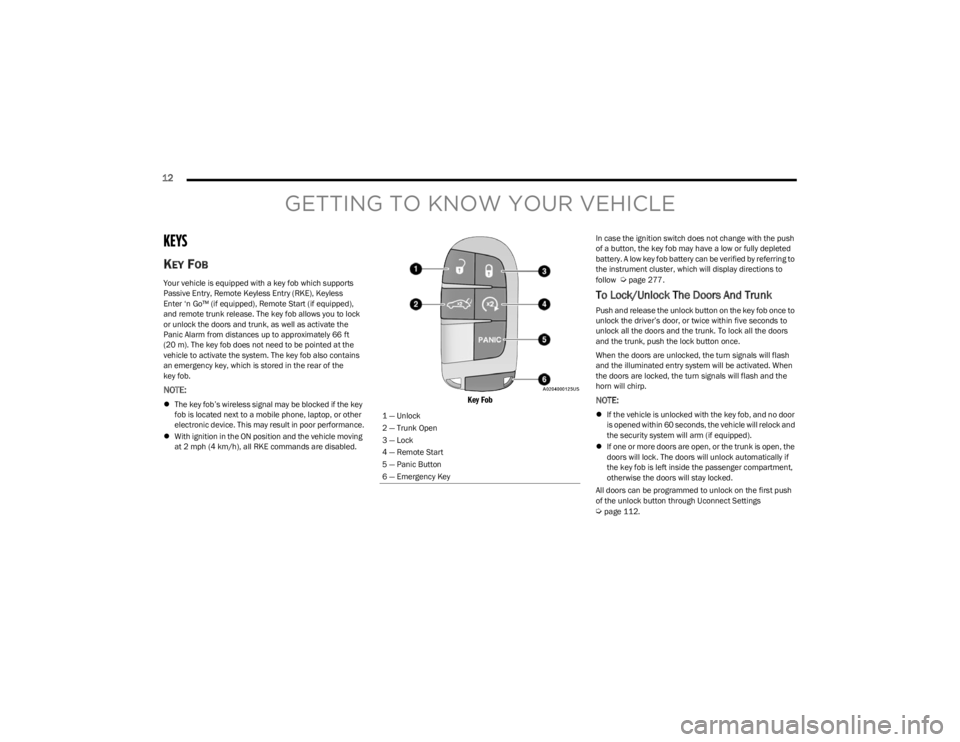
Your vehicle is equipped with a key fob which supports
Passive Entry, Remote Keyless Entry (RKE), Keyless
Enter ‘n Go™ (if equipped), Remote Start (if equipped),
and remote trunk release. The key fob allows you to lock
or unlock the doors and trunk, as well as activate the
Panic Alarm from distances up to approximately 66 ft
(20 m). The key fob does not need to be pointed at the
vehicle to activate the system. The key fob also contains
an emergency key, which is stored in the rear of the
key fob.
NOTE:
The key fob’s wireless signal may be blocked if the key
fob is located next to a mobile phone, laptop, or other
electronic device. This may result in poor performance.
With ignition in the ON position and the vehicle moving
at 2 mph (4 km/h), all RKE commands are disabled.
Key Fob
In case the ignition switch does not change with the push
of a button, the key fob may have a low or fully depleted
battery. A low key fob battery can be verified by referring to
the instrument cluster, which will display directions to
follow
Úpage 277.
To Lock/Unlock The Doors And Trunk
Push and release the unlock button on the key fob once to
unlock the driver’s door, or twice within five seconds to
unlock all the doors and the trunk. To lock all the doors
and the trunk, push the lock button once.
When the doors are unlocked, the turn signals will flash
and the illuminated entry system will be activated. When
the doors are locked, the turn signals will flash and the
horn will chirp.
NOTE:
If the vehicle is unlocked with the key fob, and no door
is opened within 60 seconds, the vehicle will relock and
the security system will arm (if equipped).
If one or more doors are open, or the trunk is open, the
doors will lock. The doors will unlock automatically if
the key fob is left inside the passenger compartment,
otherwise the doors will stay locked.
All doors can be programmed to unlock on the first push
of the unlock button through Uconnect Settings
Úpage 112.
1 — Unlock
2 — Trunk Open
3 — Lock
4 — Remote Start
5 — Panic Button
6 — Emergency Key
23_LD_OM_EN_USC_t.book Page 12
Page 23 of 292
GETTING TO KNOW YOUR VEHICLE21
DOORS
MANUAL DOOR LOCKS
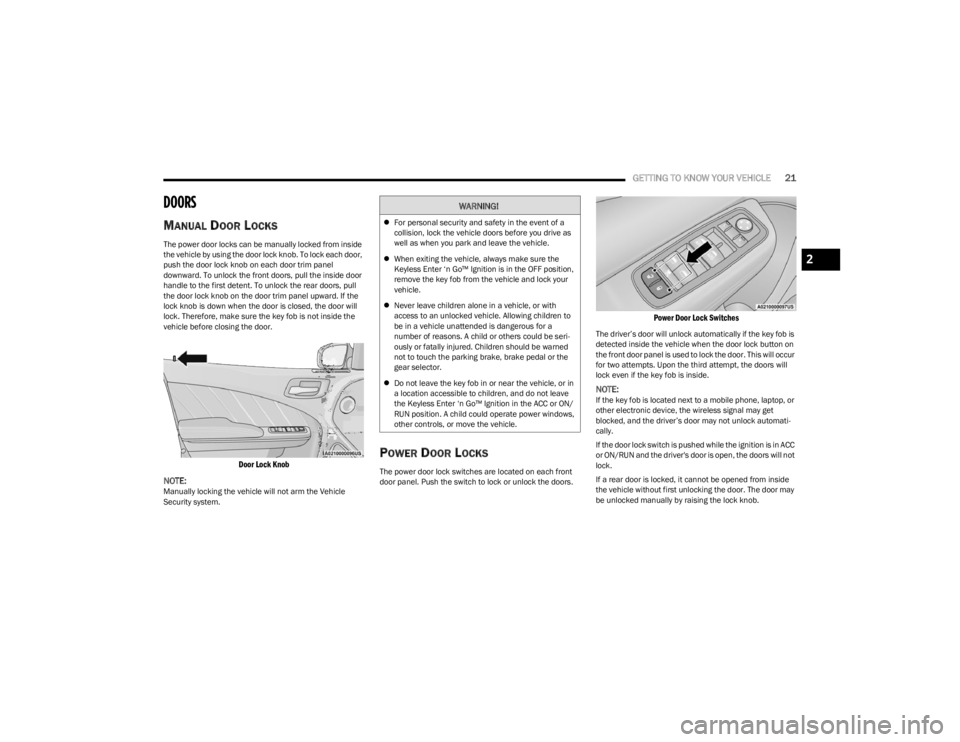
The power door locks can be manually locked from inside
the vehicle by using the door lock knob. To lock each door,
push the door lock knob on each door trim panel
downward. To unlock the front doors, pull the inside door
handle to the first detent. To unlock the rear doors, pull
the door lock knob on the door trim panel upward. If the
lock knob is down when the door is closed, the door will
lock. Therefore, make sure the key fob is not inside the
vehicle before closing the door.
Door Lock Knob
NOTE:
Manually locking the vehicle will not arm the Vehicle
Security system.
POWER DOOR LOCKS
The power door lock switches are located on each front
door panel. Push the switch to lock or unlock the doors.
Power Door Lock Switches
The driver’s door will unlock automatically if the key fob is
detected inside the vehicle when the door lock button on
the front door panel is used to lock the door. This will occur
for two attempts. Upon the third attempt, the doors will
lock even if the key fob is inside.
NOTE:If the key fob is located next to a mobile phone, laptop, or
other electronic device, the wireless signal may get
blocked, and the driver’s door may not unlock automati -
cally.
If the door lock switch is pushed while the ignition is in ACC
or ON/RUN and the driver's door is open, the doors will not
lock.
If a rear door is locked, it cannot be opened from inside
the vehicle without first unlocking the door. The door may
be unlocked manually by raising the lock knob.
WARNING!
For personal security and safety in the event of a
collision, lock the vehicle doors before you drive as
well as when you park and leave the vehicle.
When exiting the vehicle, always make sure the
Keyless Enter ‘n Go™ Ignition is in the OFF position,
remove the key fob from the vehicle and lock your
vehicle.
Never leave children alone in a vehicle, or with
access to an unlocked vehicle. Allowing children to
be in a vehicle unattended is dangerous for a
number of reasons. A child or others could be seri -
ously or fatally injured. Children should be warned
not to touch the parking brake, brake pedal or the
gear selector.
Do not leave the key fob in or near the vehicle, or in
a location accessible to children, and do not leave
the Keyless Enter ‘n Go™ Ignition in the ACC or ON/
RUN position. A child could operate power windows,
other controls, or move the vehicle.
2
23_LD_OM_EN_USC_t.book Page 21
Page 24 of 292
22GETTING TO KNOW YOUR VEHICLE
KEYLESS ENTER ‘N GO™ — PASSIVE
E
NTRY
The Passive Entry system is an enhancement to the
vehicle’s key fob and a feature of Keyless Enter ‘n Go™ —
Passive Entry. This feature allows you to lock and unlock
the vehicle’s door(s) without having to push the key fob
lock or unlock buttons.
NOTE:
Passive Entry may be programmed on/off through
Uconnect Settings Úpage 112.
The key fob may not be able to be detected by the
vehicle Passive Entry system if it is located next to a
mobile phone, laptop, or other electronic device; these
devices may block the key fob’s wireless signal and
prevent the Passive Entry system from locking/
unlocking the vehicle.
Passive Entry Unlock initiates illuminated approach
(low beams, license plate lamp, position lamps) for
whichever time is set between 0, 30, 60 or 90 seconds.
Passive Entry Unlock also initiates two flashes of the
turn signal lights.
If wearing gloves, if it has been raining/snowing, or
there is salt/dirt covering the Passive Entry door
handle, the unlock sensitivity can be affected, resulting
in a slower response time.
The doors may unlock when water is sprayed on the
Passive Entry door handles, if the key fob is located
outside of the vehicle within 5 ft (1.5 m) of the handle.
If the vehicle is unlocked by Passive Entry and no door
is opened within 60 seconds, the vehicle will relock and
(if equipped) will arm the Vehicle Security system. To Unlock From The Driver Or Passenger Side
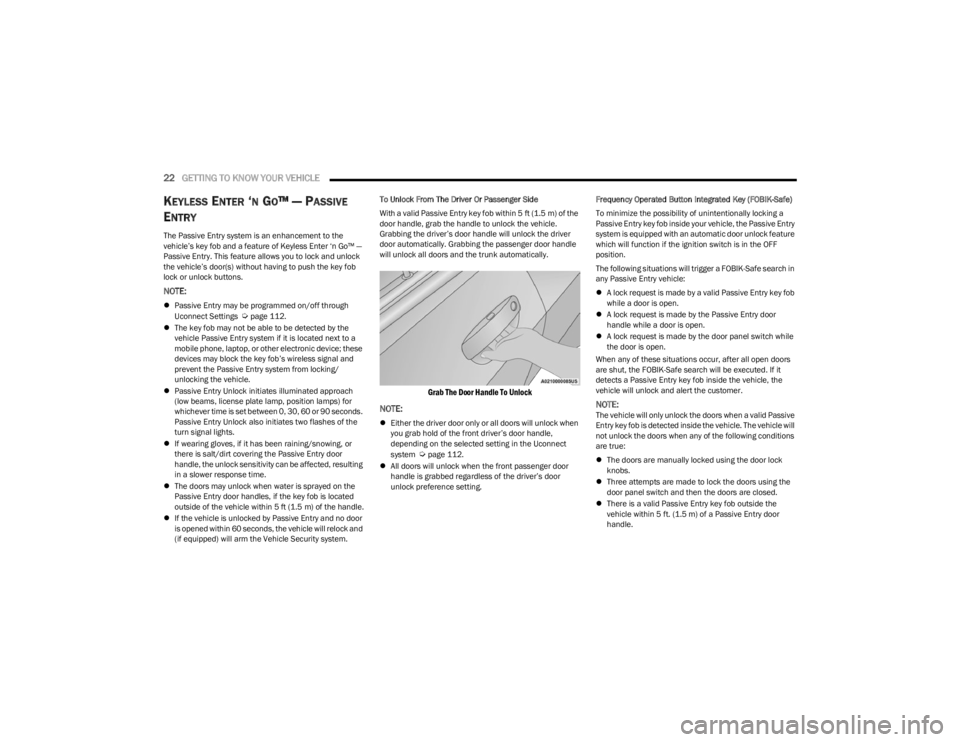
With a valid Passive Entry key fob within 5 ft (1.5 m) of the
door handle, grab the handle to unlock the vehicle.
Grabbing the driver’s door handle will unlock the driver
door automatically. Grabbing the passenger door handle
will unlock all doors and the trunk automatically.
Grab The Door Handle To Unlock
NOTE:
Either the driver door only or all doors will unlock when
you grab hold of the front driver’s door handle,
depending on the selected setting in the Uconnect
system
Úpage 112.
All doors will unlock when the front passenger door
handle is grabbed regardless of the driver’s door
unlock preference setting. Frequency Operated Button Integrated Key (FOBIK-Safe)
To minimize the possibility of unintentionally locking a
Passive Entry key fob inside your vehicle, the Passive Entry
system is equipped with an automatic door unlock feature
which will function if the ignition switch is in the OFF
position.
The following situations will trigger a FOBIK-Safe search in
any Passive Entry vehicle:
A lock request is made by a valid Passive Entry key fob
while a door is open.
A lock request is made by the Passive Entry door
handle while a door is open.
A lock request is made by the door panel switch while
the door is open.
When any of these situations occur, after all open doors
are shut, the FOBIK-Safe search will be executed. If it
detects a Passive Entry key fob inside the vehicle, the
vehicle will unlock and alert the customer.
NOTE:The vehicle will only unlock the doors when a valid Passive
Entry key fob is detected inside the vehicle. The vehicle will
not unlock the doors when any of the following conditions
are true:
The doors are manually locked using the door lock
knobs.
Three attempts are made to lock the doors using the
door panel switch and then the doors are closed.
There is a valid Passive Entry key fob outside the
vehicle within 5 ft. (1.5 m) of a Passive Entry door
handle.
23_LD_OM_EN_USC_t.book Page 22
Page 29 of 292
GETTING TO KNOW YOUR VEHICLE27
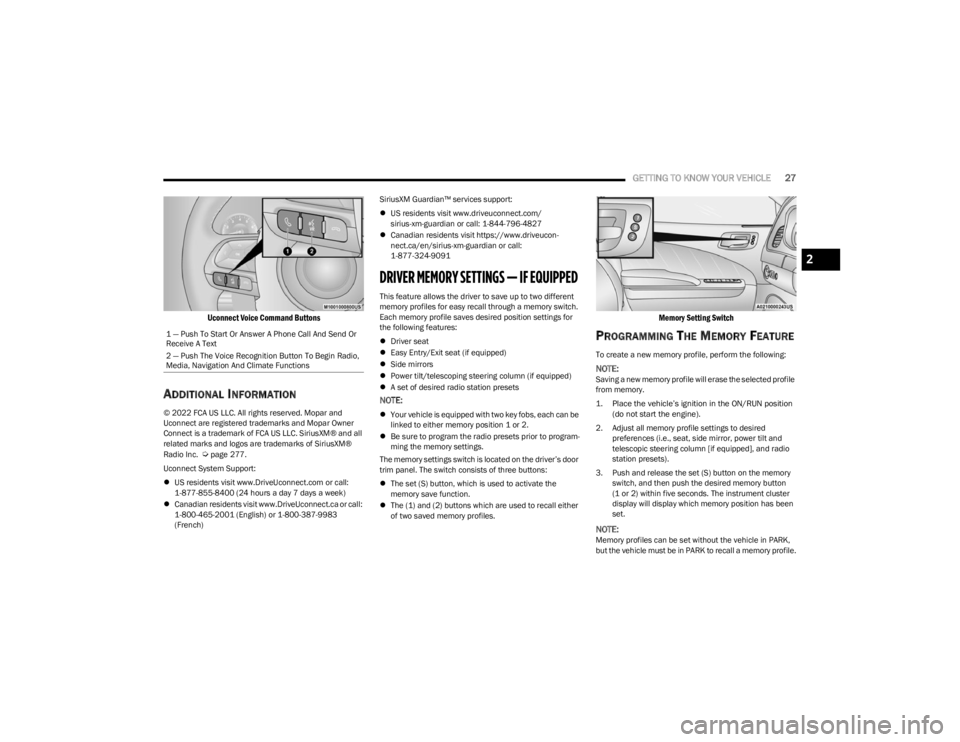
Uconnect Voice Command Buttons
ADDITIONAL INFORMATION
© 2022 FCA US LLC. All rights reserved. Mopar and
Uconnect are registered trademarks and Mopar Owner
Connect is a trademark of FCA US LLC. SiriusXM® and all
related marks and logos are trademarks of SiriusXM®
Radio Inc.
Úpage 277.
Uconnect System Support:
US residents visit www.DriveUconnect.com or call:
1-877-855-8400 (24 hours a day 7 days a week)
Canadian residents visit www.DriveUconnect.ca or call:
1-800-465-2001 (English) or 1-800-387-9983
(French) SiriusXM Guardian™ services support:
US residents visit www.driveuconnect.com/
sirius-xm-guardian or call: 1-844-796-4827
Canadian residents visit https://www.driveucon -
nect.ca/en/sirius-xm-guardian or call:
1-877-324-9091
DRIVER MEMORY SETTINGS — IF EQUIPPED
This feature allows the driver to save up to two different
memory profiles for easy recall through a memory switch.
Each memory profile saves desired position settings for
the following features:
Driver seat
Easy Entry/Exit seat (if equipped)
Side mirrors
Power tilt/telescoping steering column (if equipped)
A set of desired radio station presets
NOTE:
Your vehicle is equipped with two key fobs, each can be
linked to either memory position 1 or 2.
Be sure to program the radio presets prior to program -
ming the memory settings.
The memory settings switch is located on the driver’s door
trim panel. The switch consists of three buttons:
The set (S) button, which is used to activate the
memory save function.
The (1) and (2) buttons which are used to recall either
of two saved memory profiles.
Memory Setting Switch
PROGRAMMING THE MEMORY FEATURE
To create a new memory profile, perform the following:
NOTE:Saving a new memory profile will erase the selected profile
from memory.
1. Place the vehicle’s ignition in the ON/RUN position
(do not start the engine).
2. Adjust all memory profile settings to desired preferences (i.e., seat, side mirror, power tilt and
telescopic steering column [if equipped], and radio
station presets).
3. Push and release the set (S) button on the memory switch, and then push the desired memory button
(1 or 2) within five seconds. The instrument cluster
display will display which memory position has been
set.
NOTE:Memory profiles can be set without the vehicle in PARK,
but the vehicle must be in PARK to recall a memory profile.
1 — Push To Start Or Answer A Phone Call And Send Or
Receive A Text
2 — Push The Voice Recognition Button To Begin Radio,
Media, Navigation And Climate Functions
2
23_LD_OM_EN_USC_t.book Page 27
Page 56 of 292
54GETTING TO KNOW YOUR VEHICLE
USB/AUX CONTROL
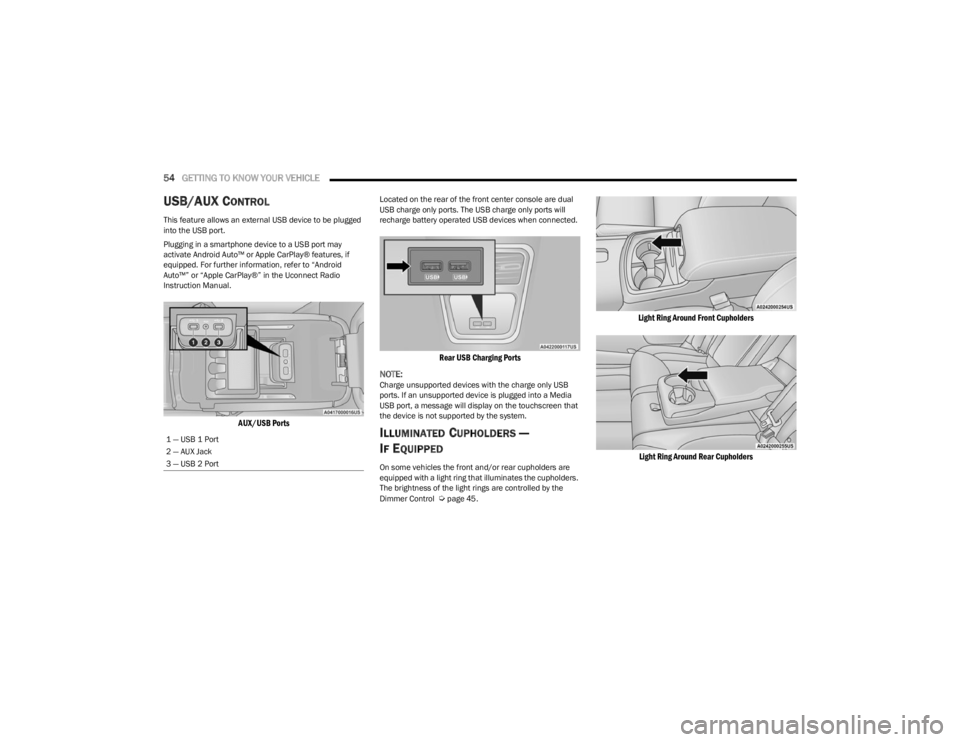
This feature allows an external USB device to be plugged
into the USB port.
Plugging in a smartphone device to a USB port may
activate Android Auto™ or Apple CarPlay® features, if
equipped. For further information, refer to “Android
Auto™” or “Apple CarPlay®” in the Uconnect Radio
Instruction Manual.
AUX/USB Ports
Located on the rear of the front center console are dual
USB charge only ports. The USB charge only ports will
recharge battery operated USB devices when connected.
Rear USB Charging Ports
NOTE:
Charge unsupported devices with the charge only USB
ports. If an unsupported device is plugged into a Media
USB port, a message will display on the touchscreen that
the device is not supported by the system.
ILLUMINATED CUPHOLDERS —
I
F EQUIPPED
On some vehicles the front and/or rear cupholders are
equipped with a light ring that illuminates the cupholders.
The brightness of the light rings are controlled by the
Dimmer Control
Úpage 45.
Light Ring Around Front Cupholders
Light Ring Around Rear Cupholders
1 — USB 1 Port
2 — AUX Jack
3 — USB 2 Port
23_LD_OM_EN_USC_t.book Page 54
Page 57 of 292
GETTING TO KNOW YOUR VEHICLE55
POWER OUTLETS
Your vehicle is equipped with 12 Volt (15 Amp) power
outlets that can be used to power cellular phones, small
electronics and other low powered electrical accessories.
The power outlets are labeled with either a “key” or a
“battery” symbol to indicate how the outlet is powered.
Power outlets labeled with a key symbol are powered
when the ignition is in the ON or ACC position, while the
outlets labeled with a battery symbol are connected
directly to the battery and powered at all times.
NOTE:All accessories connected to the battery powered outlets
should be removed or turned off when the vehicle is not in
use to protect the battery against discharge.
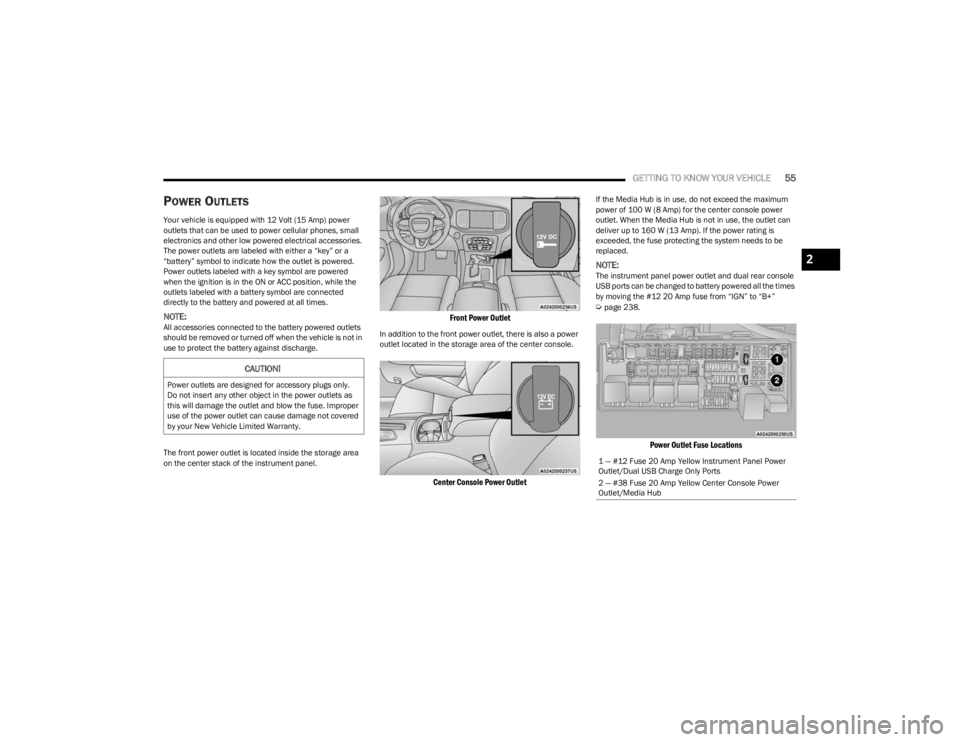
The front power outlet is located inside the storage area
on the center stack of the instrument panel.
Front Power Outlet
In addition to the front power outlet, there is also a power
outlet located in the storage area of the center console.
Center Console Power Outlet
If the Media Hub is in use, do not exceed the maximum
power of 100 W (8 Amp) for the center console power
outlet. When the Media Hub is not in use, the outlet can
deliver up to 160 W (13 Amp). If the power rating is
exceeded, the fuse protecting the system needs to be
replaced.
NOTE:The instrument panel power outlet and dual rear console
USB ports can be changed to battery powered all the times
by moving the #12 20 Amp fuse from “IGN” to “B+”
Úpage 238.
Power Outlet Fuse Locations
CAUTION!
Power outlets are designed for accessory plugs only.
Do not insert any other object in the power outlets as
this will damage the outlet and blow the fuse. Improper
use of the power outlet can cause damage not covered
by your New Vehicle Limited Warranty.
1 — #12 Fuse 20 Amp Yellow Instrument Panel Power
Outlet/Dual USB Charge Only Ports
2 — #38 Fuse 20 Amp Yellow Center Console Power
Outlet/Media Hub
2
23_LD_OM_EN_USC_t.book Page 55
Page 58 of 292
56GETTING TO KNOW YOUR VEHICLE
(Continued)
WINDOWS
POWER WINDOW CONTROLS
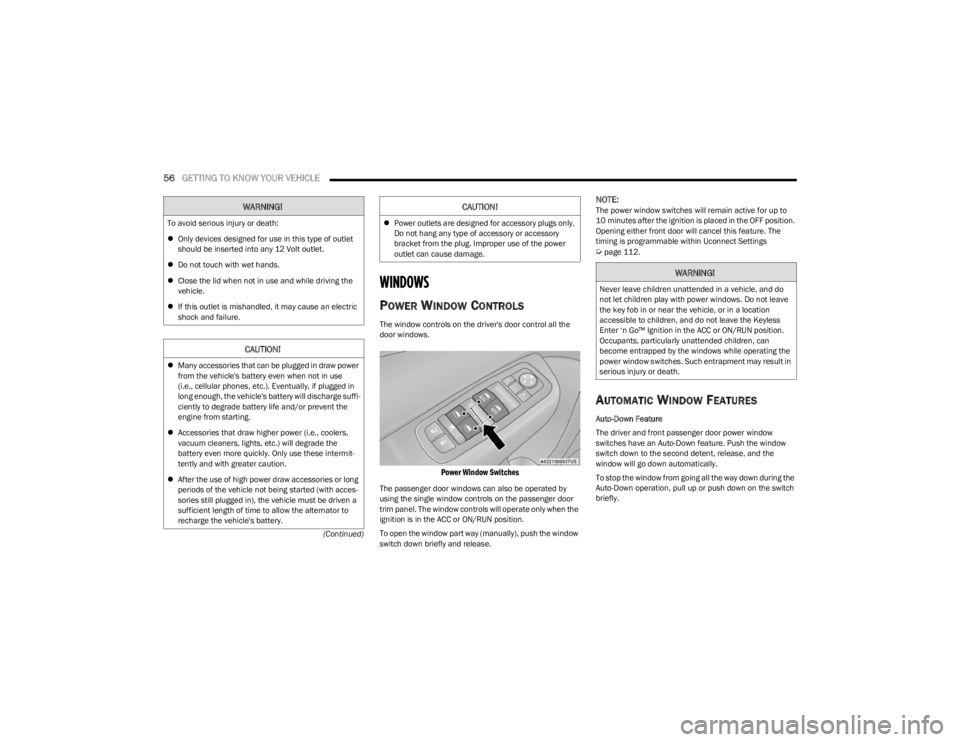
The window controls on the driver's door control all the
door windows.
Power Window Switches
The passenger door windows can also be operated by
using the single window controls on the passenger door
trim panel. The window controls will operate only when the
ignition is in the ACC or ON/RUN position.
To open the window part way (manually), push the window
switch down briefly and release.
NOTE:The power window switches will remain active for up to
10 minutes after the ignition is placed in the OFF position.
Opening either front door will cancel this feature. The
timing is programmable within Uconnect Settings
Úpage 112.
AUTOMATIC WINDOW FEATURES
Auto-Down Feature
The driver and front passenger door power window
switches have an Auto-Down feature. Push the window
switch down to the second detent, release, and the
window will go down automatically.
To stop the window from going all the way down during the
Auto-Down operation, pull up or push down on the switch
briefly.
WARNING!
To avoid serious injury or death:
Only devices designed for use in this type of outlet
should be inserted into any 12 Volt outlet.
Do not touch with wet hands.
Close the lid when not in use and while driving the
vehicle.
If this outlet is mishandled, it may cause an electric
shock and failure.
CAUTION!
Many accessories that can be plugged in draw power
from the vehicle's battery even when not in use
(i.e., cellular phones, etc.). Eventually, if plugged in
long enough, the vehicle's battery will discharge suffi -
ciently to degrade battery life and/or prevent the
engine from starting.
Accessories that draw higher power (i.e., coolers,
vacuum cleaners, lights, etc.) will degrade the
battery even more quickly. Only use these intermit -
tently and with greater caution.
After the use of high power draw accessories or long
periods of the vehicle not being started (with acces -
sories still plugged in), the vehicle must be driven a
sufficient length of time to allow the alternator to
recharge the vehicle's battery.
Power outlets are designed for accessory plugs only.
Do not hang any type of accessory or accessory
bracket from the plug. Improper use of the power
outlet can cause damage.
CAUTION!
WARNING!
Never leave children unattended in a vehicle, and do
not let children play with power windows. Do not leave
the key fob in or near the vehicle, or in a location
accessible to children, and do not leave the Keyless
Enter ‘n Go™ Ignition in the ACC or ON/RUN position.
Occupants, particularly unattended children, can
become entrapped by the windows while operating the
power window switches. Such entrapment may result in
serious injury or death.
23_LD_OM_EN_USC_t.book Page 56
Page 125 of 292

MULTIMEDIA123
Audio
When the Audio button is pressed on the touchscreen, the system displays options related to the vehicle’s sound system. These settings can change the audio location within the
vehicle, adjust the bass or treble levels, and auto-play settings from an audio device or smartphone.
NOTE:Depending on the vehicle’s options, feature settings may vary.
Setting Name Description
Balance/FadeThis setting will adjust audio levels from specific speakers in the front/back and left/right
of the vehicle. The Speaker icon can be moved to set audio location.
Equalizer This setting will adjust the “Bass”, “Mid”, and “Treble” ranges of the audio.
Speed Adjusted Volume This setting will adjust audio volume as speeds increase. At a higher setting, the
volume will increase more as the vehicle speeds up. The available settings are “Off”, “1”, “2”, and “3”.
Surround Sound This setting will turn the Surround Sound system on or off.
AUX Volume Offset This setting will tune the audio levels from a device connected through the AUX port.
The available settings are “+” and “-”.
Auto Play This setting will automatically begin playing audio from a connected device.
5
23_LD_OM_EN_USC_t.book Page 123