ESP DODGE CHARGER SRT 2007 6.G User Guide
[x] Cancel search | Manufacturer: DODGE, Model Year: 2007, Model line: CHARGER SRT, Model: DODGE CHARGER SRT 2007 6.GPages: 350, PDF Size: 5.51 MB
Page 109 of 350
This device complies with part 15 of FCC rules and with
RSS-210 of Industry Canada. Operation is subject to the
following conditions:
²This device may not cause harmful interference.
²This device must accept any interference that may be
received including interference that may cause undes-
ired operation.
NOTE:Changes or modifications not expressly ap-
proved by the party responsible for compliance could
void the user's authority to operate the equipment.
HomeLinktis a trademark owned by Johnson Controls,
Inc.
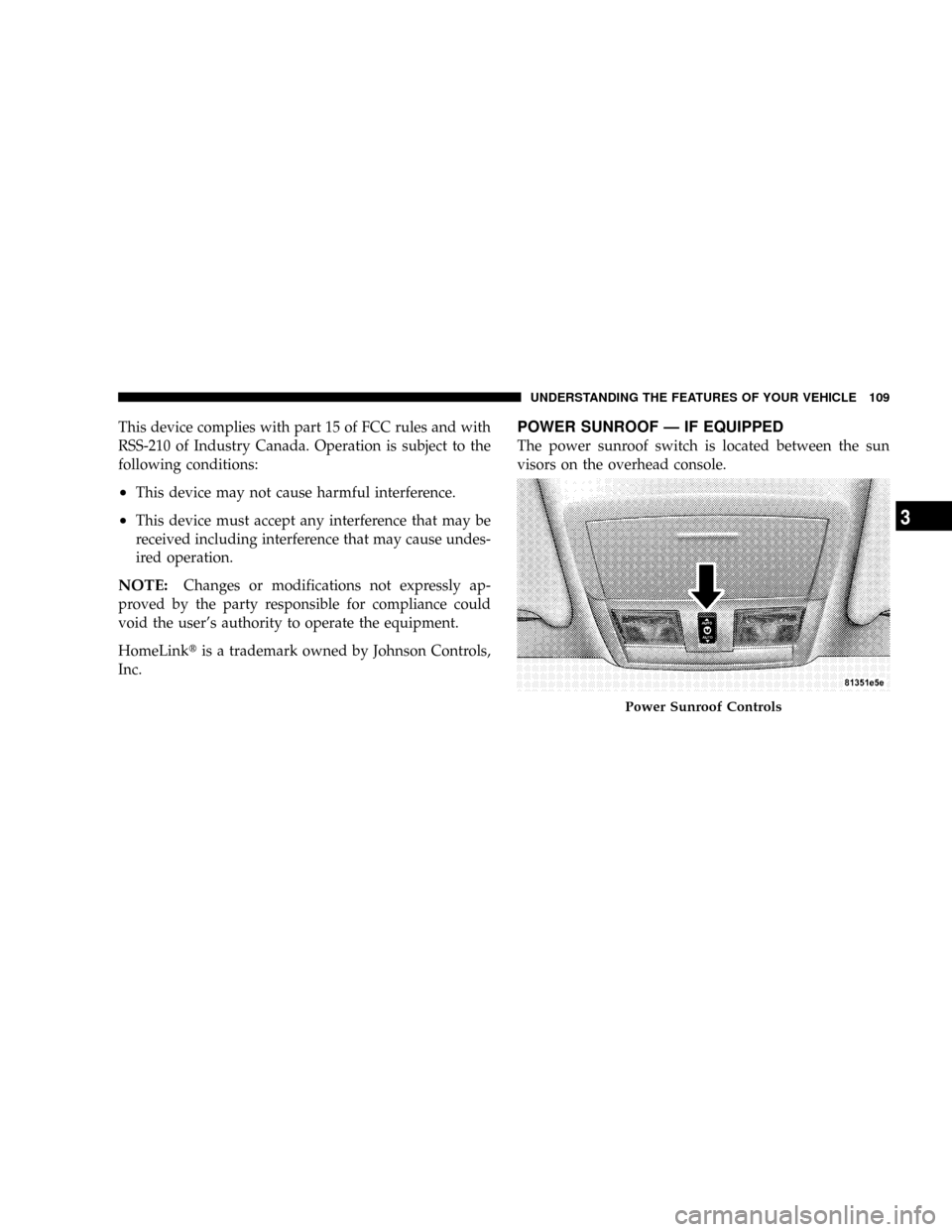
POWER SUNROOF Ð IF EQUIPPED
The power sunroof switch is located between the sun
visors on the overhead console.
Power Sunroof Controls
UNDERSTANDING THE FEATURES OF YOUR VEHICLE 109
3
Page 126 of 350

9. Turn Signal Indicators
The arrow will flash with the exterior turn signal
when the turn signal lever is operated.
NOTE:
A continuous chime will sound if the vehicle is
driven more than 1 mile (1.6 km) with either turn signal
on.
NOTE:Check for a defective outside light bulb if either
indicator flashes at a rapid rate. (See page 93 for more
information.)
10. Airbag Warning Light
This light will turn on for 6 to 8 seconds as a
bulb check when the ignition switch is first
turned ON. If the light is either not on
during starting, or stays on, or turns on
while driving, then have the system inspected at your
authorized dealer as soon as possible. (See page 45 for
more information.)11. Engine Temperature Warning Light
This light will turn on and a single chime will
sound to warn of an overheated engine condi-
tion. When this light turns on, the engine tem-
perature is critically hot. The vehicle should be turned
off immediately and serviced as soon as possible. (See
page 248 for more information.)
12. Electronic Stability Program (ESP)/Traction
Control System (TCS) Indicator Light
If this indicator light flashes during accelera-
tion, ease up on the accelerator and apply as
little throttle as possible. Adapt your speed
and driving to the prevailing road condi-
tions, and do not switch off the ESP or TCS. (See page
208 for more information.)
13. Electronic Stability Program (ESP) / Brake
Assist System (BAS) Malfunction Indicator Light
The yellow ESP/BAS malfunction indicator
light will turn on when the key in the
ignition switch is turned to the ªONº posi-
tion. The light should go out with the engine
running. If the light remains on after several ignition
126 UNDERSTANDING YOUR INSTRUMENT PANEL
Page 130 of 350

Please note that the TPMS is not a substitute for proper
tire maintenance, and it is the driver 's responsibility to
maintain correct tire pressure, even if under-inflation has
not reached the level to trigger illumination of the TPMS
low tire pressure telltale.
The Tire Pressure Monitoring Telltale Light will illumi-
nate in the instrument cluster, and an audible chime will
be activated when one or more tire pressures is low. The
Tire Pressure Monitoring Telltale Light will flash on and
off for 60 seconds when a system fault is detected. The
flash cycle will repeat every ten minutes or until the fault
condition is removed and reset. (See page 230 for more
information.)CAUTION!
The TPMS has been optimized for the original
equipment tires and wheels. TPMS pressures and
warning have been established for the tire size
equipped on your vehicle. Undesirable system op-
eration or sensor damage may result when using
replacement equipment that is not of the same size,
type, and/or style. After-market wheels can cause
sensor damage. Do not use tire sealant from a can, or
balance beads if your vehicle is equipped with a
TPMS, as damage to the sensors may result.
23. Anti-Lock Brake Light
This light monitors the Anti-Lock Brake System.
The light will turn on when the ignition switch
is turned to the ON position and may stay on for as
long as four seconds.
If the ABS light remains on or turns on while driving,
then the Anti-Lock portion of the brake system is not
130 UNDERSTANDING YOUR INSTRUMENT PANEL
Page 141 of 350

Use the SCROLL button to display one of the following
choices:
ªLanguageº
When in this display you may select one of five lan-
guages for all display nomenclature, including the trip
functions and the navigation system (if equipped). Press
the FUNCTION SELECT button while in this display to
select English, Espanol, Deutsch, Italiano, or Francais.
Then, as you continue, the information will display in the
selected language.
NOTE:The EVIC will not change the UConnectŸ
language selection. Please refer to ªLanguage Selectionº
in the HANDS±FREE COMMUNICATION (UConnectŸ)
section of this manual for details.
ªLock Doors Automatically at 15 mph (24 Km/h)º
When ON is selected, all doors will lock automatically
when the vehicle reaches a speed of 15 mph (24 km/h).
To make your selection, press and release the FUNC-
TION SELECT button until ªONº or ªOFFº appears.
ªUnlock Doors Automatically on Exitº
When ON is selected, all doors will unlock when the
vehicle is stopped and the transmission is in the P (Park)
or N (Neutral) position and the driver's door is opened.
To make your selection, press and release the FUNC-
TION SELECT button until ªONº or ªOFFº appears.
ªRemote Key Unlockº
WhenDriver Door 1st Pressis selected, only the driver's
door will unlock on the first press of the remote keyless
entry unlock button. When Driver Door 1st Press is
selected, you must press of the remote keyless entry
unlock button twice to unlock the passenger's doors.
WhenAll Doors 1st Pressis selected, all of the doors will
unlock on the first press of the remote keyless entry
unlock button. To make your selection, press and release
the FUNCTION SELECT button until ªDriver Door 1st
Pressº or ªAll Doors 1st Pressº appears.
ªSound Horn with Remote Key Lockº
When ON is selected, a short horn sound will occur when
the remote keyless entry ªLockº button is pressed. This
feature may be selected with or without the flash lights
UNDERSTANDING YOUR INSTRUMENT PANEL 141
4
Page 147 of 350

Press the rotary TUNE control a third time and TREB will
display. Turn the TUNE control to the right or left to
increase or decrease the Treble tones.
Press the rotary TUNE control a fourth time and BAL will
display. Turn the TUNE control to the right or left to
adjust the sound level from the right or left side speakers.
Press the rotary TUNE control a fifth time and FADE will
display. Turn the TUNE control to the left or right to
adjust the sound level between the front and rear speak-
ers.
Press the tune control again or wait 5 seconds to exit
setting tone, balance, and fade.
RND/SET Button (Radio Mode) To SET The
Push-Button Memory
When you are receiving a station that you wish to
commit to push-button memory, press the SET button.
The symbol SET 1 will now show in the display window.
Select the button (1-6) you wish to lock onto this station
and press and release that button. If a button is notselected within 5 seconds after pressing the SET button,
the station will continue to play but will not be stored
into push-button memory.
You may add a second station to each push-button by
repeating the above procedure with this exception: Press
the SET button twice and SET 2 will show in the display
window. Each button can be set for SET 1 and SET 2 in
both AM and FM. This allows a total of 12 AM, 12 FM,
and 12 Satellite (if equipped) stations to be stored into
push-button memory. The stations stored in SET 2
memory can be selected by pressing the push-button
twice.
Every time a preset button is used, a corresponding
button number will display.Preset Buttons1-6(Radio Mode)
These buttons tune the Radio to the stations that you
commit to push-button memory {12 AM, 12 FM, and 12
Satellite (if equipped) stations}.
UNDERSTANDING YOUR INSTRUMENT PANEL 147
4
Page 157 of 350

SCAN Button (CD MODE for CD Audio Play)
Press the Scan button to scan through each track on the
CD currently playing.
LOAD/EJECT Button (CD Mode for CD Audio
Play)
LOAD/EJECT - Load
Press the LOAD/EJT button and the push-
button with the corresponding number where
the CD is being loaded. The radio will display
PLEASE WAIT and prompt when to INSERT
DISC. After the radio displays9INSERT DISC,9insert the
CD into the player.
Radio display will show9LOADING DISC9when the disc
is loading and ªREADING DISCº when the radio is
reading the disc.
LOAD/EJT - Eject
Press the LOAD/EJT button and the push-
button with the corresponding number where
the CD was loaded and the disc will unload
and move to the entrance for easy removal.Radio display will show9EJECTING DISC9when the disc
is being ejected and prompt the user to remove the disc.
Press and hold the LOAD/EJT button for 5 seconds and
all CDs will be ejected from the radio.
If you have ejected a disc and have not removed it within
15 seconds, it will be reloaded. If the CD is not removed,
the radio will continue to play the non-removed CD. If
the CD is removed and there are other CD's in the radio,
the radio will play the next CD after a 2-minute timeout.
If the CD is removed and there are no other CD's in the
radio, the radio will remain in CD mode and display
9INSERT DISCº for 2 minutes. After 2 minutes, the radio
will go to the previous tuner mode.
The disc can be ejected with the radio and ignition OFF.
TIME Button (CD MODE for CD Audio Play)
Press this button to change the display from a large CD
playing time display to a small CD playing time display.
UNDERSTANDING YOUR INSTRUMENT PANEL 157
4
Page 160 of 350

ID3 Tag information for artist, song title, and album title
are supported for version 1 ID3 tags. ID3 version 2 is not
supported by the radios.
Playlist files are not supported. MP3 Pro files are not
supported.
Playback of MP3 and WMA Files
When a medium containing MP3 data is loaded, the
radio checks all files on the medium. If the medium
contains a lot of folders or files, the radio will take more
time to start playing the MP3 files.
Loading times for playback of MP3 and WMA files may
be affected by the following:
²Media - CD-RW media may take longer to load than
CD-R media
²Medium formats - Multisession discs may take longer
to load than non-multisession discs
²Number of files and folders - Loading times will
increase with more files and folders
To increase the speed of disc loading, it is recommended
to use CD-R media and single-session discs. To create a
single-session disc, enable the Disc at Once option before
writing to the disc.
Operation Instructions - (CD Mode for MP3 and
WMA Audio Play)
SEEK Button (CD Mode for MP3 and WMA Play)
Pressing the right side of the SEEK button plays the next
file. Pressing the left side of the SEEK button plays the
beginning of the file. Pressing the button within the first
ten seconds plays the previous file.
LOAD/EJECT Button (CD Mode for MP3 and WMA
Play)
LOAD/EJT - Load
Press the LOAD/EJT button and the push-
button with the corresponding number where
the CD is being loaded. The radio will display
PLEASE WAIT and prompt when to INSERT
DISC. After the radio displays9INSERT DISC,9insert the
CD into the player.
The radio display will show9LOADING DISC9when the
disc is loading.
160 UNDERSTANDING YOUR INSTRUMENT PANEL
Page 161 of 350

LOAD/EJT - Eject
Press the LOAD/EJT button and the push-
button with the corresponding number where
the CD was loaded and the disc will unload
and move to the entrance for easy removal.
Radio display will show9EJECTING DISC9when the disc
is being ejected and prompt the user to remove the disc.
If you have ejected a disc and have not removed it within
15 seconds, it will be reloaded. If the CD is not removed,
the radio will continue to play the non-removed CD. If
the CD is removed and there are other CD's in the radio,
the radio will play the next CD after a 2-minute timeout.
If the CD is removed and there are no other CD's in the
radio, the radio will remain in CD mode and display
9INSERT DISCº for 2 minutes. After 2 minutes, the radio
will go to the previous tuner mode.
INFO Button (CD Mode for MP3 Play)
Press and INFO button while playing MP3 or WMA disc.
The radio scrolls through the following TAG information:
Song Title, Artist, File Name, and Folder Name (if avail-
able).Press the INFO button once more to return to9elapsed
time9priority mode.
Press and hold the INFO button while in the message
display priority mode or elapsed time display priority
mode will display the song title for each file.
RW/FF (CD Mode for MP3 and WMA Play)
Press the FF side of the button to move forward through
the file or MP3 and WMA selection.
TUNE Control (CD Mode for MP3 Play)
Pressing the TUNE Control allows the adjustment of
Tone, Balance, and Fade.
AM/FM Button (CD Mode for MP3 Play)
Switches back to Radio mode.
RND/PTY Button (CD Mode for MP3 Play)
Pressing this button plays files randomly.
SET/DIR Button (CD Mode for MP3 Play)
Press the SET/DIR Button to display folders, when
playing an MP3 discs that have a file/folder structure.
UNDERSTANDING YOUR INSTRUMENT PANEL 161
4
Page 188 of 350

mElectronic Brake Control System...........208
NABS (Anti-Lock Brake System)............208
NTCS (Traction Control System)............208
NBAS (Brake Assist System)...............209
NESP (Electronic Stability Program).........209
NSynchronizing ESP....................212
NESP/BAS Malfunction Indicator Light And
ESP/TCS Indicator Light................213
mTire Safety Information..................213
NTire Markings........................213
NTire Identification Number (TIN)..........216
NTire Loading And Tire Pressure...........217
mTires Ð General Information..............221
NTire Pressure.........................221
NTire Inflation Pressures.................222
NRadial-Ply Tires......................224NTire Spinning........................224
NTread Wear Indicators..................225
NLife Of Tire.........................225
NReplacement Tires.....................226
NAlignment And Balance.................227
mTire Chains...........................227
mSnow Tires...........................228
mTire Rotation Recommendations...........229
NTire Rotation Ð Standard Tires............229
NTire Rotation Ð All Season Tires..........230
mTire Pressure Monitor System (TPMS) Ð If
Equipped
............................230
NBase System Ð If Equipped..............232
NPremium System Ð If Equipped..........234
NGeneral Information...................237
mFuel Requirements.....................237
188 STARTING AND OPERATING
Page 194 of 350
The gear shifting process is continuously adapted, de-
pendent on the driving style, the driving situation and
the road characteristics.
NOTE:
²
After selecting any driving position, wait a moment to
allow the gear to engage fully before accelerating,
especially when the engine is cold.
²If there is a need to restart the engine, be sure to cycle
the key to the LOCK position before restarting. Trans-
mission engagement may be delayed up to 10 seconds
after restart if the key is not cycled to the LOCK
position first.
²The electronically controlled transmission provides a
precise shift schedule. The transmission electronics are
self-calibrating. Therefore, the first few shifts on a new
vehicle may be somewhat abrupt or soft until after the
break-in period. This is a normal condition, and pre-
cision shifts will develop within a few shift cycles.The selector lever is automatically locked while in the P
(Park) position. To move the selector lever out of the P
(Park) position, the brake pedal must be firmly depressed
before the shift lock will release.
Shift the selector lever to the desired position only when
the engine is idling normally and the brake pedal is
applied. Do not release the brake until ready to drive. The
vehicle may otherwise accelerate quickly when the selec-
tor lever is in D (Drive) or R (Reverse) position.
WARNING!
Unintended movement of a vehicle could injure
those in and near the vehicle. As with all vehicles,
you should never exit a vehicle while the engine is
running. Before exiting a vehicle, you should always
shift the vehicle into P (Park), remove the key from
the ignition, and apply the parking brake. Once the
key is removed from the ignition, the transmission
selector lever is locked in the P (Park) position,
securing the vehicle against unwanted movement.
Furthermore, you should never leave children unat-
tended inside a vehicle.
194 STARTING AND OPERATING