instrument panel DODGE CHARGER SRT 2007 6.G User Guide
[x] Cancel search | Manufacturer: DODGE, Model Year: 2007, Model line: CHARGER SRT, Model: DODGE CHARGER SRT 2007 6.GPages: 350, PDF Size: 5.51 MB
Page 86 of 350

Lumbar Support
This feature allows you to increase or decrease the
amount of lumbar support. Turn the control lever for-
ward to increase and rearward to decrease the desired
amount of lumbar support.
Head Restraints
Head restraints can reduce the risk of whiplash injury in
the event of impact from the rear. Adjustable restraints
should be adjusted so that the upper edge is as high as
practical.The head restraints have a locking button, which must be
pushed in to lower the head restraint. The restraints may
be raised without pushing in the button.
Heated Seats
Heated seats provide comfort and warmth on cold days
and can help soothe sore muscles and backs. The heaters
provide the same heat level for both cushion and back.
The driver seat and front passenger seat are heated.
The controls for each heater are located near the bottom
center of the instrument panel. After turning on theLumbar Support Control Lever
Adjustable Head Restraint
86 UNDERSTANDING THE FEATURES OF YOUR VEHICLE
Page 89 of 350

TO OPEN AND CLOSE THE HOOD
Two latches must be released to open the hood. First, pull
the hood release lever located under the left side of the
instrument panel.
Next, move to the outside of the vehicle and push the
safety catch to the left. The safety catch is located under
the center front edge of the hood.Use the hood prop rod (if equipped) to secure the hood in
the open position.
To prevent possible damage, do not slam the hood to
close it. Lower the hood until it is open approximately 6
inches (15 cm), and then drop it. This should secure both
latches. Never drive your vehicle unless the hood is fully
closed, with both latches engaged.
Hood Release Lever
Hood Safety Catch
UNDERSTANDING THE FEATURES OF YOUR VEHICLE 89
3
Page 90 of 350
WARNING!
If the hood is not fully latched, it could fly up when
the vehicle is moving and block your forward vision.
You could have a collision. Be sure all hood latches
are fully latched before driving.
LIGHTS
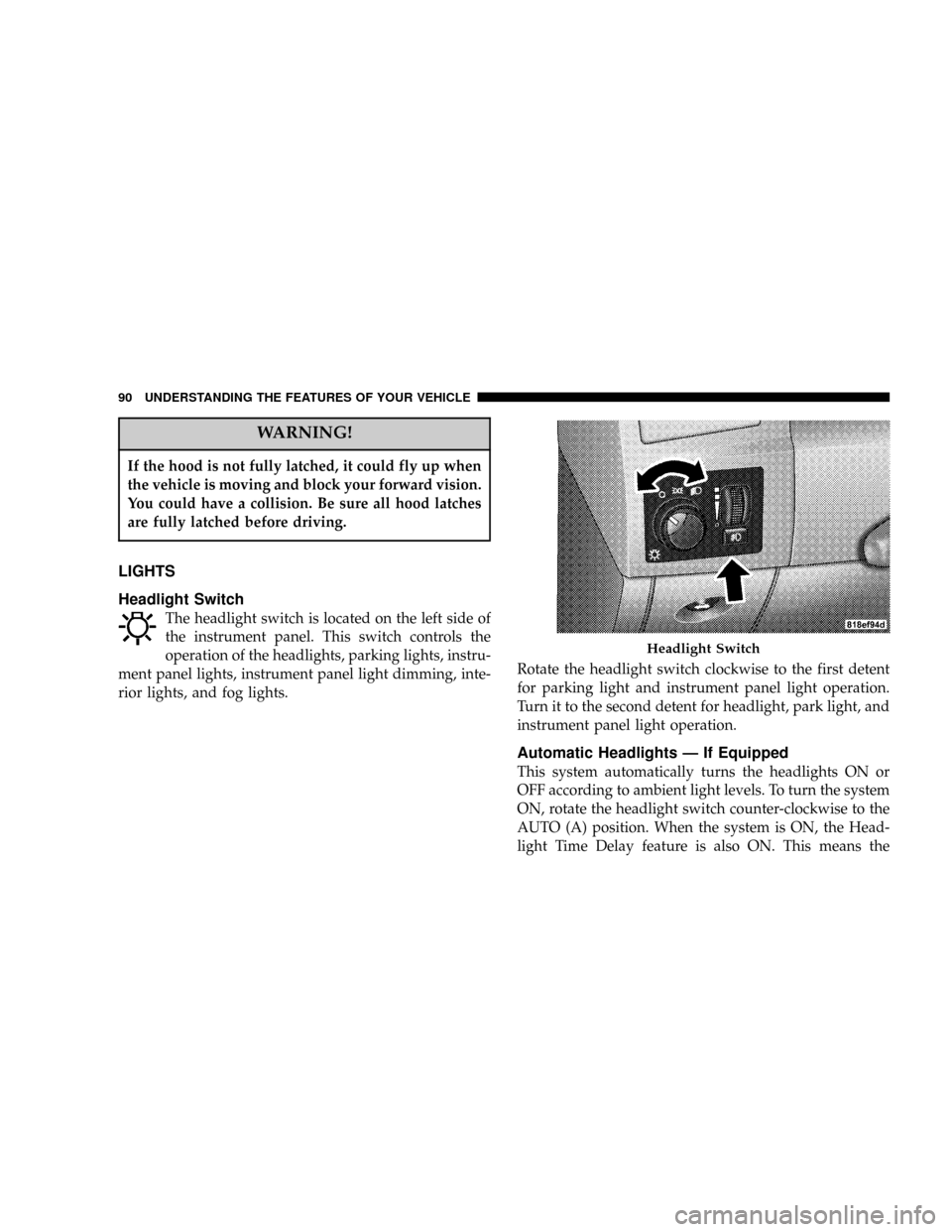
Headlight Switch
The headlight switch is located on the left side of
the instrument panel. This switch controls the
operation of the headlights, parking lights, instru-
ment panel lights, instrument panel light dimming, inte-
rior lights, and fog lights.Rotate the headlight switch clockwise to the first detent
for parking light and instrument panel light operation.
Turn it to the second detent for headlight, park light, and
instrument panel light operation.
Automatic Headlights Ð If Equipped
This system automatically turns the headlights ON or
OFF according to ambient light levels. To turn the system
ON, rotate the headlight switch counter-clockwise to the
AUTO (A) position. When the system is ON, the Head-
light Time Delay feature is also ON. This means the
Headlight Switch
90 UNDERSTANDING THE FEATURES OF YOUR VEHICLE
Page 94 of 350

Overhead Console Map/Reading Lights
These lights are mounted between the sun visors on the
overhead console. Each light is turned ON by pressing
the lens. Press the lens a second time to turn OFF the
light. These lights also turn on when a door is opened, or
when the unlock button on the remote keyless entry
transmitter is pressed, or when the dimmer control is
turned fully upward, past the second detent.
Interior Lights
The interior lights come on when a door is opened.
To protect the battery, the interior lights will turn off
automatically 10 minutes after the ignition switch is
moved to the LOCK position. This will occur if the
interior lights were switched on manually or are on
because a door is open. This includes the glove box light,
but not the trunk light. To restore interior light operation,
either turn the ignition switch ON or cycle the light
switch.
Dimmer Control
The dimmer control is part of the
headlight switch, and is located on the
left side of the instrument panel. With
the parking lights or headlights on,
rotating the dimmer control upward
will increase the brightness of the in-
strument panel lights.
Overhead Console
94 UNDERSTANDING THE FEATURES OF YOUR VEHICLE
Page 119 of 350

UNDERSTANDING YOUR INSTRUMENT PANEL
CONTENTS
mInstrument Panel And Controls............122
mPremium Instrument Cluster..............123
mInstrument Cluster Descriptions...........124
mElectronic Vehicle Information Center (EVIC). 132
NElectronic Vehicle Information Center
(EVIC) Displays......................133
NTrip Functions.......................134
NCompass Display.....................136
NTelephone Ð If Equipped...............138
NNavigation Ð If Equipped...............139
NSystem Warnings (Customer Information
Features)...........................140NPersonal Settings (Customer Programmable
Features)...........................140
mRadio General Information...............143
NRadio Broadcast Signals.................143
NTwo Types Of Signals..................143
NElectrical Disturbances..................143
NAM Reception.......................144
NFM Reception........................144
mSales Code REF Ð AM/FM/CD (Single Disc)
Radio With Optional Satellite Radio And Hands
Free Phone Capability
...................144
NOperating Instructions - Radio Mode.......145
4
Page 120 of 350

NOperation Instructions - CD Mode.........148
NOperation Instructions - Auxiliary Mode.....149
NOperating Instructions - Hands Free Phone Ð If
Equipped...........................150
NOperating Instructions - Satellite Radio Ð If
Equipped...........................150
mSales Code RAK ± AM/FM/Cassette/CD (6-Disc)
Radio With Optional Satellite Radio, Hands Free
Phone, Video, MP3, And WMA Capabilities
. . 151
NOperating Instructions - Radio Mode.......151
NOperating Instructions Ð Tape Player.......154
NSeek Button.........................155
NFast Forward (FF).....................155
NRewind (RW)........................155
NTape Eject...........................155
NScan Button.........................155
NChanging Tape Direction................155NMetal Tape Selection...................155
NPinch Roller Release...................155
NNoise Reduction......................156
NOperation Instructions - (CD Mode For CD Audio
Play)..............................156
NLoad/Eject Button (CD Mode For CD Audio
Play)..............................157
NNotes On Playing MP3 Files.............158
NOperation Instructions - (CD Mode For MP3 And
WMA Audio Play)....................160
NLoad/Eject Button (CD Mode For MP3 And
WMA Play).........................160
mSales Code REC Ð AM/FM/CD (6±Disc) Radio
With Navigation System
.................162
NOperating Instructions Ð Satellite Radio (If
Equipped)..........................163
NREC Setting The Clock.................163
NAudio Clock Display...................165
120 UNDERSTANDING YOUR INSTRUMENT PANEL
Page 121 of 350

mVideo Entertainment System (Sales Code XRV) Ð
If Equipped
..........................166
NKicker Mobile Surround (Kms1)...........167
mSatellite Radio Ð If Equipped.............167
NSystem Activation.....................167
NElectronic Serial Number/Sirius Identification
Number (ESN/SID)....................168
NSelecting Satellite Mode In REF, RAQ, And
RAK Radios.........................169
NSelecting a Channel....................169
NStoring And Selecting Pre-Set Channels......169
NUsing The PTY (Program Type) Button (If
Equipped)..........................170
NPTY Button9Scan9.....................170
NPTY Button9Seek9.....................170
NSatellite Antenna......................170
NReception Quality.....................170
mRemote Sound System Controls...........171
NRadio Operation......................172
NTape Player Operation..................172
NCD Player Operation...................172
NSatellite Radio Operation................173
mCassette Tape And Player Maintenance......173
mCD/DVD Disc Maintenance..............174
mRadio Operation And Cellular Phones.......174
mClimate Controls......................174
NManual Air Conditioning And Heating
System.............................175
NAutomatic Temperature Control Ð If
Equipped...........................177
NOperating Tips.......................182
mRear Window Features..................185
NElectric Rear Window Defroster...........185
UNDERSTANDING YOUR INSTRUMENT PANEL 121
4
Page 122 of 350

INSTRUMENT PANEL AND CONTROLS
1 Ð Air Outlet 6 Ð Radio 11 Ð Ignition Switch
2 Ð Instrument Cluster 7 Ð Climate Control 12 Ð Hood Release
3 Ð Hazard Switch 8 Ð Heated Seat Switch* 13 Ð Trunk Release Switch
4 Ð Electronic Stability Program Off Button*
/ Traction Control System Off Button*9 Ð Power Outlet 14 Ð Headlight Switch
5 Ð Glove Box 10 Ð Ash Tray* * If Equipped 122 UNDERSTANDING YOUR INSTRUMENT PANEL
Page 123 of 350

PREMIUM INSTRUMENT CLUSTER
UNDERSTANDING YOUR INSTRUMENT PANEL 123
4
Page 124 of 350

INSTRUMENT CLUSTER DESCRIPTIONS
1. Fuel Gauge
The pointer shows the level of fuel in the fuel tank when
the ignition switch is in the ON position.
2. Trip Odometer Button
Press this button to change the display from odometer to
either of two trip odometer settings. The letter ªAº or ªBº
will appear when in the trip odometer mode. Push in and
hold the button for two seconds to reset the trip odometer
to 0 miles (kilometers). The odometer must be in trip
mode to reset it.
3. Speedometer
Indicates vehicle speed.
4. Electronic Speed Control Indicator Light
This light will turn on when the electronic
speed control is ON. (See page 100 for more
information.)5. Tachometer
The red segments indicate the maximum permissible
engine revolutions-per-minute (r.p.m. x 1000) for each
gear range. Ease up on the accelerator before reaching the
red area.
6. Voltage Light
This light monitors the electrical system volt-
age. The light should turn on momentarily as
the engine is started. If the light stays on or turns on
while driving, it indicates a problem with the charging
system. Immediate service should be obtained.
7. Electronic Throttle Control (ETC) Light
This light will turn on briefly as a bulb check
when the ignition switch is turned ON. This
light will also turn on while the engine is
running if there is a problem with the Elec-
tronic Throttle Control system.
If the light comes on while the engine is running, safely
bring the vehicle to a complete stop as soon as possible,
place the gear selector in park, and cycle the ignition key.
The light should turn off. If the light remains lit with the
124 UNDERSTANDING YOUR INSTRUMENT PANEL