light DODGE CHARGER SRT 2007 6.G Manual Online
[x] Cancel search | Manufacturer: DODGE, Model Year: 2007, Model line: CHARGER SRT, Model: DODGE CHARGER SRT 2007 6.GPages: 350, PDF Size: 5.51 MB
Page 243 of 350

Loose Fuel Filler Cap Message
If the vehicle diagnostic system determines that the fuel
filler cap is loose, improperly installed, or damaged, a
ªCheck Gascapº message will display in the Electronic
Vehicle Information Center (EVIC). If this occurs, tighten
the fuel filler cap properly and press the odometer reset
button to turn off the message. If the problem continues,
the message will appear the next time the vehicle is
started.
A loose, improperly installed, or damaged fuel filler cap
may also turn on the Malfunction Indicator Light (MIL).
Refer to ªOnboard Diagnostic Systemº in Section 7 of this
manual for more information.
VEHICLE LOADING
The load carrying capacity of your vehicle is shown on
the ªVehicle Certification Label.º This information
should be used for passenger and luggage loading as
indicated.
If the seatbacks are folded for carrying cargo, do not
exceed the specified GVWR and GAWR.
Vehicle Certification Label
Your vehicle has a certification label attached to the rear
of the driver's door.
The label contains the following information:
²Name of manufacturer
²Month and year of manufacture
²Gross Vehicle Weight Rating (GVWR)
²Gross Axle Weight Rating (GAWR) front
²Gross Axle Weight Rating (GAWR) rear
²Vehicle Identification Number (VIN)
²Type of Vehicle
STARTING AND OPERATING 243
5
Page 256 of 350
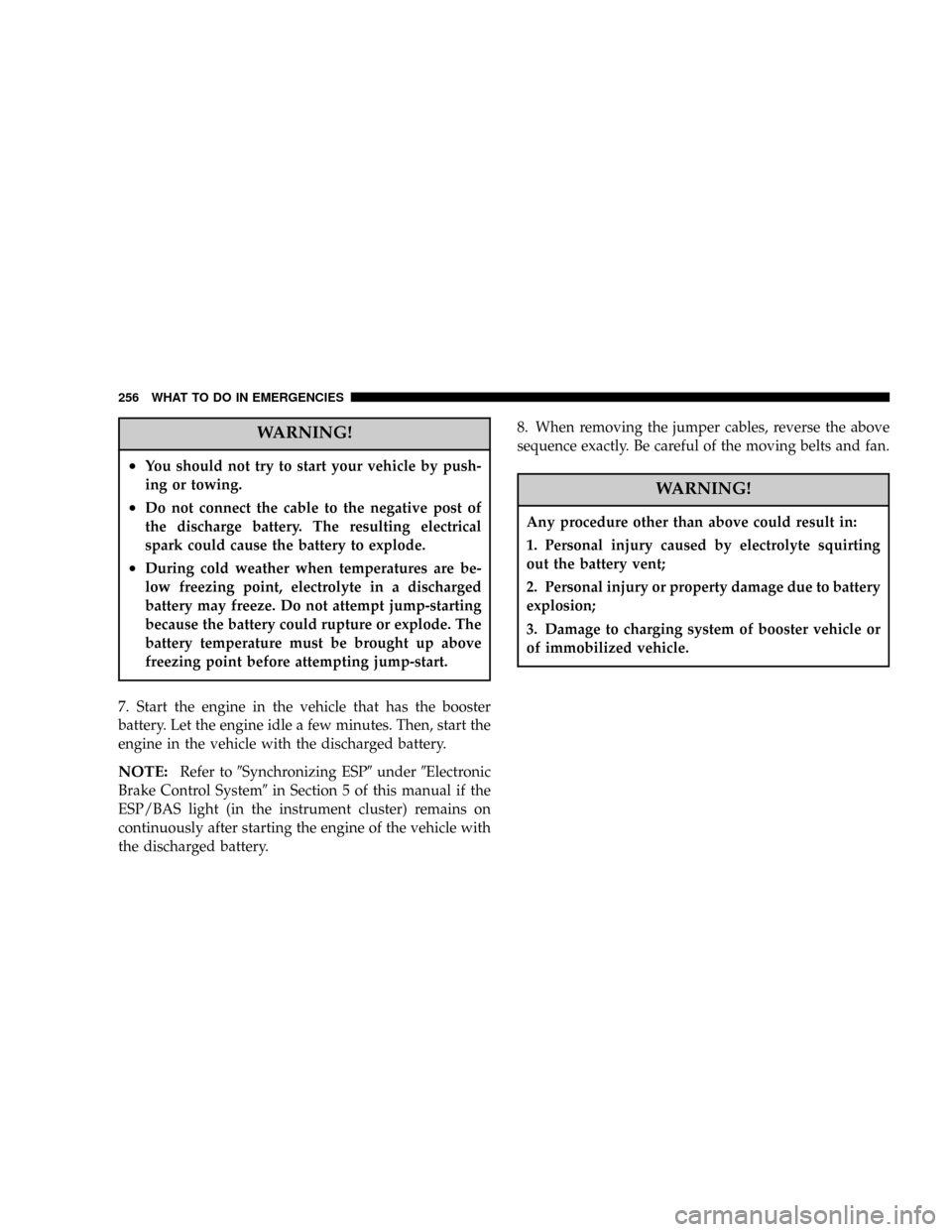
WARNING!
²You should not try to start your vehicle by push-
ing or towing.
²Do not connect the cable to the negative post of
the discharge battery. The resulting electrical
spark could cause the battery to explode.
²During cold weather when temperatures are be-
low freezing point, electrolyte in a discharged
battery may freeze. Do not attempt jump-starting
because the battery could rupture or explode. The
battery temperature must be brought up above
freezing point before attempting jump-start.
7. Start the engine in the vehicle that has the booster
battery. Let the engine idle a few minutes. Then, start the
engine in the vehicle with the discharged battery.
NOTE:Refer to9Synchronizing ESP9under9Electronic
Brake Control System9in Section 5 of this manual if the
ESP/BAS light (in the instrument cluster) remains on
continuously after starting the engine of the vehicle with
the discharged battery.8. When removing the jumper cables, reverse the above
sequence exactly. Be careful of the moving belts and fan.
WARNING!
Any procedure other than above could result in:
1. Personal injury caused by electrolyte squirting
out the battery vent;
2. Personal injury or property damage due to battery
explosion;
3. Damage to charging system of booster vehicle or
of immobilized vehicle.
256 WHAT TO DO IN EMERGENCIES
Page 262 of 350

NWindshield Washers...................277
NExhaust System......................278
NCooling System.......................278
NHoses And Vacuum/Vapor Harnesses.......283
NFuel System.........................283
NBrake System........................284
NAutomatic Transmission................286
NFront And Rear Wheel Bearings...........287
NAppearance Care And Protection From
Corrosion...........................287
NCleaning The Center Console Cup Holders . . . 291
mFuses (Power Distribution Centers).........291
NFuses (Front Power Distribution Center).....291
NFuses (Rear Power Distribution Center)......293
mVehicle Storage........................297
mReplacement Light Bulbs................298
mBulb Replacement......................299
NLow Beam Headlight, High Beam
Headlight, Park/Turn Light, And Front Side
Marker Light........................299
NBackup Light, Side Marker Light, Tail/Turn
Light, And Tail/Stop Light...............301
NLicense Light........................304
mFluids And Capacities...................304
mFluids, Lubricants, And Genuine Parts......305
NEngine.............................305
NChassis............................306
262 MAINTAINING YOUR VEHICLE
Page 264 of 350

ONBOARD DIAGNOSTIC SYSTEM Ð OBD II
Your vehicle is equipped with a sophisticated onboard
diagnostic system called OBD II. This system monitors
the performance of the emissions, engine, and automatic
transmission control systems. When these systems are
operating properly, your vehicle will provide excellent
performance and fuel economy, as well as engine emis-
sions well within current government regulations.
If any of these systems require service, the OBD II system
will turn on the ªMalfunction Indicator Light.º It will
also store diagnostic codes and other information to
assist your service technician in making repairs. Al-
though your vehicle will usually be drivable and not
need towing, see your dealer for service as soon as
possible.CAUTION!
Prolonged driving with the ªMalfunction Indicator
Lightº on could cause further damage to the emis-
sion control system. It could also affect fuel economy
and driveability. The vehicle must be serviced before
any emissions tests can be performed.
If the ªMalfunction Indicator Lightº is flashing
while the engine is running, severe catalytic con-
verter damage and power loss will soon occur. Im-
mediate service is required.
Loose Fuel Filler Cap
If the vehicle diagnostic system determines that the fuel
filler cap is loose, improperly installed, or damaged, a
ªCheck Gascapº message will display in the Electronic
Vehicle Information Center (EVIC) Ð if equipped. If this
occurs, tighten the fuel filler cap properly and press the
odometer reset button to turn off the message. If the
problem continues, the message will appear the next time
the vehicle is started.
264 MAINTAINING YOUR VEHICLE
Page 265 of 350

A loose, improperly installed, or damaged fuel filler cap
may also turn on the Malfunction Indicator Light (MIL).
EMISSIONS INSPECTION AND MAINTENANCE
PROGRAMS
In some localities, it may be a legal requirement to pass
an inspection of your vehicle's emissions control system.
Failure to pass could prevent vehicle registration.
For states, which have an I/M (Inspection and
Maintenance) requirement, this check verifies the
following: the MIL (Malfunction Indicator Lamp)
is functioning and is not on when the engine is running,
and that the OBD (On Board Diagnostic) system is ready
for testing.
Normally, the OBD system will be ready. The OBD
system maynotbe ready if your vehicle was recently
serviced, if you recently had a dead battery, or a battery
replacement. If the OBD system should be determined
not ready for the I/M test, your vehicle may fail the test.Your vehicle has a simple ignition key actuated test,
which you can use prior to going to the test station. To
check if your vehicle's OBD system is ready, you must do
the following:
1. Insert your ignition key into the ignition switch.
2. Turn the ignition to the ON position, but do not crank
or start the engine.
3. If you crank or start the engine, you will have to start
this test over.
4. As soon as you turn your key to the ON position, you
will see your MIL symbol come on as part of a normal
bulb check.
5. Approximately 15 seconds later, one of two things will
happen:
a. The MIL will flash for about 10 seconds and then
return to being fully illuminated until you turn off
the ignition key or start the engine. This means that
your vehicle's OBD system isnot readyand you
shouldnotproceed to the I/M station.
MAINTAINING YOUR VEHICLE 265
7
Page 285 of 350
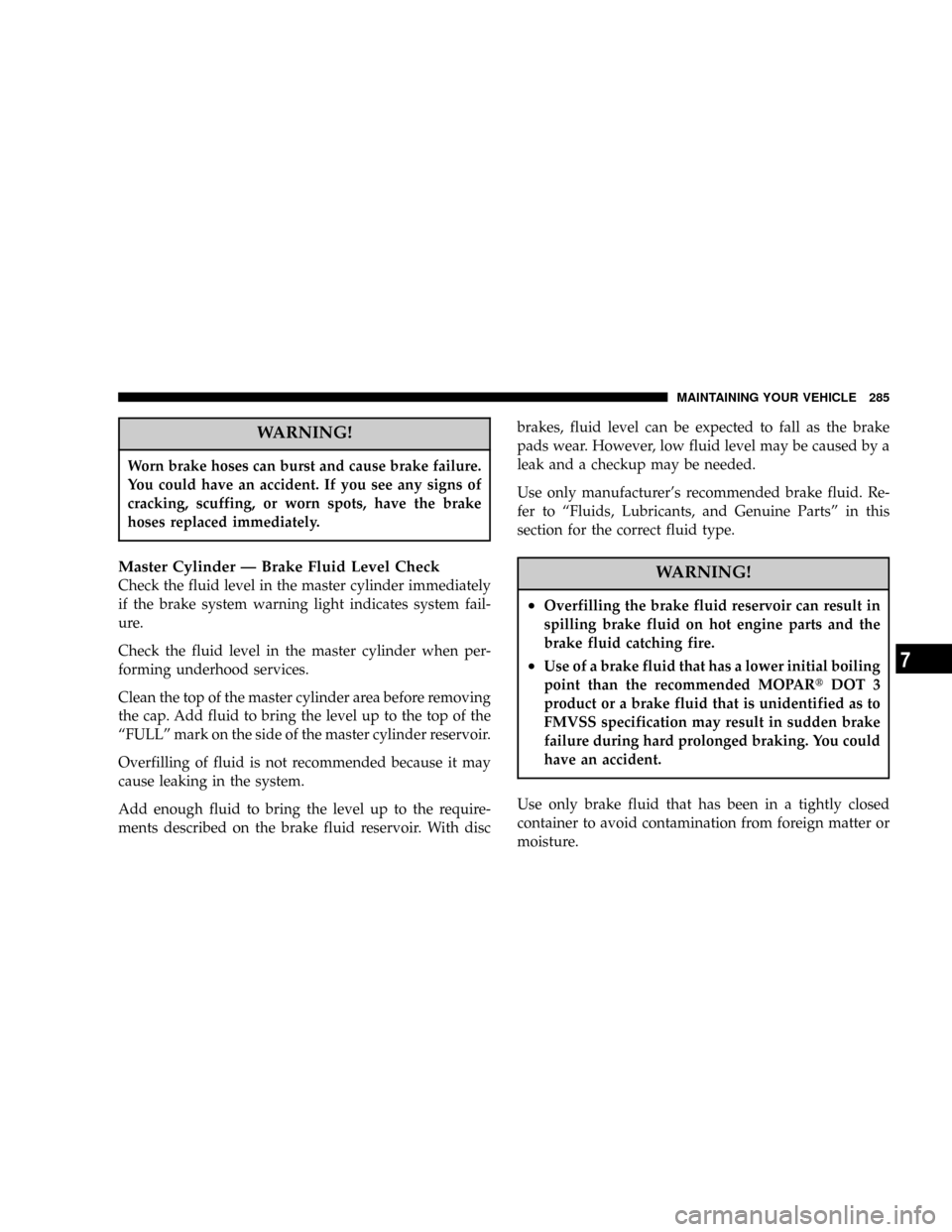
WARNING!
Worn brake hoses can burst and cause brake failure.
You could have an accident. If you see any signs of
cracking, scuffing, or worn spots, have the brake
hoses replaced immediately.
Master Cylinder Ð Brake Fluid Level Check
Check the fluid level in the master cylinder immediately
if the brake system warning light indicates system fail-
ure.
Check the fluid level in the master cylinder when per-
forming underhood services.
Clean the top of the master cylinder area before removing
the cap. Add fluid to bring the level up to the top of the
ªFULLº mark on the side of the master cylinder reservoir.
Overfilling of fluid is not recommended because it may
cause leaking in the system.
Add enough fluid to bring the level up to the require-
ments described on the brake fluid reservoir. With discbrakes, fluid level can be expected to fall as the brake
pads wear. However, low fluid level may be caused by a
leak and a checkup may be needed.
Use only manufacturer's recommended brake fluid. Re-
fer to ªFluids, Lubricants, and Genuine Partsº in this
section for the correct fluid type.WARNING!
²Overfilling the brake fluid reservoir can result in
spilling brake fluid on hot engine parts and the
brake fluid catching fire.
²Use of a brake fluid that has a lower initial boiling
point than the recommended MOPARtDOT 3
product or a brake fluid that is unidentified as to
FMVSS specification may result in sudden brake
failure during hard prolonged braking. You could
have an accident.
Use only brake fluid that has been in a tightly closed
container to avoid contamination from foreign matter or
moisture.
MAINTAINING YOUR VEHICLE 285
7
Page 290 of 350
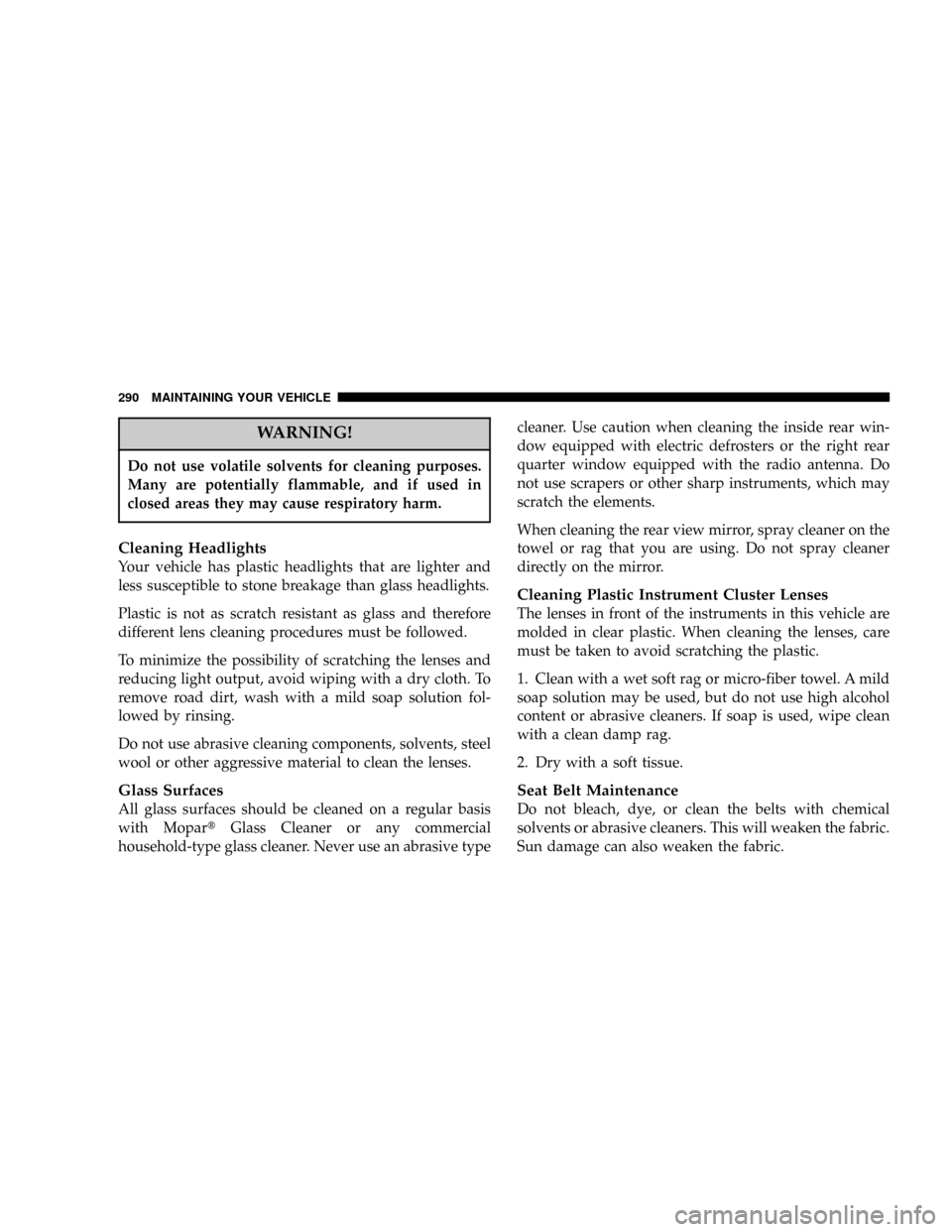
WARNING!
Do not use volatile solvents for cleaning purposes.
Many are potentially flammable, and if used in
closed areas they may cause respiratory harm.
Cleaning Headlights
Your vehicle has plastic headlights that are lighter and
less susceptible to stone breakage than glass headlights.
Plastic is not as scratch resistant as glass and therefore
different lens cleaning procedures must be followed.
To minimize the possibility of scratching the lenses and
reducing light output, avoid wiping with a dry cloth. To
remove road dirt, wash with a mild soap solution fol-
lowed by rinsing.
Do not use abrasive cleaning components, solvents, steel
wool or other aggressive material to clean the lenses.
Glass Surfaces
All glass surfaces should be cleaned on a regular basis
with MopartGlass Cleaner or any commercial
household-type glass cleaner. Never use an abrasive typecleaner. Use caution when cleaning the inside rear win-
dow equipped with electric defrosters or the right rear
quarter window equipped with the radio antenna. Do
not use scrapers or other sharp instruments, which may
scratch the elements.
When cleaning the rear view mirror, spray cleaner on the
towel or rag that you are using. Do not spray cleaner
directly on the mirror.
Cleaning Plastic Instrument Cluster Lenses
The lenses in front of the instruments in this vehicle are
molded in clear plastic. When cleaning the lenses, care
must be taken to avoid scratching the plastic.
1. Clean with a wet soft rag or micro-fiber towel. A mild
soap solution may be used, but do not use high alcohol
content or abrasive cleaners. If soap is used, wipe clean
with a clean damp rag.
2. Dry with a soft tissue.
Seat Belt Maintenance
Do not bleach, dye, or clean the belts with chemical
solvents or abrasive cleaners. This will weaken the fabric.
Sun damage can also weaken the fabric.
290 MAINTAINING YOUR VEHICLE
Page 292 of 350
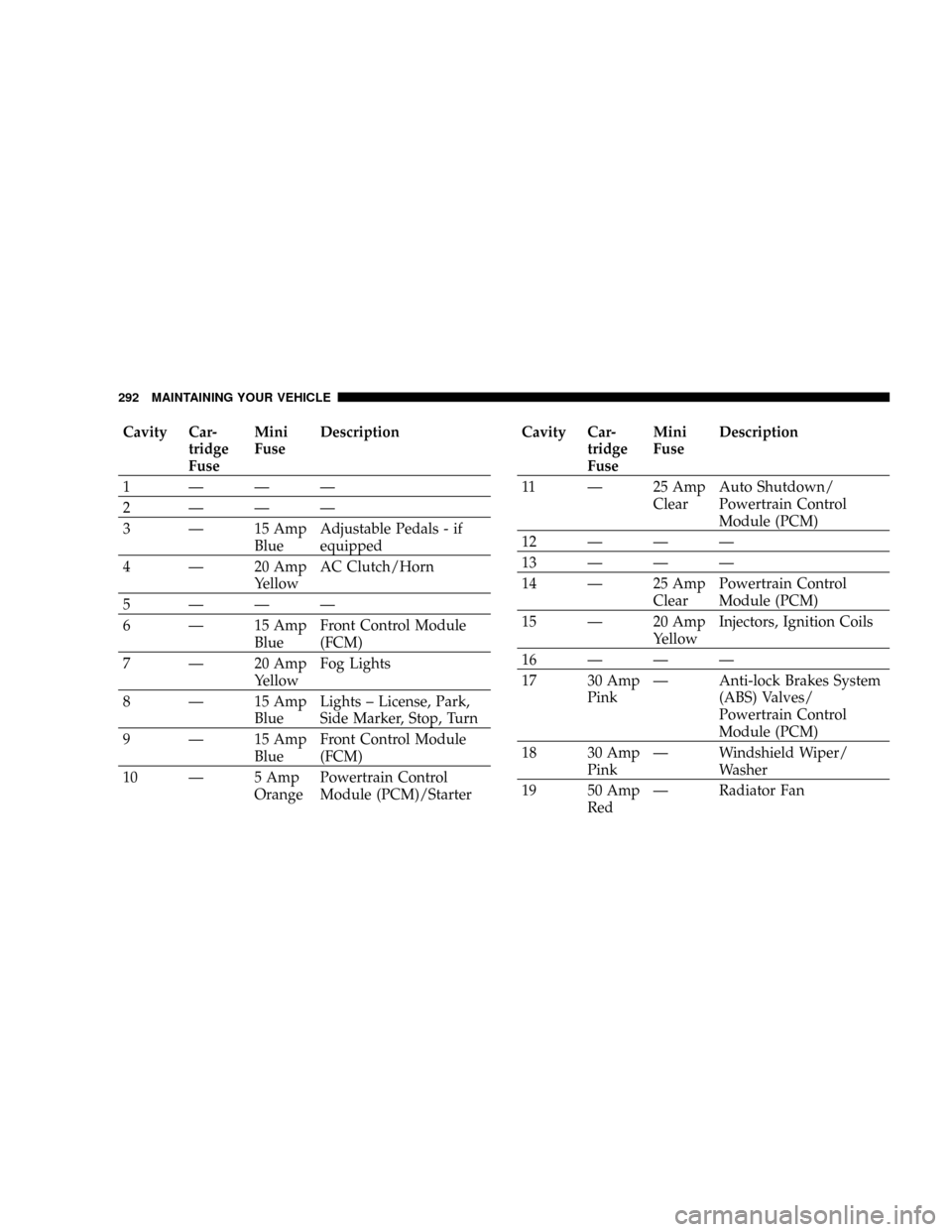
Cavity Car-
tridge
FuseMini
FuseDescription
1ÐÐÐ
2ÐÐÐ
3 Ð 15 Amp
BlueAdjustable Pedals - if
equipped
4 Ð 20 Amp
YellowAC Clutch/Horn
5ÐÐÐ
6 Ð 15 Amp
BlueFront Control Module
(FCM)
7 Ð 20 Amp
YellowFog Lights
8 Ð 15 Amp
BlueLights ± License, Park,
Side Marker, Stop, Turn
9 Ð 15 Amp
BlueFront Control Module
(FCM)
10 Ð 5 Amp
OrangePowertrain Control
Module (PCM)/StarterCavity Car-
tridge
FuseMini
FuseDescription
11 Ð 25 Amp
ClearAuto Shutdown/
Powertrain Control
Module (PCM)
12ÐÐÐ
13ÐÐÐ
14 Ð 25 Amp
ClearPowertrain Control
Module (PCM)
15 Ð 20 Amp
YellowInjectors, Ignition Coils
16ÐÐÐ
17 30 Amp
PinkÐ Anti-lock Brakes System
(ABS) Valves/
Powertrain Control
Module (PCM)
18 30 Amp
PinkÐ Windshield Wiper/
Washer
19 50 Amp
RedÐ Radiator Fan
292 MAINTAINING YOUR VEHICLE
Page 295 of 350

Cavity Car-
tridge
FuseMini
FuseDescription
17 Ð 20 Amp
YellowCluster
18 Ð 20 Amp
YellowSelectable Power Outlet
19 Ð 10 Amp
RedStop Lights
20ÐÐÐ
21ÐÐÐ
22ÐÐÐ
23ÐÐÐ
24ÐÐÐ
25ÐÐÐ
26ÐÐÐ
27 Ð 10 Amp
RedAirbag/Airbag Control
Module (ACM)
28 Ð 10 Amp
RedCurtain Airbag - if
equippedCavity Car-
tridge
FuseMini
FuseDescription
29 Ð 5 Amp
OrangeAnti-lock Brakes
Module/Cluster/Front
Control Module (FCM)/
Powertrain Control
Module (PCM)/Sentry
Key Remote Keyless
Entry/Stop Lights
30 Ð 10 Amp
RedDoor Modules/Power
Mirrors - if equipped/
Steering Control Module
31ÐÐÐ
32ÐÐÐ
33ÐÐÐ
34ÐÐÐ
MAINTAINING YOUR VEHICLE 295
7
Page 296 of 350

Cavity Car-
tridge
FuseMini
FuseDescription
35 Ð 5 Amp
OrangeAmplifier - if equipped/
Antenna/Ignition
Delay/Overhead
Console/Passenger Door
Lock & Express Power
Window Switch - if
equipped/Power Mir-
rors - if equipped/Rear
Defrost
36 Ð 20 Amp
YellowHands Free Phone - if
equipped/Media System
Monitor DVD - if
equipped/Radio/
Satellite Receiver - if
equipped
37 Ð 15 Amp
BlueTransmission - NAG1
38 Ð 5 Amp
OrangeCargo Light/Overhead
Console
39 Ð 10 Amp
RedHeated Mirrors - if
equippedCavity Car-
tridge
FuseMini
FuseDescription
40 Ð 10 Amp
RedHeated Seats - if
equipped/Inside Rear-
view Mirror
41 Ð 10 Amp
RedTire Pressure Monitoring
- if equipped
42 30 Amp
PinkÐ Front Blower Motor
43 30 Amp
PinkÐ Amplifier - if equipped/
Antenna/Rear Defrost
44 20 Amp
BlueÐ Amplifier - if equipped/
Front Control Module
(FCM)/Sunroof - if
equipped
*Cavities 11, 12, and 13 contain self-resetting fuses
(circuit breakers) that are only serviceable by an autho-
rized dealer. The Cluster is fused by the 25 amp circuit
breaker in Cavity 11. The Passenger Seat Switch is fused
by the 25 amp circuit breaker in Cavity 12. The Door
Modules and the Driver Express Power Window Switch
(if equipped) are fused by the 25 amp circuit breaker in
296 MAINTAINING YOUR VEHICLE