wheel DODGE CHARGER SRT 2012 7.G User Guide
[x] Cancel search | Manufacturer: DODGE, Model Year: 2012, Model line: CHARGER SRT, Model: DODGE CHARGER SRT 2012 7.GPages: 546, PDF Size: 17.96 MB
Page 120 of 546
•The Touch-Tone screen will be displayed,
•Use the numbered soft-keys to enter the number and
touch “Call”.
To send a touch tone using Voice Recognition (VR), press
the
button while in a call and say “1234#” or you
can say “Send Voicemail Password” if Voicemail pass-
word is stored in your mobile phonebook.
Recent Calls
You may browse up to 34 of the most recent of each of the
following call types:
•Incoming Calls
•Outgoing Calls
•Missed Calls
•All CallsThese can be accessed by touching the recent calls
soft-key on the Phone main screen.
You can also press the
button and say “Show my
incoming calls” from any screen and the Incoming calls
will be displayed.
NOTE:Incoming can also be replaced with “Outgoing”,
“Recent” or “Missed”.
Answer Or Reject An Incoming Call — No Call
Currently In Progress
When you receive a call on your mobile phone, the
Uconnect™ Phone will interrupt the vehicle audio sys-
tem, if on, and will display a pop-up showing Answer or
Ignore. Press the Answer soft-key or the
button on
the steering wheel to accept the call.
118 UNDERSTANDING THE FEATURES OF YOUR VEHICLE
PAGE POSITION:11 8JOB:@zeta.tweddle.com/chry_pdm/CLS_chrysler/GRP_owners/JOB_918945-en-dsr-12D482-126-AA_DSR/DIV_og pubnum: 12D482-126-AB_DSR •The Touch-Tone screen will be displayed,
•Use the numbered soft-keys to enter the number and
touch “Call”.
To send a touch tone using Voice Recognition (VR), press
the
button while in a call and say “1234#” or you
can say “Send Voicemail Password” if Voicemail pass-
word is stored in your mobile phonebook.
Recent Calls
You may browse up to 34 of the most recent of each of the
following call types:
•Incoming Calls
•Outgoing Calls
•Missed Calls
•All CallsThese can be accessed by touching the recent calls
soft-key on the Phone main screen.
You can also press the
button and say “Show my
incoming calls” from any screen and the Incoming calls
will be displayed.
NOTE:Incoming can also be replaced with “Outgoing”,
“Recent” or “Missed”.
Answer Or Reject An Incoming Call — No Call
Currently In Progress
When you receive a call on your mobile phone, the
Uconnect™ Phone will interrupt the vehicle audio sys-
tem, if on, and will display a pop-up showing Answer or
Ignore. Press the Answer soft-key or the
button on
the steering wheel to accept the call.
118 UNDERSTANDING THE FEATURES OF YOUR VEHICLE
PAGE POSITION:11 8JOB:@zeta.tweddle.com/chry_pdm/CLS_chrysler/GRP_owners/JOB_918945-en-dsr-12D482-126-AA_DSR/DIV_og pubnum: 12D482-126-AB_DSR
Page 134 of 546
if your vehicle is equipped. Please see the Uconnect™
Voice Command section for direction on how to use the
button.
The Uconnect™ Phone is fully integrated with the vehi-
cle’s audio system. The volume of the Uconnect™ Phone
can be adjusted either from the radio volume control
knob or from the steering wheel radio control (right
switch), if so equipped.
Operation
Voice commands can be used to operate the Uconnect™
Phone and to navigate through the Uconnect™ Phone
menu structure. Voice commands are required after most
Uconnect™ Phone prompts. There are two general meth-
ods for how Voice Command works:
1. Say compound commands like “Call John Smith mo-
bile”.2. Say the individual commands and allow the system to
guide you to complete the task.
You will be prompted for a specific command and then
guided through the available options.
•Prior to giving a voice command, one must wait for
the beep, which follows the “Listen” prompt or an-
other prompt.
•For certain operations, compound commands can be
used. For example, instead of saying “Call” and then
“John Smith” and then “mobile”, the following com-
pound command can be said: “Call John Smith mo-
bile”.
•For each feature explanation in this section, only the
compound command form of the voice command is
given. You can also break the commands into parts
and say each part of the command when you are asked
132 UNDERSTANDING THE FEATURES OF YOUR VEHICLE
PAGE POSITION:132JOB:@zeta.tweddle.com/chry_pdm/CLS_chrysler/GRP_owners/JOB_918945-en-dsr-12D482-126-AA_DSR/DIV_og pubnum: 12D482-126-AB_DSR if your vehicle is equipped. Please see the Uconnect™
Voice Command section for direction on how to use the
button.
The Uconnect™ Phone is fully integrated with the vehi-
cle’s audio system. The volume of the Uconnect™ Phone
can be adjusted either from the radio volume control
knob or from the steering wheel radio control (right
switch), if so equipped.
Operation
Voice commands can be used to operate the Uconnect™
Phone and to navigate through the Uconnect™ Phone
menu structure. Voice commands are required after most
Uconnect™ Phone prompts. There are two general meth-
ods for how Voice Command works:
1. Say compound commands like “Call John Smith mo-
bile”.2. Say the individual commands and allow the system to
guide you to complete the task.
You will be prompted for a specific command and then
guided through the available options.
•Prior to giving a voice command, one must wait for
the beep, which follows the “Listen” prompt or an-
other prompt.
•For certain operations, compound commands can be
used. For example, instead of saying “Call” and then
“John Smith” and then “mobile”, the following com-
pound command can be said: “Call John Smith mo-
bile”.
•For each feature explanation in this section, only the
compound command form of the voice command is
given. You can also break the commands into parts
and say each part of the command when you are asked
132 UNDERSTANDING THE FEATURES OF YOUR VEHICLE
PAGE POSITION:132JOB:@zeta.tweddle.com/chry_pdm/CLS_chrysler/GRP_owners/JOB_918945-en-dsr-12D482-126-AA_DSR/DIV_og pubnum: 12D482-126-AB_DSR
Page 200 of 546
The Rain Sensing system has protection features for the
wiper blades and arms, and will not operate under the
following conditions:
•Low Ambient Temperature— When the ignition is
first turned ON, the Rain Sensing system will not
operate until the wiper switch is moved, vehicle speed
is greater than 0 mph (0 km/h), or the outside tem-
perature is greater than 32°F (0°C).
•Transmission in NEUTRAL Position— When the
ignition is ON, and the transmission is in the NEU-
TRAL position, the Rain Sensing system will not
operate until the wiper switch is moved, vehicle speed
is greater than 5 mph (8 km/h), or the shift lever is
moved out of the NEUTRAL position.
NOTE:Rain Sensing can be turned on and off using the
Uconnect Touch™ System, refer to “Uconnect Touch™
Settings” in “Understanding Your Instrument Panel” for
further information.
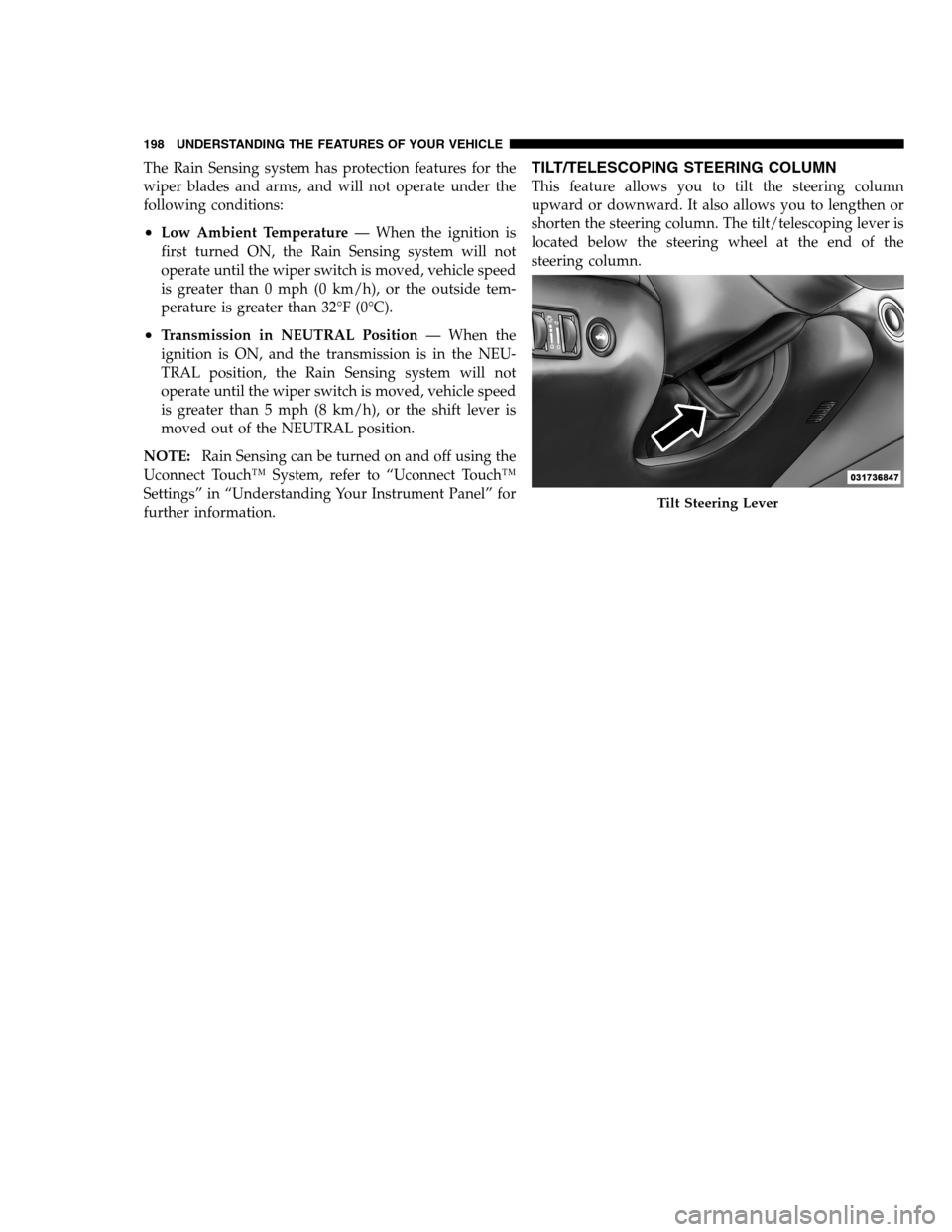
TILT/TELESCOPING STEERING COLUMN
This feature allows you to tilt the steering column
upward or downward. It also allows you to lengthen or
shorten the steering column. The tilt/telescoping lever is
located below the steering wheel at the end of the
steering column.
Tilt Steering Lever
198 UNDERSTANDING THE FEATURES OF YOUR VEHICLE
PAGE POSITION:198JOB:@zeta.tweddle.com/chry_pdm/CLS_chrysler/GRP_owners/JOB_918945-en-dsr-12D482-126-AA_DSR/DIV_og pubnum: 12D482-126-AB_DSR The Rain Sensing system has protection features for the
wiper blades and arms, and will not operate under the
following conditions:
•Low Ambient Temperature— When the ignition is
first turned ON, the Rain Sensing system will not
operate until the wiper switch is moved, vehicle speed
is greater than 0 mph (0 km/h), or the outside tem-
perature is greater than 32°F (0°C).
•Transmission in NEUTRAL Position— When the
ignition is ON, and the transmission is in the NEU-
TRAL position, the Rain Sensing system will not
operate until the wiper switch is moved, vehicle speed
is greater than 5 mph (8 km/h), or the shift lever is
moved out of the NEUTRAL position.
NOTE:Rain Sensing can be turned on and off using the
Uconnect Touch™ System, refer to “Uconnect Touch™
Settings” in “Understanding Your Instrument Panel” for
further information.
TILT/TELESCOPING STEERING COLUMN
This feature allows you to tilt the steering column
upward or downward. It also allows you to lengthen or
shorten the steering column. The tilt/telescoping lever is
located below the steering wheel at the end of the
steering column.
Tilt Steering Lever
198 UNDERSTANDING THE FEATURES OF YOUR VEHICLE
PAGE POSITION:198JOB:@zeta.tweddle.com/chry_pdm/CLS_chrysler/GRP_owners/JOB_918945-en-dsr-12D482-126-AA_DSR/DIV_og pubnum: 12D482-126-AB_DSR
Page 201 of 546
To unlock the steering column, pull the lever downward.
To tilt the steering column, move the steering wheel
upward or downward as desired. To lengthen or shorten
the steering column, pull the steering wheel outward or
push it inward as desired. To lock the steering column in
position, push the lever upward until fully engaged.
WARNING!
Do not adjust the steering column while driving.
Adjusting the steering column while driving or driv-
ing with the steering column unlocked, could cause
the driver to lose control of the vehicle. Be sure the
steering column is locked before driving your ve-
hicle. Failure to follow this warning may result in
serious injury or death.
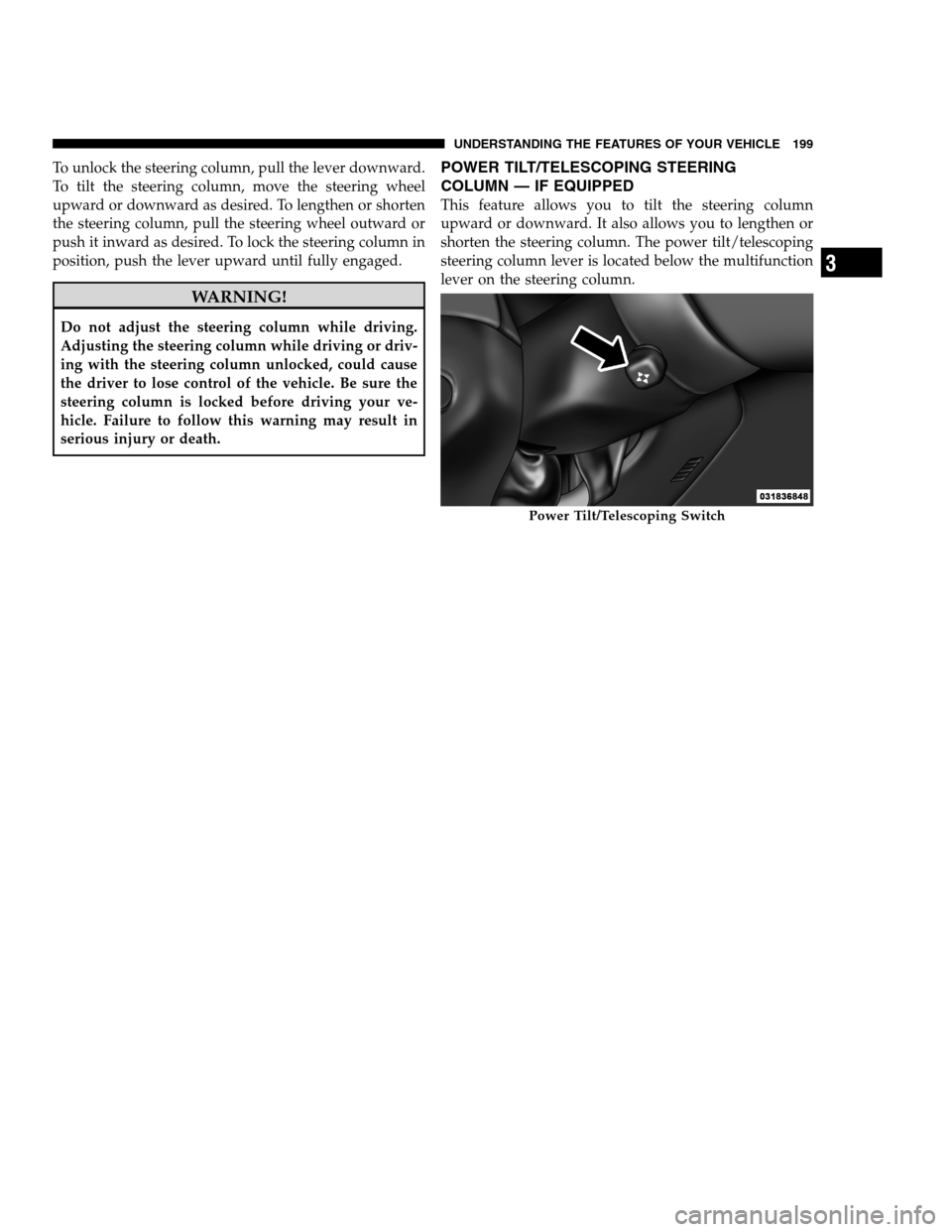
POWER TILT/TELESCOPING STEERING
COLUMN — IF EQUIPPED
This feature allows you to tilt the steering column
upward or downward. It also allows you to lengthen or
shorten the steering column. The power tilt/telescoping
steering column lever is located below the multifunction
lever on the steering column.
Power Tilt/Telescoping Switch
3
UNDERSTANDING THE FEATURES OF YOUR VEHICLE 199
PAGE POSITION:199JOB:@zeta.tweddle.com/chry_pdm/CLS_chrysler/GRP_owners/JOB_918945-en-dsr-12D482-126-AA_DSR/DIV_og pubnum: 12D482-126-AB_DSR To unlock the steering column, pull the lever downward.
To tilt the steering column, move the steering wheel
upward or downward as desired. To lengthen or shorten
the steering column, pull the steering wheel outward or
push it inward as desired. To lock the steering column in
position, push the lever upward until fully engaged.
WARNING!
Do not adjust the steering column while driving.
Adjusting the steering column while driving or driv-
ing with the steering column unlocked, could cause
the driver to lose control of the vehicle. Be sure the
steering column is locked before driving your ve-
hicle. Failure to follow this warning may result in
serious injury or death.
POWER TILT/TELESCOPING STEERING
COLUMN — IF EQUIPPED
This feature allows you to tilt the steering column
upward or downward. It also allows you to lengthen or
shorten the steering column. The power tilt/telescoping
steering column lever is located below the multifunction
lever on the steering column.
Power Tilt/Telescoping Switch
3
UNDERSTANDING THE FEATURES OF YOUR VEHICLE 199
PAGE POSITION:199JOB:@zeta.tweddle.com/chry_pdm/CLS_chrysler/GRP_owners/JOB_918945-en-dsr-12D482-126-AA_DSR/DIV_og pubnum: 12D482-126-AB_DSR
Page 202 of 546
To tilt the steering column, move the lever up or down as
desired. To lengthen or shorten the steering column, pull
the lever toward you or push the lever away from you as
desired.
NOTE:For vehicles equipped with Driver Memory
Seat, you can use your Remote Keyless Entry (RKE)
transmitter or the memory switch on the driver’s door
trim panel to return the tilt/telescopic steering column to
pre-programmed positions. Refer to “Driver Memory
Seat” in this section.WARNING!
Do not adjust the steering column while driving.
Adjusting the steering column while driving or driv-
ing with the steering column unlocked, could cause
the driver to lose control of the vehicle. Be sure the
steering column is locked before driving your ve-
hicle. Failure to follow this warning may result in
serious injury or death.
HEATED STEERING WHEEL — IF EQUIPPED
The steering wheel contains a heating element that helps
warm your hands in cold weather. The heated steering
wheel has only one temperature setting. Once the heated
steering wheel has been turned on it will operate for
approximately 58 to 70 minutes before automatically
shutting off. The heated steering wheel can shut off early
or may not turn on when the steering wheel is already
warm.
200 UNDERSTANDING THE FEATURES OF YOUR VEHICLE
PAGE POSITION:200JOB:@zeta.tweddle.com/chry_pdm/CLS_chrysler/GRP_owners/JOB_918945-en-dsr-12D482-126-AA_DSR/DIV_og pubnum: 12D482-126-AB_DSR To tilt the steering column, move the lever up or down as
desired. To lengthen or shorten the steering column, pull
the lever toward you or push the lever away from you as
desired.
NOTE:For vehicles equipped with Driver Memory
Seat, you can use your Remote Keyless Entry (RKE)
transmitter or the memory switch on the driver’s door
trim panel to return the tilt/telescopic steering column to
pre-programmed positions. Refer to “Driver Memory
Seat” in this section.WARNING!
Do not adjust the steering column while driving.
Adjusting the steering column while driving or driv-
ing with the steering column unlocked, could cause
the driver to lose control of the vehicle. Be sure the
steering column is locked before driving your ve-
hicle. Failure to follow this warning may result in
serious injury or death.
HEATED STEERING WHEEL — IF EQUIPPED
The steering wheel contains a heating element that helps
warm your hands in cold weather. The heated steering
wheel has only one temperature setting. Once the heated
steering wheel has been turned on it will operate for
approximately 58 to 70 minutes before automatically
shutting off. The heated steering wheel can shut off early
or may not turn on when the steering wheel is already
warm.
200 UNDERSTANDING THE FEATURES OF YOUR VEHICLE
PAGE POSITION:200JOB:@zeta.tweddle.com/chry_pdm/CLS_chrysler/GRP_owners/JOB_918945-en-dsr-12D482-126-AA_DSR/DIV_og pubnum: 12D482-126-AB_DSR
Page 203 of 546
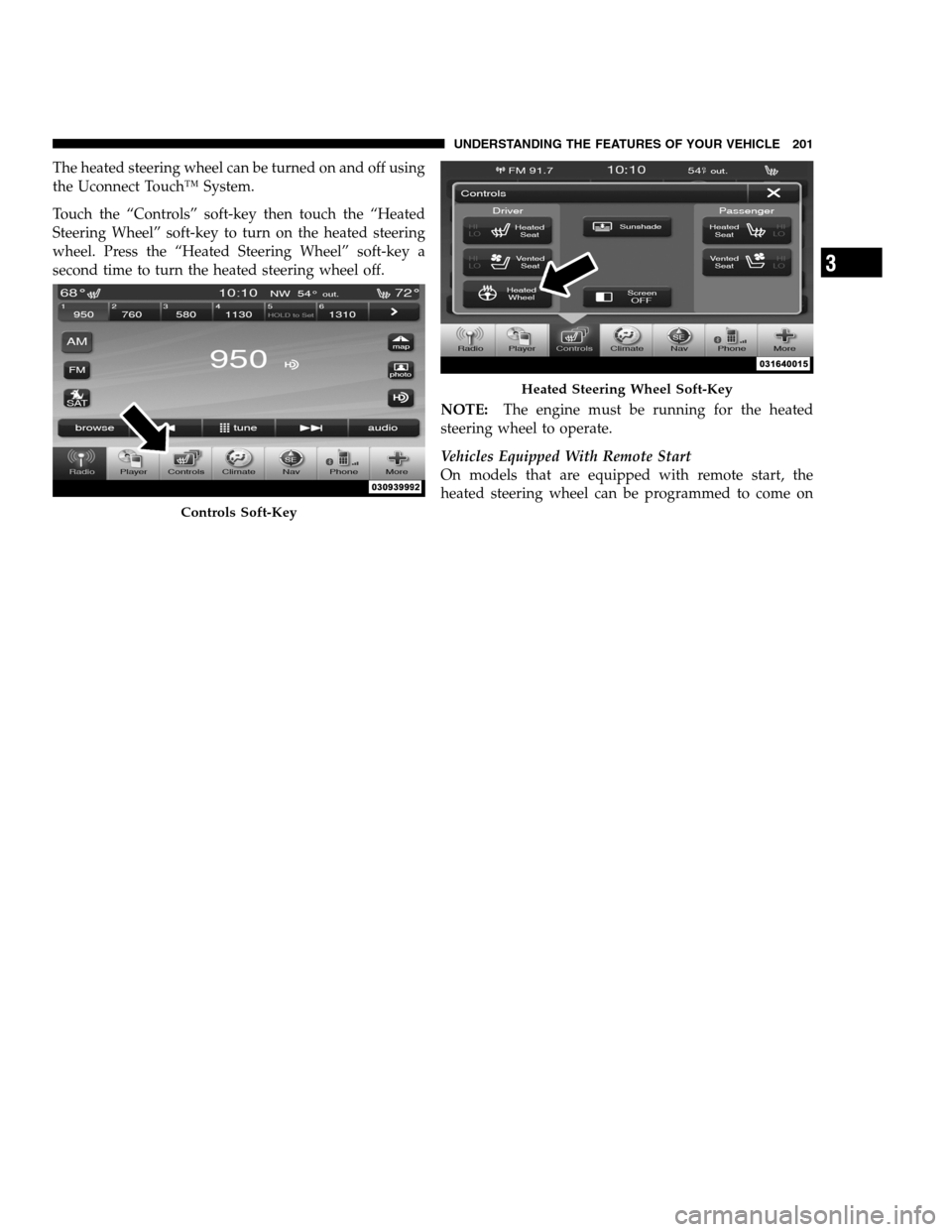
The heated steering wheel can be turned on and off using
the Uconnect Touch™ System.
Touch the “Controls” soft-key then touch the “Heated
Steering Wheel” soft-key to turn on the heated steering
wheel. Press the “Heated Steering Wheel” soft-key a
second time to turn the heated steering wheel off.
NOTE:The engine must be running for the heated
steering wheel to operate.
Vehicles Equipped With Remote Start
On models that are equipped with remote start, the
heated steering wheel can be programmed to come on
Controls Soft-Key
Heated Steering Wheel Soft-Key
3
UNDERSTANDING THE FEATURES OF YOUR VEHICLE 201
PAGE POSITION:201JOB:@zeta.tweddle.com/chry_pdm/CLS_chrysler/GRP_owners/JOB_918945-en-dsr-12D482-126-AA_DSR/DIV_og pubnum: 12D482-126-AB_DSR The heated steering wheel can be turned on and off using
the Uconnect Touch™ System.
Touch the “Controls” soft-key then touch the “Heated
Steering Wheel” soft-key to turn on the heated steering
wheel. Press the “Heated Steering Wheel” soft-key a
second time to turn the heated steering wheel off.
NOTE:The engine must be running for the heated
steering wheel to operate.
Vehicles Equipped With Remote Start
On models that are equipped with remote start, the
heated steering wheel can be programmed to come on
Controls Soft-Key
Heated Steering Wheel Soft-Key
3
UNDERSTANDING THE FEATURES OF YOUR VEHICLE 201
PAGE POSITION:201JOB:@zeta.tweddle.com/chry_pdm/CLS_chrysler/GRP_owners/JOB_918945-en-dsr-12D482-126-AA_DSR/DIV_og pubnum: 12D482-126-AB_DSR
Page 204 of 546
during a remote start. Refer to “Remote Starting System
— If Equipped” in “Things To Know Before Starting Your
Vehicle” for further information.
WARNING!
•Persons who are unable to feel pain to the skin
because of advanced age, chronic illness, diabetes,
spinal cord injury, medication, alcohol use, ex-
haustion, or other physical conditions must exer-
cise care when using the steering wheel heater. It
may cause burns even at low temperatures, espe-
cially if used for long periods.
•Do not place anything on the steering wheel that
insulates against heat, such as a blanket or cush-
ion. This may cause the steering wheel heater to
overheat.
ADJUSTABLE PEDALS — IF EQUIPPED
The adjustable pedals system is designed to allow a
greater range of driver comfort for steering wheel tilt and
seat position. This feature allows the brake, accelerator,
and clutch pedals (if equipped) to move toward or away
from the driver to provide improved position with the
steering wheel.
The switch is located on the front side of the driver’s seat
cushion side shield.
202 UNDERSTANDING THE FEATURES OF YOUR VEHICLE
PAGE POSITION:202JOB:@zeta.tweddle.com/chry_pdm/CLS_chrysler/GRP_owners/JOB_918945-en-dsr-12D482-126-AA_DSR/DIV_og pubnum: 12D482-126-AB_DSR during a remote start. Refer to “Remote Starting System
— If Equipped” in “Things To Know Before Starting Your
Vehicle” for further information.
WARNING!
•Persons who are unable to feel pain to the skin
because of advanced age, chronic illness, diabetes,
spinal cord injury, medication, alcohol use, ex-
haustion, or other physical conditions must exer-
cise care when using the steering wheel heater. It
may cause burns even at low temperatures, espe-
cially if used for long periods.
•Do not place anything on the steering wheel that
insulates against heat, such as a blanket or cush-
ion. This may cause the steering wheel heater to
overheat.
ADJUSTABLE PEDALS — IF EQUIPPED
The adjustable pedals system is designed to allow a
greater range of driver comfort for steering wheel tilt and
seat position. This feature allows the brake, accelerator,
and clutch pedals (if equipped) to move toward or away
from the driver to provide improved position with the
steering wheel.
The switch is located on the front side of the driver’s seat
cushion side shield.
202 UNDERSTANDING THE FEATURES OF YOUR VEHICLE
PAGE POSITION:202JOB:@zeta.tweddle.com/chry_pdm/CLS_chrysler/GRP_owners/JOB_918945-en-dsr-12D482-126-AA_DSR/DIV_og pubnum: 12D482-126-AB_DSR
Page 206 of 546
WARNING!
Do not adjust the pedals while the vehicle is moving.
You could lose control and have an accident. Always
adjust the pedals while the vehicle is parked.
ELECTRONIC SPEED CONTROL — IF EQUIPPED
When engaged, the Electronic Speed Control takes over
accelerator operations at speeds greater than 25 mph
(40 km/h).
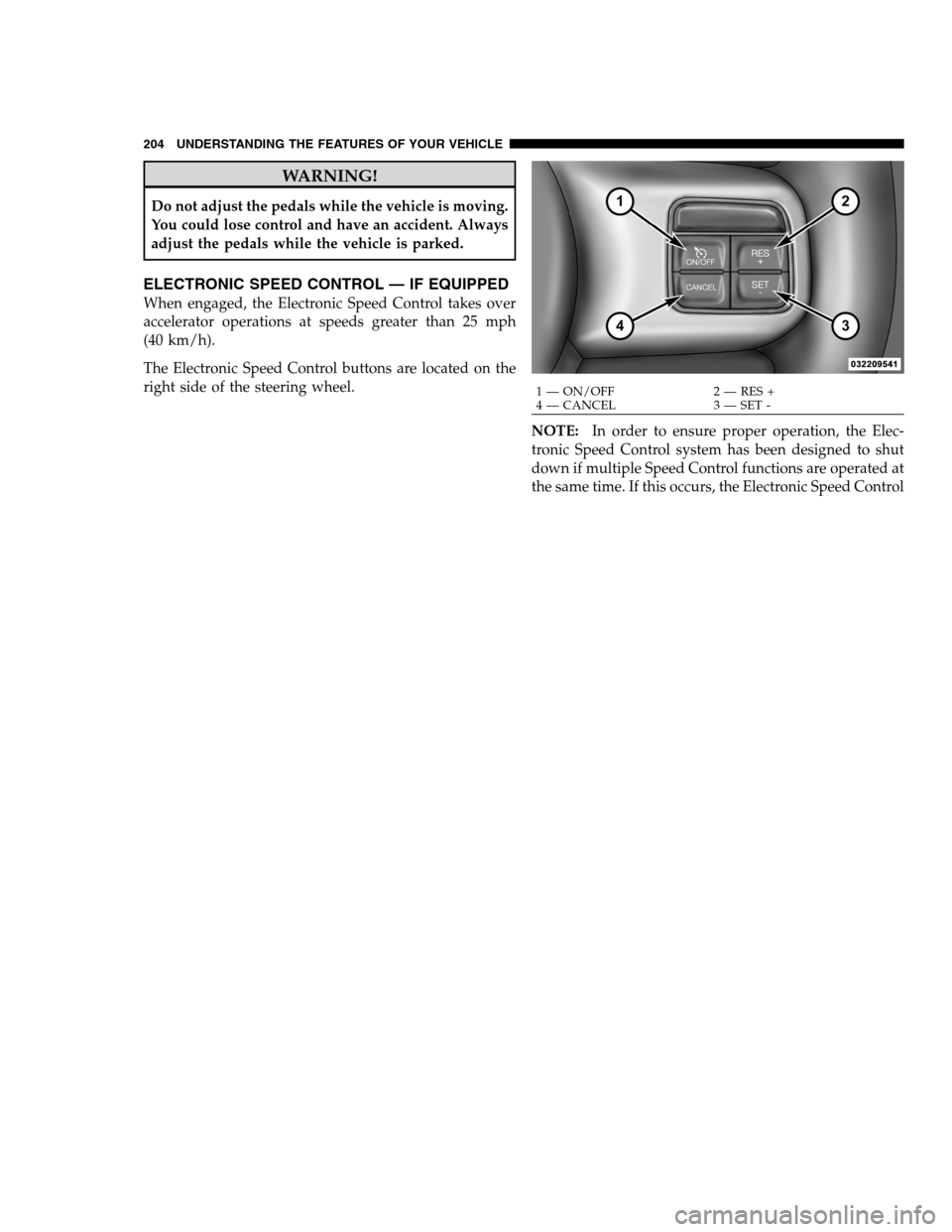
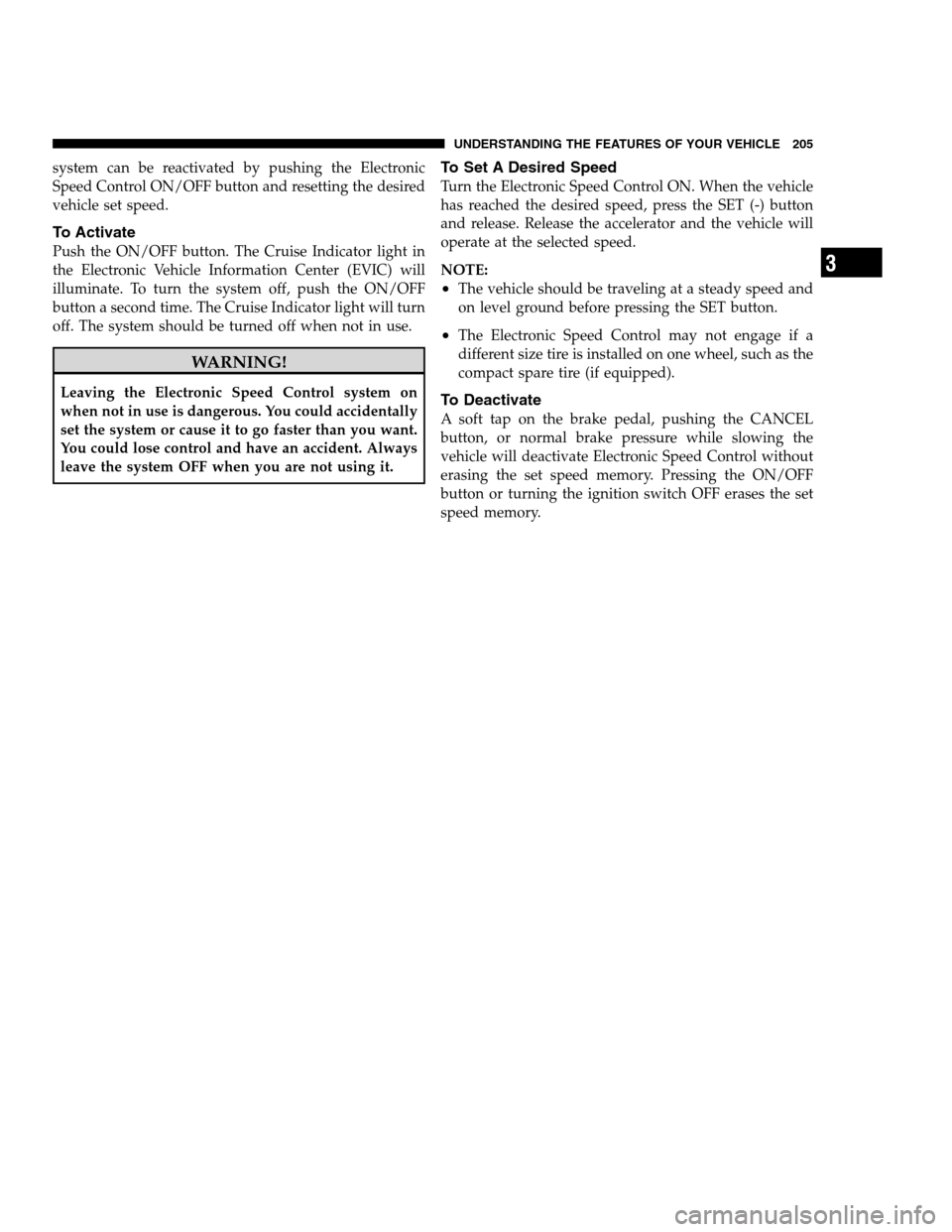
The Electronic Speed Control buttons are located on the
right side of the steering wheel.
NOTE:In order to ensure proper operation, the Elec-
tronic Speed Control system has been designed to shut
down if multiple Speed Control functions are operated at
the same time. If this occurs, the Electronic Speed Control
1 — ON/OFF 2 — RES +
4 — CANCEL 3 — SET - 204 UNDERSTANDING THE FEATURES OF YOUR VEHICLE
PAGE POSITION:204JOB:@zeta.tweddle.com/chry_pdm/CLS_chrysler/GRP_owners/JOB_918945-en-dsr-12D482-126-AA_DSR/DIV_og pubnum: 12D482-126-AB_DSR WARNING!
Do not adjust the pedals while the vehicle is moving.
You could lose control and have an accident. Always
adjust the pedals while the vehicle is parked.
ELECTRONIC SPEED CONTROL — IF EQUIPPED
When engaged, the Electronic Speed Control takes over
accelerator operations at speeds greater than 25 mph
(40 km/h).
The Electronic Speed Control buttons are located on the
right side of the steering wheel.
NOTE:In order to ensure proper operation, the Elec-
tronic Speed Control system has been designed to shut
down if multiple Speed Control functions are operated at
the same time. If this occurs, the Electronic Speed Control
1 — ON/OFF 2 — RES +
4 — CANCEL 3 — SET - 204 UNDERSTANDING THE FEATURES OF YOUR VEHICLE
PAGE POSITION:204JOB:@zeta.tweddle.com/chry_pdm/CLS_chrysler/GRP_owners/JOB_918945-en-dsr-12D482-126-AA_DSR/DIV_og pubnum: 12D482-126-AB_DSR
Page 207 of 546
system can be reactivated by pushing the Electronic
Speed Control ON/OFF button and resetting the desired
vehicle set speed.
To Activate
Push the ON/OFF button. The Cruise Indicator light in
the Electronic Vehicle Information Center (EVIC) will
illuminate. To turn the system off, push the ON/OFF
button a second time. The Cruise Indicator light will turn
off. The system should be turned off when not in use.
WARNING!
Leaving the Electronic Speed Control system on
when not in use is dangerous. You could accidentally
set the system or cause it to go faster than you want.
You could lose control and have an accident. Always
leave the system OFF when you are not using it.
To Set A Desired Speed
Turn the Electronic Speed Control ON. When the vehicle
has reached the desired speed, press the SET (-) button
and release. Release the accelerator and the vehicle will
operate at the selected speed.
NOTE:
•The vehicle should be traveling at a steady speed and
on level ground before pressing the SET button.
•The Electronic Speed Control may not engage if a
different size tire is installed on one wheel, such as the
compact spare tire (if equipped).
To Deactivate
A soft tap on the brake pedal, pushing the CANCEL
button, or normal brake pressure while slowing the
vehicle will deactivate Electronic Speed Control without
erasing the set speed memory. Pressing the ON/OFF
button or turning the ignition switch OFF erases the set
speed memory.
3
UNDERSTANDING THE FEATURES OF YOUR VEHICLE 205
PAGE POSITION:205JOB:@zeta.tweddle.com/chry_pdm/CLS_chrysler/GRP_owners/JOB_918945-en-dsr-12D482-126-AA_DSR/DIV_og pubnum: 12D482-126-AB_DSR system can be reactivated by pushing the Electronic
Speed Control ON/OFF button and resetting the desired
vehicle set speed.
To Activate
Push the ON/OFF button. The Cruise Indicator light in
the Electronic Vehicle Information Center (EVIC) will
illuminate. To turn the system off, push the ON/OFF
button a second time. The Cruise Indicator light will turn
off. The system should be turned off when not in use.
WARNING!
Leaving the Electronic Speed Control system on
when not in use is dangerous. You could accidentally
set the system or cause it to go faster than you want.
You could lose control and have an accident. Always
leave the system OFF when you are not using it.
To Set A Desired Speed
Turn the Electronic Speed Control ON. When the vehicle
has reached the desired speed, press the SET (-) button
and release. Release the accelerator and the vehicle will
operate at the selected speed.
NOTE:
•The vehicle should be traveling at a steady speed and
on level ground before pressing the SET button.
•The Electronic Speed Control may not engage if a
different size tire is installed on one wheel, such as the
compact spare tire (if equipped).
To Deactivate
A soft tap on the brake pedal, pushing the CANCEL
button, or normal brake pressure while slowing the
vehicle will deactivate Electronic Speed Control without
erasing the set speed memory. Pressing the ON/OFF
button or turning the ignition switch OFF erases the set
speed memory.
3
UNDERSTANDING THE FEATURES OF YOUR VEHICLE 205
PAGE POSITION:205JOB:@zeta.tweddle.com/chry_pdm/CLS_chrysler/GRP_owners/JOB_918945-en-dsr-12D482-126-AA_DSR/DIV_og pubnum: 12D482-126-AB_DSR
Page 212 of 546
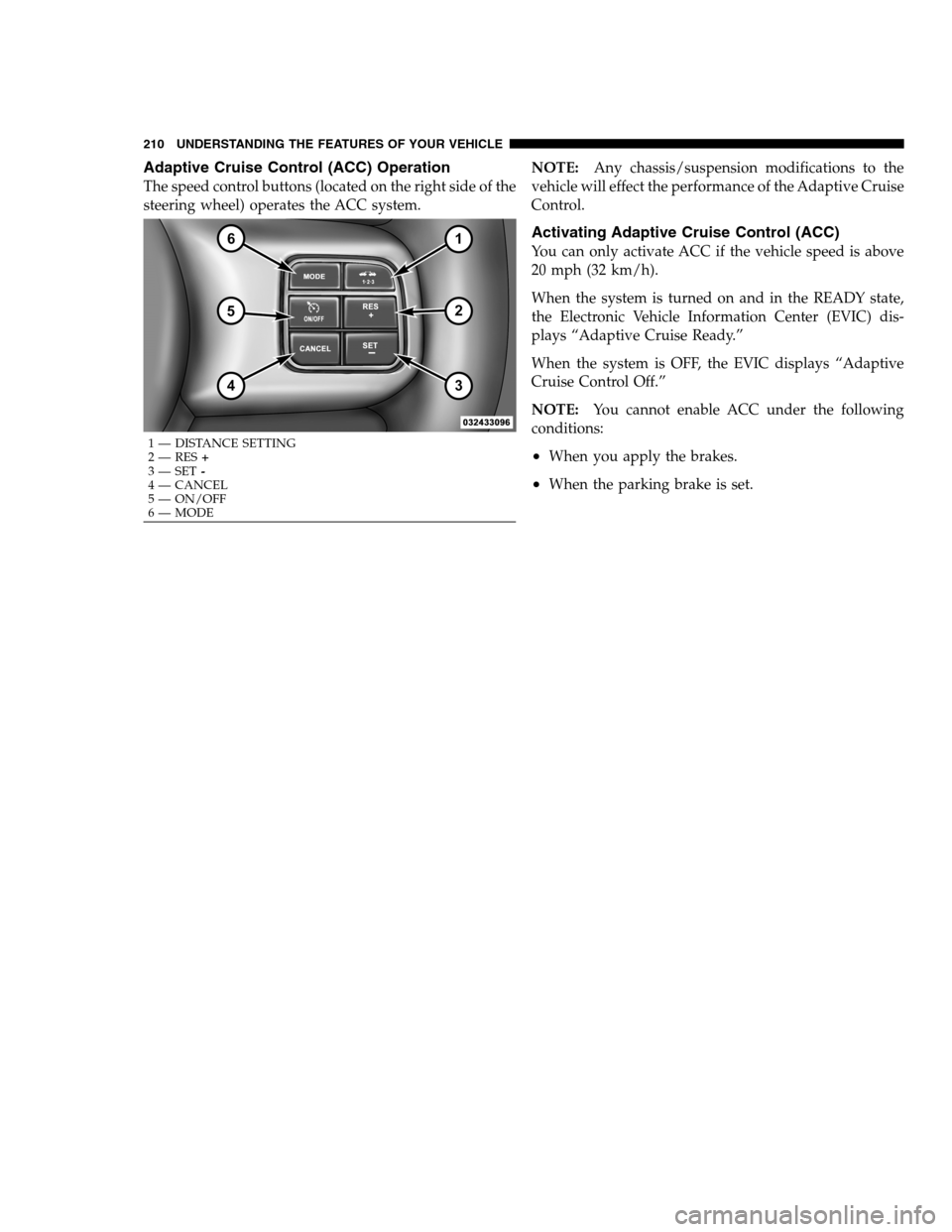
Adaptive Cruise Control (ACC) Operation
The speed control buttons (located on the right side of the
steering wheel) operates the ACC system.NOTE:Any chassis/suspension modifications to the
vehicle will effect the performance of the Adaptive Cruise
Control.
Activating Adaptive Cruise Control (ACC)
You can only activate ACC if the vehicle speed is above
20 mph (32 km/h).
When the system is turned on and in the READY state,
the Electronic Vehicle Information Center (EVIC) dis-
plays “Adaptive Cruise Ready.”
When the system is OFF, the EVIC displays “Adaptive
Cruise Control Off.”
NOTE:You cannot enable ACC under the following
conditions:
•When you apply the brakes.
•When the parking brake is set.
1 — DISTANCE SETTING
2 — RES+
3 — SET-
4 — CANCEL
5 — ON/OFF
6 — MODE 210 UNDERSTANDING THE FEATURES OF YOUR VEHICLE
PAGE POSITION:210JOB:@zeta.tweddle.com/chry_pdm/CLS_chrysler/GRP_owners/JOB_918945-en-dsr-12D482-126-AA_DSR/DIV_og pubnum: 12D482-126-AB_DSR Adaptive Cruise Control (ACC) Operation
The speed control buttons (located on the right side of the
steering wheel) operates the ACC system.NOTE:Any chassis/suspension modifications to the
vehicle will effect the performance of the Adaptive Cruise
Control.
Activating Adaptive Cruise Control (ACC)
You can only activate ACC if the vehicle speed is above
20 mph (32 km/h).
When the system is turned on and in the READY state,
the Electronic Vehicle Information Center (EVIC) dis-
plays “Adaptive Cruise Ready.”
When the system is OFF, the EVIC displays “Adaptive
Cruise Control Off.”
NOTE:You cannot enable ACC under the following
conditions:
•When you apply the brakes.
•When the parking brake is set.
1 — DISTANCE SETTING
2 — RES+
3 — SET-
4 — CANCEL
5 — ON/OFF
6 — MODE 210 UNDERSTANDING THE FEATURES OF YOUR VEHICLE
PAGE POSITION:210JOB:@zeta.tweddle.com/chry_pdm/CLS_chrysler/GRP_owners/JOB_918945-en-dsr-12D482-126-AA_DSR/DIV_og pubnum: 12D482-126-AB_DSR