display DODGE CHARGER SRT 2012 7.G Owner's Manual
[x] Cancel search | Manufacturer: DODGE, Model Year: 2012, Model line: CHARGER SRT, Model: DODGE CHARGER SRT 2012 7.GPages: 546, PDF Size: 17.96 MB
Page 176 of 546
choose from HI, LO or OFF heat settings. Amber indica-
tor lights in each switch indicate the level of heat in use.
Two indicator lights will illuminate for HI, one for LO
and none for OFF.
Press the switch once to select HI-level heating.
Press the switch a second time to select LO-
level heating. Press the switch a third time to
shut the heating elements OFF.
NOTE:
•Once a heat setting is selected, heat will be felt within
two to five minutes.
•The engine must be running for the heated seats to
operate.
When the HI-level setting is selected, the heater will
provide a boosted heat level during the first four minutes
of operation. Then, the heat output will drop to the
normal HI-level. If the HI-level setting is selected, thesystem will automatically switch to LO-level after a
maximum of 60 minutes of continuous operation. At that
time, the number of illuminated LEDs changes from two
to one, indicating the change. The LO-level setting will
turn OFF automatically after a maximum of 45 minutes.
Ventilated Seats
On some models, both the driver and passenger seats are
ventilated. Located in the seat cushion and seatback are
small fans that draw air from the seat surface through
fine perforations in the seat cover to help keep the driver
and front passenger cooler in higher ambient tempera-
tures.
The ventilated seats can be operated using the Uconnect
Touch™ System.
Front Ventilated Seat Operation — Uconnect
Touch™ 8.4/8.4 Nav:
Press the “Controls” soft-key located on the bottom of the
Uconnect Touch™ display.
174 UNDERSTANDING THE FEATURES OF YOUR VEHICLE
PAGE POSITION:174JOB:@zeta.tweddle.com/chry_pdm/CLS_chrysler/GRP_owners/JOB_918945-en-dsr-12D482-126-AA_DSR/DIV_og pubnum: 12D482-126-AB_DSR choose from HI, LO or OFF heat settings. Amber indica-
tor lights in each switch indicate the level of heat in use.
Two indicator lights will illuminate for HI, one for LO
and none for OFF.
Press the switch once to select HI-level heating.
Press the switch a second time to select LO-
level heating. Press the switch a third time to
shut the heating elements OFF.
NOTE:
•Once a heat setting is selected, heat will be felt within
two to five minutes.
•The engine must be running for the heated seats to
operate.
When the HI-level setting is selected, the heater will
provide a boosted heat level during the first four minutes
of operation. Then, the heat output will drop to the
normal HI-level. If the HI-level setting is selected, thesystem will automatically switch to LO-level after a
maximum of 60 minutes of continuous operation. At that
time, the number of illuminated LEDs changes from two
to one, indicating the change. The LO-level setting will
turn OFF automatically after a maximum of 45 minutes.
Ventilated Seats
On some models, both the driver and passenger seats are
ventilated. Located in the seat cushion and seatback are
small fans that draw air from the seat surface through
fine perforations in the seat cover to help keep the driver
and front passenger cooler in higher ambient tempera-
tures.
The ventilated seats can be operated using the Uconnect
Touch™ System.
Front Ventilated Seat Operation — Uconnect
Touch™ 8.4/8.4 Nav:
Press the “Controls” soft-key located on the bottom of the
Uconnect Touch™ display.
174 UNDERSTANDING THE FEATURES OF YOUR VEHICLE
PAGE POSITION:174JOB:@zeta.tweddle.com/chry_pdm/CLS_chrysler/GRP_owners/JOB_918945-en-dsr-12D482-126-AA_DSR/DIV_og pubnum: 12D482-126-AB_DSR
Page 183 of 546
![DODGE CHARGER SRT 2012 7.G Owners Manual 2. Adjust all memory profile settings to desired prefer-
ences (i.e., seat, side mirror, adjustable pedals [if
equipped], power tilt and telescopic steering column [if
equipped], and radio station pre](/img/12/5570/w960_5570-182.png "DODGE CHARGER SRT 2012 7.G Owners Manual 2. Adjust all memory profile settings to desired prefer-
ences (i.e., seat, side mirror, adjustable pedals [if
equipped], power tilt and telescopic steering column [if
equipped], and radio station pre")
2. Adjust all memory profile settings to desired prefer-
ences (i.e., seat, side mirror, adjustable pedals [if
equipped], power tilt and telescopic steering column [if
equipped], and radio station presets).
3. Press and release the SET (S) button on the memory
switch.
4. Within five seconds, press and release the MEMORY
button 1 or 2. The Electronic Vehicle Information Center
(EVIC) (if equipped) will display which memory position
has been set.
NOTE:
•Memory profiles can be set without the vehicle in
PARK, but the vehicle must be in PARK to recall a
memory profile.
•The Recall Memory with Remote Key Unlock feature
can be turned on and off using the Uconnect Touch™System, refer to “Uconnect Touch™ Settings” in “Un-
derstanding Your Instrument Panel” for further
information.
Linking And Unlinking The Remote Keyless Entry
Transmitter To Memory
Your RKE transmitters can be programmed to recall one
of two pre-programmed memory profiles by pressing the
UNLOCK button on the RKE transmitter.
To program your RKE transmitters, perform the follow-
ing:
1. Remove the Key Fob from the ignition (or change the
ignition to OFF, for vehicles equipped with Keyless
Enter-N-Go).
2. Select desired memory profile 1 or 2.
3. Once the profile has been recalled, press and release
the SET (S) button on the memory switch, then press and
release the side of the rocker switch labeled 1 or 23
UNDERSTANDING THE FEATURES OF YOUR VEHICLE 181
PAGE POSITION:181JOB:@zeta.tweddle.com/chry_pdm/CLS_chrysler/GRP_owners/JOB_918945-en-dsr-12D482-126-AA_DSR/DIV_og pubnum: 12D482-126-AB_DSR 2. Adjust all memory profile settings to desired prefer-
ences (i.e., seat, side mirror, adjustable pedals [if
equipped], power tilt and telescopic steering column [if
equipped], and radio station presets).
3. Press and release the SET (S) button on the memory
switch.
4. Within five seconds, press and release the MEMORY
button 1 or 2. The Electronic Vehicle Information Center
(EVIC) (if equipped) will display which memory position
has been set.
NOTE:
•Memory profiles can be set without the vehicle in
PARK, but the vehicle must be in PARK to recall a
memory profile.
•The Recall Memory with Remote Key Unlock feature
can be turned on and off using the Uconnect Touch™System, refer to “Uconnect Touch™ Settings” in “Un-
derstanding Your Instrument Panel” for further
information.
Linking And Unlinking The Remote Keyless Entry
Transmitter To Memory
Your RKE transmitters can be programmed to recall one
of two pre-programmed memory profiles by pressing the
UNLOCK button on the RKE transmitter.
To program your RKE transmitters, perform the follow-
ing:
1. Remove the Key Fob from the ignition (or change the
ignition to OFF, for vehicles equipped with Keyless
Enter-N-Go).
2. Select desired memory profile 1 or 2.
3. Once the profile has been recalled, press and release
the SET (S) button on the memory switch, then press and
release the side of the rocker switch labeled 1 or 23
UNDERSTANDING THE FEATURES OF YOUR VEHICLE 181
PAGE POSITION:181JOB:@zeta.tweddle.com/chry_pdm/CLS_chrysler/GRP_owners/JOB_918945-en-dsr-12D482-126-AA_DSR/DIV_og pubnum: 12D482-126-AB_DSR
Page 184 of 546
accordingly. “Memory Profile Set” (1 or 2) will display in
the instrument cluster on vehicles equipped with the
EVIC.
4. Press and release the LOCK button on the RKE
transmitter within 10 seconds.
NOTE:Your RKE transmitters can be unlinked to your
memory settings by pressing the SET (S) button followed
by the UNLOCK button on the RKE transmitter in Step 4
above.
Memory Position Recall
NOTE:The vehicle must be in PARK to recall memory
positions. If a recall is attempted when the vehicle is not
in PARK, a message will display in the EVIC (if
equipped).To recall the memory settings for driver 1, press
MEMORY button number 1 on the driver’s door or the
UNLOCK button on the RKE transmitter linked to
memory position 1.
To recall the memory setting for driver 2, press MEMORY
button number 2 on the driver’s door or the UNLOCK
button on the RKE transmitter linked to memory position
2.
A recall can be cancelled by pressing any of the
MEMORY buttons (S, 1, or 2) on the driver’s door during
a recall. When a recall is cancelled, the driver’s seat, side
mirror, adjustable pedals (if equipped), and power tilt
and telescopic steering column (if equipped) stop mov-
ing. A delay of one second will occur before another recall
can be selected.
182 UNDERSTANDING THE FEATURES OF YOUR VEHICLE
PAGE POSITION:182JOB:@zeta.tweddle.com/chry_pdm/CLS_chrysler/GRP_owners/JOB_918945-en-dsr-12D482-126-AA_DSR/DIV_og pubnum: 12D482-126-AB_DSR accordingly. “Memory Profile Set” (1 or 2) will display in
the instrument cluster on vehicles equipped with the
EVIC.
4. Press and release the LOCK button on the RKE
transmitter within 10 seconds.
NOTE:Your RKE transmitters can be unlinked to your
memory settings by pressing the SET (S) button followed
by the UNLOCK button on the RKE transmitter in Step 4
above.
Memory Position Recall
NOTE:The vehicle must be in PARK to recall memory
positions. If a recall is attempted when the vehicle is not
in PARK, a message will display in the EVIC (if
equipped).To recall the memory settings for driver 1, press
MEMORY button number 1 on the driver’s door or the
UNLOCK button on the RKE transmitter linked to
memory position 1.
To recall the memory setting for driver 2, press MEMORY
button number 2 on the driver’s door or the UNLOCK
button on the RKE transmitter linked to memory position
2.
A recall can be cancelled by pressing any of the
MEMORY buttons (S, 1, or 2) on the driver’s door during
a recall. When a recall is cancelled, the driver’s seat, side
mirror, adjustable pedals (if equipped), and power tilt
and telescopic steering column (if equipped) stop mov-
ing. A delay of one second will occur before another recall
can be selected.
182 UNDERSTANDING THE FEATURES OF YOUR VEHICLE
PAGE POSITION:182JOB:@zeta.tweddle.com/chry_pdm/CLS_chrysler/GRP_owners/JOB_918945-en-dsr-12D482-126-AA_DSR/DIV_og pubnum: 12D482-126-AB_DSR
Page 196 of 546
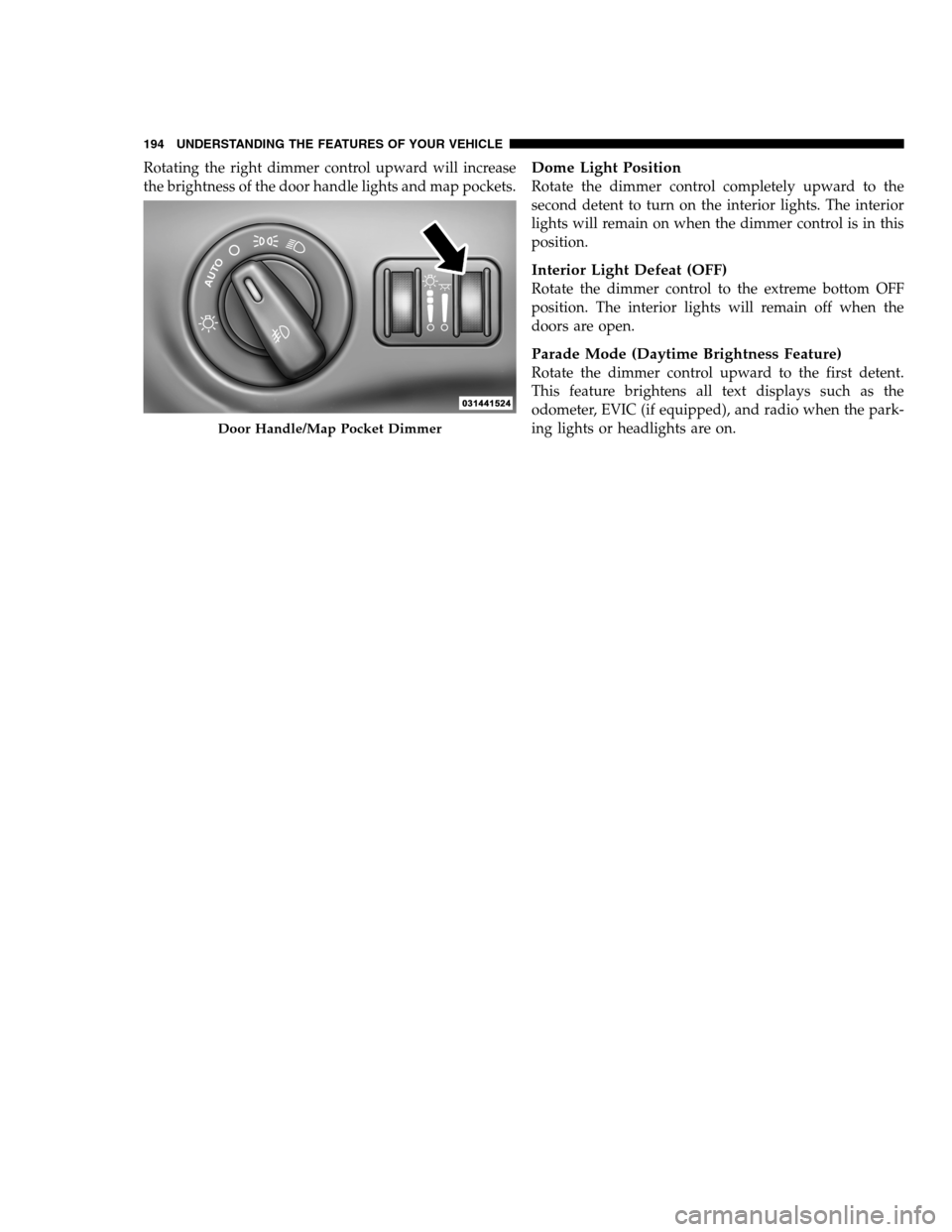
Rotating the right dimmer control upward will increase
the brightness of the door handle lights and map pockets.Dome Light Position
Rotate the dimmer control completely upward to the
second detent to turn on the interior lights. The interior
lights will remain on when the dimmer control is in this
position.
Interior Light Defeat (OFF)
Rotate the dimmer control to the extreme bottom OFF
position. The interior lights will remain off when the
doors are open.
Parade Mode (Daytime Brightness Feature)
Rotate the dimmer control upward to the first detent.
This feature brightens all text displays such as the
odometer, EVIC (if equipped), and radio when the park-
ing lights or headlights are on.
Door Handle/Map Pocket Dimmer
194 UNDERSTANDING THE FEATURES OF YOUR VEHICLE
PAGE POSITION:194JOB:@zeta.tweddle.com/chry_pdm/CLS_chrysler/GRP_owners/JOB_918945-en-dsr-12D482-126-AA_DSR/DIV_og pubnum: 12D482-126-AB_DSR Rotating the right dimmer control upward will increase
the brightness of the door handle lights and map pockets.Dome Light Position
Rotate the dimmer control completely upward to the
second detent to turn on the interior lights. The interior
lights will remain on when the dimmer control is in this
position.
Interior Light Defeat (OFF)
Rotate the dimmer control to the extreme bottom OFF
position. The interior lights will remain off when the
doors are open.
Parade Mode (Daytime Brightness Feature)
Rotate the dimmer control upward to the first detent.
This feature brightens all text displays such as the
odometer, EVIC (if equipped), and radio when the park-
ing lights or headlights are on.
Door Handle/Map Pocket Dimmer
194 UNDERSTANDING THE FEATURES OF YOUR VEHICLE
PAGE POSITION:194JOB:@zeta.tweddle.com/chry_pdm/CLS_chrysler/GRP_owners/JOB_918945-en-dsr-12D482-126-AA_DSR/DIV_og pubnum: 12D482-126-AB_DSR
Page 205 of 546
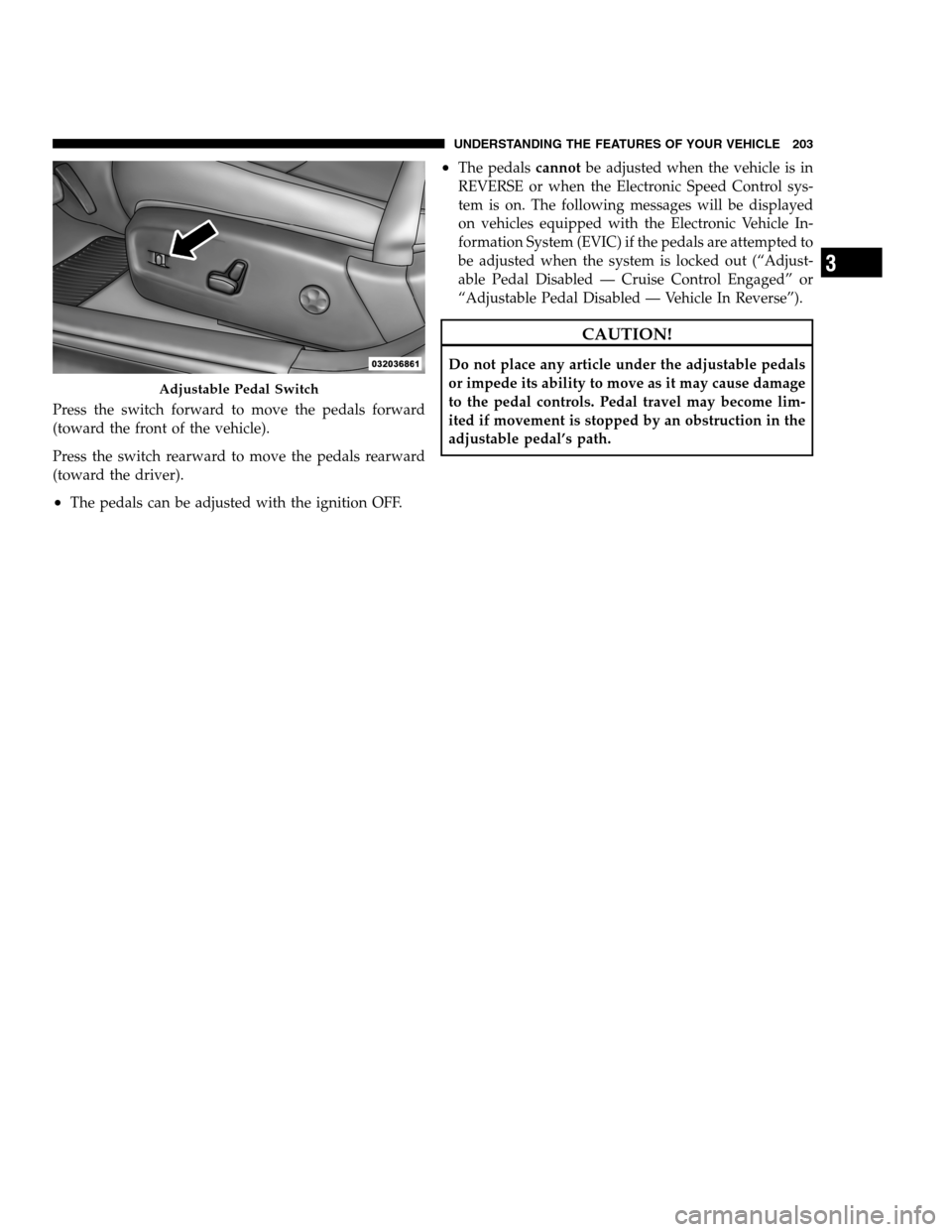
Press the switch forward to move the pedals forward
(toward the front of the vehicle).
Press the switch rearward to move the pedals rearward
(toward the driver).
•The pedals can be adjusted with the ignition OFF.
•The pedalscannotbe adjusted when the vehicle is in
REVERSE or when the Electronic Speed Control sys-
tem is on. The following messages will be displayed
on vehicles equipped with the Electronic Vehicle In-
formation System (EVIC) if the pedals are attempted to
be adjusted when the system is locked out (“Adjust-
able Pedal Disabled — Cruise Control Engaged” or
“Adjustable Pedal Disabled — Vehicle In Reverse”).
CAUTION!
Do not place any article under the adjustable pedals
or impede its ability to move as it may cause damage
to the pedal controls. Pedal travel may become lim-
ited if movement is stopped by an obstruction in the
adjustable pedal’s path.
Adjustable Pedal Switch
3
UNDERSTANDING THE FEATURES OF YOUR VEHICLE 203
PAGE POSITION:203JOB:@zeta.tweddle.com/chry_pdm/CLS_chrysler/GRP_owners/JOB_918945-en-dsr-12D482-126-AA_DSR/DIV_og pubnum: 12D482-126-AB_DSR Press the switch forward to move the pedals forward
(toward the front of the vehicle).
Press the switch rearward to move the pedals rearward
(toward the driver).
•The pedals can be adjusted with the ignition OFF.
•The pedalscannotbe adjusted when the vehicle is in
REVERSE or when the Electronic Speed Control sys-
tem is on. The following messages will be displayed
on vehicles equipped with the Electronic Vehicle In-
formation System (EVIC) if the pedals are attempted to
be adjusted when the system is locked out (“Adjust-
able Pedal Disabled — Cruise Control Engaged” or
“Adjustable Pedal Disabled — Vehicle In Reverse”).
CAUTION!
Do not place any article under the adjustable pedals
or impede its ability to move as it may cause damage
to the pedal controls. Pedal travel may become lim-
ited if movement is stopped by an obstruction in the
adjustable pedal’s path.
Adjustable Pedal Switch
3
UNDERSTANDING THE FEATURES OF YOUR VEHICLE 203
PAGE POSITION:203JOB:@zeta.tweddle.com/chry_pdm/CLS_chrysler/GRP_owners/JOB_918945-en-dsr-12D482-126-AA_DSR/DIV_og pubnum: 12D482-126-AB_DSR
Page 212 of 546
Adaptive Cruise Control (ACC) Operation
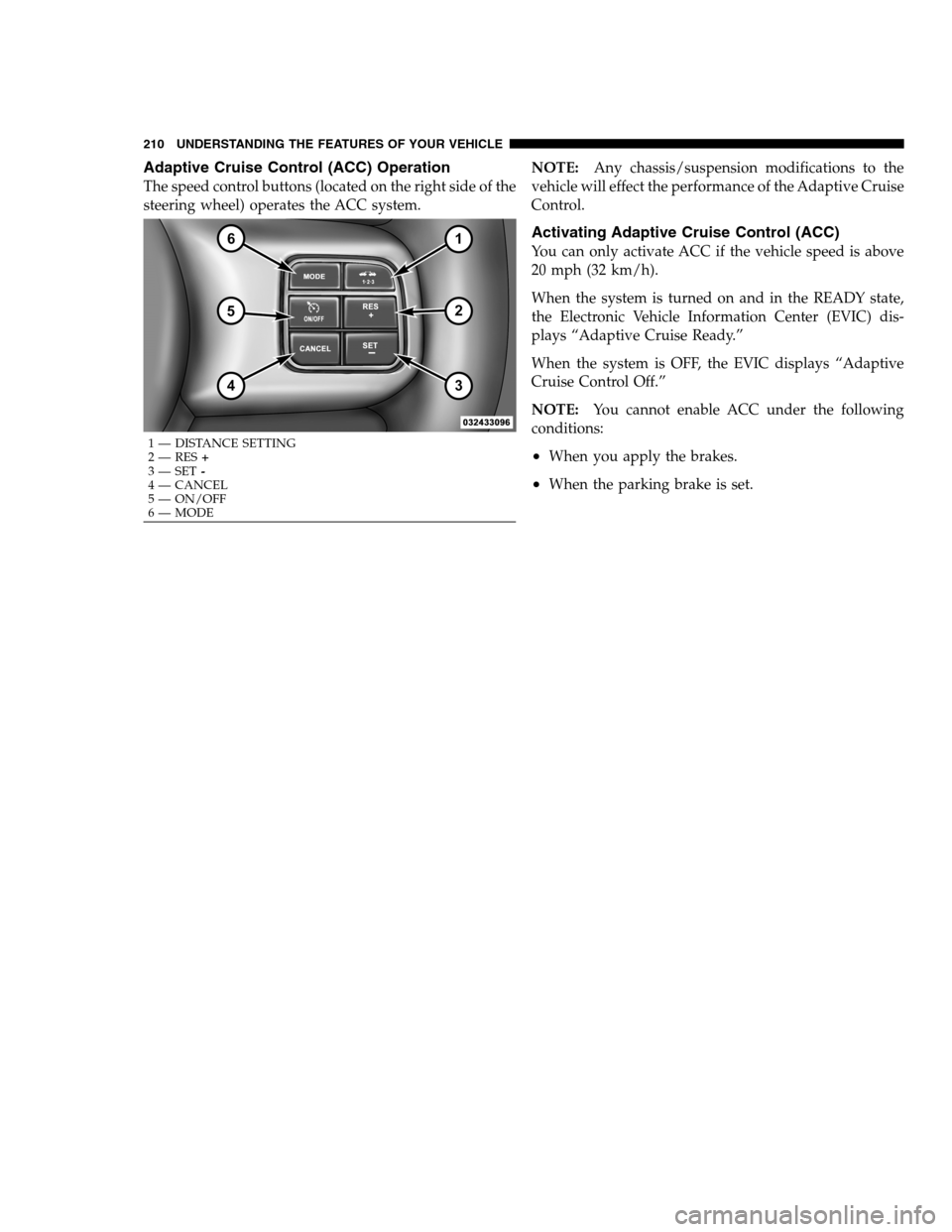
The speed control buttons (located on the right side of the
steering wheel) operates the ACC system.NOTE:Any chassis/suspension modifications to the
vehicle will effect the performance of the Adaptive Cruise
Control.
Activating Adaptive Cruise Control (ACC)
You can only activate ACC if the vehicle speed is above
20 mph (32 km/h).
When the system is turned on and in the READY state,
the Electronic Vehicle Information Center (EVIC) dis-
plays “Adaptive Cruise Ready.”
When the system is OFF, the EVIC displays “Adaptive
Cruise Control Off.”
NOTE:You cannot enable ACC under the following
conditions:
•When you apply the brakes.
•When the parking brake is set.
1 — DISTANCE SETTING
2 — RES+
3 — SET-
4 — CANCEL
5 — ON/OFF
6 — MODE 210 UNDERSTANDING THE FEATURES OF YOUR VEHICLE
PAGE POSITION:210JOB:@zeta.tweddle.com/chry_pdm/CLS_chrysler/GRP_owners/JOB_918945-en-dsr-12D482-126-AA_DSR/DIV_og pubnum: 12D482-126-AB_DSR Adaptive Cruise Control (ACC) Operation
The speed control buttons (located on the right side of the
steering wheel) operates the ACC system.NOTE:Any chassis/suspension modifications to the
vehicle will effect the performance of the Adaptive Cruise
Control.
Activating Adaptive Cruise Control (ACC)
You can only activate ACC if the vehicle speed is above
20 mph (32 km/h).
When the system is turned on and in the READY state,
the Electronic Vehicle Information Center (EVIC) dis-
plays “Adaptive Cruise Ready.”
When the system is OFF, the EVIC displays “Adaptive
Cruise Control Off.”
NOTE:You cannot enable ACC under the following
conditions:
•When you apply the brakes.
•When the parking brake is set.
1 — DISTANCE SETTING
2 — RES+
3 — SET-
4 — CANCEL
5 — ON/OFF
6 — MODE 210 UNDERSTANDING THE FEATURES OF YOUR VEHICLE
PAGE POSITION:210JOB:@zeta.tweddle.com/chry_pdm/CLS_chrysler/GRP_owners/JOB_918945-en-dsr-12D482-126-AA_DSR/DIV_og pubnum: 12D482-126-AB_DSR
Page 213 of 546
•When the automatic transmission is in PARK, RE-
VERSE or NEUTRAL.
•When pushing the RES+button without a previously
set speed in memory.
To Activate
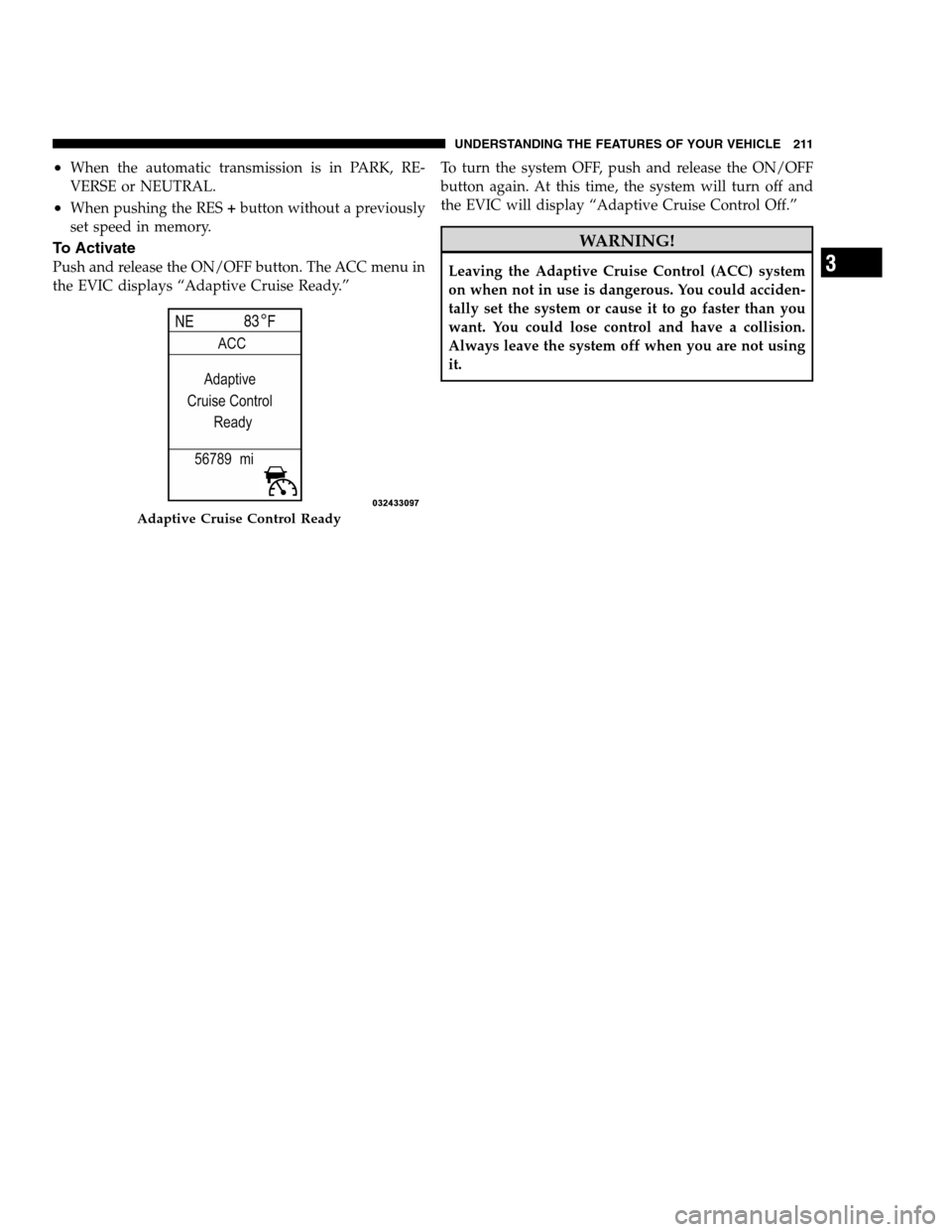
Push and release the ON/OFF button. The ACC menu in
the EVIC displays “Adaptive Cruise Ready.”To turn the system OFF, push and release the ON/OFF
button again. At this time, the system will turn off and
the EVIC will display “Adaptive Cruise Control Off.”
WARNING!
Leaving the Adaptive Cruise Control (ACC) system
on when not in use is dangerous. You could acciden-
tally set the system or cause it to go faster than you
want. You could lose control and have a collision.
Always leave the system off when you are not using
it.
Adaptive Cruise Control Ready
3
UNDERSTANDING THE FEATURES OF YOUR VEHICLE 211
PAGE POSITION:211JOB:@zeta.tweddle.com/chry_pdm/CLS_chrysler/GRP_owners/JOB_918945-en-dsr-12D482-126-AA_DSR/DIV_og pubnum: 12D482-126-AB_DSR •When the automatic transmission is in PARK, RE-
VERSE or NEUTRAL.
•When pushing the RES+button without a previously
set speed in memory.
To Activate
Push and release the ON/OFF button. The ACC menu in
the EVIC displays “Adaptive Cruise Ready.”To turn the system OFF, push and release the ON/OFF
button again. At this time, the system will turn off and
the EVIC will display “Adaptive Cruise Control Off.”
WARNING!
Leaving the Adaptive Cruise Control (ACC) system
on when not in use is dangerous. You could acciden-
tally set the system or cause it to go faster than you
want. You could lose control and have a collision.
Always leave the system off when you are not using
it.
Adaptive Cruise Control Ready
3
UNDERSTANDING THE FEATURES OF YOUR VEHICLE 211
PAGE POSITION:211JOB:@zeta.tweddle.com/chry_pdm/CLS_chrysler/GRP_owners/JOB_918945-en-dsr-12D482-126-AA_DSR/DIV_og pubnum: 12D482-126-AB_DSR
Page 214 of 546
To Set A Desired ACC Speed
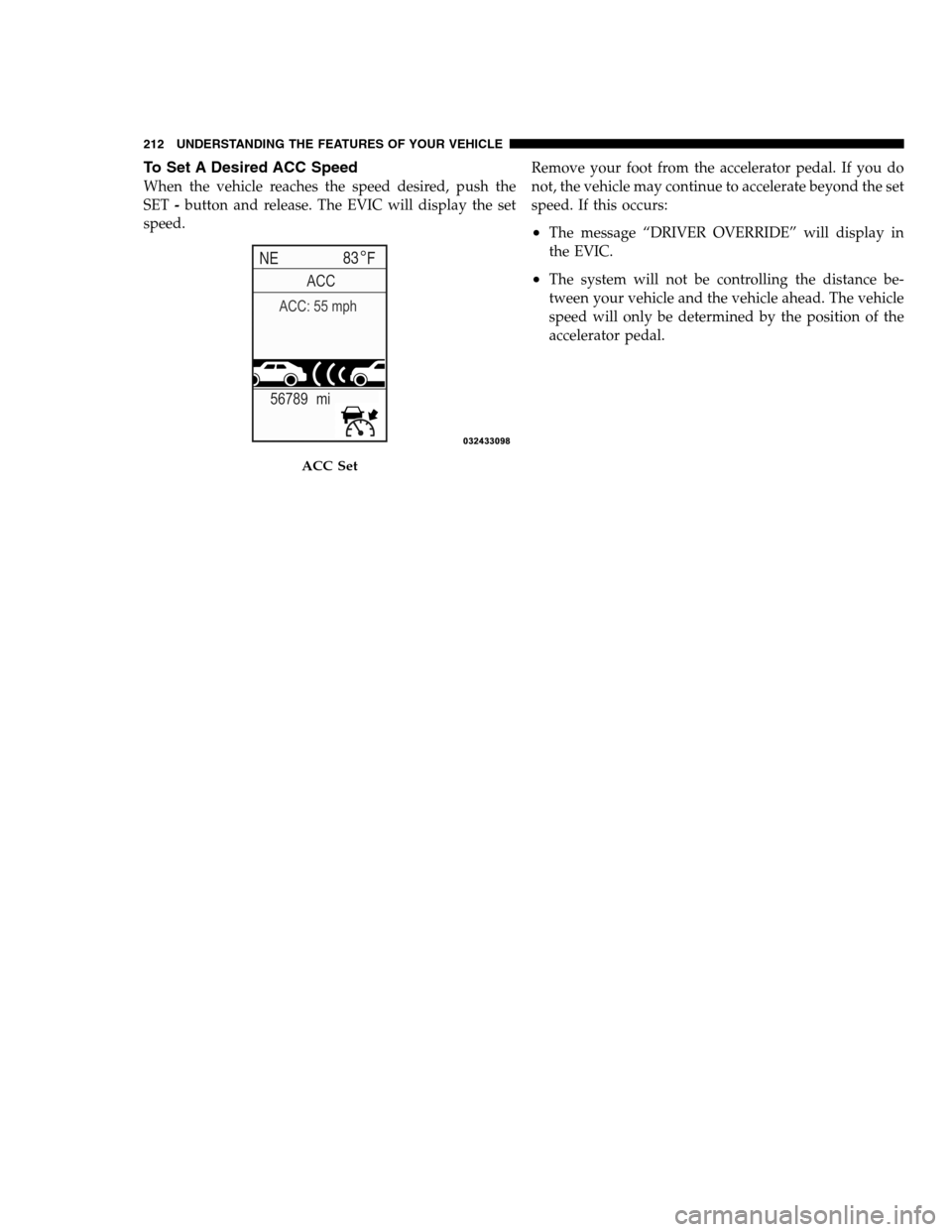
When the vehicle reaches the speed desired, push the
SET-button and release. The EVIC will display the set
speed.Remove your foot from the accelerator pedal. If you do
not, the vehicle may continue to accelerate beyond the set
speed. If this occurs:
•The message “DRIVER OVERRIDE” will display in
the EVIC.
•The system will not be controlling the distance be-
tween your vehicle and the vehicle ahead. The vehicle
speed will only be determined by the position of the
accelerator pedal.
ACC Set
212 UNDERSTANDING THE FEATURES OF YOUR VEHICLE
PAGE POSITION:212JOB:@zeta.tweddle.com/chry_pdm/CLS_chrysler/GRP_owners/JOB_918945-en-dsr-12D482-126-AA_DSR/DIV_og pubnum: 12D482-126-AB_DSR To Set A Desired ACC Speed
When the vehicle reaches the speed desired, push the
SET-button and release. The EVIC will display the set
speed.Remove your foot from the accelerator pedal. If you do
not, the vehicle may continue to accelerate beyond the set
speed. If this occurs:
•The message “DRIVER OVERRIDE” will display in
the EVIC.
•The system will not be controlling the distance be-
tween your vehicle and the vehicle ahead. The vehicle
speed will only be determined by the position of the
accelerator pedal.
ACC Set
212 UNDERSTANDING THE FEATURES OF YOUR VEHICLE
PAGE POSITION:212JOB:@zeta.tweddle.com/chry_pdm/CLS_chrysler/GRP_owners/JOB_918945-en-dsr-12D482-126-AA_DSR/DIV_og pubnum: 12D482-126-AB_DSR
Page 216 of 546
To Turn Off
The system will turn off and erase the set speed in
memory if:
•You push and release the ON/OFF button.
•You turn OFF the ignition.
To Resume Speed
Press the RES+button and release. Then remove your
foot from the accelerator pedal. The EVIC will display the
last set speed.
NOTE:You can resume ACC from a minimum of
20 mph (32 km/h).
WARNING!
The Resume function should only be used if traffic
and road conditions permit. Resuming a set speed
that is too high or too low for prevailing traffic and
road conditions could cause the vehicle to accelerate
or decelerate too sharply for safe operation. This
could cause a collision and/or serious injury.
To Vary The Speed Setting
While ACC is set, you can increase the set speed by
pressing and holding the RES+button. If the button is
continually pressed, the set speed will continue to in-
crease in 5 mph (8 km/h) increments until the button is
released. The increase in set speed is reflected in the EVIC
display.
Pressing the RES+button once will result in a 1 mph
(1.6 km/h) increase in set speed. Each subsequent tap of
the button results in an increase of 1 mph (1.6 km/h).
214 UNDERSTANDING THE FEATURES OF YOUR VEHICLE
PAGE POSITION:214JOB:@zeta.tweddle.com/chry_pdm/CLS_chrysler/GRP_owners/JOB_918945-en-dsr-12D482-126-AA_DSR/DIV_og pubnum: 12D482-126-AB_DSR To Turn Off
The system will turn off and erase the set speed in
memory if:
•You push and release the ON/OFF button.
•You turn OFF the ignition.
To Resume Speed
Press the RES+button and release. Then remove your
foot from the accelerator pedal. The EVIC will display the
last set speed.
NOTE:You can resume ACC from a minimum of
20 mph (32 km/h).
WARNING!
The Resume function should only be used if traffic
and road conditions permit. Resuming a set speed
that is too high or too low for prevailing traffic and
road conditions could cause the vehicle to accelerate
or decelerate too sharply for safe operation. This
could cause a collision and/or serious injury.
To Vary The Speed Setting
While ACC is set, you can increase the set speed by
pressing and holding the RES+button. If the button is
continually pressed, the set speed will continue to in-
crease in 5 mph (8 km/h) increments until the button is
released. The increase in set speed is reflected in the EVIC
display.
Pressing the RES+button once will result in a 1 mph
(1.6 km/h) increase in set speed. Each subsequent tap of
the button results in an increase of 1 mph (1.6 km/h).
214 UNDERSTANDING THE FEATURES OF YOUR VEHICLE
PAGE POSITION:214JOB:@zeta.tweddle.com/chry_pdm/CLS_chrysler/GRP_owners/JOB_918945-en-dsr-12D482-126-AA_DSR/DIV_og pubnum: 12D482-126-AB_DSR
Page 217 of 546
While ACC is set, the set speed can be decreased by
pressing and holding the SET-button. If the button is
continually pressed, the set speed will continue to de-
crease in 5 mph (8 km/h) increments until the button is
released. The decrease in set speed is reflected in the
EVIC display.
Pressing the SET-button once will result ina1mph
(1.6 km/h) decrease in set speed. Each subsequent tap of
the button results in a decrease of 1 mph (1.6 km/h).
NOTE:
•When you use the SET-button to decelerate, if the
engine’s braking power does not slow the vehiclesufficiently to reach the set speed, the brake system
will automatically slow the vehicle.
•The ACC system can only apply a maximum of 25% of
the vehicle’s braking capability and will not bring the
vehicle to a complete stop.
•The ACC system maintains set speed when driving up
hill and down hill. However, a slight speed change on
moderate hills is normal. In addition, downshifting
may occur while climbing uphill or descending down-
hill. This is normal operation and necessary to main-
tain set speed.3
UNDERSTANDING THE FEATURES OF YOUR VEHICLE 215
PAGE POSITION:215JOB:@zeta.tweddle.com/chry_pdm/CLS_chrysler/GRP_owners/JOB_918945-en-dsr-12D482-126-AA_DSR/DIV_og pubnum: 12D482-126-AB_DSR While ACC is set, the set speed can be decreased by
pressing and holding the SET-button. If the button is
continually pressed, the set speed will continue to de-
crease in 5 mph (8 km/h) increments until the button is
released. The decrease in set speed is reflected in the
EVIC display.
Pressing the SET-button once will result ina1mph
(1.6 km/h) decrease in set speed. Each subsequent tap of
the button results in a decrease of 1 mph (1.6 km/h).
NOTE:
•When you use the SET-button to decelerate, if the
engine’s braking power does not slow the vehiclesufficiently to reach the set speed, the brake system
will automatically slow the vehicle.
•The ACC system can only apply a maximum of 25% of
the vehicle’s braking capability and will not bring the
vehicle to a complete stop.
•The ACC system maintains set speed when driving up
hill and down hill. However, a slight speed change on
moderate hills is normal. In addition, downshifting
may occur while climbing uphill or descending down-
hill. This is normal operation and necessary to main-
tain set speed.3
UNDERSTANDING THE FEATURES OF YOUR VEHICLE 215
PAGE POSITION:215JOB:@zeta.tweddle.com/chry_pdm/CLS_chrysler/GRP_owners/JOB_918945-en-dsr-12D482-126-AA_DSR/DIV_og pubnum: 12D482-126-AB_DSR